
SNMP History and OID/MIB Tour
https://www.pei.com/snmp-history-oid-mib/
Description:
This document describes a bit of history and functionality of the SNMP protocol for monitoring.
SNMP Monitoring and Basic Architecture:
SNMP(Simple Network Management Protocol) was developed in the 80s by the IETF (Internet Engineer Task Force) as part of the IP(Internet Protocol Suite). There have been a few competitors developed by organizations, but over time SNMP has become the de-facto standard for monitoring network-connected devices. In addition to providing monitoring capabilities SNMP, also provides the ability for remote management to a variety of devices.
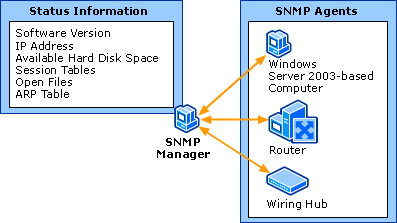
SNMP-based monitoring systems consist of Agents, which are installed on devices connected to networks and Network Management Systems/Stations(NMS), which are used to actively collect information from Agents as well as run tests against network-connected devices—usually for the purpose of determining health.
In addition to an SNMP agent serving out information about its device, it may also push notifications (known as traps) across the network to an NMS. This would be used for such information as that the device just started (known as coldstart).
In cases where SNMP is being utilized for remote management of devices, users would push changes across networks to Agents installed on devices, which then enact the prescribed changes.
SNMP OIDs:
Every piece of information an SNMP Agent serves out, and every type of trap that it supports, is associated with a unique identifier known as an OID (Object Identifier).
OID is a system created by the ITU and ISO organizations for international standardization of Data. It isn’t only used for network monitoring or SNMP, it is a standard used for all sorts of data. Examples of this are Hl7, which hass to do with electronic medical record taxonomy or Lightweight Directory Access Protocol(LDAP) protocol attributes and object classes. Think of it as an international standard for indexing data.
The OID system is heiarchical, which is to say, it is a tree structure. For instance, the OID .1.3.6, 6 would be part of .1.3 heiarchy, .3.6 would be part of the .1 hearchy etc… The root of the OID tree is only 2 values: .1 for ISO (which is where SNMP lives) and .0 for the ITU. Certain sections of the subtree for .1 are free-form, other sections are delegated to particular companies to use and yet other sections of three require that you register with ISO or the ITU. This includes goverments, large buisiness etc…
SNMP OIDs can start being found at OID .1.3.6.1
.1 - ISO assigned.

.1.3 - ISO identified organizations

.1.3.6 - The US Department of Defense

.1.3.6.1 - The Internet
Most OIDs for business network devices and systems then fall under
.1.3.6.1.4.1 - IANA (Internet Assigned Numbers Authority) registered private enterprises.Under this hierarchy, you will see OIDs for all companies setting up custom OIDs for equipment. Here are some examples:
.1.3.6.1.4.1.9 - Cisco Systems (They embraced SNMP pretty early as you can see by their low number)

.1.3.6.1.4.1.2636 - Juniper

.1.3.6.1.4.1.311 - Microsoft.
Now, say an NMS station wants to pull interface Output Queue drops from a router made by Cisco; it would make a request for the value of OID: .1.3.6.1.4.1.9.9.276.1.1.1.1.11
Which you can see is part of their tree at 1.3.6.1.4.9. Any custom statistic they develop should be registered under that portion of the OID tree.
MIBs and Enterprise Non-specific OIDs:
A MIB (Management Information Base), contains descriptions for every OID registered with either ISO or ITU. An MIB is an ASCII file, which is human readable and formatted in such a way as to work with what is called a MIB compiler. A MIB compiler simply builds a browsable tree of OIDs based descriptions of individual OIDs contained therein. The descriptions of OIDs contained in MIBs provide a short-name syntax for each OID used, the type of data allowed to be stored, and information on how that OID is used.
It is a common misconception that MIBs are necessary to enable functionality on SNMP Agents or devices. This is not true; loading MIBs into an agent simply allows that agent or client to provide more detailed information on the OIDs that it serves out or queries.
For instance, here is an SNMP client querying a server for all of it’s OIDs when the client has only the ISO MIB loaded:
iso.3.6.1.2.1.1.1.0 = STRING: "Linux PEI-HQ-NMS1 4.2.0-27-generic #32~14.04.1-Ubuntu SMP Fri Jan 22 15:32:26 UTC 2016 x86_64"

iso.3.6.1.2.1.1.2.0 = OID: iso.3.6.1.4.1.8072.3.2.10

iso.3.6.1.2.1.1.3.0 = Timeticks: (1223) 0:00:12.23

iso.3.6.1.2.1.1.4.0 = STRING: "root"

iso.3.6.1.2.1.1.5.0 = STRING: "PEI-HQ-NMS1"

iso.3.6.1.2.1.1.6.0 = STRING: "Unknown"

iso.3.6.1.2.1.1.8.0 = Timeticks: (0) 0:00:00.00

iso.3.6.1.2.1.1.9.1.2.1 = OID: iso.3.6.1.6.3.11.3.1.1

iso.3.6.1.2.1.1.9.1.2.2 = OID: iso.3.6.1.6.3.15.2.1.1

iso.3.6.1.2.1.1.9.1.2.3 = OID: iso.3.6.1.6.3.10.3.1.1

iso.3.6.1.2.1.1.9.1.2.4 = OID: iso.3.6.1.6.3.1

iso.3.6.1.2.1.1.9.1.2.5 = OID: iso.3.6.1.2.1.49

iso.3.6.1.2.1.1.9.1.2.6 = OID: iso.3.6.1.2.1.4

iso.3.6.1.2.1.1.9.1.2.7 = OID: iso.3.6.1.2.1.50

iso.3.6.1.2.1.1.9.1.2.8 = OID: iso.3.6.1.6.3.16.2.2.1

iso.3.6.1.2.1.1.9.1.2.9 = OID: iso.3.6.1.6.3.13.3.1.3
Here is a similar query from a Sun system with the SNMPv2 MIB loaded on the client:
SNMPv2-MIB::sysDescr.0 = STRING: ILOM machine custom description

SNMPv2-MIB::sysObjectID.0 = OID: SUN-ILOM-SMI-MIB::sunILOMSystems

DISMAN-EVENT-MIB::sysUpTimeInstance = Timeticks: (16439826) 1 day, 21:39:58.26

SNMPv2-MIB::sysContact.0 = STRING: set via snmp test

SNMPv2-MIB::sysName.0 = STRING: SUNSPHOSTNAME

SNMPv2-MIB::sysLocation.0 = STRING:

SNMPv2-MIB::sysServices.0 = INTEGER: 72

SNMPv2-MIB::sysORLastChange.0 = Timeticks: (14) 0:00:00.14

SNMPv2-MIB::sysORID.1 = OID: IF-MIB::ifMIB

SNMPv2-MIB::sysORID.2 = OID: SNMPv2-MIB::snmpMIB

SNMPv2-MIB::sysORID.3 = OID: TCP-MIB::tcpMIB

SNMPv2-MIB::sysORID.4 = OID: RFC1213-MIB::ip

SNMPv2-MIB::sysORID.5 = OID: UDP-MIB::udpMIB

SNMPv2-MIB::sysORID.6 = OID: SNMP-VIEW-BASED-ACM-MIB::vacmBasicGroup

SNMPv2-MIB::sysORID.7 = OID: SNMP-FRAMEWORK-MIB::snmpFrameworkMIBCompliance

SNMPv2-MIB::sysORID.8 = OID: SNMP-MPD-MIB::snmpMPDCompliance

SNMPv2-MIB::sysORID.9 = OID: SNMP-USER-BASED-SM-MIB::usmMIBCompliance
As you can see, the MIB is simply translating pieces of the OID into a more user-readable format. Instead of 1.3.6.1.2.1.1.1.0, we see SNMPv2-MIB::sysDescr.0, which for many things is easier to discern.
Mainly, MIBs contain lists of all OIDs by purpose.
Vendor Non-Specific OIDs/MIBs
Certain statistics aren’t vendor specific and have been around for a long time. Most NMS systems don’t poll for enterprise specific OIDs, but go after these long-hanging fruit that are common to all network connected devices. CPU Utilization, Disk drive utilization, and Network Utilization are all examples of types of stats that aren’t unique to a particular vendor. Most of these MIBS were created/maintained by the Internet Engineering Taskforce and are contained under:
.1.3.6.1.2.1 -> SNMP MIB2with .1.3.6.1.2 being the IETF management tree.
Here are some really handy MIBs under this heiarchy:
1.3.6.1.2.1.1 - SNMP MIB2 System: Contains system description, contact information etc...

1.3.6.1.2.1.2 - the IF-MIB, which contains a wide variety of network statistics information. Everything from number of Octets coming into an interface to a description of the interface.

1.3.6.1.2.1.25 - The Host-resources MIB, everything from disk utilization to CPU and Memory.

1.3.6.1.2.1.43 - The Printer MIB, which contains all general printer statistics.Mfuller, PEI
SNMP History and OID/MIB Tour的更多相关文章
- SNMP学习笔记之SNMP介绍,OID及MIB库
1.1. SNMP概览 SNMP的基本知识介绍简单网络管理协议(SNMP-Simple Network Management Protocol)是一个与网络设备交互的简单方法.该规范是由IETF ...
- SNMP介绍,OID及MIB库
http://blog.sina.com.cn/s/blog_4502d59c0101fcy2.html
- Ubuntu 安装snmp报Unlinked OID in IPATM-IPMC-MIB: marsMIB ::= { mib-2 57 }错误
首先运行下面的脚本(脚本摘自:http://www.th7.cn/system/lin/201304/38800.shtml) #!/bin/bashfor i in /usr/share/mibs/ ...
- SNMP学习笔记之iReasoning MIB Browser
0x00 MIB Browser iReasoning MIB浏览器是一个强大和易于使用的工具由iReasoning SNMP API提供支持. MIB浏览器是工程师管理启用SNMP的网络设备和应用程 ...
- SNMP与MIB
简单网络管理协议(SNMP:Simple Network Management Protocol)是一套网络管理协议,注意,SNMP是一个强大的网络管理协议,而不是"简单"的.利用 ...
- Linux服务器SNMP常用OID (转)
原文地址:http://www.haiyun.me/archives/linux-snmp-oid.html 收集整理一些Linux下snmp常用的OID,用做服务器监控很不错. 服务器负载: 1 2 ...
- SNMP学习笔记之Linux服务器SNMP常用OID
收集整理一些Linux下snmp常用的OID,用做服务器监控很不错. 应用示例 查看服务器1分钟平均负载: snmpwalk -v1 -c public 127.0.0.1 .1.3.6.1.4.1. ...
- ubuntu snmp Error: unknown payload OID
ubuntu snmp Error: unknown payload OID 2013-11-12 15:51:48 标签:ubuntu Error snmp unknown payload OID ...
- (转)Linux服务器SNMP常用OID
原文:https://www.haiyun.me/archives/linux-snmp-oid.html 收集整理一些Linux下snmp常用的OID,用做服务器监控很不错.服务器负载: 1 2 3 ...
随机推荐
- vulnhub~Djinn:2
这道题挺难的,和Djinn:1相比,正如作者所言,有许多相似的地方.仍然开放着端口 可以看到5个端口开放着,1337是web端口,这里面如djinn1一样,write your wish,但是send ...
- CSS超链接样式,去除下划线等
控制超链接样式 链接的四种状态: a:link - 普通的.未被访问的链接 a:visited - 用户已访问的链接 a:hover - 鼠标指针位于链接的上方 a:active - 链接被点击的时刻 ...
- markdown中锚链接实现目录跳转以及注意事项
当文章有分类,需要快速阅读,通常会先在文首部写一个目录,点击可以跳转. 为文章写目录,特别在文章较长的时候,有助于对内容的整体把握,能提高阅读效率. 以下,将写一个基本的锚目录demo,然后特别说明需 ...
- PTA数据结构与算法题目集(中文) 7-38寻找大富翁 (25 分)
PTA数据结构与算法题目集(中文) 7-38寻找大富翁 (25 分) 7-38 寻找大富翁 (25 分) 胡润研究院的调查显示,截至2017年底,中国个人资产超过1亿元的高净值人群达15万人.假 ...
- Linux命文件与目录属性
一.linux系统中文件标志 d ===> 目录 - ===> 文件 l ===> 连接文件 b ===> 可供存储设备文件 c ===> 串形端口设备文件(鼠标,键盘) ...
- istream_iterator && istream_iteratorbuf
注意 读字符时, std::istream_iterator 默认跳过空白符(除非用 std::noskipws 或等价物禁用,而 std::istreambuf_iterator 不跳过.另外, s ...
- Go gRPC进阶-TLS认证+自定义方法认证(七)
前言 前面篇章的gRPC都是明文传输的,容易被篡改数据.本章将介绍如何为gRPC添加安全机制,包括TLS证书认证和Token认证. TLS证书认证 什么是TLS TLS(Transport Layer ...
- CH5701 开车旅行(倍增dp+set)
传送门 解题思路: 一道比较有趣的题,解题工作主要分为两块: ①找出k(k=0表示小A先走,k=1表示小B先走,下面同理)从点i出发下一个到达的点to[k][i]; 一开始偷懒用了vector(偷懒一 ...
- 小程序后台隐藏后 socket 无法重新连接
小程序后台隐藏后 socket 无法重新连接 连接时 fail 回调函数的事件参数:connectSocket:fail:jsapi has no permission,event=createSoc ...
- Linux下删除大量文件效率对比
来自公众号:马哥Linux运维 今天我们来测试一下Linux下面删除大量文件的效率. 首先建立50万个文件 $ test for i in $(seq 1 500000);do echo text ...