
聊聊Disruptor 和 Aeron 这两个开源库
聊聊Disruptor 和 Aeron 这两个开源库
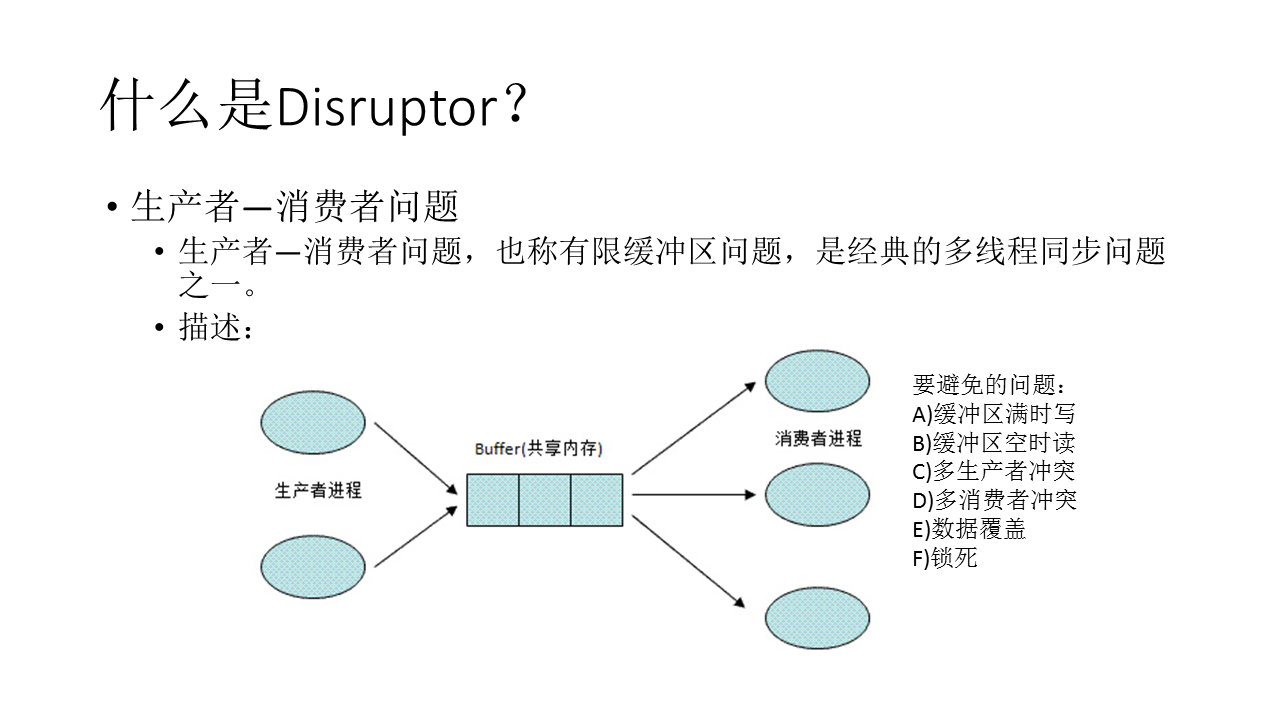
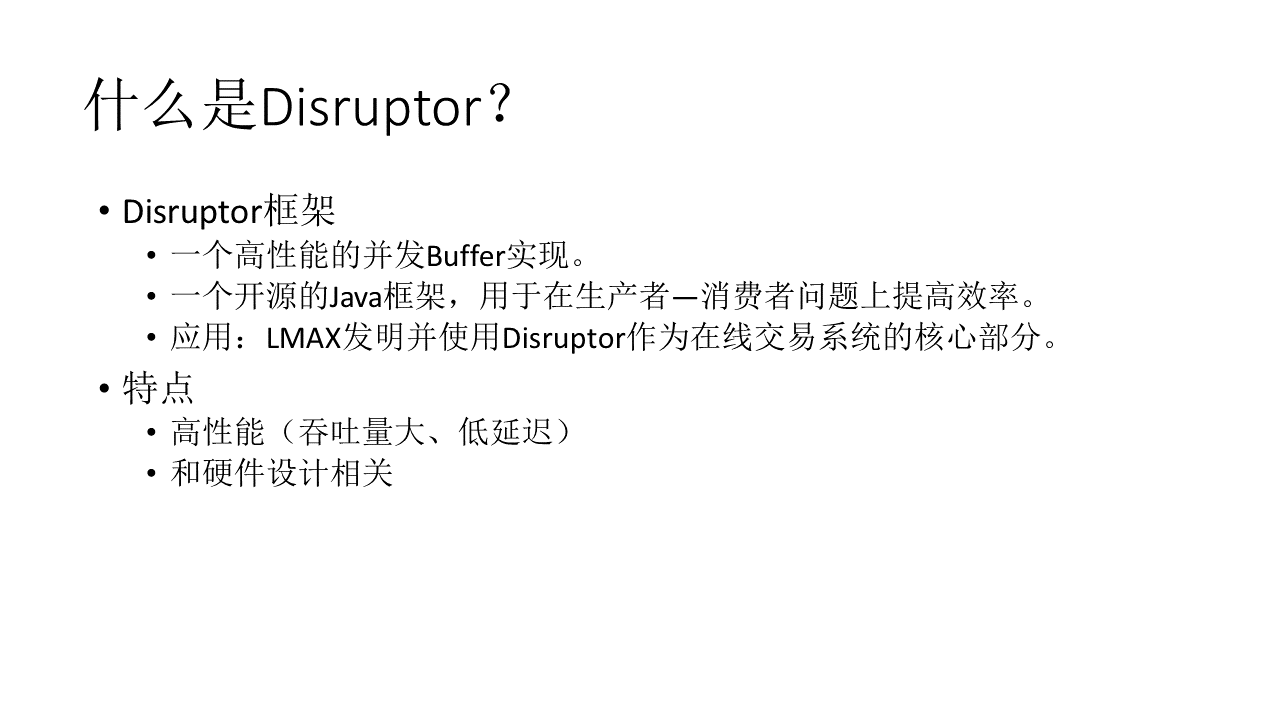
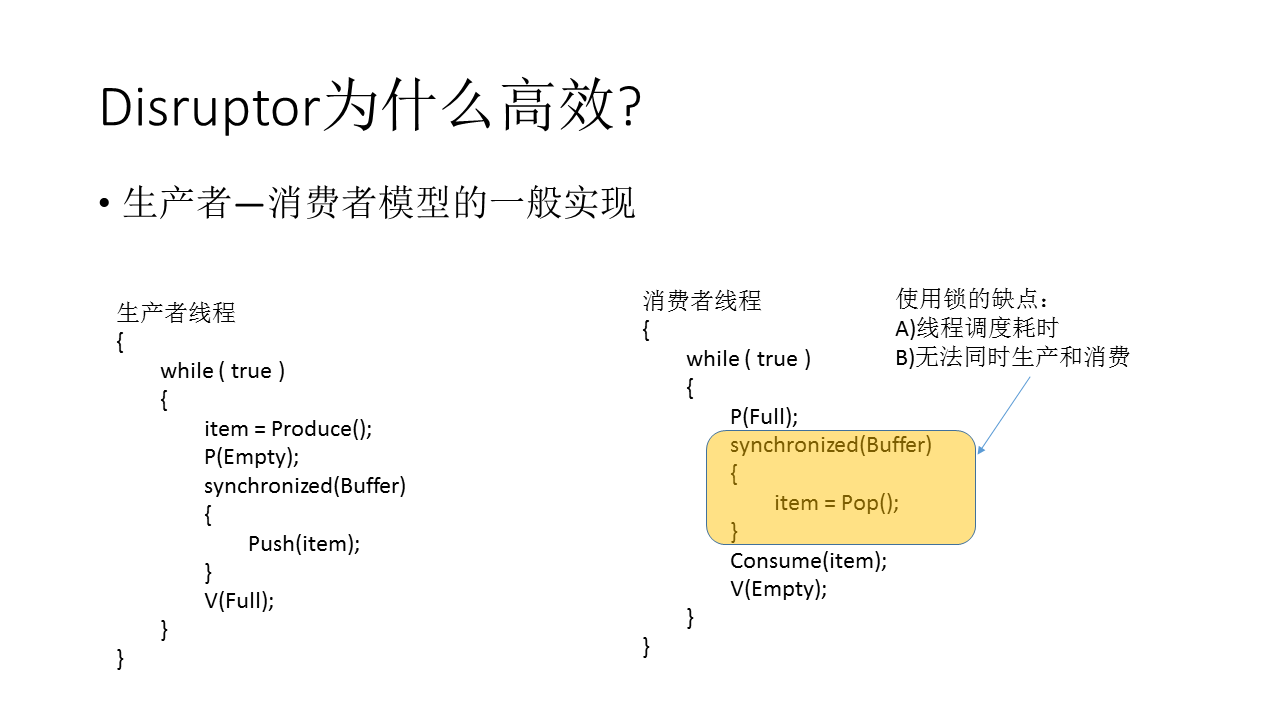
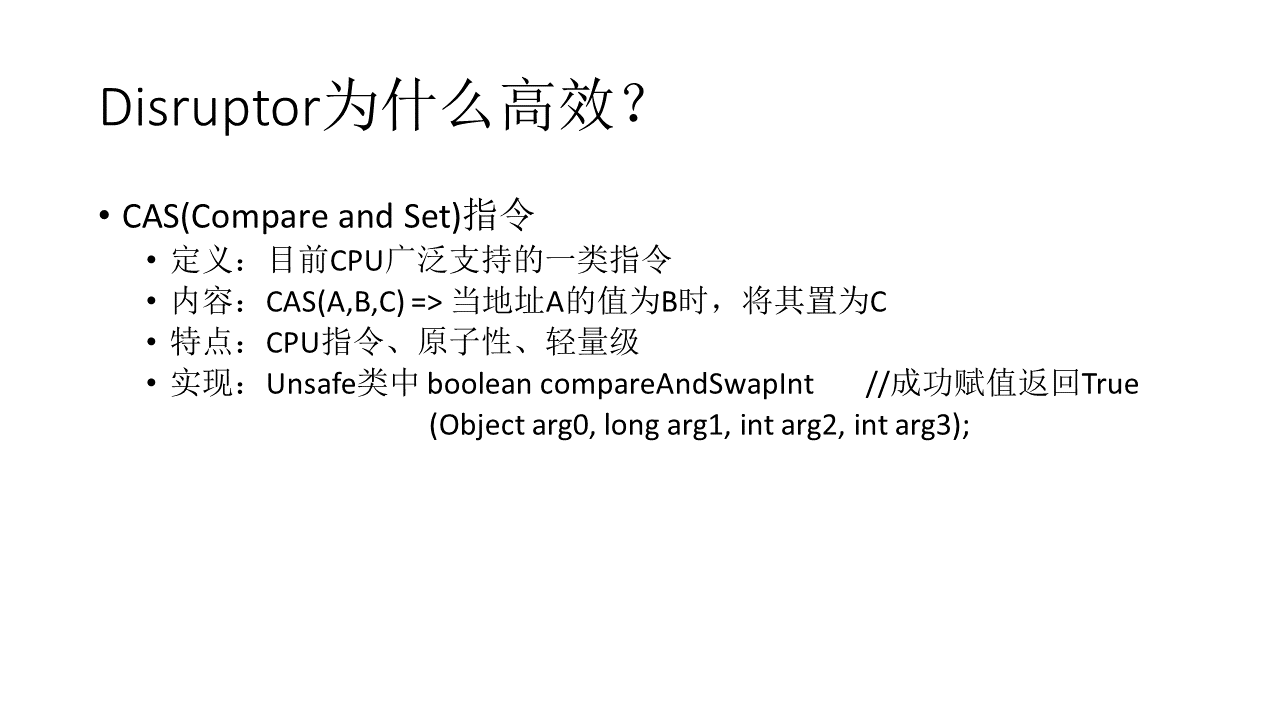
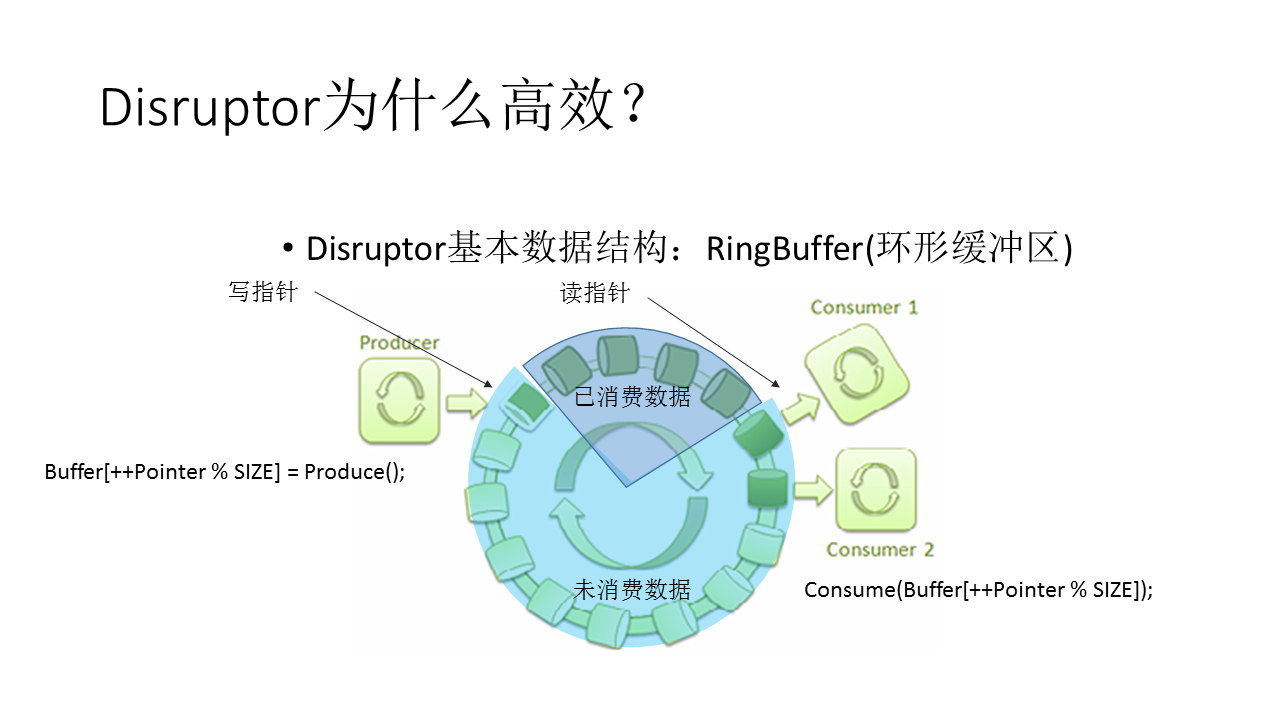
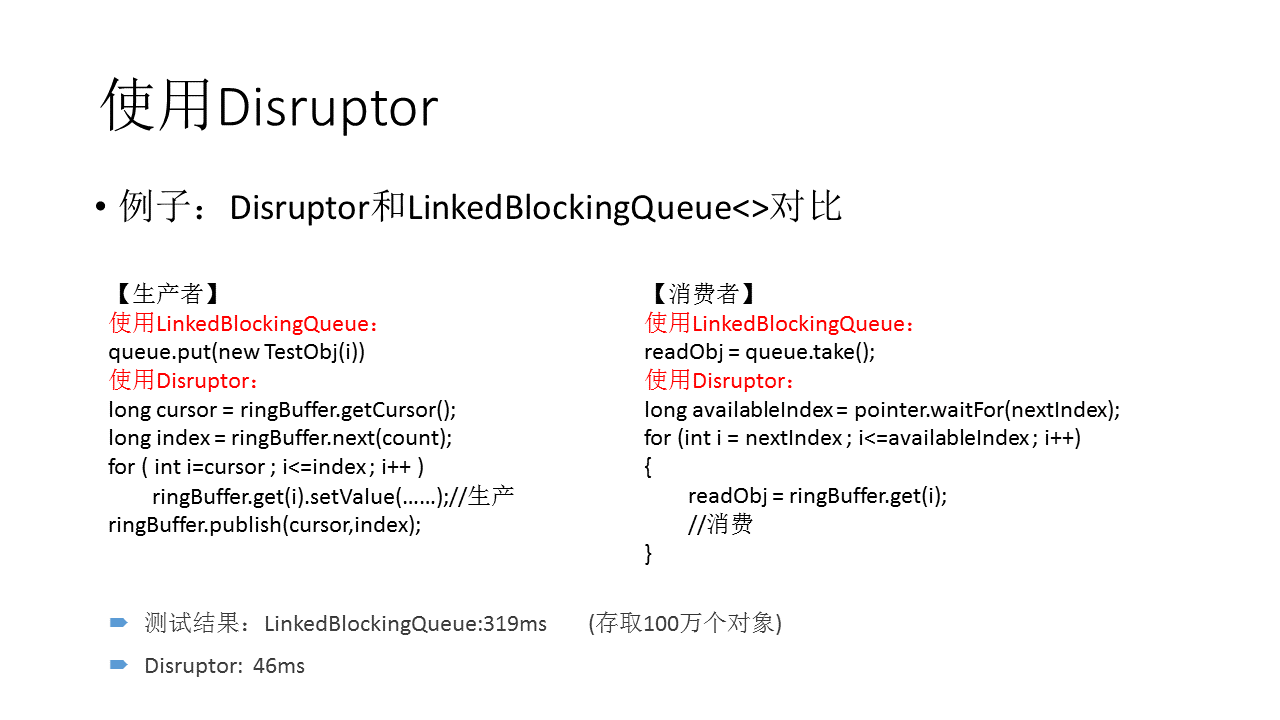
Disruptor
The best way to understand what the Disruptor is, is to compare it to something well understood and quite similar in purpose. In the case of the Disruptor this would be Java's BlockingQueue. Like a queue the purpose of the Disruptor is to move data (e.g. messages or events) between threads within the same process. However there are some key features that the Disruptor provides that distinguish it from a queue. They are:
•Multicast events to consumers, with consumer dependency graph.
•Pre-allocate memory for events.
•Optionally lock-free.
Core Concepts
Before we can understand how the Disruptor works, it is worthwhile defining a number of terms that will be used throughout the documentation and the code. For those with a DDD bent, think of this as the ubiquitous language of the Disruptor domain.
•Ring Buffer: The Ring Buffer is often considered the main aspect of the Disruptor, however from 3.0 onwards the Ring Buffer is only responsible for the storing and updating of the data (Events) that move through the Disruptor. And for some advanced use cases can be completely replaced by the user.
•Sequence: The Disruptor uses Sequences as a means to identify where a particular component is up to. Each consumer (EventProcessor) maintains a Sequence as does the Disruptor itself. The majority of the concurrent code relies on the the movement of these Sequence values, hence the Sequence supports many of the current features of an AtomicLong. In fact the only real difference between the 2 is that the Sequence contains additional functionality to prevent false sharing between Sequences and other values.
•Sequencer: The Sequencer is the real core of the Disruptor. The 2 implementations (single producer, multi producer) of this interface implement all of the concurrent algorithms use for fast, correct passing of data between producers and consumers.
•Sequence Barrier: The Sequence Barrier is produced by the Sequencer and contains references to the main published Sequence from the Sequencer and the Sequences of any dependent consumer. It contains the logic to determine if there are any events available for the consumer to process.
•Wait Strategy: The Wait Strategy determines how a consumer will wait for events to be placed into the Disruptor by a producer. More details are available in the section about being optionally lock-free.
•Event: The unit of data passed from producer to consumer. There is no specific code representation of the Event as it defined entirely by the user.
•EventProcessor: The main event loop for handling events from the Disruptor and has ownership of consumer's Sequence. There is a single representation called BatchEventProcessor that contains an efficient implementation of the event loop and will call back onto a used supplied implementation of the EventHandler interface.
•EventHandler: An interface that is implemented by the user and represents a consumer for the Disruptor.
•Producer: This is the user code that calls the Disruptor to enqueue Events. This concept also has no representation in the code.
Aeron
Aeron is an OSI layer 4 Transport for message-oriented streams. It works over UDP or IPC, and supports both unicast and multicast. The main goal is to provide an efficient and reliable connection with a low and predictable latency. Aeron has Java, C++ and .NET clients.
When to use?
A high and predictable performance is a main advantage of Aeron, it’s most useful in application which requires low-latency, high throughput (e.g. sending large files) or both (akka remoting uses Aeron).
If it can work over UDP, why not to use UDP?
The main goal of Aeron is high performance. That is why it makes sense why it can work over UDP but doesn’t support TCP. But someone can ask what features Aeron provides on top of UDP?
Aeron is OSI Layer 4 (Transport) Services. It supports next features:
1. Connection Oriented Communication
2. Reliability
3. Flow Control
4. Congestion Avoidance/Control
5. Multiplexing
Architecture
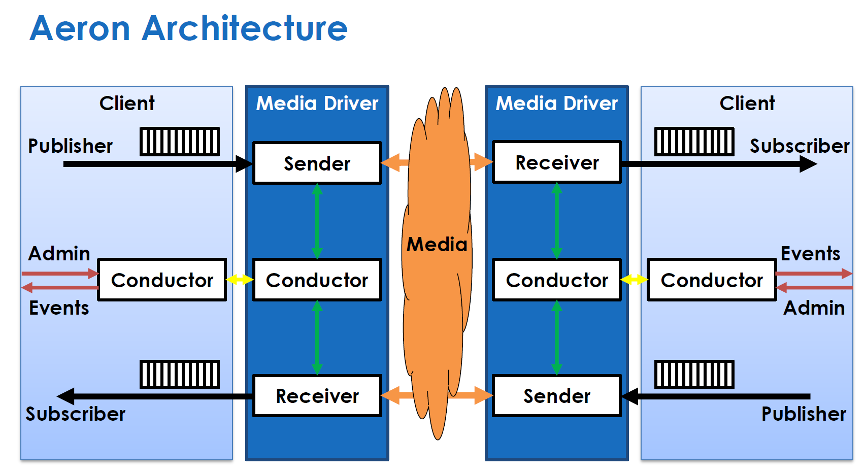
Aeron uses unidirectional connections. If you need to send requests and receive responses, you should use two connections.Publisher and Media Driver (see later) are used to send a message, Subscriber and Media Driver — to receive. Client talks to Media Driver via shared memory.
为什么将这两个库在一起聊呢,通常Disruptor框架的核心数据结构circular buffer是Java实现的,主要原因是Java对并发的支持比较友好,而且比较早的支持了内存模型,但是 C++ 11以后,C++ 同样在并发方面有了长足的进步, Aeron就是在这个背景下产生的,虽然核心代码依旧是Java,但是在对C++客户端支持的设计中也实现了比较多的,有价值的数据结构,比如OneToOneRingBuffer, ManyToOneRingBuffer。
下面就以OneToOneRingBuffer为例进行说明,
/*

 * Copyright 2014-2020 Real Logic Limited.

 *

 * Licensed under the Apache License, Version 2.0 (the "License");

 * you may not use this file except in compliance with the License.

 * You may obtain a copy of the License at

 *

 * https://www.apache.org/licenses/LICENSE-2.0

 *

 * Unless required by applicable law or agreed to in writing, software

 * distributed under the License is distributed on an "AS IS" BASIS,

 * WITHOUT WARRANTIES OR CONDITIONS OF ANY KIND, either express or implied.

 * See the License for the specific language governing permissions and

 * limitations under the License.

 */

#ifndef AERON_RING_BUFFER_ONE_TO_ONE_H

#define AERON_RING_BUFFER_ONE_TO_ONE_H

#include <climits>

#include <functional>

#include <algorithm>

#include "util/Index.h"

#include "util/LangUtil.h"

#include "AtomicBuffer.h"

#include "Atomic64.h"

#include "RingBufferDescriptor.h"

#include "RecordDescriptor.h"

namespace aeron { namespace concurrent { namespace ringbuffer {

class OneToOneRingBuffer

{

public:

    explicit OneToOneRingBuffer(concurrent::AtomicBuffer &buffer) :

        m_buffer(buffer)

    {

        m_capacity = buffer.capacity() - RingBufferDescriptor::TRAILER_LENGTH;

        RingBufferDescriptor::checkCapacity(m_capacity);

        m_maxMsgLength = m_capacity / ;

        m_tailPositionIndex = m_capacity + RingBufferDescriptor::TAIL_POSITION_OFFSET;

        m_headCachePositionIndex = m_capacity + RingBufferDescriptor::HEAD_CACHE_POSITION_OFFSET;

        m_headPositionIndex = m_capacity + RingBufferDescriptor::HEAD_POSITION_OFFSET;

        m_correlationIdCounterIndex = m_capacity + RingBufferDescriptor::CORRELATION_COUNTER_OFFSET;

        m_consumerHeartbeatIndex = m_capacity + RingBufferDescriptor::CONSUMER_HEARTBEAT_OFFSET;

    }

    OneToOneRingBuffer(const OneToOneRingBuffer &) = delete;

    OneToOneRingBuffer &operator=(const OneToOneRingBuffer &) = delete;

    inline util::index_t capacity() const

    {

        return m_capacity;

    }

    bool write(std::int32_t msgTypeId, concurrent::AtomicBuffer &srcBuffer, util::index_t srcIndex, util::index_t length)

    {

        RecordDescriptor::checkMsgTypeId(msgTypeId);

        checkMsgLength(length);

        const util::index_t recordLength = length + RecordDescriptor::HEADER_LENGTH;

        const util::index_t requiredCapacity = util::BitUtil::align(recordLength, RecordDescriptor::ALIGNMENT);

        const util::index_t mask = m_capacity - ;

        std::int64_t head = m_buffer.getInt64(m_headCachePositionIndex);

        std::int64_t tail = m_buffer.getInt64(m_tailPositionIndex);

        const util::index_t availableCapacity = m_capacity - (util::index_t)(tail - head);

        if (requiredCapacity > availableCapacity)

        {

            head = m_buffer.getInt64Volatile(m_headPositionIndex);

            if (requiredCapacity > (m_capacity - (util::index_t)(tail - head)))

            {

                return false;

            }

            m_buffer.putInt64(m_headCachePositionIndex, head);

        }

        util::index_t padding = ;

        auto recordIndex = static_cast<util::index_t>(tail & mask);

        const util::index_t toBufferEndLength = m_capacity - recordIndex;

        if (requiredCapacity > toBufferEndLength)

        {

            auto headIndex = static_cast<std::int32_t>(head & mask);

            if (requiredCapacity > headIndex)

            {

                head = m_buffer.getInt64Volatile(m_headPositionIndex);

                headIndex = static_cast<std::int32_t>(head & mask);

                if (requiredCapacity > headIndex)

                {

                    return false;

                }

                m_buffer.putInt64Ordered(m_headCachePositionIndex, head);

            }

            padding = toBufferEndLength;

        }

        if ( != padding)

        {

            m_buffer.putInt64Ordered(

                recordIndex, RecordDescriptor::makeHeader(padding, RecordDescriptor::PADDING_MSG_TYPE_ID));

            recordIndex = ;

        }

        m_buffer.putBytes(RecordDescriptor::encodedMsgOffset(recordIndex), srcBuffer, srcIndex, length);

        m_buffer.putInt64Ordered(recordIndex, RecordDescriptor::makeHeader(recordLength, msgTypeId));

        m_buffer.putInt64Ordered(m_tailPositionIndex, tail + requiredCapacity + padding);

        return true;

    }

    int read(const handler_t &handler, int messageCountLimit)

    {

        const std::int64_t head = m_buffer.getInt64(m_headPositionIndex);

        const auto headIndex = static_cast<std::int32_t>(head & (m_capacity - ));

        const std::int32_t contiguousBlockLength = m_capacity - headIndex;

        int messagesRead = ;

        int bytesRead = ;

        auto cleanup = util::InvokeOnScopeExit {

            [&]()

            {

                if (bytesRead != )

                {

                    m_buffer.setMemory(headIndex, bytesRead, );

                    m_buffer.putInt64Ordered(m_headPositionIndex, head + bytesRead);

                }

            }};

        while ((bytesRead < contiguousBlockLength) && (messagesRead < messageCountLimit))

        {

            const std::int32_t recordIndex = headIndex + bytesRead;

            const std::int64_t header = m_buffer.getInt64Volatile(recordIndex);

            const std::int32_t recordLength = RecordDescriptor::recordLength(header);

            if (recordLength <= )

            {

                break;

            }

            bytesRead += util::BitUtil::align(recordLength, RecordDescriptor::ALIGNMENT);

            const std::int32_t msgTypeId = RecordDescriptor::messageTypeId(header);

            if (RecordDescriptor::PADDING_MSG_TYPE_ID == msgTypeId)

            {

                continue;

            }

            ++messagesRead;

            handler(

                msgTypeId, m_buffer, RecordDescriptor::encodedMsgOffset(recordIndex),

                recordLength - RecordDescriptor::HEADER_LENGTH);

        }

        return messagesRead;

    }

    inline int read(const handler_t &handler)

    {

        return read(handler, INT_MAX);

    }

    inline util::index_t maxMsgLength() const

    {

        return m_maxMsgLength;

    }

    inline std::int64_t nextCorrelationId()

    {

        return m_buffer.getAndAddInt64(m_correlationIdCounterIndex, );

    }

    inline void consumerHeartbeatTime(std::int64_t time)

    {

        m_buffer.putInt64Ordered(m_consumerHeartbeatIndex, time);

    }

    inline std::int64_t consumerHeartbeatTime() const

    {

        return m_buffer.getInt64Volatile(m_consumerHeartbeatIndex);

    }

    inline std::int64_t producerPosition() const

    {

        return m_buffer.getInt64Volatile(m_tailPositionIndex);

    }

    inline std::int64_t consumerPosition() const

    {

        return m_buffer.getInt64Volatile(m_headPositionIndex);

    }

    inline std::int32_t size() const

    {

        std::int64_t headBefore;

        std::int64_t tail;

        std::int64_t headAfter = m_buffer.getInt64Volatile(m_headPositionIndex);

        do

        {

            headBefore = headAfter;

            tail = m_buffer.getInt64Volatile(m_tailPositionIndex);

            headAfter = m_buffer.getInt64Volatile(m_headPositionIndex);

        }

        while (headAfter != headBefore);

        return static_cast<std::int32_t>(tail - headAfter);

    }

    bool unblock()

    {

        return false;

    }

private:

    concurrent::AtomicBuffer &m_buffer;

    util::index_t m_capacity;

    util::index_t m_maxMsgLength;

    util::index_t m_headPositionIndex;

    util::index_t m_headCachePositionIndex;

    util::index_t m_tailPositionIndex;

    util::index_t m_correlationIdCounterIndex;

    util::index_t m_consumerHeartbeatIndex;

    inline void checkMsgLength(util::index_t length) const

    {

        if (length > m_maxMsgLength)

        {

            throw util::IllegalArgumentException(

                "encoded message exceeds maxMsgLength of " + std::to_string(m_maxMsgLength) +

                " length=" + std::to_string(length),

                SOURCEINFO);

        }

    }

};

}}}

#endif
使用示例
    AtomicBuffer ab(&buff[], buff.size());

    OneToOneRingBuffer ringBuffer(ab);

    util::index_t tail = ;

    util::index_t head = ;

    ab.putInt64(HEAD_COUNTER_INDEX, head);

    ab.putInt64(TAIL_COUNTER_INDEX, tail);

    std::cout <<"circular buffer capacity is : "<<ringBuffer.capacity() << std::endl;
    util::index_t length = ;

    util::index_t recordLength = length + RecordDescriptor::HEADER_LENGTH;

    AtomicBuffer srcAb(&srcBuff[], srcBuff.size());

    srcAb.putInt64(, );

    srcAb.putStringWithoutLength(, "");

    while (ringBuffer.write(MSG_TYPE, srcAb, , length))

    {

    }

    int timesCalled = ;

    const int messagesRead = ringBuffer.read(

        [&](std::int32_t msgTypeId, concurrent::AtomicBuffer& internalBuf, util::index_t valPosition, util::index_t length)

    {

        timesCalled++;

        std::cout << "circular buffer read value is : " << internalBuf.getInt64(valPosition)
<<" string value: " << internalBuf.getStringWithoutLength(valPosition+, length - )

            <<" called times: "<< timesCalled <<std::endl;

    });
运行结果
circular buffer capacity is :

circular buffer read value is :  string value:  called times:

circular buffer read value is :  string value:  called times:

circular buffer read value is :  string value:  called times:

circular buffer read value is :  string value:  called times:

circular buffer read value is :  string value:  called times:

circular buffer read value is :  string value:  called times:

circular buffer read value is :  string value:  called times:

circular buffer read value is :  string value:  called times:

circular buffer read value is :  string value:  called times:

circular buffer read value is :  string value:  called times:

circular buffer read value is :  string value:  called times:

circular buffer read value is :  string value:  called times:

circular buffer read value is :  string value:  called times:

circular buffer read value is :  string value:  called times:

circular buffer read value is :  string value:  called times:

circular buffer read value is :  string value:  called times:

circular buffer read value is :  string value:  called times:

circular buffer read value is :  string value:  called times:

circular buffer read value is :  string value:  called times:

circular buffer read value is :  string value:  called times:

circular buffer read value is :  string value:  called times:

circular buffer read value is :  string value:  called times:

circular buffer read value is :  string value:  called times:

circular buffer read value is :  string value:  called times:

circular buffer read value is :  string value:  called times:

circular buffer read value is :  string value:  called times:

circular buffer read value is :  string value:  called times:

circular buffer read value is :  string value:  called times:

circular buffer read value is :  string value:  called times:

circular buffer read value is :  string value:  called times:

circular buffer read value is :  string value:  called times:

circular buffer read value is :  string value:  called times:
参考资料
https://github.com/LMAX-Exchange/disruptor
https://github.com/real-logic/aeron
https://medium.com/@pirogov.alexey/aeron-low-latency-transport-protocol-9493f8d504e8
https://github.com/LMAX-Exchange/disruptor/wiki/Getting-Started

聊聊Disruptor 和 Aeron 这两个开源库的更多相关文章
- DICOM医学图像处理:开源库mDCM与DCMTK的比較分析(一),JPEG无损压缩DCM图像
背景介绍: 近期项目需求,须要使用C#进行最新的UI和相关DICOM3.0医学图像模块的开发.在C++语言下,我使用的是应用最广泛的DCMTK开源库,在本专栏的起初阶段的大多数博文都是对DCMTK开源 ...
- 使用 Golang 代码生成图表的开源库对比
本文的目标读者 对用 Golang 代码生成折线图.扇形图等图表有兴趣的朋友. 本文摘要 主要介绍 Go 中用以绘图的开源库,分别是: GitHub - wcharczuk/go-chart: go ...
- 喜大普奔,两个开源的 Spring Boot + Vue 前后端分离项目可以在线体验了
折腾了一周的域名备案昨天终于搞定了. 松哥第一时间想到赶紧把微人事和 V 部落部署上去,我知道很多小伙伴已经等不及了. 1. 也曾经上过线 其实这两个项目当时刚做好的时候,我就把它们部署到服务器上了, ...
- 两个开源的 Spring Boot + Vue 前后端分离项目
折腾了一周的域名备案昨天终于搞定了. 松哥第一时间想到赶紧把微人事和 V 部落部署上去,我知道很多小伙伴已经等不及了. 1. 也曾经上过线 其实这两个项目当时刚做好的时候,我就把它们部署到服务器上了, ...
- 学习Spring Boot看这两个开源项目就够了!非得值得收藏的资源
Spring Boot我就不做介绍了,大家都懂得它是一个多么值得我们程序员兴奋的框架. 为什么要介绍这两个开源项目呢? 1.提供了丰富的学习实践案例 2.整合了非常多优质的学习资源 不多说了,直接上链 ...
- 腾讯两大开源项目Tars、TSeer
6月25日,在LC3(LinuxCon + ContainerCon + CloudOpen)中国2018大会上,腾讯宣布其两大开源项目——RPC开发框架Tars.轻量化名字服务方案TSeer,加入L ...
- Java下好用的开源库推荐
作者:Jack47 转载请保留作者和原文出处 欢迎关注我的微信公众账号程序员杰克,两边的文章会同步,也可以添加我的RSS订阅源. 本文想介绍下自己在Java下做开发使用到的一些开源的优秀编程库,会不定 ...
- libCURL开源库在VS2010环境下编译安装,配置详解
libCURL开源库在VS2010环境下编译安装,配置详解 转自:http://my.oschina.net/u/1420791/blog/198247 http://blog.csdn.net/su ...
- GitHub上那些值得一试的JAVA开源库--转
原文地址:http://www.jianshu.com/p/ad40e6dd3789 作为一名程序员,你几乎每天都会使用到GitHub上的那些著名Java第三方库,比如Apache Commons,S ...
随机推荐
- Journal of Proteome Research | Global Proteomic Analysis of Lysine Succinylation in Zebrafish (Danio rerio) (解读人:关姣)
文献名:Global Proteomic Analysis of Lysine Succinylation in Zebrafish (Danio rerio)(斑马鱼赖氨酸琥珀酰化的全球蛋白质组学分 ...
- Servlet(简介,请求参数,页面跳转,生命周期,创建,配置,ServletContext,线程)
1.Servlet简介 servlet是java servlet的简称,称为小服务程序或服务连接器,用Java编写的服务器端程序, 主要功能在于交互式浏览和修改数据,生成动态的web内容 服务端运行的 ...
- 一文洞悉JVM内存管理机制
前言 本文已经收录到我的Github个人博客,欢迎大佬们光临寒舍: 我的GIthub博客 学习导图: 一.为什么要学习内存管理? Java与C++之间有一堵由内存动态分配和垃圾回收机制所围成的高墙,墙 ...
- 批量redis未授权检测工具&批量redis弱口令爆破工具
今天需要然后就百度搜索了一波,然后自己稍微改了一下: #!/usr/bin/python3 # -*- coding: utf-8 -*- """ @Author: 偷来 ...
- LoadRunner录制HTTPS协议脚本
学习LoadRunner录制HTTPS协议脚本,其实是一个意外的收获.当我拿到要测试的URL时,我像以前的步骤一样录制脚本,但是录制结束后,发现并没有生成脚本,开始以为是LoadRunner的原因,我 ...
- [CVPR 2019]Normalized Object Coordinate Space for Category-Level 6D Object Pose and Size Estimation
论文地址:https://arxiv.org/abs/1901.02970 github链接:https://github.com/hughw19/NOCS_CVPR2019 类别级6D物体位姿 ...
- 字符串-mask-每个元音包含偶数次的最长子字符串
2020-03-08 00:23:04 问题描述: 给你一个字符串 s ,请你返回满足以下条件的最长子字符串的长度:每个元音字母,即 'a','e','i','o','u' ,在子字符串中都恰好出现了 ...
- leetcode 876. 链表的中间结点 签到
题目: 给定一个带有头结点 head 的非空单链表,返回链表的中间结点. 如果有两个中间结点,则返回第二个中间结点. 示例 1: 输入:[1,2,3,4,5] 输出:此列表中的结点 3 (序列化形式: ...
- Hive的数据模型及各模块的应用场景
Hive的数据模型 Hive数据模型.png 数据模型组成及应用场景 Hive的数据模型主要有:database.table.partition.bucket四部分: 数据模型之database ...
- 说说自己为什么用Mac不用Win系统?
原本Mac和Win系统各有优劣,但偏偏最近有人误导身边的朋友说"学编程肯定是Windows系统呀,Mac不行的",又不给出有说服力的理由,于是我心有愤懑,正好趁机总结一下自己对于两 ...