
Springboot:员工管理之环境准备(十(1))
1:静态资源
下载静态资源:https://files.cnblogs.com/files/applesnt/ztzy.zip
项目下载:https://files.cnblogs.com/files/applesnt/hellospringboot.zip
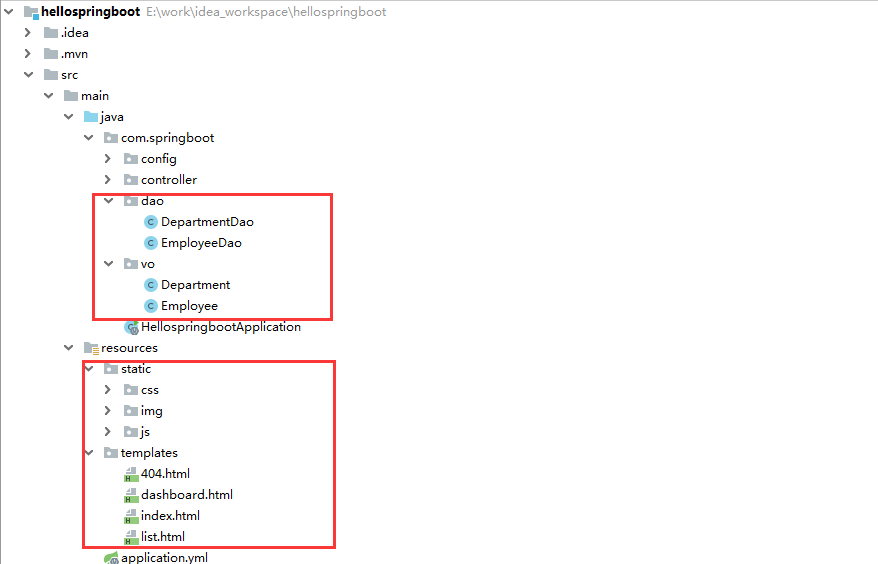
把css、js、img文件夹放在static目录下
把index.html、list.html、dashboard.html、404.html放在templates目录下
2:pom文件初始配置
<?xml version="1.0" encoding="UTF-8"?>

<project xmlns="http://maven.apache.org/POM/4.0.0" xmlns:xsi="http://www.w3.org/2001/XMLSchema-instance"

         xsi:schemaLocation="http://maven.apache.org/POM/4.0.0 https://maven.apache.org/xsd/maven-4.0.0.xsd">

    <modelVersion>4.0.0</modelVersion>

    <!--父项目 springboot版本-->

    <parent>

        <groupId>org.springframework.boot</groupId>

        <artifactId>spring-boot-starter-parent</artifactId>

        <version>2.2.6.RELEASE</version>

        <relativePath/> <!-- lookup parent from repository -->

    </parent>

    <!--项目坐标:gav-->

    <groupId>com.springboot</groupId>

    <artifactId>hellospringboot</artifactId>

    <version>0.0.1-SNAPSHOT</version>

    <name>hellospringboot</name>

    <description>Demo project for Spring Boot</description>

    <!--jdk版本-->

    <properties>

        <java.version>1.8</java.version>

    </properties>

    <!--环境依赖-->

    <dependencies>

        <!--web环境依赖,会自动装配tomcat、静态资源目录、templates目录-->

        <dependency>

            <groupId>org.springframework.boot</groupId>

            <artifactId>spring-boot-starter-web</artifactId>

        </dependency>

        <!--测试依赖-->

        <dependency>

            <groupId>org.springframework.boot</groupId>

            <artifactId>spring-boot-starter-test</artifactId>

            <scope>test</scope>

            <exclusions>

                <exclusion>

                    <groupId>org.junit.vintage</groupId>

                    <artifactId>junit-vintage-engine</artifactId>

                </exclusion>

            </exclusions>

        </dependency>

        <!--热部署插件-->

        <dependency>

            <groupId>org.springframework.boot</groupId>

            <artifactId>spring-boot-devtools</artifactId>

            <scope>runtime</scope>

        </dependency>

        <!--@ConfigurationProperties注解防变红-->

        <dependency>

            <groupId>org.springframework.boot</groupId>

            <artifactId>spring-boot-configuration-processor</artifactId>

            <optional>true</optional>

        </dependency>

        <!--thymeleaf模板支持-->

        <dependency>

            <groupId>org.springframework.boot</groupId>

            <artifactId>spring-boot-starter-thymeleaf</artifactId>

        </dependency>

        <!--lombok支持-->

        <dependency>

            <groupId>org.projectlombok</groupId>

            <artifactId>lombok</artifactId>

        </dependency>

    </dependencies>

    <!--maven打包插件-->

    <build>

        <plugins>

            <plugin>

                <groupId>org.springframework.boot</groupId>

                <artifactId>spring-boot-maven-plugin</artifactId>

            </plugin>

        </plugins>

    </build>

</project>
3:application.yml文件初始配置
server:

  port: 80 #访问端口

spring:

  thymeleaf:

    cache: false #开发时关闭缓存,不然没法看到实时页面

    prefix: classpath:/templates/ #文件存放路径

    suffix: .html  #文件后缀

    encoding: utf-8

    mode: HTML5

    servlet:

      content-type: text/html
4:构建java Bean
com\springboot\vo\Department.java #部门
使用@Data注解 如要安装lombok插件
package com.springboot.vo;

import lombok.AllArgsConstructor;

import lombok.Data;

import lombok.NoArgsConstructor;

/*部门*/

@Data  //set get toString

@NoArgsConstructor //无参构造器

@AllArgsConstructor //有参构造器

public class Department {

	/*部门id*/

	private Integer id;

	/*部门名称*/

	private String departmentName;

}
com\springboot\vo\Employee.java #员工
package com.springboot.vo;

import lombok.AllArgsConstructor;

import lombok.Data;

import lombok.NoArgsConstructor;

import java.util.Date;

/*员工*/

@Data //set get toString

@AllArgsConstructor //有参构造器

@NoArgsConstructor  //无参构造器

public class Employee {

    /*员工id*/

	private Integer id;

	/*员工姓名*/

    private String lastName;

    /*邮箱*/

    private String email;

    /*性别 0:女  1:男*/

    private Integer gender;

    /*部门*/

    private Department department;

    /*生日*/

    private Date birth;

}
5:构建模拟数据
com\springboot\dao\DepartmentDao.java #构建部门数据
package com.springboot.dao;

import java.util.Collection;

import java.util.HashMap;

import java.util.Map;

import com.springboot.vo.Department;

import org.springframework.stereotype.Repository;

/*把部门dao注入spring容器*/

@Repository

public class DepartmentDao {

	private static Map<Integer, Department> departments = null;

	/*模拟部门表 数据库数据*/

	static{

		departments = new HashMap<Integer, Department>();

		departments.put(101, new Department(101, "D-AA"));

		departments.put(102, new Department(102, "D-BB"));

		departments.put(103, new Department(103, "D-CC"));

		departments.put(104, new Department(104, "D-DD"));

		departments.put(105, new Department(105, "D-EE"));

	}

	/*查询所有部门*/

	public Collection<Department> getDepartments(){

		return departments.values();

	}

	/*通过id查询部门*/

	public Department getDepartment(Integer id){

		return departments.get(id);

	}

}
com\springboot\dao\EmployeeDao.java #构建员工数据
package com.springboot.dao;

import java.util.Collection;

import java.util.Date;

import java.util.HashMap;

import java.util.Map;

import com.springboot.vo.Department;

import com.springboot.vo.Employee;

import org.springframework.beans.factory.annotation.Autowired;

import org.springframework.stereotype.Repository;

@Repository

public class EmployeeDao {

	private static Map<Integer, Employee> employees = null;

	@Autowired

	private DepartmentDao departmentDao;

	/*模拟员工表 数据库中的数据*/

	static{

		employees = new HashMap<Integer, Employee>();

		employees.put(1001, new Employee(1001, "E-AA", "aa@163.com", 1, new Department(101, "D-AA"),new Date()));

		employees.put(1002, new Employee(1002, "E-BB", "bb@163.com", 1, new Department(102, "D-BB"),new Date()));

		employees.put(1003, new Employee(1003, "E-CC", "cc@163.com", 0, new Department(103, "D-CC"),new Date()));

		employees.put(1004, new Employee(1004, "E-DD", "dd@163.com", 0, new Department(104, "D-DD"),new Date()));

		employees.put(1005, new Employee(1005, "E-EE", "ee@163.com", 1, new Department(105, "D-EE"),new Date()));

	}

	private static Integer initId = 1006;

	/*添加员工*/

	public void save(Employee employee){

		if(employee.getId() == null){

			employee.setId(initId++);

		}

		employee.setDepartment(departmentDao.getDepartment(employee.getDepartment().getId()));

		employees.put(employee.getId(), employee);

	}

	/*查询所有员工*/

	public Collection<Employee> getAll(){

		return employees.values();

	}

	/*通过id查询员工*/

	public Employee get(Integer id){

		return employees.get(id);

	}

	/*删除员工*/

	public void delete(Integer id){

		employees.remove(id);

	}

}
6:目录结构
Springboot:员工管理之环境准备(十(1))的更多相关文章
- Springboot:员工管理之国际化(十(3))
1:IDEA编码设置UTF-8 2:创建国际化文件 i18n\login.properties #默认语言 i18n\login_en_US.properties #英文语言 i18n\login_z ...
- Springboot:员工管理之首页(十(2))
访问首页可以通过两种方式: 1:编写controller 2:自定义扩展视图解析器(推荐使用) 1:编写Controller com\springboot\controller\IndexContro ...
- Springboot:员工管理之公共页面提取 高亮显示(十(5))
把顶部和左侧的公共代码分别放到header.html和left.html中 顶部代码:resources\templates\header.html 主内容展示: <!DOCTYPE html& ...
- 170707、springboot编程之监控和管理生产环境
spring-boot-actuator模块提供了一个监控和管理生产环境的模块,可以使用http.jmx.ssh.telnet等拉管理和监控应用.审计(Auditing). 健康(health).数据 ...
- 「MySql高级查询与编程」练习:企业员工管理
题目:企业员工管理 一.语言和环境 1.实现语言:SQL. 2.开发环境:MySQL,navicat for mysql. 二.题目(100分): 1.创建数据库及数据表: (1)创建数据库,名称为d ...
- RDIFramework.NET ━ 9.2 员工管理 ━ Web部分
RDIFramework.NET ━ .NET快速信息化系统开发框架 9.2 员工管理 -Web部分 员工(职员)管理主要是对集团.企事业内部员工进行管理.在后面的章节可以看到有一个用户管理,这两者 ...
- 使用Jquery+EasyUI进行框架项目开发案例解说之中的一个---员工管理源代码分享
使用Jquery+EasyUI 进行框架项目开发案例解说之中的一个 员工管理源代码分享 在開始解说之前,我们先来看一下什么是Jquery EasyUI?jQuery EasyUI是一组基于jQuery ...
- 使用Jquery+EasyUI项目开发情况的框架是中评---员工管理源代码共享
使用Jquery+EasyUI 进行框架项目开发案例解说之中的一个 员工管理源代码分享 在開始解说之前,我们先来看一下什么是Jquery EasyUI?jQuery EasyUI是一组基于jQuery ...
- Struts2+Spring+Hibernate实现员工管理增删改查功能(一)之登录功能
昨天的博客中我分享了个人关于ssh实现员工管理的框架整合,今天我在分享管理员登录功能的实现. 转载请注明出处"http://www.cnblogs.com/smfx1314/p/78013 ...
随机推荐
- 关于STM32F103系列从大容量向中容量移植的若干问题
一.把STM32F103大容量移植到STM32F103C8T6上的步骤: 1.换启动文件 startup_stm32f10x_cl.s ——互联型的器件 包括:STM32F105x ...
- 二、sudo su root 和sudo su -的区别
1.使用sudo su root可以快速切换为root用户,输入密码后输pwd可以看到它还是在主目录下即/home/sdbi 显示为:用户名@主机名:/home/sdbi#即root@linux:/h ...
- Go语言库系列之aurora
背景介绍 今天跟大家推荐一款可以给终端输出上色的工具--aurora. 极速上手 准备工作 初始化项目 go mod init aurora 演示项目结构 . ├── go.mod ├── go.su ...
- C/C++知识总结 一 C/C++常识概述
C/C++常识概述 程序与计算机语言 C/C++简介与发展 C/C++异同 C/C++编译特点 学习编程建议 程序与计算机语言 程序:是一组计算机能识别和执行.预先编好的一些指令操作合集. 计算机语言 ...
- 1068 Find More Coins (30分)(dp)
Eva loves to collect coins from all over the universe, including some other planets like Mars. One d ...
- 摩尔投票算法( Boyer-Moore Voting Algorithm)
一.Majority Element题目介绍:给定一个长度为n的数组的时候,找出其中的主元素,即该元素在数组中出现的次数大于n/2的取整.题目中已经假定所给的数组一定含有元素,且主元素一定存在.一下是 ...
- Jmeter 压力测试笔记(1)--服务器迁移失败
近期,公司服务器因技术架构升级等原因需要迁移,在经过开发,运维DBA,测试多部门进行联合讨论后,制定出了迁移方案.迁移前也对APP应用进行了各种测试,并没有发现问题. 凌晨2点开始迁移,5点完成迁移. ...
- Github基础使用教程 ———功能介绍
Github基础使用手把手教程 --功能介绍 本人Github小白,刚摸索的差不多,记录一下经验,小白写出来的东西各位萌新一定看的懂啦~ 本篇内容主要针对想快速学会使用Github这个强大工具的 ...
- 【Linux】系统管理
软件包管理 一 软件包分类 源码包: .tar.gz .tar.bz2 二进制包: .rpm 二 二进制包安装 (一) rpm命令手动管理二进制包 (挂载光盘) 1 包名-版本号-发布次数-适合lin ...
- 如何用VmwareWorkstation安装Centos系统
教你如何安装虚拟机系统 首先你得有虚拟化软件,常用的VmwareWorkstation一般能满足日常需求. 下载地址,请自行搜索. 第一步,新建虚拟机 选择安装系统源 这里有三个选项. 1.第一个是使 ...