
linux安装nginx 并配置文件服务器和代理服务器
linux安装nginx搭建服务并实现文件服务器和代理服务器配置
1.课题的背景和意义
由于编码过程中需要进行文件上传服务,文件上传后 需要有http资源的路径需要访问。原则上可以通过Apache 、iis 、nginx 等方式映射文件夹为网站即可实现。由于使用linux环境,nginx安装方便快捷,故采用nginx来实现;
域名资源宝贵,申请额外的域名流程繁琐;
需要多个文件服务器,使用同一个域名代理进行访问。
2.环境资料准备
linux服务器一台 centos
nginx 依赖包 gcc zlib zlib-devel pcre-devel openssl openssl-devel 等;
nginx 安装包 http://nginx.org/en/download.html
3.安装、设计与实现
设计思路:
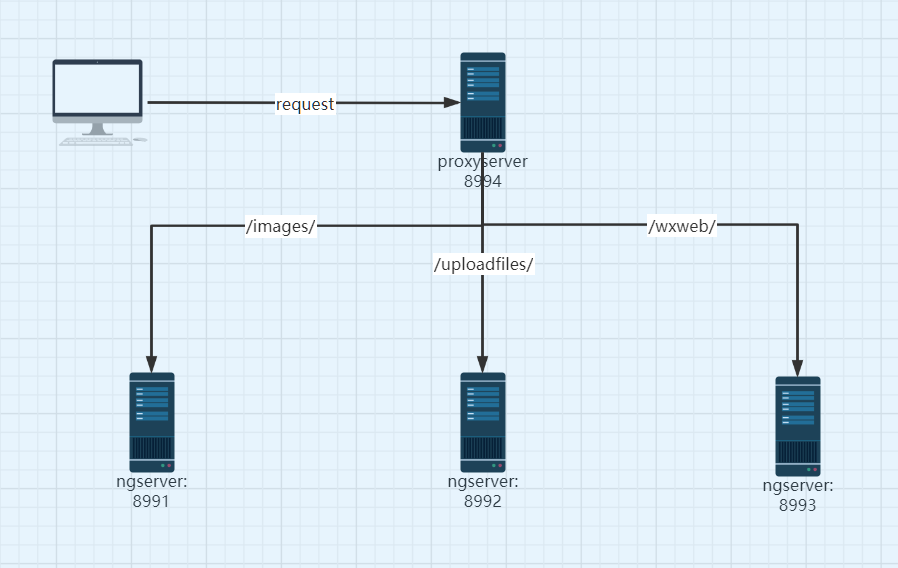
第一步 安装依赖包:yum -y install gcc zlib zlib-devel pcre-devel openssl openssl-devel
第二步 解压、编译nginx源码并安装
tar -xvf nginx-1.19.8.tar.gz
cd nginx-1.19.8/
./configure (若依赖包未安装 此处会报错,安装响应的依赖包即可 yum -y install gcc-c++)
make
make install 默认安装目录为:/usr/local/nginx/ 配置文件位置:/usr/local/nginx/conf/nginx.conf
vi /usr/local/nginx/conf/nginx.conf 修改配置文件
cd /usr/local/nginx
./nginx 运行 若修改配置文件后 需要reload nginx 命令为:./nginx -s reload
第三步:使用nginx 搭建三台服务器、 并搭建代理服务器,使用二级目录代理前面提到的三台服务器;
1.建立文件目录三个;
/mydata/weixin_sc/images
/mydata/weixin_sc/uploadfiles
/mydata/weixin_sc/wxweb
2 nginx.conf修改配置 :
  #user  nobody;

  worker_processes  1;

  #error_log  logs/error.log;

  #error_log  logs/error.log  notice;

  #error_log  logs/error.log  info;

  #pid        logs/nginx.pid;

  events {

    worker_connections  1024;

  }

  http {

    include       mime.types;

    default_type  application/octet-stream;

    #log_format  main  '$remote_addr - $remote_user [$time_local] "$request" '

    #                  '$status $body_bytes_sent "$http_referer" '

    #                  '"$http_user_agent" "$http_x_forwarded_for"';

    #access_log  logs/access.log  main;

    sendfile        on;

    #tcp_nopush     on;

    #keepalive_timeout  0;

    keepalive_timeout  65;

    #gzip  on;

    #文件服务器1

    server {

        listen       8991;

        server_name  localhost;

        location / {

            root   /mydata/weixin_sc/images;

        }

        error_page   500 502 503 504  /50x.html;

        location = /50x.html {

            root   html;

        }

        }

    #文件服务器2

    server {

        listen       8992;

        server_name  localhost;

        location / {

            root   /mydata/weixin_sc/uploadfiles;

        }

        error_page   500 502 503 504  /50x.html;

        location = /50x.html {

            root   html;

        }

       }

   #文件服务器3

    server {

        listen       8993;

        server_name  localhost;

        location / {

            root   /mydata/weixin_sc/wxweb;

        }

        error_page   500 502 503 504  /50x.html;

        location = /50x.html {

            root   html;

        }

     }

   #代理服务器

    server {

            listen 8994;

            #listen 443 ssl;

        server_name  localhost;

         #client_max_body_size 10M;

         #启用 SSL 功能, deprecated

         #ssl on;

         #证书文件名称

         #ssl_certificate

         #私钥文件名称

         #ssl_certificate_key

         #ssl_session_timeout 5m;

         #请按照以下协议配置

         #ssl_protocols TLSv1 TLSv1.1 TLSv1.2;

         #请按照以下套件配置,配置加密套件,写法遵循 openssl 标准。

         #ssl_ciphers ECDHE-RSA-AES128-GCM-SHA256:HIGH:!aNULL:!MD5:!RC4:!DHE;

         #ssl_prefer_server_ciphers on;

            add_header X-Frame-Options SAMEORIGIN;  #不允许iframe嵌套

             location / {

             proxy_pass http://localhost:8991;

             }

          #使用二级目录代理三台文件服务器,节约域名。; 注意 代理路径 /,有无/会影响代理服务,是否传递目录问题;

            location /images/ {

                  proxy_pass http://localhost:8991/;

            }

            location /uploadfiles/ {

                  proxy_pass http://localhost:8992/;

                        }

            location /wxweb/ {

                  proxy_pass http://localhost:8993/;

                              }

        }

}
重启ng服务: ./nginx -s reload
扩展学习:
查看nginx进程是否启动:
ps -ef | grep nginx
启动,关闭,重启,命令:
./nginx 启动
./nginx -s stop 关闭
./nginx -s reload 重启
参考文献:
http://nginx.org/
http://nginx.org/en/docs/
linux安装nginx 并配置文件服务器和代理服务器的更多相关文章
- linux安装Nginx 以及 keepalived 管理Nginx
linux安装Nginx 1.1将Nginx素材内容上传到/usr/local目录(pcre,zlib,openssl,nginx)(注意:必须登录用对这个文件具有操作权限的) 1.2安装pcre库 ...
- linux学习(十一)linux安装nginx
一.前言 由于本地练手的小demo用的是vue+spring boot来玩的,所以部署的时候想着用Nginx来实现反向代理[即请求转发,解决前后端分离的跨域请求问题],既然要用,那么首先得在服务器上面 ...
- Linux安装nginx代理服务器
Nginx("engine x")是一款是由俄罗斯的程序设计师Igor Sysoev所开发高性能的 Web和 反向代理 服务器,也是一个 IMAP/POP3/SMTP 代理服务器. ...
- 【转】 linux 安装nginx及编译参数详解
版权声明:本文为博主原创文章,未经博主允许不得转载. 从官网下载一个nginx 的tar.gz 版. 安装方式使用make 安装 第一步:解压 tar -zxvf nginx-1.7.4.tar.g ...
- Linux 安装Nginx(使用Mac远程访问)
阅读本文需要一定的Linux基础 一 Nginx简介 nginx是用c语言编写的一款高性能的http服务器|反向代理服务器|电子邮件(IMAP/POP3)代理服务器 由俄罗斯的程序设计师Igor Sy ...
- linux 安装 nginx 及反向代理配置
Nginx ("engine x") 是一个高性能的HTTP和反向代理服务器,以下为Linux centos平台下安装nginx并配置反向代理的过程(采用源码安装的方式) 一:安装 ...
- Linux安装Nginx以及简单理解
1.Nginx简单介绍 ①.Nginx:一个高性能的HTTP和反向代理服务器,高并发处理很不错. ②.反向代理:在计算机世界里,由于单个服务器的处理客户端(用户)请求能力有一个极限,当用户的接入请求蜂 ...
- linux安装nginx,遇坑解决
1.nginx官网下载tar包,解压linux下: 2.进入解压文件夹,执行./configure: 3.报错,原因没有安装nginx相关依赖,如gcc环境,PCRE依赖库 ,zlib 依赖库 ,Op ...
- Linux 安装Nginx+PHP+MySQL教程
一.安装nginx 通过yum安装openssl: yum -y install openssl openssl-devel 通过yum安装pcre: yum -y install pcre-deve ...
随机推荐
- 经济学,金融学:资产证券化 ABS
经济学,金融学:资产证券化 ABS ABS 资产支持证券 蚂蚁金服如何把30亿变成3000亿?资产证券化 前几天,花呗借呗的东家蚂蚁集团在上市前夕被监管部门叫停,因为这则新闻广大网民都听说了一个概念: ...
- 如何用 js 实现一个 bind 函数
如何用 js 实现一个 bind 函数 原理 实现方式 总结 refs https://developer.mozilla.org/en-US/docs/Web/JavaScript/Referenc ...
- js & void() & void(0)
js & void() & void(0) https://www.runoob.com/js/js-void.html void() <a href="javascr ...
- H5 页面与小程序之间 传递数据
H5 页面与小程序之间 传递数据 小程序里面的 H5页面与小程序之间怎么传递数据 webview与小程序之间的实时通信 webview主动发消息给小程序 webview可以利用jssdk提供的 wx. ...
- NGK Global莫斯科路演:关注内存暴涨和Defi新项目-Baccarat
此次路演由莫斯科演讲师Andrew首先致辞.首先安德鲁回顾了NGK近些年发展的整体情况,表示,NGK技术团队一直在认真的做事并将更加注重技术方案的改进,为行业提供更好的技术解决方案是NGK的愿景,NG ...
- Windows Server2012 r2 nginx反向代理图片服务器
1.下载nginx http://nginx.org/en/download.html,本人下载的1.18.0版本 2.下载 Windows Service Wrapper(winsw.exe) v ...
- Django Admin 后台Admin继承UserAdmin增加用户密码不显示明文和用户登录不了的解决方法
Django后台Admin继承UserAdmin增加用户不显示明文方法 1.在 models.py 中用户表 # 导包规范-1.Python标准模块 from django.db import mod ...
- Centos8.2安装Mongodb4.4.2(社区版)
1:下载 wget https://fastdl.mongodb.org/linux/mongodb-linux-x86_64-rhel80-4.4.2.tgz 官网地址: 2:解压 tar -zxv ...
- JavaWeb之servlet管理机制
一.什么是Servlet 简单的说,浏览器发出请求到tocat服务器,服务器就会初始化一个servlet实例(servlet采取生命托管的方式实现单例,不存在时才会创建实例),servlet示例会启动 ...
- Web性能优化之瘦身秘笈
Web 传输的内容当然是越少越好,最近一段时间的工作一直致力于 Web 性能优化,这是我近期使用过的一些缩减 Web 体积的手段 这些手段主要是为了减少 Web 传输的内容大小,只有干货 CSS 删除 ...