
linux安装nginx 并配置文件服务器和代理服务器
linux安装nginx搭建服务并实现文件服务器和代理服务器配置
1.课题的背景和意义
由于编码过程中需要进行文件上传服务,文件上传后 需要有http资源的路径需要访问。原则上可以通过Apache 、iis 、nginx 等方式映射文件夹为网站即可实现。由于使用linux环境,nginx安装方便快捷,故采用nginx来实现;
域名资源宝贵,申请额外的域名流程繁琐;
需要多个文件服务器,使用同一个域名代理进行访问。
2.环境资料准备
linux服务器一台 centos
nginx 依赖包 gcc zlib zlib-devel pcre-devel openssl openssl-devel 等;
nginx 安装包 http://nginx.org/en/download.html
3.安装、设计与实现
设计思路:
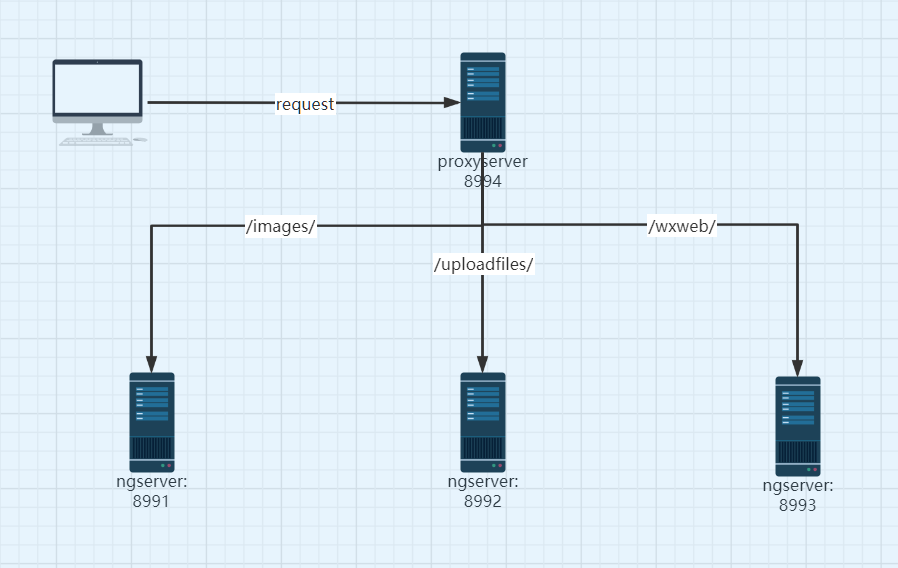
第一步 安装依赖包:yum -y install gcc zlib zlib-devel pcre-devel openssl openssl-devel
第二步 解压、编译nginx源码并安装
tar -xvf nginx-1.19.8.tar.gz
cd nginx-1.19.8/
./configure (若依赖包未安装 此处会报错,安装响应的依赖包即可 yum -y install gcc-c++)
make
make install 默认安装目录为:/usr/local/nginx/ 配置文件位置:/usr/local/nginx/conf/nginx.conf
vi /usr/local/nginx/conf/nginx.conf 修改配置文件
cd /usr/local/nginx
./nginx 运行 若修改配置文件后 需要reload nginx 命令为:./nginx -s reload
第三步:使用nginx 搭建三台服务器、 并搭建代理服务器,使用二级目录代理前面提到的三台服务器;
1.建立文件目录三个;
/mydata/weixin_sc/images
/mydata/weixin_sc/uploadfiles
/mydata/weixin_sc/wxweb
2 nginx.conf修改配置 :
  #user  nobody;

  worker_processes  1;

  #error_log  logs/error.log;

  #error_log  logs/error.log  notice;

  #error_log  logs/error.log  info;

  #pid        logs/nginx.pid;

  events {

    worker_connections  1024;

  }

  http {

    include       mime.types;

    default_type  application/octet-stream;

    #log_format  main  '$remote_addr - $remote_user [$time_local] "$request" '

    #                  '$status $body_bytes_sent "$http_referer" '

    #                  '"$http_user_agent" "$http_x_forwarded_for"';

    #access_log  logs/access.log  main;

    sendfile        on;

    #tcp_nopush     on;

    #keepalive_timeout  0;

    keepalive_timeout  65;

    #gzip  on;

    #文件服务器1

    server {

        listen       8991;

        server_name  localhost;

        location / {

            root   /mydata/weixin_sc/images;

        }

        error_page   500 502 503 504  /50x.html;

        location = /50x.html {

            root   html;

        }

        }

    #文件服务器2

    server {

        listen       8992;

        server_name  localhost;

        location / {

            root   /mydata/weixin_sc/uploadfiles;

        }

        error_page   500 502 503 504  /50x.html;

        location = /50x.html {

            root   html;

        }

       }

   #文件服务器3

    server {

        listen       8993;

        server_name  localhost;

        location / {

            root   /mydata/weixin_sc/wxweb;

        }

        error_page   500 502 503 504  /50x.html;

        location = /50x.html {

            root   html;

        }

     }

   #代理服务器

    server {

            listen 8994;

            #listen 443 ssl;

        server_name  localhost;

         #client_max_body_size 10M;

         #启用 SSL 功能, deprecated

         #ssl on;

         #证书文件名称

         #ssl_certificate

         #私钥文件名称

         #ssl_certificate_key

         #ssl_session_timeout 5m;

         #请按照以下协议配置

         #ssl_protocols TLSv1 TLSv1.1 TLSv1.2;

         #请按照以下套件配置,配置加密套件,写法遵循 openssl 标准。

         #ssl_ciphers ECDHE-RSA-AES128-GCM-SHA256:HIGH:!aNULL:!MD5:!RC4:!DHE;

         #ssl_prefer_server_ciphers on;

            add_header X-Frame-Options SAMEORIGIN;  #不允许iframe嵌套

             location / {

             proxy_pass http://localhost:8991;

             }

          #使用二级目录代理三台文件服务器,节约域名。; 注意 代理路径 /,有无/会影响代理服务,是否传递目录问题;

            location /images/ {

                  proxy_pass http://localhost:8991/;

            }

            location /uploadfiles/ {

                  proxy_pass http://localhost:8992/;

                        }

            location /wxweb/ {

                  proxy_pass http://localhost:8993/;

                              }

        }

}
重启ng服务: ./nginx -s reload
扩展学习:
查看nginx进程是否启动:
ps -ef | grep nginx
启动,关闭,重启,命令:
./nginx 启动
./nginx -s stop 关闭
./nginx -s reload 重启
参考文献:
http://nginx.org/
http://nginx.org/en/docs/
linux安装nginx 并配置文件服务器和代理服务器的更多相关文章
- linux安装Nginx 以及 keepalived 管理Nginx
linux安装Nginx 1.1将Nginx素材内容上传到/usr/local目录(pcre,zlib,openssl,nginx)(注意:必须登录用对这个文件具有操作权限的) 1.2安装pcre库 ...
- linux学习(十一)linux安装nginx
一.前言 由于本地练手的小demo用的是vue+spring boot来玩的,所以部署的时候想着用Nginx来实现反向代理[即请求转发,解决前后端分离的跨域请求问题],既然要用,那么首先得在服务器上面 ...
- Linux安装nginx代理服务器
Nginx("engine x")是一款是由俄罗斯的程序设计师Igor Sysoev所开发高性能的 Web和 反向代理 服务器,也是一个 IMAP/POP3/SMTP 代理服务器. ...
- 【转】 linux 安装nginx及编译参数详解
版权声明:本文为博主原创文章,未经博主允许不得转载. 从官网下载一个nginx 的tar.gz 版. 安装方式使用make 安装 第一步:解压 tar -zxvf nginx-1.7.4.tar.g ...
- Linux 安装Nginx(使用Mac远程访问)
阅读本文需要一定的Linux基础 一 Nginx简介 nginx是用c语言编写的一款高性能的http服务器|反向代理服务器|电子邮件(IMAP/POP3)代理服务器 由俄罗斯的程序设计师Igor Sy ...
- linux 安装 nginx 及反向代理配置
Nginx ("engine x") 是一个高性能的HTTP和反向代理服务器,以下为Linux centos平台下安装nginx并配置反向代理的过程(采用源码安装的方式) 一:安装 ...
- Linux安装Nginx以及简单理解
1.Nginx简单介绍 ①.Nginx:一个高性能的HTTP和反向代理服务器,高并发处理很不错. ②.反向代理:在计算机世界里,由于单个服务器的处理客户端(用户)请求能力有一个极限,当用户的接入请求蜂 ...
- linux安装nginx,遇坑解决
1.nginx官网下载tar包,解压linux下: 2.进入解压文件夹,执行./configure: 3.报错,原因没有安装nginx相关依赖,如gcc环境,PCRE依赖库 ,zlib 依赖库 ,Op ...
- Linux 安装Nginx+PHP+MySQL教程
一.安装nginx 通过yum安装openssl: yum -y install openssl openssl-devel 通过yum安装pcre: yum -y install pcre-deve ...
随机推荐
- Self-publishing 自出版
Self-publishing 自出版 出书 传统出版 在过去的几十年中,发布意味着要经过代理商和发布者. 自出版 如今,自助出版允许作者绕过出版商和书店,直接向公众出售. refs https:// ...
- CSS pseudo element All In One
CSS pseudo element All In One CSS 伪元素 https://developer.mozilla.org/en-US/docs/Web/CSS/Pseudo-elemen ...
- how to read the 10th line of a text using shell script
how to read the 10th line of a text using shell script shell script / bash script question https://l ...
- 如何使用 js 实现一个 Promise.all 方法 PromiseAll
如何使用 js 实现一个 Promise.all 方法 PromiseAll Promise.all PromiseAll https://developer.mozilla.org/en-US/do ...
- GitHub & GitHub Package Registry
GitHub & GitHub Package Registry npm https://github.blog/2019-05-10-introducing-github-package-r ...
- 口罩 & 防毒面具 N95 & P100
口罩 & 防毒面具 N95 & P100 N95 口罩 < 防毒面具 P100 https://www.techritual.com/2020/01/30/210599/
- C++算法代码——快速排序
题目来自:http://218.5.5.242:9018/JudgeOnline/problem.php?cid=1371&pid=1 题目描述 第一行一个数字n, n<=100000. ...
- HTTP/1.1 有点慢,我想优化下!
问你一句:「你知道 HTTP/1.1 该如何优化吗?」 我想你第一时间想到的是,使用 KeepAlive 将 HTTP/1.1 从短连接改成长链接. 这个确实是一个优化的手段,它是从底层的传输层这一方 ...
- oracle 导入导出dmp
exp 用户名/密码@地址:端口/serviceName file=D:\710.dmp exp test710/test710@192.168.15.134:1521/doit file=D:\71 ...
- windows server 2008 r2 AD域服务器设置
域控制器是指在"域"模式下,至少有一台服务器负责每一台联入网络的电脑和用户的验证工作,相当于一个单位的门卫一样,称为"域控制器(Domain Controller,简写为 ...