
利用 Github Actions 的 service container 进行集成测试
Github Action 中 Service Container 的使用
Intro
之前写过一个 StackExchange.Redis 的一个扩展,测试项目依赖 redis,所以之前测试一直只是在本地跑一下,最近通过 Github Action 中的 Service Container 来通过 CI 来跑测试,分享一下如何使用 service container 来跑测试,不仅仅是 Redis,数据库等依赖也可以使用这样的方式来测试
Redis Service Container Sample
jobs:

  # Label of the runner job

  runner-job:

    # You must use a Linux environment when using service containers or container jobs

    runs-on: ubuntu-latest

    # Service containers to run with `runner-job`

    services:

      # Label used to access the service container

      redis:

        # Docker image

        image: redis:alpine

        # Set health checks to wait until redis has started

        options: >-

          --health-cmd "redis-cli ping"

          --health-interval 10s

          --health-timeout 5s

          --health-retries 5

        ports:

          # Maps port 6379 on service container to the host

          - 6379:6379
上面是一个 redis service container 配置示例的一部分,需要注意的是使用 service container 的时候必须要使用 Linux 环境,因为 service container 的本质就是 docker run 了一个 container,通过一定的规则配置来实现在跑 CI 的环境可以访问的这个 service
上面的示例配置了一个 redis 的 service container,并将容器服务的 6379 端口映射到 host 的 6379 端口,这样 host 上的服务就可以通过 127.0.0.1:6379/localhost:6379 访问到使用 docker 跑起来的 redis 服务(redis service container)了
steps:

  # Downloads a copy of the code in your repository before running CI tests

  - name: Check out repository code

    uses: actions/checkout@v2

  # Performs a clean installation of all dependencies in the `package.json` file

  # For more information, see https://docs.npmjs.com/cli/ci.html

  - name: Install dependencies

    run: npm ci

  - name: Connect to Redis

    # Runs a script that creates a Redis client, populates

    # the client with data, and retrieves data

    run: node client.js

    # Environment variable used by the `client.js` script to create

    # a new Redis client.

    env:

      # The hostname used to communicate with the Redis service container

      REDIS_HOST: localhost

      # The default Redis port

      REDIS_PORT: 6379
Container Job Sample
上面的这种形式是在 host 上跑的,也就是直接在跑 CI 的服务器上跑的,有些情况下环境的配置比较麻烦的情况下也可以直接在指定的 docker 镜像为基础的 docker container 里跑 CI,需要注意的是 docker container 里跑 CI 的时候和直接在 host 上跑 CI 网络上有区别, host 可能就是直接访问 localhost,container 访问就是 service 名称,来看下面的 container 的一个示例:
jobs:

  # Label of the container job

  container-job:

    # Containers must run in Linux based operating systems

    runs-on: ubuntu-latest

    # Docker Hub image that `container-job` executes in

    container: node:10.18-jessie

    # Service containers to run with `container-job`

    services:

      # Label used to access the service container

      redis:

        # Docker Hub image

        image: redis

        # Set health checks to wait until redis has started

        options: >-

          --health-cmd "redis-cli ping"

          --health-interval 10s

          --health-timeout 5s

          --health-retries 5
可以看到大部分是一样的,只是多了一个 container 的配置,这样实际的 CI 就是在这个 container 里执行的,创建的执行 CI 的 container 和 service container 是在同一个 network 下,可以直接通过服务名称来访问
steps:

  # Downloads a copy of the code in your repository before running CI tests

  - name: Check out repository code

    uses: actions/checkout@v2

  # Performs a clean installation of all dependencies in the `package.json` file

  # For more information, see https://docs.npmjs.com/cli/ci.html

  - name: Install dependencies

    run: npm ci

  - name: Connect to Redis

    # Runs a script that creates a Redis client, populates

    # the client with data, and retrieves data

    run: node client.js

    # Environment variable used by the `client.js` script to create a new Redis client.

    env:

      # The hostname used to communicate with the Redis service container

      REDIS_HOST: redis

      # The default Redis port

      REDIS_PORT: 6379
Sample
提供一个我目前在用的一个 service container,和上面的示例基本是类似的,有需要的可以参考一下:
name: dotnetcore

on: [push]

jobs:

  # Label of the container job

  redis-integration-test:

    # Containers must run in Linux based operating systems

    runs-on: ubuntu-latest

    # # Docker image that `job` executes in

    # container: mcr.microsoft.com/dotnet/sdk:5.0

    # Service containers to run with `container-job`

    # https://docs.github.com/en/free-pro-team@latest/actions/guides/creating-redis-service-containers

    services:

      # Label used to access the service container

      redis:

        # Docker Hub image

        image: redis:alpine

        # Set health checks to wait until redis has started

        options: >-

          --health-cmd "redis-cli ping"

          --health-interval 10s

          --health-timeout 5s

          --health-retries 5

        ports:

          # Maps port 6379 on service container to the host

          - 6379:6379

    steps:

    - uses: actions/checkout@v1

    - name: Setup .NET Core

      uses: actions/setup-dotnet@v1

      with:

        dotnet-version: 5.0.x

    - name: dotnet info

      run: dotnet --info

    - name: build

      run: bash build.sh --target=test
CI 执行日志:
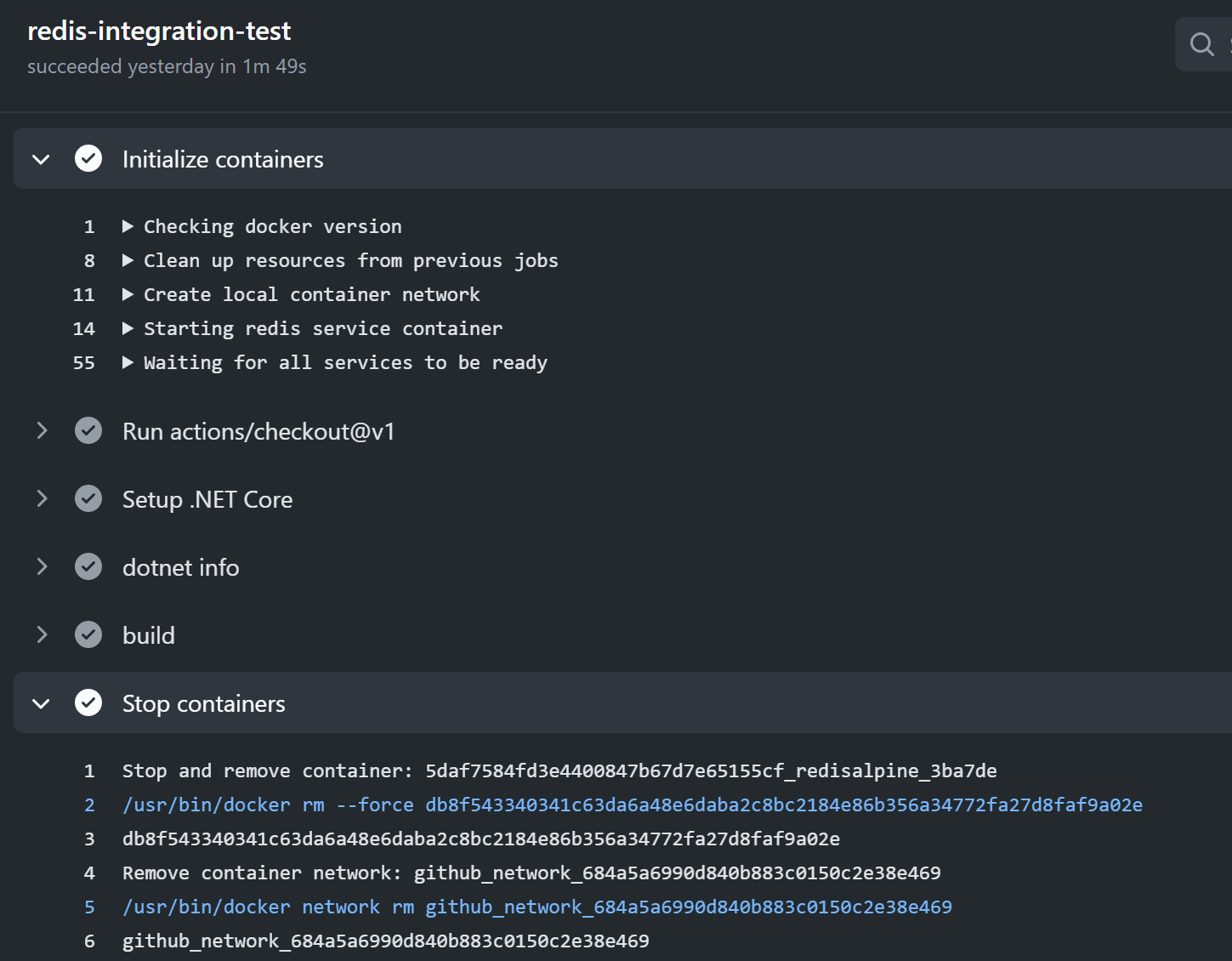
从日志上我们可以看出来比普通的 CI 执行会多出两个步骤,一个是初始化 container,一个是清理 container
完整的CI 日志可以在这里看到:https://github.com/WeihanLi/WeihanLi.Redis/runs/1400006789?check_suite_focus=true
More
虽然我的场景是 redis,但是不仅仅是 redis,很多应用外的依赖比如说数据库,甚至MQ等都是可以通过 service container 来做一个完善的集成测试,没有尝试过的快去试试吧~~
References
- https://docs.github.com/en/free-pro-team@latest/actions/guides/about-service-containers
- https://docs.github.com/en/free-pro-team@latest/actions/guides/creating-redis-service-containers
- https://github.com/WeihanLi/WeihanLi.Redis/blob/dev/.github/workflows/dotnetcore.yml
利用 Github Actions 的 service container 进行集成测试的更多相关文章
- 利用 Github Actions 自动更新 docfx 文档
利用 Github Actions 自动更新 docfx 文档 Intro docfx 是微软出品一个 .NET API 文档框架,有一个理念是代码即文档,会根据项目代码自动生成 API 文档,即使没 ...
- 如何使用 Github Actions 自动抓取每日必应壁纸?
如何白嫖 Github 服务器自动抓取必应搜索的每日壁纸呢? 如果你访问过必应搜索网站,那么你一定会被搜索页面的壁纸吸引,必应搜索的壁纸每日不同,自动更换,十分精美.这篇文章会介绍如何一步步分析出必应 ...
- 用GitHub Actions自动部署Hexo
什么是 GitHub Actions ? GitHub Actions 是一个 CI/CD(持续集成/持续部署)工具,GitHub 于 2018 年 10 月推出,正式版于 2019 年 11 月正式 ...
- Azure Terraform(九)GitHub Actions 实现 Infra 资源的自动化部署
思路浅析 使用 Terraform Code 部署 Azure 基础设施资源是特别受欢迎的,我曾经有写文章分享过利用 Azure DevOps 自动部署 Terraform Code 所描述的 Azu ...
- Asp.Net Core 轻松学-利用xUnit进行主机级别的网络集成测试
前言 在开发 Asp.Net Core 应用程序的过程中,我们常常需要对业务代码编写单元测试,这种方法既快速又有效,利用单元测试做代码覆盖测试,也是非常必要的事情:但是,但我们需要对系统进行集 ...
- 利用github给国外文件下载加速
前言 作为一名程序员,经常需要下载一些编程相关的环境,而国内的网络环境大家都知道,有的文件用浏览器是下载不动的,于是我有了利用github下载文件的想法. 我的demo项目地址:https://git ...
- Github Packages和Github Actions实践之CI/CD
概述 Github在被微软收购后,不忘初心,且更大力度的造福开发者们,推出了免费私有仓库等大更新.近期又开放了packages和actions两个大招,经笔者试用后感觉这两个功能配合起来简直无敌. G ...
- 使用.NET 6开发TodoList应用(31)——实现基于Github Actions和ACI的CI/CD
系列导航及源代码 使用.NET 6开发TodoList应用文章索引 需求和目标 在这个系列的最后一节中,我们将使用GitHub Actions将TodoList应用部署到Azure Container ...
- 为Github仓库添加Github Actions实现持续集成: Android apk自动编译发布以及github pages同步推送coding.net
内容转载自我的博客 目录 说明 1. 编写Android项目的CI配置文件 2. 编写Jekyll项目的CI配置文件 2.1 配置coding.net 2.2 配置github 2.3 自动部署到co ...
随机推荐
- 多测师讲解selenium _下拉框的定位_高级讲师肖sir
from selenium import webdriver from selenium.webdriver.support.ui import Select#导入类from time import ...
- Java9系列第三篇-同一个Jar支持多JDK版本运行
我计划在后续的一段时间内,写一系列关于java 9的文章,虽然java 9 不像Java 8或者Java 11那样的核心java版本,但是还是有很多的特性值得关注.期待您能关注我,我将把java 9 ...
- MeteoInfoLab脚本示例:获取气团轨迹每个节点的气象数据
读取HYSPLIT输出的轨迹数据文件和相应时间的气象数据文件,生成轨迹图层,循环每条轨迹的节点,读出该节点的经度.纬度.气压.时间,通过对气象数据插值获得该节点的气象数据.脚本程序: #------- ...
- 对json数组按照id精确查询并修改值
//json数组,里面有一个id等于5的,班级的标识和名称不是该班级,通过id把班级信息修改为指定的信息 var zNodes=[ { id:1, classid:1, className:" ...
- 测试-python相关
python基础 一行代码实现1~100累加,不使用for循环 方式一: sum(range(1,101)) 方式二: 1 from functools import reduce 2 reduce( ...
- ScanTailor-ScanTailor 自动矫正图像歪斜
ScanTailor 自动矫正图像歪斜 下面操作某一步可能会卡住,别担心情等待它处理完毕. New Project ... Input Directory "Browse" ...
- centOS7 查看防火墙状态 开放端口
一.防火墙的开启.关闭.禁用命令 (1)设置开机启用防火墙:systemctl enable firewalld.service (2)设置开机禁用防火墙:systemctl disable fire ...
- centos8平台redis5日志按天分割
一,创建日志的备份目录 [root@yjweb crontab]# mkdir /data/logs/redislogsbackup 说明:刘宏缔的架构森林是一个专注架构的博客,地址:https:// ...
- doment ready事件和load事件的区别及实现
从2017年9月至今工作中大部分使用react,前端渲染的一些基础性知识记忆不是很深刻了.面试**公司的时候,碰到"document ready和load的区别,以及document rea ...
- 分布式事务说的的2PC、3PC、TCC是啥
目录 2PC(Two Phase Commit) 3PC(Three Phase Commit) TCC(Try-Confirm-Cancel) 2PC(Two Phase Commit) 顾名思义, ...