
前端未来趋势之原生API:Web Components
声明:未经允许,不得转载。
Web Components 现世很久了,所以你可能听说过,甚至学习过,非常了解了。但是没关系,可以再重温一下,温故知新。
浏览器原生能力越来越强。
js
曾经的 JQuery,是前端入门必学的技能,是前端项目必用的一个库。它的强大之处在于简化了 dom 操作(强大的选择器) 和 ajax(异步) 操作。
现在原生 api querySelector()、querySelectorAll()、classList 等的出现已经大大的弱化了 dom 操作, fetch、基于 promise 的 axios 已经完全替代了 ajax, 甚至更好用了,async-await 是真的好用。
css
css 预处理器(如 scss、less) 是项目工程化处理 css 的不二选择。它的强大之处是支持变量、样式规则嵌套、函数。
现在 css 已经支持变量(--var)了, 样式规则嵌套也在计划之中,函数嘛 calc() 也非常强大,还支持 attr() 的使用,还有 css-module 模块化。
以前要制作酷炫复杂的 css 样式及动画,必须借助 css 预处理器的变量、函数或者js才行,现在用 (css-doodle)[https://css-doodle.com/] 技术,实现的更酷、更炫。
web components 组件化
Web Components 可以创建可复用的组件,未来的某一天抛弃现在所谓的框架和库,直接使用原生 API 或者是使用基于 Web Components 标准的框架和库进行开发,你觉得可能吗?我觉得是可能的。
vue-lit
vue-lit,描述如下:
Proof of concept mini custom elements framework powered by @vue/reactivity and lit-html.
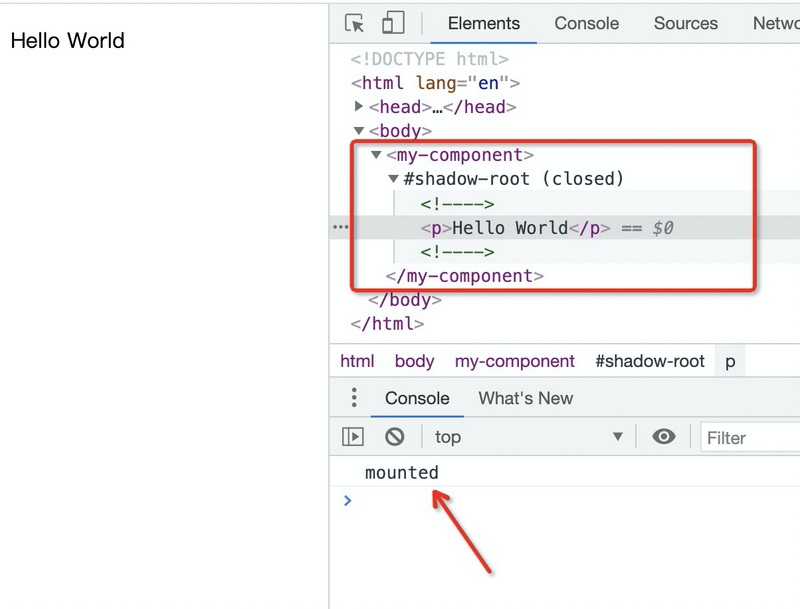
描述用到了 custom elements,而且浏览器控制台 elements 的 DOM 结构中也含有 shadow-root。而 custom element 和 shadow DOM 是 web components 的重要组成。具体看下面 demo,
说明:本文文档示例,都是可以直接复杂到一个 html 文档的 body 中,然后直接在浏览中打开预览效果的。
  <my-component />

  <script type="module">

    import {

      defineComponent,

      reactive,

      html,

      onMounted

    } from 'https://unpkg.com/@vue/lit@0.0.2';

    defineComponent('my-component', () => {

      const state = reactive({

        text: 'Hello World',

      });

      function onClick() {

        alert('cliked!');

      }

      onMounted(() => {

        console.log('mounted');

      });

      return () => html`

        <p>

          <button @click=${onClick}>Click me</button>

          ${state.text}

        </p>

      `;

    })

  </script>
// lit-html 模板,提供 html 模板(简单js表达式及事件绑定)、render 渲染能力

import { render } from 'https://unpkg.com/lit-html?module'

// reactivity 是vue3.0的核心,shallowReactive 浅响应,effect 可以理解为 watch,提供属性响应及部分生命周期处理

import {

  shallowReactive,

  effect

} from 'https://unpkg.com/@vue/reactivity/dist/reactivity.esm-browser.js'

let currentInstance

export function defineComponent(name, propDefs, factory) {

  if (typeof propDefs === 'function') {

    factory = propDefs

    propDefs = []

  }

  // 自定义元素 custom element,原生 API

  customElements.define(

    name,

    class extends HTMLElement {

      // 设置需要监听的属性

      static get observedAttributes() {

        return propDefs

      }

      constructor() {

        super()

        // 属性接入 vue 的响应式

        const props = (this._props = shallowReactive({}))

        currentInstance = this

        // lit-html 的 html 生成的模板

        const template = factory.call(this, props)

        currentInstance = null

        // bm onBeforeMount

        this._bm && this._bm.forEach((cb) => cb())

        // shadowRoot,closed 表示不可以直接通过 js 获取到定义的 customElement 操作 shadowRoot

        const root = this.attachShadow({ mode: 'closed' })

        let isMounted = false

        effect(() => {

          if (isMounted) {

            // _bu, onBeforeUpdate

            this._bu && this._bu.forEach((cb) => cb())

          }

          // 将 template 内容挂载到 shadowRoot 上

          render(template(), root)

          if (isMounted) {

            // _u,onUpdated

            this._u && this._u.forEach((cb) => cb())

          } else {

            isMounted = true

          }

        })

      }

      // 首次挂载到 dom 上后的回调,onMounted

      connectedCallback() {

        this._m && this._m.forEach((cb) => cb())

      }

      // 卸载, onUnmounted

      disconnectedCallback() {

        this._um && this._um.forEach((cb) => cb())

      }

      // 属性监听

      attributeChangedCallback(name, oldValue, newValue) {

        this._props[name] = newValue

      }

    }

  )

}

function createLifecycleMethod(name) {

  return (cb) => {

    if (currentInstance) {

      ;(currentInstance[name] || (currentInstance[name] = [])).push(cb)

    }

  }

}

export const onBeforeMount = createLifecycleMethod('_bm')

export const onMounted = createLifecycleMethod('_m')

export const onBeforeUpdate = createLifecycleMethod('_bu')

export const onUpdated = createLifecycleMethod('_u')

export const onUnmounted = createLifecycleMethod('_um')

export * from 'https://unpkg.com/lit-html?module'

export * from 'https://unpkg.com/@vue/reactivity/dist/reactivity.esm-browser.js'
shallowReactive 源码,函数注释已经表达的很清楚了,only the root level properties are reactive。对象只有根属性响应,换言之即,浅响应,和浅拷贝类似。
/**

 * Return a shallowly-reactive copy of the original object, where only the root

 * level properties are reactive. It also does not auto-unwrap refs (even at the

 * root level).

 */

export function shallowReactive<T extends object>(target: T): T {

  return createReactiveObject(

    target,

    false,

    shallowReactiveHandlers,

    shallowCollectionHandlers

  )

}
effect 源码,粗略的可以看到里面有 dep 依赖,还有 oldValue、newValue 处理。
通过分析,vue-lit 应该是将 vue3.0 的响应式和 web components 做的一个尝试。用 lit-html 的原因时因为支持模板支持简单js表达式及事件绑定(原生template目前只有slot插槽)
css-doodle
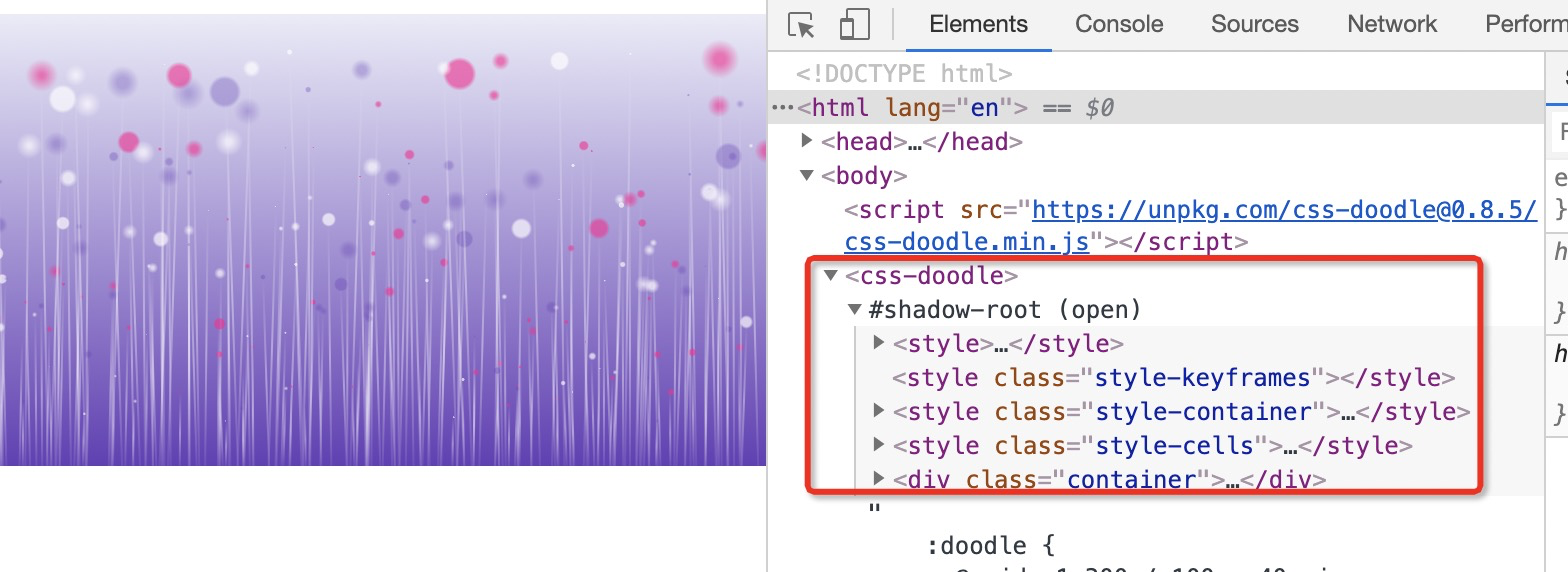
实际上,前面介绍的 css-doodle 也是一个 web component。是浏览器原生就支持的。
示例:艺术背景图。
  <script src="https://unpkg.com/css-doodle@0.8.5/css-doodle.min.js"></script>

  <css-doodle>

    :doodle {

      @grid: 1x300 / 100vw 40vmin;

      overflow: hidden;

      background: linear-gradient(rgba(63, 81, 181, .11), #673AB7);

    }

    align-self: flex-end;

    --h: @r(10, 80, .1);

    @random(.1) { --h: @r(85, 102, .1) }

    @size: 1px calc(var(--h) * 1%);

    background: linear-gradient(transparent, rgba(255, 255, 255, .4), transparent);

    background-size: .5px 100%;

    transform-origin: center 100%;

    transform: translate(@r(-2vmin, 2vmin, .01), 10%) rotate(@r(-2deg, 2deg, .01));

    :after {

      content: '';

      position: absolute;

      top: 0;

      @size: calc(2px * var(--h));

      transform: translateY(-50%) scale(.14);

      background: radial-gradient(@p(#ff03929e, #673ab752, #fffa) @r(40%), transparent 50%) 50% 50% / @r(100%) @lr() no-repeat;

    }

  </css-doodle>
dom 结构:
input、select 等内建 html 元素
input、select 也是 web component。但是是内建的,默认看不到 shadowRoot 结构,需要打开浏览器控制台的设置,勾选Show user agent shadow DOM,才可以在控制台elements中看到其结构。
设置

dom 结构

web components 组件化由 3 部分组成。
- Custom elements(自定义元素):一组JavaScript API,允许您定义custom elements及其行为,然后可以在您的用户界面中按照需要使用它们。
- Shadow DOM(影子DOM):一组JavaScript API,用于将封装的“影子”DOM树附加到元素(与主文档DOM分开呈现)并控制其关联的功能。通过这种方式,您可以保持元素的功能私有,这样它们就可以被脚本化和样式化,而不用担心与文档的其他部分发生冲突。
- HTML templates(HTML模板):
<template>和<slot>元素使您可以编写不在呈现页面中显示的标记模板。然后它们可以作为自定义元素结构的基础被多次重用。
Custom elements
用户可以使用 customElements.define 自定义 html 元素。
customElements.define(elementName, class[, extendElement]);
- elementName: 名称不能是单个单词,必须用短横线分隔。
- class: 用以定义元素行为的类,包含生命周期。
- extendElement: 可选参数,一个包含
extends属性的配置对象,指定创建元素继承哪个内置 HTML 元素
根据定义,得出有两种 custom element:
- Autonomous custom elements: 独立元素,不继承内建的HTML元素。和 html 元素一样使用,例如
<custom-info></custom-info> - Customized built-in elements: 继承内建的HTML元素。使用先写出内建html元素便签,通过 is 属性指定 custom element 名称,例如
<p is="custom-info"></p>
还有生命周期:
- connectedCallback:当 custom element首次被插入文档DOM时,被调用。
- disconnectedCallback:当 custom element从文档DOM中删除时,被调用。
- adoptedCallback:当 custom element被移动到新的文档时,被调用。
- attributeChangedCallback: 当 custom element增加、删除、修改自身属性时,被调用。
示例:独立元素。
  <button onclick="changeInfo()">更改内容</button>

  <custom-info text="hello world"></custom-info>

  <script>

    // Create a class for the element

    class CustomInfo extends HTMLElement {

      // 必须加这个属性监听,返回需要监听的属性,才能触发 attributeChangedCallback 回调

      static get observedAttributes() {

        return ['text'];

      }

      constructor() {

        // Always call super first in constructor

        super();

        // Create a shadow root

        const shadow = this.attachShadow({mode: 'open'});

        // Create p

        const info = document.createElement('p');

        info.setAttribute('class', 'info');

        // Create some CSS to apply to the shadow dom

        const style = document.createElement('style');

        console.log(style.isConnected);

        style.textContent = `

          .info {

            color: red;

          }

        `;

        // Attach the created elements to the shadow dom

        shadow.appendChild(style);

        console.log(style.isConnected);

        shadow.appendChild(info);

      }

      connectedCallback () {

        // 赋值

        this.shadowRoot.querySelector('.info').textContent = this.getAttribute('text')

      }

      attributeChangedCallback(name, oldValue, newValue) {

        // TODO

        console.log(name, oldValue, newValue)

        this.shadowRoot.querySelector('.info').textContent = newValue

      }

    }

    // Define the new element

    customElements.define('custom-info', CustomInfo);

    function changeInfo() {

      document.querySelector('custom-info').setAttribute('text', 'custom element')

    }

  </script>
示例:继承元素
<p is="custom-info" text="hello world"></p>

  <script>

    // Create a class for the element,extend p element

    class CustomInfo extends HTMLParagraphElement {

      constructor() {

        super();

        const shadow = this.attachShadow({mode: 'open'});

        const info = document.createElement('span');

        info.setAttribute('class', 'info');

        const style = document.createElement('style');

        console.log(style.isConnected);

        style.textContent = `

          .info {

            color: red;

          }

        `;

        shadow.appendChild(style);

        console.log(style.isConnected);

        shadow.appendChild(info);

      }

      connectedCallback () {

        this.shadowRoot.querySelector('.info').textContent = this.getAttribute('text')

      }

    }

    // Define the new element, extend p element

    customElements.define('custom-info', CustomInfo, {extends: 'p'});

  </script>
更多,请参考:Custom elements
Shadow DOM
Web components 的重要功能是封装——可以将标记结构、样式和行为隐藏起来,并与页面上的其他代码相隔离,保证不同的部分不会混在一起,使代码更加干净、整洁。Shadow DOM 接口是关键所在,它可以将一个隐藏的、独立的 DOM 附加到一个元素上。
附加到哪个元素上,和定义 custom element 时有关,如果是独立元素,附加到 document body 上;如果是继承元素,则附加到继承元素上。

可以和操作普通 DOM 一样,利用 API 操作 Shoadow DOM。
let shadow = elementRef.attachShadow({mode: 'open'});

let shadow = elementRef.attachShadow({mode: 'closed'});
open 表示可以通过页面内的 JavaScript 方法来获取 Shadow DOM,如'document.querySelector('custom-info').shadowRoot'。反之,获取不到。
更多,请参考:Shadow DOM
HTML templates
template 和 slot 元素可以创建出非常灵活的 shadow DOM 模板,来填充 custom element。 对于重复使用的 html 结构,可以起到简化作用,非常有意义。
示例
<!-- 显示 default text -->

  <custom-info></custom-info>

  <!-- 显示 template info -->

  <custom-info>

    <span slot="info">template info</span>

  </custom-info>

  <template id="custom-info">

    <style>

      p {

        color: red;

      }

    </style>

    <p><slot name="info">default text</slot></p>

  </template>

  <script>

    class CustomInfo extends HTMLElement {

      constructor() {

        super();

        const shadowRoot = this.attachShadow({mode: 'open'});

        const customInfoTpCon = document.querySelector('#custom-info').content;

        shadowRoot.appendChild(customInfoTpCon.cloneNode(true));

      }

    }

    customElements.define('custom-info', CustomInfo);

  </script>
更多,请参考:HTML templates and slots
web components 示例
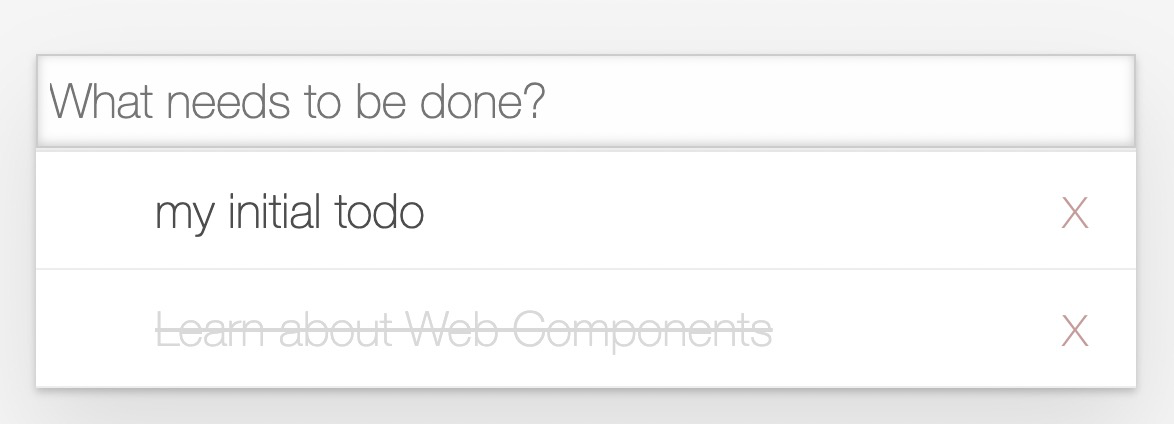
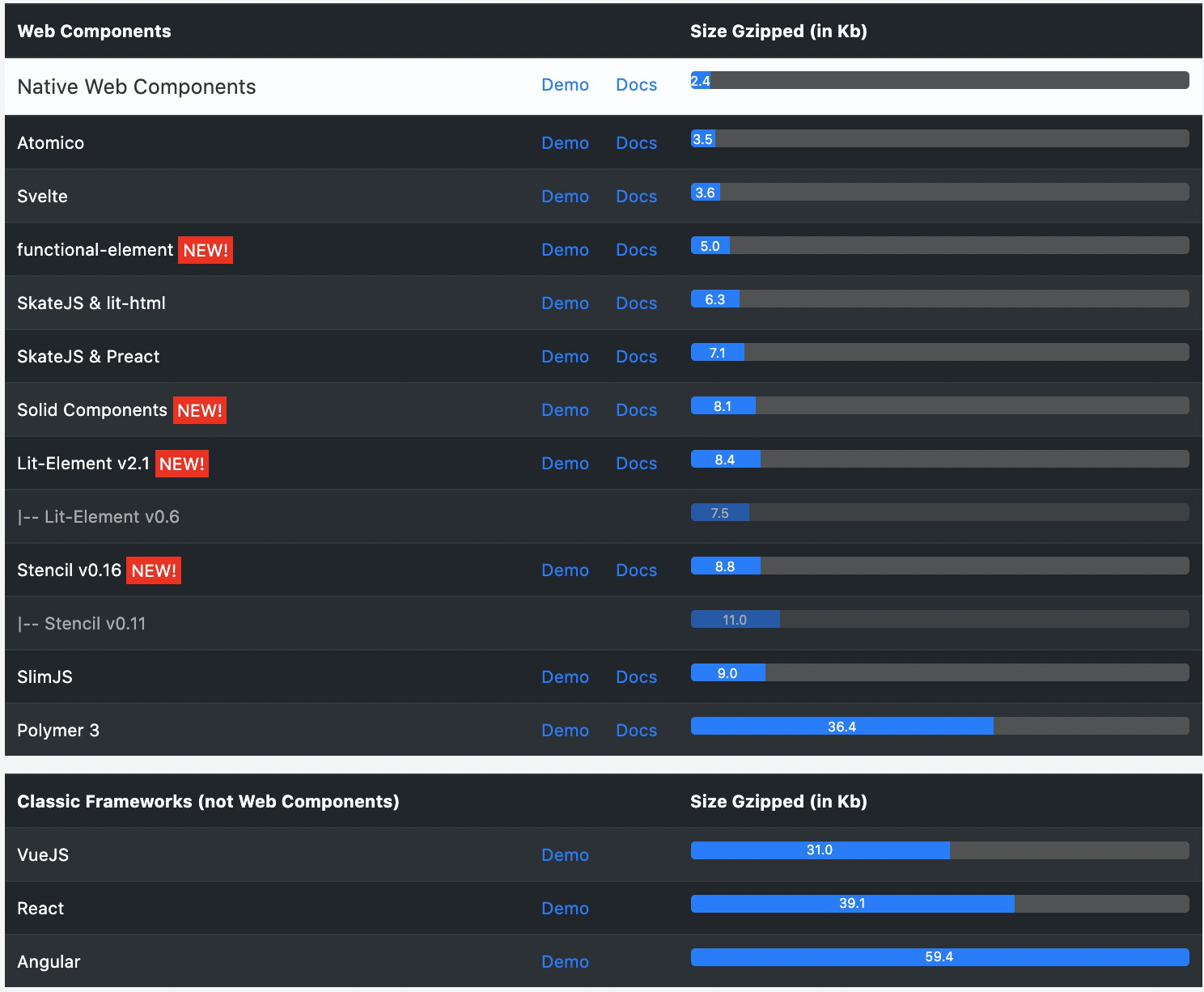
看图,结果不言而喻。
总结
浏览器原生能力正在变得很强大。web component 值得拥抱一下。虽然 template 还不是很完善(不支持表达式),但这也只是白板上的一个黑点。
参考:
前端未来趋势之原生API:Web Components的更多相关文章
- Web API之Web Components
本文参考<你的前端框架要被web组件替代了>. 于2011年面世的Web Components是一套功能组件,让开发者可以使用 HTML.CSS 和 JavaScript 创建可复用的组件 ...
- 使用Node.js原生API写一个web服务器
Node.js是JavaScript基础上发展起来的语言,所以前端开发者应该天生就会一点.一般我们会用它来做CLI工具或者Web服务器,做Web服务器也有很多成熟的框架,比如Express和Koa.但 ...
- 前端应该知道的Web Components
前端组件化的痛点 在前端组件化横行的今天,确实极大的提升了开发效率.不过有一个问题不得不被重视,拟引入的这些html.css.js代码有可能对你的其他代码造成影响. 虽然我们可以通过命名空间.闭包等一 ...
- 腾讯发布新版前端组件框架 Omi,全面拥抱 Web Components
Omi - 合一 下一代 Web 框架,去万物糟粕,合精华为一 → https://github.com/Tencent/omi 特性 4KB 的代码尺寸,比小更小 顺势而为,顺从浏览器的发展和 AP ...
- 前端组件化-Web Components【转】
以下全部转自:http://www.cnblogs.com/pqjwyn/p/7401918.html 前端组件化的痛点在前端组件化横行的今天,确实极大的提升了开发效率.不过有一个问题不得不被重视,拟 ...
- ES7前端异步玩法:async/await理解 js原生API妙用(一)
ES7前端异步玩法:async/await理解 在最新的ES7(ES2017)中提出的前端异步特性:async.await. 什么是async.await? async顾名思义是“异步”的意思,a ...
- 我的第一个原生Web Components——滑块(SingleSlider)
写着写着,就会跑偏,没错又走上了一个岔道……就是不知道这条岔道以后会不会越来越宽,有的说他是未来,有的说…… 这里不知道,也不做什么评断.减少一些重复性的工作,提高开发效率这是最根本的.说白了就是偷懒 ...
- Fiori Fundamentals和SAP UI5 Web Components
这周有位同事邀请我给团队讲一讲SAP技术的演进历史,所以我准备了下面几个主题来介绍. 其中SAP的技术回顾和演进,我的思路就是从前后台两方面分别介绍. 我画了一张非常简单的图: 去年5月我写过一篇文章 ...
- 一文读懂前端技术演进:盘点Web前端20年的技术变迁史
本文原文由作者“司徒正美”发布于公众号“前端你别闹”,即时通讯网收录时有改动,感谢原作者的分享. 1.引言 1990 年,第一个Web浏览器的诞生:1991 年,WWW诞生,这标志着前端技术的开始. ...
随机推荐
- SFUD+FAL+EasyFlash典型场景需求分析,并记一次实操记录
SFUD+FAL+EasyFlash典型场景需求分析:用整个flash存储数据,上千条数据,读取得时候用easyflash很慢,估计要检索整个flash太慢了. 改进方法:分区检索. 1存数据时,根据 ...
- three.js学习5_渲染器
THREE.WebGLRenderer WebGL Render 用WebGL渲染出你精心制作的场景 介绍 在之前的介绍中, 已经介绍过场景, 相机, 光源, 有了这些后, 就可以形成一个可观的三维展 ...
- day39 Pyhton 并发编程02
一.内容回顾 并发和并行的区别 并发 宏观上是在同时运行的 微观上是一个一个顺序执行 同一时刻只有一个cpu在工作 并行 微观上就是同时执行的 同一时刻不止有一个cpu在工作 什么是进程 一个运行中的 ...
- 【Linux编译环境的搭建】Linux都没有,怎么学Linux编程?
本文准备从0开始,一步步搭建一套属于自己的多节点Linux系统环境,这将是后续学Linux.用Linux.Linux环境编程.应用和项目部署.工具实验等一系列学习和实践的基石,希望对小伙伴们有帮助. ...
- 编程语言拟人:来自C++、Python、C语言的“傲娇”自我介绍!
软件工程领域,酷爱编程的人很多,但另一些人总是对此避之不及.而构建软件无疑会让所有人压力山大,叫苦连连. 来看看这些流行编程语言的"内心独白",JAVA现实,C++傲娇,Rus ...
- 安装JDK及环境变量配置
1.下载JDK: 下载地址:https://www.oracle.com/technetwork/java/javase/overview/index.html 2.解压,运行安装包,下一步,选择安装 ...
- 如何制作一个vagrant box
因为要用的窗口应用,基于服务器的各种box不能使用(曾经尝试安装桌面,没有成功).所以试着基于Ubuntu的虚拟机创建自己的box. 过程中主要参考了这篇文章:http://www.360do ...
- python GDAL 读写shp文件
gdal包用于处理栅格数据,ogr用于处理矢量数据. 1 #!C:\Program Files\pythonxy\python\python.exe 2 #-*- coding:gb2312 -*- ...
- [阿里DIN] 深度兴趣网络源码分析 之 如何建模用户序列
[阿里DIN] 深度兴趣网络源码分析 之 如何建模用户序列 目录 [阿里DIN] 深度兴趣网络源码分析 之 如何建模用户序列 0x00 摘要 0x01 DIN 需要什么数据 0x02 如何产生数据 2 ...
- Ubuntu Eclipse启动时报错:A Java RunTime Environment (JRE) or Java Development Kit (JDK) must be available in order to run Eclipse. No java virtual machine was found after searching the following locations:
此问题起于我在Ubuntu1004上装了两个版本的eclipse:Galieo+helios:卸载前者后出现启动不了eclipse的问题:在网上找了下,可以按如下过程进行解决: Eclipse 3 ...