
How to Convert and Import VHD to VMDK (VMWare)
VHD or Virtual Hard Disk is the disk image format used by Microsoft virtualization software such as Microsoft Virtual PC, Windows Virtual PC, Microsoft Virtual Server and Microsoft Hyper-V. VHD file format is not compatible with VMDK or Virtual Machine Disk file format used by VMWare virtual appliance products such as VMware Workstation, VMware Player, VMware Server, VMware Fusion or VMware ESX.
Both VHD and VMDK contains hard disk image which used by virtual machines. Theoretically a VHD can be converted to VMDK format and used as the hard disk image for VMWare virtual machine. In fact, the virtual machines created in Microsoft virtualization products can be easily converted VMWare virtual machines with VMware vCenter Converter.
VMware vCenter Converter is provided as free download by VMWare to facilitate, automate and simply conversions from physical machine to virtual machine as well as conversions between third-party and VMWare virtual machine image formats. The converter converts and imports supported third-party virtual machine for use on a VMWare product complete with converted .VMX and .VMDK from .VMC and .VHD without further customization. However, VMWare vCenter Converter only does conversion from a virtualization server is installed. Users can’t manually select a VHD file for conversion.
If you only have a VHD file, and want to convert it to VMDK format, WinImage can come to rescue. WinImage is a shareware but available for free evaluation use for up to 30 days. WinImage, which available in both 32-bit (x86) and 64-bit (x64) versions, is available for download from http://www.winimage.com/download.htm.
Here’s how to use WinImage to convert a VHD to VMDK disk image:
- Install and run WinImage.
- Go to Disk in the menu bar and select Convert Virtual Hard Disk Image.
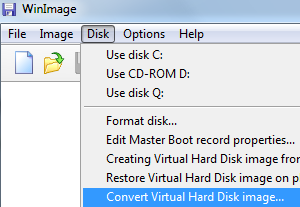
- An “Open” dialog box will show up. Make sure that the file type selected is Virtual Hard Disk (*.vhd) which should be default selection. Browse to the folder location for the VHD file, select to highlight the VHD, and then click Open.

- Select either Create Fixed Size Virtual Hard Disk or Create Dynamically Expanding Virtual Hard Disk. You should choose the later for more flexibility if you foresee there will extensive usage on the disk image.
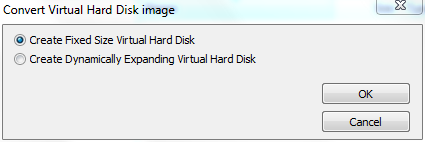
- On the “Save As” dialog box, change the output format under the Save as Type to VMWare VMDK (*.vmdk). Browse to the folder location which the output disk image to be saved and enter a file name (no extension required).

When done, click on Save button.
- WinImage will start the virtual hard disk image conversion process, which may take a while to complete, depending on the size of the virtual hard disk.
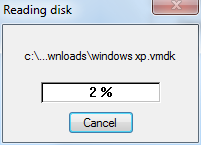
- Once the coversion is done, the VMDK vritual disk is ready for use. WinImage will try to mount the converted virtual disk image in the program after the conversion, where it asks user to select the partition to connect to.
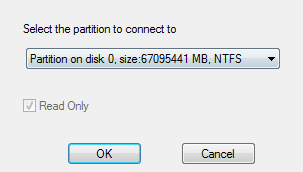
Click OK if you want to open the virtual disk in WinImage, or Cancel to return to main program.
Once the VMDK virtual disk image is created, the VMDK can be added to existing virtual machine as additional hard disk drive to access its content, or used as existing virtual disk when creating new virtual machine.
From: http://www.mydigitallife.info/how-to-convert-and-import-vhd-to-vmdk-vmware/
How to Convert and Import VHD to VMDK (VMWare)的更多相关文章
- Convert a VMDK (VMWare) file to VHDX (Hyper-V)
https://www.meziantou.net/2016/09/09/convert-a-vmdk-vmware-file-to-vhdx-hyper-v Microsoft provides a ...
- vdi、vhd、vmdk虚拟格式转换
VirtualBox带来VBoxManager.exe,可以来转换格式. 命令如下(Windows环境,Linux版的应该也有VBoxManager这个二进制文件): VBoxManager存在于Vi ...
- 虚拟硬盘格式vdi、vhd、vmdk相互转换
Windows7的引导程序能够引导vhd格式的虚拟硬盘,而VirtualBox创建的虚拟硬盘文件是vdi格式的,怎么办呢? 以前要借助其他软件才能实现,但是VirtualBox早就悄悄为我们带来了一个 ...
- VMWare File Format Learning && Use VHD File To Boot VMWare && CoreOS Docker Configuration And Running
目录 . Virtual Machine Introduce . Vmware Image File Format . VHD File Format . Convert VHD File Into ...
- 关于将Azure云上磁盘导出-使用VirtualBox转换成vmdk格式的方法记录
在工作中,经常会遇到虚拟磁盘文件格式的转换需求,尤其是在虚拟化迁移及云环境迁移到DC的虚拟化环境中 或者中转处理,如最近笔者遇到一个需要将Azure Cloud上的磁盘导出到VMware中,但Azur ...
- qcow2、raw、vmdk等镜像格式
转自 http://www.prajnagarden.com/?p=248 http://blog.csdn.net/starshine/article/details/8179483 转者言:对pr ...
- KVM磁盘镜像qcow2、raw、vmdk等格式区别(转)
raw(default) the raw format is a plain binary image of the disc image, and is very portable. On file ...
- qcow2、raw、vmdk等镜像格式的比较和基本转换
注:本文转自http://www.cnblogs.com/feisky/archive/2012/07/03/2575167.html 云计算用一个朋友的话来说:”做云计算最苦逼的就是得时时刻刻为 ...
- [React Native] Reduce Long Import Statements in React Native with Absolute Imports
In large React Native projects, it’s common to have long relative import paths like: import MyCompon ...
随机推荐
- java转python代码
今天发现一个好玩的工具:可以直接将java转成python 1. 安装工具(windows 环境下面) 先下载antlr: http://www.antlr3.org/download/antlr-3 ...
- c++中CString:: Find , ReverseFind, Left, Right
CString 是在MFC中的头文件 非MFC加上afx.h头文件 直接上代码: // ConsoleApplication1.cpp : Defines the entry point for th ...
- 阿里云服务器安装mongodb并且启动
// 1.下载 我是直接在local里面创一个mongodb文件夹进行下载和解压 curl -O https://fastdl.mongodb.org/linux/mongodb-linux-x86_ ...
- 《Java从入门到失业》第五章:继承与多态(5.8-5.10):多态与Object类
5.8多态 上面我们了解了向上转型,即一个对象变量可以引用本类及子类的对象实例,这种现象称为多态(polymorphism).多态究竟有什么用呢?我们先学习一个知识点. 5.8.1方法重写 前面我们学 ...
- 使用css实现轮播图
使用css3实现图片轮播 前言:实现图片轮播的方式有很多种 ,例如js ,css 等等. 本文主要讲述使用纯css3实现轮播图 工具介绍: 使用的编辑器: Hbuilder 进入正题 html代码: ...
- Docker(Docker Toolbox)配置镜像加速更换国内源
自己当时装的是Win10专业工作室版本,不知道为什么不支持window for docker, 所以选择了Docker Toolbox 的方式,主要是为了学习,虽然这种方式是不建议安装的,但是基础的学 ...
- Prometheus 入门教程(一):Prometheus 快速入门
文章首发于[陈树义]公众号,点击跳转到原文:https://mp.weixin.qq.com/s/ZXlBPHGcWeYh2hjBzacc3A Prometheus 是任何一个高级工程师必须要掌握的技 ...
- docker启动服务---------------nginx+php
环境 首先安装Docker,无论你是Windows还是Linux.MocOS都可以.安装Docker自行百度. Docker镜像源 访问https://hub.docker.com即可,它是镜像大仓库 ...
- centos8上配置openresty/nginx可访问php
一,创建一个测试站的目录 [root@yjweb data]# mkdir dev [root@yjweb data]# cd dev [root@yjweb dev]# mkdir think_ww ...
- php查看进程
index.php <?php /** * Created by PhpStorm. * User: mac * Date: 2020/4/23 * Time: 21:57 */ echo ...