
【Spring Security】1.快速入门
1 导入Spring Security的相关依赖
        <dependency>

            <groupId>org.springframework.boot</groupId>

            <artifactId>spring-boot-starter-security</artifactId>

        </dependency>

        <dependency>

            <groupId>org.springframework.boot</groupId>

            <artifactId>spring-boot-starter-web</artifactId>

        </dependency>
2 Spring Security认证方式之Http基本认证
2.1 实现流程
Http基本认证是最简单的认证方式,不需要任何配置,导入依赖启动应用后就会弹出默认的httpBasic认证框。也相当于在实现了BrowserSecurityConfig类进行了如下配置:
@Configuration
public class BrowserSecurityConfig extends WebSecurityConfigurerAdapter {
@Override
protected void configure(HttpSecurity http) throws Exception {
//HttpBasic的alert框登录
http.httpBasic()
.and()
.authorizeRequests()//对请求进行授权
.anyRequest()//任何请求
.authenticated();
}
}在Spring Security的默认配置中,使用用户名user,密码为控制台打印的随机码。
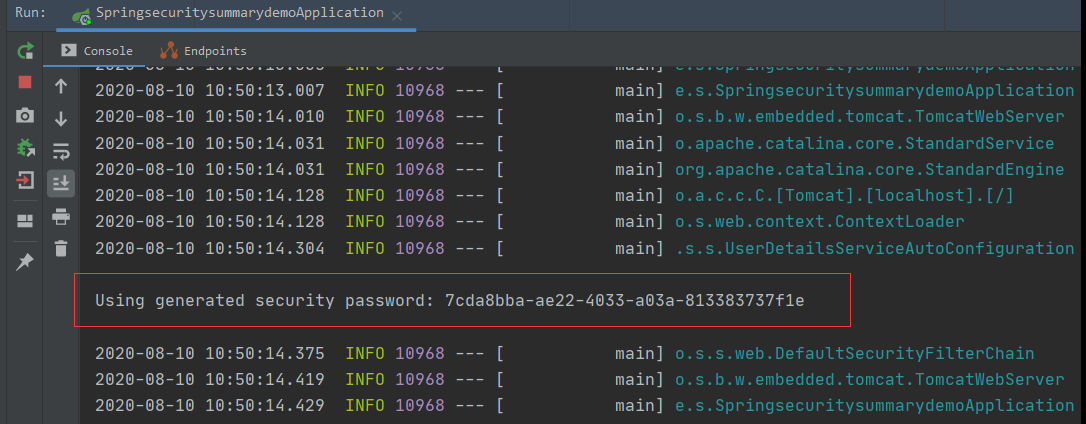
可以在resources配置文件中修改默认的用户名和密码,指定密码后控制台不再生成动态的随机码。
- properties配置
security.user.name=user

security.user.password=123456
- yml配置
spring:

    security:

      user:

        name: user

        password: 123456
2.2 Http基本认证原理

客户端向服务端请求被保护的资源,服务端向客户端请求用户名和密码,浏览器弹出登录输入框,HttpBasic模式要求传输的用户名密码使用Base64模式进行加密。客户端向服务端发起login的请求。
客户端发送的Http请求中会使用Authorization作为Header,即“Basic + 空格 + Base64密码”。而Base64很容易被逆向解码,所以HttpBstic的认证方式是不安全的。

服务器接收到请求后,到达BasicAuthenticationFilter过滤器,将提取Header值,并使用用于验证用户身份的相同算法Base64进行解码。解码结果与登录验证的用户名密码匹配,匹配成功则可以继续过滤器后续的访问。
2.3 小结
Http认证虽然配置简单,但是安全性极差,灵活性不高,无法携带cookie,所以一般应用会用安全性和灵活性更强的表单认证方式,可以通过自定义登录和验证逻辑,提高安全性。
3 表单认证
3.1 实现流程
配置使用自定义的表单登录
@Configuration
public class BrowserSecurityConfig extends WebSecurityConfigurerAdapter {
@Override
protected void configure(HttpSecurity http) throws Exception {
// 表单登录,而不是httpBasic
http.formLogin()
// 自定义登录页面
.loginPage("login.html")
// 指定处理登录请求的路径
.loginProcessingUrl("/login")
// 不限制登录页面的访问
.permitAll()
.and()
.authorizeRequests()//对请求进行授权
.anyRequest()//任何请求
.authenticated()
.and()
.csrf()
.disable();
}
}
自定义认证成功/失败的处理逻辑
Spring Security中默认的成功处理逻辑定义在AbstractAuthenticationTargetUrlRequestHandler类中,在发送登录请求并认证成功后页面会跳转回到原来的访问页面,页面跳转不适用于前后端分离的系统中,因此可以自定义成功后的处理逻辑,登录后返回JSON数据。
实现AuthenticationSuccessHandler和 AuthenticationFailureHandle类中的处理方法。
@Component("customAuthenticationSuccessHandler")
public class CustomAuthenticationSuccessHandler implements AuthenticationSuccessHandler {
@Autowired
private ObjectMapper objectMapper;
@Override
public void onAuthenticationSuccess(HttpServletRequest httpServletRequest, HttpServletResponse httpServletResponse, Authentication authentication) throws IOException, ServletException {
httpServletResponse.setContentType("application/json;charset=UTF-8");
httpServletResponse.getWriter().write(objectMapper.writeValueAsString(authentication));
}
}@Component("customAuthenticationFailureHandler")
public class CustomAuthenticationFailureHandler implements AuthenticationFailureHandler {
@Override
public void onAuthenticationFailure(HttpServletRequest httpServletRequest, HttpServletResponse httpServletResponse, AuthenticationException e) throws IOException, ServletException {
log.info("登录失败");
httpServletResponse.setStatus(HttpStatus.SC_INTERNAL_SERVER_ERROR);
httpServletResponse.setContentType("application/json;charset=UTF-8");
httpServletResponse.getWriter().write(e.getMessage());
}
}
在WebSecurity配置文件中配置自定义的处理器
@Configuration
public class BrowserSecurityConfig extends WebSecurityConfigurerAdapter {
@Override
protected void configure(HttpSecurity http) throws Exception {
// 表单登录,而不是httpBasic
http.formLogin()
// 自定义登录页面
.loginPage("login.html")
// 不限制登录页面的访问
.permitAll()
// 自定义认证后的处理器
.successHandler(customAuthenticationSuccessHandler)
.failureHandler(customAuthenticationFailureHandler)
.and()
.authorizeRequests()//对请求进行授权
.anyRequest()//任何请求
.authenticated()
.and()
.csrf()
.disable();
}
}
3.2 关于HttpSecurity
在配置文件中使用HttpSecurity进行HTTP请求安全策略的配置,HttpSecurity被设计为链式调用,执行每个方法会返回一个预期的上下文,用于连续调用,其中:
authorizeRequests()相当于XML中的<intercept-url>标签,它返回一个URL拦截注册器,可以调用它提供的anyRequest()、antMatchers()、regexMatchers()等方法来匹配系统的URL,并为它指定安全策略。
formLogin()相当于XML中的<form-login>标签,声明了需要Spring Security提供的表单认证方式,返回对应的配置器,loginPage()用于指定自定义的登录页面。Spring Security会为该登录页注册一个POST路由用于接收登录请求。
httpBasic()相当于XML中的<http-basic>标签
csrf()相当于XML中的<csrf>标签,提供了跨站请求伪造防护功能,继承WebSecurityConfigurerAdapter会默认开启csrf()方法。
使用and()方法可以结束当前标签,上下文会回到HttpSecurity,否则链式调用的上下文会自动进入对应的标签域。
【Spring Security】1.快速入门的更多相关文章
- Spring Boot:快速入门教程
什么是Spring Boot? Spring Boot是由Pivotal团队提供的全新框架,其设计目的是用来简化新Spring应用的初始搭建以及开发过程.该框架使用了特定的方式来进行配置,从而使开发人 ...
- Spring MVC 教程,快速入门,深入分析
http://elf8848.iteye.com/blog/875830/ Spring MVC 教程,快速入门,深入分析 博客分类: SPRING Spring MVC 教程快速入门 资源下载: ...
- Spring Boot【快速入门】简单案例
Spring Boot[快速入门] Spring Boot 概述 Build Anything with Spring Boot:Spring Boot is the starting point ...
- Spring Security极简入门三部曲(上篇)
目录 Spring Security极简入门三部曲(上篇) 写在前面 为什么要用Spring Security 数据库设计 demo时刻 核心代码讲解 小结 Spring Security极简入门三部 ...
- Spring Security极简入门三部曲(中篇)
目录 Spring Security极简入门三部曲(中篇) 验证流程 Authentication接口 过滤器链 AuthenticationProvider接口: demo时刻 代码讲解 小结 Sp ...
- springboot集成spring security安全框架入门篇
一. :spring security的简介 Spring Security是一个能够为基于Spring的企业应用系统提供声明式的安全访问控制解决方案的安全框架.它提供了一组可以在Spring应用上下 ...
- Shiro第四篇【Shiro与Spring整合、快速入门、Shiro过滤器、登陆认证】
Spring与Shiro整合 导入jar包 shiro-web的jar. shiro-spring的jar shiro-code的jar 快速入门 shiro也通过filter进行拦截.filter拦 ...
- 笔记:Spring Cloud Zuul 快速入门
Spring Cloud Zuul 实现了路由规则与实例的维护问题,通过 Spring Cloud Eureka 进行整合,将自身注册为 Eureka 服务治理下的应用,同时从 Eureka 中获取了 ...
- Spring Cloud Zuul 快速入门
Spring Cloud Zuul 实现了路由规则与实例的维护问题,通过 Spring Cloud Eureka 进行整合,将自身注册为 Eureka 服务治理下的应用,同时从 Eureka 中获取了 ...
- Spring MVC 教程,快速入门,深入分析[1-11]
资源下载: Spring_MVC_教程_快速入门_深入分析V1.1.pdf SpringMVC核心配置文件示例.rar 作者:赵磊 博客:http://elf8848.iteye.com ...
随机推荐
- OSCP Learning Notes - Enumeration(1)
Installing Kioptrix: Level 1 Download the vm machine form https://www.vulnhub.com/entry/kioptrix-lev ...
- Ethical Hacking - POST EXPLOITATION(1)
METERPRETER BASICS >help - shows help >background - backgrounds current session >sessions - ...
- 集训作业 洛谷P1433 吃奶酪
嗯?这题竟然是个绿题. 这个题真的不难,不要被他的难度吓到,我们只是不会计算2点之间的距离,他还给出了公式,这个就有点…… 我们直接套公式去求出需要的值,然后普通的搜索就可以了. 这个题我用的深搜,因 ...
- echarts 实战 : 图表竖着或横着是怎样判定的?
这个问题比较简单. echarts 的图表默认是竖着的. 只要 xAxis 和 yAxis 互换,竖着的图就变成了横着的图了. 所以我们可以可以写一个xy轴互换的方法. reverseXYAxis = ...
- vue : 本地调试跨域问题的解决办法:proxyTable
本来我是不想写的,但为了加深印象还是写一写吧. ./config/index.js module.exports = { dev: { // Paths assetsSubDirectory: 'st ...
- Python面试题!百度大牛总结十条Python面试题陷阱
无论是应聘Python web开发,爬虫工程师,或是数据分析,还是自动化运维,都涉及到一些基础的知识!我挑了一些Python的基础面试题,看看你能不能的答上来,也许面试的同学用的着! 问题1:请问如何 ...
- 推荐收藏:100道Linux笔试题,能拿90分以上的都去了BAT
本套笔试题共100题,每题1分,共100分.(参考答案在文章末尾) 1. cron 后台常驻程序 (daemon) 用于: A. 负责文件在网络中的共享 B. 管理打印子系统 C. 跟踪管理系统信息和 ...
- STL源码剖析:迭代器
准备知识 什么是迭代器? 迭代器是链接容器和算法的桥梁,所有的算法都通过迭代器操作容器中的数据 迭代器是一种智能指针,最重要的操作符重载就是operator*,operator-> 迭代器的实现 ...
- 题解 洛谷 P3726 【[AH2017/HNOI2017]抛硬币】
可以分别枚举两人正面朝上的次数来统计答案,所求即为 \[\sum_{i=0}^{a}\sum_{j=0}^{b} \binom{a}{i} \binom{b}{j} [i>j] \] 将\(i\ ...
- 10-9 重要的内置函数(zip、filter、map、sorted)
reverse----reversed l = [1,2,3,4,5,6] l.reverse() #不会保留原列表 print(l) l =[1,2,3,4,5,6] l2 = reversed(l ...