
vue 仿掘金评论列表
先来个最终效果
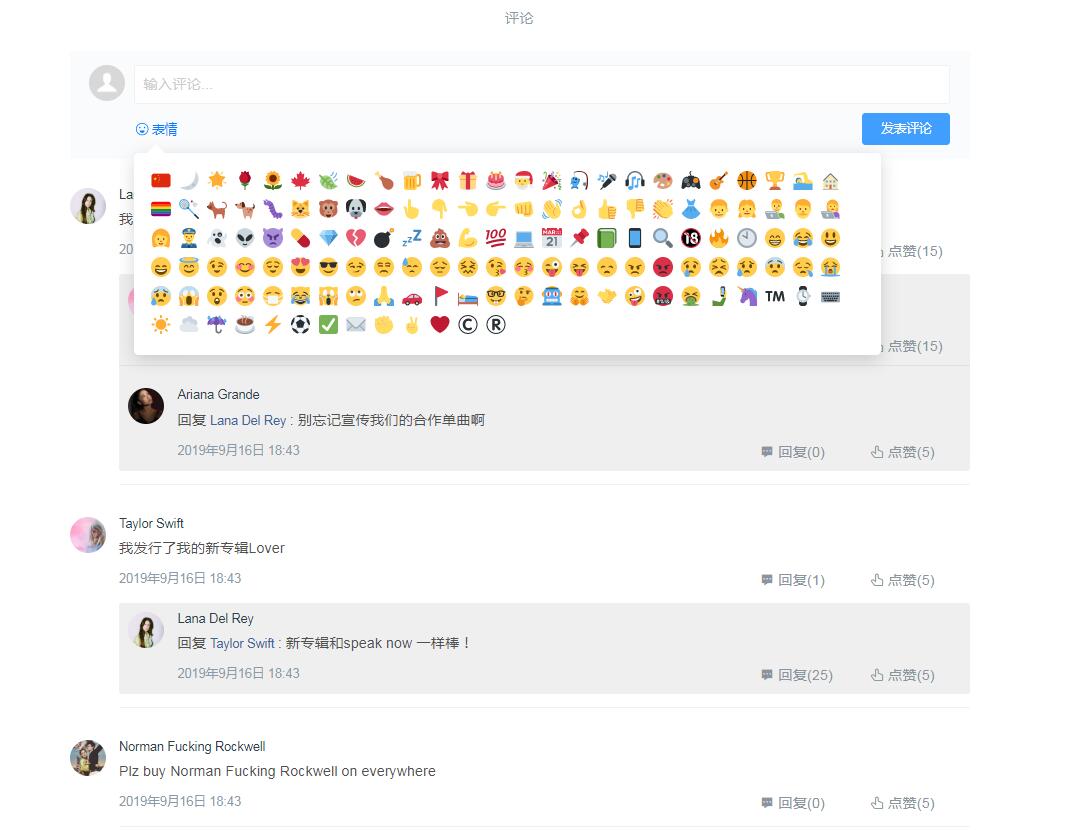
代码:
<template>

  <div class="main">

    <div class="title">评论</div>

    <div class="comment-form">

      <div class="avatar-box"><el-avatar class="header-img"  :src="defaultAvatar"></el-avatar></div>

      <div class="form-box">

        <div class="input-box"  >

          <div tabindex="0" contenteditable="true" id="replyInput" spellcheck="false"

          placeholder="输入评论..." class="reply-input replyInput" @focus="showReplyBtn" @input="onDivInput($event)"></div>

        </div>

        <div class="action-box">

          <div class="emoji emoji-btn">

            <div class="emoji-box">

              <span class="replyInput" @click="showEmoji($event)" v-clickoutside="hideReplyBtn">表情</span>

              <VEmojiPicker :isShowEmoji="isShowEmoji" :inputAdd="inputAdd" @select="selectEmoji" />

            </div>

          </div>

          <div class="reply-btn-box">

            <el-button class="reply-btn" size="medium" @click="sendComment" type="primary" >发表评论</el-button>

          </div>

        </div>

      </div>

    </div>

    <div class="item" v-for="(item,i) in comments" :key="i">

      <div class="comment">

        <div class="user-popover-box">

          <el-avatar class="header-img" :src="item.headImg"></el-avatar>

        </div>

        <div class="content-box">

          <div class="meta-box">

            <span class="username">{{item.name}}</span>

          </div>

          <div class="content">{{item.comment}}</div>

          <div class="reply-stat">

            <span class="author-time">{{item.time}}</span>

            <div class="icon-btn">

              <span @click="showReplyInput(i,item.name,item.id)">

                <i class="iconfont el-icon-s-comment"></i>

                回复({{item.commentNum}})

              </span>

              <span>

                <i class="iconfont el-icon-thumb"></i>

                点赞({{item.like}})

              </span>

            </div>

          </div>

          <div class="reply-box">

            <div class="item" v-for="(reply,j) in item.reply" :key="j">

              <div class="comment">

                <div class="user-popover-box">

                  <el-avatar class="header-img" :src="reply.fromHeadImg"></el-avatar>

                </div>

                <div class="content-box">

                  <div class="meta-box">

                    <span class="username">{{reply.from}}</span>

                  </div>

                  <div class="content">

                    <span>回复<a>{{reply.to}}</a>:</span>

                    <span class="reply">{{reply.comment}}</span>

                  </div>

                  <div class="reply-stat">

                    <span class="author-time">{{reply.time}}</span>

                    <div class="icon-btn">

                      <span @click="showReplyInput(i,reply.from,reply.id)">

                        <i class="iconfont el-icon-s-comment"></i>

                        回复({{reply.commentNum}})

                      </span>

                      <span>

                        <i class="iconfont el-icon-thumb"></i>

                        点赞({{reply.like}})

                      </span>

                    </div>

                  </div>

                </div>

              </div>

            </div>

          </div>

          <div  v-show="_inputShow(i)" class="my-reply my-comment-reply comment-form">

            <div class="avatar-box"><el-avatar class="header-img"  :src="defaultAvatar"></el-avatar></div>

            <div class="form-box">

              <div class="input-box" >

                <div

                tabindex="0"

                contenteditable="true"

                spellcheck="false"

                placeholder="输入评论..."

                @input="onDivInput($event)"

                class="reply-input reply-comment-input"

              ></div>

              </div>

              <div class="action-box">

                <div class="reply-btn-box">

                  <el-button class="reply-btn" size="medium" @click="sendCommentReply(i)" type="primary">发表评论</el-button>

                </div>

              </div>

            </div>

          </div>

        </div>

      </div>

    </div>

  </div>

</template>
js代码(注:这里引入了emoji表情,emoji的功能未实现,后面有时间加上):
import VEmojiPicker from './emoji.vue';

const clickoutside = {

  // 初始化指令

  bind(el, binding, vnode) {

    function documentHandler(e) {

      // 这里判断点击的元素是否是本身,是本身,则返回

      if (el.contains(e.target)) {

        return false;

      }

      // 判断指令中是否绑定了函数

      if (binding.expression) {

        // 如果绑定了函数 则调用那个函数,此处binding.value就是handleClose方法

        binding.value(e);

      }

    }

    // 给当前元素绑定个私有变量,方便在unbind中可以解除事件监听

    el.vueClickOutside = documentHandler;

    document.addEventListener("click", documentHandler);

  },

  update() {},

  unbind(el, binding) {

    // 解除事件监听

    document.removeEventListener("click", el.vueClickOutside);

    delete el.vueClickOutside;

  }

};

export default {

  name: "ArticleComment",

  data() {

    return {

      inputAdd:"",

      isShowEmoji:false,

      replyInput:"",

      btnShow: false,

      index: "0",

      content:'',

      emojiContent: "",

      myName: "Lana Del Rey",

      defaultAvatar: "../../static/images/default-avatar.png",

      myHeader:

        "https://ae01.alicdn.com/kf/Hd60a3f7c06fd47ae85624badd32ce54dv.jpg",

      myId: 19870621,

      to: "",

      toId: -1,

      comments: [

        {

          name: "Lana Del Rey",

          id: 19870621,

          headImg:"https://ae01.alicdn.com/kf/Hd60a3f7c06fd47ae85624badd32ce54dv.jpg",

          comment: "我发布一张新专辑Norman Fucking Rockwell,大家快来听啊",

          time: "2019年9月16日 18:43",

          commentNum: 2,

          like: 15,

          inputShow: false,

          reply: [

            {

              from: "Taylor Swift",

              fromId: 19891221,

              fromHeadImg:

                "https://ae01.alicdn.com/kf/H94c78935ffa64e7e977544d19ecebf06L.jpg",

              to: "Lana Del Rey",

              toId: 19870621,

              comment: "我很喜欢你的新专辑!!",

              time: "2019年9月16日 18:43",

              commentNum: 0,

              like: 15,

              inputShow: false

            },

            {

              from: "Ariana Grande",

              fromId: 1123,

              fromHeadImg:

                "https://ae01.alicdn.com/kf/Hf6c0b4a7428b4edf866a9fbab75568e6U.jpg",

              to: "Lana Del Rey",

              toId: 19870621,

              comment: "别忘记宣传我们的合作单曲啊",

              time: "2019年9月16日 18:43",

              commentNum: 0,

              like: 5,

              inputShow: false

            }

          ]

        },

        {

          name: "Taylor Swift",

          id: 19891221,

          headImg:

            "https://ae01.alicdn.com/kf/H94c78935ffa64e7e977544d19ecebf06L.jpg",

          comment: "我发行了我的新专辑Lover",

          time: "2019年9月16日 18:43",

          commentNum: 1,

          like: 5,

          inputShow: false,

          reply: [

            {

              from: "Lana Del Rey",

              fromId: 19870621,

              fromHeadImg:

                "https://ae01.alicdn.com/kf/Hd60a3f7c06fd47ae85624badd32ce54dv.jpg",

              to: "Taylor Swift",

              toId: 19891221,

              comment: "新专辑和speak now 一样棒!",

              time: "2019年9月16日 18:43",

              commentNum: 25,

              like: 5,

              inputShow: false

            }

          ]

        },

        {

          name: "Norman Fucking Rockwell",

          id: 20190830,

          headImg:

            "https://ae01.alicdn.com/kf/Hdd856ae4c81545d2b51fa0c209f7aa28Z.jpg",

          comment: "Plz buy Norman Fucking Rockwell on everywhere",

          time: "2019年9月16日 18:43",

          commentNum: 0,

          like: 5,

          inputShow: false,

          reply: []

        }

      ]

    };

  },

  directives: { clickoutside },

   components: {

    VEmojiPicker

  },

  methods: {

    inputFocus() {

      var replyInput = document.getElementById("replyInput");

      replyInput.focus();

    },

    showReplyBtn() {

      this.btnShow = true;

    },

    hideReplyBtn() {

      this.inputAdd = '';

      this.isShowEmoji = false;

    },

    showReplyInput(i, name, id) {

      this.comments[this.index].inputShow = false;

      this.index = i;

      this.comments[i].inputShow = true;

      this.to = name;

      this.toId = id;

    },

    _inputShow(i) {

      return this.comments[i].inputShow;

    },

    _inputHide(i) {

       this.comments[i].inputShow = false;

    },

    sendComment() {

      if (!this.replyComment) {

        this.$message({

          showClose: true,

          type: "warning",

          message: "评论不能为空"

        });

      } else {

        let a = {};

        let input = document.getElementById("replyInput");

        let timeNow = new Date().getTime();

        let time = this.dateStr(timeNow);

        a.name = this.myName;

        a.comment = this.replyComment;

        a.headImg = this.myHeader;

        a.time = time;

        a.commentNum = 0;

        a.like = 0;

        this.comments.push(a);

        this.comments.reverse();

        this.replyComment = "";

        input.innerHTML = "";

      }

    },

    sendCommentReply(i) {

      if (!this.replyComment) {

        this.$message({

          showClose: true,

          type: "warning",

          message: "评论不能为空"

        });

      } else {

        let a = {};

        let timeNow = new Date().getTime();

        let time = this.dateStr(timeNow);

        a.from = this.myName;

        a.to = this.to;

        a.fromHeadImg = this.myHeader;

        a.comment = this.replyComment;

        a.time = time;

        a.commentNum = 0;

        a.like = 0;

        this.comments[i].reply.push(a);

        this.comments[i].reply.reverse();

        this.replyComment = "";

        document.getElementsByClassName("reply-comment-input")[i].innerHTML = "";

        this._inputHide(i)

      }

    },

    onDivInput: function(e) {

      this.replyComment = e.target.innerHTML;

    },

    showEmoji(e){

       this.inputAdd = e.target.className;

      this.isShowEmoji = true;

      console.log(e.target.className)

    },

    selectEmoji(emoji) {

      this.emojiContent += `[${emoji}]`.replace(/\[([A-Za-z0-9_]+)\]/g, '<img src="../../static/images/$1.png" class="emoji" draggable="false">')//传过来的名字转为图片

      console.log(this.emojiContent)

     this.replyComment = this.emojiContent

    },

    customEmoji(text) { //这个函数就是服务器端把传过来的名称转化为图片的

      return text.replace(/\[([A-Za-z0-9_]+)\]/g, '<img src="../../static/images/$1.png" class="emoji" draggable="false">')

    },

    dateStr(date) {

      //获取js 时间戳

      var time = new Date().getTime();

      //去掉 js 时间戳后三位,与php 时间戳保持一致

      time = parseInt((time - date) / 1000);

      //存储转换值

      var s;

      if (time < 60 * 10) {

        //十分钟内

        return "刚刚";

      } else if (time < 60 * 60 && time >= 60 * 10) {

        //超过十分钟少于1小时

        s = Math.floor(time / 60);

        return s + "分钟前";

      } else if (time < 60 * 60 * 24 && time >= 60 * 60) {

        //超过1小时少于24小时

        s = Math.floor(time / 60 / 60);

        return s + "小时前";

      } else if (time < 60 * 60 * 24 * 30 && time >= 60 * 60 * 24) {

        //超过1天少于30天内

        s = Math.floor(time / 60 / 60 / 24);

        return s + "天前";

      } else {

        //超过30天ddd

        var date = new Date(parseInt(date));

        return (

          date.getFullYear() +

          "/" +

          (date.getMonth() + 1) +

          "/" +

          date.getDate()

        );

      }

    }

  }

};
css代码(注:这里使用了stylus):
.main {

  width: 1000px;

  margin: 0 auto;

  .title{

    color: #8a9aa9;

    font-size: 16px;

    font-weight:;

    text-align: center;

    padding: 1.67rem 0 5px;

  }

  .comment-form{

    display: flex;

    position: relative;

    padding: 10px;

    background-color: #fafbfc;

    border-radius: 3px;

    margin: 1.333rem 0;

    .avatar-box{

      flex: 0 0 auto;

      .header-img{

        margin-right: 10px;

      }

    }

    .form-box{

      flex: 1 1 auto;

      position: relative;

      .input-box{

        position: relative;

        display: inline-block;

        width: 100%;

        .reply-input {

          min-height: 20px;

          line-height: 22px;

          padding: 10px 110px 10px 10px;

          color: #ccc;

          background-color: #fff;

          border: 1px solid #f1f1f1;

          border-radius: 3px;

          text-align: left;

          &:empty:before {

            content: attr(placeholder);

          }

          &:focus:before {

            content: none;

          }

          &:focus {

            border: 1px solid #007fff;

            outline: none;

          }

        }

      }

      .action-box{

        display: flex;

        align-items: center;

        margin: .65rem 0 0;

        .emoji{

          position: relative;

          .emoji-box {

            display: flex;

            align-items: center;

            position: relative;

            color: #027fff;

            cursor: pointer;

            font-size: 14px;

            span{

              display:inline-block;

              padding-left 20px;

              height: 18px;

              background: url('../../static/images/emoji_bg.svg')  left center no-repeat;

              background-size:18px;

            }

          }

        }

        .reply-btn-box {

          flex: 0 0 auto;

          margin-left: auto;

        }

      }

    }

  }

  .item {

    margin-bottom: 15px;

    padding: 10px;

    .comment {

      display: flex;

      .user-popover-box {

        height: 40px;

      }

      .content-box {

        border-bottom: 1px solid #f1f1f1;

        margin-left: 15px;

        flex: 1 1 auto;

        text-align: left;

        .meta-box {

          display: flex;

          align-items: center;

          font-size: 14px;

          line-height: 1.2;

          white-space: nowrap;

        }

        .content {

          margin-top: 5px;

          font-size: 16px;

          line-height: 1.8;

          word-wrap: break-word;

          white-space: pre-wrap;

          word-break: break-all;

          color: #505050;

          a{

            display:inline-block;

            margin:0 4px;

            font-size: 14px;

            font-weight:;

            color: #406599;

            cursor:pointer;

          }

        }

        .reply-stat {

          display: flex;

          margin-top: 10px;

          font-weight:;

          .author-time {

            font-size: 14px;

            color: #8a9aa9;

            cursor: default;

          }

          .icon-btn {

            flex: 0 0 auto;

            display: flex;

            justify-content: space-between;

            margin-left: auto;

            min-width: 8.8rem;

            color: #8a93a0;

            user-select: none;

            span {

              display: inline-block;

              margin: 0 8px;

              min-width: 100px;

              padding: 0 3px;

              cursor: pointer;

            }

          }

        }

        .reply-box {

          margin: 15px 0;

          background-color: #efefef;

          border-radius: 3px;

          .item{

            padding: 10px 0 10px 10px;

            &:not(:last-child) {

              border-bottom: 1px solid rgba(178,186,194,0.3);

            }

          }

        }

      }

    }

  }

}

.my-reply {

  padding: 10px;

  background-color: #fafbfc;

  .header-img {

    display: inline-block;

    vertical-align: top;

  }

  .reply-info {

    position: relative;

    display: inline-block;

    margin-left: 5px;

    width: 90%;

    @media screen and (max-width: 1200px) {

      width: 80%;

    }

    .reply-input {

      min-height: 20px;

      line-height: 22px;

      padding: 10px 110px 10px 10px;

      color: #ccc;

      background-color: #fff;

      border: 1px solid #f1f1f1;

      border-radius: 3px;

      text-align: left;

      &:empty:before {

        content: attr(placeholder);

      }

      &:focus:before {

        content: none;

      }

      &:focus {

        border: 1px solid #007fff;

        outline: none;

      }

    }

  }

  .reply-btn-box {

    .reply-btn {

      position: relative;

      float: right;

      height: 100%;

    }

  }

}

.my-comment-reply {

  margin-left: 50px;

  .reply-input {

    width: flex;

  }

}

.author-title:not(:last-child) {

  border-bottom: 1px solid rgba(178, 186, 194, 0.3);

}

.author-title {

  padding: 10px;

  .header-img {

    display: inline-block;

    vertical-align: top;

  }

  .author-info {

    display: inline-block;

    margin-left: 5px;

    width: 60%;

    height: 40px;

    line-height: 20px;

    >span {

      display: block;

      cursor: pointer;

      overflow: hidden;

      white-space: nowrap;

      text-overflow: ellipsis;

    }

    .author-name {

      color: #000;

      font-size: 18px;

      font-weight: bold;

    }

    .author-time {

      font-size: 14px;

    }

  }

  .icon-btn {

    width: 30%;

    padding: 0 !important;

    float: right;

    @media screen and (max-width: 1200px) {

      width: 20%;

      padding: 7px;

    }

    >span {

      cursor: pointer;

    }

    .iconfont {

      margin: 0 5px;

    }

  }

  .talk-box {

    margin: 0 50px;

    >p {

      margin:;

      text-align: left;

    }

    .reply {

      font-size: 16px;

      color: #000;

    }

  }

  .reply-box {

    margin: 10px 0 0 50px;

    background-color: #efefef;

  }

}
最后附上GitHub地址:https://github.com/ALazyTiger/vue-Comment-List
vue 仿掘金评论列表的更多相关文章
- vue实现一个评论列表
<!DOCTYPE html> <html> <head> <title>简易评论列表</title> <meta charset=& ...
- Vue把父组件的方法传递给子组件调用(评论列表例子)
Vue把父组件的方法传递给子组件调用(评论列表例子) 效果展示: 相关Html: <!DOCTYPE html> <html lang="en"> < ...
- node.js评论列表和添加购物车数据库表创建
2.1:评论列表--发表评论 用户点击新闻列表某一条新闻,看到新闻详细发表评论 -用户输入评论内容 -发表评论 [将用户评论内容保存数据库 xz_comment] 2.2:评论列表--发表评论-开发评 ...
- Android开发——实现固定在ScrollView顶部的View,类似于新浪微博的评论列表的顶部
现在很多App都实现了这个功能,例如新浪微博评论页面的评论.转发.赞的数字可以固定在屏幕上方.我个人很喜欢这种设计,所以利用一点空余时间简单实现了一个类似的功能. 先来看一下上面这张图的效果 这个是新 ...
- Ion-affix & Ion-stick 仿IOS悬浮列表插件
Ion-affix & Ion-stick 仿IOS悬浮列表插件 Ion-affix 1.相关网页 Ion-affix 2.环境准备: 执行命令 bower install ion-affix ...
- WPF 自定义TreeView控件样式,仿QQ联系人列表
一.前言 TreeView控件在项目中使用比较频繁,普通的TreeView并不能满足我们的需求.因此我们需要滴对TreeView进行改造.下面的内容将介绍仿QQ联系人TreeView样式及TreeVi ...
- vue-resource使用 (vue仿百度搜索)
1.this.$http.get()方法2.this.$http.post()方法3.this.$http.jsonp()方法 (vue仿百度搜索) 在输入框中输入a, 然后在百度f12 ==> ...
- vue 仿今日头条
vue 仿今日头条 为了增加移动端项目的经验,近一周通过 vue 仿写今日头条,以下就项目实现过程中遇到的问题以及解决方法给出总结,有什么不正确的地方,恳请大家批评指正^ _ ^!,代码仓库地址为 g ...
- 动手分析安卓仿QQ联系人列表TreeView控件
因项目需要需要用到仿QQ联系人列表的控件样式,于是网上找到一个轮子(https://github.com/TealerProg/TreeView),工作完成现在简单分析一下这个源码. 一. 需要用 ...
随机推荐
- Python实现梯度法(最速上升(下降)法)寻找函数极大(极小)值
首先简介梯度法的原理.首先一个实值函数$R^{n} \rightarrow R$的梯度方向是函数值上升最快的方向.梯度的反方向显然是函数值下降的最快方向,这就是机器学习里梯度下降法的基本原理.但是运筹 ...
- router-view中绑定key='$route.fullPath'
原文链接https://www.jianshu.com/p/cf2fb443620f 来源:简书 作者:myzony 不设置 router-view 的 key 属性 由于 Vue 会复用相同组件, ...
- web api(基于NFine框架) 中接口跳转数据格式错误解决方案
using NFine.Code; using NFine.Domain; using System.Web.Http; using Newtonsoft.Json; namespace Api.Co ...
- 国外一教授坦言,用这方法能迅速成为python程序员,但都不愿意说_编程小十
越来越多的人学习python,但你学习python用了多长的时间?#Python# 你知道如何才能迅速掌握并成为python程序员吗? 有这样的一位国外的教授说,要迅速成为python程序员,几乎 ...
- platform驱动架构初探
platform总线是Linux2.6引入的虚拟总线,这类总线没有对应的硬件结构.与之相反,USB总线和PCI总线在内核中是有对应的bus(USB-bus和PCI-bus)的.为了统一管理CPU这些既 ...
- 3、尚硅谷_SSM高级整合_使用ajax操作实现删除的功能
点击删除的时候,要删除联系人,这里同点击编辑按钮一样给删除按钮添加点击事件的时候不能使用 $(".delete_btn").click(function(){ }); 这种方式,因 ...
- 新版MySQL开始使用时遇到的问题(时区、权限):
新版MySQL(本人Server version: 8.0.15)在刚开始使用时遇到的问题: 查看mysql安装版本:命令窗口 时区问题解决(The server time zone value 'Ö ...
- Github仓库如何选择开源许可证
Github仓库如何选择开源许可证 目录 Github仓库如何选择开源许可证 为什么需要开源许可证? 不使用开源许可证对于开发者有何影响? 不使用开源许可证对于项目的使用者有何影响? Github的开 ...
- yqq命令
用 apt-get install 安装时 ,会有一个提问,问是否继续,需要输入 yes.使用 yqq 的话,就没有这个提问了,自动 yes . 例如下面的更新和安装nginx: apt-get -y ...
- org.hibernate.LazyInitializationException异常解决办法
org.hibernate.LazyInitializationException异常failed to lazily initialize a collection...的解决方案使用hiberna ...