
uniapp自定义picker城市多级联动组件
uniapp自定义picker城市多级联动组件
支持多端——h5、app、微信小程序、支付宝小程序...支持自定义配置picker插件级数支持无限级
注意事项:插件传入数据格式为children树形格式,内部包含:id、name
| 参数 | 类型 | 描述 | 默认值 | 必选 |
|---|---|---|---|---|
| title | string | 标题 | '' | 否 |
| layer | number | 控制几级联动 | 1 | 否 |
| data | arr | 数据 如:[{text: '', adcode: '', children: [{text: '', adcode: ''}]}] | [] | 否 |
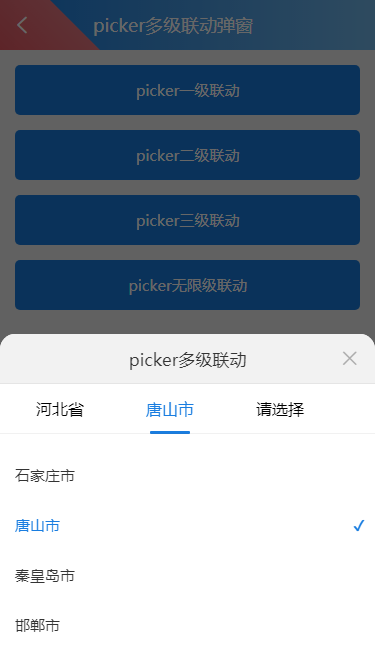
组件运行图示:
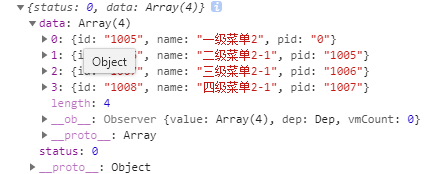
组件选择后返回数据如:
引用示例:
<template>

	<view class="content">

		<view class="aui-content" :style="{height: contentHeight}">

			<view class="aui-btn aui-btn-blue" @click.stop="showPicker($event)">picker无限级联动</view>

		</view>

		<aui-picker

			ref="picker"

			:title="auiPicker.title"

			:layer="auiPicker.layer"

			:data="auiPicker.data"

			@callback="pickerCallback"

		></aui-picker>

	</view>

</template>

<script>

	import auiPicker from '@/components/aui-picker/aui-picker.vue';

	export default {

		components: {

			auiPicker

		},

		data() {

			return {

				auiPicker: {

					title: 'picker多级联动',

					layer: null,

					data: []

				},

			}

		},

		created(){

		},

		mounted() {

		},

		methods: {

			//显示picker多级联动弹窗

			showPicker(e){

				const _this = this;

				_this.auiPicker.data=[{

					id: "1001",

					name: "一级菜单1",

					children: [{

						id: "1002",

						name: "二级菜单1-1",

						children: [{

							id: "1003",

							name: "三级菜单1-1",

							children: [{

								id: "1004",

								name: "四级菜单1-1"

							}]

						}]

					}]

				},

				{

					id: "1005",

					name: "一级菜单2",

					children: [{

						id: "1006",

						name: "二级菜单2-1",

						children: [{

							id: "1007",

							name: "三级菜单2-1",

							children: [{

								id: "1008",

								name: "四级菜单2-1"

							}]

						}]

					}]

				}];

				_this.$refs.picker.open().then(function(){

					console.log('picker打开');

				});

			},

			//picker多级联动回调

			pickerCallback(e){

				const _this = this;

				console.log(e);

				let result = '';

				e.data.forEach(function(item, index){

					result += item.name + '   ';

				});

				uni.showModal({

				    title: '提示',

				    content: result,

				    success: function (res) {

				        if (res.confirm) {

				            console.log('用户点击确定');

				        } else if (res.cancel) {

				            console.log('用户点击取消');

				        }

				    }

				});

			}

		}

	}

</script>

<style>

	.aui-content{padding: 15px 0 0 0;}

</style>
aui-picker组件完整代码:
项目components文件夹下创建aui-picker夹,此文件夹下创建aui-picker.vue——多级联动组件
<template name="aui-picker">

	<view class="aui-picker" v-if="SHOW" :class="{

		'aui-picker-in': FADE==1,

		'aui-picker-out': FADE==0}"

	>

		<view class="aui-mask" @click.stop="close"></view>

		<view class="aui-picker-main">

	        <view class="aui-picker-header">

	            <view class="aui-picker-title" v-if="title">{{title}}</view>

	            <view class="aui-picker-close iconfont iconclose" @click.stop="close"></view>

	        </view>

	        <view class="aui-picker-nav">

				<view class="aui-picker-navitem"

					v-if="nav.length>0"

					v-for="(item, index) in nav"

					:key="index"

					:data-index="index"

					:class="[index==navCurrentIndex ? 'active' : '', 'aui-picker-navitem-'+index]"

					:style="{margin: nav.length>2 ? '0 10px 0 0' : '0 30px 0 0'}"

					@click.stop="_changeNav($event)"

				>{{item.name}}</view>

				<view class="aui-picker-navitem"

					:key="nav.length"

					:data-index="nav.length"

					:class="[nav.length==navCurrentIndex ? 'active' : '', 'aui-picker-navitem-'+nav.length]"

					:style="{margin: nav.length>2 ? '0 10px 0 0' : '0 30px 0 0'}"

					@click.stop="_changeNav($event)"

				>请选择</view>

				<view class="aui-picker-navborder" :style="{left: navBorderLeft+'px'}"></view>

			</view>

	        <view class="aui-picker-content">

	            <view class="aui-picker-lists">

					<view class="aui-picker-list"

						v-for="(list, index) in queryItems.length + 1"

						:key="index"

						:data-index="index"

						:class="[index==navCurrentIndex ? 'active' : '']"

					>

						<view class="aui-picker-list-warp" v-if="index == 0">

							<view class="aui-picker-item"

								v-for="(item, key) in items"

								v-if="item.pid=='0'"

								:key="key"

								:data-pindex="index"

								:data-index="key"

								:data-id="item.id"

								:data-pid="item.pid"

								:data-name="item.name"

								:class="{'active': result.length>index && result[index].id==item.id}"

								:style="{'background': touchConfig.index==key && touchConfig.pindex==index ? touchConfig.style.background : ''}"

								@click.stop="_chooseItem($event)"

								@touchstart="_btnTouchStart($event)"

								@touchmove="_btnTouchEnd($event)"

								@touchend="_btnTouchEnd($event)"

							>{{item.name}}</view>

						</view>

						<view class="aui-picker-list-warp" v-else>

							<view class="aui-picker-item"

								v-for="(item, key) in queryItems[index-1]"

								:key="key"

								:data-pindex="index"

								:data-index="key"

								:data-id="item.id"

								:data-pid="item.pid"

								:data-name="item.name"

								:class="{'active': result.length>index && result[index].id==item.id}"

								:style="{'background': touchConfig.index==key && touchConfig.pindex==index ? touchConfig.style.background : ''}"

								@click.stop="_chooseItem($event)"

								@touchstart="_btnTouchStart($event)"

								@touchmove="_btnTouchEnd($event)"

								@touchend="_btnTouchEnd($event)"

							>{{item.name}}</view>

						</view>

					</view>

				</view>

	        </view>

		</view>

	</view>

</template>

<script>

	export default {

		name: 'aui-picker',

		props: {

			title: { //标题

				type: String,

				default: ''

			},

			layer: { //控制几级联动,默认无限级(跟随数据有无下级)

				type: Number,

				default: null

			},

			data: { //数据 如:[{id: '', name: '', children: [{id: '', name: ''}]}]

				type: Array,

				default (){

					return [

						// [{id: '', name: '', children: [{id: '', name: ''}]}]

					]

				}

			}

		},

		data(){

			return {

				SHOW: false,

				FADE: -1,

				nav: [],

				items: [],

				queryItems: [],

				navCurrentIndex: 0,

				navBorderLeft: 40,

				result: [],

				touchConfig: {

					index: -1,

					pindex: -1,

					style: {

						color: '#197DE0',

						background: '#EFEFEF'

					}

				}

			}

		},

		created(){

			const _this = this;

		},

		watch:{

			data(){

				const _this = this;

				const data = _this.data;

				_this.items = _this._flatten(data, '0')

	    }

	  },

		mounted(){

		},

		methods:{

			// 打开

			open(){

				const _this = this;

				_this.reset(); //打开时重置picker

				return new Promise(function(resolve, reject){

					_this.SHOW = true;

					_this.FADE = 1;

					resolve();

				});

			},

			// 关闭

			close(){

				const _this = this;

				return new Promise(function(resolve, reject){

					_this.FADE = 0;

					const _hidetimer = setTimeout(()=>{

						_this.SHOW = false;

						_this.FADE = -1;

						clearTimeout(_hidetimer);

						resolve();

					},100)

				});

			},

			//重置

			reset(){

				const _this = this;

				_this.queryItems = [];

				_this.nav = [];

				_this.navBorderLeft = 40;

				_this.navCurrentIndex = 0;

				_this.result = [];

			},

			//导航栏切换

			_changeNav(e){

				const _this = this;

				const index = Number(e.currentTarget.dataset.index);

				_this.navCurrentIndex = index;

				const _el = uni.createSelectorQuery().in(this).select(".aui-picker-navitem-"+index);

				_el.boundingClientRect(data => {

					_this.navBorderLeft = data.left + 20;

				}).exec();

			},

			//数据选择

			_chooseItem(e){

				const _this = this;

				const id = e.currentTarget.dataset.id;

				const name = e.currentTarget.dataset.name;

				const pid = e.currentTarget.dataset.pid;

				const _arr = [];

				_this.result[_this.navCurrentIndex] = {id: id, name: name, pid: pid};

				if(

					(!_this._isDefine(_this.layer) && _this._isDefine(_this._deepQuery(_this.data, id).children))

					||

					(_this.navCurrentIndex < (Number(_this.layer) - 1) && _this._isDefine(_this._deepQuery(_this.data, id).children))

				)

				{ //有下级数据

					_this._deepQuery(_this.data, id).children.forEach(function(item, index){

						_arr.push({id: item.id, name: item.name, pid: id});

					});

					if(_this.navCurrentIndex == _this.queryItems.length)

					{ //选择数据

						_this.queryItems.push(_arr);

						_this.nav.push({name: name});

					}

					else

					{ //重新选择数据

						_this.queryItems.splice(_this.navCurrentIndex+1, 1);

						_this.nav.splice(_this.navCurrentIndex+1, 1);

						_this.queryItems.splice(_this.navCurrentIndex, 1, _arr);

						_this.nav.splice(_this.navCurrentIndex, 1, {name: name});

					}

					_this.navCurrentIndex = _this.navCurrentIndex + 1;

					const _el = uni.createSelectorQuery().in(this).select(".aui-picker-navitem-"+_this.navCurrentIndex);

					setTimeout(()=>{

						_el.boundingClientRect(data => {

							_this.navBorderLeft = data.left + 20;

						}).exec();

					},100)

				}

				else

				{ //无下级数据

					_this.close().then(()=>{

						_this.$emit("callback", {status: 0, data: _this.result});

					});

				}

			},

			//递归遍历——将树形结构数据转化为数组格式

			_flatten(tree, pid) {

				return tree.reduce((arr, {id, name, children = []}) =>

				arr.concat([{id, name, pid}], this._flatten(children, id)), [])

			},

			//根据id查询对应的数据(如查询id=10100对应的对象)

			_deepQuery(tree, id) {

			    let isGet = false;

			    let retNode = null;

			    function deepSearch(tree, id){

			        for(let i = 0; i < tree.length; i++) {

			            if(tree[i].children && tree[i].children.length > 0) {

			                deepSearch(tree[i].children, id);

			            }

			            if(id === tree[i].id || isGet) {

			                isGet||(retNode = tree[i]);

			                isGet = true;

			                break;

			            }

			        }

			    }

			    deepSearch(tree, id);

			    return retNode;

			},

			/***判断字符串是否为空

			   @param {string} str 变量

			   @example: aui.isDefine("变量");

			*/

			_isDefine(str){

				if (str==null || str=="" || str=="undefined" || str==undefined || str=="null" || str=="(null)" || str=='NULL' || typeof (str)=='undefined'){

					return false;

				}else{

					str = str + "";

					str = str.replace(/\s/g, "");

					if (str == ""){return false;}

					return true;

				}

			},

			_btnTouchStart(e){

				const _this = this,

					index = Number(e.currentTarget.dataset.index),

					pindex = Number(e.currentTarget.dataset.pindex);

				_this.touchConfig.index = index;

				_this.touchConfig.pindex = pindex;

			},

			_btnTouchEnd(e){

				const _this = this,

					index = Number(e.currentTarget.dataset.index),

					pindex = Number(e.currentTarget.dataset.pindex);

				_this.touchConfig.index = -1;

				_this.touchConfig.pindex = -1;

			},

		}

	}

</script>

<style scoped>

	/* ====================

		多级联动弹窗

	 =====================*/

	.aui-picker{

		width: 100vw;

		height: 100vh;

		opacity: 0;

		position: fixed;

		top: 0;

		left: 0;

		z-index: 999;

		/* display: none; */

	}

	.aui-picker.aui-picker-in{

		-moz-animation: aui-fade-in .1s ease-out forwards;

		-ms-animation: aui-fade-in .1s ease-out forwards;

		-webkit-animation: aui-fade-in .1s ease-out forwards;

		animation: aui-fade-in .1s ease-out forwards;

	}

	.aui-picker.aui-picker-out{

		-moz-animation: aui-fade-out .1s ease-out forwards;

		-ms-animation: aui-fade-out .1s ease-out forwards;

		-webkit-animation: aui-fade-out .1s ease-out forwards;

		animation: aui-fade-out .1s ease-out forwards;

	}

	.aui-picker-main{

		width: 100vw;

		height: 50vh;

		background: #FFF;

		border-radius: 15px 15px 0 0;

		position: absolute;

		left: 0px;

		bottom: -50vh;

		z-index: 999;

	}

	.aui-picker.aui-picker-in .aui-picker-main{

		-moz-animation: aui-slide-up-screen .2s ease-out forwards;

		-ms-animation: aui-slide-up-screen .2s ease-out forwards;

		-webkit-animation: aui-slide-up-screen .2s ease-out forwards;

		animation: aui-slide-up-screen .2s ease-out forwards;

	}

	.aui-picker.aui-picker-out .aui-picker-main{

		-moz-animation: aui-slide-down-screen .2s ease-out forwards;

		-ms-animation: aui-slide-down-screen .2s ease-out forwards;

		-webkit-animation: aui-slide-down-screen .2s ease-out forwards;

		animation: aui-slide-down-screen .2s ease-out forwards;

	}

	.aui-picker-header{

		width: 100%;

		min-height: 50px;

		position: relative;

		z-index: 999;

		background: #F2F2F2;

		border-radius: 15px 15px 0 0;

	}

	.aui-picker-header::after{

		content: '';

		width: 100%;

		height: 1px;

		background: rgba(100,100,100,.3);

		-moz-transform: scaleY(.3);

		-ms-transform: scaleY(.3);

		-webkit-transform: scaleY(.3);

		transform: scaleY(.3);

		position: absolute;

		left: 0;

		bottom: 0;

		z-index: 999;

	}

	.aui-picker-title{

		line-height: 20px;

		text-align: center;

		font-size: 17px;

		color: #333;

		padding: 15px;

		box-sizing: border-box;

		position: absolute;

		left: 50px;

		right: 50px;

		top: 0;

	}

	.aui-picker-close.iconfont{

		width: 50px;

		height: 50px;

		line-height: 50px;

		text-align: center;

		font-size: 20px;

		color: #aaa;

		border-radius: 0 10px 0 0;

		position: absolute;

		right: 0;

		top: 0;

	}

	.aui-picker-content{

		width: 100%;

		height: -webkit-calc(100% - 100px);

		height: calc(100% - 100px);

	}

	.aui-picker-nav{

		width: 100%;

		height: 50px;

		text-align: left;

		padding: 0 20px;

		margin: 0 0 1px 0;

		justify-content: flex-start;

		white-space: nowrap;

		box-sizing: border-box;

		position: relative;

	}

	.aui-picker-nav::after{

		content: '';

		width: 100%;

		height: 1px;

		background: rgba(100,100,100,.3);

		-moz-transform: scaleY(.3);

		-ms-transform: scaleY(.3);

		-webkit-transform: scaleY(.3);

		transform: scaleY(.3);

		position: absolute;

		left: 0;

		bottom: 0;

		z-index: 999;

	}

	.aui-picker-navitem{

		width: 80px;

		line-height: 50px;

		font-size: 16px;

		margin: 0 30px 0 0;

		text-align: center;

		display: inline-block;

		overflow: hidden;

		white-space: nowrap;

		text-overflow: ellipsis;

	}

	.aui-picker-navitem.active{

		color: #197DE0;

	}

	.aui-picker-navborder{

		width: 40px;

		height: 3px;

		background: #197DE0;

		border-radius: 5px;

		transition: left .15s;

		position: absolute;

		left: 40px;

		bottom: 0;

	}

	.aui-picker-lists{

		width: 100%;

		height: 100%;

		justify-content: space-around;

		white-space: nowrap;

	}

	.aui-picker-list{

		width: 100%;

		height: 100%;

		overflow: hidden;

		overflow-y: scroll;

		display: none;

		vertical-align: top;

	}

	.aui-picker-list.active{

		display: inline-block;

	}

	.aui-picker-list-warp{

		width: 100%;

		height: auto;

		box-sizing: border-box;

		padding: 15px 0;

		display: inline-block;

	}

	.aui-picker-item{

		width: 100%;

		height: 50px;

		line-height: 50px;

		padding: 0 15px;

		box-sizing: border-box;

		font-size: 15px;

		color: #333;

		position: relative;

	}

	.aui-picker-item.active{

		color: #197DE0;

	}

	.aui-picker-item.active::after{

		content: '';

		font-size: 15px;

		color: #197DE0;

		position: absolute;

		top: 0px;

		right: 10px;

	}

</style>
uniapp自定义picker城市多级联动组件的更多相关文章
- vue城市三级联动组件 vue-area-linkage
Install the pkg with npm: // v5之前的版本 npm i --save vue-area-linkage // v5及之后的版本 npm i --save vue-area ...
- mpvue + 微信小程序 picker 实现自定义多级联动 超简洁
微信小程序官网只提供了省市区的三级联动,实际开发中更多的是自定义的多级联动: 依照微信小程序官网提供的自定义多级联动,需要使用到picker 的多列选择器,即设置 mode = multiSelect ...
- 基于uniapp自定义Navbar+Tabbar组件「兼容H5+小程序+App端Nvue」
uni-app跨端自定义navbar+tabbar组件|沉浸式导航条|仿咸鱼凸起标签栏 在跨端项目开发中,uniapp是个不错的框架.采用vue.js和小程序语法结构,使得入门开发更容易.拥有非常丰富 ...
- uni-app自定义Modal弹窗组件|仿ios、微信弹窗效果
介绍 uniapp自定义弹窗组件uniPop,基于uni-app开发的自定义模态弹窗|msg信息框|alert对话框|confirm确认框|toast弱提示框 支持多种动画效果.多弹窗类型ios/an ...
- 微信小程序-多级联动
微信小程序中的多级联动 这里用到的案例是城市选择器 先上代码: .wxml <view class="{{boxHide}}"> <view>{{nian} ...
- js 多级联动(省、市、区)
js 多级联动(省.市.区) CreateTime--2018年4月9日17:10:38 Author:Marydon 方式一: 数据从数据库获取,ajax实现局部刷新 方式二: 数据从json文 ...
- jQuery制作简洁的多级联动Select下拉框
今天我们要来分享一款很实用的jQuery插件,它是一个基于jQuery多级联动的省市地区Select下拉框,并且值得一提的是,这款联动下拉框是经过自定义美化过的,外观比浏览器自带的要漂亮许多.另外,这 ...
- vue移动端地址三级联动组件(一)
vue移动端地区三级联动 省,市,县.用的vue+mintUi 因为多级联动以及地区的规则比较多.正好有时间自己写了一个.有问题以及建议欢迎指出.涉及到dom移动,所以依赖vue+jquery.这边数 ...
- C/C++ Qt 数据库与ComBox多级联动
Qt中的SQL数据库组件可以与ComBox组件形成多级联动效果,在日常开发中多级联动效果应用非常广泛,例如当我们选择指定用户时,我们让其在另一个ComBox组件中列举出该用户所维护的主机列表,又或者当 ...
随机推荐
- Jenkins持续集成报告列表显示不正确的问题解决
利用robotframework+jenkins对系统进行持续集成,近段时间发现某一系统的Jenkins报告输出列表显示的执行用例数量不对.如图: 经检查发现Configure -- Post-bui ...
- 【总结】vertica数据库
1.简介 Vertica是一款基于列式存储架构的数据库,可以支持存放多至PB级别的结构化数据 2.列式存储 行式存储就是以行为单位进行存储,再配合B+树作为索引,就能快速通过主键找到相应的行数据.即大 ...
- Java学习的第五十三天
1.例9.5引用静态数据成员 public class Cjava { public static void main(String[]args) { Box b[] = {new Box(12,15 ...
- 庐山真面目之二微服务架构NGINX版本实现
一.简介 在上一篇文章<庐山真面目之微服务的简介和技术栈>中,我们已经探讨了微服务的来龙去脉,也说了想要实现微服务架构所需要的技术栈,今天我们开始实现一个微服务,当然这个 ...
- 解决windows下Chrome78以上跨域失效问题
1. 为什么需要解决chrome浏览器跨域的问题? 基于Hybird App的H5部分,可以直接打包进apk或者ipa包中,在开发过程中也不需要放置到临时搭建的服务器上,直接在本地打开html静态页面 ...
- opencv--ORB::create
static Ptr<ORB> cv::ORB::create ( int nfeatures = 500, ...
- C#设计模式-责任链模式(Chain of Responsibility Pattern)
引子 一个事件需要经过多个对象处理是一个挺常见的场景,譬如采购审批流程,请假流程,软件开发中的异常处理流程,web请求处理流程等各种各样的流程,可以考虑使用责任链模式来实现.现在以请假流程为例,一般公 ...
- 看得见的成本!1款工具实现K8S资源成本监控可视化
本文来自Rancher Labs 关注我们,第一时间获取技术干货 计算Kubernetes成本的复杂性 采用Kubernetes和基于服务的架构可以为企业带来诸多好处,如团队可以更快地迁移以及应用程序 ...
- 【开发板试用报告】学习GPIO编程
温湿度传感器 参考许老师教程:https://gitee.com/hihopeorg/ 下载源码git clone https://github.com/xusiwei/harmonyos-aht20 ...
- 僵尸进程与SIGCHLD信号
什么是僵尸进程? 首先内核会释放终止进程(调用了exit系统调用)所使用的所有存储区,关闭所有打开的文件等,但内核为每一个终止子进程保存了一定量的信息.这些信息至少包括进程ID,进程的终止状态,以及该 ...