
Python-sendgrid邮箱库的使用
Python中sendgrid库使用
#帮助文档https://github.com/sendgrid/sendgrid-python
https://sendgrid.com/docs/ui/account-and-settings/
https://sendgrid.api-docs.io/v3.0/mail-send/v3-mail-send
1、注册
https://sendgrid.com/注册账号,选择语言类型,创建api-keys。
2、开发环境keys值设定
把创建的keys值放进去。开发环境的shell
Mac
Update the development environment with your SENDGRID_API_KEY (more info here), for example:
echo "export SENDGRID_API_KEY='YOUR_API_KEY'" > sendgrid.env
echo "sendgrid.env" >> .gitignore
source ./sendgrid.env
Sendgrid also supports local environment file .env. Copy or rename .env_sample into .env and update SENDGRID_API_KEYwith your key.
Windows
Temporarily set the environment variable(accesible only during the current cli session):
set SENDGRID_API_KEY=YOUR_API_KEY
Permanently set the environment variable(accessible in all subsequent cli sessions):
setx SENDGRID_API_KEY "YOUR_API_KEY"
Install Package
pip install sendgrid
3、测试代码
# using SendGrid's Python Library


# https://github.com/sendgrid/sendgrid-python


import sendgrid


import os


from sendgrid.helpers.mail import *


def verification():


    sg = sendgrid.SendGridAPIClient(apikey=os.environ.get('SENDGRID_API_KEY'))


    from_email = Email("604603701@qq.com")


    to_email = Email("18804928235@163.com")


    subject = "Sending with SendGrid is Fun"


    content = Content("text/plain", "and easy to do anywhere, even with Python")


    mail = Mail(from_email, subject, to_email, content)


    response = sg.client.mail.send.post(request_body=mail.get())


    print(response.status_code)


    print(response.body)


    print(response.headers)


if __name__ == '__main__':


    verification()
# import sendgrid


# import os
# sg = sendgrid.SendGridAPIClient(apikey=os.environ.get('SENDGRID_API_KEY'))


# data = {


#   "personalizations": [


#     {


#       "to": [


#         {


#           "email": "test@example.com"


#         }


#       ],


#       "subject": "Sending with SendGrid is Fun"


#     }


#   ],


#   "from": {


#     "email": "test@example.com"


#   },


#   "content": [


#     {


#       "type": "text/plain",


#       "value": "and easy to do anywhere, even with Python"


#     }


#   ]


# }


# response = sg.client.mail.send.post(request_body=data)


# print(response.status_code)


# print(response.body)


# print(response.headers)
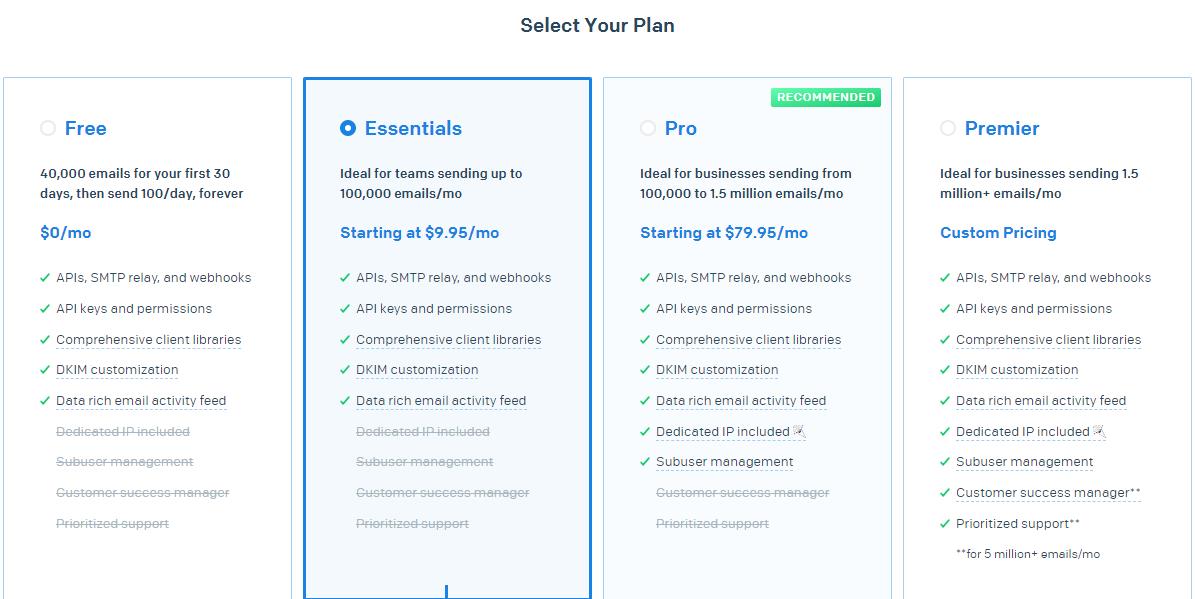
4、Plan
Plan分为三类:
1)、email api
2)、marketing campaigns(营销活动)
3)、email api 和marketing campaigns(两者一起)
5、SMTP
简单邮件传输协议(Simple Mail Transfer Protocol,SMTP) 是在Internet传输email的事实标准
6、SendGridAPIClient参数情况
继承自object。
初始化参数:
apikey: sendgrid需要使用的key。如果未提供的话,会在环境变量中查找。
api_key: sendgrid需要使用的key,提供后面的版本兼容,5.3,后就会被弃用。
impersonate_subuser:模仿subuser账号,底层客户端。
Host:api调用的基本的URL。
Opts:弃用参数的调度员。后面兼容的版本用path参数,在6以后的版本会移除。
7、mail参数
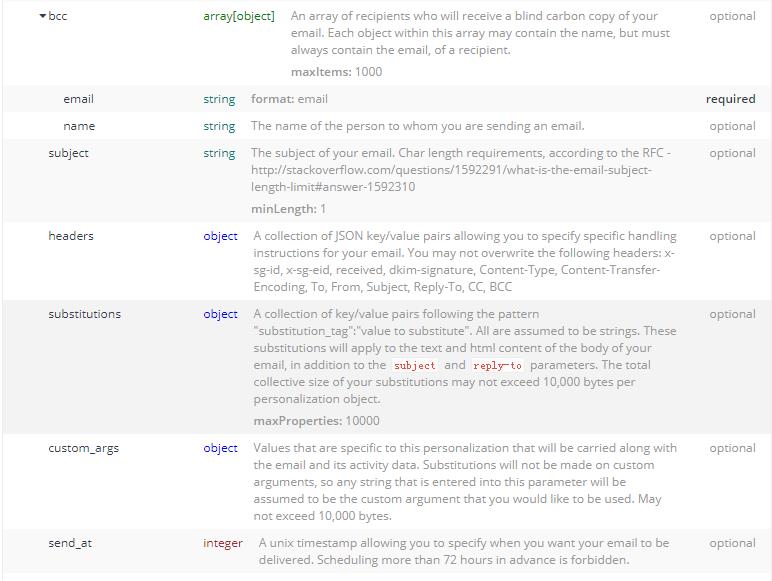
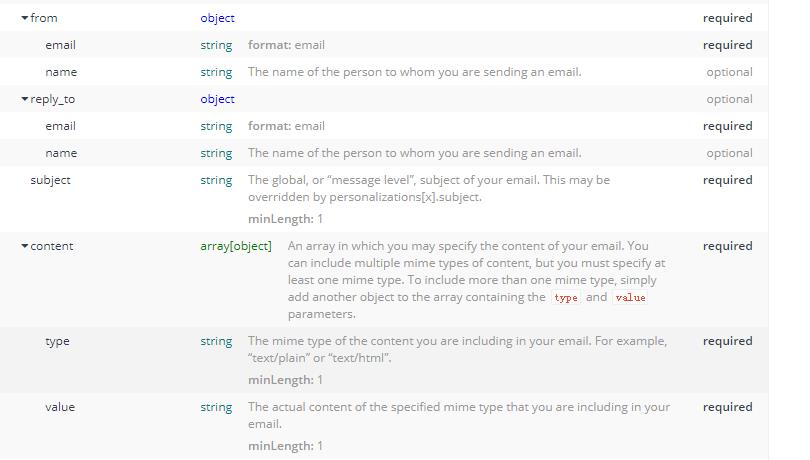
(1)from_email 来自邮箱
(2)subject 主题
(3)to_email 给谁发送
(4)content 正文
(5)get方法
方法里面有多个条件。
字典形式存储邮箱,正文和主题等。
Keys为:personalizations,个性化(里面是元组,元组里面是字典,里面是主题,给谁发送消息),from(来自哪个邮箱),content(正文消息)。
8、email参数
(1)email 邮箱
(2)name 名字
https://sendgrid.api-docs.io/v3.0/mail-send/v3-mail-send
9、headers
Authorization ,string ,1 ,validations,required
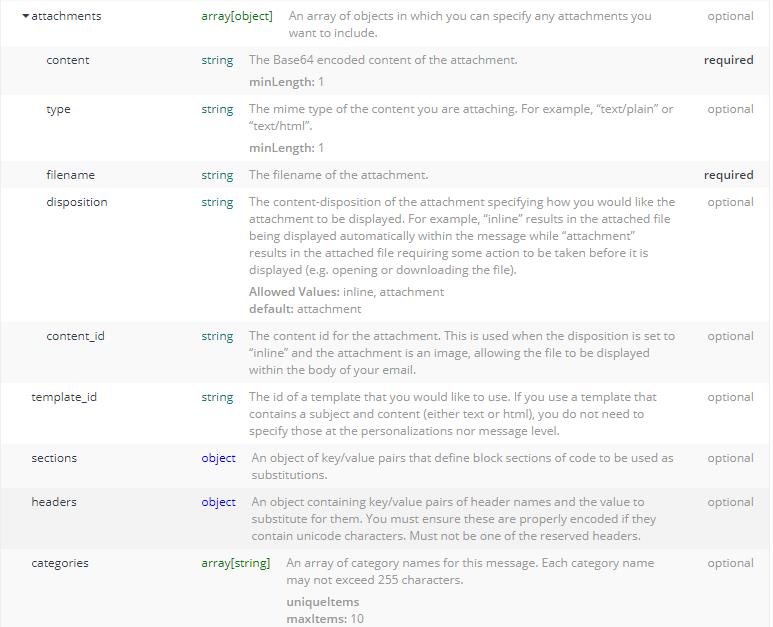
10、request body


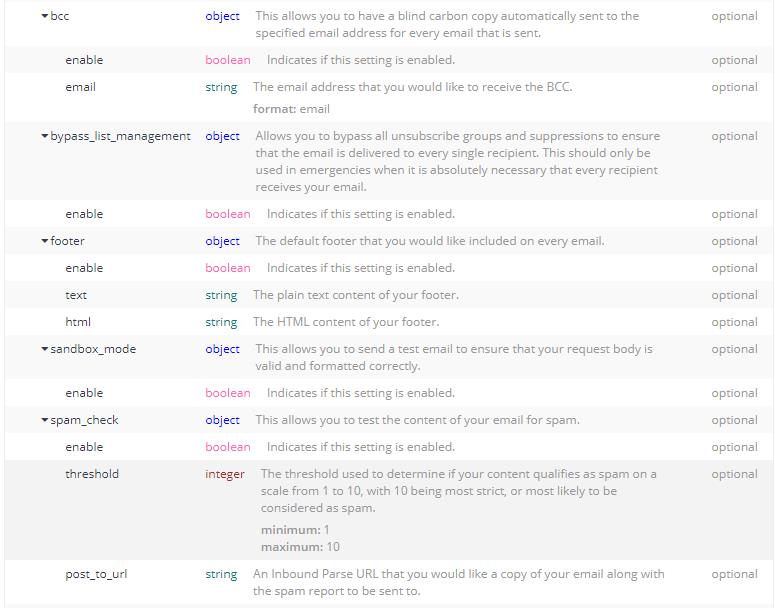

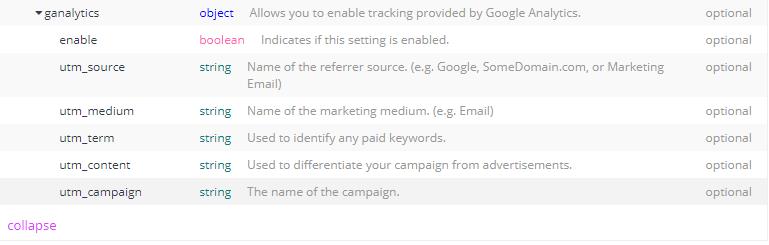
11、response
400、401、413、 202
Python-sendgrid邮箱库的使用的更多相关文章
- python采用pika库使用rabbitmq总结,多篇笔记和示例(转)
add by zhj:作者的几篇文章参考了Rabbitmq的Tutorials中的几篇文章. 原文:http://www.01happy.com/python-pika-rabbitmq-summar ...
- Python底层socket库
Python底层socket库将Unix关于网络通信的系统调用对象化处理,是底层函数的高级封装,socket()函数返回一个套接字,它的方法实现了各种套接字系统调用.read与write与Python ...
- 【C++实现python字符串函数库】strip、lstrip、rstrip方法
[C++实现python字符串函数库]strip.lstrip.rstrip方法 这三个方法用于删除字符串首尾处指定的字符,默认删除空白符(包括'\n', '\r', '\t', ' '). s.st ...
- 【C++实现python字符串函数库】二:字符串匹配函数startswith与endswith
[C++实现python字符串函数库]字符串匹配函数startswith与endswith 这两个函数用于匹配字符串的开头或末尾,判断是否包含另一个字符串,它们返回bool值.startswith() ...
- 【C++实现python字符串函数库】一:分割函数:split、rsplit
[C++实现python字符串函数库]split()与rsplit()方法 前言 本系列文章将介绍python提供的字符串函数,并尝试使用C++来实现这些函数.这些C++函数在这里做单独的分析,最后我 ...
- python使用cookielib库示例分享
Python中cookielib库(python3中为http.cookiejar)为存储和管理cookie提供客户端支持,下面是使用示例 该模块主要功能是提供可存储cookie的对象.使用此模块捕获 ...
- Python virtualenv安装库报错SSL: CERTIFICATE_VERIFY_FAILED
Python virtualenv安装库报错SSL: CERTIFICATE_VERIFY_FAILED 问题描述 使用pip按照virtualenv报错,如下: pip install virtua ...
- 【python】标准库的大致认识
正如那句 Python 社区中很有名的话所说的:“battery included”,Python 的一大好处在于它有一套很有用的标准库(standard library).标准库是随着 Python ...
- Python 图形 GUI 库 pyqtgraph
原文 Python 图形 GUI 库 pyqtgraph pyqtgraph 是纯 Python 图形 GUI 库,基于PyQT4 /pyside和NumPy.它主要目的用于在数学/科学/工程中.M ...
- python的urllib2库详细使用说明
一直以来技术群里会有新入行的同学提问关于urllib和urllib2以及cookielib相关的问题.所以我打算在这里总结一下,避免大家反复回答同样的问题浪费资源. 这篇属于教程类的文字,如果你已经非 ...
随机推荐
- P2P协议初步
今天看到一个问题,如何把一个文件快速下发到100w个服务器 如果我们将文件集中式地放在一个服务器或缓存上的话,带宽.连接都会遇到问题. 树状: 1. 每个服务器既具有文件存储能力也应具有 ...
- Design Patterns All in One (JavaScript Version)
Design Patterns All in One (JavaScript Version) JavaScript 设计模式 JavaScript 数据结构 23种设计模式分为 3 大类: 创建型模 ...
- 在线可视化设计网站 & 在线编辑器
在线可视化设计网站 在线编辑器:海报编辑器.H5 编辑器.视频编辑器.音频编辑器.抠图编辑器 在线 拖拽 可视化 编辑器 Canvas WebGL Canva With Canva, anyone c ...
- TypedArray & ArrayBuffer
TypedArray & ArrayBuffer Type Each element size in bytes Int8Array 1 Uint8Array 1 Uint8ClampedAr ...
- img & srcset
img & srcset 性能优化 <img class="fn tj s t u fa ai ht" width="3700" height=& ...
- nasm astrset_s函数 x86
xxx.asm %define p1 ebp+8 %define p2 ebp+12 %define p3 ebp+16 section .text global dllmain export ast ...
- keepalived-1.3.5+MHA部署mysql集群
MHA: MHA工作原理总结为以下几条: 从宕机崩溃的master保存二进制日志事件(binlog events): 识别含有最新更新的slave: 应用差异的中继日志(relay log)到其他sl ...
- JDK源码阅读-ByteBuffer
本文转载自JDK源码阅读-ByteBuffer 导语 Buffer是Java NIO中对于缓冲区的封装.在Java BIO中,所有的读写API,都是直接使用byte数组作为缓冲区的,简单直接.但是在J ...
- 关于C++中构造函数的常见疑问
基本概念 我们已经知道在定义一个对象时,该对象会根据你传入的参数来调用类中对应的构造函数.同时,在释放这个对象时,会调用类中的析构函数.其中,构造函数有三种,分别是默认构造函数,有参构造函数和拷贝构造 ...
- Visual Studio Code运行Python代码
目录 步骤 参考 用Pycharm开发Python程序是最好的选择,就是有点贵.基于这个背景,我就尝试一下别的IDE,看到很多人在用免费.开源的Visual Studio Code,下面是配置并运行P ...