
Python-sendgrid邮箱库的使用
Python中sendgrid库使用
#帮助文档https://github.com/sendgrid/sendgrid-python
https://sendgrid.com/docs/ui/account-and-settings/
https://sendgrid.api-docs.io/v3.0/mail-send/v3-mail-send
1、注册
https://sendgrid.com/注册账号,选择语言类型,创建api-keys。
2、开发环境keys值设定
把创建的keys值放进去。开发环境的shell
Mac
Update the development environment with your SENDGRID_API_KEY (more info here), for example:
echo "export SENDGRID_API_KEY='YOUR_API_KEY'" > sendgrid.env
echo "sendgrid.env" >> .gitignore
source ./sendgrid.env
Sendgrid also supports local environment file .env. Copy or rename .env_sample into .env and update SENDGRID_API_KEYwith your key.
Windows
Temporarily set the environment variable(accesible only during the current cli session):
set SENDGRID_API_KEY=YOUR_API_KEY
Permanently set the environment variable(accessible in all subsequent cli sessions):
setx SENDGRID_API_KEY "YOUR_API_KEY"
Install Package
pip install sendgrid
3、测试代码
# using SendGrid's Python Library


# https://github.com/sendgrid/sendgrid-python


import sendgrid


import os


from sendgrid.helpers.mail import *


def verification():


    sg = sendgrid.SendGridAPIClient(apikey=os.environ.get('SENDGRID_API_KEY'))


    from_email = Email("604603701@qq.com")


    to_email = Email("18804928235@163.com")


    subject = "Sending with SendGrid is Fun"


    content = Content("text/plain", "and easy to do anywhere, even with Python")


    mail = Mail(from_email, subject, to_email, content)


    response = sg.client.mail.send.post(request_body=mail.get())


    print(response.status_code)


    print(response.body)


    print(response.headers)


if __name__ == '__main__':


    verification()
# import sendgrid


# import os
# sg = sendgrid.SendGridAPIClient(apikey=os.environ.get('SENDGRID_API_KEY'))


# data = {


#   "personalizations": [


#     {


#       "to": [


#         {


#           "email": "test@example.com"


#         }


#       ],


#       "subject": "Sending with SendGrid is Fun"


#     }


#   ],


#   "from": {


#     "email": "test@example.com"


#   },


#   "content": [


#     {


#       "type": "text/plain",


#       "value": "and easy to do anywhere, even with Python"


#     }


#   ]


# }


# response = sg.client.mail.send.post(request_body=data)


# print(response.status_code)


# print(response.body)


# print(response.headers)
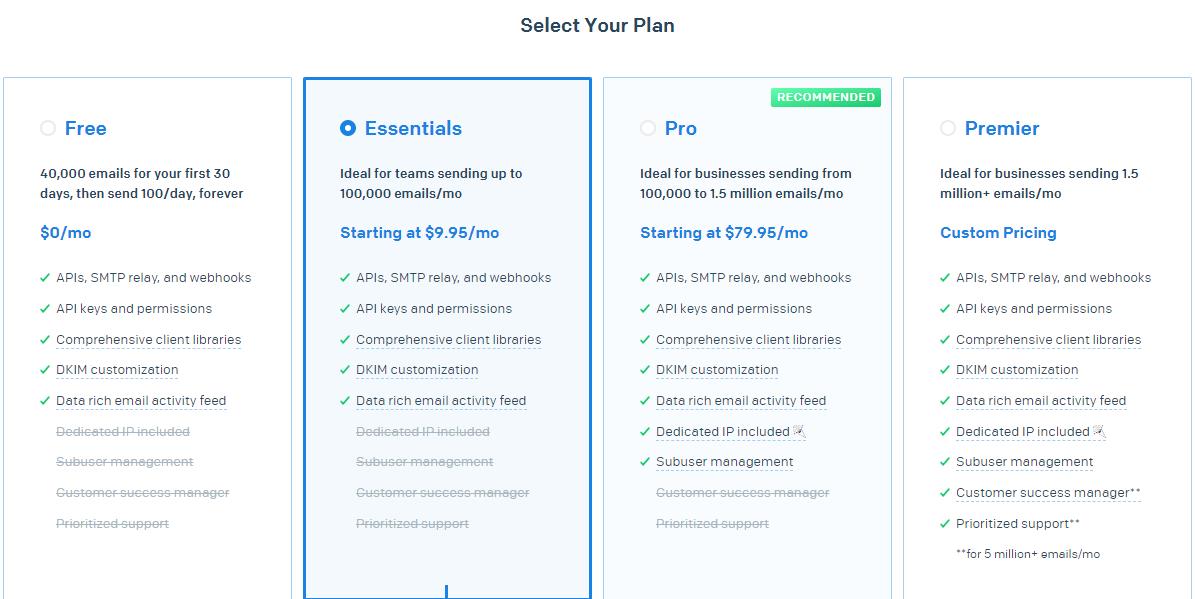
4、Plan
Plan分为三类:
1)、email api
2)、marketing campaigns(营销活动)
3)、email api 和marketing campaigns(两者一起)
5、SMTP
简单邮件传输协议(Simple Mail Transfer Protocol,SMTP) 是在Internet传输email的事实标准
6、SendGridAPIClient参数情况
继承自object。
初始化参数:
apikey: sendgrid需要使用的key。如果未提供的话,会在环境变量中查找。
api_key: sendgrid需要使用的key,提供后面的版本兼容,5.3,后就会被弃用。
impersonate_subuser:模仿subuser账号,底层客户端。
Host:api调用的基本的URL。
Opts:弃用参数的调度员。后面兼容的版本用path参数,在6以后的版本会移除。
7、mail参数
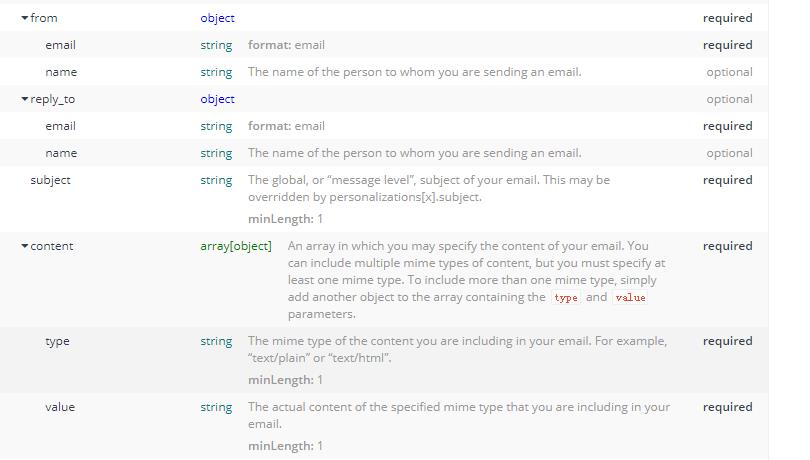
(1)from_email 来自邮箱
(2)subject 主题
(3)to_email 给谁发送
(4)content 正文
(5)get方法
方法里面有多个条件。
字典形式存储邮箱,正文和主题等。
Keys为:personalizations,个性化(里面是元组,元组里面是字典,里面是主题,给谁发送消息),from(来自哪个邮箱),content(正文消息)。
8、email参数
(1)email 邮箱
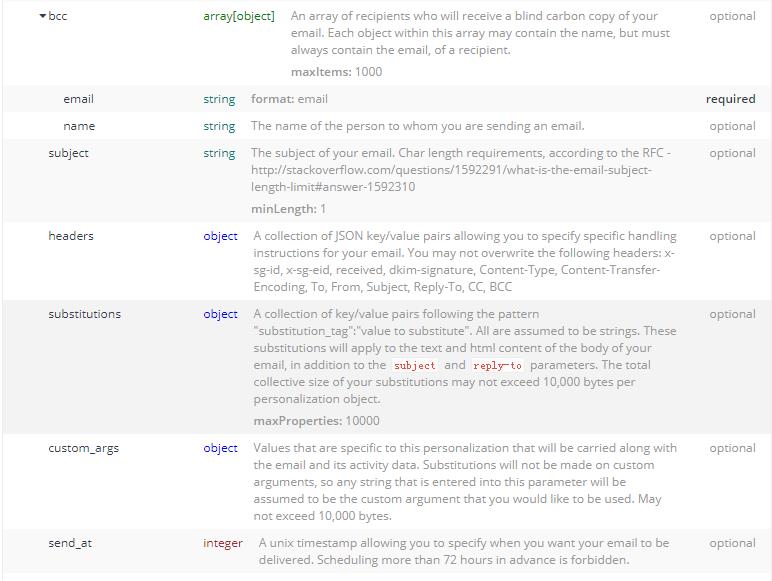
(2)name 名字
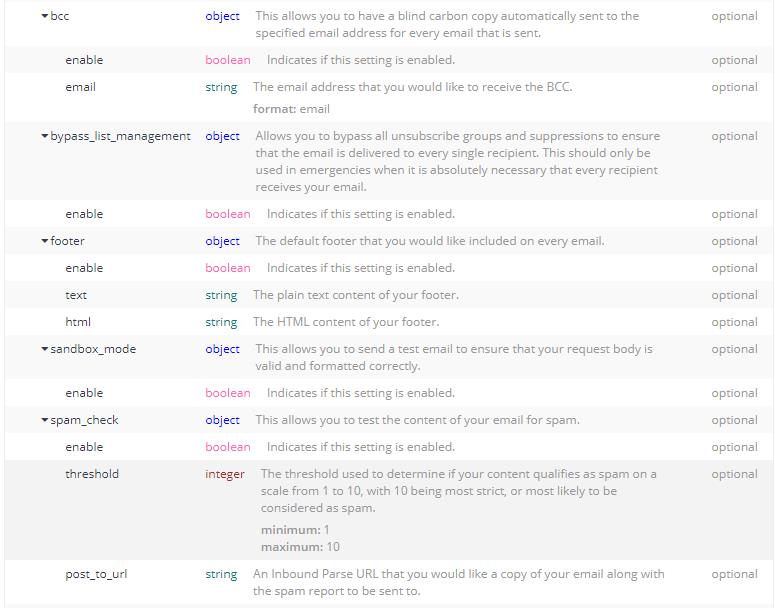
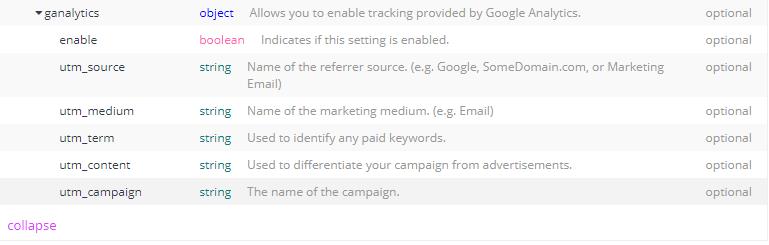
https://sendgrid.api-docs.io/v3.0/mail-send/v3-mail-send
9、headers
Authorization ,string ,1 ,validations,required
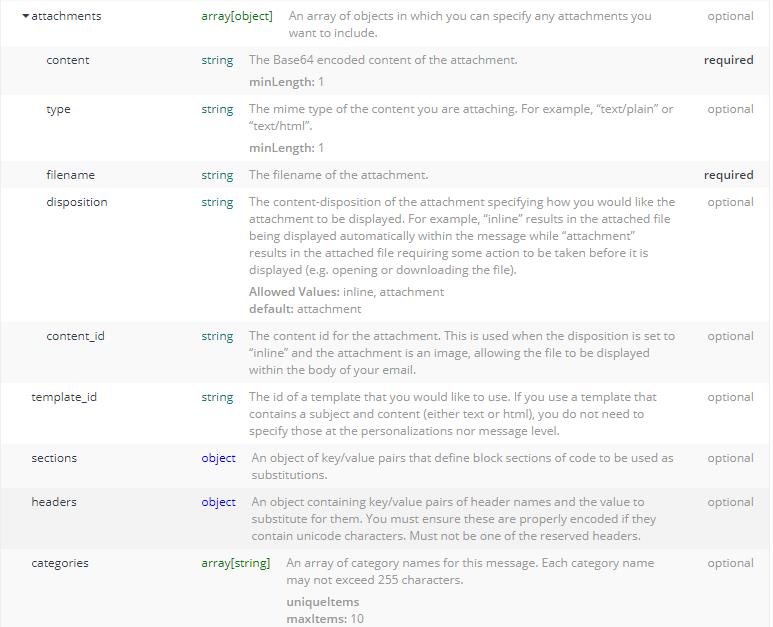
10、request body



11、response
400、401、413、 202
Python-sendgrid邮箱库的使用的更多相关文章
- python采用pika库使用rabbitmq总结,多篇笔记和示例(转)
add by zhj:作者的几篇文章参考了Rabbitmq的Tutorials中的几篇文章. 原文:http://www.01happy.com/python-pika-rabbitmq-summar ...
- Python底层socket库
Python底层socket库将Unix关于网络通信的系统调用对象化处理,是底层函数的高级封装,socket()函数返回一个套接字,它的方法实现了各种套接字系统调用.read与write与Python ...
- 【C++实现python字符串函数库】strip、lstrip、rstrip方法
[C++实现python字符串函数库]strip.lstrip.rstrip方法 这三个方法用于删除字符串首尾处指定的字符,默认删除空白符(包括'\n', '\r', '\t', ' '). s.st ...
- 【C++实现python字符串函数库】二:字符串匹配函数startswith与endswith
[C++实现python字符串函数库]字符串匹配函数startswith与endswith 这两个函数用于匹配字符串的开头或末尾,判断是否包含另一个字符串,它们返回bool值.startswith() ...
- 【C++实现python字符串函数库】一:分割函数:split、rsplit
[C++实现python字符串函数库]split()与rsplit()方法 前言 本系列文章将介绍python提供的字符串函数,并尝试使用C++来实现这些函数.这些C++函数在这里做单独的分析,最后我 ...
- python使用cookielib库示例分享
Python中cookielib库(python3中为http.cookiejar)为存储和管理cookie提供客户端支持,下面是使用示例 该模块主要功能是提供可存储cookie的对象.使用此模块捕获 ...
- Python virtualenv安装库报错SSL: CERTIFICATE_VERIFY_FAILED
Python virtualenv安装库报错SSL: CERTIFICATE_VERIFY_FAILED 问题描述 使用pip按照virtualenv报错,如下: pip install virtua ...
- 【python】标准库的大致认识
正如那句 Python 社区中很有名的话所说的:“battery included”,Python 的一大好处在于它有一套很有用的标准库(standard library).标准库是随着 Python ...
- Python 图形 GUI 库 pyqtgraph
原文 Python 图形 GUI 库 pyqtgraph pyqtgraph 是纯 Python 图形 GUI 库,基于PyQT4 /pyside和NumPy.它主要目的用于在数学/科学/工程中.M ...
- python的urllib2库详细使用说明
一直以来技术群里会有新入行的同学提问关于urllib和urllib2以及cookielib相关的问题.所以我打算在这里总结一下,避免大家反复回答同样的问题浪费资源. 这篇属于教程类的文字,如果你已经非 ...
随机推荐
- codeforces 875B
B. Sorting the Coins time limit per test 1 second memory limit per test 512 megabytes input standard ...
- P2P协议初步
今天看到一个问题,如何把一个文件快速下发到100w个服务器 如果我们将文件集中式地放在一个服务器或缓存上的话,带宽.连接都会遇到问题. 树状: 1. 每个服务器既具有文件存储能力也应具有 ...
- ARM汇编--汇编中符号和变量
习惯了使用C语言的情况下我发现自己对与汇编程序的符号和变量的理解很不深刻,今天抽空来学学加深理解.以ARM汇编来说,在汇编代码中所有以"."开头的指令都是汇编伪指令,他们不属于AR ...
- vue中怎么动态生成form表单
form-create 是一个可以通过 JSON 生成具有动态渲染.数据收集.验证和提交功能的表单生成组件.支持3个UI框架,并且支持生成任何 Vue 组件.内置20种常用表单组件和自定义组件,再复杂 ...
- 恕我直言!!!对于Maven,菜鸟玩dependency,神仙玩plugin
打包是一项神圣.而庄严的工作.package意味着我们离生产已经非常近了.它会把我们之前的大量工作浓缩成为一个.或者多个文件.接下来,运维的同学就可以拿着这些个打包文件在生产上纵横四海了. 这么一项庄 ...
- OpenCV+Ubuntu+缺少Python.h
在cmake时粗心了, 要确保有 -D PYTHON_INCLUDE_DIR=/usr/include/python3.5 且该目录下存在Python.h文件. 如果在错误提示中是python2, 那 ...
- TypeScript 1.7 & TypeScript 1.8
TypeScript 1.7 & TypeScript 1.8 1 1 https://zh.wikipedia.org/wiki/TypeScript TypeScript是一种由微软开发的 ...
- Renice INC:全球经济危机持续,2021年红酒市场走向如何?
2021年,全球经济危机仍在持续,很多国家的经济出现了严重的下滑,不得不以降低利率维持经济.那么,全球经济危机对于红酒市场有什么影响?2021年,红酒市场走势如何呢?近日,美国知名红酒公司伦尼斯公司对 ...
- [转]在ROS下使用zeroconf配置多机通信
原文地址:http://www.corvin.cn/635.html,转载主要方便随时查阅,如有版权要求,请及时联系. 0x00 为何需要配置ROS多机通信 众所周知ROS是分布式系统,因此可以将机器 ...
- ClickHouse源码笔记3:函数调用的向量化实现
分享一下笔者研读ClickHouse源码时分析函数调用的实现,重点在于分析Clickhouse查询层实现的接口,以及Clickhouse是如何利用这些接口更好的实现向量化的.本文的源码分析基于Clic ...