
Python学习笔记——基础篇【第六周】——logging模块
常用模块之logging
用于便捷记录日志且线程安全的模块
import logging

logging.basicConfig(filename='log.log',

                    format='%(asctime)s - %(name)s - %(levelname)s -%(module)s:  %(message)s',

                    datefmt='%Y-%m-%d %H:%M:%S %p',

                    level=10)

logging.debug('debug')

logging.info('info')

logging.warning('warning')

logging.error('error')

logging.critical('critical')

logging.log(10,'log')
对于等级:
CRITICAL = 50

FATAL = CRITICAL

ERROR = 40

WARNING = 30

WARN = WARNING

INFO = 20

DEBUG = 10

NOTSET = 0
只有大于当前日志等级的操作才会被记录。
对于格式,有如下属性可是配置:
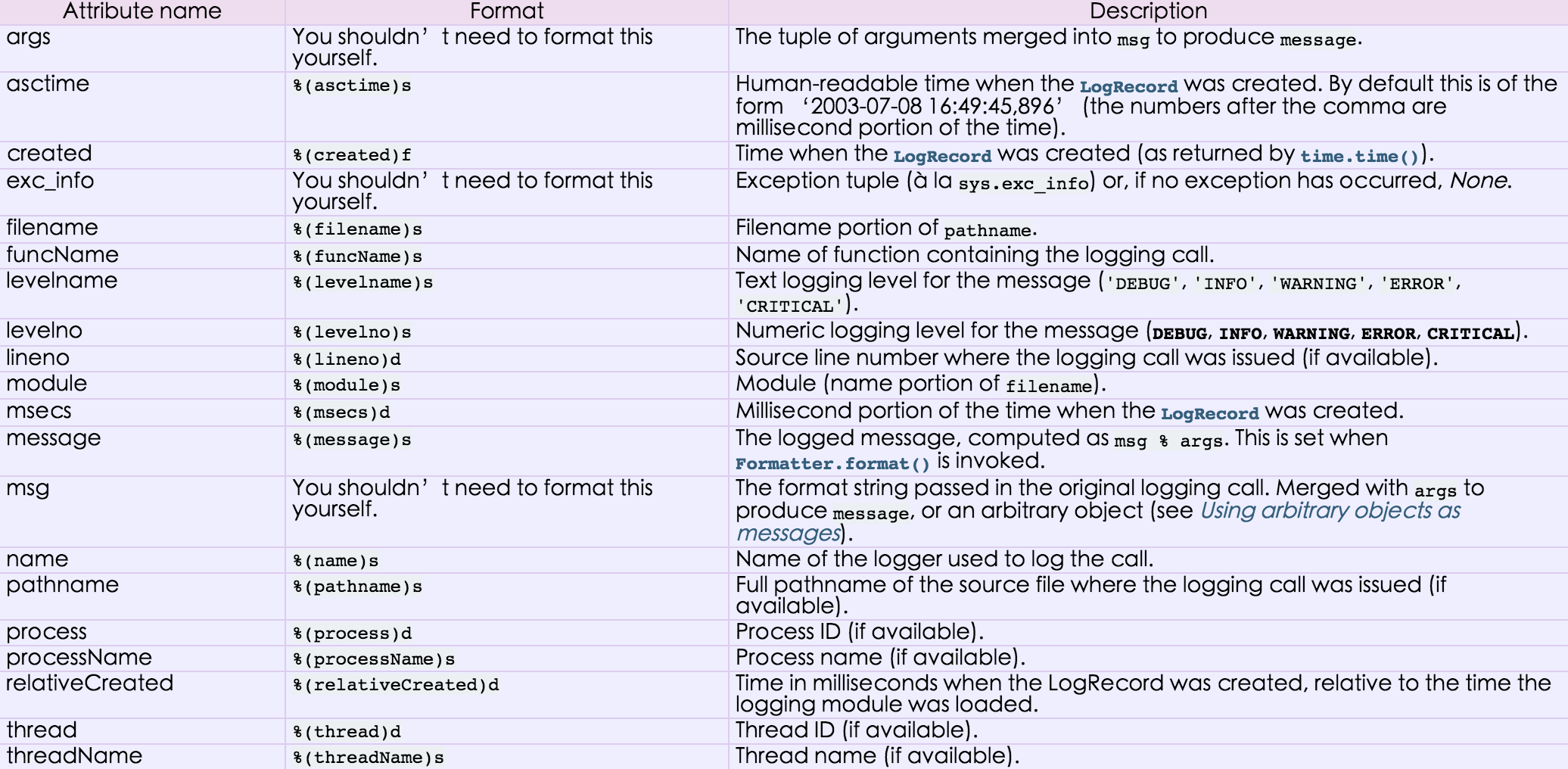
---------------------------------------------------------------------------------------------
很多程序都有记录日志的需求,并且日志中包含的信息即有正常的程序访问日志,还可能有错误、警告等信息输出,python的logging模块提供了标准的日志接口,你可以通过它存储各种格式的日志,logging的日志可以分为 debug(), info(), warning(), error() and critical() 5个级别,下面我们看一下怎么用。
最简单用法
import logging

logging.warning("user [alex] attempted wrong password more than 3 times")

logging.critical("server is down")

#输出

WARNING:root:user [alex] attempted wrong password more than 3 times

CRITICAL:root:server is down
看一下这几个日志级别分别代表什么意思
| Level | When it’s used |
|---|---|
DEBUG |
Detailed information, typically of interest only when diagnosing problems. |
INFO |
Confirmation that things are working as expected. |
WARNING |
An indication that something unexpected happened, or indicative of some problem in the near future (e.g. ‘disk space low’). The software is still working as expected. |
ERROR |
Due to a more serious problem, the software has not been able to perform some function. |
CRITICAL |
A serious error, indicating that the program itself may be unable to continue running. |
如果想把日志写到文件里,也很简单
import logging

logging.basicConfig(filename='example.log',level=logging.INFO)

logging.debug('This message should go to the log file')

logging.info('So should this')

logging.warning('And this, too')
其中下面这句中的level=loggin.INFO意思是,把日志纪录级别设置为INFO,也就是说,只有比日志是INFO或比INFO级别更高的日志 才会被纪录到文件里,在这个例子, 第一条日志是不会被纪录的,如果希望纪录debug的日志,那把日志级别改成DEBUG就行了。
logging.basicConfig(filename='example.log',level=logging.INFO)
感觉上面的日志格式忘记加上时间啦,日志不知道时间怎么行呢,下面就来加上!
import logging

logging.basicConfig(format='%(asctime)s %(message)s', datefmt='%m/%d/%Y %I:%M:%S %p')

logging.warning('is when this event was logged.')

#输出

12/12/2010 11:46:36 AM is when this event was logged.
如果想同时把log打印在屏幕和文件日志里,就需要了解一点复杂的知识 了
The logging library takes a modular approach and offers several categories of components: loggers, handlers, filters, and formatters.
- Loggers expose the interface that application code directly uses.
- Handlers send the log records (created by loggers) to the appropriate destination.
- Filters provide a finer grained facility for determining which log records to output.
- Formatters specify the layout of log records in the final output.
import logging

#create logger

logger = logging.getLogger('TEST-LOG')

logger.setLevel(logging.DEBUG)

# create console handler and set level to debug

ch = logging.StreamHandler()

ch.setLevel(logging.DEBUG)

# create file handler and set level to warning

fh = logging.FileHandler("access.log")

fh.setLevel(logging.WARNING)

# create formatter

formatter = logging.Formatter('%(asctime)s - %(name)s - %(levelname)s - %(message)s')

# add formatter to ch and fh

ch.setFormatter(formatter)

fh.setFormatter(formatter)

# add ch and fh to logger

logger.addHandler(ch)

logger.addHandler(fh)

# 'application' code

logger.debug('debug message')

logger.info('info message')

logger.warn('warn message')

logger.error('error message')

logger.critical('critical message')
参考链接:
http://www.cnblogs.com/alex3714/articles/5161349.html
http://www.cnblogs.com/wupeiqi/articles/4963027.html
Python学习笔记——基础篇【第六周】——logging模块的更多相关文章
- Python学习笔记——基础篇【第一周】——变量与赋值、用户交互、条件判断、循环控制、数据类型、文本操作
目录 Python第一周笔记 1.学习Python目的 2.Python简史介绍 3.Python3特性 4.Hello World程序 5.变量与赋值 6.用户交互 7.条件判断与缩进 8.循环控制 ...
- Python学习笔记——基础篇【第二周】——解释器、字符串、列表、字典、主文件判断、对象
目录 1.Python介绍 2.Python编码 3.接受执行传参 4.基本数据类型常用方法 5.Python主文件判断 6.一切事物都是对象 7. int内部功能介绍 8.float和long内 ...
- Python学习笔记基础篇——总览
Python初识与简介[开篇] Python学习笔记——基础篇[第一周]——变量与赋值.用户交互.条件判断.循环控制.数据类型.文本操作 Python学习笔记——基础篇[第二周]——解释器.字符串.列 ...
- Python学习笔记——基础篇【第七周】———类的静态方法 类方法及属性
新式类和经典类的区别 python2.7 新式类——广度优先 经典类——深度优先 python3.0 新式类——广度优先 经典类——广度优先 广度优先才是正常的思维,所以python 3.0中已经修复 ...
- Python学习笔记——基础篇【第五周】——常用模块学习
模块介绍 本节大纲: 模块介绍 time &datetime模块 (时间模块) random (随机数模块) os (系统交互模块) sys shutil (文件拷贝模块) j ...
- Python 学习笔记---基础篇
1. 简单测试局域网中的电脑是否连通.这些电脑的ip范围从192.168.0.101到192.168.0.200 import subprocess cmd="cmd.exe" b ...
- Python成长笔记 - 基础篇 (六)python模块
本节大纲: 模块介绍 time &datetime模块 random os sys shutil json & picle shelve xml处理 yaml处理 configpars ...
- Python学习笔记——基础篇【第六周】——面向对象
Python之路,Day6 - 面向对象学习 本节内容: 面向对象编程介绍 为什么要用面向对象进行开发? 面向对象的特性:封装.继承.多态 类.方法. 同时可参考链接: http:// ...
- Python学习笔记——基础篇【第六周】——json & pickle & shelve & xml处理模块
json & pickle 模块(序列化) json和pickle都是序列化内存数据到文件 json和pickle的区别是: json是所有语言通用的,但是只能序列化最基本的数据类型(字符串. ...
随机推荐
- django下载文件
赶快记录一下写的一个django下载文件的例子,以便以后复习: 在views.py中设置 from django.core.servers.basehttp import FileWrapper im ...
- Elmah错误日志工具
Elmah错误日志工具 Exception 对于异常的处理,以前基本就是跳转到一个自定义的错误页面,觉得这样不错挺友好的.同时还是需要记录下来这些异常,才能进一步的进行修改. 怎么去记录这些错误信息呢 ...
- C# 自动提交到百度ping服务
C# 自动提交到百度ping服务 今天无意之间看到百度站长中有这个ping服务(孤陋寡闻呀).... 那什么什么是Ping服务 ping是基于XML_RPC标准协议的更新通告服务,用于博客把内容更新快 ...
- WCF服务属性注入基础设施
WCF服务属性注入基础设施 WCF的服务的创建行为:使用默认构造函数创建WCF服务对象.如果我们想要在WCF内使用外部对象,最简单的方式就是把外部对象做成全局对象.然而这样的话会增加全局对象的数量,让 ...
- 自己动手用maven构建基于SSI的java EE应用
上篇跟大家聊了聊maven的简单使用,之前也写了一篇搭建基于SSI(struts2,spring,ibatis)的javaEE开发环境的文章,但是那篇只是给初学者搭建一个简单的SSI应用的框架,其实我 ...
- Java静态代理和动态代理
今天介绍一下代理设计模式,在业务场景中使用代理模式的好处有很多,包括什么权限校验,事务管理等等,具体有什么好处大家自动百度吧,我这里只解释代理模式的设计原理.首先这个设计模式出来的时候先是静态代理模式 ...
- shell脚本获取随机数random
用C提供的取随机数的方法srand和rand, 前者是给后者设置随机数种子seed. ; srand(seed); // time(NULL) 通常使用时间做种子 rnd_num = rand(); ...
- 对象转Json序列化
C#--对象转Json序列化 前言 最近在研究Android项目,其中涉及到Android中解析Json数据的问题,需要模拟网络中传递Json数据的模式,因为以前是.net的工程师,所以想着从.net ...
- 用Linux命令行实现删除和复制指定类型的文件
(一)Linux 删除当前目录及子目录中所有某种类型的文件 方法1 : 此方法不能处理目录中带空格的那些. rm -rf `find . -name "*.example"` Li ...
- UVa1003-Cutting sticks
试题描述 将一段木棒按要求切割,每次切割都要付出与木棒长度相同的代价,求最小代价切割. (多组数据) 输入描述 长度L. 切割点数n(n<=50). n个切割点. 输出描述 "The ...