
生命周期(vue的钩子函数)
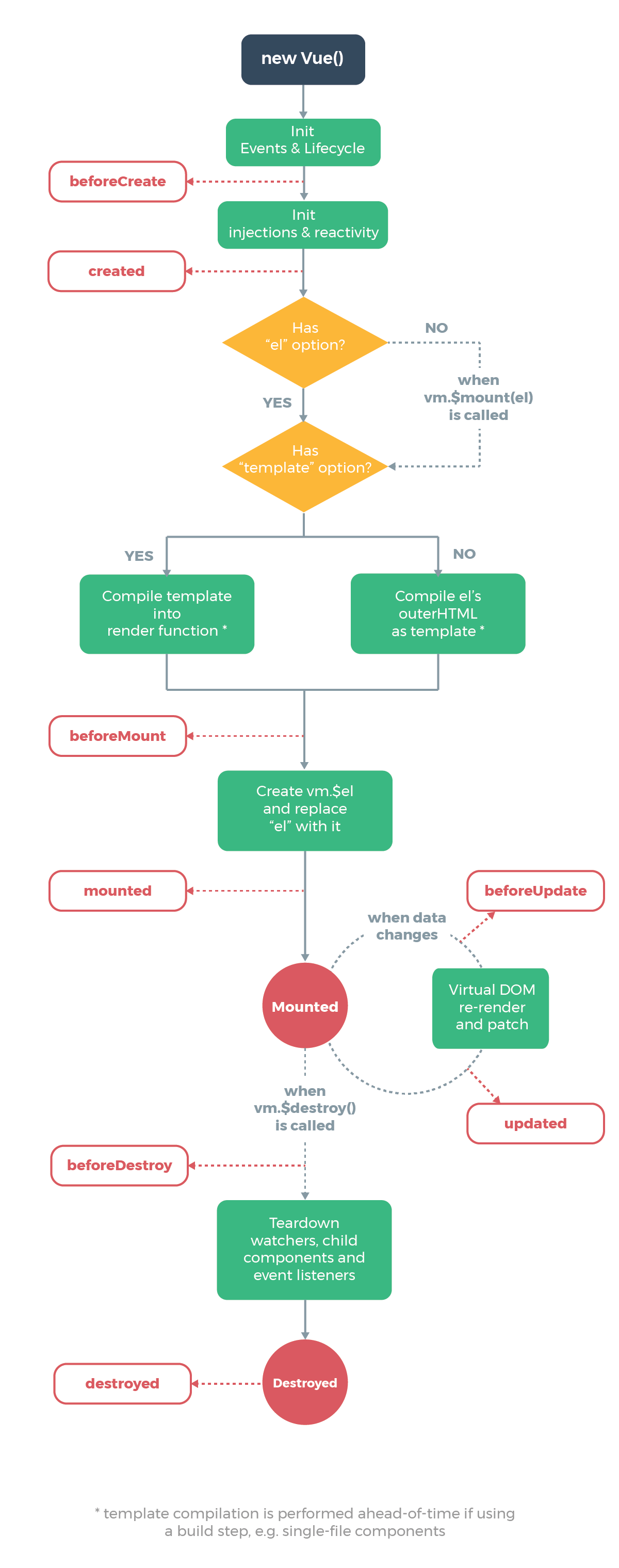
生命周期图示
- 创建前,创建后,挂载前,挂载后,更新前,更新后,销毁前,销毁后

beforeCreate:function(){

      console.log('1-beforeCreate 组件还未被创建');

},

created:function(){

      console.log('2-created 组件已被创建');

},

beforeMount:function(){

       console.log('3-beforeMount 组件已创建但还未挂载到DOM节点上');

},

mounted:function(){

       console.log('4-mounted 组件已挂载到DOM节点上');

},

beforeUpdate:function(){

       console.log('5-beforeUpdate 数据更新前');

},

updated:function(){

       console.log('6-updated 被更新后');

},

activated:function(){

        console.log('7-activated');

},

deactivated:function(){

       console.log('8-deactivated');

},

beforeDestroy:function(){

       console.log('9-beforeDestroy 组件即将被销毁');

},

destroyed:function(){

       console.log('10-destroyed 组件已经被销毁')

}
<button onclick='app.$destroy()'>销毁</button>
$el、$data
created和mounted
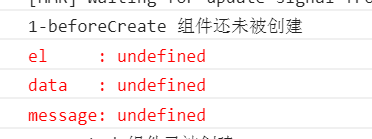
beforeCreate:el和data并未初始化
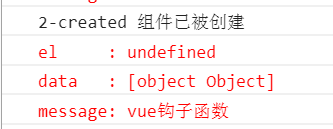
created:完成了data数据的初始化,el没有
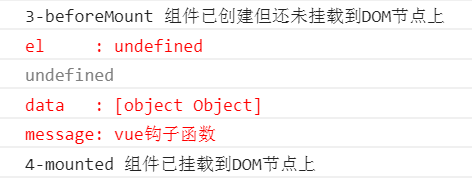
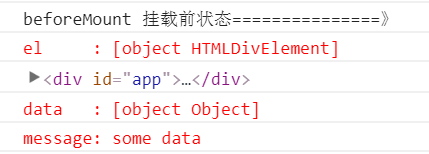
beforeMount: 完成了el和data初始化
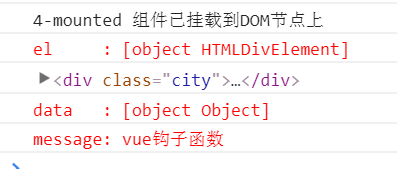
mounted: 完成挂载
  beforeCreate:function(){

  	console.log('1-beforeCreate 组件还未被创建');

  	console.log("%c%s", "color:red" , "el     : " + this.$el); //undefined

  	console.log("%c%s", "color:red","data   : " + this.$data); //undefined

  	console.log("%c%s", "color:red","message: " + this.message)//undefined

  }
	created:function(){

    	console.log('2-created 组件已被创建');

    	console.log("%c%s", "color:red","el     : " + this.$el); //undefined

   	 	console.log("%c%s", "color:red","data   : " + this.$data); //已被初始化

    	console.log("%c%s", "color:red","message: " + this.message); //已被初始化

	}
	beforeMount:function(){

    	console.log('3-beforeMount 组件已创建但还未挂载到DOM节点上');

    	console.log("%c%s", "color:red","el     : " + (this.$el)); //undefined

    	console.log(this.$el);

    	console.log("%c%s", "color:red","data   : " + this.$data); //已被初始化

    	console.log("%c%s", "color:red","message: " + this.message); //已被初始化

	}
- beforeMount 在
.vue文件中el还没被创建
            beforeMount: function () {

                console.log('beforeMount 挂载前状态===============》');

                console.log("%c%s", "color:red","el     : " + (this.$el));//已被初始化

                console.log(this.$el);

                console.log("%c%s", "color:red","data   : " + this.$data);//已被初始化

                console.log("%c%s", "color:red","message: " + this.message);//已被初始化

            }
- beforeMount在html文件中el已被初始化
	mounted:function(){

    	console.log('4-mounted 组件已挂载到DOM节点上');

   	 	console.log("%c%s", "color:red","el     : " + this.$el); //已被初始化

    	console.log(this.$el);

    	console.log("%c%s", "color:red","data   : " + this.$data); //已被初始化

    	console.log("%c%s", "color:red","message: " + this.message); //已被初始化

	}
生命周期(vue的钩子函数)的更多相关文章
- Vue生命周期简介和钩子函数
钩子就好像是把人的出生到死亡分成一个个阶段,你肯定是在出生阶段起名字,而不会在成年或者死亡的阶段去起名字.或者说你想在出生阶段去约炮,也是不行的.组件也是一样,每个阶段它的内部构造是不一样的.所以一般 ...
- VUE生命周期中的钩子函数及父子组件的执行顺序
先附一张官网上的vue实例的生命周期图,每个Vue实例在被创建的时候都需要经过一系列的初始化过程,例如需要设置数据监听,编译模板,将实例挂载到DOM并在数据变化时更新DOM等.同时在这个过程中也会运行 ...
- vue的生命周期(又称钩子函数)----以及vue1.0版本与vue2.0版本生命周期的不同
vue生命周期 1. vue1.0版本与vue2.0版本生命周期的不同 vue1.0版本生命周期图示 图1 vue1.0版本生命周期 vue1.0版本的生命周期: init 实例创建之前 creat ...
- vue中的生命周期事件和钩子函数
vue实例有一个完整的生命周期,也就是从开始创建.初始化数据.编译模板.挂载Dom.渲染->更新->渲染.卸载等一系列过程,我们称这是vue的生命周期.通俗的将就是vue实例从创建到销毁的 ...
- vue的钩子函数
1.computed 计算属性 计算属性将被混入到 Vue 实例中.所有 getter 和 setter 的 this 上下文自动地绑定为 Vue 1..aPlus: { get: function ...
- Vue的钩子函数[路由导航守卫、keep-alive、生命周期钩子]
前言 说到Vue的钩子函数,可能很多人只停留在一些很简单常用的钩子(created,mounted),而且对于里面的区别,什么时候该用什么钩子,并没有仔细的去研究过,且Vue的生命周期在面试中也算是比 ...
- vue - 过滤器-钩子函数路由
一.关于路由 1.使用vue router 本质上是声明一种可以通过路径进行 挂子,用子 找到对应的 template 进行页面渲染 <!DOCTYPE html> <html la ...
- Spring-IOC bean 生命周期之 Lifecycle 钩子
Lifecycle callbacks Initialization callbacks.Destruction callbacks 要与容器的bean生命周期管理交互,即容器在启动后和容器在销毁前对 ...
- vue中钩子函数的用法
这么多钩子函数,我们怎么用呢,我想大家可能有这样的疑问吧,我也有,哈哈哈. beforecreate : 举个栗子:可以在这加个loading事件 created :在这结束loading,还做一些初 ...
随机推荐
- linux虚拟机磁盘扩展与分区大小调整
有段时间觉得linux虚拟机上的磁盘不太够用,研究了下其磁盘扩展 1.linux虚拟机磁盘扩展 step1. 先关机在编辑虚拟机中,找到硬盘选项增加空间,进行扩展step2. 进入root fdisk ...
- [HZOI2016]偏序&[HZOI2015]偏序II K维偏序问题
description Cogs: [HZOI2016]偏序 [HZOI2015]偏序 II data range \[ n\le 5\times 10^4\] solution 嵌套\(CDQ\)的 ...
- [洛谷P3224][HNOI2012]永无乡
题目大意:给你$n$个点,每个点有权值$k$,现有两种操作: 1. $B\;x\;y:$将$x,y$所在联通块合并2. $Q\;x\;k:$查询第$x$个点所在联通块权值第$k$小是哪个数 题解:线段 ...
- POJ3347:Kadj Squares——题解
http://poj.org/problem?id=3347 题目大意:给定一些正方形的边长,让他们尽可能向左以45°角排列(不能互相重合),求在上面看只能看到哪几个正方形. ———————————— ...
- 2017 ccpc哈尔滨 A题 Palindrome
2017 ccpc哈尔滨 A题 Palindrome 题意: 给一个串\(T\),计算存在多少子串S满足\(S[i]=S[2n−i]=S[2n+i−2](1≤i≤n)\) 思路: 很明显这里的回文串长 ...
- BZOJ3832 [Poi2014]Rally 【拓扑序 + 堆】
题目链接 BZOJ3832 题解 神思路orz,根本不会做 设\(f[i]\)为到\(i\)的最长路,\(g[i]\)为\(i\)出发的最长路,二者可以拓扑序后\(dp\)求得 那么一条边\((u,v ...
- React受控组件和非受控组件
受控组件和非受控组件主要是用来解决表单组件状态谁来控制的问题.因为用户的输入会反应在界面上,相当于视图的状态发生了变化,而react是通过虚拟DOM比对修改视图的,这里就要决定谁来控制表单组件的状态. ...
- tinyxml源码解析(中)
转载于:http://www.cnblogs.com/marchtea/archive/2012/11/20/2766756.html 前言: 之前趁着这段时间比较空闲,也因为听闻tinyxml大名, ...
- Saddle Point ZOJ - 3955 题意题
Chiaki has an n × m matrix A. Rows are numbered from 1 to n from top to bottom and columns are numbe ...
- Picture POJ - 1177 (线段树-扫描线)
A number of rectangular posters, photographs and other pictures of the same shape are pasted on a wa ...