
使用MapKit框架(持续更新)
使用MapKit框架
地图显示
最简单显示地图的代码:
//

//  RootViewController.m

//  CoreLocation

//

//  Copyright (c) 2014年 Y.X. All rights reserved.

//

#import "RootViewController.h"

#import <MapKit/MapKit.h>

@interface RootViewController ()

@end

@implementation RootViewController

- (void)viewDidLoad

{

    [super viewDidLoad];

    // 初始化地图控件

    MKMapView *mapView = [[MKMapView alloc] initWithFrame:self.view.bounds];

    // 地图的类型

    mapView.mapType = MKMapTypeStandard;

    // 视图的宽度和高度将和父视图的宽度一起成比例变化

    mapView.autoresizingMask = \

        UIViewAutoresizingFlexibleWidth | UIViewAutoresizingFlexibleHeight;

    // 显示地图

    [self.view addSubview:mapView];

}

@end
RootViewController
注意:使用地图之前是需要引入MapKit框架的哦.
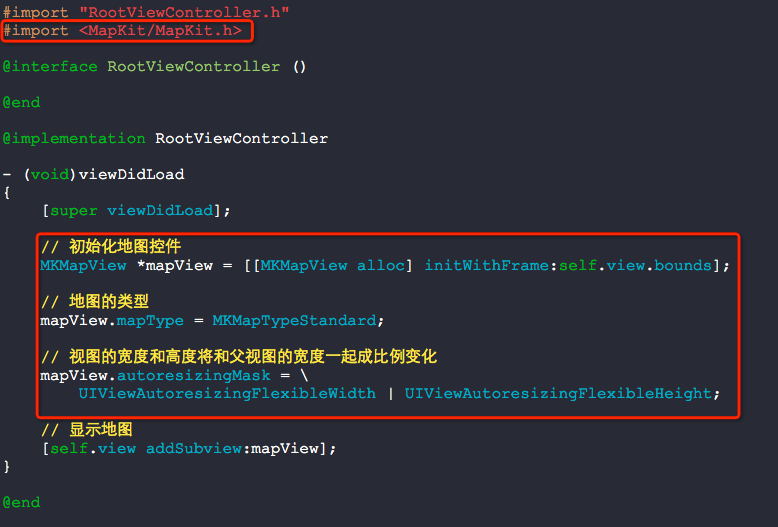

autoresizingMask是干什么用的呢(实际上,我看过后还是不懂)?
|
UIViewAutoresizingNone |
这个常量如果被设置,视图将不进行自动尺寸调整。 |
|
UIViewAutoresizingFlexibleHeight |
这个常量如果被设置,视图的高度将和父视图的高度一起成比例变化。否则,视图的高度将保持不变。 |
|
UIViewAutoresizingFlexibleWidth |
这个常量如果被设置,视图的宽度将和父视图的宽度一起成比例变化。否则,视图的宽度将保持不变。 |
|
UIViewAutoresizingFlexibleLeftMargin |
这个常量如果被设置,视图的左边界将随着父视图宽度的变化而按比例进行调整。否则,视图和其父视图的左边界的相对位置将保持不变。 |
|
UIViewAutoresizingFlexibleRightMargin |
这个常量如果被设置,视图的右边界将随着父视图宽度的变化而按比例进行调整。否则,视图和其父视图的右边界的相对位置将保持不变。 |
|
UIViewAutoresizingFlexibleBottomMargin |
这个常量如果被设置,视图的底边界将随着父视图高度的变化而按比例进行调整。否则,视图和其父视图的底边界的相对位置将保持不变。 |
|
UIViewAutoresizingFlexibleTopMargin |
这个常量如果被设置,视图的上边界将随着父视图高度的变化而按比例进行调整。否则,视图和其父视图的上边界的相对位置将保持不变。 |
//

//  RootViewController.m

//  CoreLocation

//

//  Copyright (c) 2014年 Y.X. All rights reserved.

//

#import "RootViewController.h"

#import <MapKit/MapKit.h>

@interface RootViewController ()

@end

@implementation RootViewController

- (void)viewDidLoad

{

    [super viewDidLoad];

    // 初始化地图控件

    MKMapView *mapView = [[MKMapView alloc] initWithFrame:self.view.bounds];

    // 地图的类型

    mapView.mapType = MKMapTypeStandard;

    // 视图的宽度和高度将和父视图的宽度一起成比例变化

    mapView.autoresizingMask = \

        UIViewAutoresizingFlexibleWidth | UIViewAutoresizingFlexibleHeight;

    // 显示用户所在位置(此处系统会询问你是否使用当前位置)

    mapView.showsUserLocation = YES;

    // 经纬度坐标(河南南阳)

    CLLocationCoordinate2D coor2d = {33.00, 112.52};

    // 地图缩放级别

    MKCoordinateSpan span = {, };

    // 被显示的区域

    MKCoordinateRegion region = {coor2d, span};

    // 设置显示的区域

    [mapView setRegion:region];

    // 显示地图

    [self.view addSubview:mapView];

}

@end
RootViewController.m


位置定位
//

//  RootViewController.m

//  CoreLocation

//

//  Copyright (c) 2014年 Y.X. All rights reserved.

//

#import "RootViewController.h"

#import <MapKit/MapKit.h>

@interface RootViewController ()<CLLocationManagerDelegate>

@property (nonatomic, strong) CLLocationManager *locationManager;

@end

@implementation RootViewController

- (void)viewDidLoad

{

    [super viewDidLoad];

    // 判断定位功能是否可以使用

    if([CLLocationManager locationServicesEnabled])

    {

        // 初始化定位管理器

        _locationManager = [[CLLocationManager alloc] init];

        _locationManager.delegate = self;

        // 开始定位

        [_locationManager startUpdatingLocation];

    }

    else

    {

        NSLog(@"定位功能不可用");

    }

}

- (void)locationManager:(CLLocationManager *)manager didUpdateLocations:(NSArray *)locations

{

    CLLocation *newLocation = [locations lastObject];

    NSLog(@"%@", newLocation);

    // 定位结束

    [manager stopUpdatingLocation];

}

- (void)locationManager:(CLLocationManager *)manager

       didFailWithError:(NSError *)error

{

    NSLog(@"%@", error);

    // 定位结束

    [manager stopUpdatingLocation];

}

@end
RootViewController.m
为什么需要判断定位功能可不可用呢?下图可以看出为什么了.

打印信息:
2014-05-15 09:25:11.883 CoreLocation[17610:60b] <+37.78583400,-122.40641700> +/- 5.00m (speed -1.00 mps / course -1.00) @ 5/15/14, 9:25:11 AM China Standard Time
本人将这个代理定位的方式改写成了可以使用block的方式:
YXLocation.h
//

//  YXLocation.h

//  CoreLocation

//

//  Copyright (c) 2014年 Y.X. All rights reserved.

//

#import <Foundation/Foundation.h>

#import <MapKit/MapKit.h>

@protocol YXLocationProtocol <NSObject>

@optional

- (void)currentLocation:(CLLocation *)location sucess:(BOOL)sucess;

@end

typedef void (^locationBlock_t)(CLLocation *currentLocation, BOOL sucess);

@interface YXLocation : NSObject

@property (nonatomic, copy,  readwrite)  locationBlock_t         locationBlock;

@property (nonatomic, assign, readwrite) id<YXLocationProtocol>  protocol;

@property (nonatomic, strong, readonly)  CLLocation             *location;

- (void)start;

@end
Code
YXLocation.m
//

//  YXLocation.m

//  CoreLocation

//

//  Copyright (c) 2014年 Y.X. All rights reserved.

//

#import "YXLocation.h"

@interface YXLocation ()<CLLocationManagerDelegate>

@property (nonatomic, strong) CLLocationManager *locationManager;

@end

@implementation YXLocation

- (instancetype)init

{

    self = [super init];

    if (self)

    {

        _locationManager = [[CLLocationManager alloc] init];

        _locationManager.delegate = self;

    }

    return self;

}

- (void)start

{

    if([CLLocationManager locationServicesEnabled])

    {

        [_locationManager startUpdatingLocation];

    }

    else

    {

        NSLog(@"定位功能没有开启");

        if (_locationBlock)

        {

            _locationBlock(nil, NO);

        }

        if (_protocol)

        {

            [_protocol currentLocation:nil sucess:NO];

        }

    }

}

- (void)locationManager:(CLLocationManager *)manager didUpdateLocations:(NSArray *)locations

{

    CLLocation *newLocation = [locations lastObject];

    _location = newLocation;

    if (_locationBlock)

    {

        _locationBlock(newLocation, YES);

    }

    if (_protocol)

    {

        [_protocol currentLocation:newLocation sucess:YES];

    }

    [_locationManager stopUpdatingLocation];

}

- (void)locationManager:(CLLocationManager *)manager

       didFailWithError:(NSError *)error

{

    NSLog(@"定位功能出错");

    if (_locationBlock)

    {

        _locationBlock(nil, NO);

    }

    if (_protocol)

    {

        [_protocol currentLocation:nil sucess:NO];

    }

}

@end
Code
将经纬度转换为有意义的地址
//

//  RootViewController.m

//  CoreLocation

//

//  Copyright (c) 2014年 Y.X. All rights reserved.

//

#import "RootViewController.h"

#import <MapKit/MapKit.h>

@interface RootViewController ()<CLLocationManagerDelegate>

@property (nonatomic, strong) CLLocationManager *locationManager;

@property (nonatomic, strong) CLGeocoder        *geocoder;

@end

@implementation RootViewController

- (void)viewDidLoad

{

    [super viewDidLoad];

    // 判断定位功能是否可以使用

    if([CLLocationManager locationServicesEnabled])

    {

        // 初始化定位管理器

        _locationManager = [[CLLocationManager alloc] init];

        _locationManager.delegate = self;

        // 开始定位

        [_locationManager startUpdatingLocation];

    }

    else

    {

        NSLog(@"定位功能不可用");

    }

}

- (void)locationManager:(CLLocationManager *)manager didUpdateLocations:(NSArray *)locations

{

    CLLocation *newLocation = [locations lastObject];

    // 初始化经纬度解析器

    _geocoder = [[CLGeocoder alloc] init];

    // 解析经纬度值

    [_geocoder reverseGeocodeLocation:newLocation

                    completionHandler:^(NSArray *placemarks, NSError *error) {

                        CLPlacemark *placemark = [placemarks objectAtIndex:];

                        // 将字典信息拼接起来

                        NSString *locatedAt = \

                            [[placemark.addressDictionary valueForKey:@"FormattedAddressLines"] componentsJoinedByString:@", "];

                        // 打印信息

                        NSLog(@"我在 %@",locatedAt);

                        NSLog(@"国家代码 %@",placemark.ISOcountryCode);

                        NSLog(@"国家    %@",placemark.country);

                        NSLog(@"邮政编码 %@",placemark.postalCode);

                        NSLog(@"administrativeArea %@",placemark.administrativeArea);

                        NSLog(@"locality %@",placemark.locality);

                        NSLog(@"subLocality %@",placemark.subLocality);

                        NSLog(@"subThoroughfare %@",placemark.subThoroughfare);

                    }];

    // 定位结束

    [manager stopUpdatingLocation];

}

- (void)locationManager:(CLLocationManager *)manager

       didFailWithError:(NSError *)error

{

    NSLog(@"%@", error);

    // 定位结束

    [manager stopUpdatingLocation];

}

@end
RootViewController.m
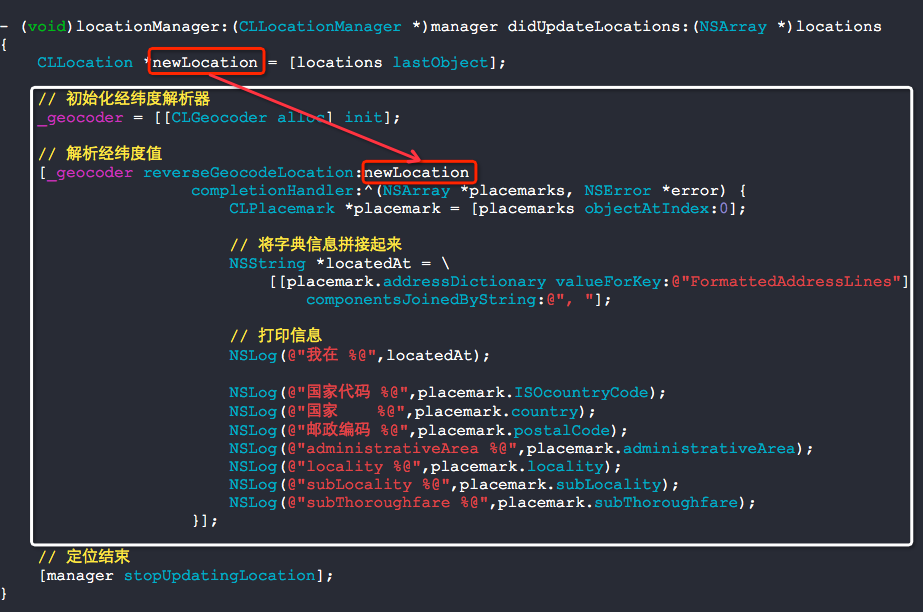
打印信息如下:
2014-05-15 09:40:13.982 CoreLocation[2482:60b] 我在 中国北京市东城区东四街道东四朝阳门北小街2-1号
2014-05-15 09:40:13.986 CoreLocation[2482:60b] 国家代码 CN
2014-05-15 09:40:13.987 CoreLocation[2482:60b] 国家 中国
2014-05-15 09:40:13.988 CoreLocation[2482:60b] 邮政编码 (null)
2014-05-15 09:40:13.989 CoreLocation[2482:60b] administrativeArea 北京市
2014-05-15 09:40:13.991 CoreLocation[2482:60b] locality (null)
2014-05-15 09:40:13.992 CoreLocation[2482:60b] subLocality 东城区
2014-05-15 09:40:13.993 CoreLocation[2482:60b] subThoroughfare 2-1号
将有意义的地址转换为经纬度
//

//  RootViewController.m

//  CoreLocation

//

//  Copyright (c) 2014年 Y.X. All rights reserved.

//

#import "RootViewController.h"

#import <MapKit/MapKit.h>

@interface RootViewController ()<CLLocationManagerDelegate>

@property (nonatomic, strong) CLGeocoder *geocoder;

@end

@implementation RootViewController

- (void)viewDidLoad

{

    [super viewDidLoad];

    _geocoder = [[CLGeocoder alloc] init];

    [_geocoder geocodeAddressString:@"中国北京市东城区东四街道东四朝阳门北小街2-1号"

                  completionHandler:^(NSArray *placemarks, NSError *error)

     {

         if([placemarks count] >  && error == nil)

         {

             NSLog(@"发现了 %lu placemark(s).",(unsigned long)[placemarks count]);

             CLPlacemark *firstPlacemark = [placemarks objectAtIndex:];

             NSLog(@"经度 = %f",firstPlacemark.location.coordinate.longitude);

             NSLog(@"纬度 = %f",firstPlacemark.location.coordinate.latitude);

         }

         else if ([placemarks count] ==  && error == nil)

         {

             NSLog(@"没有找到 placemarks.");

         }

         else if (error != nil)

         {

             NSLog(@"错误 = %@",error);

         }

     }];

}

@end
RootViewController.m

打印信息:
2014-05-15 09:51:15.270 CoreLocation[2525:60b] 发现了 2 placemark(s).
2014-05-15 09:51:15.274 CoreLocation[2525:60b] 经度 = 116.425960
2014-05-15 09:51:15.275 CoreLocation[2525:60b] 纬度 = 39.931609
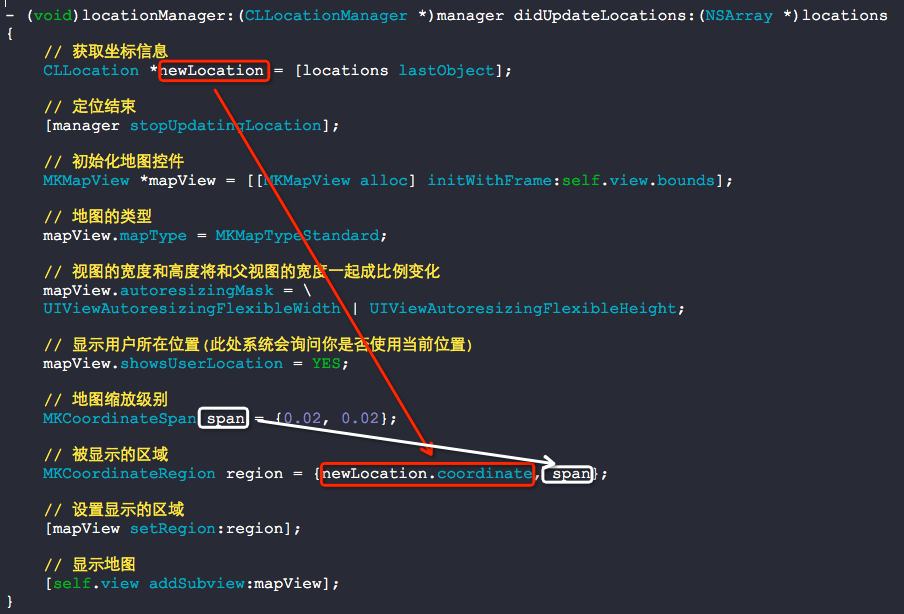
直接显示用户当前位置
//

//  RootViewController.m

//  CoreLocation

//

//  Copyright (c) 2014年 Y.X. All rights reserved.

//

#import "RootViewController.h"

#import <MapKit/MapKit.h>

@interface RootViewController ()<CLLocationManagerDelegate>

@property (nonatomic, strong) CLLocationManager *locationManager;

@end

@implementation RootViewController

- (void)viewDidLoad

{

    [super viewDidLoad];

    // 判断定位功能是否可以使用

    if([CLLocationManager locationServicesEnabled])

    {

        // 初始化定位管理器

        _locationManager = [[CLLocationManager alloc] init];

        _locationManager.delegate = self;

        // 开始定位

        [_locationManager startUpdatingLocation];

    }

    else

    {

        NSLog(@"定位功能不可用");

    }

}

- (void)locationManager:(CLLocationManager *)manager didUpdateLocations:(NSArray *)locations

{

    // 获取坐标信息

    CLLocation *newLocation = [locations lastObject];

    // 定位结束

    [manager stopUpdatingLocation];

    // 初始化地图控件

    MKMapView *mapView = [[MKMapView alloc] initWithFrame:self.view.bounds];

    // 地图的类型

    mapView.mapType = MKMapTypeStandard;

    // 视图的宽度和高度将和父视图的宽度一起成比例变化

    mapView.autoresizingMask = \

    UIViewAutoresizingFlexibleWidth | UIViewAutoresizingFlexibleHeight;

    // 显示用户所在位置(此处系统会询问你是否使用当前位置)

    mapView.showsUserLocation = YES;

    // 地图缩放级别

    MKCoordinateSpan span = {0.02, 0.02};

    // 被显示的区域

    MKCoordinateRegion region = {newLocation.coordinate, span};

    // 设置显示的区域

    [mapView setRegion:region];

    // 显示地图

    [self.view addSubview:mapView];

}

- (void)locationManager:(CLLocationManager *)manager

       didFailWithError:(NSError *)error

{

    NSLog(@"%@", error);

    // 定位结束

    [manager stopUpdatingLocation];

}

@end
RootViewController.m

使用MapKit框架(持续更新)的更多相关文章
- iOS之github第三方框架(持续更新)
1.MBProgressHUD MBProgressHUD是一个开源项目,实现了很多种样式的提示框 使用上简单.方便,并且可以对显示的内容进行自定义,功能很强大,很多项目中都有使用到. 到Github ...
- 收集前端UI框架 持续更新中....
1. elementUI 饿了么出品 基于Vue2 http://element.eleme.io/#/zh-CN 2. ZUI 开源HTML5跨屏框架 (2018年1月4日更新)一个基于 Boot ...
- ECLIPSE/JAVAWEB (二)三大框架之Hibernate框架 持续更新中...
(一)发展历史 在Struts框架中使用jdbc连接来读写数据库,我们最常见的就是打开数据库连接.使用复杂的sql语句进行读写.关闭连接,获得的数据又需要转换或封装后往外传,这是一个非常繁琐的过程. ...
- Eclipse/JavaWeb (三)三大框架之Spring框架 持续更新中...
(一)发展历史 现在我们有三个层了,可是每层之间的调用是怎样的呢?比如显示层的struts需要调用一个业务类,就需要new一个业务类出来,然后使用:业务层需要调用持久层的类,也需要new一个持久层类出 ...
- Eclipse/JavaWeb (一)三大框架之struts框架 持续更新中...
最近主要把javaweb的三大框架过一遍. (一)发展历史 传统的Java Web应用程序是采用JSP+Servlet+Javabean来实现的,这种模式实现了最基本的MVC分层,使得程序分为几层,有 ...
- iOS开发常用第三方开源框架 持续更新中...
键盘管理 TPKeyboardAvoiding IQKeyboardManager(1.2.8) 弹窗HUD MBProgressHUD(0.9.2) SVProgressHUD UIView+Toa ...
- iOS开发系列文章(持续更新……)
iOS开发系列的文章,内容循序渐进,包含C语言.ObjC.iOS开发以及日后要写的游戏开发和Swift编程几部分内容.文章会持续更新,希望大家多多关注,如果文章对你有帮助请点赞支持,多谢! 为了方便大 ...
- 我的敏捷、需求分析、UML、软件设计电子书 - 下载(持续更新中)
我将所有我的电子书汇总在一起,方便大家下载!(持续更新) 文档保存在我的网站——软件知识原创基地上(www.umlonline.org),请放心下载. 1)软件设计是怎样炼成的?(2014-4-1 发 ...
- 干货!IT小伙伴们实用的网站及工具大集合!持续更新!
1.Git 还在担心自己辛辛苦苦写的代码被误删了吗?还在担心自己改错了代码不能挽回吗?还在苦恼于多人开发合作找不到一个好的工具吗?那么用Git就对 了,Git是一个开源的分布式版本控制系统,用以有效. ...
随机推荐
- 高版本sonar安装遇到的坑-sonar 6.7.5
最近安装了6.7.5版本的sonar,发现里面的坑还是很多,下面列举下遇到的坑 sonar插件地址:https://docs.sonarqube.org/display/PLUG/Plugin+Lib ...
- MySql的数据目录
数据目录的位置 MySQL数据目录的默认位置已经被编译到MySQL服务器程序里了. 在启动服务器时,通过使用一个--datadir=dir_name选项可以明确指定数据目录位置.把MySQL数据目录安 ...
- PHP中判断字符串是否包含某个字符时,建议使用正则表达式preg_match()
判断字符串中是否包含 某个字符时,在java中时直接使用 indexOf()来判断的 在php中好像也要对应的,strpos(),stripos() 不过每次我用的都很不爽,老是出现各种各样的小问题, ...
- 获取单个checkbox选中项
1.获取单个checkbox选中项(三种写法)$("input:checkbox:checked").val()或者$("input:[type='checkbox']: ...
- Java 实例 - 标签(Label)
Java 实例 Java 中的标签是为循环设计的,是为了在多重循环中方便的使用break 和coutinue . 以下实例当在循环中使用 break 或 continue 循环时跳到指定的标签处: ...
- 数据库字段值为null利用setInc方法无法直接写入
1.数据库字段值为null利用setInc方法无法直接写入,先判断是否为空,再写入. if($points->add($dataList)){ $user=M('cuser'); $null=$ ...
- docker镜像使用和总结
一.Docker镜像是什么? 操作系统分为内核和用户空间.在Linux中,内核启动后会挂载 root 文件系统为其提供用户空间支持. docker镜像就相当于一个 root文件系统.比如:官方镜像ub ...
- 车厢调度(train.cpp)
车厢调度(train.cpp) [问题描述] 有一个火车站,铁路如图所示,每辆火车从A驶入,再从B方向驶出,同时它的车厢可以重新组合.假设从A方向驶来的火车有n节(n<=1000) ...
- mysql的一些sql用法
mysql中修改列名: alter table 表名 change abc def 列类型;比如 alter table student change pws psw char(10);
- 【Web crawler】print_all_links
How to repeat Procedures&Control CS重要概念 1.1 过程procedures 封装代码,代码重用 1.2 控制Control DEMO # -*- codi ...