
struts 文件下载 annotation 注解版
【本文简介】
本文将简单介绍使用 struts2 ,通过零配置和 annotation 实现文件下载功能。
【文件夹结构】
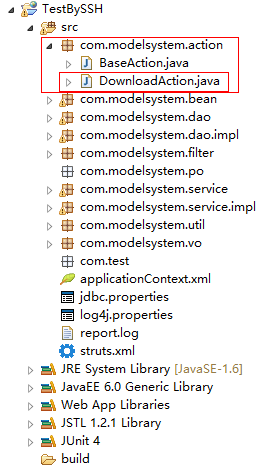
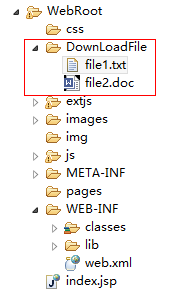
【web.xml有关struts的配置】
    <filter>

        <filter-name>struts2</filter-name>

        <filter-class>

            org.apache.struts2.dispatcher.ng.filter.StrutsPrepareAndExecuteFilter</filter-class>

    </filter>

    <filter-mapping>

        <filter-name>struts2</filter-name>

        <url-pattern>*.action</url-pattern>

    </filter-mapping>

    <filter-mapping>

        <filter-name>struts2</filter-name>

        <url-pattern>*.jsp</url-pattern>

    </filter-mapping>
【访问的对应的url】
以上的web.xml配置导致下面的访问地址的方法名有要加:.action
http://localhost:8080/TestBySSH/download!testDownload.action?fileName=file1.txt
【action代码】
 package com.modelsystem.action;

 import java.io.FileInputStream;

 import java.io.FileNotFoundException;

 import java.io.InputStream;

 import org.apache.struts2.convention.annotation.Namespace;

 import org.apache.struts2.convention.annotation.ParentPackage;

 import org.apache.struts2.convention.annotation.Result;

 import org.apache.struts2.convention.annotation.ResultPath;

 import org.apache.struts2.convention.annotation.Results;

 /**

  * @描述 struts 文件下载 annotation 注解版

  * @作者   小M

  * @博客 http://www.cnblogs.com/xiaoMzjm/

  * @时间 2014/07/30

  */

 @ParentPackage("struts-default")

 @Namespace("/")

 @ResultPath(value = "/")

 @Results({

         @Result(params = {

                 // 下载的文件格式

                 "contentType", "application/octet-stream",

                 // 调用action对应的方法

                 "inputName", "inputStream",

                 // HTTP协议,使浏览器弹出下载窗口

                 "contentDisposition", "attachment;filename=\"${fileName}\"",

                 // 文件大小

                 "bufferSize", "10240"},

                 // result 名

                 name = "download",

                 // result 类型

                 type = "stream")

 })

 public class DownloadAction extends BaseAction{

     private static final long serialVersionUID = 1L;

     /**

      * 下载文件名

      * 对应annotation注解里面的${fileName},struts 会自动获取该fileName

      */

     private String fileName;

     public String getFileName() {

         return fileName;

     }

     public void setFileName(String fileName) {

         this.fileName = fileName;

     }

     /**

      * 下载文件应访问该地址

      * 对应annotation注解里面的 name = "download"

      */

     public String testDownload() {

         return "download";

     }

     /**

      * 获取下载流

      * 对应 annotation 注解里面的 "inputName", "inputStream"

      * 假如 annotation 注解改为 "inputName", "myStream",则下面的方法则应改为:getMyStream

      * @return InputStream

      */

     public InputStream getInputStream() {

         // 文件所放的文件夹 , 有关路径问题,请参考另一篇博文:http://www.cnblogs.com/xiaoMzjm/p/3878758.html

         String path = getServletContext().getRealPath("/")+"\\DownLoadFile\\";

         // 下载路径

         String downLoadPath = path + fileName;

         // 输出

         try {

             return new FileInputStream(downLoadPath);

         } catch (FileNotFoundException e) {

             e.printStackTrace();

         }

         return null;

     }

 }
struts 文件下载 annotation 注解版的更多相关文章
- struts 多文件上传 annotation注解(零配置)+ ajaxfileupload + 异步 版本
[本文简介] struts 多文件上传.基于”零配置“+"ajaxfileupload" 的一个简单例子. [导入依赖jar包] jquery-1.7.2.js : http:// ...
- 整合初步--------->SSH(注解版)
上面的一篇博客已经介绍了 Spring和Hibernate之间的整合,没看过的童鞋可以去看看,这篇博客讲解Spring+Hibernate+Struts2注解版......... 个人觉得使用注解可能 ...
- struts2+hibernate+spring注解版框架搭建以及简单测试(方便脑补)
为了之后学习的日子里加深对框架的理解和使用,这里将搭建步奏简单写一下,目的主要是方便以后自己回来脑补: 1:File--->New--->Other--->Maven--->M ...
- SpringMVC配置版到注解版
什么是springmvc? 1.1.什么是MVC MVC是模型(Model).视图(View).控制器(Controller)的简写,是一种软件设计规范. 是将业务逻辑.数据.显示分离的方法来组织代码 ...
- springMVC(注解版笔记)
springMVC(注解版) 较之于非注解版本,发生一下变化: 1.配置文件需要配置的标签有: <!-- 包的扫描,此包下面的所有包都启用注解 --> <context:compon ...
- SpringMVC环境搭建---xml版及注解版
一.建立 JavaWeb 项目(基于Intellij 14.0.3搭建) 1.建立一个 Java 项目,在项目下新建一个文件夹 webapp ,然后在该文件夹下新建一个 WEB-INF 文件夹: 2. ...
- SSM-Spring-17:Spring中aspectJ注解版
------------吾亦无他,唯手熟尔,谦卑若愚,好学若饥------------- AspectJ AspectJ是一个面向切面的框架,它扩展了Java语言,定义了AOP 语法,能够在编译期提供 ...
- SpringBoot整合Mybatis【非注解版】
接上文:SpringBoot整合Mybatis[注解版] 一.项目创建 新建一个工程 选择Spring Initializr,配置JDK版本 输入项目名 选择构建web项目所需的state ...
- spring mvc注解版01
spring mvc是基于servlet实现的在spring mvc xml版中已经说过了,注解版相较于xml版更加简洁灵活. web项目的jar包: commons-logging-1.1.3.ja ...
随机推荐
- PHP特性整合(PHP5.X到PHP7.1.x)
Buid-in web server内置了一个简单的Web服务器 把当前目录作为Root Document只需要这条命令即可: php -S localhost:3300 也可以指定其它路径 php ...
- 资源文件properties的存放路径
参考这篇博客:http://lavasoft.blog.51cto.com/62575/184605 目前看来,大多数的做法是这样的: 比如a.properties需要被com.xxx.yyy这个包中 ...
- PHP标签
1.PHP原标签 2.脚本标签 3.短标签 需要short_open_tag=on,默认情况下为on 4.asp标签 需要asp_tags为on,默认为off
- 命令行执行php
D:\software\phpStudy\php55
- Visual Studio 2012/2010/2008 远程调试
第一步:将你本地的账号密码设置成跟服务器一样,因为远程调试也是需要用户凭证的. 第二步:将vs工具里的Remote Debugger文件夹拷贝到目标机器.大致的目录应该是:D:\Program Fil ...
- K-Means算法Demo
简介:本Demo是参照这个网站上的Demo自己用Java实现的.将Java打包为Jar,再将Jar转为exe,源代码及程序Demo下载请点我. K-Means算法简介 我尽量用通俗易懂但不规范的语言来 ...
- java动态编译 (java在线执行代码后端实现原理)
需求:要实现一个web网页中输入java代码,然后能知道编译结果以及执行结果 类似于菜鸟java在线工具的效果:https://c.runoob.com/compile/10 刚开始从什么概念都没有到 ...
- 两个表join 连接,去掉重复的数据
-------distinct 去重复查询 select * from accounts acc join (select distinct accid from roles) r on r.acc ...
- 【BZOJ4540】[Hnoi2016]序列 莫队算法+单调栈
[BZOJ4540][Hnoi2016]序列 Description 给定长度为n的序列:a1,a2,…,an,记为a[1:n].类似地,a[l:r](1≤l≤r≤N)是指序列:al,al+1,…,a ...
- oracle 实现多字段匹配一个关键字查询语句
oracle 实现多字段匹配一个关键字查询语句:有两种方法(经测试,10g中不能用,11g才行): 第一种. select * from table where ('字段名1' ||'字段名2' || ...