
The Internet Communications Engine (Ice) 跨平台异构通讯方案 第二弹-Hello world!
如果不知道ICE是什么的同学,请看上一篇的ICE简介:http://www.cnblogs.com/winds/p/3864677.html
好了,HelloWorld,从中间语言讲起。
首先,我们新建一个控制台项目,添加一个txt文件,在其中写上中间语言代码:
#ifndef HELLO_ICE

#define HELLO_ICE

module Demo

{

interface Hello

{

    void sayHello(int delay);

    void shutdown();

};

};

#endif
这是一段很简单的代码,其中
#ifndef HELLO_ICE

#define HELLO_ICE

#endif
这是ICE的一个的规范而已,必须要加,否则接下来的编译器会通不过。这个语法和.Net的条件编译不一样,更多的像C中的代码风格。
module Demo

{

}
对应的是.net中的命名空间
interface Hello

{

    void sayHello(int delay);

    void shutdown();

};
这个是一个简单的接口。简单的介绍完后,接下来的我们把txt后缀改为.ice后缀。
接下来,右键项目:
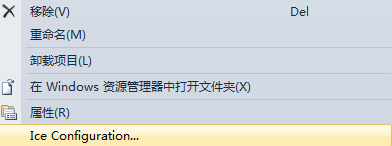
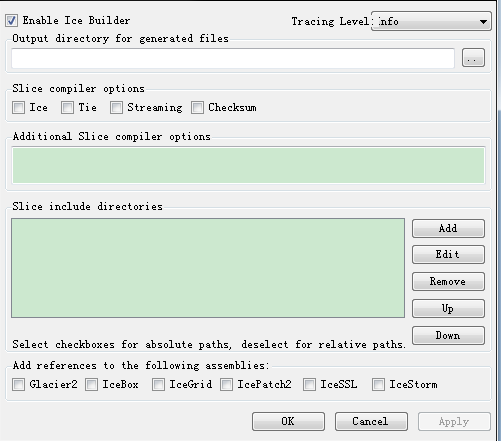
将EnableBuilder勾上,接下来ICE会自动帮我们生成Hello.cs文件:
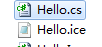
好了,这个Hello.cs文件有我们定义好的被编译为C#的接口,接下里我们开始让服务端实现接口:
public class HelloI : HelloDisp_

{

    public override void sayHello(int delay, Ice.Current current)

    {

        if(delay > )

        {

            System.Threading.Thread.Sleep(delay);

        }

        System.Console.Out.WriteLine("Hello World!");

    }

    public override void shutdown(Ice.Current current)

    {

        System.Console.Out.WriteLine("Shutting down...");

        current.adapter.getCommunicator().shutdown();

    }

}
其中HelloDisp_为Hello.cs文件中被编译为C#了的一个抽象类,我们实现接口,接下来,我们了解一下ICE的基本配置(好吧,又是配置),不过这个配置比起WCF简单多了:
Hello.Endpoints=tcp -p :udp -p
当然我们要新建一个配置文件,名字可以随便取。这里我取的名字为:config.server 放在项目的根目录下:
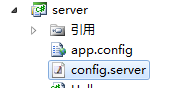
接下来,写服务端:
public class Server

{

    class App : Ice.Application

    {

        public override int run(string[] args)

        {

            if(args.Length > )

            {

                System.Console.Error.WriteLine(appName() + ": too many arguments");

                return ;

            }

            Ice.ObjectAdapter adapter = communicator().createObjectAdapter("Hello");

            adapter.add(new HelloI(), communicator().stringToIdentity("hello"));

            adapter.activate();

            communicator().waitForShutdown();

            return ;

        }

    }

    public static int Main(string[] args)

    {

        App app = new App();

        app.main(args, "config.server");return ;

    }

}
OK了,服务端写完了,接下来写客户端:
public class Client

{

    public class App : Ice.Application

    {

        private static void menu()

        {

            Console.Write(

                "usage:\n" +

                "t: send greeting as twoway\n" +

                "o: send greeting as oneway\n" +

                "O: send greeting as batch oneway\n" +

                "d: send greeting as datagram\n" +

                "D: send greeting as batch datagram\n" +

                "f: flush all batch requests\n" +

                "T: set a timeout\n" +

                "P: set a server delay");

            if(_haveSSL)

            {

                Console.Write("\nS: switch secure mode on/off");

            }

            Console.WriteLine(

                "\ns: shutdown server\n" +

                "x: exit\n" +

                "?: help\n");

        }

        public override int run(string[] args)

        {

            if(args.Length > )

            {

                Console.Error.WriteLine(appName() + ": too many arguments");

                return ;

            }

            try

            {

                communicator().getPluginManager().getPlugin("IceSSL");

                _haveSSL = true;

            }

            catch(Ice.NotRegisteredException)

            {

            }

            HelloPrx twoway = HelloPrxHelper.checkedCast(

                communicator().propertyToProxy("Hello.Proxy").ice_twoway().ice_timeout(-).ice_secure(false));

            if(twoway == null)

            {

                Console.Error.WriteLine("invalid proxy");

                return ;

            }

            HelloPrx oneway = (HelloPrx)twoway.ice_oneway();

            HelloPrx batchOneway = (HelloPrx)twoway.ice_batchOneway();

            HelloPrx datagram = (HelloPrx)twoway.ice_datagram();

            HelloPrx batchDatagram =(HelloPrx)twoway.ice_batchDatagram();

            bool secure = false;

            int timeout = -;

            int delay = ;

            menu();

            string line = null;

            do

            {

                try

                {

                    Console.Out.Write("==> ");

                    Console.Out.Flush();

                    line = Console.In.ReadLine();

                    if(line == null)

                    {

                        break;

                    }

                    if(line.Equals("t"))

                    {

                        twoway.sayHello(delay);

                    }

                    else if(line.Equals("o"))

                    {

                        oneway.sayHello(delay);

                    }

                    else if(line.Equals("O"))

                    {

                        batchOneway.sayHello(delay);

                    }

                    else if(line.Equals("d"))

                    {

                        if(secure)

                        {

                            Console.WriteLine("secure datagrams are not supported");

                        }

                        else

                        {

                            datagram.sayHello(delay);

                        }

                    }

                    else if(line.Equals("D"))

                    {

                        if(secure)

                        {

                            Console.WriteLine("secure datagrams are not supported");

                        }

                        else

                        {

                            batchDatagram.sayHello(delay);

                        }

                    }

                    else if(line.Equals("f"))

                    {

                        communicator().flushBatchRequests();

                    }

                    else if(line.Equals("T"))

                    {

                        if(timeout == -)

                        {

                            timeout = ;

                        }

                        else

                        {

                            timeout = -;

                        }

                        twoway = (HelloPrx)twoway.ice_timeout(timeout);

                        oneway = (HelloPrx)oneway.ice_timeout(timeout);

                        batchOneway = (HelloPrx)batchOneway.ice_timeout(timeout);

                        if(timeout == -)

                        {

                            Console.WriteLine("timeout is now switched off");

                        }

                        else

                        {

                            Console.WriteLine("timeout is now set to 2000ms");

                        }

                    }

                    else if(line.Equals("P"))

                    {

                        if(delay == )

                        {

                            delay = ;

                        }

                        else

                        {

                            delay = ;

                        }

                        if(delay == )

                        {

                            Console.WriteLine("server delay is now deactivated");

                        }

                        else

                        {

                            Console.WriteLine("server delay is now set to 2500ms");

                        }

                    }

                    else if(_haveSSL && line.Equals("S"))

                    {

                        secure = !secure;

                        twoway = (HelloPrx)twoway.ice_secure(secure);

                        oneway = (HelloPrx)oneway.ice_secure(secure);

                        batchOneway = (HelloPrx)batchOneway.ice_secure(secure);

                        datagram = (HelloPrx)datagram.ice_secure(secure);

                        batchDatagram = (HelloPrx)batchDatagram.ice_secure(secure);

                        if(secure)

                        {

                            Console.WriteLine("secure mode is now on");

                        }

                        else

                        {

                            Console.WriteLine("secure mode is now off");

                        }

                    }

                    else if(line.Equals("s"))

                    {

                        twoway.shutdown();

                    }

                    else if(line.Equals("x"))

                    {

                        // Nothing to do

                    }

                    else if(line.Equals("?"))

                    {

                        menu();

                    }

                    else

                    {

                        Console.WriteLine("unknown command `" + line + "'");

                        menu();

                    }

                }

                catch(System.Exception ex)

                {

                    Console.Error.WriteLine(ex);

                }

            }

            while (!line.Equals("x"));

            return ;

        }

        private static bool _haveSSL = false;

    }

    public static int Main(string[] args)

    {

        App app = new App();

        return app.main(args, "config.client");

    }

}
从这个客户端明眼人应该能看出不少东西,以后再依此介绍。当然客户端文件配置:
Hello.Proxy=hello:tcp -p :udp -p

Ice.Default.Host=192.168.1.103
好了,启动服务端和运行客户端,效果如下:

Hello world完成。源码奉上:http://files.cnblogs.com/winds/hello.zip
The Internet Communications Engine (Ice) 跨平台异构通讯方案 第二弹-Hello world!的更多相关文章
- The Internet Communications Engine (Ice) 跨平台异构通讯方案 第一弹-ICE简介
.net中的通讯方案很多,从.net Remoting,MSMQ,Webservice,WSE,WCF等等,他们都有一个特点,易用,但是都不能跨语种异构,如果你服务端要用java开发,客户端用C#开发 ...
- 什么是ICE (Internet Communications Engine)
http://user.qzone.qq.com/77811970 直接在google上搜索ICE,出来的结果并不多,所以很多人就认为ICE是个神秘的东西,其实,国内已经有很多大型应用在使用ICE了. ...
- Ice-E(Embedded Internet Communications Engine)移植到s3c2440A(arm9)linux(2.6.12)上的
2009-03-26 18:31:31 原文链接 1.前言 ICE-E是ICE在嵌入式上运行的一个版本,与ICE比较如下: Category Ice 3.3.0 Ice-E 1.3.0 Thread ...
- ZeroC Ice启用SSL通讯的配置
Zeroc ICE ( Internet Communications Engine )中间件号称标准统一,开源,跨平台,跨语言,分布式,安全,服务透明,负载均衡,面向对象,性能优越,防火墙穿透,通讯 ...
- 【开源】C#跨平台物联网通讯框架ServerSuperIO(SSIO)
[连载]<C#通讯(串口和网络)框架的设计与实现>-1.通讯框架介绍 [连载]<C#通讯(串口和网络)框架的设计与实现>-2.框架的总体设计 目 录 C#跨平台物联 ...
- 开源跨平台IOT通讯框架ServerSuperIO,集成到NuGet程序包管理器,以及Demo使用说明
物联网涉及到各种设备.各种传感器.各种数据源.各种协议,并且很难统一,那么就要有一个结构性的框架解决这些问题.SSIO就是根据时代发展的阶段和现实实际情况的结合产物. 各种数据信息,如下图 ...
- 【重大更新】开源跨平台物联网通讯框架ServerSuperIO 2.0(SSIO)下载
更新具体细节参见:[更新设计]跨平台物联网通讯框架ServerSuperIO 2.0 ,功能.BUG.细节说明,以及升级思考过程! 声明:公司在建设工业大数据平台,SSIO正好能派上用场,所以抓紧时间 ...
- [更新设计]跨平台物联网通讯框架ServerSuperIO 2.0 ,功能、BUG、细节说明,以及升级思考过程!
注:ServerSuperIO 2.0 还没有提交到开源社区,在内部测试!!! 1. ServerSuperIO(SSIO)说明 SSIO是基于早期工业现场300波特率通讯传输应用场景发展.演化而来. ...
- [更新]跨平台物联网通讯框架 ServerSuperIO v1.2(SSIO),增加数据分发控制模式
1.[开源]C#跨平台物联网通讯框架ServerSuperIO(SSIO) 2.应用SuperIO(SIO)和开源跨平台物联网框架ServerSuperIO(SSIO)构建系统的整体方案 3.C#工业 ...
随机推荐
- 爬虫开发7.scrapy框架简介和基础应用
scrapy框架简介和基础应用阅读量: 1432 scrapy 今日概要 scrapy框架介绍 环境安装 基础使用 今日详情 一.什么是Scrapy? Scrapy是一个为了爬取网站数据,提取结构性数 ...
- flutter 保存图片到本地
f'lutter 图片的保存 分为俩步: 1.开启存储图片权限开启权限需要用到permission_handler pubspec 添加 permission_handler: ^3.0.1下载包就可 ...
- Redis数据持久化,安全
一.redis数据持久化 由于redis是一个内存数据库,如果系统遇到致命问题需要关机或重启,内存中的数据就会丢失,这是生产环境所不能允许的.所以redis提供了数据持久化的能力. redis提供了两 ...
- 关于:maven项目中pom.xml文件添加依赖无法自动搜索的问题
用的是eclipse 1.Window------>Show View------->Maven Repositories(这个选项一般不直接显示,而在others里面) 2.操作完毕后会 ...
- UDF-Java提取身份证内信息
1.使用方法 #获取省份ID create temporary function getProvIdByCardIdUDF as 'com.st.PersonInfoByCardIdUDF.getPr ...
- SecureCRT上传下载文件
这篇内容在哪看到的我也找不到了,不过就是做个记录. 步骤如下: 1.SecureCRT连接远程终端. 2.在连接窗口上方右击,弹出菜单后点击Connect SFTP Session, 3.点击后弹出窗 ...
- window.onload和JQuery中$(function(){})的区别即其实现原理
一.区别 window.onload必须等到页面内包括图片的所有元素加载完毕后才能执行. 在Jquery中$(function(){ })和$(document).ready(function(){ ...
- expect分发脚本
[分发系统]yum -y install expect #!/usr/bin/expect set host "192.168.11.102" " spawn ssh r ...
- logo back 日志 发送邮件
<?xml version="1.0" encoding="UTF-8"?> <configuration> <!--<pr ...
- Chrome打开网页都提示Flash Player因过期而遭到阻止
1. 运行Chrome浏览器,地址栏输入:chrome://plugins/,找到pepflashplayer.dll安装位置, 如:D:\Program Files\GoogleChromePort ...