
CentOS 7.2安装11g数据库软件
 [Worker ] [ -- ::33.038 BST ] [RuntimeExec.runCommand:]  /tmp/CVU_11.2.0..0_oracle/exectask.sh -getkernelparam semmsl

 [Worker ] [ -- ::33.038 BST ] [RemoteExecCommand.validateCmdArgs:]  Calling validateCmdArgs

 [Worker ] [ -- ::33.038 BST ] [RemoteExecCommand.validateCmdArgs:]  Checking for arguments validity

 [performChecks.flowWorker] [ -- ::33.038 BST ] [Semaphore.acquire:]  ClientResource Constructor:Blocking Semaphore owned by performChecks.flowWorker:Acquire called by thread performChecks.flowWorker m_count=

 [Worker ] [ -- ::33.038 BST ] [RemoteExecCommand.execute:]  Trying to runRemoteExecCmd first to check if server is already running

 [Worker ] [ -- ::33.038 BST ] [RemoteExecCommand.executeInternal:]  Calling executeInternal()

 [Worker ] [ -- ::33.039 BST ] [RemoteExecCommand.executeInternal:]  executing the command: '/tmp/CVU_11.2.0.4.0_oracle/exectask.sh' with args '-getkernelparam semmsl ', 'm_stdin == null ->true', 'm_localExecution ->false', 'm_chkException ->false'

 [Worker ] [ -- ::33.046 BST ] [Utils.getLocalHost:]  Hostname retrieved: rac1, returned: rac1

 [Worker ] [ -- ::33.047 BST ] [NativeSystem.isCmdScv:]  isCmdScv: cmd=[/usr/bin/ssh -o FallBackToRsh=no  -o PasswordAuthentication=no  -o StrictHostKeyChecking=yes  -o NumberOfPasswordPrompts=  rac2 -n ]

 [Worker ] [ -- ::33.047 BST ] [NativeSystem.isCmdScv:]  isCmdScv: /usr/bin/ssh is present.

 [Worker ] [ -- ::33.047 BST ] [NativeSystem.isCmdScv:]  isCmdScv: /usr/bin/ssh is a file.

 [Worker ] [ -- ::33.047 BST ] [NativeSystem.isCmdScv:]  isCmdScv: returned true

 [Worker ] [ -- ::33.048 BST ] [RuntimeExec.runCommand:]  Calling Runtime.exec() with the command

 [Worker ] [ -- ::33.048 BST ] [RuntimeExec.runCommand:]  /bin/sh

 [Worker ] [ -- ::33.048 BST ] [RuntimeExec.runCommand:]  -c

 [Worker ] [ -- ::33.048 BST ] [RuntimeExec.runCommand:]  /usr/bin/ssh -o FallBackToRsh=no  -o PasswordAuthentication=no  -o StrictHostKeyChecking=yes  -o NumberOfPasswordPrompts=  rac2 -n /tmp/CVU_11.2.0..0_oracle/exectask.sh -getkernelparam semmsl

 [Thread-] [ -- ::33.050 BST ] [StreamReader.run:]  In StreamReader.run

 [Worker ] [ -- ::33.049 BST ] [RuntimeExec.runCommand:]  runCommand: Waiting for the process

 [Thread-] [ -- ::33.050 BST ] [StreamReader.run:]  In StreamReader.run

 [Thread-] [ -- ::33.069 BST ] [StreamReader.run:]  In StreamReader.run

 [Thread-] [ -- ::33.071 BST ] [StreamReader.run:]  In StreamReader.run

 [Worker ] [ -- ::33.071 BST ] [RuntimeExec.runCommand:]  runCommand: Waiting for the process

 [Thread-] [ -- ::33.183 BST ] [StreamReader.run:]  OUTPUT><CV_VAL><CV_CUR>kernel.sem =

 [Thread-] [ -- ::33.183 BST ] [StreamReader.run:]  OUTPUT></CV_CUR><CV_CFG>kernel.sem =

 [Thread-] [ -- ::33.183 BST ] [StreamReader.run:]  OUTPUT></CV_CFG></CV_VAL><CV_VRES></CV_VRES><CV_LOG>Exectask: kernel param retrieval successful</CV_LOG><CV_ERES></CV_ERES>

 [Worker ] [ -- ::33.183 BST ] [RuntimeExec.runCommand:]  runCommand: process returns

 [Worker ] [ -- ::33.183 BST ] [RuntimeExec.runCommand:]  RunTimeExec: output>

 [Worker ] [ -- ::33.183 BST ] [RuntimeExec.runCommand:]  <CV_VAL><CV_CUR>kernel.sem =

 [Worker ] [ -- ::33.183 BST ] [RuntimeExec.runCommand:]  </CV_CUR><CV_CFG>kernel.sem =

 [Worker ] [ -- ::33.184 BST ] [RuntimeExec.runCommand:]  </CV_CFG></CV_VAL><CV_VRES></CV_VRES><CV_LOG>Exectask: kernel param retrieval successful</CV_LOG><CV_ERES></CV_ERES>

 [Worker ] [ -- ::33.184 BST ] [RuntimeExec.runCommand:]  RunTimeExec: error>

 [Worker ] [ -- ::33.184 BST ] [RuntimeExec.runCommand:]  Returning from RunTimeExec.runCommand

 [Worker ] [ -- ::33.184 BST ] [UnixSystem.dorunRemoteExecCmd:]  retval =

 [Worker ] [ -- ::33.184 BST ] [UnixSystem.dorunRemoteExecCmd:]  exitValue =

 [Worker ] [ -- ::33.184 BST ] [RemoteExecCommand.executeInternal:]  cmdSuccess status: true

 [Worker ] [ -- ::33.184 BST ] [RemoteExecCommand.execute:]  cmdSuccess status: true

 [Worker ] [ -- ::33.184 BST ] [VerificationUtil.fetchTextByTags:]

 Tags <CV_VAL> and </CV_VAL> contains:<CV_CUR>kernel.sem =

 </CV_CUR><CV_CFG>kernel.sem =

 </CV_CFG>

 [Worker ] [ -- ::33.184 BST ] [VerificationCommand.execute:]  Formatted exectask output is:

  <CV_VAL><CV_CUR>kernel.sem =

 </CV_CUR><CV_CFG>kernel.sem =

 </CV_CFG></CV_VAL><CV_VRES></CV_VRES><CV_LOG>Exectask: kernel param retrieval successful</CV_LOG><CV_ERES></CV_ERES>

 [Worker ] [ -- ::33.184 BST ] [VerificationUtil.fetchTextByTags:]

 Tags <CV_VRES> and </CV_VRES> contains:

 [Worker ] [ -- ::33.184 BST ] [VerificationCommand.execute:]  VfyCode is:

 [Worker ] [ -- ::33.184 BST ] [VerificationUtil.fetchTextByTags:]

 Tags <CV_ERES> and </CV_ERES> contains:

 [Worker ] [ -- ::33.184 BST ] [VerificationUtil.fetchTextByTags:]

 Tags <CV_CUR> and </CV_CUR> contains:kernel.sem =

 [Worker ] [ -- ::33.184 BST ] [VerificationUtil.fetchTextByTags:]

 Tags <CV_CUR> and </CV_CUR> contains:kernel.sem =

 [Worker ] [ -- ::33.184 BST ] [VerificationUtil.fetchTextByTags:]

 Tags <CV_CFG> and </CV_CFG> contains:kernel.sem =

 [Worker ] [ -- ::33.185 BST ] [ClusterConfig$ExecuteCommand.returnCommandToClient:]  returnCommandToClient; fillCount= is full=false

 [Worker ] [ -- ::33.185 BST ] [Semaphore.acquire:]  SyncBufferEmpty:Acquire called by thread Worker  m_count=

 [Worker ] [ -- ::33.185 BST ] [Semaphore.release:]  SyncBufferFull:Release called by thread Worker  m_count=

 [Worker ] [ -- ::33.185 BST ] [ClientResource.getListener:]  Calling getListener

 [Worker ] [ -- ::33.185 BST ] [ClusterConfig$ExecuteCommand.run:]  Owner Thread name of the blocking Semaphore performChecks.flowWorker

 [Worker ] [ -- ::33.185 BST ] [ClusterConfig$ExecuteCommand.run:]  Obtained Semaphore

 [Worker ] [ -- ::33.185 BST ] [Semaphore.release:]  ClientResource Constructor:Blocking Semaphore owned by performChecks.flowWorker:Release called by thread Worker  m_count=

 [Worker ] [ -- ::33.185 BST ] [ClusterConfig$ExecuteCommand.run:]  Released Semaphore by worker=Worker

 [Worker ] [ -- ::33.185 BST ] [Semaphore.acquire:]  SyncBufferFull:Acquire called by thread Worker  m_count=

 [performChecks.flowWorker] [ -- ::33.185 BST ] [ClusterConfig.block:]  block acquired semnum=

 [performChecks.flowWorker] [ -- ::33.185 BST ] [Semaphore.acquire:]  ClientResource Constructor:Blocking Semaphore owned by performChecks.flowWorker:Acquire called by thread performChecks.flowWorker m_count=

 ^C
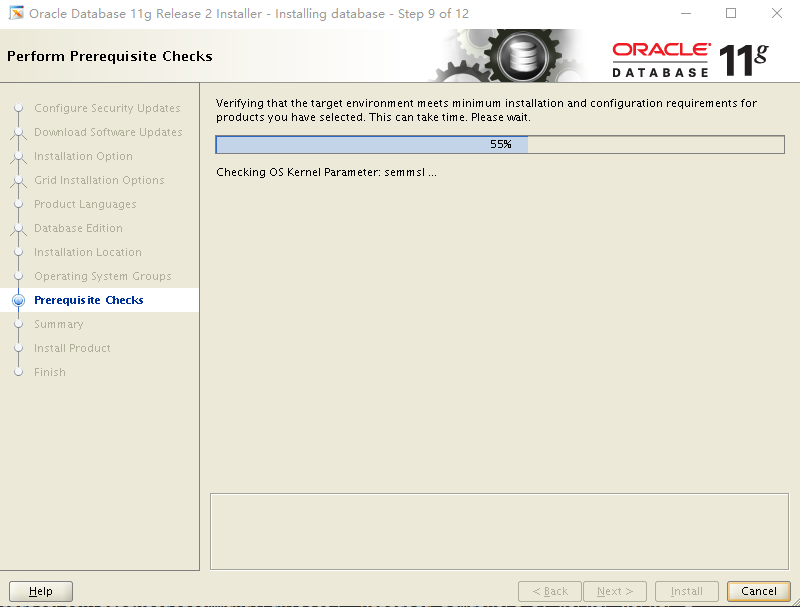
Therefore,I specify "-ignorePrereq" option again to skip the unkown issue.
 [oracle@rac1 database]$ ./runInstaller -ignorePrereq

 Starting Oracle Universal Installer...

 Checking Temp space: must be greater than  MB.   Actual  MB    Passed

 Checking swap space: must be greater than  MB.   Actual  MB    Passed

 Checking monitor: must be configured to display at least  colors.    Actual     Passed

 Preparing to launch Oracle Universal Installer from /tmp/OraInstall2018--28_01--14AM. Please wait ...[oracle@rac1 database]$ You can find the log of this install session at:

  /u01/oraInventory/logs/installActions2018--28_01--14AM.log
Then,I encountered another two making error in the step of linking binaries:

 . vim $ORACLE_HOME/sysman/lib/ins_emagent.mk

 . change "$(MK_EMAGENT_NMECTL)" into "$(MK_EMAGENT_NMECTL) -lnnz11"

 . click "Retry" to continue the OUI installation.
 [oracle@rac1 bin]$ ldd rman

     linux-vdso.so. =>  (0x00007fff017c4000)

     librt.so. => /lib64/librt.so. (0x00007ffbcd0df000)

     libclntsh.so.11.1 => /u01/oracle/db/lib/libclntsh.so.11.1 (0x00007ffbca677000)

     libnnz11.so => /u01/oracle/db/lib/libnnz11.so (0x00007ffbca2aa000)

     libdl.so. => /lib64/libdl.so. (0x00007ffbca0a6000)

     libm.so. => /lib64/libm.so. (0x00007ffbc9da4000)

     libpthread.so. => /lib64/libpthread.so. (0x00007ffbc9b88000)

     libnsl.so. => /lib64/libnsl.so. (0x00007ffbc996e000)

     libc.so. => /lib64/libc.so. (0x00007ffbc95a1000)

     libaio.so. => /lib64/libaio.so. (0x00007ffbc939f000)

     /lib64/ld-linux-x86-.so. (0x00007ffbcd2e7000)
Execute the below command and retry making:
 [oracle@rac1 bin]$ /usr/bin/make -f $ORACLE_HOME/rdbms/lib/ins_rdbms.mk ioracle

 chmod  /u01/oracle/db/bin

 test ! -f /u01/oracle/db/bin/oracle ||\

    mv -f /u01/oracle/db/bin/oracle /u01/oracle/db/bin/oracleO

 mv /u01/oracle/db/rdbms/lib/oracle /u01/oracle/db/bin/oracle

 chmod  /u01/oracle/db/bin/oracle

 [oracle@rac1 bin]$ /usr/bin/make -f $ORACLE_HOME/rdbms/lib/ins_rdbms.mk irman

  - Linking recovery manager (rman)

 rm -f /u01/oracle/db/rdbms/lib/rman

 gcc -o /u01/oracle/db/rdbms/lib/rman -m64 -z noexecstack -L/u01/oracle/db/rdbms/lib/ -L/u01/oracle/db/lib/ -L/u01/oracle/db/lib/stubs/   /u01/oracle/db/lib/s0main.o /u01/oracle/db/rdbms/lib/sskrmed.o /u01/oracle/db/rdbms/lib/skrmpt.o -ldbtools11 -lclient11 -lsql11 -lpls11  -lrt -lplp11 -lsnls11 -lunls11 -lnls11 -lslax11 -lpls11  -lrt -lplp11 /u01/oracle/db/lib/libplc11.a -lclntsh  `cat /u01/oracle/db/lib/ldflags`    -lncrypt11 -lnsgr11 -lnzjs11 -ln11 -lnl11 -lnro11 `cat /u01/oracle/db/lib/ldflags`    -lncrypt11 -lnsgr11 -lnzjs11 -ln11 -lnl11 -lnnz11 -lzt11 -lztkg11 -lclient11 -lnnetd11  -lvsn11 -lcommon11 -lgeneric11 -lmm -lsnls11 -lnls11  -lcore11 -lsnls11 -lnls11 -lcore11 -lsnls11 -lnls11 -lxml11 -lcore11 -lunls11 -lsnls11 -lnls11 -lcore11 -lnls11 `cat /u01/oracle/db/lib/ldflags`    -lncrypt11 -lnsgr11 -lnzjs11 -ln11 -lnl11 -lnro11 `cat /u01/oracle/db/lib/ldflags`    -lncrypt11 -lnsgr11 -lnzjs11 -ln11 -lnl11 -lclient11 -lnnetd11  -lvsn11 -lcommon11 -lgeneric11   -lsnls11 -lnls11  -lcore11 -lsnls11 -lnls11 -lcore11 -lsnls11 -lnls11 -lxml11 -lcore11 -lunls11 -lsnls11 -lnls11 -lcore11 -lnls11 -lclient11 -lnnetd11  -lvsn11 -lcommon11 -lgeneric11 -lsnls11 -lnls11  -lcore11 -lsnls11 -lnls11 -lcore11 -lsnls11 -lnls11 -lxml11 -lcore11 -lunls11 -lsnls11 -lnls11 -lcore11 -lnls11   `cat /u01/oracle/db/lib/sysliblist` -Wl,-rpath,/u01/oracle/db/lib -lm    `cat /u01/oracle/db/lib/sysliblist` -ldl -lm   -L/u01/oracle/db/lib

 test ! -f /u01/oracle/db/bin/rman ||\

    mv -f /u01/oracle/db/bin/rman /u01/oracle/db/bin/rmanO

 mv /u01/oracle/db/rdbms/lib/rman /u01/oracle/db/bin/rman

 chmod  /u01/oracle/db/bin/rman
Finally,It turned out to be okay again:
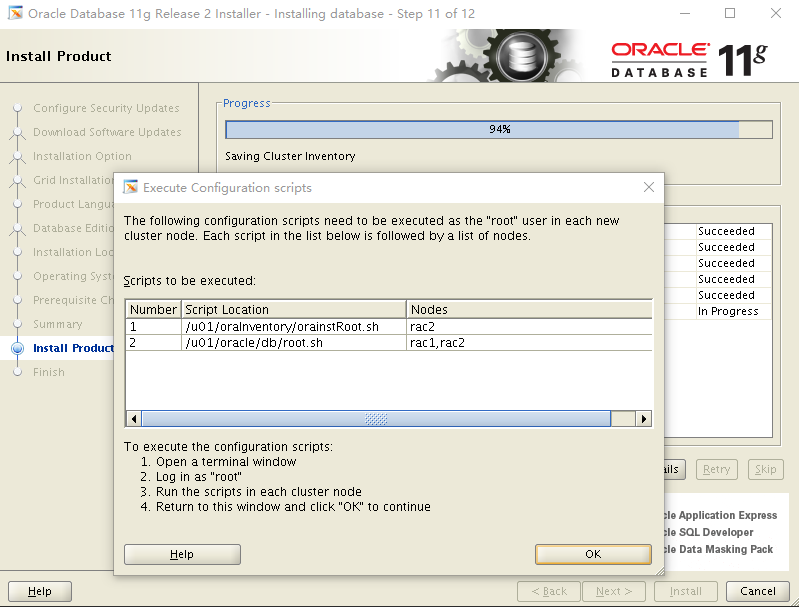
After I executed the scripts showed in the picture above on two nodes,the database software was installed normally and no more error occured.
CentOS 7.2安装11g数据库软件的更多相关文章
- 《Oracle Database 12c DBA指南》第二章 - 安装Oracle和创建数据库(2.1 安装Oracle数据库软件和创建数据库概览)
当前关于12c的中文资料比较少,本人将关于DBA的一部分官方文档翻译为中文,很多地方为了帮助中国网友看懂文章,没有按照原文句式翻译,翻译不足之处难免,望多多指正. 2.1 安装Oracle数据库软件和 ...
- 静默方式安装10g数据库软件+升级patch+手工建库
通常我们安装Oracle数据库软件,都是用OUI图形界面来完成的,但有些Unix/Linux系统中并未安装图形系统,也就无法使用图形界面来安装Oracle的产品了,对于这种场景,就只能采用静默方式来安 ...
- 在Centos中yum安装和卸载软件的使用方法(转)
在Centos中yum安装和卸载软件的使用方法 安装方法 安装一个软件时 yum -y install httpd 安装多个相类似的软件时 yum -y install httpd* 安装多个非类似软 ...
- CentOS 6.5 安装MySQL数据库
CentOS 6.5 安装MySQL数据库 [root@seeker~]# yum -y install mysql-server //安装命令 [root@seeker~]# service mys ...
- 在Centos中yum安装和卸载软件的使用方法(转载)
转自: http://gzmaster.blog.51cto.com/299556/72278 原创作品,允许转载,转载时请务必以超链接形式标明文章 原始出处 .作者信息和本声明.否则将追究法律责任. ...
- 卸载oracle 11g数据库软件
卸载oracle,从11g开始使用deinstall卸载数据库软件可以干净卸掉oracle $ cd $ORACLE_HOME/deinstall $ ls -l total 152 -rwxr-xr ...
- CentOS 7.2安装lepus数据库监控系统
环境说明 系统版本 CentOS 7.2 x86_64 软件版本 lepus 3.7 Lepus是一套开源的数据库监控平台,目前已经支持MySQL.Oracle.SQLServer.MongoDB ...
- 在centos上编译安装mariadb数据库
一.安装前提(准备数据文件.安装其他依赖的软件) 1.准备数据存放的目录 [root@localhost ~]# fdisk /dev/sdb (fdisk /dev/sdb 创建一个逻辑分区/de ...
- centos 下 yum安装和卸载软件
安装的命令是,yum install xxx,yum会查询数据库,有无这一软件包,如果有,则检查其依赖冲突关系,如果没有依赖冲突,那么最好,下载安装;如果有,则会给出提示,询问是否要同时安装依赖,或删 ...
随机推荐
- Yii2控制器 返回 json 格式数据
Yii::$app->response->format = Response::FORMAT_JSON; $data = User::find()->where([])->as ...
- android:windowSoftInputMode属性详解 软键盘
android:windowSoftInputMode activity主窗口与软键盘的交互模式,可以用来避免输入法面板遮挡问题,Android1.5后的一个新特性. 这个属性能影响两件事情: [一] ...
- HDU 1045 Fire Net(DFS 与8皇后问题类似)
Fire Net Time Limit: 2000/1000 MS (Java/Others) Memory Limit: 65536/32768 K (Java/Others)Total Su ...
- STM32平台SD卡的FatFS文件系统开发
STM32平台SD卡的FatFS文件系统开发 系统平台: STM32系列的STM32F103ZE SPI方式与SD卡通信 SD上移植FatFS系统 1 FatFS文件系统 1.1 FatFS简介 Fa ...
- css左固定右自适应常用方法
下面是几种方法的公用部分(右自适应也是一样的,换一下方向) html: <div class="demo"> <div class="sidebar&q ...
- 二、HDFS 架构
源自:http://hadoop.apache.org/docs/stable/hadoop-project-dist/hadoop-hdfs/HdfsDesign.html HDFS has a m ...
- App升级iOS7体会
本文转自App升级iOS7体会. xcode5 GM版已经发布,虽然还是pre-release版,但离最终版不远了.对于没有用到新特性的app面临的最大问题就是UI的变化.Apple提供了UI Tra ...
- struts2-笔记
文件下载http://struts.apache.org/download.cgi 第一步导入jar 包 在lib中有jar 包,不能把这些都导入到项目中 在apps 目录里面,找到实例程序,程序中直 ...
- TeamViewer13个人版使用中提示为商用版导致无法使用
前言:由于使用teamviewer个人免费版较频繁,被软件识别到不能再继续免费使用,无奈没有多余的资金进行购买正版软件, 通过鼓捣得到如下继续免费使用方案,整理下来以备不时之需,也可以被有同此困惑的朋 ...
- python__PIP : 安装第三方库
pipy国内镜像目前有: http://pypi.douban.com/ 豆瓣 http://pypi.hustunique.com/ 华中理工大学 http://pypi.sdutlinux.o ...