
SSL and SSL Certificates Explained
Secure Sockets Layer (SSL) and Transport Layer security (TLS ) are protocols that provide secure communications over a computer network or link.
They are commonly used in web browsing and email.
In this tutorial we will look:
- TLS and SSL
- Public and Private keys
- Why we need certificates and what they do
- How to get a digital certificate and understand the different common certificate types.
What is TLS
TLS is based on SSL and was developed as a replacement in response to known vulnerabilities in SSLv3.
SSL is the term commonly used, and today usually refers to TLS.
Security Provided
SSL/TLS provides data encryption, data integrity and authentication.
This means that when using SSL/TLS you can be confident that
- No one has read your message
- No one has changed your message
- You are communicating with the intended person (server)
When sending a message between two parties you have two problems that you need to address.
- How do you know that no one has read the message?
- How do you know that no one has changed the message?
The solutions to these problems are to:
- Encrypt it.– This makes the content unreadable so that to anyone viewing the message it is just gibberish.
- Sign it– This allows the recipient to be confident that it was you who sent the message, and that the message hasn’t been changed.
Both of these processes require the use of keys.
These keys are simply numbers (128 bit being common) that are then combined with the message using a particular method, commonly known as an algorithm- e.g. RSA, to either encrypt or sign the message.
Symmetrical Keys and Public and Private Keys
Almost all encryption methods in use today employ public and private keys.
These are considered much more secure than the old symmetrical key arrangement.
With a symmetrical key, a key is used to encrypt or sign the message, and the same key is used to decrypt the message.
This is the same as the keys (door, car keys) we deal with in everyday life.
he problem with this type of key arrangement is if you lose the key anyone who finds it can unlock your door.
With Public and Private keys, two keys are used that are mathematically related (they belong as a key pair), but are different.
This means a message encrypted with a public key cannot be decrypted with the same public key.
To decrypt the message you require the private key.
If this type of key arrangement were used with your car. Then you could lock the car, and leave the key in the lock as the same key cannot unlock the car.
This type of key arrangement is very secure and is used in all modern encryption/signature systems.
Keys and SSL Certificates
SSL/TLS use public and private key system for data encryption and data Integrity.
Public keys can be made available to anyone, hence the term public.
Because of this there is a question of trust, specifically:
How do you know that a particular public key belongs to the person/entity that it claims.
For example, you receive a key claiming to belong to your bank.
How do you know that it does belong to your bank?
The answer is to use a digital certificate.
A certificate serves the same purpose as a passport does in everyday life.
A passport established a link between a photo and a person, and that link has been verified by a trusted authority (passport office).
A digital certificate provides a link between a public key and an entity (business,domain name etc) that has been verified (signed) by a trusted third party ( A certificate authority)
A digital certificate provides a convenient way of distributing trusted public encryption keys.
Obtaining a Digital Certificate
You get a digital certificate from a recognized Certificate authority (CA). Just like you get a passport from a passport office.
In fact the procedure is very similar.
You fill out the appropriate forms add your public keys (they are just numbers) and send it/them to the certificate authority. (this is a certificate Request)
The certificate authority does some checks ( depends on authority), and sends you back the keys enclosed in a certificate.
The certificate is signed by the Issuing Certificate authority, and this it what guarantees the keys.
Now when someone wants your public keys, you send them the certificate, they verify the signature on the certificate, and if it verifies, then they can trust your keys.
Example Usage
To illustrate we will look at a typical web browser and web server connection using SSL. (https).
This connection is used on the Internet to send email in Gmail etc and when doing online banking,shopping etc.
- Browser connects to server Using SSL (https)
- Server Responds with Server Certificate containing the public key of the web server.
- Browser verifies the certificate by checking the signature of the CA. To do this the CA certificateneeds to be in the browser’s trusted store( See later)
- Browser uses this Public Key to agree a session key with the server.
- Web Browser and server encrypt data over the connection using the session key.
Here is a video that covers the above in more detail:
Digital Certificate Types
If you are trying to purchase a certificate for a website or to use for encrypting MQTT you will encounter two main types:
- Domain Validated Certificates (DVC)
- Extended validation Certificates (EVC)
The difference in the two types is the degree of trust in the certificate which comes with more rigorous validation.
The level of encryption they provide is identical
A domain-validated certificate (DV) is an X.509 digital certificate typically used for Transport Layer Security (TLS) where the identity of the applicant has been validated by proving some control over a DNS domain.-WikI
The validation process is normally fully automated making them the cheapest form of certificate. They are ideal for use on websites like this site that provides content, and not used for sensitive data.
An Extended Validation Certificate (EV) is a certificate used for HTTPS websites and software that proves the legal entity controlling the website or software package. Obtaining an EV certificate requires verification of the requesting entity’s identity by a certificate authority (CA).
They are generally more expensive than domain validated certificates as they involve manual validation.
Certificate Usage Restrictions- Wildcards and SANs
Generally a certificate is valid for use on a single fully qualified domain name (FQDN).
That is a certificate purchased for use on www.mydomain.com cannot be used on mail..mydomain.com or www.otherdomain.com.
However if you need to secure multiple subdomains as well as the main domain name then you can purchase a Wildcard certificate.
A wildcard certificate covers all sub domains under a particular domain name.
For example a wildcard certificate for *.mydomain.com can be used on:
- mail.mydomain.com
- www.mydomain.com
- ftp.mydomain.com
- etc
It can not be used to secure both mydomain.com and myotherdomain.com.
To cover several different domain names in a single certificate you must purchase a certificate with SAN (Subject Alternative Name).
These generally allow you to secure 4 additional domain names in addition to the main domain name. For example you could use the same certificate on:
- www.mydomain.com
- www.mydomain.org
- www.mydomain.net
- www.mydomain.co
- www.mydomain.co.uk
You can also change the domain name covered but would need have the certificate re-issued.
Why use Commercial Certificates?
It is very easy to create you own SSL certificates and encryption keys using free software tools.
These keys and certificates are just as secure as commercial ones, and can in most cases be considered even more secure.
Commercial certificates are necessary when you need widespread support for your certificate.
This is because support for the major commercial certificate authorities is built into most web browsers and operating systems.
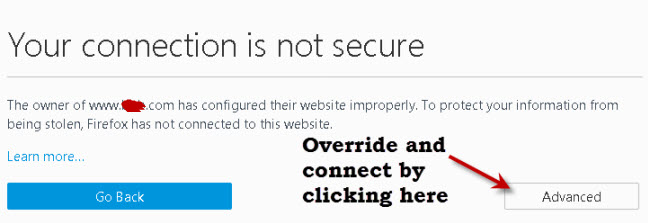
If I installed my own self generated certificate on this site when you visited you would see a message like the one below telling you that the site is not trusted.
===============
Certificate Encodings and Files Extensions
Certificates can be encoded as:
- Binary files
- ASCII (base64)files
Common file extensions in use are:
- .DER
- .PEM (Privacy Enhanced Electron Mail)
- .CRT
- .CERT
Note: There is no real correlation between the file extension and encoding. That means a .crt file can either be a .der encoded file or .pem encoded file.
Question – How do I know if you have a .der or .pem encoded file?
Answer- You can use openssl tools to find the encoding type and convert between encodings. See this tutorial –DER vs. CRT vs. CER vs. PEM Certificates
Certificate Examples
Because .pem encoded certificates are ASCII files they can be read using a simple text editor.
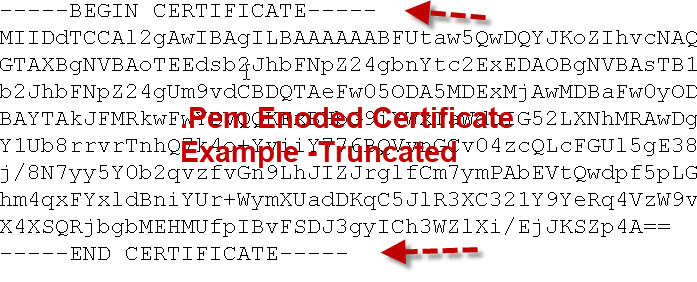
The important thing to note is that they start and end with the Begin Certificate and End Certificatelines.
Certificates can be stored in their own file or together in a single file called a bundle.
Root CA Bundle and Hashed Certificates
Although root certificates exist as single files they can also be combined into a bundle.
On Debian based Linux systems these root certificates are stored in the /etc/ssl/certs folder along with a file called ca-certificates.crt.
This file is a bundle of all the root certificates on the system .
It is created by the system and can be updated if new certificates are added using the update-ca-certificates command. See here
The ca-certifcates.crt file looks like this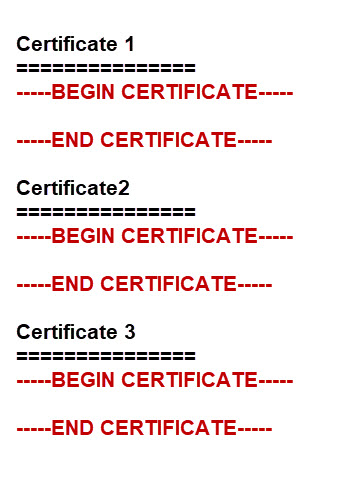
The certs folder also contains each individual certificate or a symbolic link to the certificate along with a hash.
The hash files are created by the c_rehash command and are used when a directory is specified, and not a file.For example the mosquitto_pub tool can be run as:
mosquitto_pub --cafile /etc/ssl/certs/ca-certificates.crt

or

mosquitto_pub --capath /etc/ssl/certs/
Root Certificates, Intermediate Certificates and Certificate Chains and Bundles.
A certificate authority can create subordinate certificate authorities that are responsible for issuing certificates to clients.
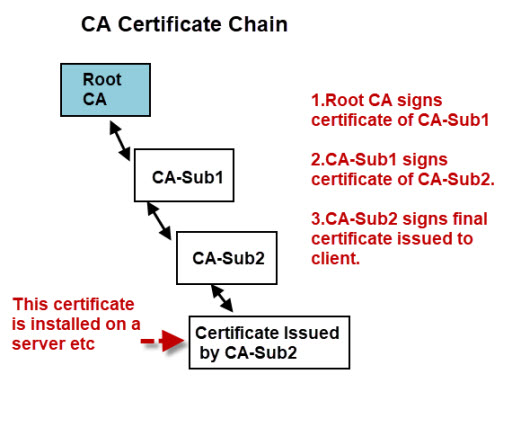
For a client to verify the authenticity of the certificate it needs to be able to verify the signatures of all the CAs in the chain this means that the client needs access to the certificates of all of the CAs in the chain.
The client may already have the root certificate installed, but probably not the certificates of the intermediate CAs.
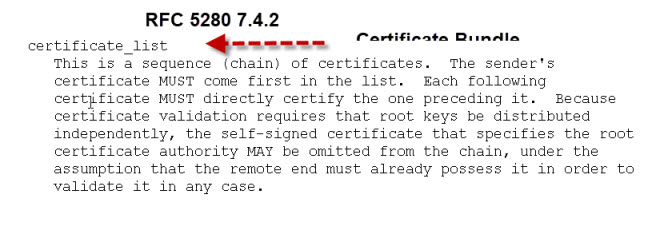
Therefore certificates are often provided as art of a certificate bundle.
This bundle would consist of all of the CA certificates in the chain in a single file, usually called CA-Bundle.crt.
If your certificates are sent individually you can create your own bundle by following the steps here.
Video
- Here is my video that covers the points above.
- Here is aMicrosoft video that I found that explains the above.
Common Questions and Answers
Q- What is a trusted store?
A- It is a list of CA certificates that you trust. All web browsers come with a list of trusted CAs.
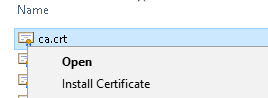
Q- Can I add my own CA to my browser trusted store?
A- Yes on Windows if you right click on the certificate you should see an install option
Q- What is a self signed certificate?
A- A self signed certificate is a certificate signed by the same entity that the certificate verifies. It is like you approving your own passport application. seewiki
Q What is a certificate fingerprint?
A- It is a hash of the actual certificate and can be used to verify the certificate without the need to have the CA certificate installed. See here
Resources
Related Tutorials:
- Mosquitto SSL Configuration -MQTT TLS Security
- Configure Mosquitto Bridge With SSL Encryption- Examples
- MQTT Security Mechanisms
SSL and SSL Certificates Explained的更多相关文章
- Apache SSL服务器配置SSL详解(转)
1.安装必要的软件 引用 我用的是apahce2.0.61版,可以直接官方提供的绑定openssl的apache. 文件名是:apache_2.0.61-win32-x86-openssl-0.9.7 ...
- ssl.SSLError: [SSL: CERTIFICATE_VERIFY_FAILED] certificate verify failed (_ssl.c:847)
/******************************************************************************* * ssl.SSLError: [SS ...
- pip cannot confirm SSL certificate: SSL module is not available
centos6.8编译安装python2.7之后,使用pip报错:pip cannot confirm SSL certificate: SSL module is not available 解决方 ...
- There was a problem confirming the ssl certificate: [SSL: TLSV1_ALERT_PROTOCOL_VERSION] tlsv1 alert protocol version (_ssl.c:661) - skipping
Could not fetch URL https://pypi.python.org/simple/xlrd/: There was a problem confirming the ssl cer ...
- 解决pyhton aiohttp ssl:None [[SSL: CERTIFICATE_VERIFY_FAILED] certificate verify failed (_ssl.c:777)
解决pyhton aiohttp ssl:证书报错问题, 错误信息> Cannot connect to host oapi.dingtalk.com:443 ssl:None [[SSL: C ...
- 【tf.keras】ssl.SSLError: [SSL: DECRYPTION_FAILED_OR_BAD_RECORD_MAC] decryption failed or bad record mac (_ssl.c:1977)
问题描述 tf.keras 在加载 cifar10 数据时报错,ssl.SSLError: [SSL: DECRYPTION_FAILED_OR_BAD_RECORD_MAC] decryption ...
- scrapy出现SSL问题 如何解决? <twisted.python.failure.Failure OpenSSL.SSL.Error: [('SSL routines', '', 'unsafe legacy renegotiation disabled')]>
问题:<twisted.python.failure.Failure OpenSSL.SSL.Error: [('SSL routines', '', 'unsafe legacy renego ...
- 免费SSL&付费SSL证书,该如何选择?
近年来Google.Apple.百度等公司不断推动 HTTPS 的普及,SSL 证书作为 HTTPS 安全协议的必备配置,自然也成为了网站.App 开发者最重要部署项目之一. 又拍云于 2016 年联 ...
- linux 搭建CA服务器 http+ssl mail+ssl 扫描与抓包
搭建CA服务器 CA服务是给服务器发放数字证书,被通信双方信任,独立的第三方机构 国内常见的CA机构 中国金融认证中心(CFCA) 中国电信安全认证中心(CTCA) 北京数字证书认证中心(BJCA) ...
随机推荐
- io模型,mysql
多路复用IO(IO multiplexing) 多路复用就是调用select来统一管理多个连接 强调: 1. 如果处理的连接数不是很高的话,使用select/epoll的web server不一定比使 ...
- JavaScript 匹配字符串偶数位置的字符 及匹配 $ 符号
已知一个字符串#####,现需要替换偶数位置的#为&. function replaceDemo(){ var s = "1#2#3#4#5#"; var regex = ...
- Mysql五种时间格式
YEAR [字节数]:1 [取值范围]:1901~2155 [赋值]: 4位数字 2位字符串:'00'~'69'相当于2000~2069:'70'~'99'相当于1970~1999 2位数字:与2位数 ...
- WPF Interaction框架简介(一)——Behavior
在WPF 4.0中,引入了一个比较实用的库——Interactions,这个库主要是通过附加属性来对UI控件注入一些新的功能,除了内置了一系列比较好用的功能外,还提供了比较良好的扩展接口.本文这里简单 ...
- 牛x的面试知识点
已经凌晨2点多了,看来今天是失眠了,反正睡不着,写篇日记总结一下我的第一次社招面试经历吧.2015年12月1日办理了离职手续,离开了万通中心,也算是和我的第一个东家正式说了再见,其实还是很喜欢国贸的, ...
- as3垃圾回收机制
as3垃圾回收机制 垃圾回收机制详解 能力越大责任越大,这对actionscript3.0来说一点没错.引入这些新控件带来一个副作用:垃圾收集器不再支持自动为你收集 垃圾等假设.也就是说Flash开发 ...
- JavaScript -- 清除缓存
在客户端有一个HTML文件,用来提交输入信息,问题在于:每次按刷新时,发觉并不是整个页面重新被装载,好似是缓存中. 因为文本框中仍出现上次输入的值,只有在地址栏中按回车整个页面才重新装载,应当怎样避免 ...
- 使用weinre调试手机页面
阅读目录 介绍Weinre 安装Weinre 通过Weinre调试页面 启动target 介绍Weinre Weinre(Web Inspector Remote),是一种远程调试工具.功能与Fire ...
- 关于onclick的执行原理
js 或者 jQuery 为文档某一节点添加onclick事件的时候,添加的onclick事件会添加在原节点的onclick事件之后,不会覆盖之前的onclick事件 如果不想让原onclick事件 ...
- Cannot call sendError() after the response has been committed(filter问题)
就是因为执行了filter的dofilter方法中 chain.doFilter(request,response)了 执行了两遍 if(){}else{chain.doFilter(request, ...