
【C语言】Linux 飞翔的小鸟
【C语言】Linux 飞翔的小鸟
零、环境部署
安装Ncurses库
sudo apt-get install libncurses5-dev
壹、编写代码
代码如下:
bird.c
#include<stdio.h>

#include<time.h>

#include<stdlib.h>

#include<signal.h>

#include<curses.h>

#include<sys/time.h>

#include<unistd.h>

int window_w = 100;

int window_h = 25;

typedef struct pipe{

        int x;

        int r;

        struct pipe *next;

}*pipe_list;

char bird_char = '@';

char pipe_char = '+';

char edge_char = '#';

char bird_die_char = '*';

char empty_char = ' ';

int bird_x, bird_y;

pipe_list piping = NULL;

int pipeline_count = 5;

int pipeline_width = 10;

int pipeline_min_height = 5;

int pipeline_gap = 6;

int running = 0;

int score = 0;

void init_curses();

int set_timer(int ms);

void show_bird();

void clear_bird();

void move_bird(int x, int y);

void move_bird_up();

void move_bird_down();

void bird_ctrl();

void show_bird_die();

void referee(int is_user);

void show_score();

void show_game_over(int empty);

pipe_list create_pipe(int n);

void draw_pipe(char ch);

void show_pipe();

void clear_pipe();

void move_pipe();

void oper_pipe();

void show_map_edge();

void init_map();

void check_yx(int *y,int *x);

void handler();

int main(void) {

    int gap_time;

    while (1) {

        printf("==========欢迎来到飞翔的小鸟==========\n");

        printf("1.普通 2.简单 3.困难\n");

        printf("请选择游戏难度:");

        char choose = getchar();

        getchar();

        if (choose == '2') {

            printf("游戏难度:简单\n");

            gap_time = 800;

        } else if (choose == '3') {

            printf("游戏难度:困难\n");

            gap_time = 300;

        } else {

            printf("游戏难度:普通\n");

            gap_time = 500;

        }

        int time_down = 2;

        while (time_down-- > 0) {

            printf("%d秒后开始游戏,请做好准备!\n", time_down);

            sleep(1);

        }

        // 初始化随机种子

        srand(time(NULL));

        // 初始化软中断

        signal(SIGALRM, handler);

        set_timer(gap_time);

        score = 0;

        running = 1;

        // 初始化组件

        init_curses();

        // 显示小鸟

        bird_x = 10; // 列

        bird_y = window_h / 2; // 行

        // 显示地图

        init_map();

        show_map_edge();

        show_game_over(1);

        // 显示管道

        piping = create_pipe(pipeline_count);

        show_pipe();

        // 显示小鸟

        show_bird();

        // 小鸟控制

        bird_ctrl();

        // 结束游戏

        endwin();

        printf("游戏结束!\n");

        printf("你本次游戏得分:%d\n", score);

        printf("按任意键继续游戏,按Q键退出游戏\n");

        choose = getchar();

        getchar();

        if (choose == 'q' || choose == 'Q') {

            break;

        }

    }

    return 0;

}

void game_run() {

    if (!running) {

        return;

    }

    // 小鸟

    move_bird_down();

    // 管道

    clear_pipe();

    move_pipe();

    oper_pipe();

    show_pipe();

    // 地图

    show_map_edge();

    // 游戏得分

    referee(0);

    show_score();

}

void handler() {

    game_run();

}

void referee(const int is_user) {

    if (!is_user) {

        score += 1;

    }

    // 判断小鸟是否撞到了管子

    move(bird_y, bird_x);

    const chtype ch = inch();

    if ((char) ch == pipe_char) {

        // 撞到管子,游戏结束

        running = 0;

        show_game_over(0);

        show_bird_die();

    }

}

void show_game_over(const int empty) {

    const char tips[] = "Game over, please press any key to continue ~ ";

    const char *p = tips;

    move(window_h + 2, 2);

    while (*p != '\0') {

        if (empty) {

            addch(empty_char);

        } else {

            attron(COLOR_PAIR(4));

            addch(*p);

            attroff(COLOR_PAIR(4));

        }

        p++;

    }

    refresh();

}

void show_score() {

    char score_str[50];

    const char *p = score_str;

    sprintf(score_str, "score : %04d", score);

    score_str[49] = 0;

    move(window_h + 1, 2);

    while (*p != '\0') {

        addch(*p);

        p++;

    }

    refresh();

}

void show_bird_die() {

    for (int i = bird_y - 1; i <= bird_y + 1; i++) {

        for (int j = bird_x - 1; j <= bird_x + 1; j++) {

            move(i, j);

            attron(COLOR_PAIR(5));

            addch(bird_die_char);

            attroff(COLOR_PAIR(5));

        }

    }

    show_bird();

    refresh();

}

void show_bird() {

    move(bird_y, bird_x);

    attron(COLOR_PAIR(1));

    addch(bird_char);

    attroff(COLOR_PAIR(1));

    refresh();

}

void clear_bird() {

    move(bird_y, bird_x);

    addch(empty_char);

    refresh();

}

void check_yx(int *y, int *x) {

    if (*x <= 0) {

        *x = 1;

    }

    if (*y <= 0) {

        *y = 1;

    }

    if (*x >= window_w) {

        *x = window_w - 1;

    }

    if (*y >= window_h) {

        *y = window_h - 1;

    }

}

void move_bird(const int x, const int y) {

    clear_bird();

    bird_x = x;

    bird_y = y;

    check_yx(&bird_y, &bird_x);

    show_bird();

}

void move_bird_up() {

    move_bird(bird_x, bird_y - 1);

}

void move_bird_down() {

    move_bird(bird_x, bird_y + 1);

}

void bird_ctrl() {

    while (1) {

        const char ch = getchar();

        if (ch == ' ') {

            move_bird_up();

            referee(1);

        }

        if (!running) {

            break;

        }

    }

}

int set_timer(const int ms) {

    int s = ms / 1000;

    int us = (ms - s * 1000) * 1000;

    struct itimerval timer;

    timer.it_value.tv_sec = s;

    timer.it_value.tv_usec = us;

    timer.it_interval.tv_sec = s;

    timer.it_interval.tv_usec = us;

    return setitimer(ITIMER_REAL, &timer, NULL);

}

void init_curses() {

    // 进入curses模式

    initscr();

    // 不显示光标

    curs_set(0);

    // 不显示输入的字符

    noecho();

    // 启用键盘

    keypad(stdscr, 1);

    // 启动颜色机制

    start_color();

    init_pair(1, COLOR_WHITE, COLOR_BLUE); // 鸟

    init_pair(2, COLOR_WHITE, COLOR_GREEN); // 柱子

    init_pair(3, COLOR_WHITE, COLOR_RED); // 墙

    init_pair(4, COLOR_RED, COLOR_WHITE); // 游戏结束提示

    init_pair(5, COLOR_YELLOW, COLOR_RED); // 小鸟爆炸特效

}

void init_map() {

    for (int i = 0; i < window_h + 2; i++) {

        for (int j = 0; j < window_w; j++) {

            move(i, j);

            addch(empty_char);

        }

    }

    refresh();

}

void show_map_edge() {

    attron(COLOR_PAIR(3));

    for (int i = 0; i <= window_h; i++) {

        move(i, 0);

        addch(edge_char);

        move(i, window_w);

        addch(edge_char);

    }

    for (int i = 0; i <= window_w; i++) {

        move(0, i);

        addch(edge_char);

        move(window_h, i);

        addch(edge_char);

    }

    attroff(COLOR_PAIR(3));

}

void oper_pipe() {

    if (piping == NULL) {

        return;

    }

    pipe_list head = piping, tail = piping;

    while (tail->next != NULL) {

        tail = tail->next;

    }

    // 检查是否已经进入左边,+1 是墙壁

    if (head->x <= (-1 * pipeline_width) + 1) {

        const pipe_list del_pipe = head;

        head = head->next;

        free(del_pipe);

    }

    // 检查右边是否太空了

    if (tail->x <= window_w - window_w / pipeline_count) {

        // 右边没得了,添加一个

        tail->next = create_pipe(1);

    }

    piping = head;

}

pipe_list create_pipe(const int n) {

    pipe_list main = NULL;

    for (int i = 0; i < n; i++) {

        const pipe_list p = malloc(sizeof(struct pipe));

        if (p == NULL) {

            perror("分配内存失败");

            return main;

        }

        p->x = (int) (window_w - window_w / (float) n * (float) i);

        p->r = random() % (window_h - pipeline_gap - pipeline_min_height) + pipeline_min_height;

        p->next = NULL;

        if (main != NULL) {

            p->next = main;

        }

        main = p;

    }

    return main;

}

void show_pipe() {

    draw_pipe(pipe_char);

}

void draw_pipe(const char ch) {

    if (ch == pipe_char) {

        attron(COLOR_PAIR(2));

    }

    pipe_list p = piping;

    while (p != NULL) {

        for (int i = 0; i < pipeline_width; i++) {

            // 列

            // 绘制上半部分

            for (int j = 0; j < p->r; j++) {

                // 行

                int y = j;

                int x = p->x + i;

                check_yx(&y, &x);

                move(y, x); // 行 列

                addch(ch);

            }

            // 绘制下半部分

            for (int j = p->r + pipeline_gap; j < window_h; j++) {

                int y = j;

                int x = p->x + i;

                check_yx(&y, &x);

                move(y, x); // 行 列

                addch(ch);

            }

        }

        p = p->next;

    }

    if (ch == pipe_char) {

        attroff(COLOR_PAIR(2));

    }

    refresh();

}

void clear_pipe() {

    draw_pipe(empty_char);

}

void move_pipe() {

    pipe_list p = piping;

    while (p != NULL) {

        p->x -= 1;

        p = p->next;

    }

}
贰、编译运行
编译
gcc bird.c -o bird -Wall -lncurses
运行
./bird
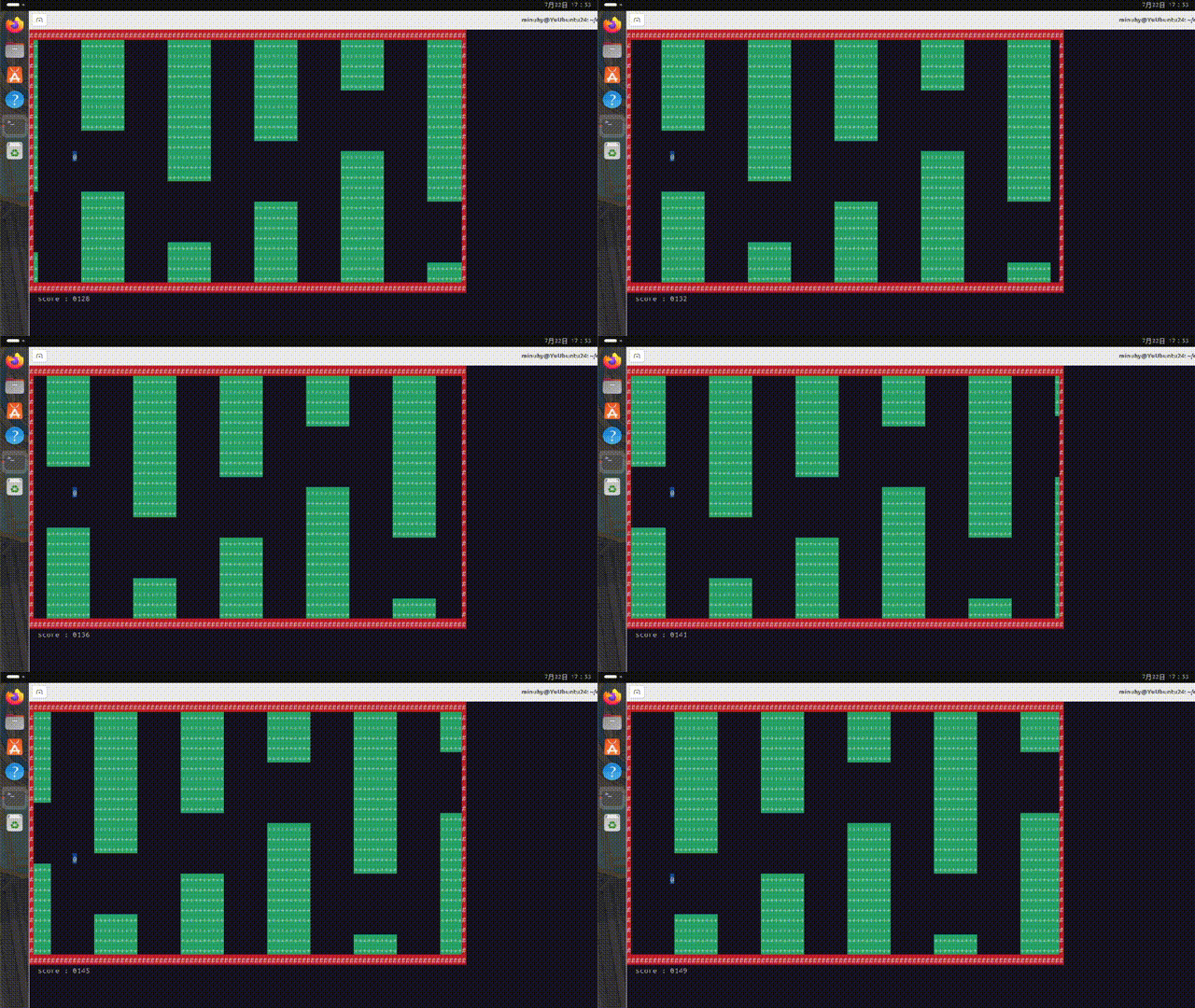
叁、运行效果
【C语言】Linux 飞翔的小鸟的更多相关文章
- go 语言开发中 GOPATH问题 与 go语言linux 开发环境 教程
https://github.com/rubyhan1314/Golang-100-Days/blob/master/Day01-15(Go%E8%AF%AD%E8%A8%80%E5%9F%BA%E7 ...
- go语言linux环境配置
linux的设置方法:有4个环境变量需要设置:GOROOT.GOPATH.GOBIN以及PATH.需要设置到某一个profile文件中(~/.bash_profile(单一用户)或/etc/profi ...
- C语言 Linux内核链表(企业级链表)
//Linux内核链表(企业级链表) #define _CRT_SECURE_NO_WARNINGS #include<stdio.h> #include<stdlib.h> ...
- C语言 linux环境基于socket的简易即时通信程序
转载请注明出处:http://www.cnblogs.com/kevince/p/3891033.html ——By Kevince 最近在看linux网络编程相关,现学现卖,就写了一个简易 ...
- [linux] C语言Linux系统编程-做成守护进程
守护进程: 必须是init进程的子进程,运行在后台,不与任何控制终端相关联. 通过以下步骤成为守护进程 1.调用fork()创建出来一个新的进程,这个新进程会是将来的守护进程 2.在新守护进程的父进程 ...
- [linux] C语言Linux系统编程进程基本概念
1.如果说文件是unix系统最重要的抽象概念,那么进程仅次于文件.进程是执行中的目标代码:活动的.生存的.运行的程序. 除了目标代码进程还包含数据.资源.状态以及虚拟化的计算机. 2.进程体系: 每一 ...
- go语言linux下安装
1.从http://golang.org/dl/下载最新版本的GO语言二进制档案包. 注意:根据操作系统和计算架构正确选择档案包 2.使用tar命令将档案包解压到/usr/local目录中.具体方法如 ...
- C语言/Linux命令行参数argc、argv[ ]详解
1.void main(int argc,char *argv[]) argv[]:表示的是一个指针数组,一共有argc个元素,其中存放的是指向每一个参数的指针. argc:参数个数 2.以Linux ...
- python语言linux操作系统oracle环境安装
金句:如果没把握,最好先Google一下. 1.严格按照 https://oracle.github.io/odpi/doc/installation.html#linux 教程一步步做 包括下载的软 ...
- [置顶] 栈/入栈/出栈顺序(c语言)-linux
说明: 1.栈底为高地址,栈顶为低地址. 2.入栈顺序:从右到左. 解释1:栈在内存中的结构 [注:0x00 到 0x04之间间隔4个地址] 入栈:指针先指向0x10,从高地址向低地址方向填数值,最终 ...
随机推荐
- 认识Token和Cookie
认识Token和Cookie 1.token和cookie有什么区别? 1.1 存储位置及方式:Cookie是浏览器用来存储本地信息的文件,有一定的存储限制,而Token是由服务器按一定算法生成的 ...
- Flutter的一些概念(二)
注:本文同步发布于微信公众号:stringwu的互联网杂谈 Flutter的一些概念(二) 1 flutter的核心渲染模块 当应用启动时flutter 会遍历所有的Widget 形成Widget 树 ...
- Hadoop 概述(二)
shell定时上传linux日志信息到hdfs 从标题可以分析出来,我们要使用到shell,还要推送日志信息到hdfs上. 定义出上传的路径和临时路径,并配置好上传的log日志信息.这里我使用了上一节 ...
- biancheng-Python机器学习算法
http://c.biancheng.net/ml_alg/ Python机器学习 就当下而言,Python 无疑是机器学习领域最火的编程语言,这得益于 Python 对科学计算的强大支持.因此,本套 ...
- Docker安装教程
这里介绍两种安装方法:centsOS安装和Ubuntu安装 CentOS安装 linux内核版本建议3.8以上,作者本人使用的是3.10:查看内核版本命令:uname -r 一般CentOS7以上都可 ...
- 本地搭建DeepSeek和知识库 Dify做智能体Agent(推荐)
一.基础信息 1.硬件环境: CPU >= 2 Core 显存/RAM ≥ 16 GiB(推荐) 2.软件 (1)Ollama Ollama 是一款跨平台的大模型管理客户端(MacOS.Wind ...
- Linux mint的hadoop安装方法
参考网址http://www.powerxing.com/install-hadoop/ 1.创建hadoop账户 这条命令创建了可以登陆的 hadoop 用户,并使用 /bin/bash 作为 sh ...
- HTML - 1、基础
<!DOCTYPE html> <!-- 指定网页内容的语言 --> <html lang="en"> <head> <!-- ...
- AI工具推荐:领先的开源 AI 代码助手——Continue
前言 之前介绍了VS Code中的AI插件Cline与Roo Code,这两个都是根据给定一个任务,开始自动写代码的.除了这两个AI代码工具之外,在平常我还很喜欢的就是Continue . Conti ...
- 如何训练LLM“思考”(像o1和DeepSeek-R1一样, 高级推理模型解析
2024年9月,OpenAI发布了它的o1模型,该模型基于大规模强化学习训练,赋予了它"高级推理"能力.不幸的是,他们是如何做到这一点的细节从未被公开披露.然而,今天,DeepSe ...