
经验总结之 _DEBUGGER _03 _Server Tomcat v8.0 Server at localhost was unable to start within xx seconds
经验总结之 _DEBUGGER _03 _Server Tomcat v8.0 Server at localhost was unable to start within xx seconds
好好的Web项目运行着 TomCat 不知道怎么了就是不能打开了 报错现象如下:
Server Tomcat v8.0 Server at localhost was unable to start

within 45 seconds. If the server requires more time, try

increasing the timeout in the server editor.

通过现象和百度查找分析得出结论和解决办法
先看解决办法 :
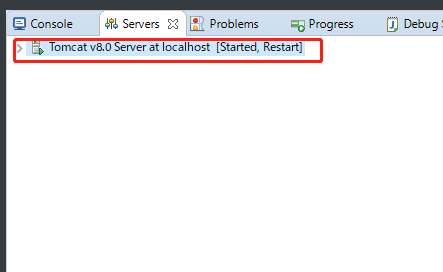
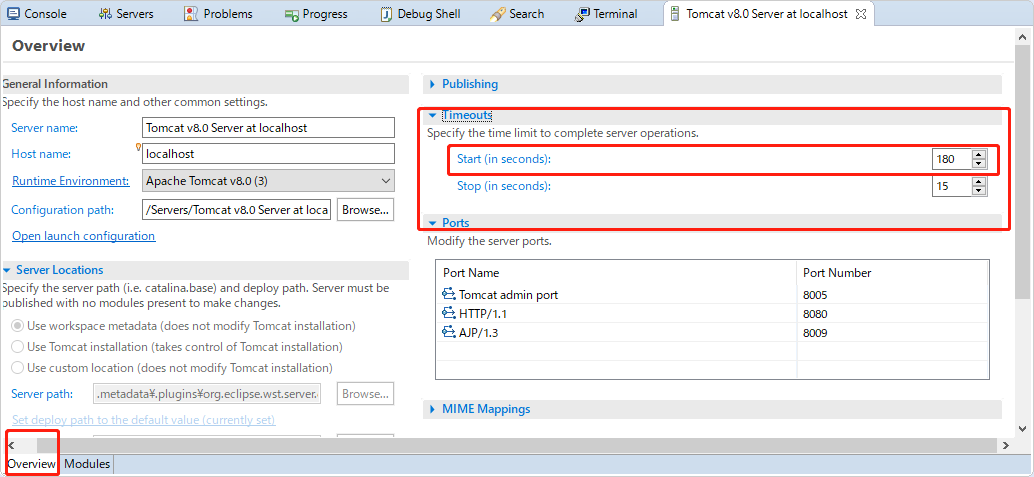
双击 eclipse 的server目录下的Tomcat服务器
修改 Tomcat 启动的超时时间值,一般来说加长启动时长可以直接解决
分析原因 :
根据问我观察到的现象:直接Start 是可以启动的,开启Debugger就会启动超时,调整时长后 如果 打了很多断点 再次 通过 Debugger启动也会超时
结论:可以认为,直接启动比 通过 debugger尽量启动 要占用的空间,需要加载的数据量都要少一点,通过debugger启动 占用的空间 加载的数据量也会 增多,那么就会导致 启动Tomcat需要的时长边长,超过了 限定的启动时间 就会启动失败,从这次经验来说 debugger 会比 直接start 多用 3 到 5 倍的启动时间(我把原来45s的启动时间 一直增加到 180s才成功启动),断点打的越多,debugger启动需要的时长会更长。
经验总结之 _DEBUGGER _03 _Server Tomcat v8.0 Server at localhost was unable to start within xx seconds的更多相关文章
- Server Tomcat v8.0 Server at localhost was unable to start within 45 seconds. If the server requires
Server Tomcat v8.0 Server at localhost was unable to start within 45 seconds. If the server requires ...
- Server Tomcat v8.0 Server at localhost was unable to start within 45 seconds
Servers -->双击你的启动服务--> 对话框左下角切换选项卡为 Overview -->中东找到Timeouts 把Start(in seconds)改为 100 ,然后按 ...
- Tomcat启动失败:Server Tomcat v8.0 Server at localhost was unable to start within 45 seconds
问题如下: 解决办法: 再次重启服务器就能解决这个问题.
- Server Tomcat v8.5 Server at localhost was unable to start within 45 seconds. If the server requires more time, try increasing the timeout in the server editor.
Server Tomcat v9.0 Server at localhost was unable to start within 45 seconds. If the server requires ...
- Server Tomcat v7.0 Server at localhost was unable to start within 45 seconds
错误:Server Tomcat v7.0 Server at localhost was unable to start within 45 seconds 错误提示就是我们限定了部署的时间导致的错 ...
- Server Tomcat v6.0 Server at localhost was unable to start within 45 seconds...
仰天长啸 Server Tomcat v6.0 Server at localhost was unable to start within 45 seconds... 当启动tomcat时候出现 ...
- Server Tomcat v7.0 Server at localhost was unable to start within 45 seconds -----》myeclipse2015
错误:Server Tomcat v7.0 Server at localhost was unable to start within 45 seconds 错误提示就是我们限定了部署的时间导致的错 ...
- Server Tomcat v6.0 Server at localhost was unable to start within 45 seconds问题
错误:Server Tomcat v6.0 Server at localhost was unable to start within 45 seconds. If the server requi ...
- Server Tomcat v7.0 Server at localhost was unable to start within 45 seconds 解决方法
Server Tomcat v6.0 Server at localhost was unable to start within 45 seconds. If the server requires ...
- 【转】Server Tomcat v7.0 Server at localhost was unable to start within 45 seconds. If
转载地址:http://fanshuyao.iteye.com/blog/1695482 在eclipse启动tomcat时遇到超时45秒的问题: Server Tomcat v7.0 Server ...
随机推荐
- DataOps 新趋势:联通数科如何利用 DolphinScheduler 实现数据一体化管理
引言 在DataOps(数据运营)的推动下,越来越多的企业开始关注数据研发和运营的一体化建设.DataOps通过自动化和流程优化,帮助企业实现数据的高效流转和管理. 当前,Apache Dolphin ...
- 为了落地DDD,我是这样“PUA”大家的
本文书接上回<先有鸡还是先有蛋?这是领域驱动设计落地最大的困局> https://mp.weixin.qq.com/s/lzAZXgchCg_VyLmyo2N18Q 故事背景 2023 ...
- manim边学边做--圆弧形
圆弧形可以算是一种特殊的圆形,它是圆形的一部分.manim中,单独为圆弧形状封装了几个模块: Arc:通用的圆弧,根据半径和角度来绘制圆弧 ArcBetweenPoints:根据两个点和角度来绘制圆弧 ...
- 全网最适合入门的面向对象编程教程:39 Python常用复合数据类型-集合
全网最适合入门的面向对象编程教程:39 Python 常用复合数据类型-集合 摘要: 在 Python 中,集合(set)是一种常用的复合数据类型.集合是一组无序且不重复的元素.与列表和元组不同,集合 ...
- 痞子衡嵌入式:在MDK开发环境下自定义安装与切换不同编译器版本的方法
大家好,我是痞子衡,是正经搞技术的痞子.今天痞子衡给大家分享的是在MDK开发环境下自定义安装与切换不同编译器版本的方法. Keil MDK 想必是嵌入式开发者最熟悉的工具之一了,自 2005 年 Ar ...
- 原生JavaScript实现一个简单的Promise构造函数示例
下面demo示例,只支持实例的then和catch,代码如下: function PromiseDiffer(fn){ var self = this; this.status = 'pendding ...
- 小tips:CSS3中的background-clip属性(背景的裁剪区域)
CSS3中的background-clip属性,其主要是用来确定背景的裁剪区域,换句话说,就是如何控制元素背景显示区域. 语法如下: background-clip : border-box || p ...
- Vs Code, Visual Studio 2022, Angular and Live Server Running Through Https and IP Address
前言 之前就写过 angular cli, vs code liveserver, vs 2019 iis express 10, vs code kestrel 使用 https + ip. 但写的 ...
- Figma 学习笔记 – Scroll and Position Fixed
Scroll Scroll 属于 prototype 的一部分. 当一个 Frame 的内容超出 Frame 的高度或宽度时, Frame 就具备了 scroll 的能力. 通过 uncheck cl ...
- Parquet.Net: 将 Apache Parquet 移植到 .NET
Parquet.Net 是一个用于读取和写入 Apache Parquet 文件的纯 .NET 库,使用MIT协议开源,github仓库:https://github.com/aloneguid/pa ...