
MVC视图展现模式之移动布局解析-续集
网站就必须用响应式布局吗?MVC视图展现模式之移动布局:http://www.cnblogs.com/dunitian/p/5213787.html
demo:http://pan.baidu.com/s/1bnTUaKJ
有人会疑问,为什么他能识别.mobile的后缀却不能识别例如:.mac .dnt 等等后缀呢?这些又是放在哪里的呢?
mobile 这个后缀其实是存放在:DisplayModeProvider.Instance.Modes 里面的,我们监视一下,发现里面就一个mobile,还有一个是默认的
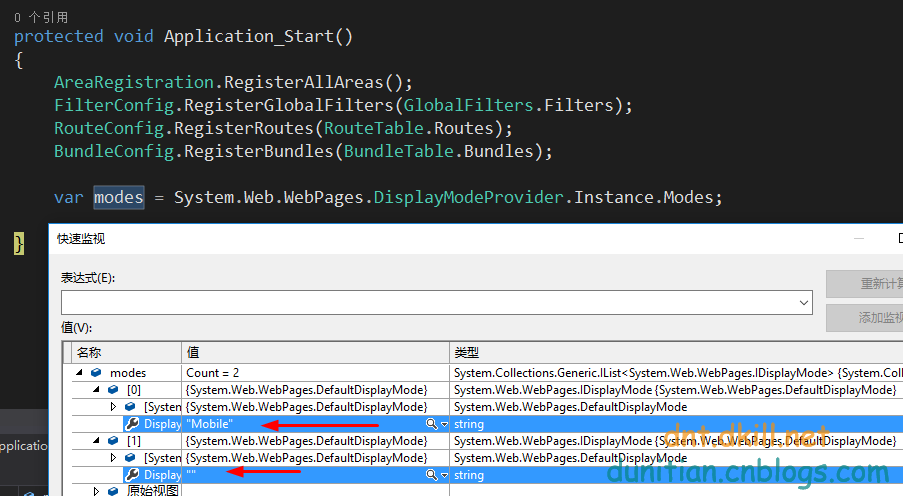
可以猜想,运行的时候是从上往下匹配的,“”的是通用匹配,那么我们加入一个自定义的后缀看看==>(可以思考一下,为什么用 insert 不用 add)
            //添加一个自定义后缀

            DisplayModeProvider.Instance.Modes.Insert(0, new DefaultDisplayMode("dnt")

            {

                ContextCondition = (Context) => Context.Request.UserAgent.Contains("dnt")

            });
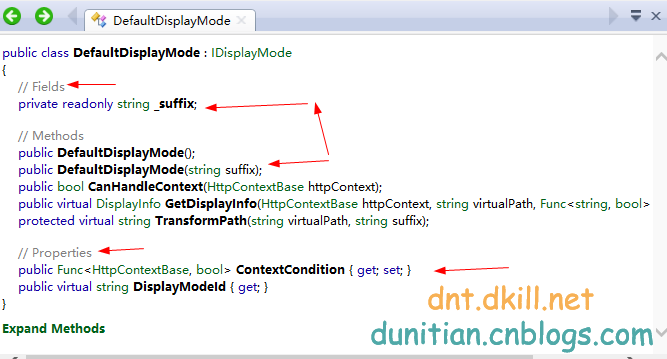
可能你不是很理解 DefaultDisplayMode,看看反编译吧----构造函数为suffix赋值(后缀)
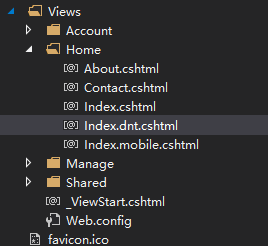
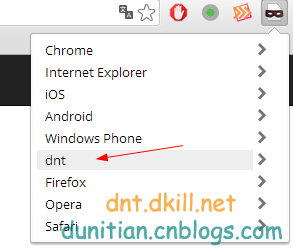
添加一个自定义的后缀视图
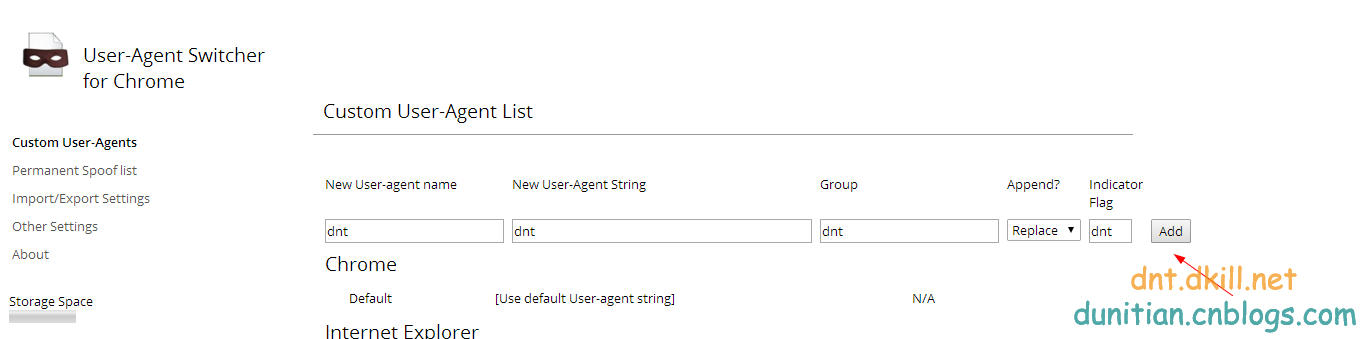
打开谷歌浏览器,设置一下User-Agent Switcher的浏览模式


附录:
DisplayModeProvider:
// Generated by .NET Reflector from F:\Work\Net\Mobile\packages\Microsoft.AspNet.WebPages.3.2.3\lib\net45\System.Web.WebPages.dll

namespace System.Web.WebPages

{

    using System;

    using System.Collections;

    using System.Collections.Generic;

    using System.Diagnostics;

    using System.Runtime.CompilerServices;

    using System.Web;

    public sealed class DisplayModeProvider

    {

        private static readonly object _displayModeKey = new object();

        private readonly List<IDisplayMode> _displayModes;

        private static readonly DisplayModeProvider _instance = new DisplayModeProvider();

        public static readonly string DefaultDisplayModeId = string.Empty;

        public static readonly string MobileDisplayModeId = "Mobile";

        internal DisplayModeProvider()

        {

            List<IDisplayMode> list = new List<IDisplayMode>();

            DefaultDisplayMode item = new DefaultDisplayMode(MobileDisplayModeId) {

                ContextCondition = context => context.GetOverriddenBrowser().IsMobileDevice

            };

            list.Add(item);

            list.Add(new DefaultDisplayMode());

            this._displayModes = list;

        }

        private int FindFirstAvailableDisplayMode(IDisplayMode currentDisplayMode, bool requireConsistentDisplayMode)

        {

            if (!requireConsistentDisplayMode || (currentDisplayMode == null))

            {

                return ;

            }

            int index = this._displayModes.IndexOf(currentDisplayMode);

            if (index < )

            {

                return this._displayModes.Count;

            }

            return index;

        }

        public IEnumerable<IDisplayMode> GetAvailableDisplayModesForContext(HttpContextBase httpContext, IDisplayMode currentDisplayMode)

        {

            return this.GetAvailableDisplayModesForContext(httpContext, currentDisplayMode, this.RequireConsistentDisplayMode);

        }

        internal IEnumerable<IDisplayMode> GetAvailableDisplayModesForContext(HttpContextBase httpContext, IDisplayMode currentDisplayMode, bool requireConsistentDisplayMode)

        {

            int iteratorVariable0 = this.FindFirstAvailableDisplayMode(currentDisplayMode, requireConsistentDisplayMode);

            for (int i = iteratorVariable0; i < this._displayModes.Count; i++)

            {

                IDisplayMode iteratorVariable2 = this._displayModes[i];

                if (iteratorVariable2.CanHandleContext(httpContext))

                {

                    yield return iteratorVariable2;

                }

            }

        }

        public DisplayInfo GetDisplayInfoForVirtualPath(string virtualPath, HttpContextBase httpContext, Func<string, bool> virtualPathExists, IDisplayMode currentDisplayMode)

        {

            return this.GetDisplayInfoForVirtualPath(virtualPath, httpContext, virtualPathExists, currentDisplayMode, this.RequireConsistentDisplayMode);

        }

        internal DisplayInfo GetDisplayInfoForVirtualPath(string virtualPath, HttpContextBase httpContext, Func<string, bool> virtualPathExists, IDisplayMode currentDisplayMode, bool requireConsistentDisplayMode)

        {

            for (int i = this.FindFirstAvailableDisplayMode(currentDisplayMode, requireConsistentDisplayMode); i < this._displayModes.Count; i++)

            {

                IDisplayMode mode = this._displayModes[i];

                if (mode.CanHandleContext(httpContext))

                {

                    DisplayInfo info = mode.GetDisplayInfo(httpContext, virtualPath, virtualPathExists);

                    if (info != null)

                    {

                        return info;

                    }

                }

            }

            return null;

        }

        internal static IDisplayMode GetDisplayMode(HttpContextBase context)

        {

            if (context == null)

            {

                return null;

            }

            return (context.Items[_displayModeKey] as IDisplayMode);

        }

        internal static void SetDisplayMode(HttpContextBase context, IDisplayMode displayMode)

        {

            if (context != null)

            {

                context.Items[_displayModeKey] = displayMode;

            }

        }

        public static DisplayModeProvider Instance

        {

            get

            {

                return _instance;

            }

        }

        public IList<IDisplayMode> Modes

        {

            get

            {

                return this._displayModes;

            }

        }

        public bool RequireConsistentDisplayMode { get; set; }

        [CompilerGenerated]

        private sealed class <GetAvailableDisplayModesForContext>d__4 : IEnumerable<IDisplayMode>, IEnumerable, IEnumerator<IDisplayMode>, IEnumerator, IDisposable

        {

            private int <>1__state;

            private IDisplayMode <>2__current;

            public IDisplayMode <>3__currentDisplayMode;

            public HttpContextBase <>3__httpContext;

            public bool <>3__requireConsistentDisplayMode;

            public DisplayModeProvider <>4__this;

            private int <>l__initialThreadId;

            public int <first>5__5;

            public int <i>5__6;

            public IDisplayMode <mode>5__7;

            public IDisplayMode currentDisplayMode;

            public HttpContextBase httpContext;

            public bool requireConsistentDisplayMode;

            [DebuggerHidden]

            public <GetAvailableDisplayModesForContext>d__4(int <>1__state)

            {

                this.<>1__state = <>1__state;

                this.<>l__initialThreadId = Environment.CurrentManagedThreadId;

            }

            private bool MoveNext()

            {

                switch (this.<>1__state)

                {

                    case :

                        this.<>1__state = -;

                        this.<first>5__5 = this.<>4__this.FindFirstAvailableDisplayMode(this.currentDisplayMode, this.requireConsistentDisplayMode);

                        this.<i>5__6 = this.<first>5__5;

                        goto Label_00A5;

                    case :

                        this.<>1__state = -;

                        break;

                    default:

                        goto Label_00BD;

                }

            Label_0097:

                this.<i>5__6++;

            Label_00A5:

                if (this.<i>5__6 < this.<>4__this._displayModes.Count)

                {

                    this.<mode>5__7 = this.<>4__this._displayModes[this.<i>5__6];

                    if (this.<mode>5__7.CanHandleContext(this.httpContext))

                    {

                        this.<>2__current = this.<mode>5__7;

                        this.<>1__state = ;

                        return true;

                    }

                    goto Label_0097;

                }

            Label_00BD:

                return false;

            }

            [DebuggerHidden]

            IEnumerator<IDisplayMode> IEnumerable<IDisplayMode>.GetEnumerator()

            {

                DisplayModeProvider.<GetAvailableDisplayModesForContext>d__4 d__;

                if ((Environment.CurrentManagedThreadId == this.<>l__initialThreadId) && (this.<>1__state == -))

                {

                    this.<>1__state = ;

                    d__ = this;

                }

                else

                {

                    d__ = new DisplayModeProvider.<GetAvailableDisplayModesForContext>d__4() {

                        <>4__this = this.<>4__this

                    };

                }

                d__.httpContext = this.<>3__httpContext;

                d__.currentDisplayMode = this.<>3__currentDisplayMode;

                d__.requireConsistentDisplayMode = this.<>3__requireConsistentDisplayMode;

                return d__;

            }

            [DebuggerHidden]

            IEnumerator IEnumerable.GetEnumerator()

            {

                return this.System.Collections.Generic.IEnumerable<System.Web.WebPages.IDisplayMode>.GetEnumerator();

            }

            [DebuggerHidden]

            void IEnumerator.Reset()

            {

                throw new NotSupportedException();

            }

            void IDisposable.Dispose()

            {

            }

            IDisplayMode IEnumerator<IDisplayMode>.Current

            {

                [DebuggerHidden]

                get

                {

                    return this.<>2__current;

                }

            }

            object IEnumerator.Current

            {

                [DebuggerHidden]

                get

                {

                    return this.<>2__current;

                }

            }

        }

    }

}
DefaultDisplayMode:
// Generated by .NET Reflector from F:\Work\Net\Mobile\packages\Microsoft.AspNet.WebPages.3.2.3\lib\net45\System.Web.WebPages.dll

namespace System.Web.WebPages

{

    using System;

    using System.IO;

    using System.Runtime.CompilerServices;

    using System.Web;

    public class DefaultDisplayMode : IDisplayMode

    {

        private readonly string _suffix;

        public DefaultDisplayMode() : this(DisplayModeProvider.DefaultDisplayModeId)

        {

        }

        public DefaultDisplayMode(string suffix)

        {

            this._suffix = suffix ?? string.Empty;

        }

        public bool CanHandleContext(HttpContextBase httpContext)

        {

            if (this.ContextCondition != null)

            {

                return this.ContextCondition(httpContext);

            }

            return true;

        }

        public virtual DisplayInfo GetDisplayInfo(HttpContextBase httpContext, string virtualPath, Func<string, bool> virtualPathExists)

        {

            string arg = this.TransformPath(virtualPath, this._suffix);

            if ((arg != null) && virtualPathExists(arg))

            {

                return new DisplayInfo(arg, this);

            }

            return null;

        }

        protected virtual string TransformPath(string virtualPath, string suffix)

        {

            if (string.IsNullOrEmpty(suffix))

            {

                return virtualPath;

            }

            string extension = Path.GetExtension(virtualPath);

            return Path.ChangeExtension(virtualPath, suffix + extension);

        }

        public Func<HttpContextBase, bool> ContextCondition { get; set; }

        public virtual string DisplayModeId

        {

            get

            {

                return this._suffix;

            }

        }

    }

}
参考:https://msdn.microsoft.com/en-us/magazine/hh975347.aspx
http://www.asp.net/mvc/overview/older-versions/aspnet-mvc-4-mobile-features
http://stackoverflow.com/questions/9354188/asp-net-mvc-4-mobile-display-modes-stop-working
MVC视图展现模式之移动布局解析-续集的更多相关文章
- 网站就必须用响应式布局吗?MVC视图展现模式之移动布局
本文先引入给读者一个自己研究的机会,下次深入说明一下: 废话不多说,直接上图 新建一个mvc的项目 在视图里面添加一个移动端视图 正常访问一下 Bootstrap自带的响应式的方式(页面代码并没有改变 ...
- MVC视图展现模式之移动布局
参考:http://www.cnblogs.com/dunitian/p/5218140.html 简单点,直接上用法 新建MVC项目,在golbal.asax中添加如下代码 //添加一个自定义后缀 ...
- Spring MVC视图解析器
Spring MVC提供的视图解析器使用ViewResolver进行视图解析,实现浏览器中渲染模型.ViewResolver能够解析JSP.Velocity模板.FreeMarker模板和XSLT等多 ...
- ASP.NET Core 入门教程 6、ASP.NET Core MVC 视图布局入门
一.前言 1.本教程主要内容 ASP.NET Core MVC (Razor)视图母版页教程 ASP.NET Core MVC (Razor)带有Section的视图母版页教程 ASP.NET Cor ...
- 模型-视图-控制器模式(MVC模式,10种常见体系架构模式之一)
一.简介: 架构模式是一个通用的.可重用的解决方案,用于在给定上下文中的软件体系结构中经常出现的问题.架构模式与软件设计模式类似,但具有更广泛的范围. 模型-视图-控制器模式,也称为MVC模式.是软件 ...
- ASP.NET Core 入门笔记7,ASP.NET Core MVC 视图布局入门
一.前言 1.本教程主要内容 ASP.NET Core MVC (Razor)视图母版页教程 ASP.NET Core MVC (Razor)带有Section的视图母版页教程 ASP.NET Cor ...
- 二、ASP.NET MVC Controller 控制器(一:深入解析控制器运行原理)
阅读目录: 1.开篇介绍 2.ASP.NETMVC Controller 控制器的入口(Controller的执行流程) 3.ASP.NETMVC Controller 控制器的入口(Controll ...
- NET/ASP.NET MVC Controller 控制器(一:深入解析控制器运行原理)
阅读目录: 1.开篇介绍 2.ASP.NETMVC Controller 控制器的入口(Controller的执行流程) 3.ASP.NETMVC Controller 控制器的入口(Controll ...
- Asp.net MVC 视图之公用代码
一.公共模板 转自:http://www.cnblogs.com/kissdodog/archive/2013/01/07/2848881.html 1.@RenderBody() 在网站公用部分通过 ...
随机推荐
- JavaScript性能优化
如今主流浏览器都在比拼JavaScript引擎的执行速度,但最终都会达到一个理论极限,即无限接近编译后程序执行速度. 这种情况下决定程序速度的另一个重要因素就是代码本身. 在这里我们会分门别类的介绍J ...
- 谈谈一些有趣的CSS题目(一)-- 左边竖条的实现方法
开本系列,讨论一些有趣的 CSS 题目,抛开实用性而言,一些题目为了拓宽一下解决问题的思路,此外,涉及一些容易忽视的 CSS 细节. 解题不考虑兼容性,题目天马行空,想到什么说什么,如果解题中有你感觉 ...
- php注册审核
通过注册审核,判断刚创建的账户是否可以使用. 后台管理员审核通过后,账号可以使用. 通过session 设置只能通过登录入口进入网页. 原理:通过数据库设置账号的一个字段状态,例: isok:1, i ...
- js 入门级常见问题
写在前面:以下是个人总结的关于js常见的入门级的问题一些总结. js是有 ECMAScript Dom Bom 三部分组成. 1,undefined,NaN,Null,infinity 1) unde ...
- 如何解决流程开发中SheetRadioButtonList页面取值问题
分享一个常见的取值问题. 应用场景: SheetRadioButtonList控件,点击其中一项执行事件操作.如果是页面加载的情况下,值就无法取到. 具体原因如下: 我给SheetRadioButto ...
- iOS之应用版本号的设置规则
版本号的格式:v<主版本号>.<副版本号>.<发布号> 版本号的初始值:v1.0.0 管理规则: 主版本号(Major version) 1. 产品的主体构件进 ...
- https 安全验证问题
最近为了满足苹果的 https 要求, 经过努力终于写出了方法 验证 SSL 证书是否满足 ATS 要求 nscurl --ats-diagnostics --verbose https://你的域名 ...
- docker4dotnet #2 容器化主机
.NET 猿自从认识了小鲸鱼,感觉功力大增.上篇<docker4dotnet #1 前世今生&世界你好>中给大家介绍了如何在Windows上面配置Docker for Window ...
- postgresql无法安装pldbgapi的问题
要对函数进行调试需要安装插件pldbgapi,当初在windows上面的postgresql实例中执行了一下语句就安装上了: create extension pldbgapi; 但是在linux中执 ...
- 前端开发小白必学技能—非关系数据库又像关系数据库的MongoDB快速入门命令(2)
今天给大家道个歉,没有及时更新MongoDB快速入门的下篇,最近有点小忙,在此向博友们致歉.下面我将简单地说一下mongdb的一些基本命令以及我们日常开发过程中的一些问题.mongodb可以为我们提供 ...