
JDBC连接池
 650) this.width=650;" src="http://s3.51cto.com/wyfs02/M02/45/0C/wKiom1PjixLxfknCAAEbp-e9BqY598.jpg" title="QQ图片20140807221904.jpg" alt="wKiom1PjixLxfknCAAEbp-e9BqY598.jpg" />
DBConnection.java
package com.test;

import java.io.IOException;

import java.sql.*;

public class DBConnection {

	//private DBConnectionPoolManager dbc = null;

	public DBConnection(){

		//dbc = DBConnectionPoolManager.getInstance();

	}


	/*public Connection newConnection() throws SQLException{

		return dbc.getConnection();


	  }*/

//	  private Connection newConnection() throws SQLException {

//		  //Class.forName("org.logicalcobwebs.proxool.ProxoolDriver");

//		  conn = DriverManager.getConnection("proxool.originDB");

//	     if (conn == null) {

//	    	 throw new SQLException("Connection failed !");

//	     }else{

//	    	 System.out.print("Connection Success !");

//	     }

//	       return conn;

//	   }


	public static Connection getMySQLConnection() {

		Connection conn = null;

  		try {

  			conn = DriverManager.getConnection("proxool.dm");

  		} catch (Exception e) {

  			System.out.println("Connection failed ! " + e.getMessage());

  		}

  		if (conn == null) {

	    	 try {

				throw new SQLException("Connection failed !");

			} catch (SQLException e) {

				e.printStackTrace();

			}

	     }else{

	    	 System.out.println("Connection Success !");

	     }

  		return conn;

	}

	public static Connection getConnection() {

		Connection conn = null;

  		try {

  			conn = DriverManager.getConnection("proxool.mysql");

  		} catch (Exception e) {

//  			e.printStackTrace();

  			System.out.println("Connection failed ! " + e.getMessage());

  		}

  		if (conn == null) {

	    	 try {

				throw new SQLException("Connection failed !");

			} catch (SQLException e) {

				e.printStackTrace();

			}

	     }else{

	    	 System.out.print("Connection Success !");

	     }

  		return conn;

	}

	public static Connection getNewConnection() {

		Connection conn = null;

  		try {

  			//Run as Java Application鐨勬椂鍊欓?氳繃杩欑鏂瑰紡寤虹珛杩炴帴

  			Class.forName("com.mysql.jdbc.Driver");

  			conn = DriverManager.getConnection("jdbc:mysql://127.0.0.1:3306/test","root","123456");

  		} catch (Exception e) {

  			//System.out.println("Connection failed ! " + e.getMessage());

  		}

  		if (conn == null) {

	    	 try {

				throw new SQLException("Connection failed !");

			} catch (SQLException e) {

				e.printStackTrace();

			}

	     }else{

	    	// System.out.print("Connection Success !");

	     }

  		return conn;

	}

	public static void close(ResultSet rs, Statement stmt, Connection conn) {

		if (rs != null)

			try {

				rs.close();

			} catch (java.sql.SQLException ex) {

				ex.printStackTrace();

			}

		if (stmt != null)

			try {

				stmt.close();

			} catch (java.sql.SQLException ex) {

				ex.printStackTrace();

			}

		if (conn != null)

			try {

				conn.close();

			} catch (java.sql.SQLException ex) {

				ex.printStackTrace();

			}

	}

	public static void close(ResultSet rs) {

		if(rs != null) {

			try {

				rs.close();

			} catch (SQLException e) {

				e.printStackTrace();

			}

		}

	}

	public static void close(Statement st) {

		if(st != null) {

			try {

				st.close();

			} catch (SQLException e) {

				e.printStackTrace();

			}

		}

	}

	public static void close(Connection conn) {

		if(conn != null) {

			try {

				conn.close();

			} catch (SQLException e) {

				e.printStackTrace();

			}

		}

	}

	public static void close(ResultSet rs, Statement st) {

		if(rs != null) {

			try {

				rs.close();

			} catch (SQLException e) {

				e.printStackTrace();

			}

		}

		if(st != null) {

			try {

				st.close();

			} catch (SQLException e) {

				e.printStackTrace();

			}

		}

	}

	public static void close(Statement st, Connection conn) {

		if(st != null) {

			try {

				st.close();

			} catch (SQLException e) {

				e.printStackTrace();

			}

		}

		if(conn != null) {

			try {

				conn.close();

			} catch (SQLException e) {

				e.printStackTrace();

			}

		}

	}

	public static void main(String[] args) {

		 DBConnection db = new DBConnection();

		//DBconn.setConfigFile("waterDB.properties");

//		System.out.println(db.getPath());

		System.out.println(DBConnection.getNewConnection());

	}

}
proxool.xml
<?xml version="1.0" encoding="UTF-8"?>

<!-- the proxool configuration can be embedded within your own application's.

	Anything outside the "proxool" tag is ignored. -->


<something-else-entirely>

	<proxool>

		<alias>mysql</alias>

		<driver-url>jdbc:mysql://127.0.0.1:3306/test</driver-url>

		<driver-class>com.mysql.jdbc.Driver</driver-class>

		<driver-properties>

			<property name="user" value="root" />

			<property name="password" value="123456" />

		</driver-properties>

		<maximum-connection-count>1000</maximum-connection-count>

		<minimum-connection-count>2</minimum-connection-count>

		<house-keeping-sleep-time>90000</house-keeping-sleep-time>

	</proxool>

</something-else-entirely>
web.xml
  <servlet>

  <servlet-name>ServletConfigurator</servlet-name>

  <servlet-class>

    org.logicalcobwebs.proxool.configuration.ServletConfigurator

  </servlet-class>

  <init-param>

    <param-name>xmlFile</param-name>

    <param-value>WEB-INF/classes/proxool.xml</param-value>

  </init-param>

  <load-on-startup>1</load-on-startup>

</servlet>
JSP(懒得写Servlet测试了,直接在JSP中测试)
<%@page import="com.test.User"%>

<%@page import="java.sql.*"%>

<%@page import="com.test.DBConnection"%>

<%@ page language="java" contentType="text/html; charset=UTF-8"

    pageEncoding="UTF-8"%>

<!DOCTYPE html PUBLIC "-//W3C//DTD HTML 4.01 Transitional//EN" "http://www.w3.org/TR/html4/loose.dtd">

<html>

<head>

<meta http-equiv="Content-Type" content="text/html; charset=UTF-8">

<title></title>

</head>

<body>

Hello world!

<%

out.println("123");

User user;

//DBConnection

//DBConnection dbConnection = new DBConnection();

//User user = new User();

Connection connection = DBConnection.getConnection();

Statement statement = connection.createStatement();

ResultSet resultSet = statement.executeQuery("select * from t_user");

while(resultSet.next()){

	out.print("<br/>");

	out.print(resultSet.getInt(1) + "  ");

	out.print(resultSet.getString(2) + "  ");

	out.print(resultSet.getString(3));

}

DBConnection.close(resultSet);

DBConnection.close(statement);

DBConnection.close(connection);

%>

</body>

</html>
运行结果perfect
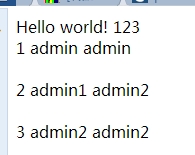 650) this.width=650;" src="http://s3.51cto.com/wyfs02/M01/45/0C/wKiom1Pji5mAJWIHAABVTGjBE64854.jpg" title="QQ截图20140807222131.png" alt="wKiom1Pji5mAJWIHAABVTGjBE64854.jpg" />
本文出自 “阿凡达” 博客,请务必保留此出处http://shamrock.blog.51cto.com/2079212/1537190
JDBC连接池的更多相关文章
- 四大流行的jdbc连接池之C3P0篇
C3P0是一个开放源代码的JDBC连接池,它在lib目录中与Hibernate一起发布,包括了实现jdbc3和jdbc2扩展规范说明的Connection 和Statement 池的DataSourc ...
- Spring+SpringMVC+MyBatis+easyUI整合优化篇(九)数据层优化-jdbc连接池简述、druid简介
日常啰嗦 终于回到既定轨道上了,这一篇讲讲数据库连接池的相关知识,线程池以后有机会再结合项目单独写篇文章(自己给自己挖坑,不知道什么时候能填上),从这一篇文章开始到本阶段结束的文章都会围绕数据库和da ...
- JDBC连接池-C池3P0连接
JDBC连接池-C3P0连接 c3p0连接池的学习英语好的看英文原版 c3p0 - JDBC3 Connection and Statement Pooling 使用c3p0连接池 三种方 ...
- JDBC连接池(三)DBCP连接池
JDBC连接池(三)DBCP连接池 在前面的随笔中提到 了 1.JDBC自定义连接池 2. C3P0连接池 今天将介绍DBCP连接池 第一步要导入jar包 (注意:mysql和mysql 驱动 ...
- JDBC连接池-自定义连接池
JDBC连接池 java JDBC连接中用到Connection 在每次对数据进行增删查改 都要 开启 .关闭 ,在实例开发项目中 ,浪费了很大的资源 ,以下是之前连接JDBC的案例 pack ...
- Jmeter(九)JDBC连接池
JDBC为java访问数据库提供通用的API,可以为多种关系数据库提供统一访问.因为SQL是关系式数据库管理系统的标准语言,只要我们遵循SQL规范,那么我们写的代码既可以访问MySQL又可以访问SQL ...
- jdbc连接池&改进dbUtil成C3P0Util
一.jdbc连接池 1.连接池的存在理由 前面介绍的dbUtils工具类虽然实现了一个对jdbc的简单封装.但它依旧采取从驱动管理获取连接 (DriverManager.getConnection ...
- Tomcat 的 JDBC 连接池
JDBC 连接池 org.apache.tomcat.jdbc.pool 是 Apache Commons DBCP 连接池的一种替换或备选方案. 那究竟为何需要一个新的连接池? 原因如下: Comm ...
- 【JDBC&Dbutils】JDBC&JDBC连接池&DBUtils使用方法(重要)
-----------------------JDBC---------- 0. db.properties文件 driver=com.mysql.jdbc.Driver url=jdbc: ...
- spring boot(10)-tomcat jdbc连接池
默认连接池 tomcat jdbc是从tomcat7开始推出的一个连接池,相比老的dbcp连接池要优秀很多.spring boot将tomcat jdbc作为默认的连接池,只要在pom.xml中引入了 ...
随机推荐
- java classloader
一个jvm中默认的classloader有Bootstrap ClassLoader.Extension ClassLoader.App ClassLoader,分别各司其职: Bootstrap ...
- python调用模块&函数
一般模块是抽象的概念,按照功能划分模块,尽可能保证每个模块互相独立. 一般模块里有多个函数.当然,如果你愿意,也可以把一个几个模块写进一个大函数.对于python 模块,每个模块可以包含多个函数,但一 ...
- BIEE定制化
(1)自定义图片的引用 (2)修改产品本身的一些图片内容 (3)修改产品本身的一些文字 如何引用自己的自定义图片: 直接找路径或者图片就可以修改 推荐不要直接替换,直接替换导致有的内容没办法直接显示出 ...
- [cf140e]New Year Garland
Description 用$m$种颜色的彩球装点$n$层的圣诞树.圣诞树的第$i$层恰由$l[i]$个彩球串成一行,且同一层内的相邻彩球颜色不同,同时相邻两层所使用彩球的颜色集合不同. 求有多少种装点 ...
- 【BZOJ-1009】GT考试 KMP+DP+矩阵乘法+快速幂
1009: [HNOI2008]GT考试 Time Limit: 1 Sec Memory Limit: 162 MBSubmit: 2745 Solved: 1694[Submit][Statu ...
- 【bzoj1911】 Apio2010—特别行动队
http://www.lydsy.com/JudgeOnline/problem.php?id=1911 (题目链接) 题意 给出一个序列,将序列分成连续的几段,每段的价值为a*s*s+b*s+c,其 ...
- 提高SQL的查询效率
1.对查询进行优化,应尽量避免全表扫描,首先应考虑在 where 及 order by 涉及的列上建立索引. 2.应尽量避免在 where 子句中对字段进行 null 值判断,否则将导致引擎放弃使 ...
- MOOCULUS微积分-2: 数列与级数学习笔记 2. Series
此课程(MOOCULUS-2 "Sequences and Series")由Ohio State University于2014年在Coursera平台讲授. PDF格式教材下载 ...
- CSS 公共样式分享
global.css | reset.css(格式化样式) common.css(公共组件样式) layout.css(当前页面样式) 清除全站所有页面的浏览器默认样式,保证在初始样式在所有浏览器下一 ...
- 屠蛟之路_乘风破浪_FifthDay
乘风破浪 一艘大船 (我们写的几千行代码) 一片汪洋 (软工耗费的时间) 一群骚年 (一不小心就火了) 为救一位公主 (吃自助餐) 选择去跋山涉水,乘风破浪(解决bug,解决冲突) 毫不畏惧 (韧性) ...