
iOS 实现Tabbarcontroller中间自定义样式 最简单的方法
先上图:
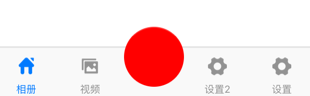
如果我们要实现中间按钮自定义样式,方法应该蛮多,这里介绍一种最简单的。
1、创建类继承:UITabBarController,如下代码都是写在该类的 .m文件里
2、定义最中间的自定义样式,写在viewDidLoad里
    UIButton *btn = [[UIButton alloc] init];

    btn.layer.cornerRadius = 30;

    btn.layer.masksToBounds = YES;

    btn.backgroundColor = [UIColor redColor];

    btn.frame = CGRectMake(0, 0, 60, 60);

    CGPoint center = self.tabBar.center;

    center.y=center.y-15;

    btn.center = center;

    [self.view addSubview:btn];

    [btn addTarget:self action:@selector(hhhCLick) forControlEvents:UIControlEventTouchUpInside];
这里解释一下:
我们获取当前tabbar的center点,然后自定义一个按钮,给予自己想要的样式,然后add上去。
这里要注意一点,这里用的自定义按钮,没有用系统tabbarItem,所以最后setViewController的时候要留出位置。
完整代码如下:
- (void)viewDidLoad {

    [super viewDidLoad];

    // Do any additional setup after loading the view.

    HomeViewController *home = [[HomeViewController alloc] init];

    UINavigationController *homeNav = [[UINavigationController alloc] initWithRootViewController:home];

    home.title = @"相册";

    home.navigationItem.title = @"相册";

    home.tabBarItem.image = [[UIImage imageNamed:@"home"] imageWithRenderingMode:UIImageRenderingModeAutomatic];

    home.tabBarItem.selectedImage = [[UIImage imageNamed:@"home_selected"] imageWithRenderingMode:UIImageRenderingModeAutomatic];

    VideoViewController *pic = [[VideoViewController alloc] init];

    UINavigationController *picNav = [[UINavigationController alloc] initWithRootViewController:pic];

    pic.title = @"视频";

    pic.navigationItem.title = @"视频";

    pic.tabBarItem.image = [[UIImage imageNamed:@"picture"] imageWithRenderingMode:UIImageRenderingModeAutomatic];

    pic.tabBarItem.selectedImage = [[UIImage imageNamed:@"picture_selected"] imageWithRenderingMode:UIImageRenderingModeAutomatic];

    SeetingViewController *setting = [[SeetingViewController alloc] init];

    UINavigationController *setNav = [[UINavigationController alloc] initWithRootViewController:setting];

    setting.tabBarItem.title = @"设置";

    setting.navigationItem.title = @"设置";

    setting.tabBarItem.image = [[UIImage imageNamed:@"setting"] imageWithRenderingMode:UIImageRenderingModeAutomatic];

    setting.tabBarItem.selectedImage = [[UIImage imageNamed:@"setting_selected"] imageWithRenderingMode:UIImageRenderingModeAutomatic];

    SeetingViewController *setting222 = [[SeetingViewController alloc] init];

    UINavigationController *setNav222 = [[UINavigationController alloc] initWithRootViewController:setting222];

    setting222.tabBarItem.title = @"设置2";

    setting222.navigationItem.title = @"设置2";

    setting222.tabBarItem.image = [[UIImage imageNamed:@"setting"] imageWithRenderingMode:UIImageRenderingModeAutomatic];

    setting222.tabBarItem.selectedImage = [[UIImage imageNamed:@"setting_selected"] imageWithRenderingMode:UIImageRenderingModeAutomatic];

    NSMutableArray *arry = [[NSMutableArray alloc] init];

    [arry addObject:homeNav];

    [arry addObject:picNav];

    [arry addObject:[UIViewController new]];

    [arry addObject:setNav222];

    [arry addObject:setNav];

    [self setViewControllers:arry animated:YES];

    //-----------这里是自定义样式按钮-----------

    UIButton *btn = [[UIButton alloc] init];

    btn.layer.cornerRadius = 30;

    btn.layer.masksToBounds = YES;

    btn.backgroundColor = [UIColor redColor];

    btn.frame = CGRectMake(0, 0, 60, 60);

    CGPoint center = self.tabBar.center;

    center.y=center.y-15;

    btn.center = center;

    [self.view addSubview:btn];

    [btn addTarget:self action:@selector(hhhCLick) forControlEvents:UIControlEventTouchUpInside];

}
点击按钮事件,自己可以Modal到新控制器。
-(void)hhhCLick{

    SeetingViewController *setting111 = [[SeetingViewController alloc] init];

    UINavigationController *setNav111 = [[UINavigationController alloc] initWithRootViewController:setting111];

    setting111.tabBarItem.title = @"";

    setting111.navigationItem.title = @"设置1";

    [self presentViewController:setNav111 animated:YES completion:nil];

}
iOS 实现Tabbarcontroller中间自定义样式 最简单的方法的更多相关文章
- iOS 中使用 XIB 自定义cell 的两种方法 以及 编译出现常见 的错误 ++++(xcode6.0之后)
一. 注册cell 1.创建自定义cell并勾选 xib :(勾选xib就会自动生成与cell文件关联的xib) 2.在 tableViewController里注册自定义Cell (或者遵守tabl ...
- vue点击时动态改变样式 ------- 最简单的方法
vue点击时动态改变样式 template中 <li :class="{ active:index==isActive }" @click="changeValue ...
- iOS 中使用 XIB 自定义cell的两种方法以及编译出现常见 的错误 (xcode6.0之后)
一. 注册cell 1.创建自定义cell并勾选 xib :(勾选xib就会自动生成与cell文件关联的xib) 2.在 tableViewController里注册自定义Cell (或者遵守tabl ...
- 移动端ios下H5的:active样式失效的解决方法
在body上绑定一个touchstart事件,空函数就行: document.body.addEventListener('touchstart', function(){}, false) 或者在b ...
- Yii2 ActiveForm表单自定义样式
实例: <?php $form = ActiveForm::begin([ 'fieldConfig' => [ 'template' => '<div class=" ...
- Dialog详解(包括进度条、PopupWindow、自定义view、自定义样式的对话框)
Dialog详解(包括进度条.PopupWindow.自定义view.自定义样式的对话框) Android中提供了多种对话框,在实际应用中我们可能会需要修改这些已有的对话框.本实例就是从实际出发, ...
- 超详细的Xcode代码格式化教程,可自定义样式。
超详细的Xcode代码格式化教程,可自定义样式. 为什么要格式化代码 当团队内有多人开发的时候,每个人写的代码格式都有自己的喜好,也可能会忙着写代码而忽略了格式的问题.在之前,我们可能会写完代码后,再 ...
- [置顶]
bootstrap自定义样式-bootstrap侧边导航栏的实现
前言 bootstrap自带的响应式导航栏是向下滑动的,有时满足不了个性化的需求,需要做一个类似于android drawerLayout 侧滑的菜单,这就是我要实现的bootstrap自定义侧滑菜单 ...
- Expo大作战(十二)--expo中的自定义样式Custom font,以及expo中的路由Route&Navigation
简要:本系列文章讲会对expo进行全面的介绍,本人从2017年6月份接触expo以来,对expo的研究断断续续,一路走来将近10个月,废话不多说,接下来你看到内容,讲全部来与官网 我猜去全部机翻+个人 ...
随机推荐
- JS的预编译和执行顺序 详析(及全局与局部变量)
最近在复习javascript的事件处理时发现了一个问题,于是总结一下:javascript的预编译和执行顺序的问题: <html> <head> <title> ...
- phpcms 移植【添加相关文章】功能
添加相关文章功能相当有用,移植一个过来基本上可以实现比较复杂的页面内包含分类功能,做二次开发时可以省下不少力气. 用例:如果一个产品,属于一个厂家,而这个厂家是动态添加的,既不是一个分类,而是一个厂家 ...
- rabbitMQ publish丢包分析
rabbitMQ publish丢包分析
- Web 开发最有用的50款 jQuery 插件集锦——《综合篇》
这篇文章是<Web 开发最有用的50款 jQuery 插件集锦>系列的最后一篇,整个系列向大家分享了在网站开发中非常有帮助的 50 款 jQuery 插件,这些插件按用途主要有以下类别:网 ...
- Hashslider – 带有 Hash 标签功能的 jQuery 内容滑块
Hashslider 实现了常见的 jQuery 滑块的功能,特别之处在于给 URL 加上了标签,因此你能够连接到滑块的某块内容.滑块的内容也可以从外部的 HTML 文件获取. 您可能感兴趣的相关文章 ...
- JavaScript 随机链接
<html> <body> <script type="text/javascript"> var r=Math.random() if (r& ...
- ArcPy之Python介绍
1.Python简介 Python是一种面向对象.解释型计算机程序设计语言;Python是一种简单易学,功能强大的编程语言.它有高效率的高层数据结构,简单而有效地实现面向对象编程.Python简洁的语 ...
- TextView显示颜色高亮的问题
TextView textView = (TextView) findViewById( R.id.tv ); String text = "<font color=\"#d ...
- 我曾经的第一个OC程序
一. OC简介 C语言的基础上,增加了一层最小的面向对象语法 完全兼容C语言 可以在OC代码中混入C语言代码,甚至是C++代码 可以使用OC开发Mac OS X平台和iOS平台的应用程序 二. OC语 ...
- vs2012中EF6的BUG
BUG不怕,只要开源 1.无主键表序列化时会自动将所有非空列均设为主键列 Creating table -- Creating table 't_b_Camera' CREATE TABLE [dbo ...