
Android 12(S) MultiMedia Learning(二)MediaPlayer Java
Android提供了MediaPlayer这样一个简单易用的音视频java播放接口,通过几个接口调用即可实现音视频播放。
源码位置 http://aospxref.com/android-12.0.0_r3/xref/frameworJavaks/base/media/java/android/media/MediaPlayer.java ,可以从这里找到我们想要的播放接口,大致浏览一圈,除了没有倍速播放接口,其他还是比较全的。
好,我们要实现一个最简单的播放器要哪些步骤和哪些接口呢?
// 1、创建MediaPlayer对象
    new MediaPlayer

// 2、设置数据源
    setDataSource

// 3、设置播放窗口
    setDisPlay
// 4、准备播放
    prepare/prepareAsync

// 5、开始播放以及其他功能
    start/pause/seekTo/stop
1、构造函数
    public MediaPlayer() {

        this(AudioSystem.AUDIO_SESSION_ALLOCATE);

    }

    private MediaPlayer(int sessionId) {

        super(new AudioAttributes.Builder().build(),

                AudioPlaybackConfiguration.PLAYER_TYPE_JAM_MEDIAPLAYER);

        Looper looper;

        if ((looper = Looper.myLooper()) != null) {

            mEventHandler = new EventHandler(this, looper);

        } else if ((looper = Looper.getMainLooper()) != null) {

            mEventHandler = new EventHandler(this, looper);

        } else {

            mEventHandler = null;

        }

        mTimeProvider = new TimeProvider(this);

        mOpenSubtitleSources = new Vector<InputStream>();

        AttributionSource attributionSource = AttributionSource.myAttributionSource();

        // set the package name to empty if it was null

        if (attributionSource.getPackageName() == null) {

            attributionSource = attributionSource.withPackageName("");

        }

        /* Native setup requires a weak reference to our object.

         * It's easier to create it here than in C++.

         */

        try (ScopedParcelState attributionSourceState = attributionSource.asScopedParcelState()) {

            native_setup(new WeakReference<MediaPlayer>(this), attributionSourceState.getParcel());

        }

        baseRegisterPlayer(sessionId);

    }
这里主要做了两件事:
a. 调用baseRegisterPlayer方法获取AudioSevice,并且做一些设定。但是这边有一个疑问,这个sessionId并没有传给native,有什么作用的?
b. 调用JNI方法native_setup
JNI代码位置 http://aospxref.com/android-12.0.0_r3/xref/frameworks/base/media/jni/
static void

android_media_MediaPlayer_native_setup(JNIEnv *env, jobject thiz, jobject weak_this,

                                       jobject jAttributionSource)

{

    ALOGV("native_setup");

    Parcel* parcel = parcelForJavaObject(env, jAttributionSource);

    android::content::AttributionSourceState attributionSource;

    attributionSource.readFromParcel(parcel);

    sp<MediaPlayer> mp = new MediaPlayer(attributionSource);

    if (mp == NULL) {

        jniThrowException(env, "java/lang/RuntimeException", "Out of memory");

        return;

    }

    // create new listener and give it to MediaPlayer

    sp<JNIMediaPlayerListener> listener = new JNIMediaPlayerListener(env, thiz, weak_this);

    mp->setListener(listener);

    // Stow our new C++ MediaPlayer in an opaque field in the Java object.

    setMediaPlayer(env, thiz, mp);

}
JNI代码中创建了一个native的MediaPlayer对象,并且给这个对象注册了一个Listener,这样native MediaPlayer就可以通过这个listener来调用Java层的postEventFromNative方法
// native mediaplayer

void MediaPlayer::notify(int msg, int ext1, int ext2, const Parcel *obj)

{

     // ......

     sp<MediaPlayerListener> listener = mListener;

     listener->notify(msg, ext1, ext2, obj);

}

// JNI

void JNIMediaPlayerListener::notify(int msg, int ext1, int ext2, const Parcel *obj)

{

        // ......

        env->CallStaticVoidMethod(mClass, fields.post_event, mObject,

                msg, ext1, ext2, NULL);

        // ......

}

// 在native_init中初始化

fields.post_event = env->GetStaticMethodID(clazz, "postEventFromNative",

                                               "(Ljava/lang/Object;IIILjava/lang/Object;)V");

// Java mediaplayer

private static void postEventFromNative(Object mediaplayer_ref,

                                                            int what, int arg1, int arg2, Object obj)
2、setDataSource
这个函数有很多重载版本,用的最多的应该是参数只有uri的版本,最后调用到私有的setDataSource当中,这个方法中会调用nativeSetDataSource方法
    public void setDataSource(String path)

            throws IOException, IllegalArgumentException, SecurityException, IllegalStateException {

        setDataSource(path, null, null);

    }

@UnsupportedAppUsage(maxTargetSdk = Build.VERSION_CODES.R, trackingBug = 170729553)

    private void setDataSource(String path, String[] keys, String[] values,

            List<HttpCookie> cookies)

            throws IOException, IllegalArgumentException, SecurityException, IllegalStateException {

        final Uri uri = Uri.parse(path);

        final String scheme = uri.getScheme();

        if ("file".equals(scheme)) {

            path = uri.getPath();

        } else if (scheme != null) {

            // handle non-file sources

            nativeSetDataSource(

                MediaHTTPService.createHttpServiceBinderIfNecessary(path, cookies),

                path,

                keys,

                values);

            return;

        }

        final File file = new File(path);

        try (FileInputStream is = new FileInputStream(file)) {

            setDataSource(is.getFD());

        }

    }
JNI代码主要调用了native mediaplayer 的 setDataSource方法
static void

android_media_MediaPlayer_setDataSourceAndHeaders(

        JNIEnv *env, jobject thiz, jobject httpServiceBinderObj, jstring path,

        jobjectArray keys, jobjectArray values) {

// ......

    status_t opStatus =

        mp->setDataSource(

                httpService,

                pathStr,

                headersVector.size() > 0? &headersVector : NULL);

}
3、setDisplay
这里比较简单,直接调用JNI函数 _setVideoSurface
    public void setDisplay(SurfaceHolder sh) {

        mSurfaceHolder = sh;

        Surface surface;

        if (sh != null) {

            surface = sh.getSurface();

        } else {

            surface = null;

        }

        _setVideoSurface(surface);

        updateSurfaceScreenOn();

    }
JNI中主要是调用native mediaplayer的setVideoSurfaceTexture方法,根据注释内容,这个方法的调用需要在setDataSource之后调用
static void

setVideoSurface(JNIEnv *env, jobject thiz, jobject jsurface, jboolean mediaPlayerMustBeAlive)

{

// .....

    sp<IGraphicBufferProducer> new_st;

    if (jsurface) {

        sp<Surface> surface(android_view_Surface_getSurface(env, jsurface));

        if (surface != NULL) {

            new_st = surface->getIGraphicBufferProducer();

            if (new_st == NULL) {

                jniThrowException(env, "java/lang/IllegalArgumentException",

                    "The surface does not have a binding SurfaceTexture!");

                return;

            }

            new_st->incStrong((void*)decVideoSurfaceRef);

        } else {

            jniThrowException(env, "java/lang/IllegalArgumentException",

                    "The surface has been released");

            return;

        }

    }

    env->SetLongField(thiz, fields.surface_texture, (jlong)new_st.get());

    // This will fail if the media player has not been initialized yet. This

    // can be the case if setDisplay() on MediaPlayer.java has been called

    // before setDataSource(). The redundant call to setVideoSurfaceTexture()

    // in prepare/prepareAsync covers for this case.

    mp->setVideoSurfaceTexture(new_st);

}
4、prepareAsync
这个更简单了,直接调用JNI方法prepareAsync
public native void prepareAsync() throws IllegalStateException;
调用了native mediaplayer的prepareAsync方法
static void

android_media_MediaPlayer_prepareAsync(JNIEnv *env, jobject thiz)

{

    sp<MediaPlayer> mp = getMediaPlayer(env, thiz);

    if (mp == NULL ) {

        jniThrowException(env, "java/lang/IllegalStateException", NULL);

        return;

    }

    // Handle the case where the display surface was set before the mp was

    // initialized. We try again to make it stick.

    sp<IGraphicBufferProducer> st = getVideoSurfaceTexture(env, thiz);

    mp->setVideoSurfaceTexture(st);

    process_media_player_call( env, thiz, mp->prepareAsync(), "java/io/IOException", "Prepare Async failed." );

}
由于是异步调用,native mediaplayer 的prepare执行结束之后,会发送一个MEDIA_PREPARED,然后执行OnPreparedListener 方法
5、start/pause/stop/seekTo
这几个方法比较类似,都是在接口中去调用JNI方法,start调用 _start方法
    public void start() throws IllegalStateException {

        //FIXME use lambda to pass startImpl to superclass

        final int delay = getStartDelayMs();

        if (delay == 0) {

            startImpl();

        } else {

            new Thread() {

                public void run() {

                    try {

                        Thread.sleep(delay);

                    } catch (InterruptedException e) {

                        e.printStackTrace();

                    }

                    baseSetStartDelayMs(0);

                    try {

                        startImpl();

                    } catch (IllegalStateException e) {

                        // fail silently for a state exception when it is happening after

                        // a delayed start, as the player state could have changed between the

                        // call to start() and the execution of startImpl()

                    }

                }

            }.start();

        }

    }

    private void startImpl() {

        baseStart(0); // unknown device at this point

        stayAwake(true);

        tryToEnableNativeRoutingCallback();

        _start();

    }

    private native void _start() throws IllegalStateException;
JNI中调用native mediaplayer的start方法
static void

android_media_MediaPlayer_start(JNIEnv *env, jobject thiz)

{

    ALOGV("start");

    sp<MediaPlayer> mp = getMediaPlayer(env, thiz);

    if (mp == NULL ) {

        jniThrowException(env, "java/lang/IllegalStateException", NULL);

        return;

    }

    process_media_player_call( env, thiz, mp->start(), NULL, NULL );

}
接下来用这几个接口来写一个最简单的播放器,代码以及效果如下
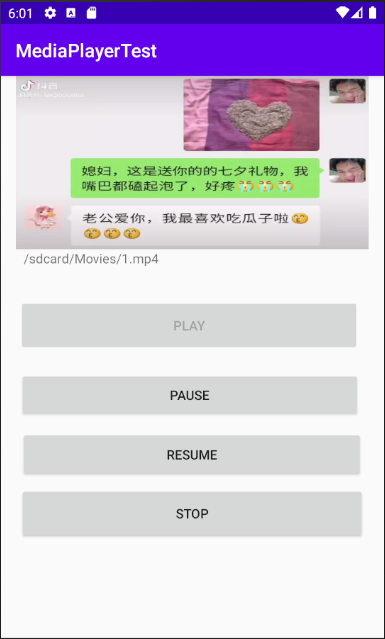
package com.example.mediaplayertest;

import androidx.appcompat.app.AppCompatActivity;

import android.media.MediaPlayer;

import android.os.Bundle;

import android.util.Log;

import android.view.SurfaceView;

import android.view.View;

import android.widget.Button;

import android.widget.TextView;

import java.io.IOException;

public class MainActivity extends AppCompatActivity {

    public static final String TAG = "MainActivity";

    TextView textView = null;

    Button start = null;

    Button pause = null;

    Button resume = null;

    Button stop = null;

    SurfaceView surfaceView = null;

    String uri = null;

    MediaPlayer player = null;

    @Override

    protected void onCreate(Bundle savedInstanceState) {

        super.onCreate(savedInstanceState);

        setContentView(R.layout.activity_main);

        start = findViewById(R.id.btn_play);

        pause = findViewById(R.id.btn_pause);

        resume = findViewById(R.id.btn_resume);

        stop = findViewById(R.id.btn_stop);

        textView = findViewById(R.id.textView);

        surfaceView = findViewById(R.id.surfaceView);

        start.setOnClickListener(clickListener);

        pause.setOnClickListener(clickListener);

        resume.setOnClickListener(clickListener);

        stop.setOnClickListener(clickListener);

    }

    private View.OnClickListener clickListener = new View.OnClickListener() {

        @Override

        public void onClick(View view) {

            switch (view.getId()){

                case R.id.btn_play:

                    Play();

                    break;

                case R.id.btn_pause:

                    Pause();

                    break;

                case R.id.btn_resume:

                    Resume();

                    break;

                case R.id.btn_stop:

                    Stop();

                    break;

                default:

                    break;

            }

        }

    };

    @Override

    protected void onDestroy()

    {

        super.onDestroy();

        if (player != null && player.isPlaying())

        {

            player.stop();

            player.release();

            player = null;

        }

    }

    private void Play()

    {

        uri = textView.getText().toString();

        player = new MediaPlayer();

        player.setOnPreparedListener(new MediaPlayer.OnPreparedListener() {

            @Override

            public void onPrepared(MediaPlayer mediaPlayer) {

                mediaPlayer.start();

            }

        });

        player.setOnCompletionListener(new MediaPlayer.OnCompletionListener() {

            @Override

            public void onCompletion(MediaPlayer mediaPlayer) {

                mediaPlayer.reset();

                start.setEnabled(true);

            }

        });

        player.setDisplay(surfaceView.getHolder());

        try {

            player.setDataSource(uri);

        } catch (IOException e) {

            e.printStackTrace();

        }

        player.prepareAsync();

        start.setEnabled(false);

    }

    private void Pause()

    {

        if(player != null && player.isPlaying())

            player.pause();

    }

    private void Resume()

    {

        if (player != null)

            player.start();

    }

    private void Stop()

    {

        if (player != null)

        {

            player.stop();

            player.release();

            player = null;

        }

        start.setEnabled(true);

    }

}
Android 12(S) MultiMedia Learning(二)MediaPlayer Java的更多相关文章
- 【朝花夕拾】Android性能篇之(二)Java内存分配
前言 在内存方面,相比于C/C++程序员,咱们java系程序员算是比较幸运的,因为对于内存的分配和回收,都交给了JVM来处理了,而不需要手动在代码中去完成.有了虚拟机内存管理机制,也就不 ...
- android NDK 实用学习(二)-java端对象成员赋值和获取对象成员值
1,关于java端类及接口定义请参考: android NDK 实用学习-获取java端类及其类变量 2,对传过来的参数进行赋值: 对bool类型成员进行赋值 env->SetBooleanF ...
- Android 音频的播放之二MediaPlayer
MediaPlayer类可用于控制音频/视频文件或流的播放.关于怎样使用这个类的方法还能够阅读VideoView类的文档. 1.状态图 对播放音频/视频文件和流的控制是通过一个状态机来管理的. 下图显 ...
- 【朝花夕拾】Android性能篇之(三)Java内存回收
在上一篇日志([朝花夕拾]Android性能篇之(二)Java内存分配)中有讲到,JVM内存由程序计数器.虚拟机栈.本地方法栈.GC堆,方法区五个部分组成.其中GC堆是一块多线程的共享区域,它存在的作 ...
- Android 12(S) 图形显示系统 - Surface 一点补充知识(十二)
必读: Android 12(S) 图形显示系统 - 开篇 一.前言 因为个人工作主要是Android多媒体播放的内容,在工作中查看源码或设计程序经常会遇到调用API: static inline i ...
- Android 基于Android的手机邮件收发(JavaMail)之二( Welcome.java 和 ReceiveAndSend.java )
周末休息,这次我们继上次内容继续.上一篇内容我们讲述的是一些准备工作.下载两个javamail.jar和activation.jar文件,然后再BuildPath~ 言归正传,为了展示效果,在这里我申 ...
- Android 12(S) 图形显示系统 - 示例应用(二)
1 前言 为了更深刻的理解Android图形系统抽象的概念和BufferQueue的工作机制,这篇文章我们将从Native Level入手,基于Android图形系统API写作一个简单的图形处理小程序 ...
- Android反编译(一)之反编译JAVA源码
Android反编译(一) 之反编译JAVA源码 [目录] 1.工具 2.反编译步骤 3.实例 4.装X技巧 1.工具 1).dex反编译JAR工具 dex2jar http://code.go ...
- Android系列之网络(二)----HTTP请求头与响应头
[声明] 欢迎转载,但请保留文章原始出处→_→ 生命壹号:http://www.cnblogs.com/smyhvae/ 文章来源:http://www.cnblogs.com/smyhvae/p/ ...
- Android特效专辑(十二)——仿支付宝咻一咻功能实现波纹扩散特效,精细小巧的View
Android特效专辑(十二)--仿支付宝咻一咻功能实现波纹扩散特效,精细小巧的View 先来看看这个效果 这是我的在Only上添加的效果,说实话,Only现在都还只是半成品,台面都上不了,怪自己技术 ...
随机推荐
- 【直播回顾】Hello HarmonyOS进阶课程第五课——原子化服务
由HDE李洋老师主讲的Hello HarmonyOS进阶系列应用篇第五课<原子化服务>, 已于6月1日晚上 19 点在HarmonyOS社群内成功举行.本节课李洋老师带领大家了解Harmo ...
- 重新点亮linux 命令树————压缩和解压缩[四]
前言 简单整理一下压缩和解压缩. 正文 在windows 中我们使用压缩和解压缩一般是7z这个压缩和解压软件,但是在linux中压缩和解压是两个不同的软件. 在最早的linux 备份介质是磁带,使用的 ...
- spring cloud 学习笔记 服务注册与发现(二)
前言 服务注册与发现的学习.这个其实是微服务的核心了,因为微服务的一个重要理念就是将项目拆分,达到解耦的地步.那么如何把这些服务联系到一起就很关键. 如果一个服务到另外一个服务通过ip地址之间访问,虽 ...
- C3P0反序列化链分析
前言 C3P0是一个开源的JDBC连接池,它实现了数据源和JNDI绑定,支持JDBC3规范和JDBC2的标准扩展.使用它的开源项目有Hibernate.Spring等.之前有接触到过,但是没有深入了解 ...
- SpringBoot使用Redis做缓存结合自带注解
配置Spring Cache <dependency> <groupId>org.springframework.boot</groupId> <artifa ...
- NL2SQL技术方案系列(1):NL2API、NL2SQL技术路径选择;LLM选型与Prompt工程技巧,揭秘项目落地优化之道
NL2SQL技术方案系列(1):NL2API.NL2SQL技术路径选择:LLM选型与Prompt工程技巧,揭秘项目落地优化之道 NL2SQL基础系列(1):业界顶尖排行榜.权威测评数据集及LLM大模型 ...
- 力扣15(Java)-三数之和(中等)
题目: 给你一个整数数组 nums ,判断是否存在三元组 [nums[i], nums[j], nums[k]] 满足 i != j.i != k 且 j != k ,同时还满足 nums[i] + ...
- 力扣278(java&python)-第一个错误的版本(简单)
题目: 你是产品经理,目前正在带领一个团队开发新的产品.不幸的是,你的产品的最新版本没有通过质量检测.由于每个版本都是基于之前的版本开发的,所以错误的版本之后的所有版本都是错的. 假设你有 n 个版本 ...
- 云效故障定位研究论文被ICSE 2021 SEIP track收录
近期,由阿里云云效团队联合复旦大学CodeWisdom研究团队.阿里技术风险部安全生产团队,合作完成的论文<MicroHECL: High-Efficient Root Cause Locali ...
- dotnet 7 WPF 破坏性改动 按下 F3 让 DataGrid 自动排序
本文记录在 dotnet 7 下的 WPF 的一个破坏性改动.在 dotnet 7 下的 WPF 支持 DataGrid 在按下 F3 键的时候,自动按照当前所选列进行列自动排序.这将会让原本采用 F ...