
Web SSH 的原理与在 ASP.NET Core SignalR 中的实现
前言
有个项目,需要在前端有个管理终端可以 SSH 到主控机的终端,如果不考虑用户使用 vim 等需要在控制台内现实界面的软件的话,其实使用 Process 类型去启动相应程序就够了。而这次的需求则需要考虑用户会做相关设置。
原理
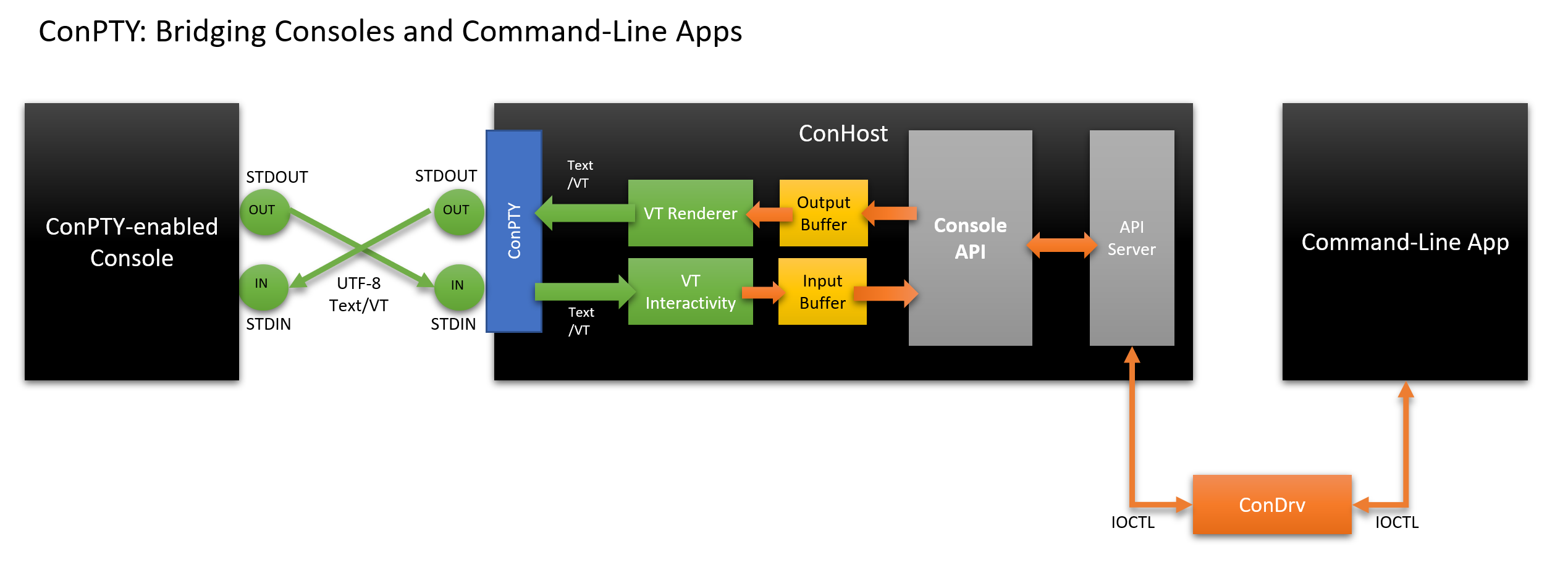
这里用到的原理是伪终端。伪终端(pseudo terminal)是现代操作系统的一个功能,他会模拟一对输入输出设备来模拟终端环境去执行相应的进程。伪终端通常会给相应的进程提供例如环境变量或文件等来告知他在终端中运行,这样像 vim 这样的程序可以在最后一行输出命令菜单或者像 npm / pip 这样的程序可以打印炫酷的进度条。通常在我们直接创建子进程的时候,在 Linux 上系统自带了 openpty 方法可以打开伪终端,而在 Windows 上则等到 Windows Terminal 推出后才出现了真正的系统级伪终端。下面付一张来自微软博客的伪终端原理图,Linux 上的原理与之类似
基本设计
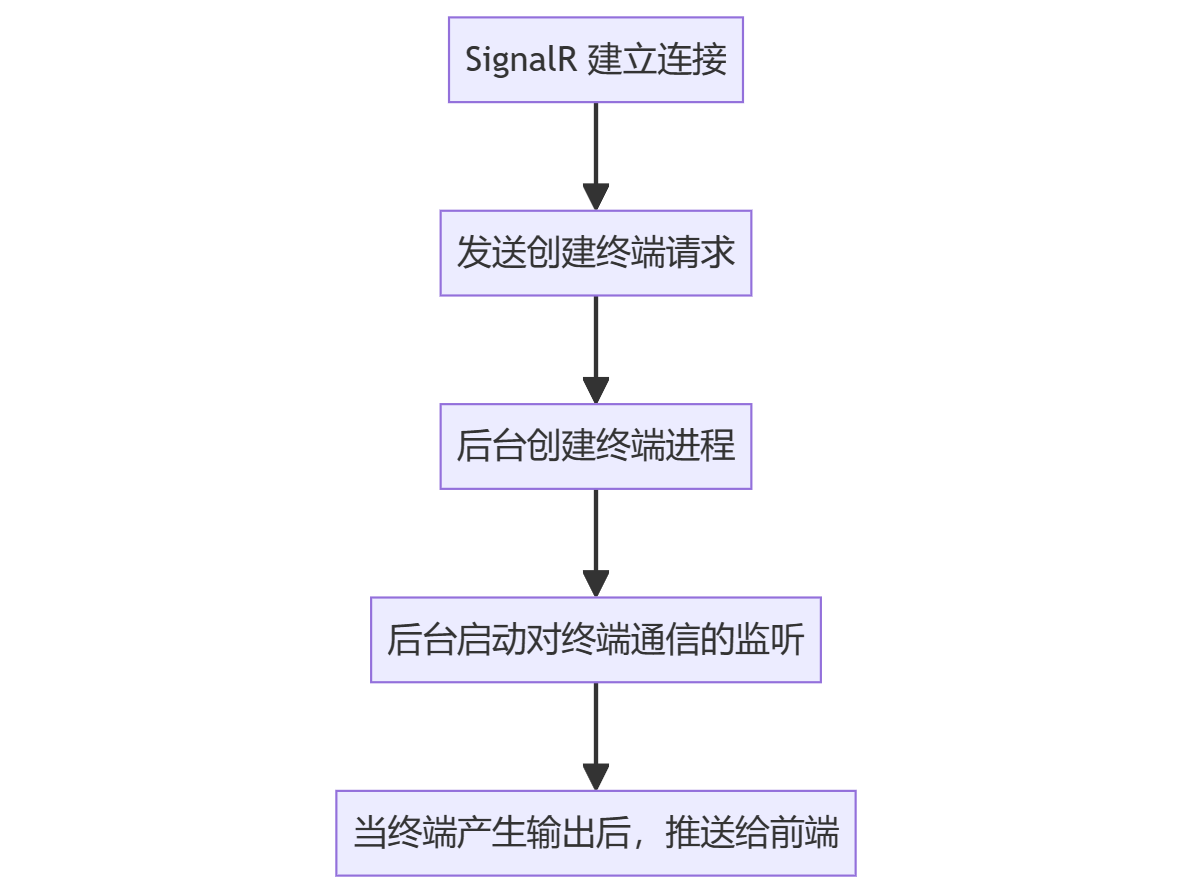
建立连接与监听终端输出
监听前端输入
A[终端窗口收到键盘事件] --> B[SignalR 发送请求];
B --> C[后台转发到对应终端]
超时与关闭
A[当 SignalR 发送断开连接或终端超时] --> B[关闭终端进程];
依赖库
portable_pty
这里用到这个 Rust 库来建立终端,这个库是一个独立的进程,每次建立连接都会运行。这里当初考虑过直接在 ASP.NET Core 应用里调用 vs-pty(微软开发的,用在 vs 里的库,可以直接在 vs 安装位置复制一份),但是 vs-pty 因为种种原因在 .NET 7 + Ubuntu 22.04 的环境下运行不起来故放弃了。
xterm.js
这个是前端展示终端界面用的库,据说 vs code 也在用这个库,虽然文档不多,但是用起来真的很简单。
SignalR
这个不多说了,咱 .NET 系列 Web 实时通信选他就没错。
代码
废话不多讲了,咱还是直接看代码吧,这里代码还是比较长的,我节选了一些必要的代码。具体 SignalR 之类的配置,还请读者自行参考微软官方文档。
main.rs这个 Rust 代码用于建立伪终端并和 .NET 服务通信,这里使用了最简单的 UDP 方式通信。
use portable_pty::{self, native_pty_system, CommandBuilder, PtySize};

use std::{io::prelude::*, sync::Arc};

use tokio::net::UdpSocket;

#[tokio::main(flavor = "multi_thread", worker_threads = 4)]

async fn main() -> Result<(), Box<dyn std::error::Error>> {

    let args = std::env::args().collect::<Vec<_>>();

    // 启动一个终端

    let pty_pair = native_pty_system().openpty(PtySize {

        rows: args.get(2).ok_or("NoNumber")?.parse()?,

        cols: args.get(3).ok_or("NoNumber")?.parse()?,

        pixel_width: 0,

        pixel_height: 0,

    })?;

    // 执行传进来的命令

    let mut cmd = CommandBuilder::new(args.get(4).unwrap_or(&"bash".to_string()));

    if args.len() > 5 {

        cmd.args(&args[5..]);

    }

    let mut proc = pty_pair.slave.spawn_command(cmd)?;

    // 绑定输入输出

    let mut reader = pty_pair.master.try_clone_reader()?;

    let mut writer = pty_pair.master.take_writer()?;

    // 绑定网络

    let main_socket = Arc::new(UdpSocket::bind("localhost:0").await?);

    let recv_socket = main_socket.clone();

    let send_socket = main_socket.clone();

    let resize_socket = UdpSocket::bind("localhost:0").await?;

    // 连接到主服务后发送地址

    main_socket

        .connect(args.get(1).ok_or("NoSuchAddr")?)

        .await?;

    main_socket

        .send(&serde_json::to_vec(&ClientAddr {

            main: main_socket.local_addr()?.to_string(),

            resize: resize_socket.local_addr()?.to_string(),

        })?)

        .await?;

    // 读取终端数据并发送

    let read = tokio::spawn(async move {

        loop {

            let mut buf = [0; 1024];

            let n = reader.read(&mut buf).unwrap();

            if n == 0 {

                continue;

            }

            println!("{:?}", &buf[..n]);

            send_socket.send(&buf[..n]).await.unwrap();

        }

    });

    // 接收数据并写入终端

    let write = tokio::spawn(async move {

        loop {

            let mut buf = [0; 1024];

            let n = recv_socket.recv(&mut buf).await.unwrap();

            if n == 0 {

                continue;

            }

            println!("{:?}", &buf[..n]);

            writer.write_all(&buf[..n]).unwrap();

        }

    });

    // 接收调整窗口大小的数据

    let resize = tokio::spawn(async move {

        let mut buf = [0; 1024];

        loop {

            let n = resize_socket.recv(&mut buf).await.unwrap();

            if n == 0 {

                continue;

            }

            let size: WinSize = serde_json::from_slice(buf[..n].as_ref()).unwrap();

            pty_pair

                .master

                .resize(PtySize {

                    rows: size.rows,

                    cols: size.cols,

                    pixel_width: 0,

                    pixel_height: 0,

                })

                .unwrap();

        }

    });

    // 等待进程结束

    let result = proc.wait()?;

    write.abort();

    read.abort();

    resize.abort();

    if 0 == result.exit_code() {

        std::process::exit(result.exit_code() as i32);

    }

    return Ok(());

}

/// 窗口大小

#[derive(serde::Deserialize)]

struct WinSize {

    /// 行数

    rows: u16,

    /// 列数

    cols: u16,

}

/// 客户端地址

#[derive(serde::Serialize)]

struct ClientAddr {

    /// 主要地址

    main: String,

    /// 调整窗口大小地址

    resize: String,

}
SshPtyConnection.cs这个代码用于维持一个后台运行的 Rust 进程,并管理他的双向通信。
    public class SshPtyConnection : IDisposable

    {

        /// <summary>

        /// 客户端地址

        /// </summary>

        private class ClientEndPoint

        {

            public required string Main { get; set; }

            public required string Resize { get; set; }

        }

        /// <summary>

        /// 窗口大小

        /// </summary>

        private class WinSize

        {

            public int Cols { get; set; }

            public int Rows { get; set; }

        }

        /// <summary>

        /// SignalR 上下文

        /// </summary>

        private readonly IHubContext<SshHub> _hubContext;

        /// <summary>

        /// 日志记录器

        /// </summary>

        private readonly ILogger<SshPtyConnection> _logger;

        /// <summary>

        /// UDP 客户端

        /// </summary>

        private readonly UdpClient udpClient;

        /// <summary>

        /// 最后活动时间

        /// </summary>

        private DateTime lastActivity = DateTime.UtcNow;

        /// <summary>

        /// 是否已释放

        /// </summary>

        private bool disposedValue;

        /// <summary>

        /// 是否已释放

        /// </summary>

        public bool IsDisposed => disposedValue;

        /// <summary>

        /// 最后活动时间

        /// </summary>

        public DateTime LastActivity => lastActivity;

        /// <summary>

        /// 取消令牌

        /// </summary>

        public CancellationTokenSource CancellationTokenSource { get; } = new CancellationTokenSource();

        /// <summary>

        /// 窗口大小

        /// </summary>

        public event EventHandler<EventArgs> Closed = delegate { };

        /// <summary>

        /// 构造函数

        /// </summary>

        /// <param name="hubContext"></param>

        /// <param name="logger"></param>

        /// <exception cref="ArgumentNullException"></exception>

        public SshPtyConnection(IHubContext<SshHub> hubContext, ILogger<SshPtyConnection> logger)

        {

            _hubContext = hubContext ?? throw new ArgumentNullException(nameof(hubContext));

            _logger = logger ?? throw new ArgumentNullException(nameof(logger));

            lastActivity = DateTime.Now;

            udpClient = new(IPEndPoint.Parse("127.0.0.1:0"));

        }

        /// <summary>

        /// 开始监听

        /// </summary>

        /// <param name="connectionId">连接 ID</param>

        /// <param name="username">用户名</param>

        /// <param name="height">行数</param>

        /// <param name="width">列数</param>

        public async void StartAsync(string connectionId, string username, int height, int width)

        {

            var token = CancellationTokenSource.Token;

            _logger.LogInformation("process starting");

            // 启动进程

            using var process = Process.Start(new ProcessStartInfo

            {

                FileName = OperatingSystem.IsOSPlatform("windows") ? "PtyWrapper.exe" : "pty-wrapper",

                // 这里用了 su -l username,因为程序直接部署在主控机的 root 下,所以不需要 ssh 只需要切换用户即可,如果程序部署在其他机器上,需要使用 ssh

                ArgumentList = { udpClient.Client.LocalEndPoint!.ToString() ?? "127.0.0.1:0", height.ToString(), width.ToString(), "su", "-l", username }

            });

            // 接收客户端地址

            var result = await udpClient.ReceiveAsync();

            var clientEndPoint = await JsonSerializer.DeserializeAsync<ClientEndPoint>(new MemoryStream(result.Buffer), new JsonSerializerOptions

            {

                PropertyNameCaseInsensitive = true

            });

            if (clientEndPoint == null)

            {

                CancellationTokenSource.Cancel();

                return;

            }

            process!.Exited += (_, _) => CancellationTokenSource.Cancel();

            var remoteEndPoint = IPEndPoint.Parse(clientEndPoint.Main);

            udpClient.Connect(remoteEndPoint);

            var stringBuilder = new StringBuilder();

            // 接收客户端数据,并发送到 SignalR,直到客户端断开连接或者超时 10 分钟

            while (!token.IsCancellationRequested && lastActivity.AddMinutes(10) > DateTime.Now && !(process?.HasExited ?? false))

            {

                try

                {

                    lastActivity = DateTime.Now;

                    var buffer = await udpClient.ReceiveAsync(token);

                    await _hubContext.Clients.Client(connectionId).SendAsync("WriteDataAsync", Encoding.UTF8.GetString(buffer.Buffer));

                    stringBuilder.Clear();

                }

                catch (Exception e)

                {

                    _logger.LogError(e, "ConnectionId: {ConnectionId} Unable to read data and send message.", connectionId);

                    break;

                }

            }

            // 如果客户端断开连接或者超时 10 分钟,关闭进程

            if (process?.HasExited ?? false) process?.Kill();

            if (lastActivity.AddMinutes(10) < DateTime.Now)

            {

                _logger.LogInformation("ConnectionId: {ConnectionId} Pty session has been closed because of inactivity.", connectionId);

                try

                {

                    await _hubContext.Clients.Client(connectionId).SendAsync("WriteErrorAsync", "InactiveTimeTooLong");

                }

                catch (Exception e)

                {

                    _logger.LogError(e, "ConnectionId: {ConnectionId} Unable to send message.", connectionId);

                }

            }

            if (token.IsCancellationRequested)

            {

                _logger.LogInformation("ConnectionId: {ConnectionId} Pty session has been closed because of session closed.", connectionId);

                try

                {

                    await _hubContext.Clients.Client(connectionId).SendAsync("WriteErrorAsync", "SessionClosed");

                }

                catch (Exception e)

                {

                    _logger.LogError(e, "ConnectionId: {ConnectionId} Unable to send message.", connectionId);

                }

            }

            Dispose();

        }

        /// <summary>

        /// 接收 SignalR 数据,并发送到客户端

        /// </summary>

        /// <param name="data">数据</param>

        /// <returns></returns>

        /// <exception cref="AppException"></exception>

        public async Task WriteDataAsync(string data)

        {

            if (disposedValue)

            {

                throw new AppException("SessionClosed");

            }

            try

            {

                lastActivity = DateTime.Now;

                await udpClient.SendAsync(Encoding.UTF8.GetBytes(data));

            }

            catch (Exception e)

            {

                CancellationTokenSource.Cancel();

                Dispose();

                throw new AppException("SessionClosed", e);

            }

        }

        /// <summary>

        /// 回收资源

        /// </summary>

        /// <param name="disposing"></param>

        protected virtual void Dispose(bool disposing)

        {

            if (!disposedValue)

            {

                if (disposing)

                {

                    CancellationTokenSource.Cancel();

                    udpClient.Dispose();

                }

                disposedValue = true;

                Closed(this, new EventArgs());

            }

        }

        public void Dispose()

        {

            Dispose(disposing: true);

            GC.SuppressFinalize(this);

        }

    }
SshService这段代码用于管理SshPtyConnection和 SignalR 客户端连接之间的关系
    public class SshService : IDisposable

    {

        private bool disposedValue;

        private readonly IHubContext<SshHub> _hubContext;

        private readonly ILoggerFactory _loggerFactory;

        private Dictionary<string, SshPtyConnection> _connections;

        public SshService(IHubContext<SshHub> hubContext, ILoggerFactory loggerFactory)

        {

            _hubContext = hubContext ?? throw new ArgumentNullException(nameof(hubContext));

            _connections = new Dictionary<string, SshPtyConnection>();

            _loggerFactory = loggerFactory ?? throw new ArgumentNullException(nameof(loggerFactory));

        }

        /// <summary>

        /// 创建终端连接

        /// </summary>

        /// <param name="connectionId">连接 ID</param>

        /// <param name="username">用户名</param>

        /// <param name="height">行数</param>

        /// <param name="width">列数</param>

        /// <returns></returns>

        /// <exception cref="InvalidOperationException"></exception>

        public Task CreateConnectionAsync(string connectionId, string username, int height, int width)

        {

            if (_connections.ContainsKey(connectionId))

                throw new InvalidOperationException();

            var connection = new SshPtyConnection(_hubContext, _loggerFactory.CreateLogger<SshPtyConnection>());

            connection.Closed += (sender, args) =>

            {

                _hubContext.Clients.Client(connectionId).SendAsync("WriteErrorAsync", "SessionClosed");

                _connections.Remove(connectionId);

            };

            _connections.Add(connectionId, connection);

            // 运行一个后台线程

            connection.StartAsync(connectionId, username, height, width);

            return Task.CompletedTask;

        }

        /// <summary>

        /// 写入数据

        /// </summary>

        /// <param name="connectionId">连接 ID</param>

        /// <param name="data">数据</param>

        /// <exception cref="AppException"></exception>

        public async Task ReadDataAsync(string connectionId, string data)

        {

            if (_connections.TryGetValue(connectionId, out var connection))

            {

                await connection.WriteDataAsync(data);

            }

            else

                throw new AppException("SessionClosed");

        }

        /// <summary>

        /// 关闭连接

        /// </summary>

        /// <param name="connectionId">连接 ID</param>

        /// <exception cref="AppException"></exception>

        public Task CloseConnectionAsync(string connectionId)

        {

            if (_connections.TryGetValue(connectionId, out var connection))

            {

                connection.Dispose();

            }

            else

                throw new AppException("SessionClosed");

            return Task.CompletedTask;

        }

        /// <summary>

        /// 回收资源

        /// </summary>

        /// <param name="disposing"></param>

        protected virtual void Dispose(bool disposing)

        {

            if (!disposedValue)

            {

                if (disposing)

                {

                    foreach (var item in _connections.Values)

                    {

                        item.Dispose();

                    }

                }

                disposedValue = true;

            }

        }

        public void Dispose()

        {

            Dispose(disposing: true);

            GC.SuppressFinalize(this);

        }

    }
WebSsh.vue这段代码是使用 vue 展示终端窗口的代码
<script setup lang="ts">

import { onMounted, ref } from 'vue';

import { Terminal } from 'xterm';

import { FitAddon } from 'xterm-addon-fit';

import { WebLinksAddon } from 'xterm-addon-web-links';

import { SearchAddon } from 'xterm-addon-search';

import { WebglAddon } from 'xterm-addon-webgl';

import * as signalR from '@microsoft/signalr';

import 'xterm/css/xterm.css';

const termRef = ref<HTMLElement | null>(null);

// 创建 xterm 终端

const term = new Terminal();

// 定义 SignalR 客户端

const connection = new signalR.HubConnectionBuilder()

  .withUrl('/hubs/ssh', {

    accessTokenFactory: () => localStorage.getItem('token'),

  } as any)

  .build();

let isClosed = false;

// 监听键盘事件并发送到后端

term.onData((data) => {

  if (isClosed) {

    return;

  }

  connection.invoke('ReadDataAsync', data).then((result) => {

    if (result.code == 400) {

      isClosed = true;

      term.write('SessionClosed');

    }

  });

});

// 监听后端数据回传

connection.on('WriteDataAsync', (data) => {

  term.write(data);

});

// 监听后端终端关闭

connection.on('WriteErrorAsync', () => {

  isClosed = true;

  term.write('SessionClosed');

});

// 加载插件

const fit = new FitAddon();

term.loadAddon(fit);

term.loadAddon(new WebLinksAddon());

term.loadAddon(new SearchAddon());

term.loadAddon(new WebglAddon());

onMounted(async () => {

  // eslint-disable-next-line @typescript-eslint/no-non-null-assertion

  term.open(termRef.value!);

  fit.fit();

  // 启动 SignalR 客户端

  await connection.start();

  // 创建终端

  connection.invoke('CreateNewTerminalAsync', term.rows, term.cols);

});

</script>

<template>

  <div ref="termRef" class="xTerm"></div>

</template>

<style scoped>

</style>
SshHub.cs这个文件是 SignalR 的 Hub 文件,用来做监听的。
    [Authorize]

    public class SshHub : Hub<ISshHubClient>

    {

        private readonly SshService _sshService;

        private readonly ILogger<SshHub> _logger;

        public SshHub(SshService sshService, ILogger<SshHub> logger)

        {

            _sshService = sshService ?? throw new ArgumentNullException(nameof(sshService));

            _logger = logger ?? throw new ArgumentNullException(nameof(logger));

        }

        /// <summary>

        /// 创建一个新的终端

        /// </summary>

        /// <param name="height"></param>

        /// <param name="width"></param>

        /// <returns></returns>

        public async Task<BaseResponse> CreateNewTerminalAsync(int height = 24, int width = 80)

        {

            try

            {

                var username = Context.User?.FindFirst("preferred_username")?.Value;

                if (username == null)

                {

                    return new BaseResponse

                    {

                        Code = 401,

                        Message = "NoUsername"

                    };

                }

                if (!Context.User?.IsInRole("user") ?? false)

                {

                    username = "root";

                }

                _logger.LogInformation($"{username}");

                await _sshService.CreateConnectionAsync(Context.ConnectionId, username, height, width);

                return new BaseResponse();

            }

            catch (InvalidOperationException)

            {

                return new BaseResponse() { Code = 500, Message = "TerminalAlreadyExist" };

            }

            catch (Exception e)

            {

                _logger.LogError(e, "ConnectionId: {ConnectionId} No such pty session.", Context.ConnectionId);

                return new BaseResponse() { Code = 500, Message = "UnableToCreateTerminal" };

            }

        }

        /// <summary>

        /// 读取输入数据

        /// </summary>

        /// <param name="data"></param>

        /// <returns></returns>

        public async Task<BaseResponse> ReadDataAsync(string data)

        {

            try

            {

                await _sshService.ReadDataAsync(Context.ConnectionId, data);

                return new BaseResponse();

            }

            catch (Exception e)

            {

                _logger.LogError(e, "ConnectionId: {ConnectionId} No such pty session.", Context.ConnectionId);

                return new BaseResponse { Message = "NoSuchSeesion", Code = 400 };

            }

        }

    }

    /// <summary>

    /// 客户端接口

    /// </summary>

    public interface ISshHubClient

    {

        /// <summary>

        /// 写入输出数据

        /// </summary>

        /// <param name="data"></param>

        /// <returns></returns>

        Task WriteDataAsync(string data);

        /// <summary>

        /// 写入错误数据

        /// </summary>

        /// <param name="data"></param>

        /// <returns></returns>

        Task WriteErrorAsync(string data);

    }
参考文献
- Windows Command-Line: Introducing the Windows Pseudo Console (ConPTY)
- portable_pty - Rust
- xterm.js
- 教程:使用 TypeScript 和 Webpack 开始使用 ASP.NET Core SignalR
Web SSH 的原理与在 ASP.NET Core SignalR 中的实现的更多相关文章
- ASP.NET Core SignalR中的流式传输
什么是流式传输? 流式传输是这一种以稳定持续流的形式传输数据的技术. 流式传输的使用场景 有些场景中,服务器返回的数据量较大,等待时间较长,客户端不得不等待服务器返回所有数据后,再进行相应的操作.这时 ...
- 百度Web富文本编辑器ueditor在ASP.NET MVC3项目中的使用说明
====================================================================== [百度Web富文本编辑器ueditor在ASP.NET M ...
- ASP.NET Core MVC中构建Web API
在ASP.NET CORE MVC中,Web API是其中一个功能子集,可以直接使用MVC的特性及路由等功能. 在成功构建 ASP.NET CORE MVC项目之后,选中解决方案,先填加一个API的文 ...
- ASP.NET Core MVC 中的 [Controller] 和 [NonController]
前言 我们知道,在 MVC 应用程序中,有一部分约定的内容.其中关于 Controller 的约定是这样的. 每个 Controller 类的名字以 Controller 结尾,并且放置在 Contr ...
- ASP.NET Core中的缓存[1]:如何在一个ASP.NET Core应用中使用缓存
.NET Core针对缓存提供了很好的支持 ,我们不仅可以选择将数据缓存在应用进程自身的内存中,还可以采用分布式的形式将缓存数据存储在一个“中心数据库”中.对于分布式缓存,.NET Core提供了针对 ...
- 006.Adding a controller to a ASP.NET Core MVC app with Visual Studio -- 【在asp.net core mvc 中添加一个控制器】
Adding a controller to a ASP.NET Core MVC app with Visual Studio 在asp.net core mvc 中添加一个控制器 2017-2-2 ...
- 008.Adding a model to an ASP.NET Core MVC app --【在 asp.net core mvc 中添加一个model (模型)】
Adding a model to an ASP.NET Core MVC app在 asp.net core mvc 中添加一个model (模型)2017-3-30 8 分钟阅读时长 本文内容1. ...
- ASP.NET Core Razor中处理Ajax请求
如何ASP.NET Core Razor中处理Ajax请求 在ASP.NET Core Razor(以下简称Razor)刚出来的时候,看了一下官方的文档,一直没怎么用过.今天闲来无事,准备用Rozor ...
- 007.Adding a view to an ASP.NET Core MVC app -- 【在asp.net core mvc中添加视图】
Adding a view to an ASP.NET Core MVC app 在asp.net core mvc中添加视图 2017-3-4 7 分钟阅读时长 本文内容 1.Changing vi ...
- ASP.NET Core WebAPI中的分析工具MiniProfiler
介绍 作为一个开发人员,你知道如何分析自己开发的Api性能么? 在Visual Studio和Azure中, 我们可以使用Application Insight来监控项目.除此之外我们还可以使用一个免 ...
随机推荐
- Nginx之数据流代理stream模块简介和使用 ---九五小庞
一.stream模块简介 stream模块一般用于TCP/UDP数据流的代理和负载均衡,通过stream模块我们可以代理转发tcp报文.ngx_stream_core_module模块从1.9.0 ...
- 关于DVWA靶场高难度命令执行的代码审计
需要的环境:dvwa 使用的工具:PHP手册 high难度源代码: <?php if( isset( $_POST[ 'Submit' ] ) ) { // Get input $target ...
- Blazor中如何呈现富文本/HTML
将需要显示字符串转换成MarkupString类型 @((MarkupString)htmlString) 参考文献 https://stackoverflow.com/questions/60167 ...
- AI回答打鸟问题
GPT-3.5 树上有9只鸟,猎枪打下来1只,还剩几只? 如果猎枪打下来1只鸟,那么树上剩下的鸟应该是8只.
- 超详细的mysql总结(DQL)
上一篇文章总结了 DDL.DML的使用,这一篇文章把剩下的 DQL 加上~ DQL(Data Query Language)即数据库查询语言,用来查询所需要的信息,在查询的过程中,需要判断所查询的 ...
- 论文解读(AAD)《Knowledge distillation for BERT unsupervised domain adaptation》
Note:[ wechat:Y466551 | 可加勿骚扰,付费咨询 ] 论文信息 论文标题:Knowledge distillation for BERT unsupervised domain a ...
- debian11编译安装freeswitch
前言 环境: 系统版本:debian 11 x86_64 FreeSWITCH版本:1.10.6 安装步骤 安装依赖(安装之前最好换apt软件源为国内的) apt install -y gnupg2 ...
- 《CUDA编程:基础与实践》读书笔记(1):CUDA编程基础
1. GPU简介 GPU与CPU的主要区别在于: CPU拥有少数几个快速的计算核心,而GPU拥有成百上千个不那么快速的计算核心. CPU中有更多的晶体管用于数据缓存和流程控制,而GPU中有更多的晶体管 ...
- 安装iTerm2和oh-my-zsh
安装iTerm2和oh-my-zsh 此文是在参考许多教程(见目录:参考)并结合本人安装经历写下的一篇关于iTerm2和oh-my-zsh的认识和超级详细安装教程.全文所有图片均为本人截屏拍摄.希望能 ...
- 三维模型OBJ格式轻量化压缩处理的数据质量提升方法分析
三维模型OBJ格式轻量化压缩处理的数据质量提升方法分析 在三维模型的OBJ格式轻量化压缩处理过程中,除了减小文件大小和提高加载速度之外,我们也需要考虑如何提升数据质量.以下是几种常见的方法: 1.优化 ...