
Parallel 与 ConcurrentBag<T> 这对儿黄金搭档(C#)【并发编程系列】
〇、前言
日常开发中经常会遇到数据统计,特别是关于报表的项目。数据处理的效率和准确度当然是首要关注点。
本文主要介绍,如何通过 Parallel 来并行处理数据,并组合 ConcurrentBag<T> 集合,来将处理效率达到高点的同时,也能确保数据的准确。
一、ConcurrentBag<T> 简介
1、简介与源码
ConcurrentBag<T>,表示对象的线程安全的无序集合。ConcurrentBag 内部将数据按线程的标识独立进行存储,程序可以在同一个线程中插入、删除元素,所以每个线程对其数据的操作是非常快的。
下面是源码供参考:
点击展开 ConcurrentBag 源码
// System.Collections.Concurrent, Version=5.0.0.0, Culture=neutral, PublicKeyToken=b03f5f7f11d50a3a

// System.Collections.Concurrent.ConcurrentBag<T>

using System;

using System.Collections;

using System.Collections.Concurrent;

using System.Collections.Generic;

using System.Diagnostics;

using System.Diagnostics.CodeAnalysis;

using System.Threading;

[DebuggerTypeProxy(typeof(System.Collections.Concurrent.IProducerConsumerCollectionDebugView<>))]

[DebuggerDisplay("Count = {Count}")]

public class ConcurrentBag<T> : IProducerConsumerCollection<T>, IEnumerable<T>, IEnumerable, ICollection, IReadOnlyCollection<T>

{

	private sealed class WorkStealingQueue

	{

		private volatile int _headIndex;

		private volatile int _tailIndex;

		private volatile T[] _array = new T[32];

		private volatile int _mask = 31;

		private int _addTakeCount;

		private int _stealCount;

		internal volatile int _currentOp;

		internal bool _frozen;

		internal readonly WorkStealingQueue _nextQueue;

		internal readonly int _ownerThreadId;

		internal bool IsEmpty => _headIndex - _tailIndex >= 0;

		internal int DangerousCount

		{

			get

			{

				int stealCount = _stealCount;

				int addTakeCount = _addTakeCount;

				return addTakeCount - stealCount;

			}

		}

		internal WorkStealingQueue(WorkStealingQueue nextQueue)

		{

			_ownerThreadId = Environment.CurrentManagedThreadId;

			_nextQueue = nextQueue;

		}

		internal void LocalPush(T item, ref long emptyToNonEmptyListTransitionCount)

		{

			bool lockTaken = false;

			try

			{

				Interlocked.Exchange(ref _currentOp, 1);

				int num = _tailIndex;

				if (num == int.MaxValue)

				{

					_currentOp = 0;

					lock (this)

					{

						_headIndex &= _mask;

						num = (_tailIndex = num & _mask);

						Interlocked.Exchange(ref _currentOp, 1);

					}

				}

				int headIndex = _headIndex;

				if (!_frozen && headIndex - (num - 1) < 0 && num - (headIndex + _mask) < 0)

				{

					_array[num & _mask] = item;

					_tailIndex = num + 1;

				}

				else

				{

					_currentOp = 0;

					Monitor.Enter(this, ref lockTaken);

					headIndex = _headIndex;

					int num2 = num - headIndex;

					if (num2 >= _mask)

					{

						T[] array = new T[_array.Length << 1];

						int num3 = headIndex & _mask;

						if (num3 == 0)

						{

							Array.Copy(_array, array, _array.Length);

						}

						else

						{

							Array.Copy(_array, num3, array, 0, _array.Length - num3);

							Array.Copy(_array, 0, array, _array.Length - num3, num3);

						}

						_array = array;

						_headIndex = 0;

						num = (_tailIndex = num2);

						_mask = (_mask << 1) | 1;

					}

					_array[num & _mask] = item;

					_tailIndex = num + 1;

					if (num2 == 0)

					{

						Interlocked.Increment(ref emptyToNonEmptyListTransitionCount);

					}

					_addTakeCount -= _stealCount;

					_stealCount = 0;

				}

				checked

				{

					_addTakeCount++;

				}

			}

			finally

			{

				_currentOp = 0;

				if (lockTaken)

				{

					Monitor.Exit(this);

				}

			}

		}

		internal void LocalClear()

		{

			lock (this)

			{

				if (_headIndex - _tailIndex < 0)

				{

					_headIndex = (_tailIndex = 0);

					_addTakeCount = (_stealCount = 0);

					Array.Clear(_array, 0, _array.Length);

				}

			}

		}

		internal bool TryLocalPop([MaybeNullWhen(false)] out T result)

		{

			int tailIndex = _tailIndex;

			if (_headIndex - tailIndex >= 0)

			{

				result = default(T);

				return false;

			}

			bool lockTaken = false;

			try

			{

				_currentOp = 2;

				Interlocked.Exchange(ref _tailIndex, --tailIndex);

				if (!_frozen && _headIndex - tailIndex < 0)

				{

					int num = tailIndex & _mask;

					result = _array[num];

					_array[num] = default(T);

					_addTakeCount--;

					return true;

				}

				_currentOp = 0;

				Monitor.Enter(this, ref lockTaken);

				if (_headIndex - tailIndex <= 0)

				{

					int num2 = tailIndex & _mask;

					result = _array[num2];

					_array[num2] = default(T);

					_addTakeCount--;

					return true;

				}

				_tailIndex = tailIndex + 1;

				result = default(T);

				return false;

			}

			finally

			{

				_currentOp = 0;

				if (lockTaken)

				{

					Monitor.Exit(this);

				}

			}

		}

		internal bool TryLocalPeek([MaybeNullWhen(false)] out T result)

		{

			int tailIndex = _tailIndex;

			if (_headIndex - tailIndex < 0)

			{

				lock (this)

				{

					if (_headIndex - tailIndex < 0)

					{

						result = _array[(tailIndex - 1) & _mask];

						return true;

					}

				}

			}

			result = default(T);

			return false;

		}

		internal bool TrySteal([MaybeNullWhen(false)] out T result, bool take)

		{

			lock (this)

			{

				int headIndex = _headIndex;

				if (take)

				{

					if (headIndex - (_tailIndex - 2) >= 0 && _currentOp == 1)

					{

						SpinWait spinWait = default(SpinWait);

						do

						{

							spinWait.SpinOnce();

						}

						while (_currentOp == 1);

					}

					Interlocked.Exchange(ref _headIndex, headIndex + 1);

					if (headIndex < _tailIndex)

					{

						int num = headIndex & _mask;

						result = _array[num];

						_array[num] = default(T);

						_stealCount++;

						return true;

					}

					_headIndex = headIndex;

				}

				else if (headIndex < _tailIndex)

				{

					result = _array[headIndex & _mask];

					return true;

				}

			}

			result = default(T);

			return false;

		}

		internal int DangerousCopyTo(T[] array, int arrayIndex)

		{

			int headIndex = _headIndex;

			int dangerousCount = DangerousCount;

			for (int num = arrayIndex + dangerousCount - 1; num >= arrayIndex; num--)

			{

				array[num] = _array[headIndex++ & _mask];

			}

			return dangerousCount;

		}

	}

	private sealed class Enumerator : IEnumerator<T>, IDisposable, IEnumerator

	{

		private readonly T[] _array;

		private T _current;

		private int _index;

		public T Current => _current;

		object IEnumerator.Current

		{

			get

			{

				if (_index == 0 || _index == _array.Length + 1)

				{

					throw new InvalidOperationException(System.SR.ConcurrentBag_Enumerator_EnumerationNotStartedOrAlreadyFinished);

				}

				return Current;

			}

		}

		public Enumerator(T[] array)

		{

			_array = array;

		}

		public bool MoveNext()

		{

			if (_index < _array.Length)

			{

				_current = _array[_index++];

				return true;

			}

			_index = _array.Length + 1;

			return false;

		}

		public void Reset()

		{

			_index = 0;

			_current = default(T);

		}

		public void Dispose()

		{

		}

	}

	private readonly ThreadLocal<WorkStealingQueue> _locals;

	private volatile WorkStealingQueue _workStealingQueues;

	private long _emptyToNonEmptyListTransitionCount;

	public int Count

	{

		get

		{

			if (_workStealingQueues == null)

			{

				return 0;

			}

			bool lockTaken = false;

			try

			{

				FreezeBag(ref lockTaken);

				return DangerousCount;

			}

			finally

			{

				UnfreezeBag(lockTaken);

			}

		}

	}

	private int DangerousCount

	{

		get

		{

			int num = 0;

			for (WorkStealingQueue workStealingQueue = _workStealingQueues; workStealingQueue != null; workStealingQueue = workStealingQueue._nextQueue)

			{

				num = checked(num + workStealingQueue.DangerousCount);

			}

			return num;

		}

	}

	public bool IsEmpty

	{

		get

		{

			WorkStealingQueue currentThreadWorkStealingQueue = GetCurrentThreadWorkStealingQueue(forceCreate: false);

			if (currentThreadWorkStealingQueue != null)

			{

				if (!currentThreadWorkStealingQueue.IsEmpty)

				{

					return false;

				}

				if (currentThreadWorkStealingQueue._nextQueue == null && currentThreadWorkStealingQueue == _workStealingQueues)

				{

					return true;

				}

			}

			bool lockTaken = false;

			try

			{

				FreezeBag(ref lockTaken);

				for (WorkStealingQueue workStealingQueue = _workStealingQueues; workStealingQueue != null; workStealingQueue = workStealingQueue._nextQueue)

				{

					if (!workStealingQueue.IsEmpty)

					{

						return false;

					}

				}

			}

			finally

			{

				UnfreezeBag(lockTaken);

			}

			return true;

		}

	}

	bool ICollection.IsSynchronized => false;

	object ICollection.SyncRoot

	{

		get

		{

			throw new NotSupportedException(System.SR.ConcurrentCollection_SyncRoot_NotSupported);

		}

	}

	private object GlobalQueuesLock => _locals;

	public ConcurrentBag()

	{

		_locals = new ThreadLocal<WorkStealingQueue>();

	}

	public ConcurrentBag(IEnumerable<T> collection)

	{

		if (collection == null)

		{

			throw new ArgumentNullException("collection", System.SR.ConcurrentBag_Ctor_ArgumentNullException);

		}

		_locals = new ThreadLocal<WorkStealingQueue>();

		WorkStealingQueue currentThreadWorkStealingQueue = GetCurrentThreadWorkStealingQueue(forceCreate: true);

		foreach (T item in collection)

		{

			currentThreadWorkStealingQueue.LocalPush(item, ref _emptyToNonEmptyListTransitionCount);

		}

	}

	public void Add(T item)

	{

		GetCurrentThreadWorkStealingQueue(forceCreate: true).LocalPush(item, ref _emptyToNonEmptyListTransitionCount);

	}

	bool IProducerConsumerCollection<T>.TryAdd(T item)

	{

		Add(item);

		return true;

	}

	public bool TryTake([MaybeNullWhen(false)] out T result)

	{

		WorkStealingQueue currentThreadWorkStealingQueue = GetCurrentThreadWorkStealingQueue(forceCreate: false);

		if (currentThreadWorkStealingQueue == null || !currentThreadWorkStealingQueue.TryLocalPop(out result))

		{

			return TrySteal(out result, take: true);

		}

		return true;

	}

	public bool TryPeek([MaybeNullWhen(false)] out T result)

	{

		WorkStealingQueue currentThreadWorkStealingQueue = GetCurrentThreadWorkStealingQueue(forceCreate: false);

		if (currentThreadWorkStealingQueue == null || !currentThreadWorkStealingQueue.TryLocalPeek(out result))

		{

			return TrySteal(out result, take: false);

		}

		return true;

	}

	private WorkStealingQueue GetCurrentThreadWorkStealingQueue(bool forceCreate)

	{

		WorkStealingQueue workStealingQueue = _locals.Value;

		if (workStealingQueue == null)

		{

			if (!forceCreate)

			{

				return null;

			}

			workStealingQueue = CreateWorkStealingQueueForCurrentThread();

		}

		return workStealingQueue;

	}

	private WorkStealingQueue CreateWorkStealingQueueForCurrentThread()

	{

		lock (GlobalQueuesLock)

		{

			WorkStealingQueue workStealingQueues = _workStealingQueues;

			WorkStealingQueue workStealingQueue = ((workStealingQueues != null) ? GetUnownedWorkStealingQueue() : null);

			if (workStealingQueue == null)

			{

				workStealingQueue = (_workStealingQueues = new WorkStealingQueue(workStealingQueues));

			}

			_locals.Value = workStealingQueue;

			return workStealingQueue;

		}

	}

	private WorkStealingQueue GetUnownedWorkStealingQueue()

	{

		int currentManagedThreadId = Environment.CurrentManagedThreadId;

		for (WorkStealingQueue workStealingQueue = _workStealingQueues; workStealingQueue != null; workStealingQueue = workStealingQueue._nextQueue)

		{

			if (workStealingQueue._ownerThreadId == currentManagedThreadId)

			{

				return workStealingQueue;

			}

		}

		return null;

	}

	private bool TrySteal([MaybeNullWhen(false)] out T result, bool take)

	{

		if (CDSCollectionETWBCLProvider.Log.IsEnabled())

		{

			if (take)

			{

				CDSCollectionETWBCLProvider.Log.ConcurrentBag_TryTakeSteals();

			}

			else

			{

				CDSCollectionETWBCLProvider.Log.ConcurrentBag_TryPeekSteals();

			}

		}

		while (true)

		{

			long num = Interlocked.Read(ref _emptyToNonEmptyListTransitionCount);

			WorkStealingQueue currentThreadWorkStealingQueue = GetCurrentThreadWorkStealingQueue(forceCreate: false);

			bool num2;

			if (currentThreadWorkStealingQueue != null)

			{

				if (TryStealFromTo(currentThreadWorkStealingQueue._nextQueue, null, out result, take))

				{

					goto IL_0078;

				}

				num2 = TryStealFromTo(_workStealingQueues, currentThreadWorkStealingQueue, out result, take);

			}

			else

			{

				num2 = TryStealFromTo(_workStealingQueues, null, out result, take);

			}

			if (!num2)

			{

				if (Interlocked.Read(ref _emptyToNonEmptyListTransitionCount) == num)

				{

					break;

				}

				continue;

			}

			goto IL_0078;

			IL_0078:

			return true;

		}

		return false;

	}

	private bool TryStealFromTo(WorkStealingQueue startInclusive, WorkStealingQueue endExclusive, [MaybeNullWhen(false)] out T result, bool take)

	{

		for (WorkStealingQueue workStealingQueue = startInclusive; workStealingQueue != endExclusive; workStealingQueue = workStealingQueue._nextQueue)

		{

			if (workStealingQueue.TrySteal(out result, take))

			{

				return true;

			}

		}

		result = default(T);

		return false;

	}

	public void CopyTo(T[] array, int index)

	{

		if (array == null)

		{

			throw new ArgumentNullException("array", System.SR.ConcurrentBag_CopyTo_ArgumentNullException);

		}

		if (index < 0)

		{

			throw new ArgumentOutOfRangeException("index", System.SR.Collection_CopyTo_ArgumentOutOfRangeException);

		}

		if (_workStealingQueues == null)

		{

			return;

		}

		bool lockTaken = false;

		try

		{

			FreezeBag(ref lockTaken);

			int dangerousCount = DangerousCount;

			if (index > array.Length - dangerousCount)

			{

				throw new ArgumentException(System.SR.Collection_CopyTo_TooManyElems, "index");

			}

			try

			{

				int num = CopyFromEachQueueToArray(array, index);

			}

			catch (ArrayTypeMismatchException ex)

			{

				throw new InvalidCastException(ex.Message, ex);

			}

		}

		finally

		{

			UnfreezeBag(lockTaken);

		}

	}

	private int CopyFromEachQueueToArray(T[] array, int index)

	{

		int num = index;

		for (WorkStealingQueue workStealingQueue = _workStealingQueues; workStealingQueue != null; workStealingQueue = workStealingQueue._nextQueue)

		{

			num += workStealingQueue.DangerousCopyTo(array, num);

		}

		return num - index;

	}

	void ICollection.CopyTo(Array array, int index)

	{

		if (array is T[] array2)

		{

			CopyTo(array2, index);

			return;

		}

		if (array == null)

		{

			throw new ArgumentNullException("array", System.SR.ConcurrentBag_CopyTo_ArgumentNullException);

		}

		ToArray().CopyTo(array, index);

	}

	public T[] ToArray()

	{

		if (_workStealingQueues != null)

		{

			bool lockTaken = false;

			try

			{

				FreezeBag(ref lockTaken);

				int dangerousCount = DangerousCount;

				if (dangerousCount > 0)

				{

					T[] array = new T[dangerousCount];

					int num = CopyFromEachQueueToArray(array, 0);

					return array;

				}

			}

			finally

			{

				UnfreezeBag(lockTaken);

			}

		}

		return Array.Empty<T>();

	}

	public void Clear()

	{

		if (_workStealingQueues == null)

		{

			return;

		}

		WorkStealingQueue currentThreadWorkStealingQueue = GetCurrentThreadWorkStealingQueue(forceCreate: false);

		if (currentThreadWorkStealingQueue != null)

		{

			currentThreadWorkStealingQueue.LocalClear();

			if (currentThreadWorkStealingQueue._nextQueue == null && currentThreadWorkStealingQueue == _workStealingQueues)

			{

				return;

			}

		}

		bool lockTaken = false;

		try

		{

			FreezeBag(ref lockTaken);

			for (WorkStealingQueue workStealingQueue = _workStealingQueues; workStealingQueue != null; workStealingQueue = workStealingQueue._nextQueue)

			{

				T result;

				while (workStealingQueue.TrySteal(out result, take: true))

				{

				}

			}

		}

		finally

		{

			UnfreezeBag(lockTaken);

		}

	}

	public IEnumerator<T> GetEnumerator()

	{

		return new Enumerator(ToArray());

	}

	IEnumerator IEnumerable.GetEnumerator()

	{

		return GetEnumerator();

	}

	private void FreezeBag(ref bool lockTaken)

	{

		Monitor.Enter(GlobalQueuesLock, ref lockTaken);

		WorkStealingQueue workStealingQueues = _workStealingQueues;

		for (WorkStealingQueue workStealingQueue = workStealingQueues; workStealingQueue != null; workStealingQueue = workStealingQueue._nextQueue)

		{

			Monitor.Enter(workStealingQueue, ref workStealingQueue._frozen);

		}

		Interlocked.MemoryBarrier();

		for (WorkStealingQueue workStealingQueue2 = workStealingQueues; workStealingQueue2 != null; workStealingQueue2 = workStealingQueue2._nextQueue)

		{

			if (workStealingQueue2._currentOp != 0)

			{

				SpinWait spinWait = default(SpinWait);

				do

				{

					spinWait.SpinOnce();

				}

				while (workStealingQueue2._currentOp != 0);

			}

		}

	}

	private void UnfreezeBag(bool lockTaken)

	{

		if (!lockTaken)

		{

			return;

		}

		for (WorkStealingQueue workStealingQueue = _workStealingQueues; workStealingQueue != null; workStealingQueue = workStealingQueue._nextQueue)

		{

			if (workStealingQueue._frozen)

			{

				workStealingQueue._frozen = false;

				Monitor.Exit(workStealingQueue);

			}

		}

		Monitor.Exit(GlobalQueuesLock);

	}

}
2、属性
Count
获取 ConcurrentBag<T> 中包含的元素数
IsEmpty
获取一个值,该值指示 ConcurrentBag<T> 是否为空
3、方法
Add(T)
将对象添加到 ConcurrentBag<T> 中。
Clear()
从 ConcurrentBag<T> 中删除所有值。
CopyTo(T[], Int32)
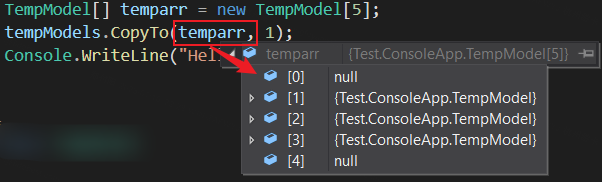
从指定数组索引开始将 ConcurrentBag<T> 元素复制到现有一维 Array 中。以下示例代码:
ConcurrentBag<TempModel> tempModels = new ConcurrentBag<TempModel>();

tempModels.Add(new TempModel() { Code = "1", Name = "一" });

tempModels.Add(new TempModel() { Code = "2", Name = "二" });

tempModels.Add(new TempModel() { Code = "3", Name = "三" });

TempModel[] temparr = new TempModel[5];

tempModels.CopyTo(temparr, 1);
输出结果为:
TryPeek(T)
尝试从 ConcurrentBag<T> 返回一个对象但不移除该对象。
TryTake(T)
尝试从 ConcurrentBag<T> 中移除和返回一个对象。
ToString()
返回表示当前对象的字符串。测试值:System.Collections.Concurrent.ConcurrentBag`1[Test.ConsoleApp.TempModel]
ToArray()
将 ConcurrentBag<T> 元素复制到新数组。
GetEnumerator()
获取当前时间的枚举器。 调用后不影响集合的任何更新。枚举器可以安全地与读取、写入 ConcurrentBag<T> 同时使用。
GetHashCode()
获取集合的哈希值。
4、List<T> 和 ConcurrentBag<T> 对比
众所周知,List<T> 集合是非线程安全的,所以我们采用并行编程时会发生丢数据的情况。比如我们通过多线程将一千个对象加入 List<T>,我们最终得到的集合中元素数就会小于一千。
如下测试代码,通过多任务对象 Task 实现将一千个对象加入到 List<T> 中,添加了一千次,但实际上最终的 objects.Count() 值为 913,小于 1000。 但如果将集合名称改成 ConcurrentBag<T>,结果就不会丢失,最终为等于 1000。
static void Main(string[] args)

{

    try

    {

        // List<MyObject> objects = new List<MyObject>();

        ConcurrentBag<MyObject> objects = new ConcurrentBag<MyObject>();

        Task[] tasks = new Task[1000];

        for (int i = 0; i < 1000; i++)

        {

            tasks[i] = Task.Run(() =>

                objects.Add(new MyObject() { Name = "1", Threadnum = Thread.GetCurrentProcessorId() }));

        }

        Task.WaitAll(tasks); // 等待所有任务完成

        Console.WriteLine(objects.Count()); // List<T>:913; ConcurrentBag<T>:1000

        Console.ReadLine();

    }

    catch (Exception ex)

    {

    }

}

public class MyObject

{

    public string Name { get; set; }

    public int Threadnum { get; set; }

}
二、Parallel 的使用
任务并行库(TPL)支持通过 System.Threading.Tasks.Parallel 类实现数据操作的并行。Parallel.For 或 Parallel.ForEach 编写的循环逻辑与常见的 for 和 foreach 类似,只是增加并行逻辑,来提升效率。TPL 省去了客户端创建线程或列工作项,同时在基本循环中,不需要加锁,TPL 会处理所有低级别的工作。
常用的方法有 Parallel.For、Parallel.ForEach、Parallel.Invoke 等,下面将一一例举。
1、Parallel.For()
1.1 重载一:Parallel.For(Int32, Int32, Action<Int32>)
// fromInclusive:开始索引(含) toExclusive:结束索引(不含) body:不允许为 null

public static System.Threading.Tasks.ParallelLoopResult For (int fromInclusive, int toExclusive, Action<int> body);
以下示例使用 For 方法调用 100 个委托,该委托生成随机 Byte 值,并计算其总和:
ParallelLoopResult result = Parallel.For(0, 100,

    ctr =>

    {

        //Random rnd = new Random(ctr * 100000); // public Random(int Seed); // 随机数的种子,若种子相同,多次生成的随机数序列值相同

        Random rnd = new Random();

        Byte[] bytes = new Byte[100]; // Byte 数组,每个值的范围为 0~255

        rnd.NextBytes(bytes); // 生成 100 个 Byte 数值

        int sum = 0;

        foreach (var byt in bytes) // 再将生成的 100 个数值相加

            sum += byt;

        Console.WriteLine("Iteration {0,2}: {1:N0}", ctr, sum);

    });

Console.WriteLine("Result: Completed Normally");
1.2 比较执行效率 Parallel.For() 和 for()
Paraller.For() 方法类似于 for 循环语句,也是根据入参多次执行同一逻辑操作。使用 Paraller.For() 方法,可以无序的并行运行迭代,而 for 循环只能根据既定的顺序串行运行。
如下实例,对比 Parallel.For() 和 for() 循环的执行效率进行比较:
// 进行 5 此对比

for (int j = 1; j < 6; j++)

{

    // for()

    Console.WriteLine($"\n第{j}次比较");

    ConcurrentBag<int> bag = new ConcurrentBag<int>();

    var watch = Stopwatch.StartNew();

    watch.Start();

    for (int i = 0; i < 20000000; i++)

    {

        bag.Add(i);

    }

    watch.Stop();

    Console.WriteLine($"串行计算:集合有:{bag.Count},总共耗时:{watch.ElapsedMilliseconds}");

    // Parallel.For()

    bag = new ConcurrentBag<int>();

    watch = Stopwatch.StartNew();

    watch.Start();

    Parallel.For(0, 20000000, i => // i 为整数序列号

                 {

                     bag.Add(i);

                 });

    watch.Stop();

    Console.WriteLine($"并行计算:集合有:{bag.Count},总共耗时:{watch.ElapsedMilliseconds}");

}
代码总共执行了五次对比,如下图中的耗时比较,很明显,采用并行的 Parallel.For() 远比串行的 for() 效率要高许多。

1.3 重载二:Parallel.For(Int32, Int32, Action<Int32,ParallelLoopState>)
// fromInclusive:开始索引(含) toExclusive:结束索引(不含) body:不允许为 null

public static ParallelLoopResult For (int fromInclusive, int toExclusive, Action<int, ParallelLoopState> body);
此重载增加了 System.Threading.Tasks.ParallelLoopState 循环状态参数,从而使得我们可以通过循环状态来控制并行循环的运行。
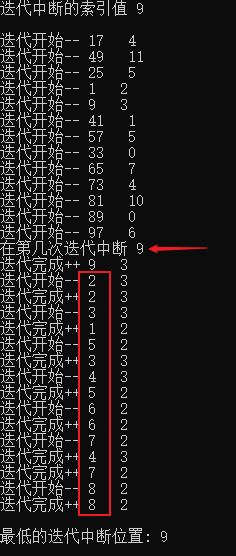
以下实例,执行 100 次迭代,在随机数 breakIndex 指示的一次迭代时进行中断操作,调用完 Break() 方法后,循环状态的 ShouldExitCurrentIteration 属性值就是 true,然后进入判断if (state.LowestBreakIteration < i),当当前迭代序号大于中断时的序号,就直接返回,不再进行后续操作。
var rnd = new Random();

int breakIndex = rnd.Next(1, 11);

Console.WriteLine($"Will call Break at iteration {breakIndex}\n");

var result = Parallel.For(1, 101, (i, state) => // 实际执行的是 1 ~ 100,不包含 101

{

    Console.WriteLine($"Beginning iteration {i} {Thread.GetCurrentProcessorId()}");

    int delay;

    lock (rnd)

        delay = rnd.Next(1, 1001);

    Thread.Sleep(delay);

    if (state.ShouldExitCurrentIteration)

    {

        if (state.LowestBreakIteration < i)

            return;

    }

    if (i == breakIndex) // 8

    {

        Console.WriteLine($"Break in iteration {i}");

        state.Break();

    }

    Console.WriteLine($"Completed iteration {i} {Thread.GetCurrentProcessorId()}");

});

if (result.LowestBreakIteration.HasValue)

    Console.WriteLine($"\nLowest Break Iteration: {result.LowestBreakIteration}");

else

    Console.WriteLine($"\nNo lowest break iteration.");
如下是当索引值为 9 时的处理过程:(当迭代序号为 9 时,执行 Break(),此之前已经开始迭代执行的大于 9 的迭代,均直接退出,只有开始没有结束)
1.4 重载三:Parallel.For(Int32, Int32, ParallelOptions, Action<Int32,ParallelLoopState>)
// fromInclusive:开始索引(含) toExclusive:结束索引(不含) body:不允许为 null

public static ParallelLoopResult For (int fromInclusive, int toExclusive, ParallelOptions parallelOptions, Action<int, ParallelLoopState> body);
此重载在执行 for 循环时,可以配置循环选项 ParallelOptions。
下边是一个实例,通过配置 ParallelOptions 的 CancellationToken 属性,使得循环支持手动取消:
static void Main(string[] args)

{

    CancellationTokenSource cancellationSource = new CancellationTokenSource();

    ParallelOptions options = new ParallelOptions();

    options.CancellationToken = cancellationSource.Token;

    try

    {

        ParallelLoopResult loopResult = Parallel.For( 0, 10, options,

                (i, loopState) =>

                {

                    Console.WriteLine("Start Thread={0}, i={1}", Thread.CurrentThread.ManagedThreadId, i);

                    if (i == 5) // 模拟某次迭代执行时,取消循环

                    {

                        cancellationSource.Cancel();

                    }

                    for (int j = 0; j < 10; j++)

                    {

                        Thread.Sleep(1 * 200); // 模拟耗时任务

                        if (loopState.ShouldExitCurrentIteration) // 判断循环是否已经取消执行

                            return;

                    }

                    Console.WriteLine($"Finish Thread={Thread.CurrentThread.ManagedThreadId}, i={i}");

                }

            );

        if (loopResult.IsCompleted)

        {

            Console.WriteLine("All iterations completed successfully. THIS WAS NOT EXPECTED.");

        }

    }

    catch (AggregateException aex) // 注意:AggregateException 为并行中专用的异常信息集合

    {

        Console.WriteLine($"Parallel.For has thrown an AggregateException. THIS WAS NOT EXPECTED.\n{aex}");

        //foreach (var item in aex.InnerExceptions) // 可以通过循环将全部信息记录下来

        //{

        //    Console.WriteLine(item.InnerException.Message + "     " + item.GetType().Name);

        //}

        //aex.Handle(p => // 如果想往上级抛,需要使用 Handle 方法处理一下

        //{

        //    if (p.InnerException.Message == "my god!Exception from childTask1 happend!")

        //        return true;

        //    else

        //        return false; // 返回 false 表示往上继续抛出异常

        //});

    }

    catch (OperationCanceledException ocex) // 专门用于取消循环异常的捕捉

    {

        Console.WriteLine($"An iteration has triggered a cancellation. THIS WAS EXPECTED.\n{ocex}");

    }

    finally

    {

        cancellationSource.Dispose();

    }

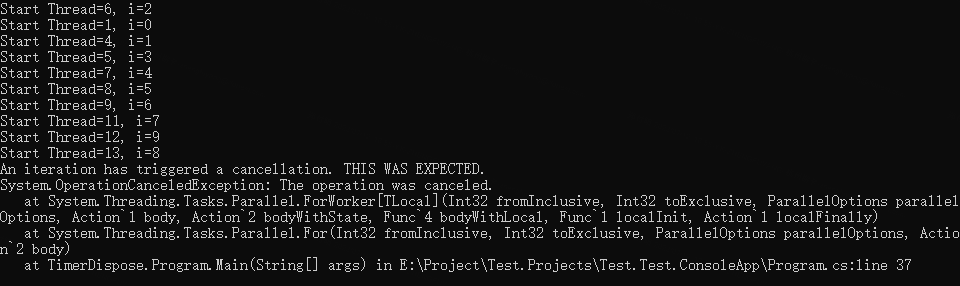
}如下图中的输出,所有迭代任务都未完成,主要是因为耗时操作执行完成之前,循环就取消了,在if (loopState.ShouldExitCurrentIteration)判断时,均为 true 就直接返回了。
1.5 重载四:For<TLocal>(Int32, Int32, ParallelOptions, Func<TLocal>, Func<Int32,ParallelLoopState,TLocal,TLocal>, Action<TLocal>)
public static ParallelLoopResult For<TLocal> (int fromInclusive, int toExclusive,

                                              ParallelOptions parallelOptions,

                                              Func<TLocal> localInit,

                                              Func<int,ParallelLoopState,TLocal,TLocal> body,

                                              Action<TLocal> localFinally);
以下示例使用线程局部变量来计算许多冗长操作的结果之和。 此示例将并行度限制为 4。
static void Main(string[] args)

{

    int result = 0;

    int N = 1000000;

    Parallel.For(

        0, N,

        // 限制最多 4 个并行任务

        new ParallelOptions { MaxDegreeOfParallelism = 4 },

        // Func<TLocal> 初始化本地变量,本地变量是线程独立变量

        () => 0,

        // Func<Int32,ParallelLoopState,TLocal,TLocal> 迭代操作

        (i, loop, localState) =>

        {

            for (int ii = 0; ii < 10000; ii++) ;

            return localState + 1;

        },

        localState =>

            Interlocked.Add(ref result, localState)

    );

    Console.WriteLine("实际运算结果: {0}. 目标值: 1000000", result);

    Console.ReadLine();

}
如下图输出结果:

参考:https://learn.microsoft.com/zh-cn/dotnet/api/system.threading.tasks.parallel.for?view=net-7.0
关于 ParallelOptions 详见:https://learn.microsoft.com/zh-cn/dotnet/api/system.threading.tasks.paralleloptions?view=net-7.0
2、Parallel.ForEach()
2.1 重载一:Parallel.ForEach<TSource>(IEnumerable<TSource>, Action<TSource>)
public static ParallelLoopResult ForEach<TSource> (IEnumerable<TSource> source, Action<TSource> body);执行 ForEach 操作,在处理关于 IEnumerable 集合的任务时,可并行运行迭代。
如下代码块,简单的将一个整数数组,输出到控制台:
static void Main(string[] args)

{

    int[] ints = { 11, 12, 13, 14, 15, 16, 17, 18, 19 };

    ParallelLoopResult result = Parallel.ForEach(ints,

        i =>

        {

            Console.WriteLine(i);

        });

    Console.ReadLine();

}
从输出结果看,ForEach 操作是无序的:

2.2 重载二:ForEach<TSource>(IEnumerable<TSource>, ParallelOptions, Action<TSource,ParallelLoopState,Int64>)
public static ParallelLoopResult ForEach<TSource> (IEnumerable<TSource> source, ParallelOptions parallelOptions, Action<TSource,ParallelLoopState,long> body);执行具有 64 位索引(标识待循环集合的顺序)的 foreach 操作,其中在 IEnumerable 上可能会并行运行迭代,而且可以配置循环选项,可以监视和操作循环的状态。
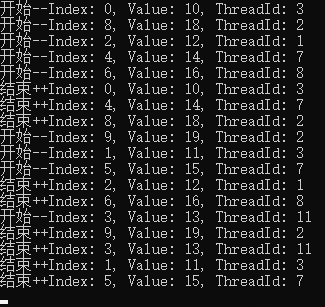
如下示例代码,设置并行任务数为 5,在索引为 6 的任务执行过程中中断循环,看下输出结果:
static void Main(string[] args)

{

    // 创建一个集合,其中包含一些数字

    var numbers = new int[] { 10, 11, 12, 13, 14, 15, 16, 17, 18, 19 };

    // 使用 ParallelOptions 选项设置并行处理的行为

    var parallelOptions = new ParallelOptions

    {

        MaxDegreeOfParallelism = 5

    };

    Parallel.ForEach(numbers, parallelOptions, (source, loopState, index) => // index:集合中对象的从 0 开始的序号

    {

        // 在此处编写并行处理逻辑

        Console.WriteLine($"开始--Index: {index}, Value: {source}, ThreadId: {Thread.GetCurrentProcessorId()}");

        if (loopState.ShouldExitCurrentIteration)

            return;

        Thread.Sleep(200);

        if (index == 6)

            loopState.Break();

        Console.WriteLine($"结束++Index: {index}, Value: {source}, ThreadId: {Thread.GetCurrentProcessorId()}");

    });

    Console.ReadLine();

}
如下图输出结果,一次性开始 5 个并行任务,当第 6 个任务进入时,中断循环。
由于操作是无序的,所以在中断之前可能索引在 6 之后的已经开始或者已经执行完成,如下图 8、9 已经执行完毕,7尚未执行。
注意,若允许并行的任务数少时,可能 6 之后的任务都还没来得及开始,另外,每次执行的结果不同。
2.3 重载三:Parallel.ForEach<TSource>(Partitioner<TSource>, Action<TSource>)
public static ParallelLoopResult ForEach<TSource> (System.Collections.Concurrent.Partitioner<TSource> source, Action<TSource> body);此重载的独到之处,就是可以将数据进行分区,每一个小区内实现串行计算,分区采用 Partitioner.Create() 实现。
long sum = 0;

long sumtop = 10000000;

Stopwatch sw = Stopwatch.StartNew();

Parallel.ForEach(Partitioner.Create(0, sumtop), (range) =>

{

    long local = 0;

    for (long i = range.Item1; i < range.Item2; i++)

        local += i;

    Interlocked.Add(ref sum, local); // Interlocked:为由多个线程共享的变量提供原子操作 Add():求和后替换原来的数值,相当于 +=

});

sw.Stop();

Console.WriteLine($"Partitioner.Create() 分区方式执行效率: result = {sum}, time = {sw.ElapsedMilliseconds} ms");

// 输出:

// Partitioner.Create() 分区方式执行效率: result = 49999995000000, time = 8 ms
关于分区的创建方法 Partitioner.Create(0, Int64)
- 指定了分区的范围,就是 0 ~ Int64;
- 参数中并没有指定分多少个区,默认是系统自动判断执行的。
- 还可以指定分区,做法就是
Partitioner.Create(0, 3000000, Environment.ProcessorCount),其中 Environment.ProcessorCount 参数,就对应当前计算机逻辑处理器的数量。
2.4 重载四:ForEach<TSource,TLocal>(IEnumerable<TSource>, Func<TLocal>, Func<TSource,ParallelLoopState,TLocal,TLocal>, Action<TLocal>)
执行具有线程本地数据的 foreach 操作,其中在 IEnumerable 上可能会并行运行迭代,而且可以监视和操作循环的状态。
public static ParallelLoopResult ForEach<TSource,TLocal> (IEnumerable<TSource> source,

                                                          Func<TLocal> localInit,

                                                          Func<TSource,ParallelLoopState,TLocal,TLocal> body,

                                                          Action<TLocal> localFinally);
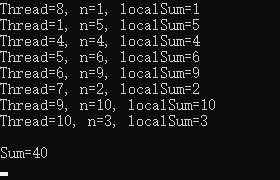
如下示例,将全部整数逐个输出并且最后在输出他们之和:
static void Main(string[] args)

{

    // 全部值的和为 40

    int[] input = { 4, 1, 6, 2, 9, 5, 10, 3 };

    int sum = 0;

    try

    {

        Parallel.ForEach(

                // IEnumerable<TSource> 可枚举的数据源

                input,

                // Func<TLocal> 用于返回每个任务的【本地数据的初始状态】的函数委托

                // 本示例中的目的就是将 TLocal localSum 的值在每次迭代都赋值为 0

                () => 0,

                // Func<TSource,ParallelLoopState,TLocal,TLocal> 将为每个迭代调用一次的委托

                (n, loopState, localSum) =>

                {

                    localSum += n;

                    Console.WriteLine($"Thread={Thread.CurrentThread.ManagedThreadId}, n={n}, localSum={localSum}");

                    return localSum;

                },

                // Action<TLocal> 用于对每个任务的本地状态执行一个最终操作的委托

                // 此示例中的作用是将每个值逐一求和,并返回 sum

                (localSum) =>

                    Interlocked.Add(ref sum, localSum)

            );

        Console.WriteLine("\nSum={0}", sum);

    }

    catch (AggregateException e)

    {

        Console.WriteLine("Parallel.ForEach has thrown an exception. This was not expected.\n{0}", e);

    }

    Console.ReadLine();

}
如下输出结果,其中 localSum 在每个线程中初始值都是 0,在其他线程中参与的求和运算,不影响当前线程。
2.5 比较执行效率 for、Parallel.For()、Parallel.For()+TLocal、Parallel.ForEach(Partitioner.Create(), Action<TSource>)
static void Main(string[] args)

{

    Stopwatch sw = null;

    long sum = 0;

    long sumtop = 10000000;

    // 常规 for 循环

    sw = Stopwatch.StartNew();

    for (long i = 0; i < sumtop; i++)

        sum += i;

    sw.Stop();

    Console.WriteLine($"result = {sum}, time = {sw.ElapsedMilliseconds} ms  --常规 for 循环");

    // Parallel.For() 方式

    sum = 0;

    sw = Stopwatch.StartNew();

    Parallel.For(0L, sumtop,

        (item) => Interlocked.Add(ref sum, item));

    sw.Stop();

    Console.WriteLine($"result = {sum}, time = {sw.ElapsedMilliseconds} ms  --Parallel.For() 方式");

    // Parallel.For() + TLocal

    sum = 0;

    sw = Stopwatch.StartNew();

    Parallel.For(

        0L, sumtop,

        () => 0L,

        (item, state, prevLocal) =>

            prevLocal + item,

        local =>

            Interlocked.Add(ref sum, local));

    sw.Stop();

    Console.WriteLine($"result = {sum}, time = {sw.ElapsedMilliseconds} ms  --Parallel.For() + locals 方式");

    // Partitioner.Create() 分区方式

    sum = 0;

    sw = Stopwatch.StartNew();

    Parallel.ForEach(Partitioner.Create(0L, sumtop), (range) =>

    {

        long local = 0;

        for (long i = range.Item1; i < range.Item2; i++)

            local += i;

        Interlocked.Add(ref sum, local);

    });

    sw.Stop();

    Console.WriteLine($"result = {sum}, time = {sw.ElapsedMilliseconds} ms  --Partitioner.Create() 分区方式");

    Console.ReadLine();

}
如下输出结果,效率最高的显然是自动分区的方式,比常规的 for 循环块将近一倍。最慢的是 Parallel.For() 方式,由于加锁求和导致上下文频繁切换比较耗时,因此这种求和的计算模式不适用。

参考:https://learn.microsoft.com/zh-cn/dotnet/api/system.threading.tasks.parallel.foreach?view=net-7.0
3、Parallel.ForEachAsync()
Parallel.ForEachAsync() 是在 .NET 6 中新增的一个 API,是 Parallel.ForEach() 的异步版本。https://learn.microsoft.com/zh-cn/dotnet/api/system.threading.tasks.parallel.foreachasync?view=net-7.0
下面简单说明一下 Parallel.ForEach() 和 Parallel.ForEachAsync() 的区别。
- Parallel.ForEach() 是在默认多个或指定的个数的线程下执行的。而 Parallel.ForEachAsync() 不一定是多线程的,强调的是异步而已。
- 若目标集合必须按照顺序执行,则不能选用 Parallel.ForEach() 方法,因为它是无序执行的。
- 当待处理的数据量很大或者执行过程比较耗时,则选用多线程执行的 Parallel.ForEach() 方法更好。
下面是一个关于重载 ForEachAsync<TSource>(IAsyncEnumerable<TSource>, ParallelOptions, Func<TSource,CancellationToken,ValueTask>) 的一个简单示例代码:
static async Task Main(string[] args)

{

    var nums = Enumerable.Range(0, 10).ToArray();

    await Parallel.ForEachAsync(

        nums,

        new ParallelOptions { MaxDegreeOfParallelism = 3 }, // 配置最多同时分配三个线程

        async (i, token) => // Func<TSource,CancellationToken,ValueTask> // 其中 ValueTask 提供异步操作的可等待结果,指的是下文 await 的内容

        {

            Console.WriteLine($"开始迭代任务 {i} ThreadId:{Thread.GetCurrentProcessorId()}");

            // public static Task Delay(int millisecondsDelay, CancellationToken cancellationToken)

            // 在指定毫秒后,调用 token 取消当前任务

            await Task.Delay(1000, token);

            Console.WriteLine($"完成迭代任务 {i}");

        });

    Console.WriteLine("Finished!");

    Console.ReadLine();

}详情可参考:https://learn.microsoft.com/zh-cn/dotnet/api/system.threading.tasks.parallel.foreachasync?view=net-7.0 ; https://www.gregbair.dev/posts/parallel-foreachasync/
4、Parallel.Invoke()
尽可能并行执行提供的每个操作。
4.1 两个重载:Invoke(Action[])、Invoke(ParallelOptions, Action[])
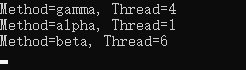
下面是一个运用 Invoke(Action[]) 重载的示例,分别加入了三个操作,然后看执行结果。第二个重载是在第一个重载的基础上加了并行选项 ParallelOptions 就不在赘述了。
static void Main(string[] args)

{

    try

    {

        Parallel.Invoke(

            BasicAction,	// 第一个操作 - 静态方法

            () =>		// 第二个操作 - 箭头函数

            {

                Console.WriteLine("Method=beta, Thread={0}", Thread.CurrentThread.ManagedThreadId);

            },

            delegate ()		// 第三个操作 - 委托函数

            {

                Console.WriteLine("Method=gamma, Thread={0}", Thread.CurrentThread.ManagedThreadId);

            }

        );

    }

    catch (AggregateException e)

    {

        Console.WriteLine("An action has thrown an exception. THIS WAS UNEXPECTED.\n{0}", e.InnerException.ToString());

    }

    Console.ReadLine();

}

static void BasicAction()

{

    Console.WriteLine("Method=alpha, Thread={0}", Thread.CurrentThread.ManagedThreadId);

}
由输出结果可知,三个操作是无序的、多线程执行的。
两个参考:https://learn.microsoft.com/zh-cn/dotnet/api/system.threading.tasks.parallel.invoke?view=net-7.0 Parallel的使用
三、简单总结一下下
实际上看的资料再多,如果没用到实际开发当中就是无用功,下边简单总结一下吧。
由本文 1.2 比较执行效率 Parallel.For() 和 for() 中可知:
- 对于大批量耗时且顺序要求不高的场景可以采用 Parallel.For() 方法,如果对次序有依赖,则只能采用常用的 for 循环。
- 对于操作简单的循环操作,Parallel.For() 就不太适合了,因为多线程操作涉及到上下文的切换,过多的切换场景会严重影响程序运行的效率。
- 由于示例中的操作比较简单,此时 Parallel.For() 上下文的的切换耗时以及加锁的缺点就凸现了,效率最差。
- 使用线程本地变量(TLocal)的 Parallel.For() 可以避免将大量的访问同步为共享状态的开销,所以可以看到效率就高很多。可参考:编写具有线程局部变量的 Parallel.For 循环
- 分区循环操作 Partitioner.Create(0, Int64) 方法的效率最高,因为事先给待处理的任务进行了分区,分区内串行,避免了过多的上下文切换耗时。
注:个人整理,欢迎路过的大佬评论区指正和补充。
Parallel 与 ConcurrentBag<T> 这对儿黄金搭档(C#)【并发编程系列】的更多相关文章
- JavaScript大杂烩8 - 理解文本解析的"黄金搭档"
文本解析"黄金搭档" - String与RegExp对象 文本解析是任何语言中最常用的功能,JavaScript中也是一样,而正则表达式作为最常用的方式,JavaScript也同样 ...
- 读HikariCP源码学Java(一)-- 通过ConcurrentBag类学习并发编程思想
前言 ConcurrentBag是HikariCP中实现的一个池化资源的并发管理类.它是一个高性能的生产者-消费者队列. ConcurrentBag的并发性能优于LinkedBlockingQueue ...
- 动画黄金搭档:CADisplayLink&CAShapeLayer
我们在开发中有时会遇到一些看似非常复杂的动画,不知该如何下手,今天的这篇文章中我会讲到如何利用CADisplayLink和CAShapeLayer来构建一些复杂的动画,希望能在你下次构建动画中,给你一 ...
- 动画黄金搭档:CADisplayLink & CAShapeLayer
我们在开发中有时会遇到一些看似非常复杂的动画,不知该如何下手,今天的这篇文章中我会讲到如何利用CADisplayLink和CAShapeLayer来构建一些复杂的动画,希望能在你下次构建动画中,给你一 ...
- MarkDown的黄金搭档Typora编辑器
让你成为热爱写作的程序员 学习编程的小伙伴,要养成记笔记的好习惯,并发布到博客上去与同行分享你的学习经验,那么传统的文本编辑器或多或少会不尽人意,效率低,而且码字体验与写代码完全不一样. 下面推荐一款 ...
- Apache Hudi:CDC的黄金搭档
1. 介绍 Apache Hudi是一个开源的数据湖框架,旨在简化增量数据处理和数据管道开发.借助Hudi可以在Amazon S3.Aliyun OSS数据湖中进行记录级别管理插入/更新/删除.AWS ...
- 【读书笔记】.Net并行编程(三)---并行集合
为了让共享的数组,集合能够被多线程更新,我们现在(.net4.0之后)可以使用并发集合来实现这个功能.而System.Collections和System.Collections.Generic命名空 ...
- Java并发编程系列-(3) 原子操作与CAS
3. 原子操作与CAS 3.1 原子操作 所谓原子操作是指不会被线程调度机制打断的操作:这种操作一旦开始,就一直运行到结束,中间不会有任何context switch,也就是切换到另一个线程. 为了实 ...
- JVM性能优化系列-(2) 垃圾收集器与内存分配策略
2. 垃圾收集器与内存分配策略 垃圾收集(Garbage Collection, GC)是JVM实现里非常重要的一环,JVM成熟的内存动态分配与回收技术使Java(当然还有其他运行在JVM上的语言,如 ...
- C#并发编程之初识并行编程
写在前面 之前微信公众号里有一位叫sara的朋友建议我写一下Parallel的相关内容,因为手中商城的重构工作量较大,一时之间无法抽出时间.近日,这套系统已有阶段性成果,所以准备写一下Parallel ...
随机推荐
- [MAUI]模仿iOS多任务切换卡片滑动的交互实现
@ 目录 原理 创建布局 创建分布函数 创建动效 创建绑定数据 细节调整 首张卡片的处理 为卡片添加裁剪 跳转到最后一张卡片 项目地址 看了上一篇博文的评论,大家对MAUI还是比较感兴趣的,非常感谢大 ...
- 京东APP百亿级商品与车关系数据检索实践
导读 本文主要讲解了京东百亿级商品车型适配数据存储结构设计以及怎样实现适配接口的高性能查询.通过京东百亿级数据缓存架构设计实践案例,简单剖析了jimdb的位图(bitmap)函数和lua脚本应用在高性 ...
- 码云SSH公钥及仓库建设
码云SSH公钥及仓库建设 第一步注册码云账号并按图示点击 在新打开的界面,按图示点击 进入点击如下图步骤 然后照着做下图 ssh-keygen -t rsa -C "xxxxx@xxxxx. ...
- Python竖版大屏 | 用pyecharts开发可视化的奇妙探索!
你好!我是@马哥python说,一枚10年程序猿,正在试错用pyecharts开发可视化大屏的非常规排版. 以下,我用8种ThemeType展示的同一个可视化数据大屏. 1.SHINE主题 2.LI ...
- Netty实战(一)
目录 第一章 Java网络编程 1.1 Java NIO 1.2 选择器 第二章 Netty是什么 2.1 Netty简介 2.2 Netty的特性 2.2.1 设计 2.2.2 易于使用 2.2.3 ...
- LINQ检索使用
我看网上对LINQ的讲解 自己整合了一下 是语言集成查询(Language Integrated Query)是一组用于C#和Visual Basic语言的扩展.能够允许编写C#或VB代码以查询数据相 ...
- 一次性掌握innodb引擎如何解决幻读和不可重复读
了解mysql的都知道,在mysql的RR(可重复)隔离级别下解决了幻读和不可重复.你知道RR下是怎么解决的吗,很多人会回答是通过MVCC和next-key解决的,具体是怎么解决的,今天来重点分析下. ...
- 洛谷 P5979 [PA2014] Druzyny
简要题意 有 \(n\) 个人,把他们划分成尽可能多的区间,其中第 \(i\) 个人要求它所在的区间长度大于等于 \(c_i\),小于等于 \(d_i\),求最多的区间数量以及如此划分的方案数. 数据 ...
- instance norm
与Batch Norm加快计算收敛不同, IN是在[1]中提出的,目的是提高style transfer的表现. 计算如下: \[IN(x)=\gamma (\frac{x-\mu(x)}{\sigm ...
- Android BottomNavigation底部导航栏使用
原文地址: Android BottomNavigation底部导航栏使用 - Stars-One的杂货小窝 基本使用 本文侧重点记录一些特殊的样式设置,所以基本使用这里就简单概述一下,详细图文可以去 ...