
Spring Cloud Gateway编码实现任意地址跳转
欢迎访问我的GitHub
这里分类和汇总了欣宸的全部原创(含配套源码):https://github.com/zq2599/blog_demos
本篇概览
- 作为《Spring Cloud Gateway实战》系列的第十四篇,本文会继续发掘Spring Cloud Gateway的潜力,通过编码体验操控网关的乐趣,开发出一个实用的功能:让Spring Cloud Gateway应用在收到请求后,可以按照业务的需要跳转到任意的地址去
一般路由规则
- 先来看一个普通的路由规则,如下所示,意思是将所有/hello/**的请求转发到http://127.0.0.1:8082这个地址去:
spring:

  application:

    name: hello-gateway

  cloud:

    gateway:

      routes:

        - id: path_route

          uri: http://127.0.0.1:8082

          predicates:

          - Path=/hello/**
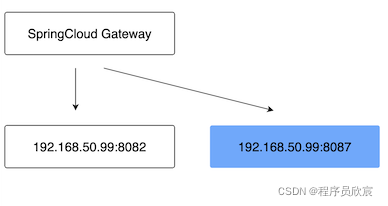
- 上述规则的功能如下图所示,假设这就是生产环境的样子,192.168.50.99:8082是提供服务的后台应用:

特殊规则
- 以上是常规情况,但也有些特殊情况,要求SpringCloud Gateway把浏览器的请求转发到不同的服务上去
- 如下图所示,在之前的环境中增加了另一个服务(即蓝色块),假设蓝色服务代表测试环境
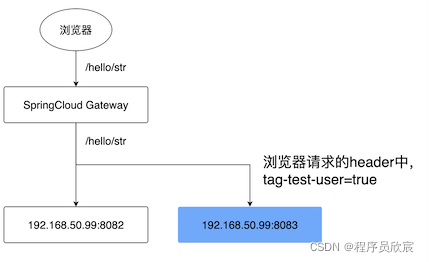
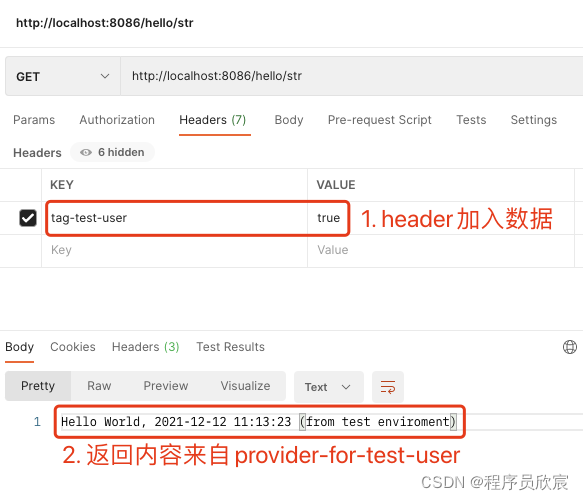
- 浏览器发起的/hello/str请求中,如果header中带有tag-test-user,并且值等于true,此时要求SpringCloud Gateway把这个请求转发到测试环境
- 如果浏览器的请求header中没有tag-test-user,SpringCloud Gateway需要像以前那样继续转发到192.168.50.99:8082
- 很明显,上述需求难以通过配置来实现,因为转发的地址和转发逻辑都是围绕业务逻辑来定制的,这也就是本篇的目标:对同一个请求path,可以通过编码转发到不同的地方去
- 实现上述功能的具体做法是:自定义过滤器
设计
- 编码之前先设计,把关键点想清楚再动手
- 今天咱们要开发一个SpringCloud Gateway应用,里面新增一个自定义过滤器
- 实现这个功能需要三个知识点作为基础,也就是说,您会通过本篇实战掌握以下知识点:
- 自定义过滤器
- 自定义过滤器的配置参数和bean的映射
- 编码构造Route实例
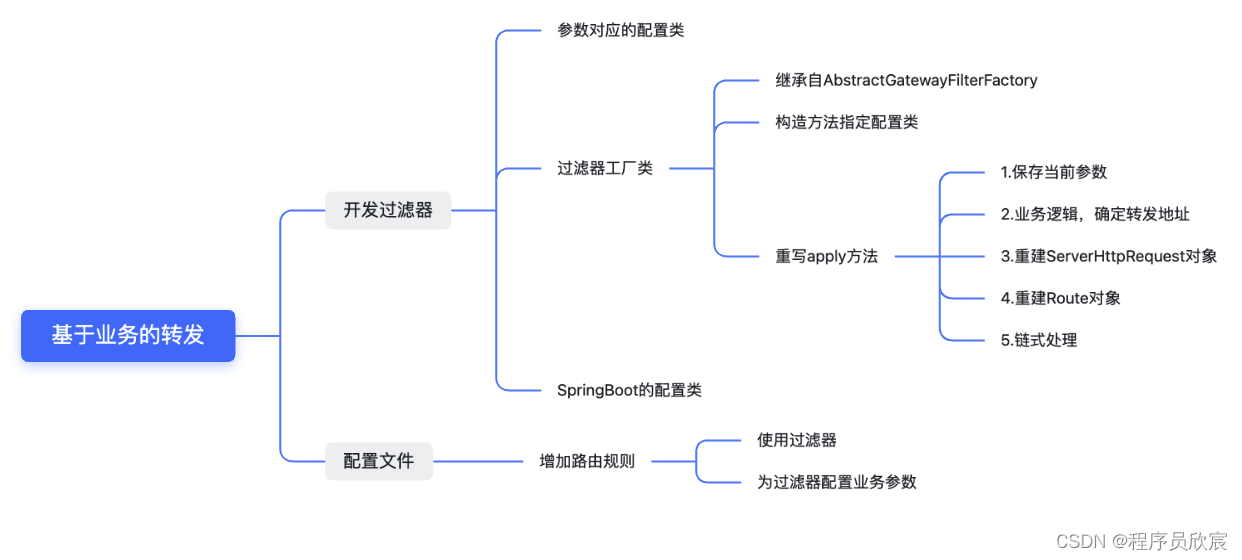
- 用思维导图将具体工作内容展开,如下图所示,咱们就按部就班的实现吧:
源码下载
- 本篇实战中的完整源码可在GitHub下载到,地址和链接信息如下表所示(https://github.com/zq2599/blog_demos):
| 名称 | 链接 | 备注 |
|---|---|---|
| 项目主页 | https://github.com/zq2599/blog_demos | 该项目在GitHub上的主页 |
| git仓库地址(https) | https://github.com/zq2599/blog_demos.git | 该项目源码的仓库地址,https协议 |
| git仓库地址(ssh) | git@github.com:zq2599/blog_demos.git | 该项目源码的仓库地址,ssh协议 |
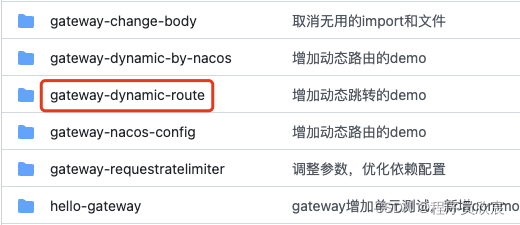
- 这个git项目中有多个文件夹,本篇的源码在spring-cloud-tutorials文件夹下,如下图红框所示:
 - spring-cloud-tutorials内部有多个子项目,本篇的源码在gateway-dynamic-route文件夹下,如下图红框所示:
编码
- 新建名为gateway-dynamic-route的maven工程,其pom.xml内容如下:
<?xml version="1.0" encoding="UTF-8"?>

<project xmlns="http://maven.apache.org/POM/4.0.0"

         xmlns:xsi="http://www.w3.org/2001/XMLSchema-instance"

         xsi:schemaLocation="http://maven.apache.org/POM/4.0.0 http://maven.apache.org/xsd/maven-4.0.0.xsd">

    <parent>

        <artifactId>spring-cloud-tutorials</artifactId>

        <groupId>com.bolingcavalry</groupId>

        <version>1.0-SNAPSHOT</version>

    </parent>

    <modelVersion>4.0.0</modelVersion>

    <artifactId>gateway-dynamic-route</artifactId>

    <dependencies>

        <dependency>

            <groupId>com.bolingcavalry</groupId>

            <artifactId>common</artifactId>

            <version>${project.version}</version>

        </dependency>

        <dependency>

            <groupId>org.springframework.cloud</groupId>

            <artifactId>spring-cloud-starter-gateway</artifactId>

        </dependency>

    </dependencies>

    <build>

        <plugins>

            <!-- 如果父工程不是springboot,就要用以下方式使用插件,才能生成正常的jar -->

            <plugin>

                <groupId>org.springframework.boot</groupId>

                <artifactId>spring-boot-maven-plugin</artifactId>

                <configuration>

                    <mainClass>com.bolingcavalry.gateway.GatewayDynamicRouteApplication</mainClass>

                </configuration>

                <executions>

                    <execution>

                        <goals>

                            <goal>repackage</goal>

                        </goals>

                    </execution>

                </executions>

            </plugin>

        </plugins>

    </build>

</project>
- 启动类是普通的SpringBoot启动类:
package com.bolingcavalry.gateway;

import org.springframework.boot.SpringApplication;

import org.springframework.boot.autoconfigure.SpringBootApplication;

@SpringBootApplication

public class GatewayDynamicRouteApplication {

    public static void main(String[] args) {

        SpringApplication.run(GatewayDynamicRouteApplication.class,args);

    }

}
- 接下来是本篇的核心,自定义过滤器类,代码中已经添加了详细的注释,有几处要注意的地方稍后会提到:
package com.bolingcavalry.gateway.filter;

import lombok.Data;

import lombok.ToString;

import lombok.extern.slf4j.Slf4j;

import org.springframework.cloud.gateway.filter.GatewayFilter;

import org.springframework.cloud.gateway.filter.factory.AbstractGatewayFilterFactory;

import org.springframework.cloud.gateway.route.Route;

import org.springframework.http.HttpHeaders;

import org.springframework.http.HttpMethod;

import org.springframework.http.server.reactive.ServerHttpRequest;

import org.springframework.stereotype.Component;

import org.springframework.util.MultiValueMap;

import org.springframework.web.util.UriComponentsBuilder;

import java.net.URI;

import static org.springframework.cloud.gateway.support.ServerWebExchangeUtils.GATEWAY_ROUTE_ATTR;

@Component

@Slf4j

public class BizLogicRouteGatewayFilterFactory extends AbstractGatewayFilterFactory<BizLogicRouteGatewayFilterFactory.BizLogicRouteConfig> {

    private static final String TAG_TEST_USER = "tag-test-user";

    public BizLogicRouteGatewayFilterFactory() {

        super(BizLogicRouteConfig.class);

    }

    @Override

    public GatewayFilter apply(BizLogicRouteConfig config) {

        return (exchange, chain) -> {

            // 本次的请求对象

            ServerHttpRequest request =  exchange.getRequest();

            // 调用方请求时的path

            String rawPath = request.getURI().getRawPath();

            log.info("rawPath [{}]", rawPath);

            // 请求头

            HttpHeaders headers = request.getHeaders();

            // 请求方法

            HttpMethod httpMethod = request.getMethod();

            // 请求参数

            MultiValueMap<String, String> queryParams = request.getQueryParams();

            // 这就是定制的业务逻辑,isTestUser等于ture代表当前请求来自测试用户,需要被转发到测试环境

            boolean isTestUser = false;

            // 如果header中有tag-test-user这个key,并且值等于true(不区分大小写),

            // 就认为当前请求是测试用户发来的

            if (headers.containsKey(TAG_TEST_USER)) {

                String tageTestUser = headers.get(TAG_TEST_USER).get(0);

                if ("true".equalsIgnoreCase(tageTestUser)) {

                    isTestUser = true;

                }

            }

            URI uri;

            if (isTestUser) {

                log.info("这是测试用户的请求");

                // 从配置文件中得到测试环境的uri

                uri = UriComponentsBuilder.fromHttpUrl(config.getTestEnvUri() + rawPath).queryParams(queryParams).build().toUri();

            } else {

                log.info("这是普通用户的请求");

                // 从配置文件中得到正式环境的uri

                uri = UriComponentsBuilder.fromHttpUrl(config.getProdEnvUri() + rawPath).queryParams(queryParams).build().toUri();

            }

            // 生成新的Request对象,该对象放弃了常规路由配置中的spring.cloud.gateway.routes.uri字段

            ServerHttpRequest serverHttpRequest = request.mutate().uri(uri).method(httpMethod).headers(httpHeaders -> httpHeaders = httpHeaders).build();

            // 取出当前的route对象

            Route route = exchange.getAttribute(GATEWAY_ROUTE_ATTR);

            //从新设置Route地址

            Route newRoute =

                    Route.async().asyncPredicate(route.getPredicate()).filters(route.getFilters()).id(route.getId())

                            .order(route.getOrder()).uri(uri).build();

            // 放回exchange中

            exchange.getAttributes().put(GATEWAY_ROUTE_ATTR,newRoute);

            // 链式处理,交给下一个过滤器

            return chain.filter(exchange.mutate().request(serverHttpRequest).build());

        };

    }

    /**

     * 这是过滤器的配置类,配置信息会保存在此处

     */

    @Data

    @ToString

    public static class BizLogicRouteConfig {

        // 生产环境的服务地址

        private String prodEnvUri;

        // 测试环境的服务地址

        private String testEnvUri;

    }

}
- 上述代码中要注意的地方如下:
- BizLogicRouteConfig是过滤器的配置类,可以在使用过滤器时在配置文件中配置prodEnvUri和testEnvUri的值,在代码中可以通过这两个字段取得配置值
- 过滤器的工厂类名为BizLogicRouteGatewayFilterFactory,按照规则,过滤器的名字是BizLogicRoute
- 在apply方法中,重新创建ServerHttpRequest和Route对象,它们的参数可以按照业务需求随意设置,然后再将这两个对象设置给SpringCloud gateway的处理链中,接下来,处理链上的其他过滤拿到的就是新的ServerHttpRequest和Route对象了
配置
- 假设生产环境地址是http://127.0.0.1:8082,测试环境地址是http://127.0.0.1:8087,整个SpringCloud Gateway应用的配置文件如下,可见使用了刚刚创建的过滤器,并且为此过滤器配置了两个参数:
server:

  #服务端口

  port: 8086

spring:

  application:

    name: gateway-dynamic-route

  cloud:

    gateway:

      routes:

        - id: path_route

          uri: http://0.0.0.0:8082

          predicates:

          - Path=/hello/**

          filters:

            - name: BizLogicRoute

              args:

                prodEnvUri: http://127.0.0.1:8082

                testEnvUri: http://127.0.0.1:8087
- 至此,编码完成了,启动这个服务
开发和启动后台服务,模拟生产和测试环境
- 接下来开始验证功能是否生效,咱们要准备两个后台服务:
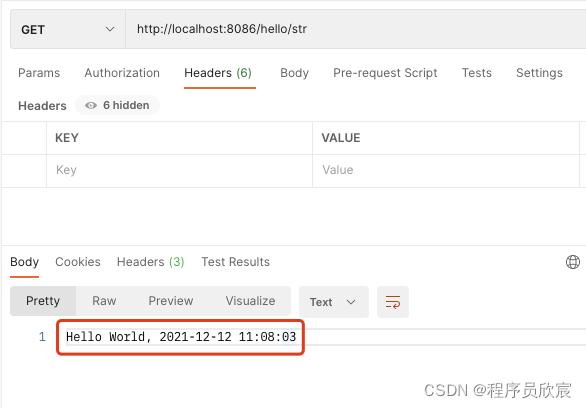
- 模拟生产环境的后台服务是provider-hello,监听端口是8082,其/hello/str接口的返回值是Hello World, 2021-12-12 10:53:09
- 模拟测试环境的后台服务是provider-for-test-user,监听端口是8087,其/hello/str接口的返回值是Hello World, 2021-12-12 10:57:11 (from test enviroment)(和生产环境相比,返回内容多了个(from test enviroment)),对应Controller参考如下:
package com.bolingcavalry.provider.controller;

import com.bolingcavalry.common.Constants;

import org.springframework.web.bind.annotation.*;

import java.text.SimpleDateFormat;

import java.util.Date;

import java.util.Map;

@RestController

@RequestMapping("/hello")

public class Hello {

    private String dateStr(){

        return new SimpleDateFormat("yyyy-MM-dd hh:mm:ss").format(new Date());

    }

    /**

     * 返回字符串类型

     * @return

     */

    @GetMapping("/str")

    public String helloStr() {

        return Constants.HELLO_PREFIX + ", " + dateStr() + " (from test enviroment)";

    }

}
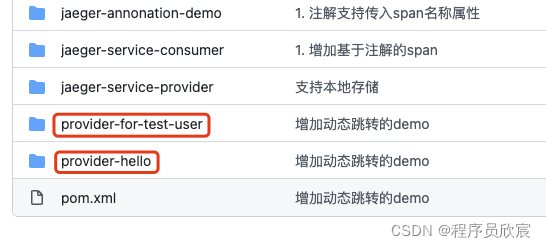
- 以上两个服务,对应的代码都在我的Github仓库中,如下图红框所示:
- 启动gateway-dynamic-route、provider-hello、provider-for-test-user服务
- 此时,SpringCloud gateway应用和两个后台服务都启动完成,情况如下图,接下来验证刚才开发的过滤器能不能像预期那样转发:
验证
- 用postman工具向gateway-dynamic-route应用发起一次请求,返回值如下图红框所示,证明这是provider-hello的响应,看来咱们的请求已经正常到达:
- 再发送一次请求,如下图,这次在header中加入键值对,得到的结果是provider-for-test-user的响应
- 至此,过滤器的开发和验证已经完成,通过编码,可以把外部请求转发到任何咱们需要的地址去,并且支持参数配置,这个过滤器还有一定的可配置下,减少了硬编码的比率,如果您正在琢磨如何深度操控SpringCloud Gateway,希望本文能给您一些参考;
欢迎关注博客园:程序员欣宸
Spring Cloud Gateway编码实现任意地址跳转的更多相关文章
- spring Cloud网关之Spring Cloud Gateway
Spring Cloud Gateway是什么?(官网地址:https://cloud.spring.io/spring-cloud-gateway/reference/html/) Spring C ...
- Spring Cloud Gateway 动态修改请求参数解决 # URL 编码错误传参问题
Spring Cloud Gateway 动态修改请求参数解决 # URL 编码错误传参问题 继实现动态修改请求 Body 以及重试带 Body 的请求之后,我们又遇到了一个小问题.最近很多接口,收到 ...
- Spring Cloud Gateway 整合阿里 Sentinel网关限流实战!
大家好,我是不才陈某~ 这是<Spring Cloud 进阶>第八篇文章,往期文章如下: 五十五张图告诉你微服务的灵魂摆渡者Nacos究竟有多强? openFeign夺命连环9问,这谁受得 ...
- Spring Cloud gateway 六 Sentinel nacos存储动态刷新
微服务当前这么火爆的程度,如果不能学会一种微服务框架技术.怎么能升职加薪,增加简历的筹码?spring cloud 和 Dubbo 需要单独学习.说没有时间?没有精力?要学俩个框架?而Spring C ...
- 熬夜肝了这篇Spring Cloud Gateway的功能及综合使用
前言 SpringCloud 是微服务中的翘楚,最佳的落地方案. Spring Cloud Gateway 是 Spring Cloud 新推出的网关框架,之前是 Netflix Zuul.网关通常在 ...
- 【Spring Cloud & Alibaba 实战 | 总结篇】Spring Cloud Gateway + Spring Security OAuth2 + JWT 实现微服务统一认证授权和鉴权
一. 前言 hi,大家好~ 好久没更文了,期间主要致力于项目的功能升级和问题修复中,经过一年时间的打磨,[有来]终于迎来v2.0版本,相较于v1.x版本主要完善了OAuth2认证授权.鉴权的逻辑,结合 ...
- Spring Cloud Gateway夺命连环10问?
大家好,我是不才陈某~ 最近有很多小伙伴私信我催更 <Spring Cloud 进阶>,陈某也总结了一下,最终原因就是陈某之前力求一篇文章将一个组件重要知识点讲透,这样导致了文章篇幅很长, ...
- 微服务网关 Spring Cloud Gateway
1. 为什么是Spring Cloud Gateway 一句话,Spring Cloud已经放弃Netflix Zuul了.现在Spring Cloud中引用的还是Zuul 1.x版本,而这个版本是 ...
- 跟我学SpringCloud | 第十二篇:Spring Cloud Gateway初探
SpringCloud系列教程 | 第十二篇:Spring Cloud Gateway初探 Springboot: 2.1.6.RELEASE SpringCloud: Greenwich.SR1 如 ...
- 最全面的改造Zuul网关为Spring Cloud Gateway(包含Zuul核心实现和Spring Cloud Gateway核心实现)
前言: 最近开发了Zuul网关的实现和Spring Cloud Gateway实现,对比Spring Cloud Gateway发现后者性能好支持场景也丰富.在高并发或者复杂的分布式下,后者限流和自定 ...
随机推荐
- [Java EE]辨析: POJO(PO / DTO / VO) | BO/DO | DAO
概念不清,会很影响开发中的逻辑性和条理性,进而影响接口设计,代码编写的质量. 网络上大家对这些个概念的探究很多,但终究没有一个统一的说法. 不论哪家解释,我觉得最重要的是: 1)词汇之间的解释统一: ...
- vulnhub靶场之DRIFTINGBLUES: 5
准备: 攻击机:虚拟机kali.本机win10. 靶机:DriftingBlues: 5,下载地址:https://download.vulnhub.com/driftingblues/driftin ...
- SpringBoot 缓存注解的使用
最近比较忙,没时间更新了.上一篇文章我说了如何使用Redis做缓存,文末我稍微提到了SpringBoot对缓存的支持.本篇文章就针对SpringBoot说一下如何使用. 1.SpringBoot对缓存 ...
- DG:Oracle查看是否搭建DataGuard
Oracle查看是否是DataGuard 1.查看归档路径 show parameter log_archive_dest LOG_ARCHIVE_DEST_n, 归档文件的生成路径, LOCATIO ...
- vue自定义组件——split-pane
pre { overflow-y: auto; max-height: 500px } github地址: https://github.com/lxmghct/my-vue-components 组 ...
- 颜值即正义,献礼就业季,打造多颜色多字体双飞翼布局技术简历模版(Resume)
一年好景君须记,最是橙黄橘绿时.金三银四,秣马厉兵,没有一个好看的简历模板怎么行?无论是网上随便下载还是花钱买,都是一律千篇的老式模版,平平无奇,味同嚼蜡,没错,蜡都要沿着嘴角流下来了.本次我们基于H ...
- 探究公众号接口漏洞:从后台登录口到旁站getshell
探究公众号接口漏洞:从后台登录口到旁站getshell 1.入口 发现与利用公众号接口安全漏洞 某120公众号提供了一处考核平台,通过浏览器处打开该网站. 打开可以看到一处密码登录口,试了一下常用的手 ...
- java项目 学生成绩管理系统 (源码+数据库文件)
需要的私信我 备注来意:项目名称 来了就点个赞再走呗,即将毕业的兄弟有福了 文章底部获取源码 java项目 学生成绩管理 (源码+数据库文件)技术框架:java+springboot+vue+m ...
- [OpenCV-Python] 6 OpenCV 中的绘图函数
文章目录 OpenCV-Python: II OpenCV 中的 Gui 特性 6 OpenCV 中的绘图函数 6.1 画线 6.2 画矩形 6.3 画圆 6.4 画椭圆 6.5 画多边形 6.6 在 ...
- CentOS 7 部署SonarQube 8.3版本及配置jenkins分析C#代码
安装SonarQube 8.3版本 官方文档 下载地址 准备工作 准备一台CentOS 7服务器 SonarQube 8.3版本只支持Java 11 (下载Java 11) 安装PostgreSQL ...