
Android程序获取鸿蒙手机设备信息(是否鸿蒙手机、版本号、小版本号等)
1、效果图
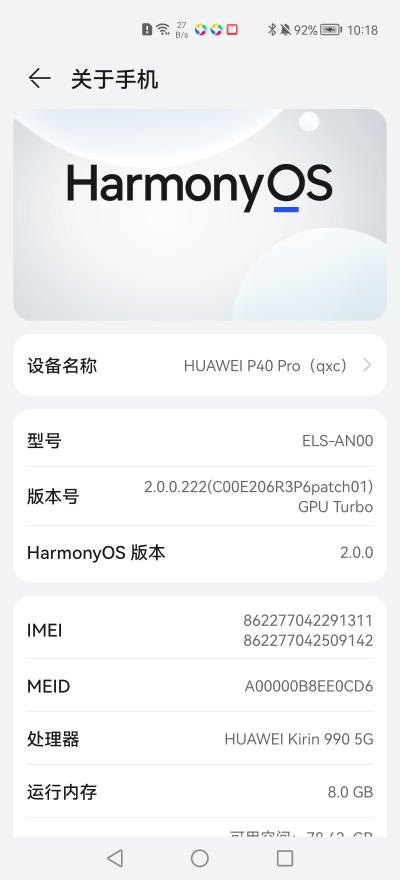
鸿蒙手机 --> 关于手机的截图:
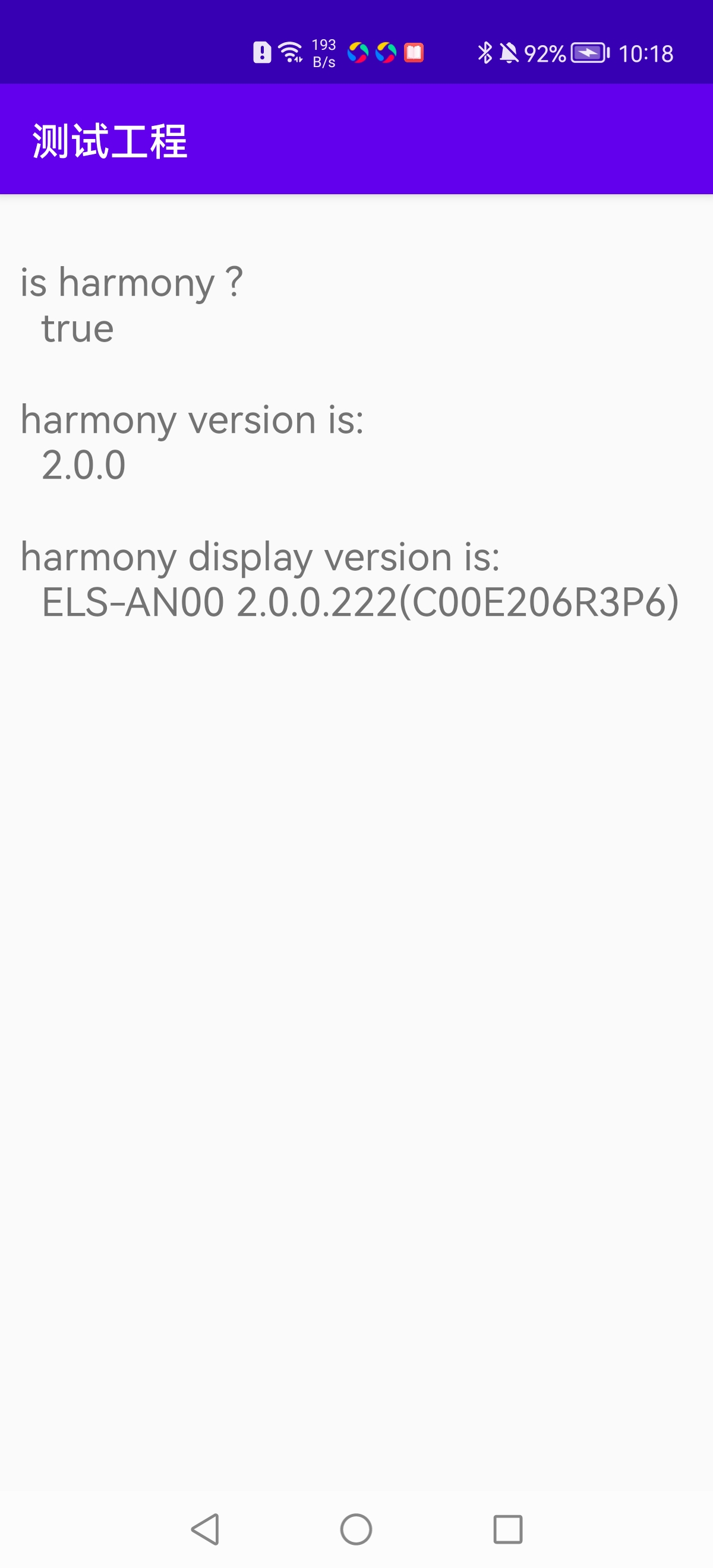
Android程序获取鸿蒙手机设备信息的截图:
2、实现
本案例DEMO的实现主要借鉴了网上现有的资料: https://blog.csdn.net/chenzhengfeng/article/details/119868210
并在此基础上进行了扩展、封装,希望能帮到有需要的小伙伴们~
2.1、鸿蒙工具类封装 HarmonyUtils
import android.text.TextUtils;

import java.lang.reflect.Method;

/**

 * 齐行超

 * 2020-02-16

 */

public class HarmonyUtils {

    /**

     * 是否为鸿蒙系统

     *

     * @return true为鸿蒙系统

     */

    public static boolean isHarmonyOs() {

        try {

            Class<?> buildExClass = Class.forName("com.huawei.system.BuildEx");

            Object osBrand = buildExClass.getMethod("getOsBrand").invoke(buildExClass);

            return "Harmony".equalsIgnoreCase(osBrand.toString());

        } catch (Throwable x) {

            return false;

        }

    }

    /**

     * 获取鸿蒙系统版本号

     *

     * @return 版本号

     */

    public static String getHarmonyVersion() {

        return getProp("hw_sc.build.platform.version", "");

    }

    /**

     * 获取属性

     * @param property

     * @param defaultValue

     * @return

     */

    private static String getProp(String property, String defaultValue) {

        try {

            Class spClz = Class.forName("android.os.SystemProperties");

            Method method = spClz.getDeclaredMethod("get", String.class);

            String value = (String) method.invoke(spClz, property);

            if (TextUtils.isEmpty(value)) {

                return defaultValue;

            }

            return value;

        } catch (Throwable e) {

            e.printStackTrace();

        }

        return defaultValue;

    }

    /**

     * 获得鸿蒙系统版本号(含小版本号,实际上同Android的android.os.Build.DISPLAY)

     * @return 版本号

     */

    public static String getHarmonyDisplayVersion() {

        return android.os.Build.DISPLAY;

    }

}
2.2、HarmonyUtils的调用
当前案例中,在一个activity中实现了对HarmonyUtils工具类的调用。
Activity代码:
import androidx.appcompat.app.AppCompatActivity;

import android.os.Bundle;

import android.widget.TextView;

public class HarmonyActivity extends AppCompatActivity {

    @Override

    protected void onCreate(Bundle savedInstanceState) {

        super.onCreate(savedInstanceState);

        setContentView(R.layout.activity_harmony);

        TextView tv_is_harmony = findViewById(R.id.tv_is_harmony);

        TextView tv_harmony_version = findViewById(R.id.tv_harmony_version);

        TextView tv_harmony_display_version = findViewById(R.id.tv_harmony_display_version);

        boolean isHarmony = HarmonyUtils.isHarmonyOs();

        tv_is_harmony.setText("is harmony ?  \n  "+ isHarmony);

        String harmonyVersion = HarmonyUtils.getHarmonyVersion();

        tv_harmony_version.setText("harmony version is: \n  "+harmonyVersion);

        String displayVersion = HarmonyUtils.getHarmonyDisplayVersion();

        tv_harmony_display_version.setText("harmony display version is: \n  "+displayVersion);

    }

}
布局文件:
<?xml version="1.0" encoding="utf-8"?>

<androidx.constraintlayout.widget.ConstraintLayout xmlns:android="http://schemas.android.com/apk/res/android"

    xmlns:app="http://schemas.android.com/apk/res-auto"

    xmlns:tools="http://schemas.android.com/tools"

    android:layout_width="match_parent"

    android:layout_height="match_parent"

    android:padding="10dp"

    tools:context=".HarmonyActivity">

    <TextView

        android:layout_width="match_parent"

        android:layout_height="wrap_content"

        android:text="is harmony ?"

        android:id="@+id/tv_is_harmony"

        android:textSize="20sp"

        android:layout_marginTop="20dp"

        app:layout_constraintTop_toTopOf="parent"/>

    <TextView

        android:layout_width="match_parent"

        android:layout_height="wrap_content"

        app:layout_constraintTop_toBottomOf="@id/tv_is_harmony"

        android:id="@+id/tv_harmony_version"

        android:textSize="20sp"

        android:layout_marginTop="20dp"

        android:text="harmony version"/>

    <TextView

        android:layout_width="match_parent"

        android:layout_height="wrap_content"

        app:layout_constraintTop_toBottomOf="@id/tv_harmony_version"

        android:id="@+id/tv_harmony_display_version"

        android:textSize="20sp"

        android:layout_marginTop="20dp"

        android:text="harmony display version"/>

</androidx.constraintlayout.widget.ConstraintLayout>
Android程序获取鸿蒙手机设备信息(是否鸿蒙手机、版本号、小版本号等)的更多相关文章
- 【转】android 安卓APP获取手机设备信息和手机号码的代码示例
http://blog.csdn.net/changemyself/article/details/7421476 下面我从安卓开发的角度,简单写一下如何获取手机设备信息和手机号码 准备条件:一部安卓 ...
- android 安卓APP获取手机设备信息和手机号码的代码示例
下面我从安卓开发的角度,简单写一下如何获取手机设备信息和手机号码 准备条件:一部安卓手机.手机SIM卡确保插入手机里.eclipse ADT和android-sdk开发环境 第一步:新建一个andro ...
- iOS开发-Swift获取手机设备信息(UIDevice)
使用UiDevice获取设备信息 获取设备名称 let name = UIDevice.currentDevice().name 获取设备系统名称 let systemName = UIDevice. ...
- IOS 获取更多的设备信息
● 如果想获得更多的设备信息,比如 ● 设备型号.CPU情况.内存使用情况.硬盘使用情况 ● 是否越狱.装了哪些传感器.当前运行的进程 ● ... ... ● 有2种方法获取更多的设备信息 ...
- 小程序开发之获取客户来源 scene 场景值 手机设备信息
为什么要获取客户来源 用作数据分析,根据客户来源,做精准转化! 判断客户来源入口方式 1.通过官方的scene场景值 常见场景值 场景值ID 说明 1001 发现栏小程序主入口,「最近使用」列表 10 ...
- java翻译到mono C#实现系列(3) 获取手机设备信息(残缺,)
using System; using Android.App; using Android.Content; using Android.Runtime; using Android.Views; ...
- ?Object-C获取手机设备信息
一.获取UiDevice设备信息 // 获取设备名称 NSString *name = [[UIDevice currentDevice] name]; // 获取设备系统名称 NSString *s ...
- ?Swift获取手机设备信息
使用UiDevice获取设备信息: 获取设备名称 let name = UIDevice.currentDevice().name 获取设备系统名称 let systemName = UIDevice ...
- iOS开发-Object-C获取手机设备信息(UIDevice)
一.获取UiDevice设备信息 // 获取设备名称 NSString *name = [[UIDevice currentDevice] name]; // 获取设备系统名称 NSString *s ...
- ADB——查看手机设备信息
查看设备信息 查看手机型号 adb shell getprop ro.product.model 查看电池状况 adb shell dumpsys battery ''' Current Batter ...
随机推荐
- MindSpore强化学习:使用PPO配合环境HalfCheetah-v2进行训练
本文分享自华为云社区<MindSpore强化学习:使用PPO配合环境HalfCheetah-v2进行训练>,作者: irrational. 半猎豹(Half Cheetah)是一个基于Mu ...
- 2021“MINIEYE杯”中国大学生算法设计超级联赛(1)
2021"MINIEYE杯"中国大学生算法设计超级联赛(1) 1001 Mod, Or and Everything 题意: 对于每次输入的数字n,求(n%1)|...(n%n)的 ...
- FTP主动模式和被动模式(2)
防火墙对FTP的影响 ASPF 多通道协议 应用层程序有些使用的是单通道协议,有些使用的是多通道协议. 单通道协议 例如http协议,整个协议交互过程中,服务端和客户端只建立一个连接,并且服务端固定使 ...
- 可以远程剪视频、做PS设计的远程控制软件体验
编辑切换为居中 在这里插入图片描述 远程连接 资源共享的新时代 过去很长一段时间,计算机网络最主要的用途就是分享数据资源.进入新时代,伴随网络的高速发展以及云计算等技术的发展,我们进入了不仅仅是数 ...
- npm包离线安装
npm包离线安装 npm包的安装,在Internet联网机器上通过npm install轻松搞定的事情,在离线或者纯内网环境下就变得异常艰难,本文就来讲一讲离线安装npm包的方法. 通过 npm in ...
- snmpwalk命令详解
snmp安装 yum -y install net-snmp-libs net-snmp net-snmp-utils 系统镜像里面就有这些包.可yum安装 snmpwalk集合 snmpwalk + ...
- JDK8之前,匿名内部类访问的局部变量为什么必须要用final修饰
更多博文请关注:https://blog.bigcoder.cn 前不久在学习中意外发现了自己原来忽略的一个小知识点,挺有意思的,现在我来给大家分享一下! 我们先来看一段代码 public class ...
- Particles.js:为Web项目增添动态粒子效果
Particles.js:为Web项目增添动态粒子效果 示例 介绍 Particles.js是一个轻量级的JavaScript库,用于在Web页面上创建和管理动态粒子效果.它允许开发者通过简单的配置文 ...
- 8.21考试总结(NOIP模拟45)[打表·蛇·购物·ants]
有型的东西终究会消逝,不过--终于,这份回忆还是永远不朽的- 前言 这次考试暴露出来了不少问题. 比如答题策略策略不当导致 T2 的 65pts 暴力根本没有打. 知识遗忘太快不牢固,T4 是之前的一 ...
- 通过USB口扩展wan口上网(4G上网卡)
通过USB口扩展wan口上网(4G上网卡) 一.前言 现爱快可支持通过USB口扩展wan口上网,不再居于地点的限制,随时随地流畅上网. 二.具体配置 现在有两种设备可以实现通过USB口转化为wan口上 ...