
python os 模块介绍
"""

重命名文件

    os.rename(src,dst)

    os.rename('123.txt','124.txt')

删除文件

    os.remove(path)

    os.remove('123.txt')

创建目录

    os.mkdir()

创建多级目录

    os.makedirs()

删除目录

    os.rmdir()

删除多级目录

    os.removedirs()

获取当前目录

    os.getcwd()

修改所在目录

    os.chdir()

判断文件是否存在

    os.path.exists()

判断是否为文件

    os.path.isfile()

判断是否为目录

    os.path.isdir()

获取绝对路径

    os.path.abspath()

判断是否为绝对路径

    os.path.isabs()

获取路径的最后部分

    os.path.basename()

获取父级路径

    os.path.dirname()

获取文件夹内的子文件(重要)

    os.listdir()

"""

import os

# os.rename("log.txt","log.properties")

# os.remove("log.properties")

# open("log.txt","w")

# os.mkdir("abc")

# os.rmdir("abc")

# os.makedirs("a/b/c/d")

# os.removedirs("a/b/c/d")

# os.chdir("../")

# print(os.getcwd())

# file_name = "abc.jpeg"

# if os.path.exists(file_name):

#     if os.path.isdir(file_name):

#         print("删除文件夹成功")

#         os.rmdir(file_name)

#     elif os.path.isfile(file_name):

#         print("删除文件成功")

#         os.remove(file_name)

# else:

#     print("文件不存在")

path = os.getcwd()

for f in os.listdir(path):

    if f.endswith(".py"):

        print(f)
os.walk方法,主要用来遍历一个目录内各个子目录和子文件。
os.walk(top, topdown=True, onerror=None, followlinks=False)
可以得到一个三元tupple(dirpath, dirnames, filenames),
第一个为起始路径,第二个为起始路径下的文件夹,第三个是起始路径下的文件。
dirpath
是一个string,代表目录的路径,
dirnames
是一个list,包含了dirpath下所有子目录的名字。
filenames
是一个list,包含了非目录文件的名字。
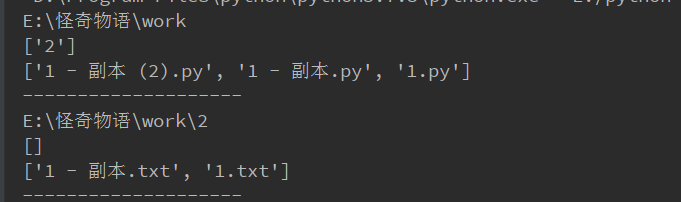
 for (path, dirs, files) in os.walk(r"E:\怪奇物语\work"):

        print(path) # 路径名

        print(dirs) # 包含的文件夹名

        print(files) # 包含的文件

        print("--"*10)
以文件的默认编码打开此文件
with open("your_file", 'rb') as fp:

    file_data = fp.read()

    result = chardet.detect(file_data)

    file_content = file_data.decode(encoding=result['encoding'])
几个案例
# 1.封装自定一个函数,可以将Iterable对象中的所有数据写到目标文件file中,

# 如果Iterable中存储的不是字符串,转换为字符串处理

def write_lines(file, Iterable):

    with open(file, mode="a", encoding="utf-8") as f:

        for i in Iterable:

            if isinstance(i, str):

                f.write(i + '\n')

            else:

                f.write(str(i) + "\n")

# write_lines("1.txt",[1,2,3,4,5,6,"abcde"])
# 2.自定义一个函数,可以实现文件的复制(先读取目标文件,然后写入新文件)

# 比如:def copyfile(file) 将file复制一份,被复制出来的文件名为file_副本.后缀

def copyfile(file):

    filetup = file.rpartition(".")

    new_name = str(filetup[0]) + "_副本" + str(filetup[1] + filetup[2])

    if os.path.exists(file):

        with open(file, mode="r", encoding="utf-8") as f:

            with open(new_name, mode="w", encoding="utf-8") as f1:

                content = f.read(1024)

                while content:

                    f1.write(content)

                    content = f.read(1024)

    else:

        print("file not exists")

# copyfile("digui.py")
# 3.打印某个文件夹内所有的的文件名

def print_all_file(file_path):

    file_list = os.listdir(file_path)

    for f in file_list:

        f = file_path + "\\" + f

        if os.path.isfile(f):

            print(f)

        elif os.path.isdir(f):

            print_all_file(f)

# print_all_file(r"E:\python workspace\day13")
# 4.尝试将一个文件夹内所有的.py文件名前都添加上你的名字做前缀(注意文件先备份)

# 例如:test01.py  ->  xxx_test01.py

def add_prefix(file_path, prefix):

    file_list = os.listdir(file_path)

    for f in file_list:

        f = file_path + "\\" + f

        if os.path.isfile(f):

            basename = os.path.basename(f)

            dirname = os.path.dirname(f)

            # print(dirname+"\\"+prefix+basename)

            os.rename(f, dirname + "\\" + prefix + basename)

        elif os.path.isdir(f):

            add_prefix(f, prefix)

# add_prefix(r"E:\python workspace\day13","songdan_")
# 5.封装一个函数,可以实现类似操作系统的模糊查询功能(输入一个关键字,可以展示目标文件夹中包含关键字的所有文件)

import chardet

def find_file_contains_key(f,key):

    if key in f:

        print(f"包含{key}的文件名为:{f}:")

    with open(f, mode="rb") as fp:

        file_data = fp.read()

        result = chardet.detect(file_data)

        file_content = file_data.decode(encoding=result['encoding'])

        now_fname = ""

        for line in file_content:

            line = line.strip()

            if key in line:

                if now_fname == "":

                    now_fname = f.name

                    print(f"包含内容为{key}的文件名为:{f.name}:")

                print(f"\t\t内容为:{line}")

def show_file_by_word(file_path, key):

    file_list = os.listdir(file_path)

    for f in file_list:

        f = file_path + "\\" + f

        # 文件,查询里面是否包含关键字

        if os.path.isfile(f) and f.endswith(".py"):

            find_file_contains_key(f,key)

        # 文件夹,找出里面的文件

        elif os.path.isdir(f):

            show_file_by_word(f, key)

show_file_by_word(r"E:\python workspace\day13", "songdan")
# 6.统计某个文件夹内所有.py文件中的代码行数

count = 0

def count_file_words(file_path):

    file_list = os.listdir(file_path)

    global count

    for f in file_list:

        f = file_path + "\\" + f

        if os.path.isfile(f) and f.endswith(".py"):

            with open(f, mode="r", encoding="utf-8") as f:

                for line in f:

                    line = line.strip()

                    if "#" not in line and len(line) > 0:

                        count += 1

        # 文件夹,找出里面的文件

        elif os.path.isdir(f):

            count_file_words(f)

    return count

# count_file_words(r"E:\python workspace\day13\test")

print(count)
更多案例参见:https://github.com/geekcomputers/Python/tree/master/
python os 模块介绍的更多相关文章
- Python—os模块介绍
OS模块 我们平时工作中很常用到的一个模块,通过os模块调用系统命令,获得路径,获取操作系统的类型等都是使用该模块.os 模块提供了很多允许你的程序与操作系统直接交互的功能 得到当前工作目录,即当前P ...
- Python os模块介绍
os.getcwd() 获取当前工作目录,即当前python脚本工作的目录路径 os.chdir("dirname") 改变当前脚本工作目录:相当于shell下cd os.curd ...
- Python OS模块常用功能 中文图文详解
一.Python OS模块介绍 OS模块简单的来说它是一个Python的系统编程的操作模块,可以处理文件和目录这些我们日常手动需要做的操作. 可以查看OS模块的帮助文档: >>> i ...
- python file对象测试数据的读写操作及OS模块介绍(四)
import from....import 引入模块 引入类 ①import 如果文件在lib下而且是python模块 :import 模块名. ②from....import from 包名.包 ...
- Python day18模块介绍2(使用BASE_DIR修改临时path,os模块)
1.BASE_DIR修改path(别人导入py项目时不会因为绝对路径无法解释) #sys修改环境变量 #使用BASE_DIR将绝对路径改为相对路径 import sys,os BASE_DIR=os. ...
- Python::OS 模块 -- 进程参数
os模块的简介请参看 Python::OS 模块 -- 简介 os模块的文件和目录操作 Python::OS 模块 -- 文件和目录操作 os模块的进程管理 Python::OS 模块 -- 进程管理 ...
- Python::OS 模块 -- 进程管理
os模块的简介参看 Python::OS 模块 -- 简介 os模块的文件相关操作参看 Python::OS 模块 -- 文件和目录操作 os模块的进程参数 Python::OS 模块 -- 进程参数 ...
- Python::OS 模块 -- 文件和目录操作
os模块的简介参看 Python::OS 模块 -- 简介 os模块的进程管理 Python::OS 模块 -- 进程管理 os模块的进程参数 Python::OS 模块 -- 进程参数 os模块中包 ...
- python OS 模块 文件目录操作
Python OS 模块 文件目录操作 os模块中包含了一系列文件操作的函数,这里介绍的是一些在Linux平台上应用的文件操作函数.由于Linux是C写的,低层的libc库和系统调用的接口都是C AP ...
随机推荐
- Web前后端缓存技术(缓存的主要作用是什么)
Web前后端缓存技术Web前后端缓存技术(缓存的主要作用是什么) 一.总结 一句话总结: 加快页面打开速度 减少网络带宽消耗 降低服务器压力 1.在Web应用中,应用缓存的地方有哪些? 主要有浏览器缓 ...
- 469 Same Tree
原题网址:https://www.lintcode.com/problem/same-tree/description 描述 检查两棵二叉树是否等价.等价的意思是说,首先两棵二叉树必须拥有相同的结构, ...
- java 用户注册登陆Demo
一个用户注册登陆的系统,用到了MD5加密处理密码,实现了一个简单的数据库连接池connectionPool, 实现了注册,登陆,登陆之后修改用户信息等功能,非常适合初学者 一.准备工作 数据库:MyS ...
- HTMl中常用标签
文本标记语言,即HTML(Hypertext Markup Language),是用于描述网页文档的一种标记语言. HTML之所以称为超文本标记语言,是因为文本中包含了所谓“超级链接”点.所谓超级链接 ...
- Linq之Sum用法新体会
1.简单应用,求数组的和,示例: , , , , , , , , , }; double numSum = numbers.Sum(); Console.WriteLine("The sum ...
- django2.x报错No module named 'django.core.urlresolvers'b
解决方法就是: from django.urls import reverse 最近从django1.9迁移到django2.0中出现一个意外的报错: 这个报错的原因在stack overflow上有 ...
- vim编辑器操作①
Linux文本编辑器: 行编辑器:sed 全屏编辑器:nano,vi/vim 本文主要介绍说明vim编辑器的相关使用: 其有三种模式,即: 编辑模式(默认模式).插入模式(输入模式).末行模式(内置的 ...
- mysql导出数据库某些表的数据
# 导出数据,一般从从库导出,减少主库的压力.mysqldump -hhostname -P3306 --single-transaction --master-data= database_name ...
- leetcode 57 Insert Interval & leetcode 1046 Last Stone Weight & leetcode 1047 Remove All Adjacent Duplicates in String & leetcode 56 Merge Interval
lc57 Insert Interval 仔细分析题目,发现我们只需要处理那些与插入interval重叠的interval即可,换句话说,那些end早于插入start以及start晚于插入end的in ...
- TZ_16_Vue的v-for、v-if、v-show、v-bind、watch
1.v-for 遍历数据渲染页面是非常常用的需求,Vue中通过v-for指令来实现. 1>遍历一个users数组 <!-- ve-for --> <ul> <li ...