
jQuery---表格删除案例
表格删除案例
on的简单事件
    //1. 找到清空按钮,注册点击事件,清空tbody

    $("#btn").on("click", function () {

      $("#j_tb").empty();

    });
on的委托事件
      //2. 找到delete,注册点击事件

      $("#j_tb").on("click", ".get", function () {

        $(this).parent().parent().remove();

      });
on的简单事件
      //3. 找到添加按钮,注册点击事件

      $("#btnAdd").on("click", function () {

        $('<tr> <td>jQuery111</td> <td>传智播客-前端与移动开发学院111</td> <td><a href="javascrip:;" class="get">DELETE</a></td> </tr>').appendTo("#j_tb");

      });
效果如下:
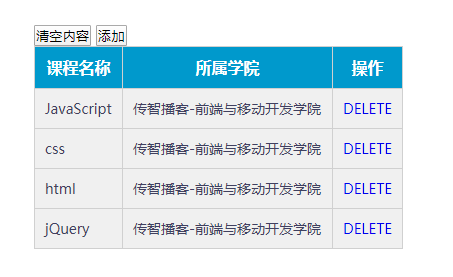
<!DOCTYPE html>

<html>

<head lang="en">

  <meta charset="UTF-8">

  <title></title>

  <style>

    * {

      padding: 0;

      margin: 0;

    }

    .wrap {

      width: 410px;

      margin: 100px auto 0;

    }

    table {

      border-collapse: collapse;

      border-spacing: 0;

      border: 1px solid #c0c0c0;

    }

    th,

    td {

      border: 1px solid #d0d0d0;

      color: #404060;

      padding: 10px;

    }

    th {

      background-color: #09c;

      font: bold 16px "΢ÈíÑźÚ";

      color: #fff;

    }

    td {

      font: 14px "΢ÈíÑźÚ";

    }

    td a.get {

      text-decoration: none;

    }

    a.del:hover {

      text-decoration: underline;

    }

    tbody tr {

      background-color: #f0f0f0;

    }

    tbody tr:hover {

      cursor: pointer;

      background-color: #fafafa;

    }

    .btnAdd {

      width: 110px;

      height: 30px;

      font-size: 20px;

      font-weight: bold;

    }

    .form-item {

      height: 100%;

      position: relative;

      padding-left: 100px;

      padding-right: 20px;

      margin-bottom: 34px;

      line-height: 36px;

    }

    .form-item>.lb {

      position: absolute;

      left: 0;

      top: 0;

      display: block;

      width: 100px;

      text-align: right;

    }

    .form-item>.txt {

      width: 300px;

      height: 32px;

    }

    .mask {

      position: absolute;

      top: 0px;

      left: 0px;

      width: 100%;

      height: 100%;

      background: #000;

      opacity: 0.15;

      display: none;

    }

    .form-add {

      position: fixed;

      top: 30%;

      left: 50%;

      margin-left: -197px;

      padding-bottom: 20px;

      background: #fff;

      display: none;

    }

    .form-add-title {

      background-color: #f7f7f7;

      border-width: 1px 1px 0 1px;

      border-bottom: 0;

      margin-bottom: 15px;

      position: relative;

    }

    .form-add-title span {

      width: auto;

      height: 18px;

      font-size: 16px;

      font-family: ËÎÌå;

      font-weight: bold;

      color: rgb(102, 102, 102);

      text-indent: 12px;

      padding: 8px 0px 10px;

      margin-right: 10px;

      display: block;

      overflow: hidden;

      text-align: left;

    }

    .form-add-title div {

      width: 16px;

      height: 20px;

      position: absolute;

      right: 10px;

      top: 6px;

      font-size: 30px;

      line-height: 16px;

      cursor: pointer;

    }

    .form-submit {

      text-align: center;

    }

    .form-submit input {

      width: 170px;

      height: 32px;

    }

  </style>

</head>

<body>

  <div class="wrap">

    <input type="button" value="清空内容" id="btn">

    <input type="button" value="添加" id="btnAdd">

    <table>

      <thead>

        <tr>

          <th>课程名称</th>

          <th>所属学院</th>

          <th>操作</th>

        </tr>

      </thead>

      <tbody id="j_tb">

        <tr>

          <!-- <td><input type="checkbox"/></td> -->

          <td>JavaScript</td>

          <td>传智播客-前端与移动开发学院</td>

          <td><a href="javascrip:;" class="get">DELETE</a></td>

        </tr>

        <tr>

          <!-- <td><input type="checkbox"/></td> -->

          <td>css</td>

          <td>传智播客-前端与移动开发学院</td>

          <td><a href="javascrip:;" class="get">DELETE</a></td>

        </tr>

        <tr>

          <!-- <td><input type="checkbox"/></td> -->

          <td>html</td>

          <td>传智播客-前端与移动开发学院</td>

          <td><a href="javascrip:;" class="get">DELETE</a></td>

        </tr>

        <tr>

          <td>jQuery</td>

          <td>传智播客-前端与移动开发学院</td>

          <td><a href="javascrip:;" class="get">DELETE</a></td>

        </tr>

      </tbody>

    </table>

  </div>

  <script src="jquery-1.12.4.js"></script>

  <script>

    $(function () {

      //1. 找到清空按钮,注册点击事件,清空tbody

      $("#btn").on("click", function () {

        $("#j_tb").empty();

      });

      //2. 找到delete,注册点击事件

      $("#j_tb").on("click", ".get", function () {

        $(this).parent().parent().remove();

      });

      //3. 找到添加按钮,注册点击事件

      $("#btnAdd").on("click", function () {

        $('<tr> <td>jQuery111</td> <td>传智播客-前端与移动开发学院111</td> <td><a href="javascrip:;" class="get">DELETE</a></td> </tr>').appendTo("#j_tb");

      });

    });

  </script>

</body>

</html>
jQuery---表格删除案例的更多相关文章
- jQuery 表格删除,添加行
var colsNum = 4; 1,$(document),ready(function () { $.("#id1").parent().after('<tr class ...
- Web jquery表格组件 JQGrid 的使用 - 7.查询数据、编辑数据、删除数据
系列索引 Web jquery表格组件 JQGrid 的使用 - 从入门到精通 开篇及索引 Web jquery表格组件 JQGrid 的使用 - 4.JQGrid参数.ColModel API.事件 ...
- 基于jQuery表格增加删除代码示例
<!doctype html> <html lang="en"> <head> <meta charset="UTF-8&quo ...
- Web jquery表格组件 JQGrid 的使用 - 从入门到精通 开篇及索引
因为内容比较多,所以每篇讲解一些内容,最后会放出全部代码,可以参考.操作中总会遇到各式各样的问题,个人对部分问题的研究在最后一篇 问题研究 里.欢迎大家探讨学习. 代码都经过个人测试,但仍可能有各种未 ...
- Web jquery表格组件 JQGrid 的使用 - 11.问题研究
系列索引 Web jquery表格组件 JQGrid 的使用 - 从入门到精通 开篇及索引 Web jquery表格组件 JQGrid 的使用 - 4.JQGrid参数.ColModel API.事件 ...
- Web jquery表格组件 JQGrid 的使用 - 4.JQGrid参数、ColModel API、事件及方法
系列索引 Web jquery表格组件 JQGrid 的使用 - 从入门到精通 开篇及索引 Web jquery表格组件 JQGrid 的使用 - 4.JQGrid参数.ColModel API.事件 ...
- Web jquery表格组件 JQGrid 的使用 - 5.Pager翻页、搜索、格式化、自定义按钮
系列索引 Web jquery表格组件 JQGrid 的使用 - 从入门到精通 开篇及索引 Web jquery表格组件 JQGrid 的使用 - 4.JQGrid参数.ColModel API.事件 ...
- Web jquery表格组件 JQGrid 的使用 - 6.准备工作 & Hello JQGrid
系列索引 Web jquery表格组件 JQGrid 的使用 - 从入门到精通 开篇及索引 Web jquery表格组件 JQGrid 的使用 - 4.JQGrid参数.ColModel API.事件 ...
- Web jquery表格组件 JQGrid 的使用 - 8.Pager、新增数据、查询、刷新、查看数据
系列索引 Web jquery表格组件 JQGrid 的使用 - 从入门到精通 开篇及索引 Web jquery表格组件 JQGrid 的使用 - 4.JQGrid参数.ColModel API.事件 ...
随机推荐
- 脚本在Shell可以执行成功,放到crontab里执行失败
一.背景 自己写了个监控MGR状态的脚本,直接在Linux的Shell环境下可以执行成功,但是只要放到crontab里执行,就失败,脚本内容如下 #!/bin/bash MAIL_ADDR=`cat ...
- CSS学习 | 思维导图
CSS样式
- 倒转数组 Leetcode189
倒转数组 Leetcode189 记录调整数组顺序而不需要另加内存的一种方法: 题目 189. 旋转数组 给定一个数组,将数组中的元素向右移动 k 个位置,其中 k 是非负数. 示例 1: 输入: [ ...
- Perl Tk在IC设计中的应用、Windows、Linux平台下的安装-各种错误的摸索解决
本文转自:自己的微信公众号<集成电路设计及EDA教程> <Perl Tk在IC设计中的应用.Windows.Linux平台下的安装-各种错误的摸索解决> Perl在IC设计中有 ...
- Codeforces_101498
A.map统计数量,更新最大值. #include<bits/stdc++.h> using namespace std; int n; map<int,int> mp; in ...
- BZOJ 3339 Rmq Problem(离线+线段树+mex函数)
题意: q次询问,问[l,r]子区间的mex值 思路: 对子区间[l,r],当l固定的时候,[l,r]的mex值对r单调不减 对询问按照l离线,对当前的l,都有维护一个线段树,每个叶节点保存[l,r] ...
- 清晰架构(Clean Architecture)的Go微服务
我用Go和gRPC创建了一个微服务项目,并试图找出最好的程序结构,它可以作为我其他项目的模板.我还将程序设计和编程的最佳实践应用于Go Microservice程序,例如清晰架构(Clean Arch ...
- Linux gcc链接动态库出错:LIBRARY_PATH和LD_LIBRARY_PATH的区别
昨天在自己的CentOs7.1上写makefile的时候,发现在一个C程序在编译并链接一个已生成好的lib动态库的时候出错.链接命令大概是这样的: [root@typecodes tcpmsg]# g ...
- 《N诺机试指南》(七)排版类问题
1.菱形问题: 解析: 主要通过打印空格和星形来打印整个图形,将整体分为=上三角形+下三角形 首先观察上三角形可以发现:第一行2个空格1个星.第二行1个空格3个星.第三行0个空格5个星 空格数 ...
- finished with exit code -1073740791 (0xC0000409)解决方案
1.在用keras框架跑NER的train时,而且只是在用了keras_contrib.layers的CRF时出现问题: 遇到无错跳出finished with exit code -10737407 ...