
2-3 Numpy+Matplotlib可视化(一)
(1)pyplot基础绘图
 # -*-coding:utf-8-*-

 # !/usr/bin/env python

 # Author:@vilicute

 import numpy as np

 import matplotlib.pyplot as plt

 t = np.arange(-5*np.pi, 5*np.pi, 0.01)

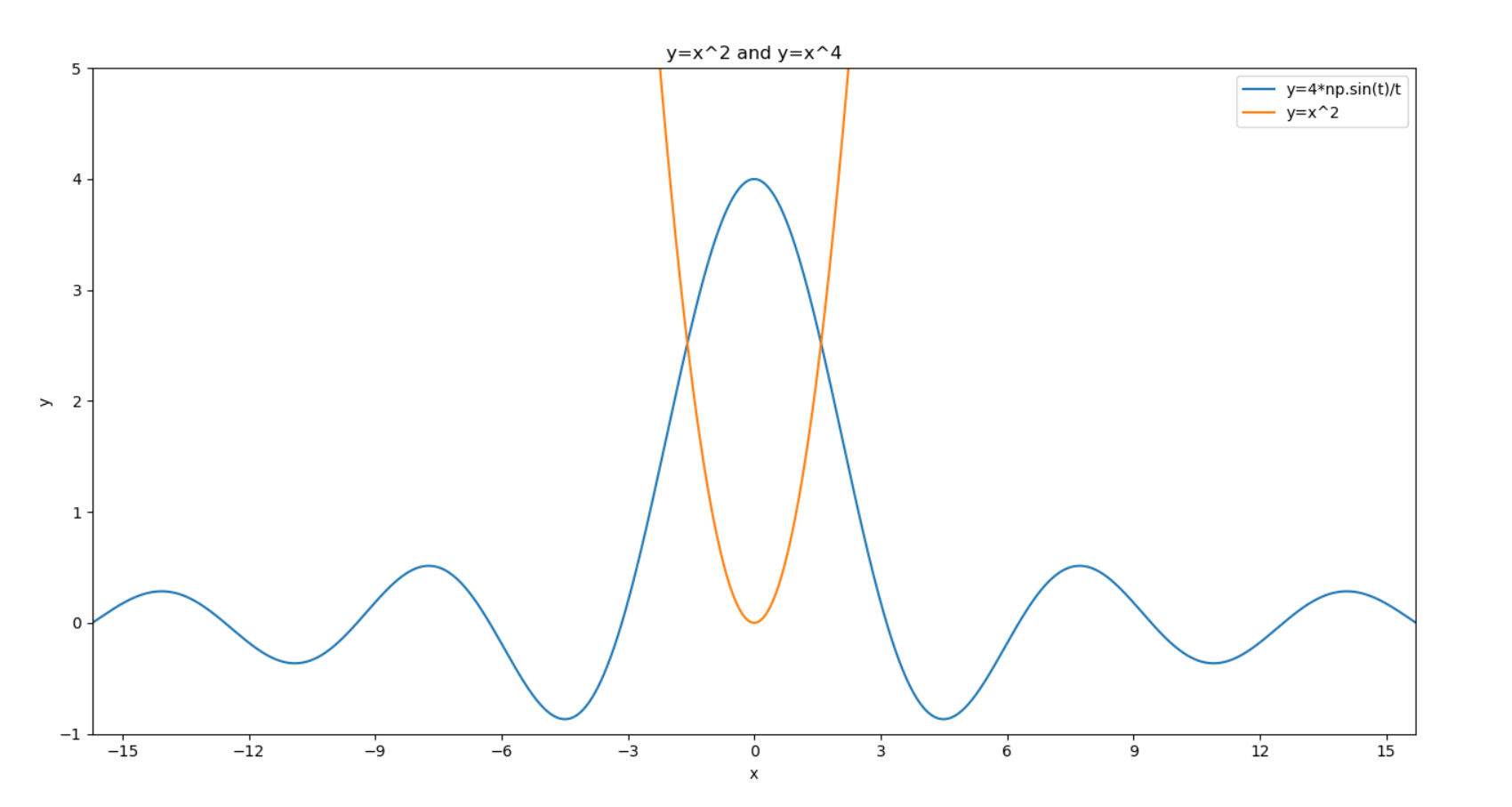
 plt.title('y=x^2 and y=x^4')  # 添加标题

 plt.xlabel('x')  # x轴名称

 plt.ylabel('y')  # y轴名称

 plt.xlim((-5*np.pi, 5*np.pi))  # x轴范围

 plt.ylim((-1, 5))  # y轴范围

 plt.xticks([-15, -12, -9, -6, -3, 0, 3, 6, 9, 12, 15])  # x轴刻度

 plt.yticks([-1, 0, 1, 2 , 3, 4, 5])  # y轴刻度

 plt.plot(t, 4*np.sin(t)/t)

 plt.plot(t, t**2)

 plt.legend(['y=4*np.sin(t)/t', 'y=x^2'])  # 标注说明

 plt.show()
(2)多图绘制
 # -*-coding:utf-8-*-

 # !/usr/bin/env python

 # Author:@vilicute

 import numpy as np

 import matplotlib.pyplot as plt

 t = np.arange(0, 2*np.pi, 0.01)

 pl = plt.figure(figsize=(8, 6), dpi=80)  # 确定画布大小

 ax1 = pl.add_subplot(2, 1, 1)  # 创建一个2行1列子图,第一个图

 plt.title('y=x^2 and y=x^4')  # 添加标题

 plt.xlabel('x')  # x轴名称

 plt.ylabel('y')  # y轴名称

 plt.xlim((0, 1))  # x轴范围

 plt.ylim((0, 1))  # y轴范围

 plt.xticks([0, 0.2, 0.4, 0.6, 0.8, 1.0])  # x轴刻度

 plt.yticks([0, 0.2, 0.4, 0.6, 0.8, 1.0])  # y轴刻度

 plt.plot(t, t**2)

 plt.plot(t, t**4)

 plt.legend(['y=x^2', 'y=x^4'])  # 标注说明

 ax2 = pl.add_subplot(2, 1, 2)  # 第二个图

 plt.title('sin(x) and cos(x)')

 plt.xlabel('x')

 plt.ylabel('y')

 plt.xlim((0, np.pi*2))

 plt.ylim((-1, 1))

 plt.xticks([0, np.pi/2, np.pi, 3*np.pi/2, np.pi*2])

 plt.yticks([-1, -0.5, 0, 0.5, 1.0])

 plt.plot(t, np.sin(t))

 plt.plot(t, np.cos(t))

 plt.legend(['sin(x)', 'cos(x)'])

 plt.show()

2-3 Numpy+Matplotlib可视化(一)的更多相关文章
- LogisticRegression in MLLib (PySpark + numpy+matplotlib可视化)
参考'LogisticRegression in MLLib' (http://www.cnblogs.com/luweiseu/p/7809521.html) 通过pySpark MLlib训练lo ...
- 2-4 Numpy+Matplotlib可视化(二)
自定义绘图 # -*-coding:utf-8-*- # !/usr/bin/env python # Author:@vilicute import numpy as np import matpl ...
- 【学习总结】GirlsInAI ML-diary day-21-初识 Numpy, Matplotlib, Seanborn [柱状图、折线图、箱图]
[学习总结]GirlsInAI ML-diary 总 原博github链接-day21 初识 Numpy, Matplotlib, Seanborn [柱状图.折线图.箱图] 一.Titanic练习赛 ...
- 国外大神制作的一个很棒的matplotlib 可视化教程
国外大神制作的一个很棒的matplotlib 可视化教程 参考:https://www.machinelearningplus.com/plots/top-50-matplotlib-visualiz ...
- 在mac安装numpy matplotlib scipy
p.p1 { margin: 0.0px 0.0px 0.0px 0.0px; font: 11.0px Menlo; color: #000000; background-color: #fffff ...
- Ubuntu-Python2.7安装 scipy,numpy,matplotlib 和pip
一. scipy,numpy,matplotlib sudo apt-get install python-scipy sudo apt-get install python-numpy sudo a ...
- NumPy Matplotlib库
NumPy - Matplotlib Matplotlib 是 Python 的绘图库. 它可与 NumPy 一起使用,提供了一种有效的 MatLab 开源替代方案. 它也可以和图形工具包一起使用,如 ...
- 21、numpy—Matplotlib
NumPy Matplotlib Matplotlib 是 Python 的绘图库. 它可与 NumPy 一起使用,提供了一种有效的 MatLab 开源替代方案. 它也可以和图形工具包一起使用,如 P ...
- SciKit-Learn 使用matplotlib可视化数据
章节 SciKit-Learn 加载数据集 SciKit-Learn 数据集基本信息 SciKit-Learn 使用matplotlib可视化数据 SciKit-Learn 可视化数据:主成分分析(P ...
随机推荐
- selenium简单应用
文章引用自:https://wenku.baidu.com/view/d5c296c75727a5e9846a6182.html 例子:
- LUOGU P2296 寻找道路 (noip 2014)
传送门 解题思路 首先建一张反图,从终点dfs出哪个点直接或间接相连,然后直接跑最短路,跑的时候判断一下所连的点是否与终点相连. 代码 #include<iostream> #includ ...
- thinkPHP使用中踩的坑,记录一下(不停更)
版本3.2.3 1.数据库操作中的连贯操作table(),在查询的时候可以切换表,但是在插入,更新的时候请不要使用.例如 D('user')->table('auth')->add($da ...
- ERROR:ORA-30076: 对析出来源无效的析出字段
DEBUG:key: sql: select count(*) as col_0_0_ from jc_user cmsuser0_ where 1=1 and cmsuser0_.register_ ...
- [code] if (x<0)x=0;else if (x>255)x=255;
//颜色范围0-255: // 1.原始: )tem_b=;)tem_b=; )tem_g=;)tem_g=; )tem_r=;)tem_r=; //2.使用条件状态值生成掩码来移除条件分支 tem_ ...
- sort方法
作用:对列表进行排序 >>> spam=[2,5,3,14,1,-7] >>> spam.sort() >>> spam [-7, 1, 2, 3 ...
- docker 安装redis 并配置外网可以访问 - flymoringbird的博客 - CSDN博客
原文:docker 安装redis 并配置外网可以访问 - flymoringbird的博客 - CSDN博客 端口映射,data目录映射,配置文件映射(在当前目录下进行启动). docker run ...
- LA3902 Networlk
Network Consider a tree network with n nodes where the internal nodes correspond to servers and the ...
- python \r \t \n 各种转义字符
转义字符 描述 \(在行尾时) 续行符 \\ 反斜杠符号 \’ 单引号 \” 双引号 \a 响铃 \b 退格(Backspace) \e 转义 \000 空 \n 换行 \v 纵向制表符 \t 横向制 ...
- TZ_02MyBatis_lazy SqlMapConfig.xml
Mybatis的延迟加载又称为懒加载 mybatis在一对多的查询中,例如查询一个用户时需要查询这个用户下的所有账户信息,如果一次性的select * from user u left join ac ...