
IOS开发基础知识--碎片46
1:带中文的URL处理
// http://static.tripbe.com/videofiles/视频/我的自拍视频.mp4

NSString *path  = (__bridge_transfer NSString *)CFURLCreateStringByReplacingPercentEscapesUsingEncoding(NULL,(__bridge CFStringRef)model.mp4_url, CFSTR(""),CFStringConvertNSStringEncodingToEncoding(NSUTF8StringEncoding));
2:取WebView高度
- (void)webViewDidFinishLoad:(UIWebView *)webView  {

    CGFloat height = [[webView stringByEvaluatingJavaScriptFromString:@"document.body.offsetHeight"] floatValue];

    CGRect frame = webView.frame;

    webView.frame = CGRectMake(frame.origin.x, frame.origin.y, frame.size.width, height);

}
另外一种方式利用KVO实例:

-(void)viewDidLoad{

    // KVO,作为一个观察者,只要属性"contentSize"发生变化,回调方法里面就会通知

    [_webView.scrollView addObserver:self forKeyPath:@"contentSize" options:NSKeyValueObservingOptionNew context:NULL];

}

//  回调方法

- (void)observeValueForKeyPath:(NSString *)keyPath ofObject:(id)object change:(NSDictionary *)change context:(void *)context

{

    if(object == _webView.scrollView && [keyPath isEqualToString:@"contentSize"])

    {

        //  得到最大的Y坐标

        CGSize size = _webView.scrollView.contentSize;

        if (size.height > 568.0) {

            // 遮挡广告

            _hideBottomImage = [[UIImageView alloc] initWithFrame:CGRectMake(, size.height-, ScreenWidth, )];

            _hideBottomImage.image = [UIImage imageNamed:@"banner"];

            [_webView.scrollView addSubview:_hideBottomImage];

        }

    }

    else

    {

        //  调用父类的方法

        [super observeValueForKeyPath:keyPath ofObject:object change:change context:context];

    }

}

- (void)dealloc{//---->在ARC环境下也能调用dealloc方法,只是不需要写[super dealloc]

    // 移除KVO,否则会引起资源泄露

    [_webView.scrollView removeObserver:self forKeyPath:@"contentSize"];

}
3:UIView的部分圆角问题
UIView *view2 = [[UIView alloc] initWithFrame:CGRectMake(, , , )];

view2.backgroundColor = [UIColor redColor];

[self.view addSubview:view2];


UIBezierPath *maskPath = [UIBezierPath bezierPathWithRoundedRect:view2.bounds byRoundingCorners:UIRectCornerBottomLeft | UIRectCornerBottomRight cornerRadii:CGSizeMake(, )];

CAShapeLayer *maskLayer = [[CAShapeLayer alloc] init];

maskLayer.frame = view2.bounds;

maskLayer.path = maskPath.CGPath;

view2.layer.mask = maskLayer;

//其中,byRoundingCorners:UIRectCornerBottomLeft |UIRectCornerBottomRight

//指定了需要成为圆角的角。该参数是UIRectCorner类型的,可选的值有:

* UIRectCornerTopLeft

* UIRectCornerTopRight

* UIRectCornerBottomLeft

* UIRectCornerBottomRight

* UIRectCornerAllCorners
4:强制App直接退出
- (void)exitApplication {

    AppDelegate *app = [UIApplication sharedApplication].delegate;

    UIWindow *window = app.window;

    [UIView animateWithDuration:1.0f animations:^{

        window.alpha = ;

    } completion:^(BOOL finished) {

        exit();

    }];

}
5:修改占位符颜色和大小
textField.placeholder = @"请输入用户名";

[textField setValue:[UIColor redColor] forKeyPath:@"_placeholderLabel.textColor"];

[textField setValue:[UIFont boldSystemFontOfSize:] forKeyPath:@"_placeholderLabel.font"];
6:取消系统的返回手势
self.navigationController.interactivePopGestureRecognizer.enabled = NO;
7:改WebView字体/颜色
UIWebView设置字体大小,颜色,字体: UIWebView无法通过自身的属性设置字体的一些属性,只能通过html代码进行设置 在webView加载完毕后:
- (void)webViewDidFinishLoad:(UIWebView *)webView {

    NSString *str = @"document.getElementsByTagName('body')[0].style.webkitTextSizeAdjust= '60%'";

    [webView stringByEvaluatingJavaScriptFromString:str];

}

或者加入以下代码

NSString *jsString = [[NSString alloc] initWithFormat:@"document.body.style.fontSize=%f;document.body.style.color=%@",fontSize,fontColor];

[webView stringByEvaluatingJavaScriptFromString:jsString];
8:WebView图片自适应屏幕
- (void)webViewDidFinishLoad:(UIWebView *)webView {

  NSString *js = @"function imgAutoFit() { \

     var imgs = document.getElementsByTagName('img'); \

     for (var i = 0; i < imgs.length; ++i) {\

        var img = imgs[i];   \

        img.style.maxWidth = %f;   \

     } \

  }";

  js = [NSString stringWithFormat:js, [UIScreen mainScreen].bounds.size.width - ];

  [webView stringByEvaluatingJavaScriptFromString:js];

  [webView stringByEvaluatingJavaScriptFromString:@"imgAutoFit()"];

}
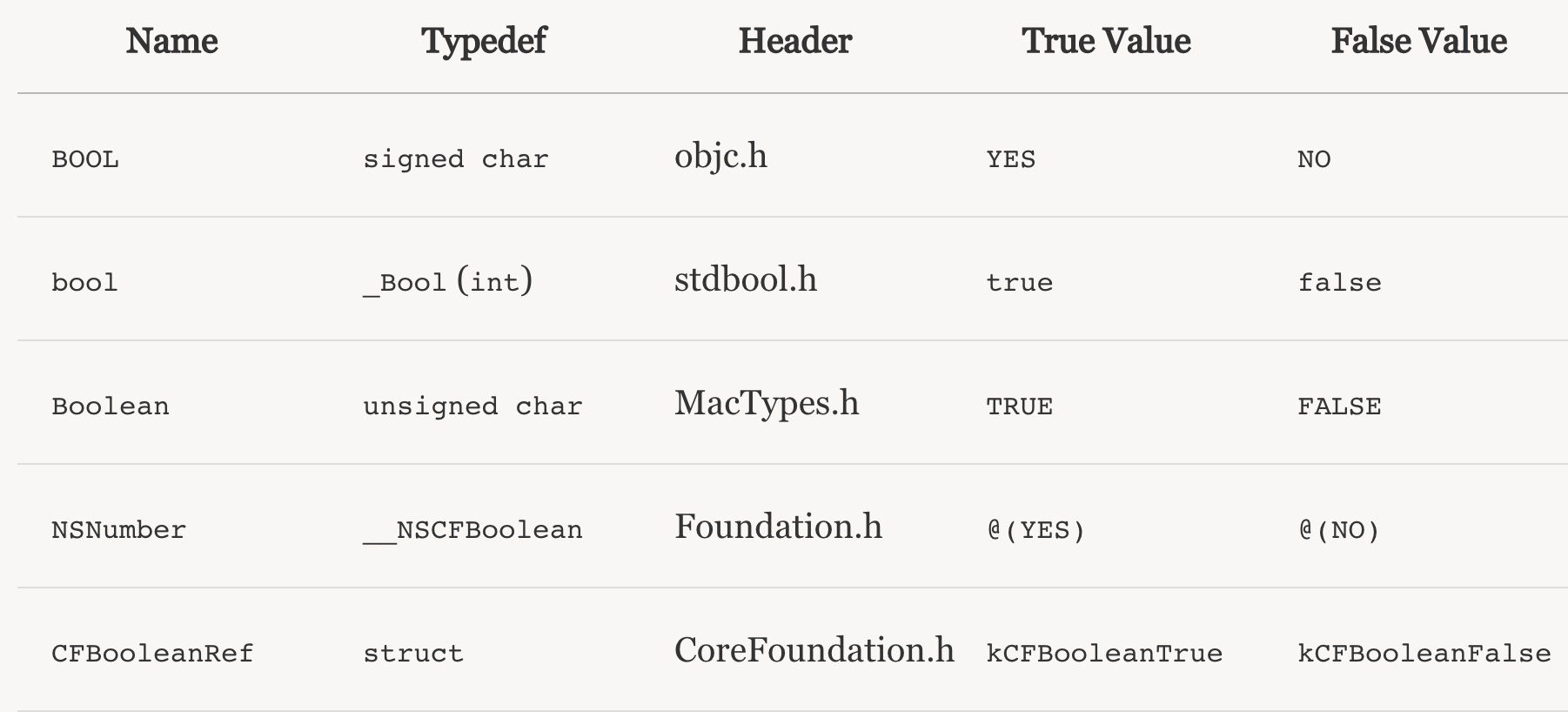
9:BOOL / bool / Boolean / NSCFBoolean的区别
10:nil / Nil / NULL / NSNull区别

a、nil:一般赋值给空对象;
b、NULL:一般赋值给nil之外的其他空值。如SEL等;
举个栗子(好重啊~):
[NSApp beginSheet:sheet
modalForWindow:mainWindow
modalDelegate:nil //pointing to an object
didEndSelector:NULL //pointing to a non object/class
contextInfo:NULL]; //pointing to a non object/class
c、NSNULL:NSNull只有一个方法:+ (NSNull *) null;
[NSNull null]用来在NSArray和NSDictionary中加入非nil(表示列表结束)的空值.
NSMutableDictionary *mutableDictionary = [NSMutableDictionary dictionary];

mutableDictionary[@"someKey"] = [NSNull null]; // Sets value of NSNull singleton for `someKey`

NSLog(@"Keys: %@", [mutableDictionary allKeys]); // @[@"someKey"]
d、当向nil发送消息时,返回NO,不会有异常,程序将继续执行下去;
而向NSNull的对象发送消息时会收到异常。
11:子类中实现 -isEqual: 和 hash
@interface Person

@property NSString *name;

@property NSDate *birthday;

- (BOOL)isEqualToPerson:(Person *)person;

@end

@implementation Person

- (BOOL)isEqualToPerson:(Person *)person {

  if (!person) {

    return NO;

  }

  BOOL haveEqualNames = (!self.name && !person.name) || [self.name isEqualToString:person.name];

  BOOL haveEqualBirthdays = (!self.birthday && !person.birthday) || [self.birthday isEqualToDate:person.birthday];

  return haveEqualNames && haveEqualBirthdays;

}

#pragma mark - NSObject

- (BOOL)isEqual:(id)object {

  if (self == object) {

    return YES;

  }

  if (![object isKindOfClass:[Person class]]) {

    return NO;

  }

  return [self isEqualToPerson:(Person *)object];

}

- (NSUInteger)hash {

  return [self.name hash] ^ [self.birthday hash];

}
IOS开发基础知识--碎片46的更多相关文章
- IOS开发基础知识碎片-导航
1:IOS开发基础知识--碎片1 a:NSString与NSInteger的互换 b:Objective-c中集合里面不能存放基础类型,比如int string float等,只能把它们转化成对象才可 ...
- IOS开发基础知识--碎片33
1:AFNetworking状态栏网络请求效果 直接在AppDelegate里面didFinishLaunchingWithOptions进行设置 [[AFNetworkActivityIndicat ...
- IOS开发基础知识--碎片42
1:报thread 1:exc_bad_access(code=1,address=0x70********) 闪退 这种错误通常是内存管理的问题,一般是访问了已经释放的对象导致的,可以开启僵尸对象( ...
- IOS开发基础知识--碎片50
1:Masonry 2个或2个以上的控件等间隔排序 /** * 多个控件固定间隔的等间隔排列,变化的是控件的长度或者宽度值 * * @param axisType 轴线方向 * @param fi ...
- IOS开发基础知识--碎片3
十二:判断设备 //设备名称 return [UIDevice currentDevice].name; //设备型号,只可得到是何设备,无法得到是第几代设备 return [UIDevice cur ...
- IOS开发基础知识--碎片11
1:AFNetwork判断网络状态 #import “AFNetworkActivityIndicatorManager.h" - (BOOL)application:(UIApplicat ...
- IOS开发基础知识--碎片14
1:ZIP文件压缩跟解压,使用ZipArchive 创建/添加一个zip包 ZipArchive* zipFile = [[ZipArchive alloc] init]; //次数得zipfilen ...
- IOS开发基础知识--碎片16
1:Objective-C语法之动态类型(isKindOfClass, isMemberOfClass,id) 对象在运行时获取其类型的能力称为内省.内省可以有多种方法实现. 判断对象类型 -(BOO ...
- IOS开发基础知识--碎片19
1:键盘事件顺序 UIKeyboardWillShowNotification // 键盘显示之前 UIKeyboardDidShowNotification // 键盘显示完成后 UIKeyboar ...
随机推荐
- Neutron Vlan Network 原理- 每天5分钟玩转 OpenStack(92)
前面我们陆续学习了 Neutron local network,flat network 和 DHCP 服务,从本节将开始讨论 vlan network. vlan network 是带 tag 的网 ...
- 为 Neutron 准备物理基础设施(I) - 每天5分钟玩转 OpenStack(75)
前面讨论了 Neutron 的架构和基础知识,接下来就要通过实验深入学习和实践了. 第一步就是准备实验用的物理环境,考虑如下几个问题: 需要几个节点? 如何分配节点的角色? 节点上部署哪些服务? 配几 ...
- mac下无法识别手机usb问题
一.无论是mac还是windows下连接手机调试android程序,一定要确认手机开启了usb调试.如果没有开启请参考我的步骤. 设置->关于手机->版本号 连续点击版本号 ...
- 拨乱反正:DDD 回归具体的业务场景,Domain Model 再再重新设计
首先,把最真挚的情感送与梅西,加油! 写在前面 阅读目录: 重申业务场景 Domain Model 设计 后记 上一篇<设计窘境:来自 Repository 的一丝线索,Domain Model ...
- 不要给<a>设置outline:none
outline属性有什么作用 原文链接 a{outline:none} do not do it 当用户使用tab键进行链接切换时,该属性会在当前选中的链接(获得焦点)使用该属性,一般来说是虚线框 的 ...
- 相克军_Oracle体系_随堂笔记005-Database buffer cache
本章主要阐述SGA中的Database buffer cache. Buffer cache { 1.pin (读写瞬间的状态) 2.clean 3.dirty 4.unused } --Databa ...
- 原创:从零开始,微信小程序新手入门宝典《一》
为了方便大家了解并入门微信小程序,我将一些可能会需要的知识,列在这里,让大家方便的从零开始学习:一:微信小程序的特点张小龙:张小龙全面阐述小程序,推荐通读此文: 小程序是一种不需要下载.安装即可使用的 ...
- [linux]挂载smb
什么是 smb 服务器消息区块(英语:Server Message Block,缩写为SMB,服务器消息区块),又称网络文件共享系统(英语:Common Internet File System,缩写 ...
- ASP.NET CMS模板培训教程
注意:此文档中出现所有的类,都是公司内部的,也就是说,只是给公司内部人员培训的一篇文章而已,如果其他的人看到了, 看不懂里面的类,那是因为这都是我公司内部的框架. 首先是进入我们的系统的后台,然后选择 ...
- 如何访问facebook (转)
对于普通大众,访问facebook需要两个条件:1)使用代理 2)翻译网页内容.本文将介绍怎样安全高速地访问诸如facebook之类的国外网站,并提供相关软件下载. 工具/原料 chromeGAE软件 ...