
IOS开发基础知识--碎片46
1:带中文的URL处理
// http://static.tripbe.com/videofiles/视频/我的自拍视频.mp4

NSString *path  = (__bridge_transfer NSString *)CFURLCreateStringByReplacingPercentEscapesUsingEncoding(NULL,(__bridge CFStringRef)model.mp4_url, CFSTR(""),CFStringConvertNSStringEncodingToEncoding(NSUTF8StringEncoding));
2:取WebView高度
- (void)webViewDidFinishLoad:(UIWebView *)webView  {

    CGFloat height = [[webView stringByEvaluatingJavaScriptFromString:@"document.body.offsetHeight"] floatValue];

    CGRect frame = webView.frame;

    webView.frame = CGRectMake(frame.origin.x, frame.origin.y, frame.size.width, height);

}
另外一种方式利用KVO实例:

-(void)viewDidLoad{

    // KVO,作为一个观察者,只要属性"contentSize"发生变化,回调方法里面就会通知

    [_webView.scrollView addObserver:self forKeyPath:@"contentSize" options:NSKeyValueObservingOptionNew context:NULL];

}

//  回调方法

- (void)observeValueForKeyPath:(NSString *)keyPath ofObject:(id)object change:(NSDictionary *)change context:(void *)context

{

    if(object == _webView.scrollView && [keyPath isEqualToString:@"contentSize"])

    {

        //  得到最大的Y坐标

        CGSize size = _webView.scrollView.contentSize;

        if (size.height > 568.0) {

            // 遮挡广告

            _hideBottomImage = [[UIImageView alloc] initWithFrame:CGRectMake(, size.height-, ScreenWidth, )];

            _hideBottomImage.image = [UIImage imageNamed:@"banner"];

            [_webView.scrollView addSubview:_hideBottomImage];

        }

    }

    else

    {

        //  调用父类的方法

        [super observeValueForKeyPath:keyPath ofObject:object change:change context:context];

    }

}

- (void)dealloc{//---->在ARC环境下也能调用dealloc方法,只是不需要写[super dealloc]

    // 移除KVO,否则会引起资源泄露

    [_webView.scrollView removeObserver:self forKeyPath:@"contentSize"];

}
3:UIView的部分圆角问题
UIView *view2 = [[UIView alloc] initWithFrame:CGRectMake(, , , )];

view2.backgroundColor = [UIColor redColor];

[self.view addSubview:view2];


UIBezierPath *maskPath = [UIBezierPath bezierPathWithRoundedRect:view2.bounds byRoundingCorners:UIRectCornerBottomLeft | UIRectCornerBottomRight cornerRadii:CGSizeMake(, )];

CAShapeLayer *maskLayer = [[CAShapeLayer alloc] init];

maskLayer.frame = view2.bounds;

maskLayer.path = maskPath.CGPath;

view2.layer.mask = maskLayer;

//其中,byRoundingCorners:UIRectCornerBottomLeft |UIRectCornerBottomRight

//指定了需要成为圆角的角。该参数是UIRectCorner类型的,可选的值有:

* UIRectCornerTopLeft

* UIRectCornerTopRight

* UIRectCornerBottomLeft

* UIRectCornerBottomRight

* UIRectCornerAllCorners
4:强制App直接退出
- (void)exitApplication {

    AppDelegate *app = [UIApplication sharedApplication].delegate;

    UIWindow *window = app.window;

    [UIView animateWithDuration:1.0f animations:^{

        window.alpha = ;

    } completion:^(BOOL finished) {

        exit();

    }];

}
5:修改占位符颜色和大小
textField.placeholder = @"请输入用户名";

[textField setValue:[UIColor redColor] forKeyPath:@"_placeholderLabel.textColor"];

[textField setValue:[UIFont boldSystemFontOfSize:] forKeyPath:@"_placeholderLabel.font"];
6:取消系统的返回手势
self.navigationController.interactivePopGestureRecognizer.enabled = NO;
7:改WebView字体/颜色
UIWebView设置字体大小,颜色,字体: UIWebView无法通过自身的属性设置字体的一些属性,只能通过html代码进行设置 在webView加载完毕后:
- (void)webViewDidFinishLoad:(UIWebView *)webView {

    NSString *str = @"document.getElementsByTagName('body')[0].style.webkitTextSizeAdjust= '60%'";

    [webView stringByEvaluatingJavaScriptFromString:str];

}

或者加入以下代码

NSString *jsString = [[NSString alloc] initWithFormat:@"document.body.style.fontSize=%f;document.body.style.color=%@",fontSize,fontColor];

[webView stringByEvaluatingJavaScriptFromString:jsString];
8:WebView图片自适应屏幕
- (void)webViewDidFinishLoad:(UIWebView *)webView {

  NSString *js = @"function imgAutoFit() { \

     var imgs = document.getElementsByTagName('img'); \

     for (var i = 0; i < imgs.length; ++i) {\

        var img = imgs[i];   \

        img.style.maxWidth = %f;   \

     } \

  }";

  js = [NSString stringWithFormat:js, [UIScreen mainScreen].bounds.size.width - ];

  [webView stringByEvaluatingJavaScriptFromString:js];

  [webView stringByEvaluatingJavaScriptFromString:@"imgAutoFit()"];

}
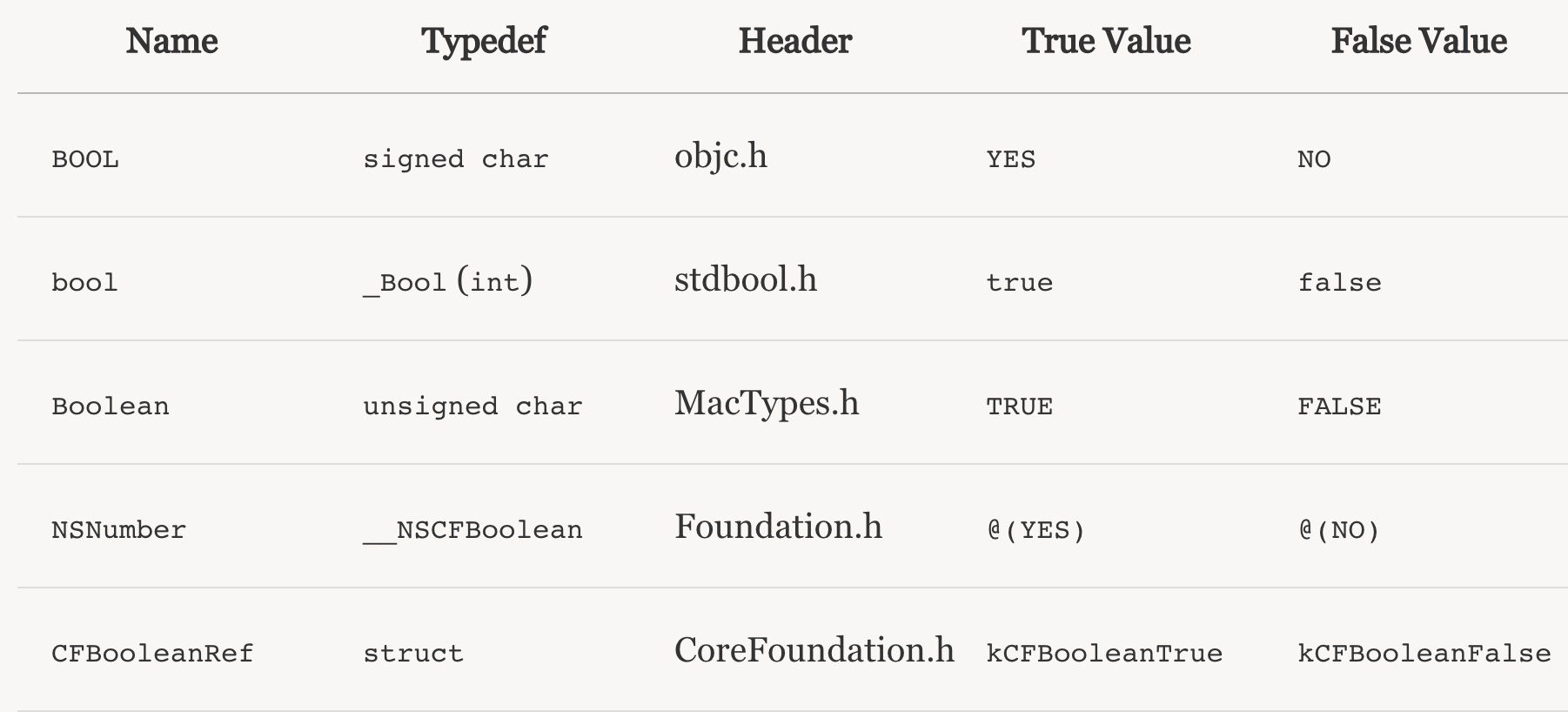
9:BOOL / bool / Boolean / NSCFBoolean的区别
10:nil / Nil / NULL / NSNull区别

a、nil:一般赋值给空对象;
b、NULL:一般赋值给nil之外的其他空值。如SEL等;
举个栗子(好重啊~):
[NSApp beginSheet:sheet
modalForWindow:mainWindow
modalDelegate:nil //pointing to an object
didEndSelector:NULL //pointing to a non object/class
contextInfo:NULL]; //pointing to a non object/class
c、NSNULL:NSNull只有一个方法:+ (NSNull *) null;
[NSNull null]用来在NSArray和NSDictionary中加入非nil(表示列表结束)的空值.
NSMutableDictionary *mutableDictionary = [NSMutableDictionary dictionary];

mutableDictionary[@"someKey"] = [NSNull null]; // Sets value of NSNull singleton for `someKey`

NSLog(@"Keys: %@", [mutableDictionary allKeys]); // @[@"someKey"]
d、当向nil发送消息时,返回NO,不会有异常,程序将继续执行下去;
而向NSNull的对象发送消息时会收到异常。
11:子类中实现 -isEqual: 和 hash
@interface Person

@property NSString *name;

@property NSDate *birthday;

- (BOOL)isEqualToPerson:(Person *)person;

@end

@implementation Person

- (BOOL)isEqualToPerson:(Person *)person {

  if (!person) {

    return NO;

  }

  BOOL haveEqualNames = (!self.name && !person.name) || [self.name isEqualToString:person.name];

  BOOL haveEqualBirthdays = (!self.birthday && !person.birthday) || [self.birthday isEqualToDate:person.birthday];

  return haveEqualNames && haveEqualBirthdays;

}

#pragma mark - NSObject

- (BOOL)isEqual:(id)object {

  if (self == object) {

    return YES;

  }

  if (![object isKindOfClass:[Person class]]) {

    return NO;

  }

  return [self isEqualToPerson:(Person *)object];

}

- (NSUInteger)hash {

  return [self.name hash] ^ [self.birthday hash];

}
IOS开发基础知识--碎片46的更多相关文章
- IOS开发基础知识碎片-导航
1:IOS开发基础知识--碎片1 a:NSString与NSInteger的互换 b:Objective-c中集合里面不能存放基础类型,比如int string float等,只能把它们转化成对象才可 ...
- IOS开发基础知识--碎片33
1:AFNetworking状态栏网络请求效果 直接在AppDelegate里面didFinishLaunchingWithOptions进行设置 [[AFNetworkActivityIndicat ...
- IOS开发基础知识--碎片42
1:报thread 1:exc_bad_access(code=1,address=0x70********) 闪退 这种错误通常是内存管理的问题,一般是访问了已经释放的对象导致的,可以开启僵尸对象( ...
- IOS开发基础知识--碎片50
1:Masonry 2个或2个以上的控件等间隔排序 /** * 多个控件固定间隔的等间隔排列,变化的是控件的长度或者宽度值 * * @param axisType 轴线方向 * @param fi ...
- IOS开发基础知识--碎片3
十二:判断设备 //设备名称 return [UIDevice currentDevice].name; //设备型号,只可得到是何设备,无法得到是第几代设备 return [UIDevice cur ...
- IOS开发基础知识--碎片11
1:AFNetwork判断网络状态 #import “AFNetworkActivityIndicatorManager.h" - (BOOL)application:(UIApplicat ...
- IOS开发基础知识--碎片14
1:ZIP文件压缩跟解压,使用ZipArchive 创建/添加一个zip包 ZipArchive* zipFile = [[ZipArchive alloc] init]; //次数得zipfilen ...
- IOS开发基础知识--碎片16
1:Objective-C语法之动态类型(isKindOfClass, isMemberOfClass,id) 对象在运行时获取其类型的能力称为内省.内省可以有多种方法实现. 判断对象类型 -(BOO ...
- IOS开发基础知识--碎片19
1:键盘事件顺序 UIKeyboardWillShowNotification // 键盘显示之前 UIKeyboardDidShowNotification // 键盘显示完成后 UIKeyboar ...
随机推荐
- Android NDK开发Hello Word!
在之前的博客中已经为大家介绍了,如何在win环境下配置DNK程序,本篇我将带大家实现一个简单的Hello jni程序,让大家真正感受一下NDK开发的魅力.这里我们选择使用C+JAVA开发Android ...
- 数据可视化-EChart2.0使用总结1
图表是企业级Web开发必不可少的一个功能点.也是“数据可视化的一个具体呈现”.今天看到阮一峰翻译的“数据可视化:基本图表”一文,同时梳理一下公司现在项目使用的EChart2.0类库.阮一峰的文章同时也 ...
- AspNetPager分页控件配置
AspNetPager是asp.net中常用的分页控件,下载AspNetPager.dll,添加引用,在工具栏就可以看到AspNetPager控件: 拖过来之后,设置如下属性: <webdiye ...
- Hammer.js分析(四)——recognizer.js
不同识别器会使用不同逻辑,根据从相关Input类获取到的事件对象和事件,实现自定义的触屏事件,例如tap.pinch等. 一.继承关系 Recognizer与前面的Input一样,也相当于是个抽象类. ...
- RAC某节点启动遭遇ORA-01105,ORA-01606
环境:RHEL6.5 + Oracle11.2.0.4 双节点RAC 故障现象:节点1实例没有启动成功,节点2正常启动. 1.故障现象 2.解决过程 3.总结 1.故障现象 尝试启动RAC 节点1,遭 ...
- Cesium应用篇:2影像服务(上)
文章中相关范例下载路径:https://yunpan.cn/cByQqkANWN7Pu 访问密码 823d Cesium中提供了多种ImageryProvider方式,来满足用户的实际需 ...
- Cesium原理篇:4Web Workers剖析
JavaScript是单线程的,又是异步的,而最新的HTML5中,通过Web Workers可以在JS中支持多线程开发.这是几个意思?异步还是单线程,这怎么理解?Web Workers又是什么原理?实 ...
- 用JPUSH极光推送实现服务端向安装了APP应用的手机推送消息(C#服务端接口)
这次公司要我们做一个功能,就是当用户成功注册以后,他登录以后要收到消息,当然这个消息是安装了我们的手机APP应用的手机咯. 极光推送的网站的网址是:https://www.jpush.cn/ 极光推送 ...
- SQL SERVER四舍五入你除了用ROUND还有其他方法吗?
引言 今天和测试沟通一个百分比计算方式时遇到一个问题, 我在存储过程里用到了强转CAST(32.678 AS DECIMAL(5,1)) 我认为该方式只会保留一位小数,我给测试的回复是我并没有用到四 ...
- 使用脚本操作UpdatePanel中控件的问题
假设有一个脚本(用js或者jQuery等类似手段编写),为UpdatePanel中的一个普通的TextBox赋值.如果你以为这样写: <head runat="server" ...