
RedHat版本Linux安装chrome-stable配合chromeDriver进行自动化测试环境准备
一、Linux机器安装google-chrome-stable
1、设置google-chrome软件源
sudo vim /etc/yum.repos.d/google-chrome.repo
[google-chrome]

name=google-chrome

baseurl=http://dl.google.com/linux/chrome/rpm/stable/x86_64

enabled=

gpgcheck=

gpgkey=https://dl.google.com/linux/linux_signing_key.pub
2、安装依赖[过程中如提示有其他依赖缺失,可至https://rpmfind.net/linux/rpm2html/search.php 查询对应名字rpm包 执行sudo yum install -y 安装即可]
sudo yum install https://mirrors.dotsrc.org/fedora-epel/7/x86_64/Packages/e/epel-release-7-11.noarch.rpm -y

sudo yum install Xvfb -y

sudo yum install xorg-x11-fonts* -y

sudo yum install https://rpmfind.net/linux/fedora/linux/development/rawhide/Everything/x86_64/os/Packages/l/liberation-fonts-common-2.00.5-6.fc32.noarch.rpm -y

sudo yum install https://rpmfind.net/linux/fedora/linux/development/rawhide/Everything/x86_64/os/Packages/l/liberation-mono-fonts-2.00.5-6.fc32.noarch.rpm -y

sudo yum install https://rpmfind.net/linux/fedora/linux/development/rawhide/Everything/x86_64/os/Packages/l/liberation-sans-fonts-2.00.5-6.fc32.noarch.rpm -y

sudo yum install https://rpmfind.net/linux/fedora/linux/development/rawhide/Everything/x86_64/os/Packages/l/liberation-serif-fonts-2.00.5-6.fc32.noarch.rpm -y

sudo yum install -y https://rpmfind.net/linux/fedora-secondary/development/rawhide/Everything/ppc64le/os/Packages/l/liberation-fonts-2.00.5-6.fc32.noarch.rpm -y
3、安装google-chrome-stable
sudo yum install google-chrome-stable -y
二、准备客户端【webdriver随客户端发放到服务器】
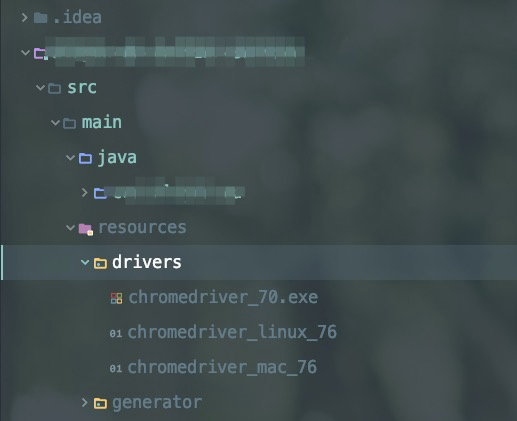
public static WebDriver driver;
/**

     * 初始化Driver

     * @throws Exception

     */

public void initDriver() throws Exception {

     String path;

        File file;

String osName = System.getProperty("os.name").toLowerCase();
          // webdriver 版本做持久化,driver初始化时载入内存,动态调用配置

                if (getClass().getResource("/") == null) {

                    String chromePath = "drivers/".concat(osName.startsWith("windows") ? ContextUtils.getContextStr(CHROME_DRIVER_WINDOWS) : osName.startsWith("mac") ? ContextUtils.getContextStr(CHROME_DRIVER_MAC) : ContextUtils.getContextStr(CHROME_DRIVER_LINUX));

                    path = String.format("%s%starget%s%s", System.getProperty("base.dir"), File.separator, File.separator, chromePath);

                    file = new File(path);

                } else {

                    String chromePath = "drivers/".concat(osName.startsWith("windows") ? ContextUtils.getContextStr(CHROME_DRIVER_WINDOWS) : osName.startsWith("mac") ? ContextUtils.getContextStr(CHROME_DRIVER_MAC) : ContextUtils.getContextStr(CHROME_DRIVER_LINUX));

                    path = String.format("%s%s%s", getClass().getResource("/").getPath(), File.separator, chromePath);

                    file = new File(path);

                    if (file.exists() == false) {

                        FileUtils.copyInputStreamToFile(new ClassPathResource(chromePath).getInputStream(), new File(path));

                    }

                }

                if (!osName.startsWith("windows")) {

                    try {

                        Runtime.getRuntime().exec(String.format("chmod 777 %s", path));

                    } catch (Exception ex) {

                    }

                }

                CartierSystemSettings systemSettings = systemSettingsMapper.selectValueByCode(ChromeDriverService.CHROME_DRIVER_WHITELISTED_IPS_PROPERTY);

                if (null != systemSettings) {

                    System.setProperty(ChromeDriverService.CHROME_DRIVER_WHITELISTED_IPS_PROPERTY, systemSettings.getValue());

                }

                logger.info("webdriver.chrome.driver={}", path);

                System.setProperty(ChromeDriverService.CHROME_DRIVER_EXE_PROPERTY, path);

                ChromeOptions options = getChromeOptions(osName);

                driver = new ChromeDriver(options);

}

/**

     * 对非mac & Windows系统开启隐藏头模式

     * @param osName

     * @return

     */

    public static ChromeOptions getChromeOptions(String osName) {

        ChromeOptions options = new ChromeOptions();

        if (!osName.startsWith("mac") && !osName.startsWith("windows")) {

            options.addArguments("--headless");

            options.addArguments("--disable-gpu");

            options.addArguments("--no-sandbox");

        }

        options.addArguments("--verbose");

        options.addArguments("window-size=1920x1920");

        return options;

    }
RedHat版本Linux安装chrome-stable配合chromeDriver进行自动化测试环境准备的更多相关文章
- 关于Linux部分版本无法安装Chrome的问题
在想要yum安装Chrome浏览器后发现安装没有相应的包,在查询后得知Chrome已经对Redhat和Centos等部分版本停止支持, 所以这些新版的系统中直接安装就显得有些困难了,那么从网上找到了一 ...
- linux安装chrome及chromedriver(转)
1.chrome: curl https://intoli.com/install-google-chrome.sh | bash 1.1.centos安装chrome: 從 Google 下載最新版 ...
- 在Ubuntu上安装Chrome浏览器和ChromeDriver
启动脚本后报错 selenium.common.exceptions.WebDriverException: Message: 'chromedriver' executable may have w ...
- linux安装chrome浏览器
按照下面的方式安装 wget -P /home/linfu/桌面 https://dl.google.com/linux/direct/google-chrome-stable_current_amd ...
- Ubuntu16.4下安装Chrome浏览器以及Chromedriver
一.Chrome浏览器的安装 对于谷歌Chrome32位版本,使用如下链接: wget https://dl.google.com/linux/direct/google-chrome-stable_ ...
- linux 安装 Chrome
一.添加PPA 从Google Linux Repository(http://www.google.com/linuxrepositories/)下载安装Key,或把下面的代码复制进终端,回车,需要 ...
- Redhat/Centos6.x安装Chrome
由于Chrome对rhel6.x不在支持发布版本,只能安装chromium版本! 01.下载地址 http://people.centos.org/hughesjr/chromium/6/x86_64 ...
- linux安装chrome
wget http://chrome.richardlloyd.org.uk/install_chrome.sh chmod u+x install_chrome.sh ./install_chrom ...
- 32位linux安装chrome浏览器
首先你需要一个安装包,可以在CSDN上搜索google-chrome-stable_current_i386.deb. 然后在终端输入 sudo apt-get install gdebi 然后找到安 ...
随机推荐
- go strconv
strconv是golang用来做数据类型转换的一个库. 介绍下strconv最常用的两个方法, 没有解释语言那么自在可以str(int),int(string), 那还算简练. num, err : ...
- vps被封逃逸_v2+cloudflare+websocket+tls+nginx
每逢重大节日,总有那么一大部分vps凉凉,以下为能正经正常使用vps,无奈之举,此法由于多层代理,夜间速度会有影响,白天感受不明显. 由于博客园内容审查,v2_ray 中间的 下划线为分隔符,相关链接 ...
- vue PC端页面引入vue-quill-editor富文本插件
项目需要:在添加新类别的弹框中,要在输入框中输入多条描述信息,不同的描述信息要换行输入,输入后点击确定传给后端,接口返回成功后点击查看刚添加的新类别时,描述框中展现多条换行的描述信息也要跟填写时一样( ...
- Vim: Overwrite read-only file without quiting vim
当你忘记以sudo命令使用vim编辑一个只读文件时,可以执行以下vim命令强制覆写该文件: :w !sudo tee % > /dev/null 命令太长,可在vimrc文件中做命令映射(映射为 ...
- Java创建线程后,调用start()方法和run()的区别
1) start方法: 用start方法来启动线程,真正实现了多线程运行,这时无需等待run方法体代码执行完毕而直接继续执行下面的代码.通过调用Thread类的start()方法来启动一个线程,这时此 ...
- bzoj4237稻草人
题意:给你一个田地,问左下角和右上角有稻草人并且内部除了边界都没有稻草人的矩形数. 标程: #include<bits/stdc++.h> using namespace std; int ...
- PHP面向对象简易验证码类
PHP简易验证码类 <?php class authCode { private static $instance = null; #实例对象 private $width = 120; #图片 ...
- Ruby——输入&输出
Ruby的输入和输出操作.输入是程序从键盘.文件或者其他程序读取数据.输出是程序产生数据.可以输出到屏幕.文件或者其他程序. Ruby中的一些类有些方法会执行输入&输出操作.例如Kernel. ...
- bzoj1046题解
[解题思路] 先倒着求一遍LIS,然后对于每个询问L从左到右找到第一个大于等于L的上升序列即可.复杂度O(N(log2N+M)). [参考代码] #pragma GCC optimize(2) #in ...
- phpmyadmin利用的多种方式
关于phpmyadmin的利用方式大佬们已经总结的很好了,这里只是造轮子(便于记录学习) 确认版本 渗透测试信息搜集永远是首位(也是最重要的一步).   默认目录/doc/html/index ...