
c#本地缓存当数据库表更改时,缓存失效。
web.config
<?xml version="1.0" encoding="utf-8"?>

<!--

  有关如何配置 ASP.NET 应用程序的详细信息,请访问

  http://go.microsoft.com/fwlink/?LinkId=152368

  -->

<configuration>

  <configSections>

    <!-- For more information on Entity Framework configuration, visit http://go.microsoft.com/fwlink/?LinkID=237468 -->

    <section name="entityFramework" type="System.Data.Entity.Internal.ConfigFile.EntityFrameworkSection, EntityFramework, Version=5.0.0.0, Culture=neutral, PublicKeyToken=b77a5c561934e089" requirePermission="false" />

  </configSections>

  <connectionStrings>

    <add name="TestMvcConnectionString"

         connectionString="Data Source=LJJ-FF\LJJ;Initial Catalog=TestMvc;User ID=sa;Password=111111;Max Pool Size=500;Min Pool Size=1;"

         providerName="System.Data.SqlClient" />

  </connectionStrings>

  <appSettings>

    <add key="webpages:Version" value="2.0.0.0" />

    <add key="webpages:Enabled" value="false" />

    <add key="PreserveLoginUrl" value="true" />

    <add key="ClientValidationEnabled" value="true" />

    <add key="UnobtrusiveJavaScriptEnabled" value="true" />

  </appSettings>

  <system.web>

    <caching>

      <sqlCacheDependency enabled="true" pollTime="">

        <databases>

          <add connectionStringName="TestMvcConnectionString" name="TestMvc"/>

        </databases>

      </sqlCacheDependency>

    </caching>

    <httpRuntime targetFramework="4.5" />

    <compilation debug="true" targetFramework="4.5" />

    <authentication mode="Forms">

      <forms loginUrl="~/Account/Login" timeout="" />

    </authentication>

    <pages>

      <namespaces>

        <add namespace="System.Web.Helpers" />

        <add namespace="System.Web.Mvc" />

        <add namespace="System.Web.Mvc.Ajax" />

        <add namespace="System.Web.Mvc.Html" />

        <add namespace="System.Web.Optimization" />

        <add namespace="System.Web.Routing" />

        <add namespace="System.Web.WebPages" />

      </namespaces>

    </pages>

    <profile defaultProvider="DefaultProfileProvider">

      <providers>

        <add name="DefaultProfileProvider" type="System.Web.Providers.DefaultProfileProvider, System.Web.Providers, Version=1.0.0.0, Culture=neutral, PublicKeyToken=31bf3856ad364e35" connectionStringName="DefaultConnection" applicationName="/" />

      </providers>

    </profile>

    <membership defaultProvider="DefaultMembershipProvider">

      <providers>

        <add name="DefaultMembershipProvider" type="System.Web.Providers.DefaultMembershipProvider, System.Web.Providers, Version=1.0.0.0, Culture=neutral, PublicKeyToken=31bf3856ad364e35" connectionStringName="DefaultConnection" enablePasswordRetrieval="false" enablePasswordReset="true" requiresQuestionAndAnswer="false" requiresUniqueEmail="false" maxInvalidPasswordAttempts="" minRequiredPasswordLength="" minRequiredNonalphanumericCharacters="" passwordAttemptWindow="" applicationName="/" />

      </providers>

    </membership>

    <roleManager defaultProvider="DefaultRoleProvider">

      <providers>

        <add name="DefaultRoleProvider" type="System.Web.Providers.DefaultRoleProvider, System.Web.Providers, Version=1.0.0.0, Culture=neutral, PublicKeyToken=31bf3856ad364e35" connectionStringName="DefaultConnection" applicationName="/" />

      </providers>

    </roleManager>

    <!--

            If you are deploying to a cloud environment that has multiple web server instances,

            you should change session state mode from "InProc" to "Custom". In addition,

            change the connection string named "DefaultConnection" to connect to an instance

            of SQL Server (including SQL Azure and SQL  Compact) instead of to SQL Server Express.

      -->

    <sessionState mode="InProc" customProvider="DefaultSessionProvider">

      <providers>

        <add name="DefaultSessionProvider" type="System.Web.Providers.DefaultSessionStateProvider, System.Web.Providers, Version=1.0.0.0, Culture=neutral, PublicKeyToken=31bf3856ad364e35" connectionStringName="DefaultConnection" />

      </providers>

    </sessionState>

  </system.web>

  <system.webServer>

    <validation validateIntegratedModeConfiguration="false" />

    <handlers>

      <remove name="ExtensionlessUrlHandler-ISAPI-4.0_32bit" />

      <remove name="ExtensionlessUrlHandler-ISAPI-4.0_64bit" />

      <remove name="ExtensionlessUrlHandler-Integrated-4.0" />

      <add name="ExtensionlessUrlHandler-ISAPI-4.0_32bit" path="*." verb="GET,HEAD,POST,DEBUG,PUT,DELETE,PATCH,OPTIONS" modules="IsapiModule" scriptProcessor="%windir%\Microsoft.NET\Framework\v4.0.30319\aspnet_isapi.dll" preCondition="classicMode,runtimeVersionv4.0,bitness32" responseBufferLimit="" />

      <add name="ExtensionlessUrlHandler-ISAPI-4.0_64bit" path="*." verb="GET,HEAD,POST,DEBUG,PUT,DELETE,PATCH,OPTIONS" modules="IsapiModule" scriptProcessor="%windir%\Microsoft.NET\Framework64\v4.0.30319\aspnet_isapi.dll" preCondition="classicMode,runtimeVersionv4.0,bitness64" responseBufferLimit="" />

      <add name="ExtensionlessUrlHandler-Integrated-4.0" path="*." verb="GET,HEAD,POST,DEBUG,PUT,DELETE,PATCH,OPTIONS" type="System.Web.Handlers.TransferRequestHandler" preCondition="integratedMode,runtimeVersionv4.0" />

    </handlers>

  </system.webServer>

  <runtime>

    <assemblyBinding xmlns="urn:schemas-microsoft-com:asm.v1">

      <dependentAssembly>

        <assemblyIdentity name="System.Web.Helpers" publicKeyToken="31bf3856ad364e35" />

        <bindingRedirect oldVersion="1.0.0.0-2.0.0.0" newVersion="2.0.0.0" />

      </dependentAssembly>

      <dependentAssembly>

        <assemblyIdentity name="System.Web.Mvc" publicKeyToken="31bf3856ad364e35" />

        <bindingRedirect oldVersion="1.0.0.0-4.0.0.0" newVersion="4.0.0.0" />

      </dependentAssembly>

      <dependentAssembly>

        <assemblyIdentity name="System.Web.WebPages" publicKeyToken="31bf3856ad364e35" />

        <bindingRedirect oldVersion="1.0.0.0-2.0.0.0" newVersion="2.0.0.0" />

      </dependentAssembly>

      <dependentAssembly>

        <assemblyIdentity name="EntityFramework" publicKeyToken="b77a5c561934e089" />

        <bindingRedirect oldVersion="0.0.0.0-5.0.0.0" newVersion="5.0.0.0" />

      </dependentAssembly>

      <dependentAssembly>

        <assemblyIdentity name="WebGrease" publicKeyToken="31bf3856ad364e35" />

        <bindingRedirect oldVersion="1.0.0.0-1.3.0.0" newVersion="1.3.0.0" />

      </dependentAssembly>

    </assemblyBinding>

  </runtime>

  <entityFramework>

    <defaultConnectionFactory type="System.Data.Entity.Infrastructure.LocalDbConnectionFactory, EntityFramework">

      <parameters>

        <parameter value="v11.0" />

      </parameters>

    </defaultConnectionFactory>

  </entityFramework>

</configuration>
代码:
using System;

using System.Collections.Generic;

using System.Linq;

using System.Web;

using System.Web.Caching;

using System.Web.Mvc;

namespace TestSystemWebCache.Controllers

{

    public class HomeController : Controller

    {

        //

        // GET: /Home/

        public ActionResult Index()

        {

            System.Web.Caching.Cache cache = System.Web.HttpContext.Current.Cache;

            //数据库连接字符串名字

            //启用更改通知

            SqlCacheDependencyAdmin.EnableNotifications(System.Configuration.ConfigurationManager.ConnectionStrings["TestMvcConnectionString"].ConnectionString);

            //数据库连接字符串名字和表的名字

            //连接到 SQL Server 数据库并为 SqlCacheDependency 更改通知准备数据库表

            SqlCacheDependencyAdmin.EnableTableForNotifications(System.Configuration.ConfigurationManager.ConnectionStrings["TestMvcConnectionString"].ConnectionString, "Student");

            //制定缓存策略

            SqlCacheDependency scd = new SqlCacheDependency("TestMvc", "Student");//数据库的名字和表名字

            string oldwCache = (string)cache.Get("SiteInfo");

            ViewBag.oldwCache = oldwCache;

            if (oldwCache == null)

            {

                //插入缓存

                cache.Insert("SiteInfo", "ljj", scd);

                string ss = (string)cache.Get("SiteInfo");

            }

            string newCache= (string)cache.Get("SiteInfo");

            ViewBag.newCache = newCache;

            return View();

        }

    }

}
我们对Student表启用缓存通知。
打开vs命令工具行,输入:aspnet_regsql -S LJJ-FF\LJJ -U sa -P 111111 -ed -d TestMvc -et -t Student
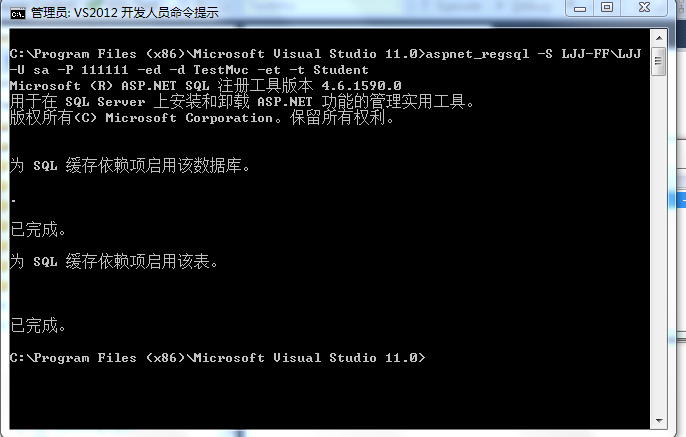
这样当数据表更新的时候,缓存就会失效。
 public UserMenuEntityCollection GetUserMenuCollection(string language, int level)

        {

            UserMenuEntityCollection returnCollection = HttpContext.Current.Cache[className] as UserMenuEntityCollection;

            if (returnCollection != null)

            {

                return returnCollection;

            }

            returnCollection = GetUserMenuFromDB(language, level);

            if (!SqlCacheDependencyAdmin.GetTablesEnabledForNotifications(ConfigurationManager.ConnectionStrings["AARTOConnectionString"].ConnectionString).Contains(tableName))

            {

                SqlCacheDependencyAdmin.EnableTableForNotifications(ConfigurationManager.ConnectionStrings["AARTOConnectionString"].ConnectionString, tableName);

            }

            string dataBaseName = "";

            ConnectionStringSettings connectionStringSettings = ConfigurationManager.ConnectionStrings["AARTOConnectionString"];

            string[] connectParameterArray = connectionStringSettings.ConnectionString.Split(';');

            foreach (string connectParameter in connectParameterArray)

            {

                if (connectParameter.Substring(, connectParameter.IndexOf("=")) == "Initial Catalog")

                {

                    //dataBaseName = connectParameter.Substring(connectParameter.IndexOf("="));

                    dataBaseName = connectParameter.Substring(connectParameter.IndexOf("=") + );

                    break;

                }

            }

            SqlCacheDependency sqlDependency = new SqlCacheDependency(dataBaseName, tableName);

            HttpContext.Current.Cache.Insert(className, returnCollection, sqlDependency);

            return returnCollection;

        }
利用反射取缓存代码:
using System;

using System.Collections.Generic;

using System.Linq;

using System.Text;

using System.Web;

using System.Web.Caching;

using System.Collections;

using System.Reflection;

using System.Data.SqlClient;

using System.Configuration;

using System.Data;

using SIL.AARTO.DAL.Entities;

namespace SIL.AARTO.BLL.Utility.Cache

{

    public abstract class AARTOCache

    {

        public static System.Web.Caching.Cache Cache = HttpContext.Current.Cache;

        protected string className;

        protected string tableName;

        protected static object GetCacheData(string className, string tableName)

        {

            Type typeEntity = Type.GetType("SIL.AARTO.DAL.Entities." + className + ",SIL.AARTO.DAL.Entities");

            Type typeService = Type.GetType("SIL.AARTO.DAL.Services." + className + "Service,SIL.AARTO.DAL.Services");

            object objEntity = Activator.CreateInstance(typeEntity);

            object objService = Activator.CreateInstance(typeService);

            object result = Cache[tableName];

            if (result == null)

            {

                string dataBaseName = "";

                ConnectionStringSettings connectionStringSettings = ConfigurationManager.ConnectionStrings["AARTOConnectionString"];

                string[] connectParameterArray = connectionStringSettings.ConnectionString.Split(';');

                foreach (string connectParameter in connectParameterArray)

                {

                    if (connectParameter.Substring(, connectParameter.IndexOf("=")) == "Initial Catalog")

                    {

                        //dataBaseName = connectParameter.Substring(connectParameter.IndexOf("="));

                        dataBaseName = connectParameter.Substring(connectParameter.IndexOf("=") + );

                        break;

                    }

                }

                foreach (MethodInfo info in typeService.GetMethods())

                {

                    if (info.Name == "GetAll")

                    {

                        result = info.Invoke(objService, null);

                        //if (result != null)

                        //{

                        //    SqlCacheDependencyAdmin.EnableNotifications(connectionStringSettings.ConnectionString);

                        //    if (!SqlCacheDependencyAdmin.GetTablesEnabledForNotifications(connectionStringSettings.ConnectionString).Contains(tableName))

                        //    {

                        //        SqlCacheDependencyAdmin.EnableTableForNotifications(connectionStringSettings.ConnectionString, tableName);

                        //    }

                        //    SqlCacheDependency sqlCacheDependency = new SqlCacheDependency(dataBaseName, tableName);

                        //    HttpContext.Current.Cache.Insert(tableName, result, sqlCacheDependency);

                        //}

                        break;

                    }

                }

            }

            return result;

        }

        private static void OnRemoveQuotesCollection(string key, object val,

              CacheItemRemovedReason r)

        {

            // Do something about the dependency Change

            if (r == CacheItemRemovedReason.DependencyChanged)

            {

                HttpRuntime.Cache.Remove(key);

            }

        }

    }

}
using System;

using System.Collections.Generic;

using System.Linq;

using System.Text;

using System.Data;

using SIL.AARTO.DAL.Entities;

using SIL.AARTO.DAL.Services;

using System.Web.UI.WebControls;

using SIL.AARTO.BLL.Utility.UserMenu;

using System.Web;

using System.Web.Caching;

using System.Configuration;

namespace SIL.AARTO.BLL.Utility.Cache

{

    public class AARTOMenuLookUpCache : AARTOCache

    {

        //public readonly string className="AartoMenu";

        //public readonly string tableName = "AARTOMenu";

        public TList<AartoMenuLookup> GetAll()

        {

            className = "AartoMenuLookup";

            tableName = "AARTOMenuLookup";

            return GetCacheData(className, tableName) as TList<AartoMenuLookup>;

        }

    }

    public class AARTOMenuCache : AARTOCache

    {

        public AARTOMenuCache()

        {

            className = "GenerateUserMenuByLanguageAndLevel";

            tableName = "AARTOMenu";

        }

        private static AartoMenuService menuService = new AartoMenuService();

        public TList<AartoMenu> GetAll()

        {

            className = "AartoMenu";

            tableName = "AARTOMenu";

            return GetCacheData(className, tableName) as TList<AartoMenu>;

        }

        public UserMenuEntityCollection GetUserMenuFromDB(string language, int level)

        {

            UserMenuEntityCollection returnCollection = new UserMenuEntityCollection();

            UserMenuEntityCollection containerCollection = new UserMenuEntityCollection();

            UserMenuEntityCollection currentCollection = new UserMenuEntityCollection();

            //int currentLevel = 0;

            int oldlevel = ;

            using (IDataReader reader = menuService.GenerateUserMenuByLanguageAndLevel(language, level))

            {

                while (reader.Read())

                {

                    UserMenuEntity menu = GetUserMenuEntityFromDataReader(reader);

                    if (menu.Level == )

                    {

                        returnCollection.Add(menu);

                        containerCollection.Add(menu);

                    }

                    else

                    {

                        if (oldlevel != menu.Level)

                        {

                            containerCollection.Clear();

                            foreach (UserMenuEntity menuEntity in currentCollection)

                            {

                                containerCollection.Add(menuEntity);

                            }

                            currentCollection.Clear();

                            oldlevel = menu.Level;

                        }

                        currentCollection.Add(menu);

                        CreateUserMenu(containerCollection, menu);

                    }

                }

            }

            return returnCollection;

        }

        public UserMenuEntityCollection GetUserMenuCollection(string language, int level)

        {

            UserMenuEntityCollection returnCollection = HttpContext.Current.Cache[className] as UserMenuEntityCollection;

            if (returnCollection != null)

            {

                return returnCollection;

            }

            returnCollection = GetUserMenuFromDB(language, level);

            if (!SqlCacheDependencyAdmin.GetTablesEnabledForNotifications(ConfigurationManager.ConnectionStrings["AARTOConnectionString"].ConnectionString).Contains(tableName))

            {

                SqlCacheDependencyAdmin.EnableTableForNotifications(ConfigurationManager.ConnectionStrings["AARTOConnectionString"].ConnectionString, tableName);

            }

            string dataBaseName = "";

            ConnectionStringSettings connectionStringSettings = ConfigurationManager.ConnectionStrings["AARTOConnectionString"];

            string[] connectParameterArray = connectionStringSettings.ConnectionString.Split(';');

            foreach (string connectParameter in connectParameterArray)

            {

                if (connectParameter.Substring(, connectParameter.IndexOf("=")) == "Initial Catalog")

                {

                    //dataBaseName = connectParameter.Substring(connectParameter.IndexOf("="));

                    dataBaseName = connectParameter.Substring(connectParameter.IndexOf("=") + );

                    break;

                }

            }

            SqlCacheDependency sqlDependency = new SqlCacheDependency(dataBaseName, tableName);

            HttpContext.Current.Cache.Insert(className, returnCollection, sqlDependency);

            return returnCollection;

        }

        private void CreateUserMenu(UserMenuEntityCollection container, UserMenuEntity menu)

        {

            foreach (UserMenuEntity menuEntity in container)

            {

                if (menuEntity.AaMeID == menu.ParentAaMeID)

                {

                    menu.ParentMenuEntity = menuEntity;

                    menuEntity.UserMenuList.Add(menu);

                    break;

                }

            }

        }

        private UserMenuEntity GetUserMenuEntityFromDataReader(IDataReader reader)

        {

            UserMenuEntity userMenu = new UserMenuEntity();

            userMenu.AaMeID = Convert.ToDecimal(reader["AaMeID"]);

            userMenu.ParentAaMeID = reader["AaParentMeIDMeID"] == DBNull.Value ?  : Convert.ToDecimal(reader["AaParentMeIDMeID"]);

            userMenu.AMLMenuItemName = reader["AaMLMenuItemName"].ToString();

            userMenu.PageID = reader["AaPageID"].ToString();

            userMenu.UserRole = reader["AaUserRoleID"] == DBNull.Value ?  : Convert.ToInt32(reader["AaUserRoleID"]);

            userMenu.Level = Convert.ToInt32(reader["Level"]);

            userMenu.AaMeOrderNo = Convert.ToInt32(reader["AaMeOrderNo"]);

            userMenu.IsVisable = true;

            userMenu.IsAarto = reader["IsAARTO"] == DBNull.Value ? false : Convert.ToBoolean(reader["IsAARTO"]);

            userMenu.AaMePageURL = reader["AaPageURL"].ToString();

            userMenu.IsNewWindow = reader["IsNewWindow"] == DBNull.Value ? false : Convert.ToBoolean(reader["IsNewWindow"]);

            return userMenu;

        }

    }

}
c#本地缓存当数据库表更改时,缓存失效。的更多相关文章
- 数据库表设计时一对一关系存在的必要性 数据库一对一、一对多、多对多设计 面试逻辑题3.31 sql server 查询某个表被哪些存储过程调用 DataTable根据字段去重 .Net Core Cors中间件解析 分析MySQL中哪些情况下数据库索引会失效
数据库表设计时一对一关系存在的必要性 2017年07月24日 10:01:07 阅读数:694 在表设计过程中,我无意中觉得一对一关系觉得好没道理,直接放到一张表中不就可以了吗?真是说,网上信息什么都 ...
- Oracle数据库表设计时的注意事项
表是Oracle数据库中最基本的对象之一.万丈高楼从平地起,这个基础对象对于数据库来说,非常重要.因为其设计是否合理,直接跟数据库的性能相关.从Oracle数据库菜鸟到数据库专家这个过程中,在表设计与 ...
- 关于redis的几件小事(八)缓存与数据库双写时的数据一致性
1.Cache aside pattern 这是最经典的 缓存+数据库 读写模式,操作如下: ①读的时候,先读缓存,缓存没有就读数据库,然后将取出的数据放到缓存,同时返回请求响应. ②更新的时候,先删 ...
- 缓存与数据库一致性之三:缓存穿透、缓存雪崩、key重建方案
一.缓存穿透预防及优化 缓存穿透是指查询一个根本不存在的数据,缓存层和存储层都不会命中,但是出于容错的考虑,如果从存储层查不到数据则不写入缓存层,如图 11-3 所示整个过程分为如下 3 步: 缓存层 ...
- 转载LINQ TO Entity 在数据库发生更改时更新实体数据模型 .edmx 文件
转载原出处:http://blog.csdn.net/litao2/article/details/8629335 在“模型浏览器”中,右击 .edmx 文件,然后选择“从数据库更新模型”. 模型更新 ...
- 面试前必知Redis面试题—缓存雪崩+穿透+缓存与数据库双写一致问题
今天来分享一下Redis几道常见的面试题: 如何解决缓存雪崩? 如何解决缓存穿透? 如何保证缓存与数据库双写时一致的问题? 一.缓存雪崩 1.1什么是缓存雪崩? 回顾一下我们为什么要用缓存(Redis ...
- 解决 MVC4 Code First 数据迁移 数据库发生更改导致调试失败解决方法(二)
文章转载自:http://www.cnblogs.com/amoniyibeizi/p/4486617.html 前几天学MVC过程中,遇到更改Model类以后,运行程序就会出现数据已更改的问题导致调 ...
- 缓存与数据库一致性之二:高并发下的key重建(先淘汰cache再写db)的问题
一.为什么数据会不一致 回顾一下上一篇文章<缓存与数据库一致性之一:缓存更新设计>中对缓存.数据库进行读写操作的流程. 写流程: (1)先淘汰cache (2)再写db 读流程: (1)先 ...
- EFCore 通过实体Model生成创建SQL Server数据库表脚本
在我们的项目中经常采用Model First这种方式先来设计数据库Model,然后通过Migration来生成数据库表结构,有些时候我们需要动态通过实体Model来创建数据库的表结构,特别是在创建像临 ...
随机推荐
- crontab调用python脚本新思路
crontab调用python脚本文件,有可能失败,定时执行并没有执行,怎么办? 答:写一个shell脚本调用python,然后用crontab调用shell脚本.具体细节,有时间补充. ————— ...
- kruskal算法生成最小生成树
kurskal算法更适合稀疏图 kruskal算法伪代码: int kruskal(){ 令最小生成树的边权之和为ans, 最小生成树的当前边数为Num_Edge; 将所有边按边权从小到大排序; fo ...
- angular6 路由拼接查询参数如 ?id=1 并获取url参数
angular6 路由拼接查询参数如 ?id=1 并获取url参数 路由拼接参数: <div class="category-border" [routerLink]=&qu ...
- ASCII编码,将英文存储到计算机
前面我们已经讲到,计算机是以二进制的形式来存储数据的,它只认识 0 和 1 两个数字,我们在屏幕上看到的文字,在存储之前都被转换成了二进制(0和1序列),在显示时也要根据二进制找到对应的字符. 可想而 ...
- 一文明白所谓的CS与BS设计模式
CS设计模式 概念:CS设计模式,C代表的是Client,S代表的是Server.正如图中的所示,是客户机与服务器之间的交互.这种交互在早期的软件系统中,大多数都是采用这种模式,通过将任务合理分配到C ...
- web布局相关
1.用table布局时,如果设置了table-layout:fixed或者对第一行的两个列进行了合并后导致后面的列宽度失效,这是可以使用 <colgroup> <col ...
- JavaScript对象之对象标签和对象序列化
对象标签有三种:proto.class和extensible. 一.proto标签 例如我新建了一个person对象,那么其__proto__则指向Person.prototype,然后Person. ...
- 网站调用qq第三方登录
1. 准备工作 (1) 接入QQ登录前,网站需首先进行申请,获得对应的appid与appkey,以保证后续流程中可正确对网站与用户进行验证与授权. ① 注册QQ互联开发者账号 网址 https:/ ...
- springboot @ComponentScan注解
@ComponentScan 告诉Spring从哪里找到bean. 如果你的其他包都在@SpringBootApplication注解的启动类所在的包及其下级包,则你什么都不用做,SpringBoot ...
- C9300升级-TFTP
1.操作命令:CAT9300(config)#ip tftp blocksize 8192CAT9300(config)#install add file tftp://10.1.100.37/cat ...