
Android——音乐播放器完善——进度条显示当前播放进度,加可拖动进度条(未待解决完问题)
效果:
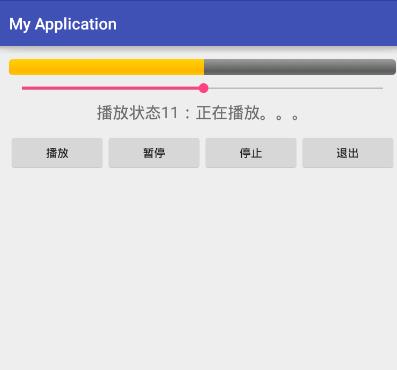
问题:可拖动进度条随进度条移动时,会致使音乐卡顿(待解决)
xml
<?xml version="1.0" encoding="utf-8"?>

<LinearLayout xmlns:android="http://schemas.android.com/apk/res/android"

    xmlns:tools="http://schemas.android.com/tools"

    android:layout_width="match_parent"

    android:layout_height="match_parent"

    android:paddingBottom="@dimen/activity_vertical_margin"

    android:paddingLeft="@dimen/activity_horizontal_margin"

    android:paddingRight="@dimen/activity_horizontal_margin"

    android:paddingTop="@dimen/activity_vertical_margin"

    tools:context="com.example.chenshuai.myapplication.ActivityMusic"

    android:orientation="vertical">

    <ProgressBar

        android:layout_width="match_parent"

        android:layout_height="wrap_content"

        style="@android:style/Widget.ProgressBar.Horizontal"

        android:id="@+id/pb"

        />

    <SeekBar

        android:layout_width="match_parent"

        android:layout_height="wrap_content"

        android:id="@+id/sbr" />

    <TextView

        android:layout_width="match_parent"

        android:layout_height="40sp"

        android:text="播放状态"

        android:textSize="20sp"

        android:gravity="center_horizontal"

        android:id="@+id/tv_1"/>

    <LinearLayout

        android:layout_width="match_parent"

        android:layout_height="wrap_content">

        <Button

            android:layout_width="0dp"

            android:layout_height="wrap_content"

            android:layout_weight="1"

            android:text="播放"

            android:onClick="play_onclick"/>

        <Button

            android:layout_width="0dp"

            android:layout_height="wrap_content"

            android:layout_weight="1"

            android:text="暂停"

            android:onClick="pause_onclick"/>

        <Button

            android:layout_width="0dp"

            android:layout_height="wrap_content"

            android:layout_weight="1"

            android:text="停止"

            android:onClick="stop_onclick"/>

        <Button

            android:layout_width="0dp"

            android:layout_height="wrap_content"

            android:layout_weight="1"

            android:text="退出"

            android:onClick="exit_onclick"/>

    </LinearLayout>

</LinearLayout>
Service
package com.example.chenshuai.myapplication;

import android.app.Service;

import android.content.Intent;

import android.media.MediaPlayer;

import android.os.Binder;

import android.os.IBinder;

public class MyServiceMusic extends Service {

    public MyServiceMusic() {

    }

    public class Mybind extends Binder

    {

        //获取歌曲长度

        public int getMusicDuration()

        {

            int rtn = 0;

            if (mediaPlayer != null)

            {

                rtn = mediaPlayer.getDuration();

            }

            return rtn;

        }

        //获取当前播放进度

        public int getMusicCurrentPosition()

        {

            int rtn = 0;

            if (mediaPlayer != null)

            {

                rtn = mediaPlayer.getCurrentPosition();

            }

            return rtn;

        }

        public void seekTo(int position)

        {

            if (mediaPlayer != null)

            {

                mediaPlayer.seekTo(position);

            }

        }

    }

    @Override

    public IBinder onBind(Intent intent) {

        // TODO: Return the communication channel to the service.

        //throw new UnsupportedOperationException("Not yet implemented");

        return  new Mybind();

    }

    private MediaPlayer mediaPlayer;

    @Override

    public int onStartCommand(Intent intent, int flags, int startId) {

        //获取意图传递的信息

        String action = intent.getStringExtra("action");

        switch (action)

        {

            case "play":

                if (mediaPlayer == null)

                {

                    mediaPlayer = MediaPlayer.create(this,R.raw.onceagain);

                }

                mediaPlayer.start();

                break;

            case "stop":

                if (mediaPlayer !=null)

                {

                    mediaPlayer.stop();

                    mediaPlayer.reset();

                    mediaPlayer.release();

                    mediaPlayer = null;

                }

                break;

            case "pause":

                if (mediaPlayer !=null && mediaPlayer.isPlaying())

                {

                    mediaPlayer.pause();

                }

                break;

        }

        return super.onStartCommand(intent, flags, startId);

    }

}
java
package com.example.chenshuai.myapplication;

import android.content.ComponentName;

import android.content.Context;

import android.content.Intent;

import android.content.ServiceConnection;

import android.os.Bundle;

import android.os.IBinder;

import android.support.v7.app.AppCompatActivity;

import android.view.View;

import android.widget.ProgressBar;

import android.widget.SeekBar;

import android.widget.TextView;

public class ActivityMusicservice extends AppCompatActivity {

    TextView tv_1;

    ProgressBar pb;

    SeekBar sbr;

    @Override

    protected void onCreate(Bundle savedInstanceState) {

        super.onCreate(savedInstanceState);

        setContentView(R.layout.activity_activity_music);

        tv_1 = (TextView)findViewById(R.id.tv_1);

        tv_1.setText("播放状态11:停止播放。。。");

        pb = (ProgressBar)findViewById(R.id.pb);

        sbr = (SeekBar)findViewById(R.id.sbr);

    }

    ServiceConnection serviceConnection;

    MyServiceMusic.Mybind mybind;

    public void play_onclick(View view)

    {

        Intent intent = new Intent(this,MyServiceMusic.class);

        intent.putExtra("action","play");

        startService(intent);

        tv_1.setText("播放状态11:正在播放。。。");

        if (serviceConnection == null) {

            serviceConnection = new ServiceConnection() {

                @Override

                public void onServiceConnected(ComponentName name, IBinder service) {

                    mybind = (MyServiceMusic.Mybind) service;

                    //设置进度条的最大长度

                    int max = mybind.getMusicDuration();

                    pb.setMax(max);

                    sbr.setMax(max);

                    sbr.setOnSeekBarChangeListener(new SeekBar.OnSeekBarChangeListener() {

                        @Override

                        public void onProgressChanged(SeekBar seekBar, int progress, boolean fromUser) {

                            mybind.seekTo(progress);

                        }

                        @Override

                        public void onStartTrackingTouch(SeekBar seekBar) {

                        }

                        @Override

                        public void onStopTrackingTouch(SeekBar seekBar) {

                        }

                    });

                    //连接之后启动子线程设置当前进度

                  new Thread()

                    {

                        public void run()

                        {

                            //改变当前进度条的值

                            //设置当前进度

                            while (true) {

                                pb.setProgress(mybind.getMusicCurrentPosition());

                               // sbr.setProgress(mybind.getMusicCurrentPosition());

                                try {

                                    Thread.sleep(100);

                                } catch (Exception e) {

                                    e.printStackTrace();

                                }

                            }

                        }

                    }.start();

                }

                @Override

                public void onServiceDisconnected(ComponentName name) {

                }

            };

            //以绑定方式连接服务

            bindService(intent, serviceConnection, Context.BIND_AUTO_CREATE);

        }

    }

    public void stop_onclick(View view)

    {

        Intent intent = new Intent(this,MyServiceMusic.class);

        intent.putExtra("action","stop");

        startService(intent);

        tv_1.setText("播放状态11:停止播放。。。");

    }

    public void pause_onclick(View view)

    {

        Intent intent = new Intent(this, MyServiceMusic.class);

        intent.putExtra("action","pause");

        startService(intent);

        tv_1.setText("播放状态11:暂停播放。。。");

    }

    public void exit_onclick(View view)

    {

        stop_onclick(view);

        finish();

    }

}
manifest.xml
<service

            android:name=".MyServiceMusic"

            android:enabled="true"

            android:exported="true" />
Android——音乐播放器完善——进度条显示当前播放进度,加可拖动进度条(未待解决完问题)的更多相关文章
- 仿迅雷播放器教程 -- 基于VLC的MFC播放器 (6)
代码下载:http://download.csdn.net/detail/qq316293804/6409417 昨天的教程里写着预计MFC播放器会隔得久一点,但是今晚仔细看了下VLC的常 ...
- vlc播放器设置开机自动全屏播放网络视频流
因工作需要,要用vlc视频播放器实现开机自动全屏播放某个网络视频流.百度了下,说的都很模糊,经过整理,设置方法如下: 一,添加视频流地址:rtsp://wowzaec2demo.streamlock. ...
- 开源播放器 ijkplayer (一) :使用Ijkplayer播放直播视频
1.ijkplayer 编码 IjkPlayer支持硬解码和软解码. 软解码时不会旋转视频角度这时需要你通过onInfo的what == IMediaPlayer.MEDIA_INFO_VIDEO_R ...
- 开发个RTMP播放器居然这么难?RTMP播放器对标和考察指标
好多开发者提到,RTMP播放器,不知道有哪些对标和考察指标,以下大概聊聊我们的一点经验,感兴趣的,可以关注 github: 1. 低延迟:大多数RTMP的播放都面向直播场景,如果延迟过大,严重影响体验 ...
- 仿迅雷播放器教程 -- 基于VLC的C++播放器 (4)
经过前面的介绍,想必大家对VLC和ffmpeg都有一定印象了,还记得学习ffmpeg多么蛋疼吗?那么VLC会不会也这么蛋疼呢? 那么我们来看一段官方的Demo,Alberl精简了Demo,只留 ...
- 使用EasyNVR无插件流媒体服务器接口和EasyPlayer.js播放器插件实现web网页H5播放无插件
1.背景需求 很多客户在使用EasyNVR无插件流媒体服务器时,不喜欢产品化的界面,有时可能满足不了日常观看使用的需求.因此软件提供丰富的HTTP接口,供第三方平台调用集成.但是有时客户这边可能没有专 ...
- EasyPlayer播放器浏览器ActiveX/OCX插件RTSP播放/抓拍/录像功能调用说明
EasyPlayerPro与EasyPlayer-RTSP新增ocx多窗口播放功能 这里以EasyPlayerPro为例,使用方法如下: 打开播放器文件夹,进入Bin/C++目录,可以看到reg.ba ...
- 仿迅雷播放器教程 -- 基于ffmpeg的C++播放器 (1)
2011年12月份的时候发了这篇博客 http://blog.csdn.net/qq316293804/article/details/7107049 ,博文最后说会开源一个播放器,没想到快两年了,才 ...
- JavaScript多个h5播放器video,点击一个播放其他暂停
<!DOCTYPE html> <html lang="en"> <head> <meta charset="UTF-8&quo ...
随机推荐
- ASP.NET 的ClientIDMode属性
在ASP.NET 4.0之前我们总是要为控件的ClientID头疼,比如明明一个叫lblName的Label放在一个叫做grd的GridView里面后,在页面上改Label的ID就变成了诸如grd_c ...
- WGAN (原理解析)
在GAN的相关研究如火如荼甚至可以说是泛滥的今天,一篇新鲜出炉的arXiv论文<Wasserstein GAN>却在Reddit的Machine Learning频道火了,连Goodfel ...
- Ajax接收并显示后台传来的list集合内的数据信息
最近在学习Ajax做一个留言系统的时候碰到需要将list集合从后台传到前台ajax接收并显示的情况,在网上搜了很多,但很多情况都不是和我遇见的情况一样的,现在,直接贴出我的问题及解决方法. 后台代码: ...
- Four Node.js Gotchas that Operations Teams Should Know about
There is no doubt that Node.js is one of the fastest growing platforms today. It can be found at sta ...
- php分享十三:mysql事物
一:事物的隔离级别 1:隔离级别的类型 SQL标准定义了4类隔离级别,包括了一些具体规则,用来限定事务内外的哪些改变是可见的,哪些是不可见的: Read Uncommitted(读取未提交内容) Re ...
- 好的 IOS 学习网站
http://www.objc.io/contributors.html codeproject. http://www.codeproject.com/KB/iPhone/
- shell - 常识
一.用户登陆进入系统后的系统环境变量: $HOME 使用者自己的目录 $PATH 执行命令时所搜寻的目录 $TZ 时区 $MAILCHECK 每隔多少秒检查是否有新的信件 $PS1 在命令列时的提示号 ...
- Java常考面试题(二)
序言 昨天刚开始的”每日5题面试“这类文章,感觉还不错,把一些平常看似懂了的东西,弄清楚了.就像什么是虚拟机?这个问题,看起来知道,但是要说出个所以然来,又懵逼了,经常回过头来看看做过的面试题,试着用 ...
- Net AOP(五) 各种IoC框架下实现AOP
public interface IUserProcessor { void RegUser(User user); } public class UserProcessor : IUserProce ...
- 10-free-must-read-books-machine-learning-data-science
Spring. Rejuvenation. Rebirth. Everything’s blooming. And, of course, people want free ebooks. With ...