
RunAsDate v1.36 突破软件试用30天的工具
http://www.nirsoft.net/utils/run_as_date.html
RunAsDate v1.36 - Run a program with the specified date/time
Copyright (c) 2007 - 2017 Nir Sofer
See Also
- NirCmd - Do many useful tasks from command-line, without displaying any user interface.
Description
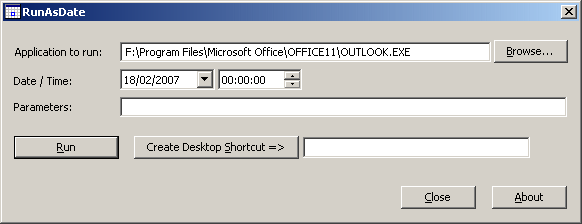
RunAsDate is a small utility that allows you to run a program in the date and time that you specify. This utility doesn't change the current system date and time of your computer, but it only injects the date/time that you specify into the desired application.
You can run multiple applications simultaneously, each application works with different date and time, while the real date/time of your system continues to run normally.
How does it work ?
RunAsDate intercepts the kernel API calls that returns the current date and time (GetSystemTime, GetLocalTime, GetSystemTimeAsFileTime, NtQuerySystemTime, GetSystemTimePreciseAsFileTime), and replaces the current date/time with the date/time that you specify.
System Requirements
RunAsDate works under Windows 2000, Windows XP, Windows Server 2003, Windows Server 2008, Windows Vista, Windows 7, Windows 8, and Windows 10. Older versions of Windows are not supported. There is also x64 version available in a separated download, for using with x64 applications.
Important Notice !!
I get many email messages that say something like "I tried to extend the trial period of xyz software with RunAsDate and it didn't work". Running a software with different date/time can be used for many legitimate purposes and for these purposes RunAsDate was created. I have never said implicitly or explicitly that RunAsDate can be used for extending the trial period of a software. For some shareware programs, RunAsDate might really work, but many shareware creators are smart enough to detect that the date/time was modified and when they detect the time change, they end the trial period immediately.
Please don't bother yourself to send me a question about extending the trial period of a software, because these kind of messages are simply deleted without answering.
Versions History
- Version 1.36:
- Added 'Run As Administrator' button to easily run RunAsDate as Administrator. You have to run RunAsDate as Administrator when the program you want to run with RunAsDate requires elevation.
- Version 1.35:
- RunAsDate now displays an error message if you try to run 32-bit program with 64-bit version of RunAsDate or 64-bit program with 32-bit version of RunAsDate.
- RunAsDate now displays an error message if it fails to run the specified .exe file.
- RunAsDate now also intercepts the NtQuerySystemTime and GetSystemTimePreciseAsFileTime API functions.
- RunAsDate now also intercepts the date/time functions on kernelbase.dll (in addition to kernel32.dll). This change solves the issue with cmd.exe on Windows 10 (it uses the APIs on kernelbase.dll )
- Version 1.31:
- Fixed bug: When a program executed with RunAsDate requested to get the current time in GMT (GetSystemTime and GetSystemTimeAsFileTime API), RunAsDate provided the wrong time with a difference of one hour if the computer date was in summer (With daylight saving time) but the selected RunAsDate date was in winter (Without daylight saving time) and vice versa...
- Version 1.30:
- Added option to set the date/time relative to the current time. You can add (positive number) or subtract (negative number) the following time units: seconds, minutes, hours, days, months, and years.
- Added 'Start in folder' option.
- RunAsDate now saves the last settings to config file (RunAsDate.cfg)
- Version 1.21:
- Fixed bug with 'Move the time forward according to the real time' option: After around 7 minutes from the time that the application was started, RunAsDate failed to calculate the time properly.
- Version 1.20:
- Added 'Return to the current date/time after xx seconds' option.
- Version 1.16:
- Fixed bug: RunAsDate removed a quote character when using it in the {Program parameters} section of the command-line string.
- Version 1.15:
- Fixed RunAsDate to work properly on Windows 8 64-bit.
- Version 1.11:
- Added Drag & Drop support: You can now choose the .exe file to run by dragging it from Explorer into the main window of RunAsDate.
- Version 1.10:
- Added auto complete support in the filename field.
- Added x64 version.
- Version 1.05:
- Fixed bug: When using 'Create Desktop Shortcut', the /immediate and /movetime options were not added to the shortcut's command-line
- Version 1.04:
- The main dialog-box is now resizable.
- Version 1.03:
- Added 'Immediate Mode' - Change the date immediately when the program starts.
- Version 1.02:
- New option: Move the time forward according to the real time.
- Version 1.01:
- New option: Create a shortcut on your desktop that will run a program with the date/time that you specify.
- When you don't specify the time in the command-line, the current time will be used, instead of 00:00:00.
- Version 1.00 - First release.
Using RunAsDate
RunAsDate doesn't require any installation process or additional DLL files. In order to start using it, simply copy the executable file (RunAsDate.exe) to any folder you like, and run it.
In the main window of RunAsDate, select the desired date and time and the application that you want to run. Optionally, you can also specify the command-line parameters to run the program. Press the "Run" button to start the application with the specified date/time.
Immediate Mode
In versions prior to 1.03, RunAsDate always waited until the kernel was fully loaded, and only then injected the desired date/time. This mean that some programs that get the date/time im very early stage, received the real current date/time, instead of the fake date/time of RunAsDate. Starting from version 1.03, when the 'Immediate Mode' is turned on, RunAsDate inject the date/time immediately when the process starts, without waiting to the kernel loading. However, this mode can also cause troubles to some applications, especially if they were written in .NET
If executing an application from RunAsDate cause it to crash, you should turn off the 'Immediate Mode'.
Using RunAsDate from Command-Line
You can also use RunAsDate from command-line, with the following syntax:
RunAsDate.exe {/immediate} {/movetime} {/startin [folder]} {/returntime [seconds] } [dd\mm\yyyy] {hh:mm:ss} [Program to run] {Program parameters}
Examples:
RunAsDate.exe 22\10\2002 12:35:22 "C:\Program Files\Microsoft Office\OFFICE11\OUTLOOK.EXE"
RunAsDate.exe 14\02\2005 "c:\temp\myprogram.exe" param1 param2
RunAsDate.exe /movetime 11\08\2004 16:21:42 "C:\Program Files\Microsoft Office\OFFICE11\OUTLOOK.EXE"
RunAsDate.exe /movetime /returntime 15 10\12\2001 11:41:26 "c:\temp\myprogram.exe"
RunAsDate.exe Hours:-10 "C:\Program Files\Microsoft Office\OFFICE11\OUTLOOK.EXE"
RunAsDate Limitations
- RunAsDate will not affect applications that take the current date/time from another source. For example: application that loads the current date from remote server.
Translating RunAsDate To Another Language
RunAsDate allows you to easily translate all dialog-boxes and other strings to other languages.
In order to do that, follow the instructions below:
- Run RunAsDate with /savelangfile parameter:
RunAsDate.exe /savelangfile
A file named RunAsDate_lng.ini will be created in the folder of RunAsDate utility. - Open the created language file in Notepad or in any other text editor.
- Translate the dialog-boxes and string entries to the desired language.
- After you finish the translation, Run RunAsDate, and all translated strings will be loaded from the language file.
If you want to run RunAsDate without the translation, simply rename the language file, or move it to another folder.
License
This utility is released as freeware. You are allowed to freely distribute this utility via floppy disk, CD-ROM, Internet, or in any other way, as long as you don't charge anything for this. If you distribute this utility, you must include all files in the distribution package, without any modification !
Be aware that selling this utility as a part of a software package is not allowed !
Disclaimer
The software is provided "AS IS" without any warranty, either expressed or implied, including, but not limited to, the implied warranties of merchantability and fitness for a particular purpose. The author will not be liable for any special, incidental, consequential or indirect damages due to loss of data or any other reason.
Feedback
If you have any problem, suggestion, comment, or you found a bug in my utility, you can send a message to nirsofer@yahoo.com
| Download RunAsDate |
| Download RunAsDate for x64 |
RunAsDate v1.36 突破软件试用30天的工具的更多相关文章
- XP/Win7下QTP11循环试用30天的破解方法
XP/Win7下QTP11循环试用30天的破解方法. XP下:1.找到以下路径:C:\Documents and Settings\All Users\Application Data\SafeNet ...
- IO流实现模拟软件试用的功能
import java.io.*; public class TryOut { /** * IO流模拟软件试用次数的功能 * 这里注意try里BufferedOutputStream不要和InputS ...
- Rational 最新软件试用下载地址
看到非常多 TX 都在问老版本号 Raitonal 软件相关的问题,可是因为产品升级的时候有非常多名字都发生了更改(比方说 Rational Rose 最新的版本号变成了 Rational Softw ...
- 代码实现:当我们下载一个试用版软件,没有购买正版的时候,每执行一次就会提醒我们还有多少次使用机会用学过的IO流知识,模拟试用版软件,试用10次机会,执行一次就提示一次您还有几次机会,如果次数到了提示请购买正版
package com.loaderman.test; import java.io.BufferedReader; import java.io.FileReader; import java.io ...
- App运营者必须知道的30款数据分析工具
如今的移动应用早已不再是某种结构单一.功能简单的工具了.当我们的移动应用变得越来越庞杂,我们便会需要借用分析工具,来跟踪和分析App内的每一个部分.幸运的是,目前市面上有许多数据分析工具可供App开发 ...
- [软件推荐]快速文件复制工具(Limit Copy) V4.0 绿色版
快速文件复制工具(Limit Copy)绿色版是一款智能变频超快复制绿色软件. 快速文件复制工具(Limit Copy)功能比较完善,除了文件复制还可以智能变频,直接把要复制的文件拖入窗口即可,无需手 ...
- PyRedisAdmin v1.0 Beta 发布,Redis 在线管理工具 - 开源中国社区
PyRedisAdmin v1.0 Beta 发布,Redis 在线管理工具 - 开源中国社区 PyRedisAdmin v1.0 Beta 发布,Redis 在线管理工具
- cheatsheet——mac 上的一款可以显示软件所有快捷键的小工具
https://www.mediaatelier.com/CheatSheet/ 发现一款可以显示 mac 上各种软件所有快捷键的小工具:cheatsheet,只要长按 command 键就可以了~ ...
- Mac 软件专题:教学参考工具软件-外语/医学/天文/地理/数学等
今天和大家分享mac软件专题:教学参考工具软件,在这个专题中,主要向大家推荐一些Mac上优秀的教育教学.知识参考类的软件,包含外语.医学.天文.地址.数学.音乐等方面,学生.老师以及相关的工作者不要错 ...
随机推荐
- phpmyadmin配置文件权限错误,不应任何用户都能修改
访问phpmyadmin提示“配置文件权限错误,不应任何用户都能修改” 原因:phpmyadmin目录权限过高,设置了777访问权限 解决: $ phpmyadin 转自: http://www.it ...
- php foreach 传值还是传引用
From: http://my.oschina.net/guomingliang/blog/215457 php 中遍历一个array时可以使用for或foreach,foreach的语法为:fore ...
- VOIP NAT穿越之SIP信令穿越
本文原创自 http://blog.csdn.net/voipmaker 转载注明出处. 本文是VOIP通信NAT系列专题的第三篇, 本文论述NAT对SIP协议穿越的影响.SIP协议是基于文本的,而 ...
- 清除 Xcode 项目缓存
运行错误.编译错误.发布错误可尝试清除 Xcode 缓存:清除 Xcode 缓存也能减少占用磁盘空间. (1)前往文件夹(control+shift+G),删除里面的文件: /Users/用户名/Li ...
- go类型系统
https://blog.csdn.net/hittata/article/details/50915496 https://blog.csdn.net/hittata/article/details ...
- DotNetBar如何控制窗体样式
在C#中使用控件DevComponents.DotNetBar时,如何创建一个漂亮的窗口,并控制窗体样式呢? 1.新建一个DotNetBar窗体 2.使OFFICE窗口风格 ...
- Matlab 随机数字
1.随机生成仅仅有0.1元素的矩阵(m行n列) A=round(rand(m,n)) 2.随机生成每行有若干个0,1元素的矩阵,比方每行仅仅有2个元素为1,其它元素为0 A=zeros(4,5) fo ...
- 【Winform】自定义Messagebox
1.保持Msgbox的Icon 2.可以追加Checkbox,RadioBOx 下载
- 九度 1557:和谐答案 (LIS 变形)
题目描述: 在初试即将开始的最后一段日子里,laxtc重点练习了英语阅读的第二部分,他发现了一个有意思的情况.这部分的试题最终的答案总是如下形式的:1.A;2.C;3.D;4.E;5.F.即共有六个空 ...
- PHP mysql经典问题,防止库存把控不足问题
在目前这家公司做的第一个项目抽奖项目,要求每人每天可以有20次抽奖机会,抽奖机会可以通过多种方式获取,那么就要求每次入库增加抽奖机会的时候检测当前拥有的抽奖机会是否达到了20次,如果达到了,就不再增加 ...