
Unity打安卓包 Android 所有错误解决方案大全(几乎囊括所有打包错误 )
Unity打包出错解决方案
|
本文提供全流程,中文翻译。 Chinar 坚持将简单的生活方式,带给世人! (拥有更好的阅读体验 —— 高分辨率用户请根据需求调整网页缩放比例) |
|
Chinar —— 心分享、心创新! 助力快速解决 Unity 打包中常见错误 给新手节省宝贵的时间,避免采坑! |
1
Change Name —— 未设置修改包名 / 公司名 / 项目名
由于未设置修改 包名 / 公司名 / 项目名
导致报错,最为简单
| 具体错误字符: |
|---|
UnityException: Package Name has not been set up correctly

Please set the Package Name in the Player Settings. The value must follow the convention 'com.YourCompanyName.YourProductName' and can contain alphanumeric characters and underscore.

Each segment must not start with a numeric character or underscore.
Error building Player: 2 errorsUnityEditor.BuildPlayerWindow+BuildMethodException: 3 errors
at UnityEditor.BuildPlayerWindow+DefaultBuildMethods.BuildPlayer (BuildPlayerOptions options) [0x0020e] inBuild completed with a result of 'Failed'
UnityEngine.GUIUtility:ProcessEvent(Int32, IntPtr)
| 解决方案: |
|---|
更改 公司名 / 包名 / 项目名

——
2
SDK Tools —— Unity版本低,需要安卓工具版本也低些
一般高版本的2017.2-2017.3都不会报此错误
常见于 5.X 版本
| 具体错误字符: |
|---|
Error:Invalid command android<br>UnityEditor.HostView:OnGUI()CommandInvokationFailure: Unable to list target platforms.
Please make sure the android sdk path is correct. See the Console for more details. Error building Player: CommandInvokationFailure:
Unable to list target platforms.
Please make sure the android sdk path is correct. See the Console for more details.
| 解决方案: |
|---|
更换安卓工具包,至较低的版本
2.解压后替换 安卓 SDK 中的 Tools 文件夹
3.然后重新打包,即可成功!!!
反之:如果 Unity 版本高,同样需要换成高版本的 安卓 SDK Tools
3
AR Vuforia Android TV —— Vuforia AR 发开中,打包安卓报错
由于 Vuforia 不支持 Android TV ,导致报错
| 具体错误字符: |
|---|
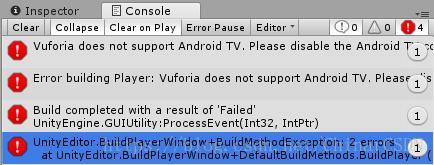
Vuforia does not support Android TV. Please disable the Android TV compatibility in the Player Settings.

UnityEngine.Debug:LogError(Object)

BuildObserver:OnPreprocessBuild(BuildTarget, String)

UnityEngine.GUIUtility:ProcessEvent(Int32, IntPtr)
Error building Player: Vuforia does not support Android TV. Please disable the Android TV compatibility in the Player Settings.Build completed with a result of 'Failed'
UnityEngine.GUIUtility:ProcessEvent(Int32, IntPtr)
UnityEditor.BuildPlayerWindow+BuildMethodException: 2 errors

  at UnityEditor.BuildPlayerWindow+DefaultBuildMethods.BuildPlayer (BuildPlayerOptions options) [0x0020e] in C:\buildslave\unity\build\Editor\Mono\BuildPlayerWindowBuildMethods.cs:181

  at UnityEditor.BuildPlayerWindow.CallBuildMethods (Boolean askForBuildLocation, BuildOptions defaultBuildOptions) [0x00065] in C:\buildslave\unity\build\Editor\Mono\BuildPlayerWindowBuildMethods.cs:88

UnityEngine.GUIUtility:ProcessEvent(Int32, IntPtr)
| 解决方案: |
|---|
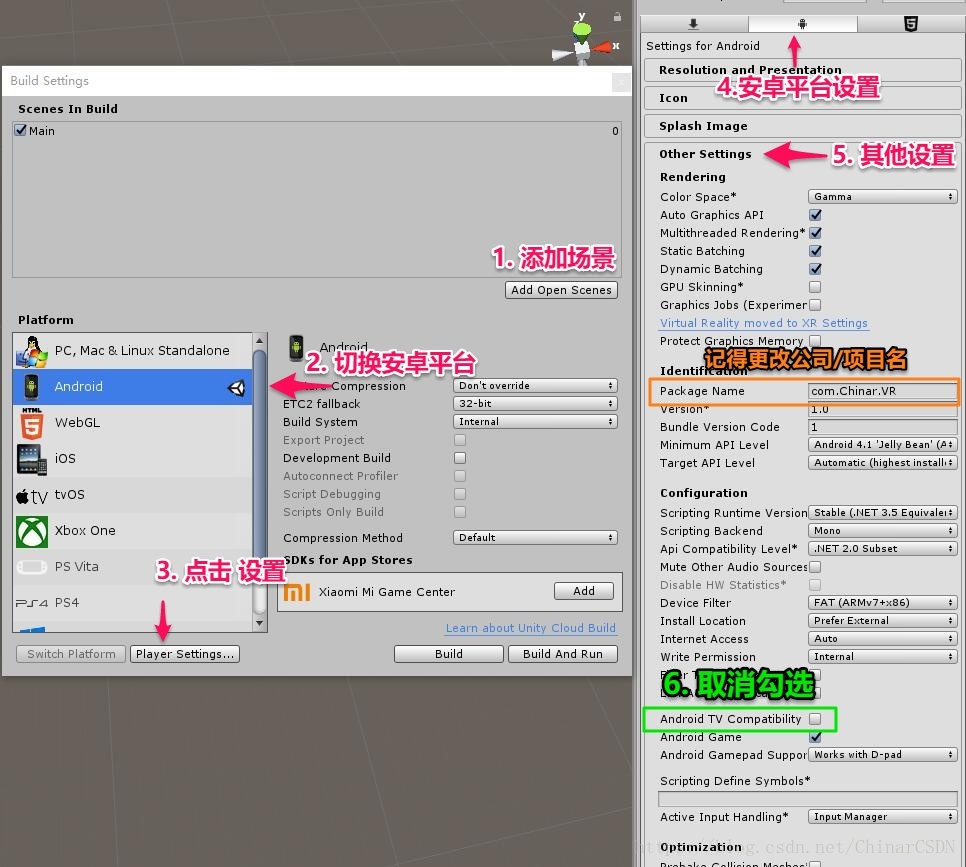
所以需要在 Player Setting 中关闭该选项
即可成功打包工程
4
Quote UnityEditor —— 脚本引用 UnityEditor,无法打包
打包项目/工程时报错
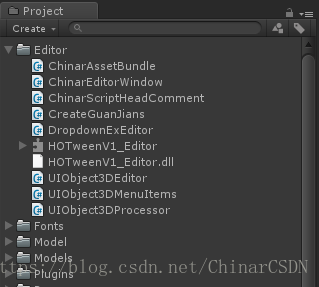
Unity Asset 目录中,如果脚本中引用了 UnityEditor
那么该脚本就应该放在 Editor 文件夹下 ( 如果没有,就新建一个名为 Editor 的文件夹)
| 具体错误字符: |
|---|
Assets/CreateGuanJians.cs(4,7): error CS0246: The type or namespace name `UnityEditor' could not be found. Are you missing an assembly reference?Error building Player because scripts had compiler errorsBuild completed with a result of 'Failed'
UnityEditor.BuildPlayerWindow:BuildPlayerAndRun()UnityEditor.BuildPlayerWindow+BuildMethodException: 2 errors
at UnityEditor.BuildPlayerWindow+DefaultBuildMethods.BuildPlayer (BuildPlayerOptions options) [0x0020e] in C:\buildslave\unity\build\Editor\Mono\BuildPlayerWindowBuildMethods.cs:181
at UnityEditor.BuildPlayerWindow.CallBuildMethods (Boolean askForBuildLocation, BuildOptions defaultBuildOptions) [0x00065] in C:\buildslave\unity\build\Editor\Mono\BuildPlayerWindowBuildMethods.cs:88
UnityEditor.BuildPlayerWindow:BuildPlayerAndRun()

| 解决方案: |
|---|
将引用有 UnityEditor 的脚本放在 Editor 文件夹下
( 如果没有,就新建一个名为 Editor 的文件夹)
即可成功打包工程
5
Update —— 不断更新中…….最后汇集所有报错指南
错误不断更新中…….最后汇集所有报错指南
请您惠存,支持 Chinar
支持
May Be —— 搞开发,总有一天要做的事!
|
拥有自己的服务器,无需再找攻略! Chinar 提供一站式教程,闭眼式创建! 为新手节省宝贵时间,避免采坑! |
先点击领取 —— 阿里全产品优惠券 (享受最低优惠)
1 —— 云服务器超全购买流程 (新手必备!)
2 —— 阿里ECS云服务器自定义配置 - 购买教程(新手必备!)
3—— Windows 服务器配置、运行、建站一条龙 !
4 —— Linux 服务器配置、运行、建站一条龙 !

" role="presentation">
技术交流群:806091680 ! Chinar 欢迎你的加入
END
本博客为非营利性个人原创,除部分有明确署名的作品外,所刊登的所有作品的著作权均为本人所拥有,本人保留所有法定权利。违者必究
对于需要复制、转载、链接和传播博客文章或内容的,请及时和本博主进行联系,留言,Email: ichinar@icloud.com
对于经本博主明确授权和许可使用文章及内容的,使用时请注明文章或内容出处并注明网址
Unity打安卓包 Android 所有错误解决方案大全(几乎囊括所有打包错误 )的更多相关文章
- php源码编译常见错误解决方案大全
php源码编译常见错误解决方案大全http://www.cnlvzi.com/index.php/Index/article/id/143 在CentOS编译PHP5的时候有时会遇到以下的一些错误信息 ...
- Oracle Ora 错误解决方案合集
注:本文来源于 < Oracle学习笔记 --- Oracle ORA错误解决方案 > ORA-00001: 违反唯一约束条件 (.)错误说明:当在唯一索引所对应的列上键入重复值时,会触发 ...
- 有关 Android Studio 重复引入包的问题和解决方案
虽然相同包名相同类名的文件在不同 SDK 中出现的概率极低,但是一旦出现,处理起来就比较棘手.最好的解决方案就是联系提供 SDK 的技术人员反映问题,让其通过修改源码重新打包一个新的 Jar 包. 还 ...
- [Android Studio导入第三方类库方法] Error:(19, 23) 错误: 程序包org.apache.http不存在
本文主要参考以下链接: http://m.blog.csdn.net/blog/BoxRice/48575027 https://drakeet.me/android-studio http://ww ...
- unity调用安卓打包apk时的错误unable to convert classes into dex format
出现这种问题一般是由于有重复的文件所致,看下unity报的错误那些文件重复了,把重复的文件删了即可 例如,将eclipse中的安卓工程bin\class导出jar包时,会将下面的.class文件打包, ...
- Unity调用安卓Android的Toast
需求:在游戏中弹窗消息,调起安卓的Toast 项目中需要做Unity和安卓交互时,经常需要通过安卓Toast来做简单的输出,以便于测试. 方法一:Unity中,C#主导 // Unity调用安卓的土司 ...
- Unity通过Jar包调用Android
Unity通过Jar包调用Android 我们会需要面对下面几个问题,我们一个一个来解决: 怎样在Android Studio中打Jar包 怎样打一个Unity使用的Jar包 怎样在Unity工程中使 ...
- 面向Unity程序员的Android快速上手教程
作者:Poan,腾讯移动客户端开发 工程师 商业转载请联系腾讯WeTest获得授权,非商业转载请注明出处. WeTest 导读 随着Unity.cocos2dx等优秀跨平台游戏引擎的出现,开发者可以把 ...
- unity与安卓通讯的一些事儿
1.unity与安卓通讯的两种方法: 第一种是unity导出安卓工程,在unity的BuildSetting窗口可以将unity工程导出为安卓工程,然后再用Eclipse或者Android Studi ...
随机推荐
- STL_std::iterator
1. VC6里面 看到,std::iterator 就是一个指针,但是 vs2010中貌似不是这样(感觉像是一个类...具体是啥还不太确定...)... 2.
- C++指针总结
在C++中通过动态创建的对象,我们只能获得一个指针,并通过指针控制它.指针是存放对象的内存地址值,更准确的描述是对象的起始地址值.每一个指针都有一个相关的类型,不同数据类型的指针之间的区别不在指针的描 ...
- Python mysql-SQL概要
2017-09-05 20:10:58 一.SQL语句及其种类 SQL使用关键字,表名,列名等组合成一条语句来描述操作的内容.关键字是指那些含义或者使用方法是先已经定义好的英语单词.根据RDBMS赋予 ...
- 20170622xlVBA多部门分类汇总同类合并单元格
Public Sub Basic_CodeFrame() AppSettings On Error GoTo ErrHandler Dim StartTime, UsedTime As Variant ...
- 大年三十。让字母在屏幕上奔跑:(sleep , system"clear")
system "clear",ruby清屏(osk系统上,window上用system "cls"). https://stackoverflow.com/qu ...
- Codeforces Round #364 (Div. 1) (差一个后缀自动机)
B. Connecting Universities 大意: 给定树, 给定2*k个点, 求将2*k个点两两匹配, 每个匹配的贡献为两点的距离, 求贡献最大值 单独考虑每条边$(u,v)$的贡献即可, ...
- php安装redis扩展全
一.安装redis mac 下安装也可以使用 homebrew,homebrew 是 mac 的包管理器. 1.执行 brew install redis 2.启动 redis,可以使用后台服务启动 ...
- Java使用FFmpeg处理视频文件指南
Java使用FFmpeg处理视频文件指南 本文主要讲述如何使用Java + FFmpeg实现对视频文件的信息提取.码率压缩.分辨率转换等功能: 之前在网上浏览了一大圈Java使用FFmpeg处理音视频 ...
- hdu1864(01包)
最大报销额 Time Limit: 1000/1000 MS (Java/Others) Memory Limit: 32768/32768 K (Java/Others)Total Submi ...
- elasticsearch term match multi_match区别
转自:http://www.cnblogs.com/yjf512/p/4897294.html match 最简单的一个match例子: 查询和"我的宝马多少马力"这个查询语句匹配 ...