
【Hibernate】解析hibernate中的缓存
Hibernate中的缓存一共有三种,一级缓存、二级缓存、查询缓存。缓存除了使用Hibernate自带的缓存,还可以使用redis进行缓存,或是MongoDB进行缓存。
所使用的Demo:
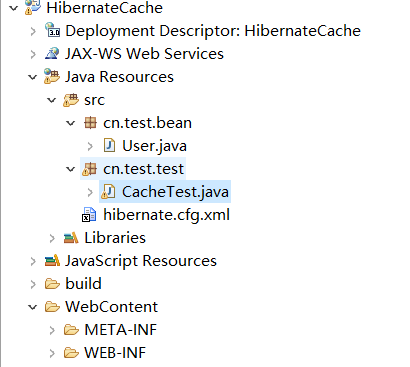
User.java文件
package cn.test.bean;

import javax.persistence.Column;

import javax.persistence.Entity;

import javax.persistence.Id;

import javax.persistence.Table;

@Entity

@Table(name="user")//表示对应的表名

public class User {

    @Id

    @Column(name="uid")

    private int id;

    @Column(name="uname")

    private String name;

    @Column(name="upass")

    private String password;

    public int getId() {

        return id;

    }

    public void setId(int id) {

        this.id = id;

    }

    public String getName() {

        return name;

    }

    public void setName(String name) {

        this.name = name;

    }

    public String getPassword() {

        return password;

    }

    public void setPassword(String password) {

        this.password = password;

    }

}
User.java
hibernate.cfg.xml
<?xml version='1.0' encoding='UTF-8'?>
<!DOCTYPE hibernate-configuration PUBLIC
"-//Hibernate/Hibernate Configuration DTD 3.0//EN"
"http://hibernate.sourceforge.net/hibernate-configuration-3.0.dtd"> <!-- Generated by MyEclipse Hibernate Tools. -->
<hibernate-configuration>
<session-factory>
<property name="dialect">
org.hibernate.dialect.MySQLDialect
</property>
<property name="connection.url">
jdbc:mysql://localhost:3306/test?useUnicode=true&characterEncoding=utf8
</property>
<property name="connection.username">root</property>
<property name="connection.password">517839</property>
<property name="connection.driver_class">
com.mysql.jdbc.Driver
</property>
        <property name="show_sql">true</property>

<property name="format_sql">true</property> <!-- 加载映射描述信息 -->
<mapping class="cn.test.bean.User" /> </session-factory>
</hibernate-configuration>
hibernate.cfg.xml
其中:
<property name="show_sql">true</property>
<property name="format_sql">true</property>
表示开启打印底层执行的SQL日志。
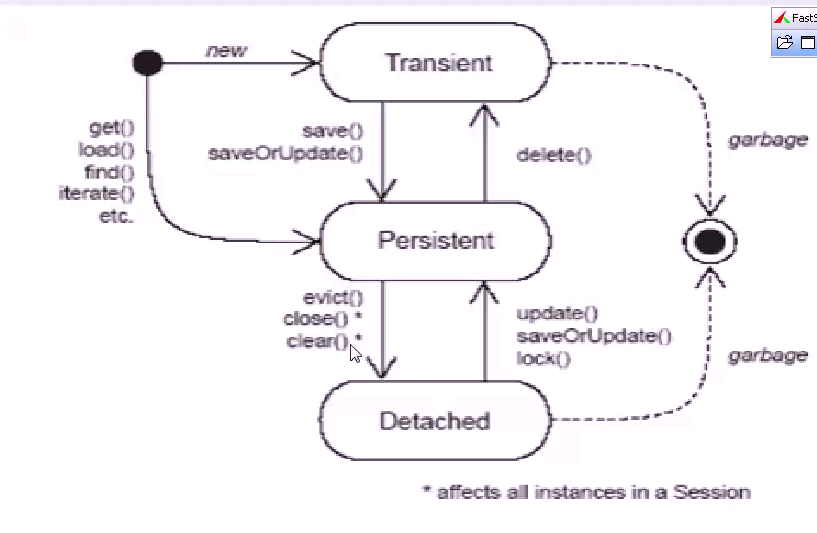
下面这是图片反应了hibernate缓存的大致流程:
1,一级缓存
每个 Session 对象创建出来,就会分配一块缓存空间,可以存储 session 对象访问的对象信息。 session 关闭后会自动清除缓存,手动清除可以用session.clear() , session.evict(obj) 。 Session 一级缓存是独享。
load/get/save/update/saveorupdate 方法处理的对象都会放入缓存中
Configuration conf = new Configuration();

conf.configure("hibernate.cfg.xml");//读取连接参数和映射描述信息

SessionFactory factory = conf.buildSessionFactory();

Session session = factory.openSession();

User user1 = (User)session.load(User.class,1);

System.out.println(user1.getName());//honny,如果不调用用getName()方法,那么数据不会显示,因为load()默认使用的是一种延迟加载的机制,只有使用到数据的时候才会到数据库中查询

//先从session缓存中查找,如果没找到再去数据库获取

User user2 = (User)session.load(User.class,1);

System.out.println(user2.getName());//honny

System.out.println(user1==user2);//true,因为user1和user2使用的是同一个session
然后再来看一看控制台:
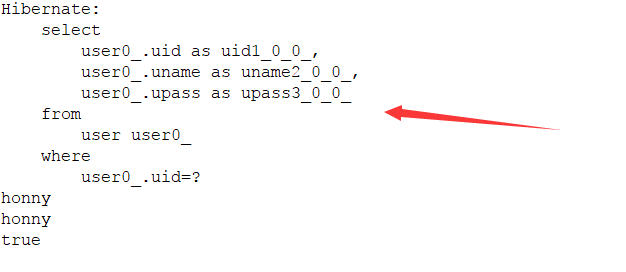
从控制台中,我们也可以看出上只执行了一次SQL查询。
一级查询的优缺点:
优点:可以减少查询数据库的次数,加快查询速度。
缺点:在批量操作中容易导致内存溢出问题。
2,二级缓存
二级缓存是SessionFactory 对象缓存,可以被创建出的多个 Session 对象共享。
下面是一张图片体现一级缓存和二级缓存的关系:
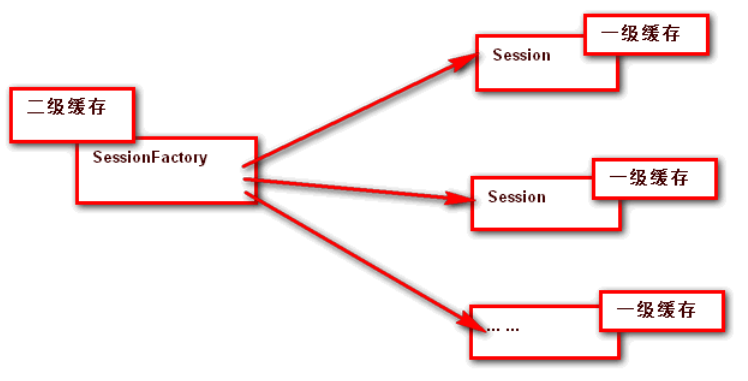
从这个我们就看出了二级缓存包含了一级缓存。
二级缓存默认是关闭的,如果要使用需要手动开启,下面是开启过程:
1.导入ehcache 工具包和 ehcache.xml 配置文件(配置文件放到src路径下)
echache工具包包括:ehcache-core-2.4.3.jar,hibernate-ehcache-4.2.21.Final.jar,slf4j-api-1.6.1.jar
ehcache.xml 文件
<!--

  ~ Hibernate, Relational Persistence for Idiomatic Java

  ~

  ~ Copyright (c) 2007, Red Hat Middleware LLC or third-party contributors as

  ~ indicated by the @author tags or express copyright attribution

  ~ statements applied by the authors. All third-party contributions are

  ~ distributed under license by Red Hat Middleware LLC.

  ~

  ~ This copyrighted material is made available to anyone wishing to use, modify,

  ~ copy, or redistribute it subject to the terms and conditions of the GNU

  ~ Lesser General Public License, as published by the Free Software Foundation.

  ~

  ~ This program is distributed in the hope that it will be useful,

  ~ but WITHOUT ANY WARRANTY; without even the implied warranty of MERCHANTABILITY

  ~ or FITNESS FOR A PARTICULAR PURPOSE.  See the GNU Lesser General Public License

  ~ for more details.

  ~

  ~ You should have received a copy of the GNU Lesser General Public License

  ~ along with this distribution; if not, write to:

  ~ Free Software Foundation, Inc.

  ~ 51 Franklin Street, Fifth Floor

  ~ Boston, MA  02110-1301  USA

  -->

<ehcache>

    <!-- Sets the path to the directory where cache .data files are created.

         If the path is a Java System Property it is replaced by

         its value in the running VM.

         The following properties are translated:

         user.home - User's home directory

         user.dir - User's current working directory

         java.io.tmpdir - Default temp file path -->

    <diskStore path="./target/tmp"/>

    <!--Default Cache configuration. These will applied to caches programmatically created through

        the CacheManager.

        The following attributes are required for defaultCache:

        maxInMemory       - Sets the maximum number of objects that will be created in memory

        eternal           - Sets whether elements are eternal. If eternal,  timeouts are ignored and the element

                            is never expired.

        timeToIdleSeconds - Sets the time to idle for an element before it expires. Is only used

                            if the element is not eternal. Idle time is now - last accessed time

        timeToLiveSeconds - Sets the time to live for an element before it expires. Is only used

                            if the element is not eternal. TTL is now - creation time

        overflowToDisk    - Sets whether elements can overflow to disk when the in-memory cache

                            has reached the maxInMemory limit.

        -->

    <defaultCache

        maxElementsInMemory="10000"

        eternal="false"

        timeToIdleSeconds="120"

        timeToLiveSeconds="120"

        overflowToDisk="true"

        />

    <!--Predefined caches.  Add your cache configuration settings here.

        If you do not have a configuration for your cache a WARNING will be issued when the

        CacheManager starts

        The following attributes are required for defaultCache:

        name              - Sets the name of the cache. This is used to identify the cache. It must be unique.

        maxInMemory       - Sets the maximum number of objects that will be created in memory

        eternal           - Sets whether elements are eternal. If eternal,  timeouts are ignored and the element

                            is never expired.

        timeToIdleSeconds - Sets the time to idle for an element before it expires. Is only used

                            if the element is not eternal. Idle time is now - last accessed time

        timeToLiveSeconds - Sets the time to live for an element before it expires. Is only used

                            if the element is not eternal. TTL is now - creation time

        overflowToDisk    - Sets whether elements can overflow to disk when the in-memory cache

                            has reached the maxInMemory limit.

        -->

    <!-- Sample cache named sampleCache1

        This cache contains a maximum in memory of 10000 elements, and will expire

        an element if it is idle for more than 5 minutes and lives for more than

        10 minutes.

        If there are more than 10000 elements it will overflow to the

        disk cache, which in this configuration will go to wherever java.io.tmp is

        defined on your system. On a standard Linux system this will be /tmp"

        -->

    <cache name="sampleCache1"

        maxElementsInMemory="10000"

        eternal="false"

        timeToIdleSeconds="300"

        timeToLiveSeconds="600"

        overflowToDisk="true"

        />

    <!-- Sample cache named sampleCache2

        This cache contains 1000 elements. Elements will always be held in memory.

        They are not expired. -->

    <cache name="sampleCache2"

        maxElementsInMemory="1000"

        eternal="true"

        timeToIdleSeconds="0"

        timeToLiveSeconds="0"

        overflowToDisk="false"

        /> -->

    <!-- Place configuration for your caches following -->

</ehcache>
ehcache.xml
2.在 hibernate.cfg.xml 中配置参数开启二级缓存,启用 ehcache
<property name="hibernate.cache.use_sencond_level_cache">true</property>

<property name="hibernate.cache.region.factory_class">

org.hibernate.cache.ehcache.EhCacheRegionFactory

</property>
3.在要缓存的对象类型中,指定 @Cache 注解标记
@Entity

@Table(name="user")//表示对应的表名

@Cache(usage=CacheConcurrencyStrategy.READ_WRITE)

public class User {

    //........

}
到这里hibernate的二级缓存配置就配好了,下面来测试一下:
Configuration conf = new Configuration();

conf.configure("hibernate.cfg.xml");//读取连接参数和映射描述信息

SessionFactory factory = conf.buildSessionFactory();

Session session1 = factory.openSession();

User user1=(User)session1.load(User.class, 1);

System.out.println(user1.getName());//honny

Session session2 = factory.openSession();

//先从缓存中查找,如果没有查到再去数据库中取

User user2=(User)session2.load(User.class, 1);

System.out.println(user2.getName());//honny
下面是控制台打印的打印:
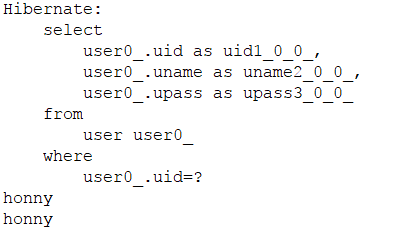
我们可以看出,用同一个SessionFactory的两个不同session对象查询相同的数据,只从数据库中取了一次。
3,查询缓存
一级和二级缓存,只能缓存单个对象,如果需要缓存一个结果集,必须使用查询缓存。
查询缓存默认也是关闭的,如需使用需要手动开启,下面是开启过程:
1.针对的对象必需已经开启了二级缓存
2.在 hibernate.cfg.xml 中添加开启查询缓存的配置
<property name="hibernate.cache.use_query_cache">true</property>
3.在查询执行前,调用 query.setCacheable(true);
下面看一看测试:
        String hql="from User";

        Configuration conf=new Configuration();

        conf.configure("hibernate.cfg.xml");

        SessionFactory factory=conf.buildSessionFactory();

        Session session1 = factory.openSession();

        Query query1 = session1.createQuery(hql);

        query1.setCacheable(true);//设置开启缓存

        List list1 = query1.list();

        for(Object user:list1){

            System.out.println(((User)user).getName());

        }

        System.out.println("------------------------");

        Session session2 = factory.openSession();

        Query query2 = session2.createQuery(hql);

        query2.setCacheable(true);

        List list2 =query2.list();

        for(Object user:list2){

            System.out.println(((User)user).getName());

        }
然后来看一看控制台:
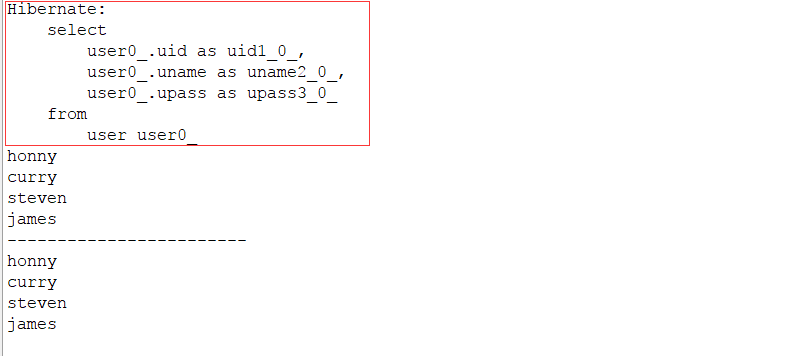
从控制台中,我们可以看出,底层查询的数据库的过程也只执行了一次。
上面就是hibernate的三种缓存。最后总结一下,并不是所有的方法都会产生缓存效果,只有“load/get/save/update/saveorupdate”才会产生缓存效果。三种缓存中一级缓存是默认开启的,二级缓存和三级缓存默认是关闭的。
【Hibernate】解析hibernate中的缓存的更多相关文章
- 分享知识-快乐自己:论Hibernate中的缓存机制
Hibernate缓存 缓存: 是计算机领域的概念,它介于应用程序和永久性数据存储源之间. 缓存: 一般人的理解是在内存中的一块空间,可以将二级缓存配置到硬盘.用白话来说,就是一个存储数据的容器.我们 ...
- Hibernate中一级缓存和二级缓存使用详解
一.一级缓存二级缓存的概念解释 (1)一级缓存就是Session级别的缓存,一个Session做了一个查询操作,它会把这个操作的结果放在一级缓存中,如果短时间内这个 session(一定要同一个ses ...
- [原理][源代码解析]spring中@Transactional,Propagation.SUPPORTS,以及 Hibernate Session,以及jdbc Connection关系---转载
问题: 一. 1. Spring 如何处理propagation=Propagation.SUPPORTS? 2. Spring 何时生成HibernateSession ? 3. propagati ...
- hibernate中的缓存机制
一.为什么要用Hibernate缓存? Hibernate是一个持久层框架,经常访问物理数据库. 为了降低应用程序对物理数据源访问的频次,从而提高应用程序的运行性能. 缓存内的数据是对物理数据源中的数 ...
- hibernate中的缓存问题与快照机制
1. 什么是缓存 数据存储到数据库里面,数据库本身是一个文件系统,使用流方式操作文件(效率不高) 改进方式:把数据存到内存中,不需要使用流方式,可以直接读取内存中的数据 缓存:内存中的临时数据,当内 ...
- Hibernate中一级缓存和二级缓存
缓存是介于应用程序和物理数据源之间,其作用是为了降低应用程序对物理数据源访问的频次,从而提高了应用的运行性能.缓存内的数据是对物理数据源中的数据的复制,应用程序在运行时从缓存读写数据,在特定的时刻或事 ...
- Hibernate 中一级缓存和快照区的理解
刚刚开始的时候觉得这个快照区很难理解,在网上看了很多博客之后,开始明白了.我是结合 ADO.NET 理解的,在ADO.NET 中有一个类, 叫 SqlCommandBuilder,在我看来,他就是 A ...
- Hibernate中"二级缓存"配置
实体类 : package cn.happy.entity; public class Emp { private Integer empNo; private String empName; pub ...
- Hibernate中二级缓存指的是什么?
一.一级缓存.二级缓存的概念解释 (1)一级缓存就是Session级别的缓存,一个Session做了一个查询操作,它会把这个操作的结果放在一级缓存中,如果短时间内这个 session(一定要同一个se ...
随机推荐
- Eclipse小技巧:收起outline的头文件
- 【Python】torrentParser1.02
#------------------------------------------------------------------------------------ # torrentParse ...
- Android 原生 Android ActionBar
本文内容 关于 ActionBar 必要条件 项目结构 环境 演示一:Action Bar 显示隐藏 演示二:Action Item 显示菜单选项 演示三:Action Home 启用"返回 ...
- 电脑技巧 如何保存网页为PDF
安装Adobe Acrobat X pro(要安装版本,不要绿色版),完成之后再打印机里面可以看到添加了新的Adobe PDF打印机 对于任意的Office文档,都可以直接打印到PDF得到PDF文 ...
- jquery_opacity_css透明
语法: $(selector).animate({params},speed,callback); 示例一.jquery_opacity_css透明 $(function () { $('.conta ...
- jQuery开发技巧
jQuery 事件 - submit() 方法 $("form").submit(function(e){}); 当提交表单时,会发生 submit 事件. 该事件只适用于表单元素 ...
- C# Directory.GetFiles()获取多个类型格式的文件
第一种方式 System.IO.Directory.GetFiles()获取多个类型格式的文件 System.IO.Directory.GetFiles("c:\","( ...
- Pause Web Sessions
To pause specific sessions, add rules using FiddlerScript to the OnBeforeRequest function (except wh ...
- MyBatis Spring MapperScannerConfigurer 配置
没有必要在 Spring 的 XML 配置文件中注册所有的映射器.相反,你可以使用一个 MapperScannerConfigurer , 它 将 会 查 找 类 路 径 下 的 映 射 器 并 自 ...
- Java通过join方法来暂停当前线程
目标线程的join方法暂停当前线程,直到目前线程完成(从run()方法返回). Java代码: package Threads; import java.io.IOException; /** * C ...