
为什么有的需要安全连接的的application只有开Fiddler才好用?
Help! Running Fiddler Fixes My App???
|
Over the years, the most interesting class of support requests for Fiddler are of the form: "My application or website is failing, but when I try to capture a repro with Fiddler, the problem goes away completely! How is Fiddler fixing it?" In general, Fiddler isn't designed to automatically "fix" problems in web applications—it's designed only to permit you to debug them. If you enable Fiddler's Lint feature, it can flag problematic traffic to get your attention, but it still won't fix the issues it finds. However, in some cases the introduction of a proxy (e.g. Fiddler) into the client-server channel changes things just enough that intermittent errors become more rare, or even go away entirely. In today's post, we'll explore some of these situations. HTTPWebRequest The most common fault which is "fixed" by Fiddler concerns .NET applications which successfully complete a few HTTP or HTTPS requests but then "hang" and refuse to send any more, or begin to send requests very slowly and serially, even when requests are made on parallel threads. When the developer starts using Fiddler to debug the traffic, the problem goes away entirely. In these cases, the problem always turns out to be that the developer called the GetResponseStream() This fix for this problem is simple: Ensure you always call Close() on the result of a call to GetResponseStream(). Slow Requests Another common problem concerns applications which make many requests in a row but execute more slowly than the developer hopes. When Fiddler is started, the application suddenly accelerates and requests complete in much less time. There are several possible explanations for this behavior. Keep-Alive In some cases, the time required to open a new network connection to the server is greater than the time required to send the request and download the response. Therefore, if the client opens a new connection for every request, the application's performance is greatly degraded. The practice of reusing a single TCP/IP connection for multiple requests is called "keep-alive" and it's the default behavior in HTTP/1.1. However, clients or servers may choose to disable keep-alive by either sending a Connection: close header or by abruptly closing the connection after each transaction. Fiddler maintains a "connection pool" of idle keep-alive connections to the server. When the a client request comes in, this pool is first checked to determine if an existing connection is available on which the request can be sent. Even if the client specifies a Connection: close request header, that only causes Fiddler to close the client's connection after the response is sent—the server connection is returned to the pool (unless it too disabled keep-alive). What this means is that if your client isn't using Keep-Alive connections, its performance can be severely impacted. However, when Fiddler is introduced, performance is improved because "expensive" server connections are reused. (Since Fiddler and the client are (typically) running on the same computer, establishing a new connection from the client to Fiddler is very fast.) The fix for this problem is simple: Ensure that your client is using KeepAlive connections. That's as simple as:
Note that creating connections to servers can be even more expensive than the simple TCP/IP establishment cost. First, there's TCP/IP Slow-Start, a congestion-management feature of the protocol that means that new connections have a slower transfer rate than longer-lived connections. Next, if you're using HTTPS, there's an expensive cryptographic handshake which must be performed on each new connection. Lastly, if your connections use either the NTLM or Negotiate authentication protocols, you may find that each new connection requires a 3-step handshake (e.g. the server sends a HTTP/401 challenge, the client resends the request, the server sends another HTTP/401 challenge, the client resends the request with a challenge-response, and the server finally sends a HTTP/200). Because these are "connection-oriented" authentication protocols, subsequent requests over an existing connection may be able to avoid these extra round-trips. Buffer Sizes In rare cases, users report that large file uploads occur much faster through Fiddler. In some cases, they find that their application's uploads time-out without Fiddler but succeed when Fiddler is running. Fiddler buffers the complete HTTP request in memory before sending it to the server; request data is sent to the server using efficiently-sized buffers. If the client is using an inefficient buffer size when writing to the network, Fiddler can help mask this problem because Fiddler is running locally and the client's network inefficiency is less problematic when the traffic hasn't even left the machine. Internet Explorer 6 had this problem and it required a registry change to use efficient buffers; IE7 and later utilized better defaults to avoid this problem. Today, most client frameworks use properly-sized buffers, but older implementations may not. Slow Proxy Determination Some developers have found that the first network request sent by their application is delayed by as long as 30 seconds on some machines, or that every request sent suffers from such a delay. When Fiddler is started, they note that Fiddler itself spends a fair bit of time on the Looking up gateway… splashscreen startup step, but after that, both Fiddler and their application suffer no delays. In these cases, the typical problem is that the system is configured to Automatically Detect Proxy Settings or is configured to use a Proxy Configuration script. This configuration is found inside Internet Explorer's Tools > Internet Options > Connections > LAN Settings screen. (Be sure to check when Fiddler is not running):
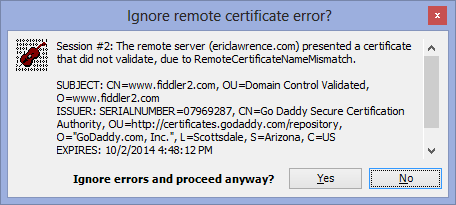
The performance problem arises when the proxy determination process (WPAD) takes a long time to complete (either fail or succeed), or when the URL of the automatic configuration script is unreachable. Fiddler helps resolve proxy determination performance problems because it changes the system's proxy settings to point directly at Fiddler, such that other applications spend no time trying to figure out which proxy to use. Fiddler itself attempts to find the system's proxy during its "Looking up gateway…" startup step, but it caches the result of that process for all subsequent requests from all applications. Most applications will individually cache the proxy determination once per session, but some do not and thus pay the penalty repeatedly. For instance, on Windows Vista and Windows 7, the WebDAV framework attempts to re-detect the proxy on every single operation, which can lead to a huge performance problem. Only a small percentage of users require a proxy server to reach the Internet, and therefore simply unchecking both of these boxes can usually resolve the performance problem. If the PC requires a proxy, you should speak to your IT Administrators about how to improve the proxy's performance. HTTPS Issues Some users find that HTTPS traffic only works when Fiddler is running and decrypting secure traffic. Certificate Errors By default, Fiddler warns you about invalid certificates when connecting to HTTPS sites:
If you elect to ignore this warning, Fiddler will effectively "hide" the certificate error from the client application, such that it only sees the certificate Fiddler generated for HTTPS interception. Most browsers show a meaningful error message if they encounter an invalid certificate:
…but many applications will fail silently or with a confusing error message. Even within the browser, sometimes no error message is shown (e.g. when using XmlHttpRequest). The fix here is simple: Correct or replace the server's certificate. Protocol Versioning Some users have found that their applications fail to establish HTTPS connections with certain servers unless Fiddler is running and decrypting traffic, in which case everything works fine. This problem typically arises when the application or user has enabled the TLS/1.1 or TLS/1.2 protocols, which can cause some servers to misbehave. Running Fiddler resolves such problems because Fiddler, by default, only uses SSLv3.0 and TLSv1.0 when communicating with HTTPS servers, avoiding the compatibility problems seen on legacy servers. If your computer has the .NET Framework v4.5 installed, Fiddler v4 can be configured to attempt to use TLS/1.1+ which will lead to the same connection failure seen when Fiddler wasn't present. To resolve this issue, either disable TLS/1.1+ on the client, or better yet, nag the server operator to upgrade their software to support the TLS standard. |


Misbehaving HTTPS Servers impair TLS 1.1 and TLS 1.2
|
Back in the summer of 2009, I blogged about Windows 7's new support for TLS 1.1 and TLS 1.2. These new protocols are disabled by default, but can be enabled using Group Policy or the Advanced Tab of the Internet Control Panel:
Some adventurous Internet Explorer users have found that if they enable these new protocols, some secure sites will fail to load:
Upon encountering an error like this, a user might try to see what's going wrong by enabling Fiddler's HTTPS Decryption feature and re-visiting the site. When they do that, they find that the site starts working correctly. What's going on? Fiddler is based on the .NET Framework's SSLStream class, which only supports SSLv2, SSLv3, and TLS 1.0, and Fiddler only enables the latter two protocols by default. By running Fiddler, the user has effectively turned off outbound use of TLS v1.1 and TLS v1.2, and that remedies the connection problem. To see what's failing, you need to use a lower-level debugger like WireShark or Netmon. When you use Netmon, you'll see the following sequence:
If you examine the "Encrypted Alert" from the server, you will see that it contains the byte sequence "02 46", meaning Fatal Alert: Protocol Version. The server isn't supposed to behave this way—it's instead expected to simply reply using the latest HTTPS protocol version it supports (e.g. "3.1" aka TLS 1.0). Now, had the server gracefully closed the connection at this point, it would be okay– code in WinINET would fallback and retry the connection offering only TLS 1.0. WinINET includes code such that TLS1.1 & 1.2 fallback to TLS1.0, then fallback to SSL3 (if enabled) then SSL2 (if enabled). The downside to fallback is performance—the extra roundtrips required for the new lower-versioned handshake will usually result in a penalty amounting to tens or hundreds of milliseconds. However, this server used a TCP/IP RST to abort the connection, which disables the fallback code in WinINET and causes the entire connection sequence to be abandoned, leaving the user with the "Internet Explorer cannot display the webpage" error message. Because Fiddler doesn't support the newest TLS protocol versions, it does not encounter this problem. However, there are even a few older HTTPS sites that cannot be viewed with Fiddler unless support for TLS 1.0 is disabled in Fiddler. That's because Fiddler will not fallback from TLS 1.0 to SSL 3, while WinINET will do so (if SSL3 is enabled). If a server refuses a TLS 1.0 connection request from Fiddler, it's treated as a fatal error. Only by disabling TLS 1.0 support in Fiddler (described here) can the sites' traffic be successfully inspected by Fiddler. Hopefully, buggy HTTPS servers will continue to wane in popularity and enable clients to successfully enable newer protocol versions with minimal compatibility impact. -Eric Lawrence Update: If the server negotiates a TLS1.2 connection with a Windows 7 or 8 schannel.dll-using client application, and it provides a certificate chain which uses the (weak) MD5 hash algorithm, the client will abort the connection (TCP/IP FIN) upon receipt of the certificate. |



为什么有的需要安全连接的的application只有开Fiddler才好用?的更多相关文章
- spring boot 连接 Oracle 的 application的简单配置
server.port=8090 //Tomcat服务端口号spring.datasource.driver-class-name= oracle.jdbc.driver.OracleDriver / ...
- 能ping通网络,也正常连接,就是打不开网页,无法访问网络
netsh winsock reset命令,作用是重置 Winsock 目录.如果一台机器上的Winsock协议配置有问题的话将会导致网络连接等问题,就需要用netsh winsock reset命令 ...
- visualSVN server 安装成功,但是无法连接,url打不开
转自:https://www.oschina.net/question/878142_91825 点击开始–>程序->VisualSVN–>VisuaSVN Server Manag ...
- 如何使用fiddler抓取https请求(PC和移动端)
最近做一个抓取移动端app接口,并执行评论,收藏的接口功能测试.怎么搞/(ㄒoㄒ)/~~ 按照老思路试一试,第一步还是要用fiddler来帮忙获取接口信息! 一.基本的抓取http请求设置: 1.cm ...
- 【转】MySQL连接超时断开的问题
这遍文章转过来做个笔记,时不时看看. 转:http://blog.csdn.net/nethibernate/article/details/6658855 Exception如下: org.hi ...
- Application对象、Session对象、Cookie对象、Server对象初步认识
Application对象:记录应用程序参数的对象 用于共享应用程序级信息,即多个用户共享一个Application对象.在第一个用户请求ASP.NET文件时,将启动应用程序并创建Applicatio ...
- db2操作 连接、备份、恢复db2
先deactivate后再start standby再primary报错不能启动hadr standby的时候,先restore,但是别rollback,直接start hadr as standby ...
- 记录关于使用ADO.NET 连接池连接Oracle时Session信息不更新的坑
最近的一个项目中,由于界面查询的数据量比较大,关联的表比较多,有些数据查出来需要临时保存起来供后面的查询使用,于是想到了用oracle的临时表来实现这个需求.大家都知道,oracle的临时表有两种:事 ...
- Application对象
Application对象报讯是应用程序参数的额,多个用户可以共享一个Application.用于启动和管理ASP.NET应用程序. Count 属性 获取Application对象变量的个数,集合 ...
随机推荐
- 【 D3.js 入门系列 --- 9 】 常见可视化图形
本人的个人博客为: www.ourd3js.com csdn博客为: blog.csdn.net/lzhlzz 转载请注明出处,谢谢. Layout ,直译为"布局,安排".但在 ...
- RabbitMQ高级指南:从配置、使用到高可用集群搭建
本文大纲: 1. RabbitMQ简介 2. RabbitMQ安装与配置 3. C# 如何使用RabbitMQ 4. 几种Exchange模式 5. RPC 远程过程调用 6. RabbitMQ高可用 ...
- Linux kernel AIO
http://blog.csdn.net/abcd1f2/article/details/47440087
- Android Studio 怎样打JAR包
Android Studio 怎样打JAR包 在eclipse中我们知道怎样将一个项目导出为jar包,供其他项目使用. 在AS中能够通过改动gradle才处理. 我们新建一个项目MakeJar,在项目 ...
- 使用Axure RP原型设计实践06,登录验证
登录验证主要功能包括: ● 用户名错误,提示无效用户名,用户名和密码文本框清空● 用户名存在,密码错误,提示密码错误,密码清空,焦点进入密码框● 用户名和密码都正确,验证通过 本篇接着"使用 ...
- Delphi 包的设计思想及它与PAS、BPL、DCU、DLL、OXC的关系
一.Delphi中各种文件的介绍,及其关系. OXC: ActiveX控件.会被安装到某一个组件包DPK中,在Imports中会创建PAS.DCU.DCR三个文件. DLL: 动态链接库文件,它的Ex ...
- 利用mvn deploy命令上传包(转)
本文转自https://blog.csdn.net/chenaini119/article/details/52764543 mvn安装 下载maven的bin,在apache官方网站可以下载. ht ...
- 如何修改Mac截屏保存路径
MAC OS X系统默认的截图路径是桌面文件夹,默认的截图格式是 PNG 图片格式,如何自定义设置呢? 截图保存路径 打开终端(Terminal)并输入如下命令: defaults write com ...
- Universal-Image-Loader解析(二)——DisplayImageOptions的详细配置与简单的图片加载
在使用这个框架的时候,我们必须要配置一个DisplayImageOptions对象来作为ImageLoader.getInstance().displayImage()中的参数,所以很有必要讲解这个对 ...
- 多线程-Executors和Executor,线程池
jdk1.5之前,所有的线程都是需要自己手动创建的,由jvm销毁,当请求过多的时候,频繁的创建和销毁线程是非常浪费资源的.jdk1.5为此做了优化,提供了 java.util.concurrent 包 ...