
CHtmlEditCtrl (3): More HTML Editor Options
In this version of our HTML Editor, we'll create a floating source view/edit window and we'll implement a system that will give us access to the most commonly desired formatting options; for instance, we'll be able to select fonts and colors, insert images, bullet lists, set text justification, and so forth.
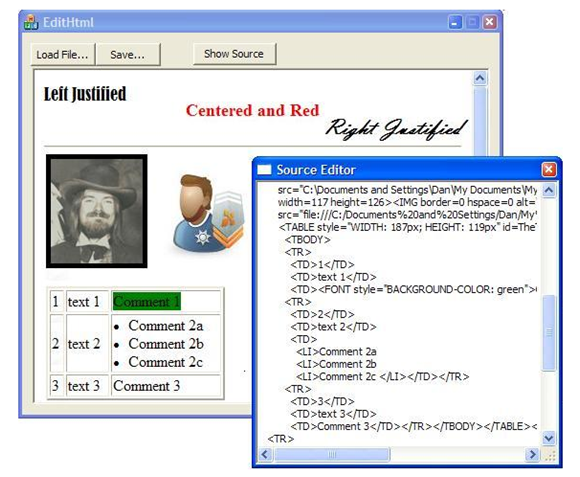
In previous articles part 1 and part 2, we've been working with a "minimalist" implementation of an HTML editing control -- we're using a dialog-based application (rather than using the full-blown document/view architecture). We'll keep with that concept on this article, too. Rather than implement a toolbar, we'll create a right-click Context Menu that will provide all of the functionality that we want to give to the user.
Floating Source Window
Displaying the source text is cool and great for techy-types, but in a "minimalist" implementation, it shouldn't be intrusive. So in this version, I placed the source-text editor in its own modeless window. The code to accomplish this is surprisingly simple with MFC: Use the Resource Editor to create a dialog with a single control -- the edit box. In the main program, create that dialog right away, but don't show it until requested. The "code behind" that synchronizes the source view with the browser view is very similar to what was in the earlier version, but it applies to a text edit box in the floating text-edit window rather than a window in the main dialog.
Context Menu Handling
In this final installment of this series, I wanted to experiment with the many IDM_XXXXX Command Identifiers that are available with the MSHTML support and its editing functionality. The CHtmlEditCtrl control supports most of these with a thin wrapper that simply calls
ExecCommand( IDM_XXXX,... );
I decided to create a context menu so that a user could right-click and...
1) Be reminded of the Ctrl+key accelerators
2) Have access to some functions that do not have built-in Ctrl-key handlers.

Such a large context menu is a bit ungainly, and yours will likely be smaller when you eliminate items that you don't want to support. It's table-driven -- I've created a table of commands and menu text that's easy to set up and maintain. Here's the main sequence:
|
typedef struct { int nHtmlEdCmdID; CString sMenuText; } EditCmds; EditCmds m_EdCmds[]= { { IDM_BOLD ,L"Bold\tCtrl+B" }, { IDM_ITALIC ,L"Italic\tCtrl+I" }, { IDM_UNDERLINE ,L"Underline\tCtrl+U" }, { IDM_REMOVEFORMAT ,L"RemoveFormat\tCtrl+spc" }, {-1 ,0 }, { IDM_FONT ,L"Font and Color" }, { IDM_FORECOLOR ,L"Foreground color" }, { IDM_BACKCOLOR ,L"Background color" }, {-1 ,0 }, { IDM_ORDERLIST ,L"OrderList" }, { IDM_UNORDERLIST ,L"UnorderList" }, {-1 ,0 }, { IDM_INDENT ,L"Indent" }, { IDM_OUTDENT ,L"Outdent" }, { IDM_JUSTIFYCENTER ,L"JustifyCenter" }, { IDM_JUSTIFYLEFT ,L"JustifyLeft" }, { IDM_JUSTIFYRIGHT ,L"JustifyRight" }, {-1 ,0 }, { IDM_HYPERLINK ,L"Hyperlink\tCtrl+K" }, { IDM_UNLINK ,L"Unlink" }, { IDM_BOOKMARK ,L"Bookmark (anchor)" }, { IDM_UNBOOKMARK ,L"UnBookmark" }, {-1 ,0 }, { IDM_IMAGE ,L"Insert Image..." }, { IDM_HORIZONTALLINE ,L"Horizontal Line" }, {-1 ,0 }, { IDM_UNDO ,L"Undo\tCtrl+bksp" }, { IDM_CUT ,L"Cut\tCtrl+X" }, { IDM_COPY ,L"Copy\tCtrl+C" }, { IDM_DELETE ,L"Delete\tDel" }, { IDM_PASTE ,L"Paste\tCtrl+V" }, { IDM_SELECTALL ,L"SelectAll\tCtrl+A" }, {-1 ,0 }, { IDM_FIND ,L"Find...\tCtrl+F" }, { IDM_PRINT ,L"Print...\tCtrl+P" }, { IDM_PRINTPREVIEW ,L"Print Preview" }, {0 ,0 }, // end of list }; void CEditHtmlDlg::OnContextMenu(CWnd* pWnd, CPoint pt ) { CMenu mnu; mnu.CreatePopupMenu(); for (int j=0; m_EdCmds[j].nHtmlEdCmdID != 0; j++ ) { int nCmdID = m_EdCmds[j].nHtmlEdCmdID; if ( nCmdID == -1 ) { mnu.AppendMenuW( MF_SEPARATOR, nCmdID, L"" ); } else { mnu.AppendMenuW( MF_STRING, nCmdID+M_CmdsStart, m_EdCmds[j].sMenuText ); long nStatus= m_ctlEditHtml.QueryStatus( nCmdID ); if (!(nStatus & OLECMDF_ENABLED)) { mnu.EnableMenuItem( nCmdID+M_CmdsStart, MF_DISABLED|MF_GRAYED); } } } m_ctlEditHtml.ClientToScreen( &pt ); mnu.TrackPopupMenu(TPM_LEFTALIGN, pt.x, pt.y, this ); } void CEditHtmlDlg::OnRangeCmds(UINT nID) { int nRealID= nID-M_CmdsStart; // Demo: Some commands need user input if ( nRealID == IDM_BACKCOLOR ) { m_ctlEditHtml.SetBackColor(L"green"); // or numeric: RGB(0,255,0) return; } m_ctlEditHtml.ExecCommand( nRealID, 0,0,0 ); } |
Note that I didn't bother using the Resource Editor to create the menu -- I just wrote code to build the context menu on-the-fly. Note the call to m_ctlEditHtml.QueryStatus() on line 56. This lets me disable menu commands that do not apply. For instance, the Paste command is disabled if the clipboard is empty and the Hyperlink command is disabled if no text is currently selected.
An important part of this system is the addition of this line:
|
ON_COMMAND_RANGE(M_EdCmdsStart, M_EdCmdsStart+IDM_REMOVEFORMAT, OnRangeCmds) |
in the MESSAGE MAP section near the top of the dialog box code. I use the existing IDM_XXXX values, but added an offset value (M_EdCmdsStart) to each one to avoid conflict with other command you might be supporting. Every WM_COMMAND message that is higher than M_EdCmdsStart will be routed to my OnRangeCmds handler (line 66above). These mostly pass through directly to the ExecCommand function, but it is also possible to intercept the command and take specific action here. For instance, setting the background color requires a color value -- either a string such as "Red", or an RGB value such as 0xFF000000. To demonstrate, I just hard coded "green," but you could toss up a dialog box to obtain the desired color value.
Project Source Code
The full source code for this project is available for download. It includes a VS2008 project file.
EditHtml3.zip
References:
Previous Articles:
Use CHtmlEditCtrl to Create a Simple HTML Editor
Add a Source Text Editor to Your HTML Editor
MSHTML Command Identifiers
http://msdn.microsoft.com/en-us/library/aa741315(VS.85).aspx
CHtmlEditCtrl Class
http://msdn.microsoft.com/en-us/library/h14ht0dh.aspx
CHtmlEditCtrlBase Class
http://msdn.microsoft.com/en-us/library/54542c1c.aspx
MSHTML Editing Overviews and Tutorials
http://msdn.microsoft.com/en-us/library/aa770039(VS.85).aspx
=-=-=-=-=-=-=-=-=-=-=-=-=-=-=-=-=-=-=-=-=-=-=-=-=-=-=-=-=-=-=-=-=-=-=-=-=-=-=-=-=-=
If you liked this article and want to see more from this author, please click the Yes button near the:
Was this article helpful?
label that is just below and to the right of this text. Thanks!
=-=-=-=-=-=-=-=-=-=-=-=-=-=-=-=-=-=-=-=-=-=-=-=-=-=-=-=-=-=-=-=-=-=-=-=-=-=-=-=-=-=
From: https://www.experts-exchange.com/articles/1479/More-HTML-Editor-Options.html
CHtmlEditCtrl (3): More HTML Editor Options的更多相关文章
- Delphi Code Editor 之 编辑器选项
Delphi Code Editor 之 编辑器选项 可从Code Editor的右键菜单中选择“Properties”菜单项来查看编辑器选项.也可以从主菜单[Tools | Editor Optio ...
- Customizing the Editor
Use the General, Text Editor, Options Dialog Box to customize the appearance and functionality of th ...
- Delphi Code Editor 之 基本操作
Delphi Code Editor 之 基本操作 毫无疑问,Delphi是高度可视化的.这是使用Delphi进行编程的最大好处之一.当然,任何一个有用的程序中都有大量手工编写的代码.当读者开始编写应 ...
- JQuery easyUi datagrid 中 editor 动态设置最大值最小值
前言 近来项目中使用到 easyui 来进行页面设计,感觉挺方便的,但是网上除了api外,其他有价值的资料比较少,故在此分享一点经验,供大家参考. 问题 JQuery easyUi datagri ...
- datagrid editor动态的改变不同行修改列的editor属性
onBeforeEdit: function (row) { let options = $(this).treegrid('options'); options.tempeditor = optio ...
- easyui datagrid 编辑模式详解
一,建立编辑器 从api得知,扩展一种新的编辑器类型,需要提供以上几个方法.项目中正好需要一个checkbox 类型编辑器,但在easyui中并没提供这样的编辑器,那我们可以通过扩展编辑器来解决 ...
- JQuery Easy Ui DataGrid
Extend from $.fn.panel.defaults. Override defaults with $.fn.datagrid.defaults. The datagrid display ...
- arcmap Command
The information in this document is useful if you are trying to programmatically find a built-in com ...
- 方便!C++ builder快捷键大全
Clipboard control (default) Ctrl+Ins Edit|Copy Shift+Del Edit|Cut Shift+Ins Edit|Paste Ctrl+C Edit|C ...
随机推荐
- Dapper Miser implementation of CMSIS-DAP, MC HCK as SWD Adapter
Dapper Miser In late 2013, I created a functional implementation of CMSIS-DAP that runs in a low cos ...
- How to convert a byte to its binary string representation
How to convert a byte to its binary string representation For example, the bits in a byte B are 1000 ...
- 利用Android Lost通过互联网或短信远程控制安卓设备
利用Android Lost通过互联网或短信远程控制安卓设备 作者:Jack Wallen| 杰克·瓦伦翻译:PurpleEndurer.2014-11-15第1版 使用智能手机要考虑的一个至关重要的 ...
- WinForm多语言版本实战项目演练
一.课程介绍 关于如何实现“WinForm多语言版本”网上有很多实现技术方案,可以说是“琳琅满目”,"包罗万象".俗话说的好:一千个读者就有一千个哈姆雷特!如果您工作中恰好也遇到这 ...
- AutoMapper在MVC中的运用02-Decimal转String、集合、子父类映射
本篇AutoMapper使用场景: ※ Decimal转换成String类型 ※ 源数组转换成目标数组 ※ 源中的集合(数组)属性转换成目标中的集合(数组)属性 ※ 子类父类间的映射 Decimal转 ...
- SpringBoot配置多数据源
原文:https://www.jianshu.com/p/033e0ebeb617 项目中用到了两个数据库,分别是Oracle和Mysql,涉及到了多数据源问题,这里做下记录 官方讲解:https:/ ...
- Linkedin工程师是如何优化他们的Java代码的
http://greenrobot.me/devpost/java-faster-less-jvm-garbage/ Linkedin工程师是如何优化他们的Java代码的 最近在刷各大公司的技术博客的 ...
- Windows下LuaJIT的编译和使用
1.下载LuaJIT,download>> 2.编译 开始 –> 程序 –> Microsoft Visual Studio xx –> Visual Studio To ...
- End2endIT
"C:\Program Files\Java\jdk1.8.0_112\bin\java" -ea -Didea.test.cyclic.buffer.size=1048576 & ...
- [Ubuntu] fg、bg让你的进程在前后台之间切换
refer to : http://man.linuxde.net/jobs Linux下的fg和bg命令是进程的前后台调度命令,即将指定号码(非进程号)的命令进程放到前台或后台运行.比如一个需要长 ...