
Android 沉浸式顶部
研究了下这个,记录下代码。
主页面代码:activity_main.xml
<?xml version="1.0" encoding="utf-8"?>

<android.support.constraint.ConstraintLayout xmlns:android="http://schemas.android.com/apk/res/android"

    xmlns:app="http://schemas.android.com/apk/res-auto"

    xmlns:tools="http://schemas.android.com/tools"

    android:layout_width="match_parent"

    android:layout_height="match_parent"

    tools:context=".MainActivity">

    <TextView

        android:layout_width="match_parent"

        android:layout_height="70dp"

        android:text="Hello World!"

        android:gravity="center"

        android:background="@color/colorAccent"

        app:layout_constraintLeft_toLeftOf="parent"

        app:layout_constraintRight_toRightOf="parent"

        app:layout_constraintTop_toTopOf="parent" />

   <!-- android:fitsSystemWindows="true" android:clipToPadding="true"-->

</android.support.constraint.ConstraintLayout>
添加三个文件:三份 style 文件,即默认的values(不设置状态栏透明)、values-v19、values-v21(解决半透明遮罩问题)。
values 下 style.xml
  <style name="TranslucentTheme" parent="AppTheme">

        <!--在Android 4.4之前的版本上运行,直接跟随系统主题-->

    </style>
values-v19 下 style.xml
<?xml version="1.0" encoding="utf-8"?>

<resources>

    <style name="TranslucentTheme" parent="Theme.AppCompat.Light.NoActionBar">

        <item name="android:windowTranslucentStatus">true</item>

        <item name="android:windowTranslucentNavigation">true</item>

    </style>

</resources>
values-v21 下 style.xml
<?xml version="1.0" encoding="utf-8"?>

<resources>

    <style name="TranslucentTheme" parent="Theme.AppCompat.Light.NoActionBar">

        <item name="android:windowTranslucentStatus">false</item>

        <item name="android:windowTranslucentNavigation">true</item>

        <item name="android:statusBarColor">@android:color/transparent</item>

    </style>

</resources>
这里需要在:AndroidMainfest.xml 里添加样式。
<?xml version="1.0" encoding="utf-8"?>

<manifest xmlns:android="http://schemas.android.com/apk/res/android"

    package="controller.hzl.com.dingbu2">

    <application

        android:allowBackup="true"

        android:icon="@mipmap/ic_launcher"

        android:label="@string/app_name"

        android:roundIcon="@mipmap/ic_launcher_round"

        android:supportsRtl="true"

        android:theme="@style/AppTheme">

        <activity android:name=".MainActivity"

            android:theme="@style/TranslucentTheme"

            >

            <intent-filter>

                <action android:name="android.intent.action.MAIN" />

                <category android:name="android.intent.category.LAUNCHER" />

            </intent-filter>

        </activity>

    </application>

</manifest>
主Acitivity没有修改。
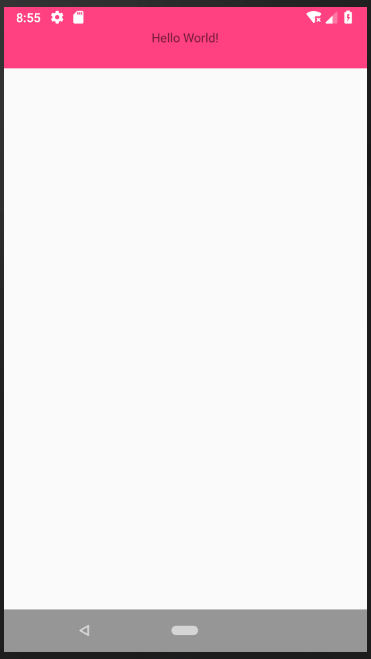
效果图:
Android 沉浸式顶部的更多相关文章
- Android沉浸式(侵入式)标题栏(状态栏)Status(一)
Android沉浸式(侵入式)标题栏(状态栏)Status(一) 现在越来越多的APP设计采用这种称之为沉浸式状态栏(Status)的设计,这种沉浸式状态栏又称之"侵入式"状 ...
- android 沉浸式状态栏的实现
本文介绍一种简单的实现沉浸式状态栏的方法,要高于或等于api19才可以. 实现android沉浸式状态栏很简单,添加代码两步就可以搞定. 一.在activity中添加 getWindow().addF ...
- Android沉浸式状态栏(透明状态栏)最佳实现
Android沉浸式状态栏(透明状态栏)最佳实现 在Android4.4之前,我们的应用没法改变手机的状态栏颜色,当我们打开应用时,会出现上图中左侧的画面,在屏幕的顶部有一条黑色的状态栏,和应用的风格 ...
- Android 沉浸式状态栏 实现方式二 ( 更简单 )
以前写过一个沉浸式状态栏 的实现方式 Android 沉浸式状态栏 实现方式一 现在有个更为简单的实现方式 . 相关链接 http://www.apkbus.com/forum.php?mod=vie ...
- Android沉浸式(侵入式)标题栏(状态栏)Status(三)
Android沉浸式(侵入式)标题栏(状态栏)Status(三) 从附录文章1,2可以看到,依靠Android系统提供的标准方案,状态栏即便在透明状态下,仍然有些半透明而不是全透明.本文是And ...
- Android沉浸式(侵入式)标题栏(状态栏)Status(二)
Android沉浸式(侵入式)标题栏(状态栏)Status(二) 附录1以xml写style实现了Android沉浸式(侵入式)状态栏(标题栏),同样以上层Java代码实现.在附录文章1的基础上 ...
- [置顶]
Xamarin android沉浸式状态栏
虽然关于android "沉浸式"状态栏有很多博客介绍过,从小菜到大神无一例外.我第一次看到这种"沉浸"式的效果我也以为真的是这么叫,然而根本不是这么回事,完全 ...
- Android 沉浸式状态栏完美解决方案
现在搜索Android 沉浸式状态栏,真的是一堆一堆,写的特别多,但是真正用的舒服的真没有,在这里自己整理一下开发记录 注意,在使用这个步骤过程之前,请把之前设置的代码注释一下 把布局带有androi ...
- flutter android沉浸式状态栏
import 'package:flutter/services.dart'; import 'dart:io'; class _MyAppState extends State<MyApp&g ...
随机推荐
- 【JQuery】事件冒泡及使用jQuery阻止
(1)什么是事件起泡 首先你要明白一点,当一个事件发生的时候,该事件总是有一个事件源,即引发这个事件的对象,一个事件不能凭空产生,这就是事件的发生. 当事件发生后,这个事件就要开始传播.为什么要传播呢 ...
- stm32开发 - 远离 Keil uVision, 回到 Visual Studio
学了8051单片机, 学了MSP430系列, 终于开始步入正轨, 开始学习 stm32(ARM Cortex-M3)系列微处理器~ 学51用Keil uVision开发环境, 提一下Keil uVis ...
- redis cluster 集群重新启动关闭
找遍了redis cluster官方文档,没发现有关集群重新启动和关闭的方法.为啥会没有呢,推測redis cluster至少要三个节点才干执行,三台同一时候挂掉的可能性比較小,仅仅要不同一时候挂掉. ...
- Java Nashorn--Part 4
Nashorn 和 javax.script 包 Nashorn 并不是第一个在 Java 平台上运行的脚本语言.在Java 6 就提供了 javax.script java 包,它为脚本语言引擎提供 ...
- pdm画表间结构
PDM(物理概念模型)各种属性建立如PK,AK等 https://blog.csdn.net/qq_27376871/article/details/51321609 CDM: ER图详细教程 通常在 ...
- [转]在windows上实现多个java jdk的共存解决办法
问题背景 公司项目中应用到的jdk环境为1.6,最近在家学习IntelliJ IDEA中sdk多环境配置时,想安装Jdk1.8,作为学习基础.那么问题来了,公司项目扩展不支持jdk1.8,为了既能满足 ...
- Matlab 2016b 正式版下载
Matlab 2016b 正式版下载 这两天为完成最优化大作业,zyy又开始鼓捣matlab了.之前我装的是matlab 2013a,发现不支持求解整数规划,遂更新了一下. 下载地址 链接:http ...
- Windows 计划任务 Task Schedule 怎么 运行 .bat文件
1. 新建 test.bat 需要切换文件夹以后 并且执行程序. cd /D "F:\xxxfolder" && dotnet testdll.dll 2. 直接设 ...
- 用友iuap云运维平台支持基于K8s的微服务架构
什么是微服务架构? 微服务(MicroServices)架构是当前互联网业界的一个技术热点,业内各公司也都纷纷开展微服务化体系建设.微服务架构的本质,是用一些功能比较明确.业务比较精练的服务去解决更大 ...
- android 覆盖安装问题
1.android中覆盖安装不会导致data/data/package下的数据被删除 2.数据库会有数据库的一套升级机制 3.sharepreference 不会被覆盖,如果在app中有使用Key记录 ...