
(3)shiro自定义realm
上面一章说到shiro的认证和授权最底层就是调用realm的getAuthorizationInfo(获取用户的角色和资源)和getAuthenticationInfo(校验账号密码是否正确)两个方法。
如果我们要从数据库中查询用户和他的权限信息,我们可以使用shiro提供给我们的JdbcRealm
JdbcRealm
添加jar
<dependency>

    <groupId>mysql</groupId>

    <artifactId>mysql-connector-java</artifactId>

    <version>5.1.25</version>

</dependency>

<dependency>

    <groupId>com.alibaba</groupId>

    <artifactId>druid</artifactId>

    <version>0.2.23</version>

</dependency>
classpath环境下新建shiro-jdbc.ini如下配置
这里我们采用了阿里巴巴的数据源,注入到jdbcRealm的dataSource变量中,并且将这个jdbcRealm注入到securityManager,有点类似于spring的注入。
下面的sql放在github上对应的章节根目录下,导入即可,数据库密码填写自己数据库密码
jdbcRealm=org.apache.shiro.realm.jdbc.JdbcRealm

dataSource=com.alibaba.druid.pool.DruidDataSource

dataSource.driverClassName=com.mysql.jdbc.Driver

dataSource.url=jdbc:mysql://localhost:3306/shiro

dataSource.username=root

dataSource.password=123456

jdbcRealm.dataSource=$dataSource

#注入securityManager的realm

securityManager.realms=$jdbcRealm
测试代码:
ShiroUtils.login("classpath:shiro-jdbc.ini","zhang","123456");

Subject subject = SecurityUtils.getSubject();

//是否通过认证

System.out.println(subject.isAuthenticated());
其中ShiroUtils的登录方法(这个以后直接略过):
    public static void login(String configPath,String username,String password){

        Factory<SecurityManager> factory =new IniSecurityManagerFactory(configPath);

        //得到安全管理器

        SecurityManager securityManager = factory.getInstance();

        SecurityUtils.setSecurityManager(securityManager);

        Subject subject = SecurityUtils.getSubject();

        UsernamePasswordToken token = new UsernamePasswordToken(username, password);

        try {

            subject.login(token);

        } catch (AuthenticationException e) {

            e.printStackTrace();

        }

    }
最后输出true。
因为jdbcRealm里面的sql都是固定的,所以我们表结构都要按照JdbcRealm里面创建对应的表。下面是JdbcRealm里面各种查询的sql(salt是密码加密,后面介绍加密再说,我们这里直接用明文密码)
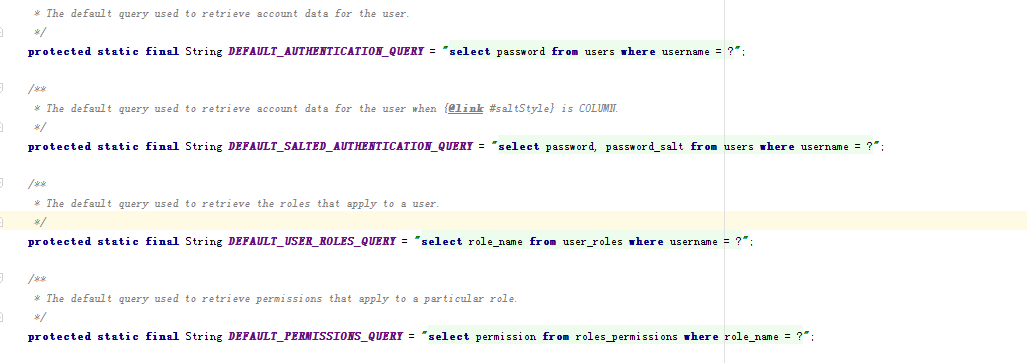
表里面数据分别如下
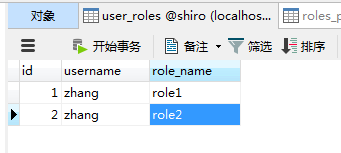

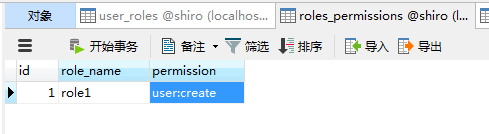
接着测试代码添加如下:
        System.out.println(subject.hasRole("role1"));

        System.out.println(subject.isPermitted("user:create"));
最后输出true,false
为什么角色role1获取到了,permission没有获取到呢。
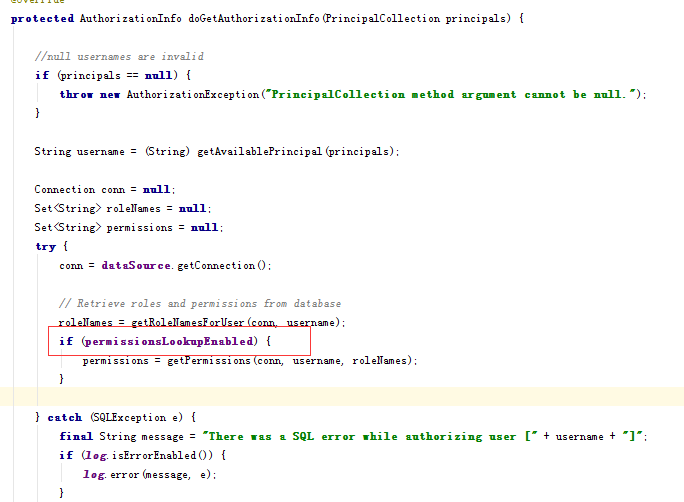
原因是JdbcRealm里面有个permissionsLookupEnabled默认是false,所以不会查询对应的资源权限,我们在配置文件中打开这个查询。
#打开permission查询

jdbcRealm.permissionsLookupEnabled=true
再查询就是true了。
自定义Realm
1 新增MyRealm类直接继承AuthorizingRealm.
public class MyRealm extends AuthorizingRealm {

    //认证信息,

    @Override

    protected AuthenticationInfo doGetAuthenticationInfo(AuthenticationToken token) throws AuthenticationException {

        UsernamePasswordToken upToken = (UsernamePasswordToken) token;

        String username = upToken.getUsername();

        String password = new String(upToken.getPassword());

        //模拟用户名密码是否正确

        if(!"zhang".equals(username)){

           throw new UnknownAccountException();

        }

        if(!"123456".equals(password)){

            throw new IncorrectCredentialsException();

        }

        return new SimpleAuthenticationInfo(username,password,getName());

    }

    //授权

    @Override

    protected AuthorizationInfo doGetAuthorizationInfo(PrincipalCollection principals) {

        //获取用户名

        String username = (String)getAvailablePrincipal(principals);

        //模拟从数据库查询出来对应的角色和权限

        Set<String> roles = new HashSet<String>();

        roles.add("role_1");

        roles.add("role_2");

        Set<String> permissions = new HashSet<String>();

        permissions.add("user:create");

        permissions.add("user:delete");

        SimpleAuthorizationInfo info = new SimpleAuthorizationInfo();

        info.setRoles(roles);

        info.setStringPermissions(permissions);

        return info;

    }

}
2,classpath文件下新建shiro-myrealm.ini配置文件
myrealm= com.nfcm.shiro.Realm.MyRealm

securityManager.realms=$myrealm
3,测试
        ShiroUtils.login("classpath:shiro-myrealm.ini","zhang","123456");

        Subject subject = SecurityUtils.getSubject();

        //是否通过认证

        System.out.println(subject.isAuthenticated());

        //是否有role1角色

        System.out.println(subject.hasRole("role_1"));

        System.out.println(subject.isPermitted("user:create"));
到这里全部测试通过。
github代码地址
https://github.com/cmniefei/shiroparent
(3)shiro自定义realm的更多相关文章
- 权限框架 - shiro 自定义realm
上篇文章中是使用的默认realm来实现的简单登录,这仅仅只是个demo,真正项目中使用肯定是需要连接数据库的 首先创建自定义realm文件,如下: 在shiro中注入自定义realm的完全限定类名: ...
- shiro自定义Realm
1.1 自定义Realm 上边的程序使用的是shiro自带的IniRealm,IniRealm从ini配置文件中读取用户的信息,大部分情况下需要从系统的数据库中读取用户信息,所以需要自定义realm. ...
- shiro自定义realm支持MD5算法认证(六)
1.1 散列算法 通常需要对密码 进行散列,常用的有md5.sha, 对md5密码,如果知道散列后的值可以通过穷举算法,得到md5密码对应的明文. 建议对md5进行散列时加salt(盐),进行 ...
- shiro自定义realm认证(五)
上一节介绍了realm的作用: realm:需要根据token中的身份信息去查询数据库(入门程序使用ini配置文件),如果查到用户返回认证信息,如果查询不到返回null.token就相当于是对用户输入 ...
- Shiro自定义Realm时用注解的方式注入父类的credentialsMatcher
用Shiro做登录权限控制时,密码加密是自定义的. 数据库的密码通过散列获取,如下,算法为:md5,盐为一个随机数字,散列迭代次数为3次,最终将salt与散列后的密码保存到数据库内,第二次登录时将登录 ...
- Shiro自定义realm实现密码验证及登录、密码加密注册、修改密码的验证
一:先从登录开始,直接看代码 @RequestMapping(value="dologin",method = {RequestMethod.GET, RequestMethod. ...
- shiro中自定义realm实现md5散列算法加密的模拟
shiro中自定义realm实现md5散列算法加密的模拟.首先:我这里是做了一下shiro 自定义realm散列模拟,并没有真正链接数据库,因为那样东西就更多了,相信学到shiro的人对连接数据库的一 ...
- Shiro笔记(四)Shiro的realm认证
认证流程: 1.获取当前Subject.调用SecurityUtils.getSubject(); 2.测试当前用户是否已经被认证,即是否已经登录,调用Subject的isAurhenticated( ...
- 自定义shiro的Realm实现和CredentialsMatcher实现以及Token实现
Realm是shiro比较核心的接口,简单说它的实现类就是校验用户输入的账号信息的地方.如果想自定义实现一般的配置文件如下: <!--自定义Realm 继承自AuthorizingRealm - ...
随机推荐
- shell教程-001:shell简介 什么是shell,shell命令的两种执行方式
Shell本身是一个用C语言编写的程序,它是用户使用Unix/Linux的桥梁,用户的大部分工作都是通过Shell完成的. Shell既是一种命令语言,又是一种程序设计语言.作为命令语言,它交互式地解 ...
- 联想服务器配置 RAID
联想服务器配置 RAID BIOS 中配置 RAID 阵列卡 x3650 和 x3850 一.进入 RAID 1.在开机自检时按 F1 进入 UEFI 配置界面 2.选择 System Setting ...
- java学习之路之javaSE基础2
java学习之路之javaSE基础2 所有的代码都是引用他人写的. 1.逻辑运算符 //&,|,^,! //int x = 10; //5 < x < 15 //x > 5 ...
- php生成随机颜色代码
function rand_color($color_array) { $color = dechex(rand(3355443,13421772)); if (in_array($color, $c ...
- wxWidgets:简单消息处理
早期的wxWidgets使用类似MFC的方式进行消息处理:在新版中这种映射方式仍然得以保留. 在MyFrame.h中添加: private: void OnQuitButton(wxCommandEv ...
- wxWidgets:入门
0. 介绍 wxWidgets是一个开源的跨平台的C++构架库(framework),它可以提供GUI和其它工具.目前的3.0.0版本支持所有版本的Windows.带GTK+或Motif的Unix和M ...
- autoit 中文API
中文API 参考地址: http://www.jb51.net/shouce/autoit/ 虫师的selelnium里面也有简单的说 环境搭建+上传弹窗的小案例
- java实验三——求平均数,数组排序(有关java保留小数位数,由于编译器版本未到1.5导致的报错format函数第二个参数不对,要求是Object[])
package hello; import java.util.Arrays; public class 实验三更正版 { public static void main(String[] args) ...
- echo off
就是说关闭回显 @echo off并不是DOS程序中的,而是DOS批处理中的.当年的DOS,所有操作都用键盘命令来完成,当你每次都要输入相同的命令时,可以把这么多命令存为一个批处理,从此以后,只要运行 ...
- js如何判断小数点后有几位
<script> var n=3.143423423;alert(n.toString().split(".")[1].length); </script> ...