
alsa声卡分析alsa-utils调用过程
如何分析tinyplay 播放音频和tinymix的过程?需要相应的工具来支持追查;
一、分析tinyplay和tinymix:
1.1 利用strace工具:
strace -o tinyplay.log tinyplay 1.wav
strace -o tinymixer.log tinymixer "SEC_MI2S_RX Audio Mixer MultiMedia1" 1
利用strace工具获取APP的log,从应用层往下看;
1.2 分析alsa-utils源码:
tiny工具源码在android/external/tinyalsa目录下;
二、tinyplay调用分析(tinyplay.log搜索设备节点“/dev/snd/pcmC0D0p”)
2.1 tinyplay的open过程:
snd_pcm_f_ops[0]是播放音频的file_operations,snd_pcm_f_ops[1]则是录音的file_operations:
 const struct file_operations snd_pcm_f_ops[] = {

     {

         .owner =        THIS_MODULE,

         .write =        snd_pcm_write,

         .aio_write =        snd_pcm_aio_write,

         .open =            snd_pcm_playback_open,

         .release =        snd_pcm_release,

         .llseek =        no_llseek,

         .poll =            snd_pcm_playback_poll,

         .unlocked_ioctl =    snd_pcm_playback_ioctl,

         .compat_ioctl =     snd_pcm_ioctl_compat,

         .mmap =            snd_pcm_mmap,

         .fasync =        snd_pcm_fasync,

         .get_unmapped_area =    snd_pcm_get_unmapped_area,

     },

     {

         .owner =        THIS_MODULE,

         .read =            snd_pcm_read,

         .aio_read =        snd_pcm_aio_read,

         .open =            snd_pcm_capture_open,

         .release =        snd_pcm_release,

         .llseek =        no_llseek,

         .poll =            snd_pcm_capture_poll,

         .unlocked_ioctl =    snd_pcm_capture_ioctl,

         .compat_ioctl =     snd_pcm_ioctl_compat,

         .mmap =            snd_pcm_mmap,

         .fasync =        snd_pcm_fasync,

         .get_unmapped_area =    snd_pcm_get_unmapped_area,

     }

 };
我们从snd_pcm_playback_open函数开始向下分析:
 static int snd_pcm_playback_open(struct inode *inode, struct file *file)

 {

     struct snd_pcm *pcm;

     int err = nonseekable_open(inode, file);

     if (err < )

         return err;

     pcm = snd_lookup_minor_data(iminor(inode),

                     SNDRV_DEVICE_TYPE_PCM_PLAYBACK);  //取得其私有数据并返回的

     err = snd_pcm_open(file, pcm, SNDRV_PCM_STREAM_PLAYBACK);

     if (pcm)

         snd_card_unref(pcm->card);      //减少设备对象的引用计数 snd_card_unref(card);

     return err;

 }
在下面调用了snd_pcm_open函数:
 static int snd_pcm_open(struct file *file, struct snd_pcm *pcm, int stream)

 {

     int err;

     wait_queue_t wait;

     if (pcm == NULL) {

         err = -ENODEV;

         goto __error1;

     }

     err = snd_card_file_add(pcm->card, file);

     if (err < )

         goto __error1;

     if (!try_module_get(pcm->card->module)) {

         err = -EFAULT;

         goto __error2;

     }

     init_waitqueue_entry(&wait, current);

     add_wait_queue(&pcm->open_wait, &wait);

     mutex_lock(&pcm->open_mutex);

     while () {

         err = snd_pcm_open_file(file, pcm, stream);  // 将操作该声卡card的应用程序添加到card->files_list

         if (err >= )

             break;

         if (err == -EAGAIN) {

             if (file->f_flags & O_NONBLOCK) {

                 err = -EBUSY;

                 break;

             }

         } else

             break;

         set_current_state(TASK_INTERRUPTIBLE);

         mutex_unlock(&pcm->open_mutex);

         schedule();

         mutex_lock(&pcm->open_mutex);

         if (pcm->card->shutdown) {

             err = -ENODEV;

             break;

         }

         if (signal_pending(current)) {

             err = -ERESTARTSYS;

             break;

         }

     }

     remove_wait_queue(&pcm->open_wait, &wait);

     mutex_unlock(&pcm->open_mutex);

     if (err < )

         goto __error;

     return err;

       __error:

     module_put(pcm->card->module);

       __error2:

           snd_card_file_remove(pcm->card, file);

       __error1:

           return err;

 }
再从snd_pcm_open_file继续向下看:
 static int snd_pcm_open_file(struct file *file,

                  struct snd_pcm *pcm,

                  int stream)

 {

     struct snd_pcm_file *pcm_file;

     struct snd_pcm_substream *substream;

     int err;

     err = snd_pcm_open_substream(pcm, stream, file, &substream);    //打开substream结构体

     if (err < )

         return err;

     pcm_file = kzalloc(sizeof(*pcm_file), GFP_KERNEL);

     if (pcm_file == NULL) {

         snd_pcm_release_substream(substream);

         return -ENOMEM;

     }

     pcm_file->substream = substream;

     if (substream->ref_count == ) {

         substream->file = pcm_file;

         substream->pcm_release = pcm_release_private;

     }

     file->private_data = pcm_file;

     return ;

 }
 int snd_pcm_open_substream(struct snd_pcm *pcm, int stream,

                struct file *file,

                struct snd_pcm_substream **rsubstream)

 {

     struct snd_pcm_substream *substream;

     int err;

     err = snd_pcm_attach_substream(pcm, stream, file, &substream);

     if (err < )

         return err;

     if (substream->ref_count > ) {

         *rsubstream = substream;

         return ;

     }

     err = snd_pcm_hw_constraints_init(substream);    //初始化substream结构体

     if (err < ) {

         snd_printd("snd_pcm_hw_constraints_init failed\n");

         goto error;

     }

     if ((err = substream->ops->open(substream)) < )

         goto error;

     substream->hw_opened = ;

     err = snd_pcm_hw_constraints_complete(substream);

     if (err < ) {

         snd_printd("snd_pcm_hw_constraints_complete failed\n");

         goto error;

     }

     *rsubstream = substream;

     return ;

  error:

     snd_pcm_release_substream(substream);

     return err;

 }
snd_pcm_open_substream
在snd_pcm_open_substream函数中:
     if ((err = substream->ops->open(substream)) < )    // substream->ops : snd_pcm_ops结构体

         goto error;
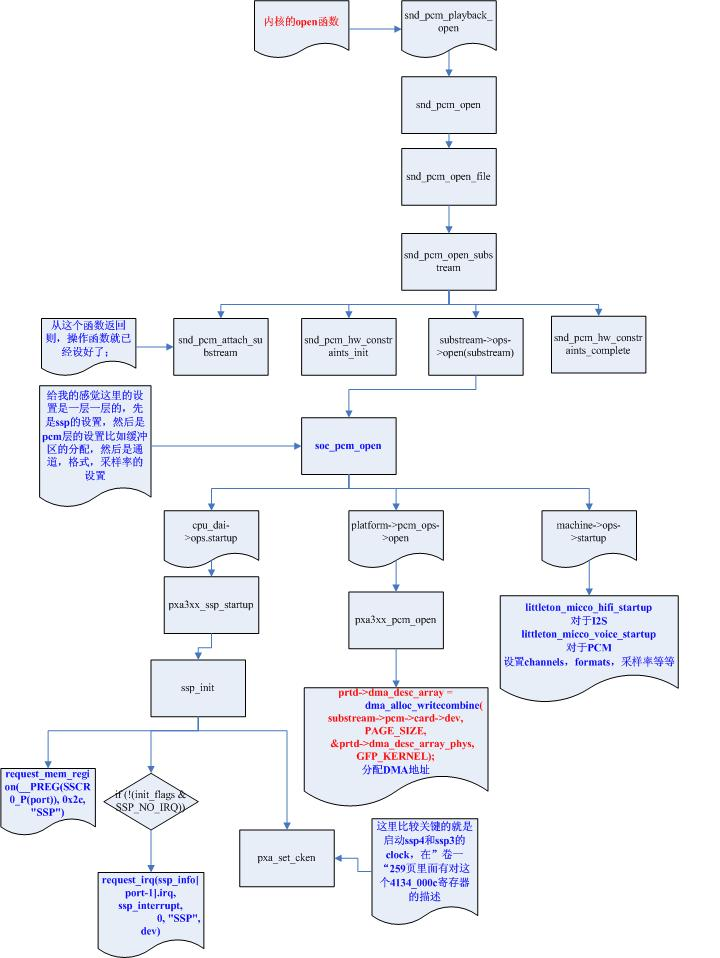
依次调用cpu_dai, dma, codec_dai, machine(三大模块)的open或startup函数;
msm_mi2s_snd_startup函数:
 struct snd_soc_pcm_runtime *rtd = substream->private_data;

 struct snd_soc_card *card = rtd->card;

 struct snd_soc_dai *cpu_dai = rtd->cpu_dai;

 struct snd_soc_codec *codec = rtd->codec;
设置snd_soc_pcm_runtime的cpu、codec等模块;然后在snd_soc_pcm_runtime函数中对codec函数进行相应的设置,之后通过音频数据流通道播放出声音;
调用过程如下图:
2.2 tinyplay的ioctl过程:
同样也是snd_pcm_f_ops[0]结构体的file_operations:
 {

         .owner =        THIS_MODULE,

         .write =        snd_pcm_write,

         .aio_write =        snd_pcm_aio_write,

         .open =            snd_pcm_playback_open,

         .release =        snd_pcm_release,

         .llseek =        no_llseek,

         .poll =            snd_pcm_playback_poll,

         .unlocked_ioctl =    snd_pcm_playback_ioctl,

         .compat_ioctl =     snd_pcm_ioctl_compat,

         .mmap =            snd_pcm_mmap,

         .fasync =        snd_pcm_fasync,

         .get_unmapped_area =    snd_pcm_get_unmapped_area,

 },
从snd_pcm_playback_ioctl函数向下看:
 static long snd_pcm_playback_ioctl(struct file *file, unsigned int cmd,

                    unsigned long arg)

 {

     struct snd_pcm_file *pcm_file;

     pcm_file = file->private_data;    //获取相应的私有数据

     if ((((cmd >> ) & 0xff) != 'A') && (((cmd >> ) & 0xff) != 'C'))

         return -ENOTTY;

     return snd_pcm_playback_ioctl1(file, pcm_file->substream, cmd,

                        (void __user *)arg);

 }
snd_pcm_playback_ioctl1:
 static int snd_pcm_playback_ioctl1(struct file *file,

                    struct snd_pcm_substream *substream,

                    unsigned int cmd, void __user *arg)

 {

     if (snd_BUG_ON(!substream))

         return -ENXIO;

     if (snd_BUG_ON(substream->stream != SNDRV_PCM_STREAM_PLAYBACK))

         return -EINVAL;

         //根据case不同,对播放进行相应的不同操作

     switch (cmd) {

     case SNDRV_PCM_IOCTL_WRITEI_FRAMES:

     {

         struct snd_xferi xferi;

         struct snd_xferi __user *_xferi = arg;

         struct snd_pcm_runtime *runtime = substream->runtime;

         snd_pcm_sframes_t result;

         if (runtime->status->state == SNDRV_PCM_STATE_OPEN)

             return -EBADFD;

         if (put_user(, &_xferi->result))

             return -EFAULT;

         if (copy_from_user(&xferi, _xferi, sizeof(xferi)))

             return -EFAULT;

         result = snd_pcm_lib_write(substream, xferi.buf, xferi.frames);

         __put_user(result, &_xferi->result);

         return result <  ? result : ;

     }

     case SNDRV_PCM_IOCTL_WRITEN_FRAMES:

     {

         struct snd_xfern xfern;

         struct snd_xfern __user *_xfern = arg;

         struct snd_pcm_runtime *runtime = substream->runtime;

         void __user **bufs;

         snd_pcm_sframes_t result;

         if (runtime->status->state == SNDRV_PCM_STATE_OPEN)

             return -EBADFD;

         if (runtime->channels > )

             return -EINVAL;

         if (put_user(, &_xfern->result))

             return -EFAULT;

         if (copy_from_user(&xfern, _xfern, sizeof(xfern)))

             return -EFAULT;

         bufs = memdup_user(xfern.bufs,

                    sizeof(void *) * runtime->channels);

         if (IS_ERR(bufs))

             return PTR_ERR(bufs);

         result = snd_pcm_lib_writev(substream, bufs, xfern.frames);

         kfree(bufs);

         __put_user(result, &_xfern->result);

         return result <  ? result : ;

     }

     case SNDRV_PCM_IOCTL_REWIND:

     {

         snd_pcm_uframes_t frames;

         snd_pcm_uframes_t __user *_frames = arg;

         snd_pcm_sframes_t result;

         if (get_user(frames, _frames))

             return -EFAULT;

         if (put_user(, _frames))

             return -EFAULT;

         result = snd_pcm_playback_rewind(substream, frames);

         __put_user(result, _frames);

         return result <  ? result : ;

     }

     case SNDRV_PCM_IOCTL_FORWARD:

     {

         snd_pcm_uframes_t frames;

         snd_pcm_uframes_t __user *_frames = arg;

         snd_pcm_sframes_t result;

         if (get_user(frames, _frames))

             return -EFAULT;

         if (put_user(, _frames))

             return -EFAULT;

         result = snd_pcm_playback_forward(substream, frames);

         __put_user(result, _frames);

         return result <  ? result : ;

     }

     }

     return snd_pcm_common_ioctl1(file, substream, cmd, arg);

 }
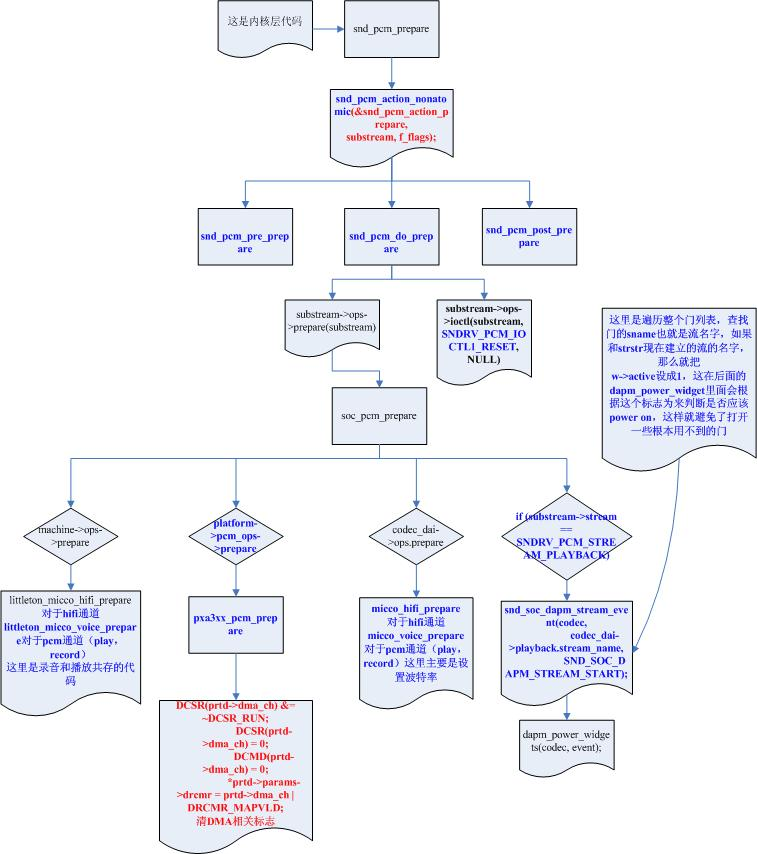
从snd_pcm_common_ioctl1继续分析,进入函数的prepare中:
当函数prepare完毕后,就一切准备就绪了,只等一个trigger;而trigger的执行会在上层的alsalib调用write的函数触发;prepare过程可以看下图,具体就不继续分析了:
下一节我们将来分析tinymixer的调用过程;
alsa声卡分析alsa-utils调用过程(二)-tinymixer
alsa声卡分析alsa-utils调用过程的更多相关文章
- alsa声卡分析alsa-utils调用过程(一)-tinyplay
如何分析tinyplay 播放音频和tinymix的过程?需要相应的工具来支持追查: 一.分析tinyplay和tinymix: 1.1 利用strace工具: strace -o tinyplay. ...
- Spring源码分析之`BeanFactoryPostProcessor`调用过程
前文传送门: Spring源码分析之预启动流程 Spring源码分析之BeanFactory体系结构 本文内容: AbstractApplicationContext#refresh前部分的一点小内容 ...
- alsa声卡分析alsa-utils调用过程(二)-tinymixer
继上一篇文章:http://www.cnblogs.com/linhaostudy/p/8515277.html 三.tinymixer调用分析:(tinymixer.log搜索节点:/dev/snd ...
- mybatis源码分析(方法调用过程)
十一月月底,宿舍楼失火啦,搞得20多天没有网,目测直到放假也不会来了... 正题 嗯~,其实阅读源码不是为了应付面试,更重要的让你知道,大师是怎样去写代码的,同样是用Java,为啥Clinton Be ...
- Openstack Nova 源码分析 — RPC 远程调用过程
目录 目录 Nova Project Services Project 的程序入口 setuppy Nova中RPC远程过程调用 nova-compute RPC API的实现 novacompute ...
- ALSA声卡07_分析调用过程_学习笔记
1.编译新的strace工具分析aplay和amixer应用程序对声卡的调用过程 (1)因为旧的strace工具不能识别不能识别alsa声卡驱动程序里面的ioctrl. (2)编译过程参考http:/ ...
- ALSA声卡笔记1---ALSA驱动框架
1.声卡驱动程序sound.c (1)入口函数里通过register_chrdev()函数注册file_operations 结构体 (2)file_operations 结构体,里面只有open函数 ...
- ALSA声卡驱动中的DAPM详解之七:dapm事件机制(dapm event)
前面的六篇文章,我们已经讨论了dapm关于动态电源管理的有关知识,包括widget的创建和初始化,widget之间的连接以及widget的上下电顺序等等.本章我们准备讨论dapm框架中的另一个机制:事 ...
- ALSA声卡驱动中的DAPM详解之五:建立widget之间的连接关系
前面我们主要着重于codec.platform.machine驱动程序中如何使用和建立dapm所需要的widget,route,这些是音频驱动开发人员必须要了解的内容,经过前几章的介绍,我们应该知道如 ...
随机推荐
- grep的小技巧
grep '^[^#]' /etc/openvpn/server.conf 中括号必须匹配一个字符^$属于标志位,不属于字符 grep没把\n看成字符 grep把空行看成^$ 还是perl的标准,空行 ...
- 【转】Vim使用笔记
http://www.cnblogs.com/jiqingwu/archive/2012/06/14/vim_notes.html 曾经使用了两年多的Vim,手册也翻过一遍.虽然现在不怎么用vim了, ...
- MySQL--当事务遇到DDL命令
众所周知MySQL的DDL语句是非事务的,即不能对DLL语句进行回滚操作,哪在事务中包含DDL语句会怎样呢? 如: #禁用自动提交 set autocommit=off; #创建tb1 create ...
- 一步一步创建ASP.NET MVC5程序[Repository+Autofac+Automapper+SqlSugar](八)
前言 Hi, 大家好,还是星期五,还是Rector,又在图享网准时和大家见面了. 今天给大家带来系列教程<一步一步创建ASP.NET MVC5程序[Repository+Autofac+Auto ...
- 跳转语句Break、continue
跳转语句Break.continue 1.break -跳出 作用范围:switch或循环语句; -当break语句单独存在时,下面不需要定义其他语句,因为直接被跳出,不执行下面的语句. -break ...
- AngularJS执行流程详解(转)
一.启动阶段 大家应该都知道,当浏览器加载一个HTML页面时,它会将HMTL页面先解析成DOM树,然后逐个加载DOM树中的每一个元素节点.我们可以把AngularJS当做一个类似jQuery的js库, ...
- Apache Traffic Server服务搭建
一.简介 Apache Traffic Server(ATS或TS)是一个高性能的.模块化的HTTP代理和缓存服务器,与 Nginx 和 Squid 类似.它通过将频繁访问的信息缓存在网络的边缘来改善 ...
- BZOJ 3994: [SDOI2015]约数个数和 [莫比乌斯反演 转化]
2015 题意:\(d(i)\)为i的约数个数,求\(\sum\limits_{i=1}^n \sum\limits_{j=1}^m d(ij)\) \(ij\)都爆int了.... 一开始想容斥一下 ...
- BZOJ 1935: [Shoi2007]Tree 园丁的烦恼 [树状数组 离线 离散化]
传送门 刚才我还在郁闷网上怎么没人用$CDQ$分治做 突然发现根本没有时间序.... #include<iostream> #include<cstdio> #include& ...
- 算法&数据结构系列 -- 堆(优先队列)
前言 话说新开的博客十分好用... 所以,我打算开一个坑,名曰[算法系列]. 什么意思--从名字泥应该就猜得出来... 废话不多说,进入正文~~ 正文 原理 首先,堆是一颗棵二叉树.. 其次,堆是一棵 ...