
MongoDB ODBC Driver for Data Integration with Power BI
This guide will walk you through connecting Microsoft Power BI to a MongoDB DataSet using our MongoDB certified ODBC driver.
Microsoft Power BI enables rich data visualization of your company’s data through its suite of analytics tools, letting you easily analyze and share insights in any device. Here’s how to take this awesome BI tool and integrate it with MongoDB data to take it to the next level.
Note: This guide assumes you have MongoDB installed with the “Restaurants” MongoDB Data Set. The “Restaurants” MongoDB Data Set can be found here.
Determine whether your version of PowerBI is 32bit or 64bit. Then, download + install the corresponding free 15 day trial of the DataDirect for MongoDB ODBC driver.
Navigate to the Progress DataDirect for ODBC Installation directory and click on the ODBC Administrator.
Click on User or System DSN and click Add:
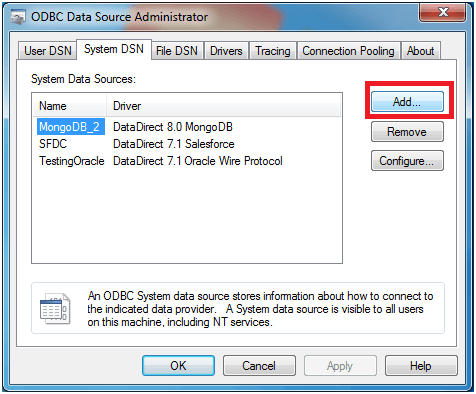
Select DataDirect 8.0 MongoDB.
Configure the Data Sources by filling out a Data Source Name, the Host Name, Port Number, and which Database within MongoDB you want to connect to (you may chose to leave this blank if you prefer). The Schema Definition Path will be automatically generated for you, but feel free to click on the Browse button in order to change the location of the schema or rename it. Schema Tool Note: The DataDirect MongoDB 8.0 driver will automatically generate a schema for you without you having to open up the Schema Tool!
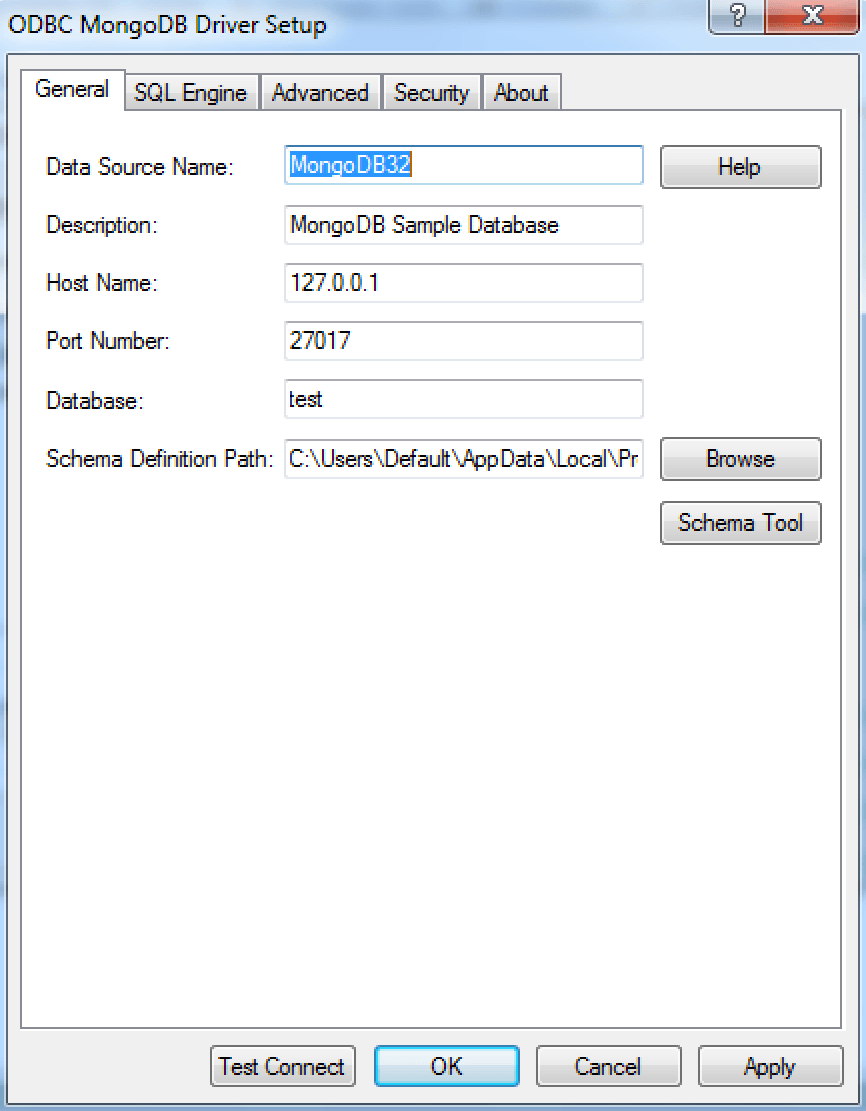
Click on Test Connect and ensure that your connection is established.
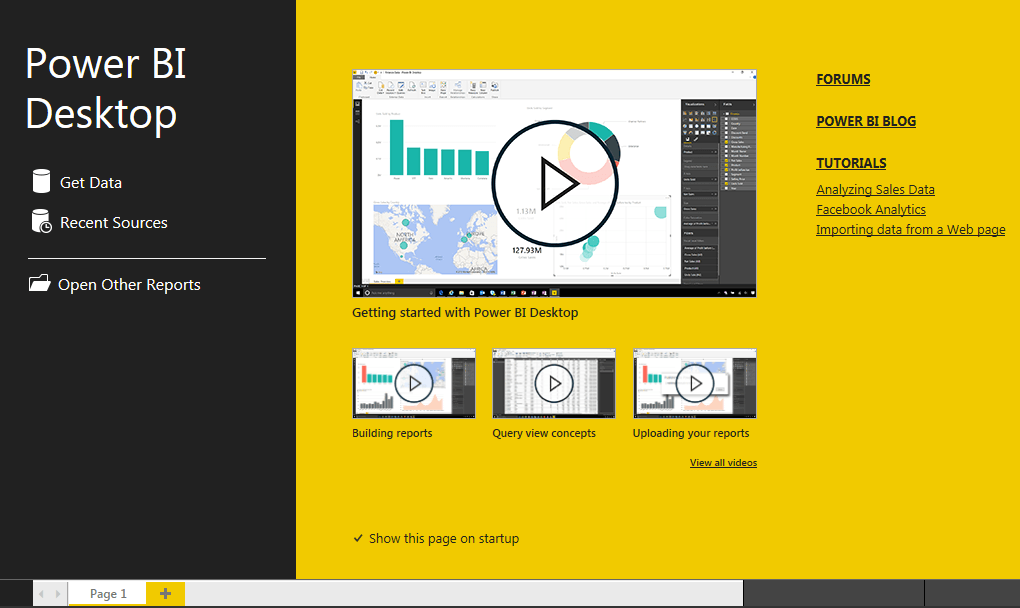
Launch Microsoft Power BI and select New Report:
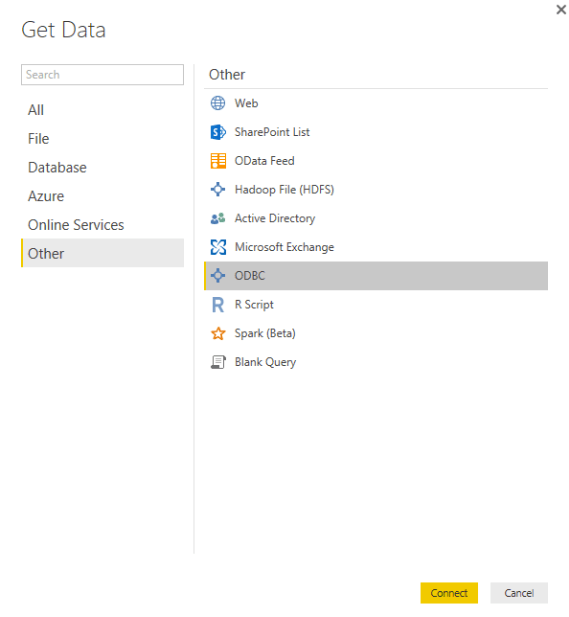
- Select ‘Get Data’ > Other > ODBC and click Connect:
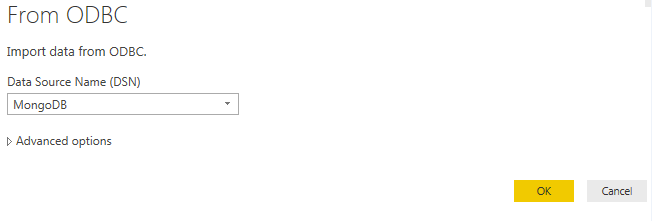
- Select your MongoDB Data Source Name from the drop down window and select OK:
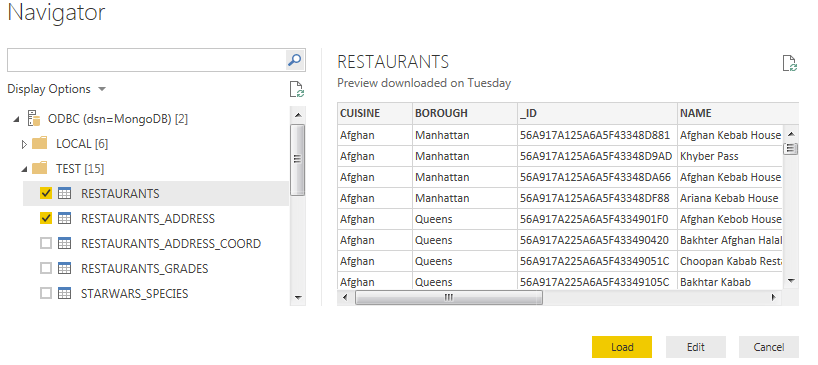
From the Navigator pane, select the MongoDB data you would like to use in PowerBI. In our case, we are selecting Restaurants and Restaurants_Address for our Visualization.
Select Load.
- You can now see your selected tables in PowerBI on the right hand side of the screen under “Fields.”
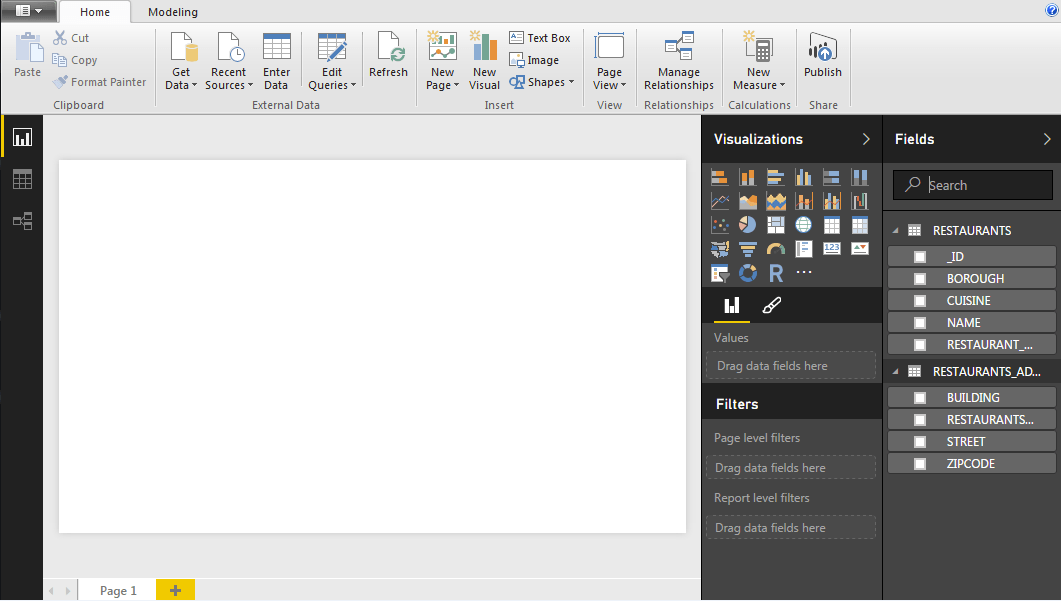
- Next, select the Fields from your MongoDB that you’d like to use in your Visualization. In our case, we are going to select Restaurants (Cuisine) and Restaurants_Address (Zipcode).
-and-restaurants_address-(zipcode).png?sfvrsn=b35e1e13_0)
Then, select the Filled Map Visualization indicated by a this icon
 .
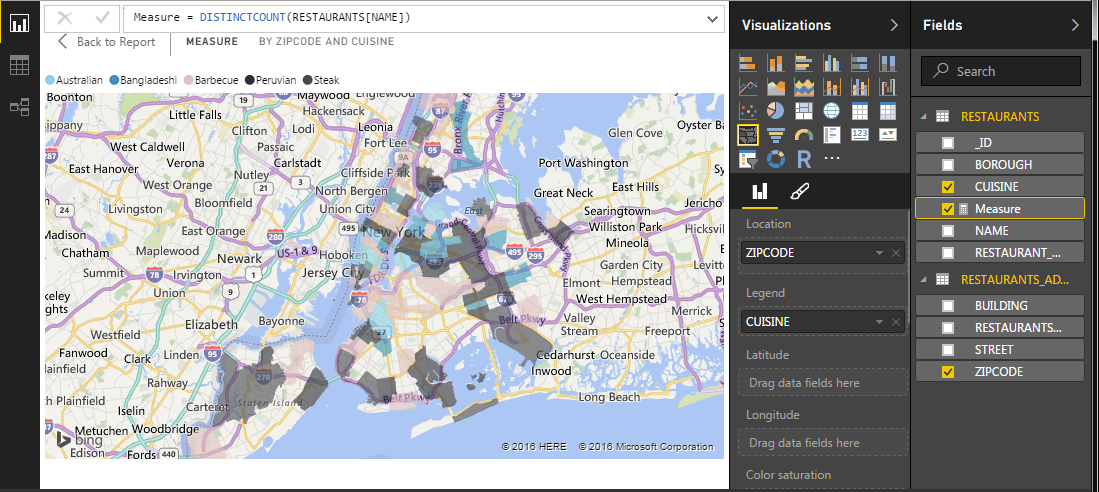
.You will then see your data transformed into a map visualization representing all of the different types of cuisines located in our geographic area (in this case, the greater New York City area).
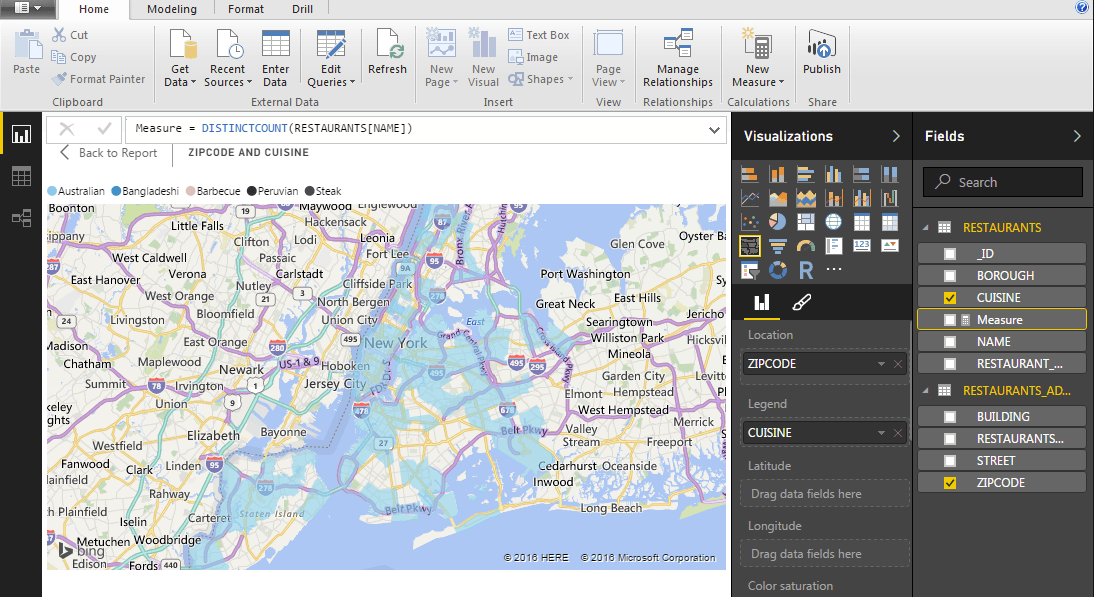
Suppose we wanted to count the different types of restaurants by cuisine in each zip code? We can easily accomplish this, adding a “New Measure” by selecting the New Measure icon from the toolbar under Calculations.
Our New Measure is going to count the number of restaurants in each zip code for us. So we will use Measure = DISTINCTCOUNT(RESTAURANTS[NAME])
.png?sfvrsn=3526e55e_0)
Our map now reflects the count of each type of Cuisine by zip code.
MongoDB ODBC Driver for Data Integration with Power BI的更多相关文章
- POWER BI 基于 ODBC 数据源的配置刷新-以Amazon Redshift为例
POWER BI 基于 ODBC 数据源的配置刷新-以Amazon Redshift为例 Powerbi 有多种数据源连接,可以使用它们连接到不同数据源. 如果在 Power BI Desktop 的 ...
- 微软新神器-Power BI横空出世,一个简单易用,还用得起的BI产品,你还在等什么???
在当前互联网,由于大数据研究热潮,以及数据挖掘,机器学习等技术的改进,各种数据可视化图表层出不穷,如何让大数据生动呈现,也成了一个具有挑战性的可能,随之也出现了大量的商业化软件.今天就给大家介绍一款逆 ...
- Tutorial: Facebook analytics using Power BI Desktop
In this tutorial you learn how to import and visualize data from Facebook. During the tutorial you'l ...
- Power BI免费版(Free),专业版(Pro)以及增值版(Premium)授权功能对比, Server
Features of Power BI Report Server and the Power BI service Features Power BI Report Server Power BI ...
- MongoDB C Driver使用教程
MongoDB C Driver使用教程 转载请注明出处http://www.cnblogs.com/oloroso/ 本指南提供简介 MongoDB C 驱动程序. 在 C API 的详细信息,请参 ...
- Ignoring Extra Elements in mongoDB C# Driver
MongoDB删除字段后会报错: Element ... does not match any field or property of class Customer. 需要在实体类增加 [BsonI ...
- 【原创】Qt 使用ODBC driver 连接SQL Server
最近在做数据库的课程设计.第一个需要解决的问题是使用什么工具来实现这个系统.经过一番资料查找,决定使用SQL Server Express 2012作为服务器,使用Qt作为编写客户端程序语言.问题是c ...
- ODBC Driver Development
ODBC Driver Development By Vikash Agarwal, May 01, 2002 Open your database system to the world. Vika ...
- MongoDB Java Driver操作指南
MongoDB为Java提供了非常丰富的API操作,相比关系型数据库,这种NoSQL本身的数据也有点面向对象的意思,所以对于Java来说,Mongo的数据结构更加友好. MongoDB在今年做了一次重 ...
随机推荐
- SQL优化 MySQL版 -分析explain SQL执行计划与Extra
Extra 作者 : Stanley 罗昊 [转载请注明出处和署名,谢谢!] 注:此文章必须有一定的Mysql基础,或观看执行计划入门篇传送门: https:.html 终于总结到哦SQK执行计划的最 ...
- jquery获取元素(父级的兄弟元素的子元素)
一.获取父级元素 使用jquery获取父级元素: parent() 例如:$(this).parent('ul'); 二.获取同级元素 使用jquery获取同级元素:siblings() 例如:$(t ...
- 基于Socket通讯(C#)和WebSocket协议(net)编写的两种聊天功能(文末附源码下载地址)
今天我们来盘一盘Socket通讯和WebSocket协议在即时通讯的小应用——聊天. 理论大家估计都知道得差不多了,小编也通过查阅各种资料对理论知识进行了充电,发现好多demo似懂非懂,拷贝回来又运行 ...
- c# 正则表达式替换字符串中常见的特殊字符
第一种,若字符串中含有字母,则使用以下方法 public static string RemoveSpecialCharacterToupper(string hexData) { //下文中的‘\\ ...
- Keepalived 的使用
1.什么是keepalived Keepalived的作用是检测web服务器的状态,如果有一台web服务器死机,或工作出现故障,Keepalived将检测到,并将有故障的web服务器从系统中剔除,当w ...
- Editplus的扩展程序的删除
好久没用Editplus,然后准备删除,结果发现有进程正在运行,删除不掉 ,于是,用软件管家删除 用软件管家删除结束之后,有残留文件,就是Editplus的扩展程序 1.于是找到Edit ...
- 学习笔记—JVM
JVM结构 JVM总体结构图 类加载子系统与方法区: 类加载子系统负责从文件系统和网络中加载Class信息,加载的类信息存放于一块称为方法区的内存空间. 除了类信息外,方法区中还可能会存放运行时常量池 ...
- java压缩指定目录下的所有文件和文件夹的代码
将代码过程较好的代码段备份一下,下边资料是关于java压缩指定目录下的所有文件和文件夹的代码,希望对码农有帮助. String sourceDir="E:\test";int pa ...
- ARDC连接设备异常之ADB version mismatch的处理
如果ARDC提示ADB version mismatch,说明系统当前运行的adb server与client不匹配.此时如果在cmd.exe中运行adb devices命令则会出现类似如下的提示信息 ...
- 从零学习Fluter(九):正式使用flutter进入商业开发
一下为下个app 功能模块简要划分 接口文档需要说明 公告接口 messageTitle -- 消息内容 红包墙接口 使用说明 地理位置定位 shareGetMoney - 分享活动金额 lookCo ...