
跨域WebApi的Jquery EasyUI的数据交互
目录
1 大概思路... 1
2 创建WebAPI 1
3 创建CrossMainController并编写... 1
4 Nuget安装microsoft.aspnet.webapi.cors. 4
5 跨域设置路由... 4
6 编写Jquery EasyUI界面... 5
7 运行效果... 7
8 总结... 7
1 大概思路
l 创建WebAPI
l 创建CrossMainController并编写
l Nuget安装microsoft.aspnet.webapi.cors
l 跨域设置路由
l 编写Jquery EasyUI界面
l 运行效果
2 创建WebAPI
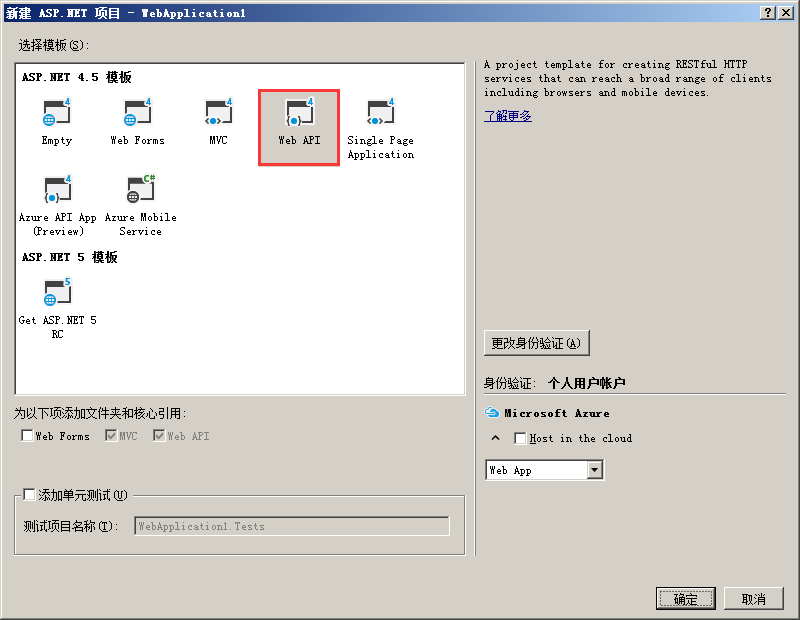
创建WebAPI,新建->项目->ASP.NET Web应用程序->Web API
3 创建CrossMainController并编写
编写如下:
using CrossdomainWebApi.Models;

using System;

using System.Collections.Generic;

using System.Linq;

using System.Net;

using System.Net.Http;

using System.Web.Http;

namespace CrossdomainWebApi.Controllers

{

    [RoutePrefix("api/CrossMain")]

    public class CrossMainController : ApiController

    {

        [Route("GetUserInfo")]

        [HttpPost]

        public HttpResponseMessage GetUserInfo([FromBody]formUserInfo obj)

        {

            //[FromBody]int page, [FromBody]int rows, [FromBody]string email

            List<UserInfoViewModel> listStudent = new List<UserInfoViewModel>();

            for (int i = ; i < ; i++)

            {

                UserInfoViewModel student = new Models.UserInfoViewModel();

                Random ran = new Random();

                student.Email = i.ToString() + ran.Next(, ).ToString() + "System@qq.com";

                student.HasRegistered = true;

                student.LoginProvider = "Yes";

                listStudent.Add(student);

            }

            int page = obj.page;

            int rows = obj.rows;

            List<UserInfoViewModel> ts = new List<UserInfoViewModel>();

            for (int i = (page - ) * rows; i < (page * rows>listStudent.Count? listStudent.Count:page * rows) ; i++)

            {

                ts.Add(listStudent[i]);

            }

            string json= Newtonsoft.Json.JsonConvert.SerializeObject(new { rows = ts, total = listStudent.Count, success = true });

            return new HttpResponseMessage { Content = new StringContent(json, System.Text.Encoding.UTF8, "text/plain") };

        }

    }

    /// <summary>

    /// form提交数据

    /// </summary>

    public class formUserInfo

    {

        public int page { get; set; }

        public int rows { get; set; }

        public string email { get; set; }

    }

}
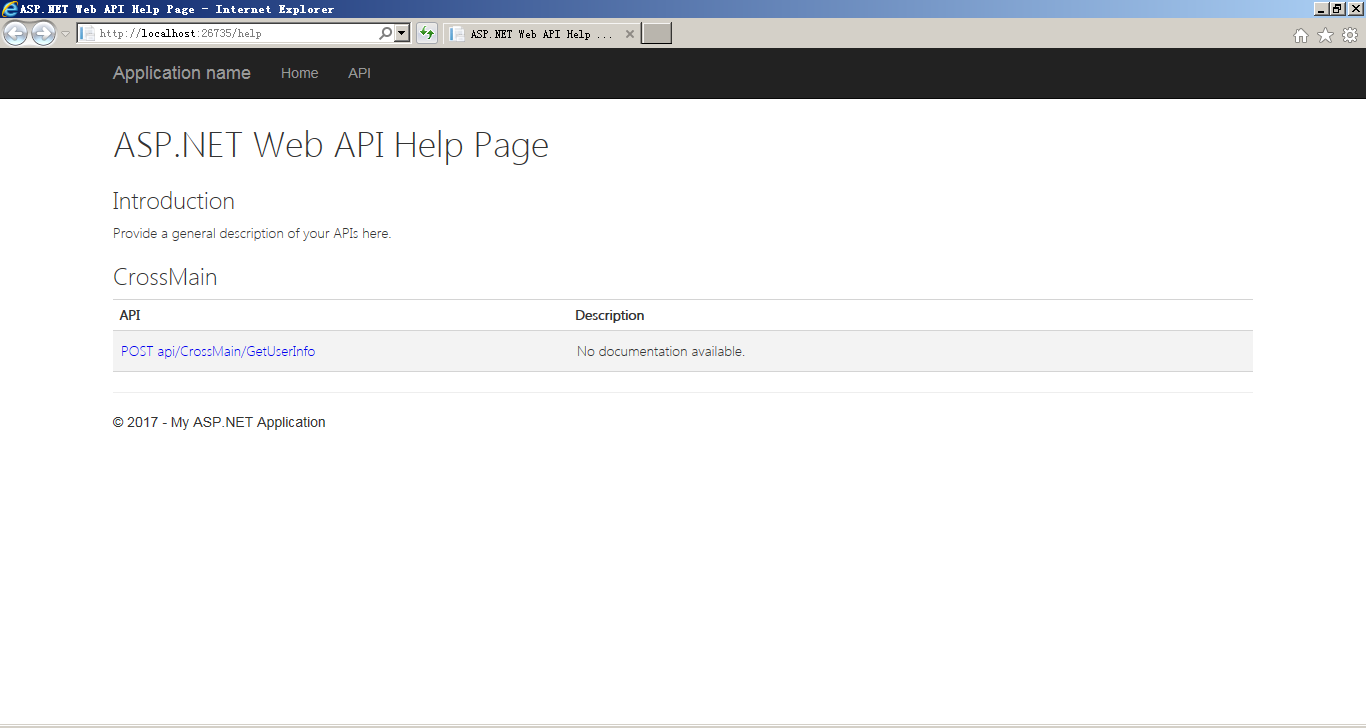
启动运行:http://localhost:26735/help
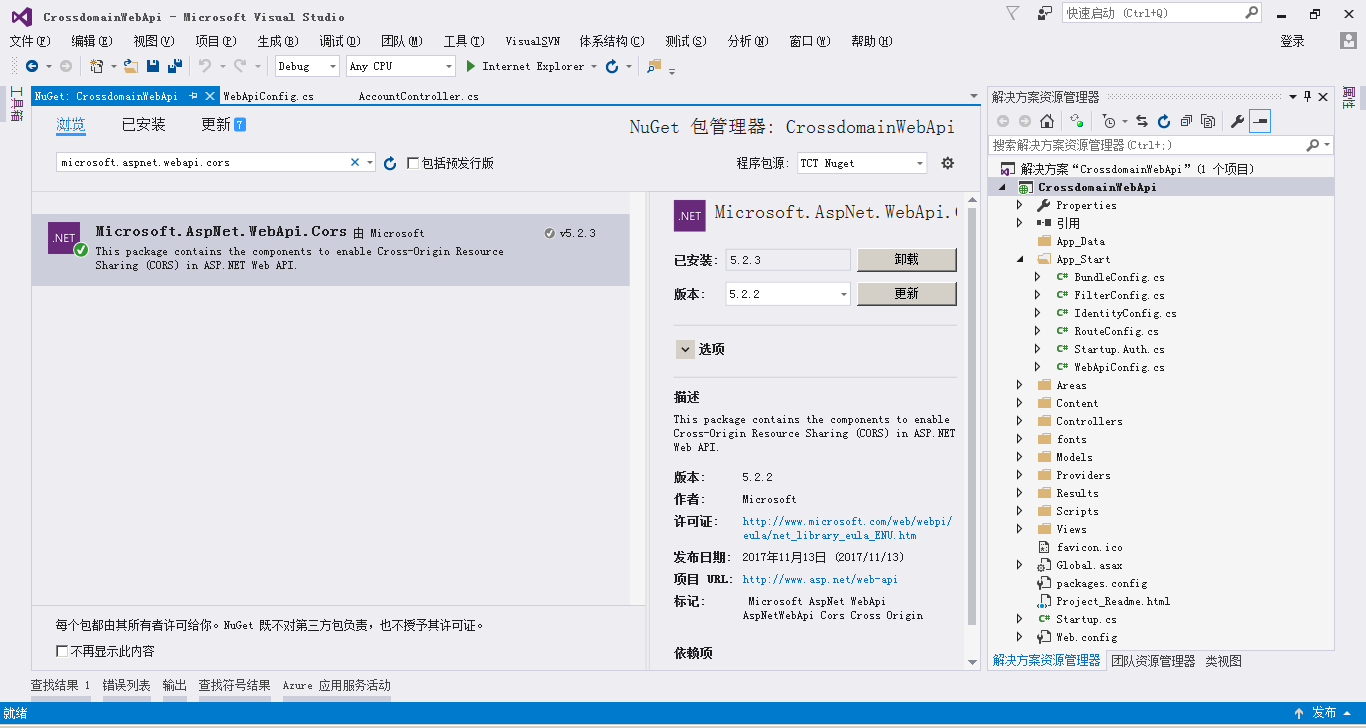
4 Nuget安装microsoft.aspnet.webapi.cors

5 跨域设置路由
设置项目 crossdomainwebapi\crossdomainwebapi\app_start\webapiconfig.cs
using System;

using System.Collections.Generic;

using System.Linq;

using System.Net.Http;

using System.Web.Http;

using Microsoft.Owin.Security.OAuth;

using Newtonsoft.Json.Serialization;

//跨域引用

using System.Web.Http.Cors;

namespace CrossdomainWebApi

{

    public static class WebApiConfig

    {

        public static void Register(HttpConfiguration config)

        {

            // Web API configuration and services

            // Configure Web API to use only bearer token authentication.

            //config.SuppressDefaultHostAuthentication();

            //config.Filters.Add(new HostAuthenticationFilter(OAuthDefaults.AuthenticationType));

            //跨域配置

            config.EnableCors(new EnableCorsAttribute("*", "*", "*"));

            // Web API routes

            config.MapHttpAttributeRoutes();

            config.Routes.MapHttpRoute(

                name: "DefaultApi",

                routeTemplate: "api/{controller}/{id}",

                defaults: new { id = RouteParameter.Optional }

            );

        }

    }

}
6 编写Jquery EasyUI界面
前台界面代码如下:
<!DOCTYPE HTML>
<html>
<head>
<title>Ems SA</title>
<link rel="stylesheet" type="text/css" href="JqueryEasyui/themes/bootstrap/easyui.css" />
<link rel="stylesheet" type="text/css" href="JqueryEasyui/themes/icon.css" />
<link rel="stylesheet" type="text/css" href="JqueryEasyui/demo/demo.css" />
<script type="text/javascript" src="JqueryEasyui/jquery.min.js"></script>
<script type="text/javascript" src="JqueryEasyui/jquery.easyui.min.js"></script>
<script type="text/javascript">
function doSearch() { }
</script>
</head>
<body>
<div>
<table id="dg" class="easyui-datagrid" style="width: 100%; height: auto; min-height: 400px"
data-options="
iconCls: 'icon-edit',
singleSelect: true,
url: 'http://localhost:26735/Api/CrossMain/GetUserInfo',
method: 'post',
pagination:true,
pageSize:15,
pageList: [5, 10, 15],
queryParams: {'email': ‘’}
">
<thead>
<tr>
<th data-options="field:'ck',checkbox:true">
</th>
<th data-options="field:'Email',width:'20%'">
</th>
<th data-options="field:'HasRegistered'">
HasRegistered
</th>
<th data-options="field:'HasRegistered'">
HasRegistered
</th>
</tr>
</thead>
</table>
</div>
</body>
</html>
7 运行效果
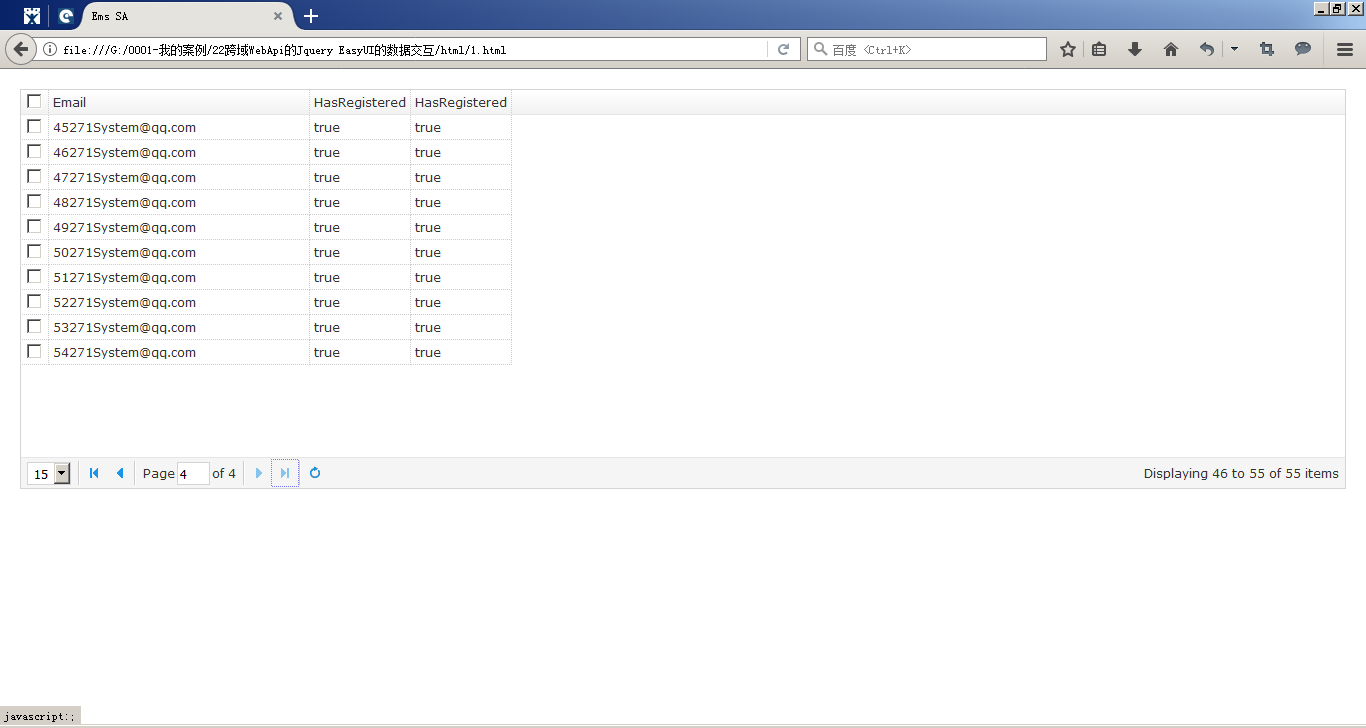
启动WebAPI,并刷新Jquery EasyUI界面,可见如下图:
8 总结
WebAPI提供广泛的对外开放,可以起到整合性的作用,例如:跟Oracle ERP、SAP的SCM、MM、PP以及SD领域。WebAPI形成一个Web标准,对于一些微服务,也起到关键性的作用。跨域还能不受限制让更多人访问,当然,也降低了安全性。
源代码下载:
http://download.csdn.net/download/ruby_matlab/10117635
PDF下载:
跨域WebApi的Jquery EasyUI的数据交互pdf
跨域WebApi的Jquery EasyUI的数据交互的更多相关文章
- 浅析Ajax跨域原理及JQuery中的实现分析
AJAX 的出现使得网页可以通过在后台与服务器进行少量数据交换,实现网页的局部刷新.但是出于安全的考虑,ajax不允许跨域通信.如果尝试从不同的域请求数据,就会出现错误.如果能控制数据驻留的远程服务器 ...
- Ajax跨域原理及JQuery中的实现
浅析Ajax跨域原理及JQuery中的实现分析 AJAX 的出现使得网页可以通过在后台与服务器进行少量数据交换,实现网页的局部刷新.但是出于安全的考虑,ajax不允许跨域通信.如果尝试从不同的域请 ...
- 扩充 jQuery EasyUI Datagrid 数据行鼠标悬停/离开事件(onMouseOver/onMouseOut)
客户需求: jQuery EasyUI Datagrid 用户列表鼠标悬停/离开数据行时显示人员头像(onMouseOver/onMouseOut) 如图所示,Datagrid 鼠标悬停/离开数据行时 ...
- 扩展 jQuery EasyUI Datagrid 数据行鼠标悬停/离开事件(onMouseOver/onMouseOut)
客户需求: jQuery EasyUI Datagrid 用户列表鼠标悬停/离开数据行时显示人员头像(onMouseOver/onMouseOut) 如图所示,Datagrid 鼠标悬停/离开数据行时 ...
- ASP.NET 跨域请求之jQuery的ajax jsonp的使用解惑 (转载)
前天在项目中写的一个ajax jsonp的使用,出现了问题:可以成功获得请求结果,但没有执行success方法,直接执行了error方法提示错误——ajax jsonp之前并没有用过,对其的理解为跟普 ...
- ajax 跨域webapi 最简单的demo(只介绍Get)
这几天遇到一个nodejs的项目,使用VSCode开发,需要连接数据库的,但是用nodejs连接数据库比较繁琐,需要安装很多东西,本人也懒得去研究了.后来想到建一个WebAPI然后用ajax来调用,避 ...
- JSONP跨域原理和jQuery.getJSON用法
JSONP是一个非官方的协议,它允许在服务器端集成Script tags返回至客户端,通过javascript callback的形式实现跨域访问(这仅仅是JSONP简单的实现形式).本文主要介绍JS ...
- 跨域问题及jQuery中Ajax传参的讲解
1.跨域:不再同一服务器下,就是协议,域名,端口,有一个不一样: 浏览器对于javascript的同源策略的限制: 案例: 以 http://172.164.23:8088/ 为例 相同域名:172. ...
- 套用JQuery EasyUI列表显示数据、分页、查询
声明,本博客从csdn搬到cnblogs博客园了,以前的csdn不再更新,朋友们可以到这儿来找我的文章,更多的文章会发表,谢谢关注! 有时候闲的无聊,看到extjs那么肥大,真想把自己的项目改了,最近 ...
随机推荐
- poj 2159 D - Ancient Cipher 文件加密
Ancient Cipher Description Ancient Roman empire had a strong government system with various departme ...
- MySQL数据库数据信息迁移
环境内核信息: [root@zabbix-01 ~]# uname -a Linux lodboyedu-01 2.6.32-696.el6.x86_64 #1 SMP Tue Mar 21 19:2 ...
- 动态规划-迷宫-百度之星-Labyrinth
Labyrinth Problem Description 度度熊是一仅仅喜欢探险的熊.一次偶然落进了一个m*n矩阵的迷宫,该迷宫仅仅能从矩阵左上角第一个方格開始走,仅仅有走到右上角的第一个格子才算走 ...
- Intent及IntentFilter具体解释
Intent用于启动Activity, Service, 以及BroadcastReceiver三种组件, 同一时候还是组件之间通信的重要媒介. 使用Intent启动组件的优势 1, Intent为组 ...
- 被动式Telnet研究及实现(解决内外网远程维护的困难)-part A
欢迎转载.转载请保留原文链接:http://blog.csdn.net/mikulee/article/details/40149779 项目背景及需求: 近期公司有一个项目: 我们在一个arm主机上 ...
- 跨平台应用集成(在ASP.NET Core MVC 应用程序中集成 Microsoft Graph)
作者:陈希章 发表于 2017年6月25日 谈一谈.NET 的跨平台 终于要写到这一篇了.跨平台的支持可以说是 Office 365 平台在设计伊始就考虑的目标.我在前面的文章已经提到过了,Micro ...
- java枚举细节
1.在没有枚举之前,我们如果需要一些常量,比如说,我们想用一些常量来代替订单的几种状态,如已下单未付款.已付款未发货.已发货未确认收货.已收货未评价.已评价.我们会定义一个用来装常量的类,比如: p ...
- 如何导入外部的源码到eclipse中
用struts,spring等框架开发也有两年的时间了,一直很少去阅读其源码,每次在eclipse编码的过程中想要看某一个类的源码,ctrl点击总是出现source not found的提示,也没有去 ...
- 【java】彩票中奖码生成器:java.util.Random里的方法public int nextInt(int bound)
package 彩票中奖码生成器; import java.util.Random; public class TestRandom { public static void main(String[ ...
- Boost Coroutine2 - stackful coroutine简介
协程可以很轻量的在子例程中进行切换,它由程序员进行子例程的调度(即切换)而不像线程那样需要内核参与,同时也省去了内核线程切换的开销,因为一个协程切换保留的就是函数调用栈和当前指令的寄存器,而线程切换需 ...