
AsyncTask用法解析-下载文件动态更新进度条
1. 泛型
AysncTask<Params, Progress, Result>
Params:启动任务时传入的参数,通过调用asyncTask.execute(param)方法传入。
Progress:后台任务执行的进度,若不用显示进度条,则不需要指定。
Result:后台任务结束时返回的结果。
2. 重要方法
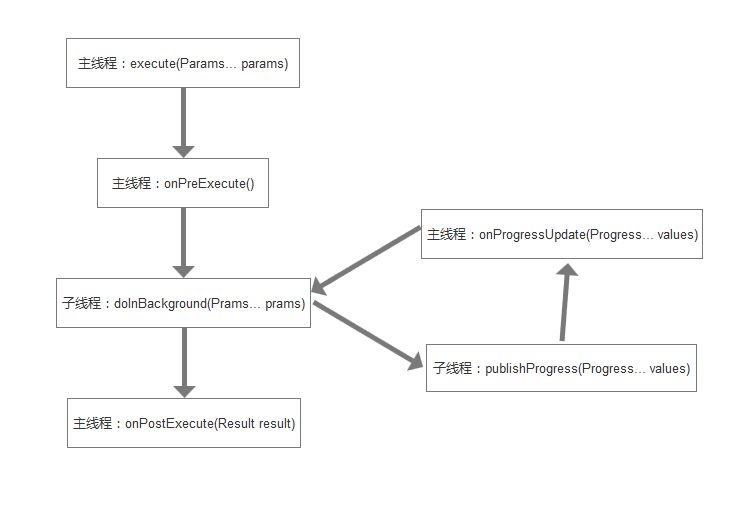
doInBackground(Params... params):必须重写的方法,后台任务就在这里执行,会开启一个新的线程。params为启动任务时传入的参数,参数个数不定。
onPreExecute():在主线程中调用,在后台任务开启前的操作在这里进行,例如显示一个进度条对话框。
onPostExecute(Result result):当后台任务结束后,在主线程中调用,处理doInBackground()方法返回的结果。
onProgressUpdate(Progress... values):当在doInBackground()中调用publishProgress(Progress... values)时,返回主线程中调用,这里的参数个数也是不定的。
onCancelled():取消任务。
3. 注意事项
(1)execute()方法必须在主线程中调用;
(2)AsyncTask实例必须在主线程中创建;
(3)不要手动调用doInBackground()、onPreExecute()、onPostExecute()、onProgressUpdate()方法;
(4)注意防止内存泄漏,在doInBackground()方法中若出现对Activity的强引用,可能会造成内存泄漏。
4. 下载文件动态更新进度条(未封装)
布局:
<?xml version="1.0" encoding="utf-8"?>

<LinearLayout xmlns:android="http://schemas.android.com/apk/res/android"

    xmlns:tools="http://schemas.android.com/tools"

    android:layout_width="match_parent"

    android:layout_height="match_parent"

    android:orientation="vertical"

    android:padding="20dp"

    tools:context="com.studying.asynctaskdemo.MainActivity">

    <ProgressBar

        android:id="@+id/progressBar"

        style="?android:progressBarStyleHorizontal"

        android:layout_width="match_parent"

        android:layout_height="wrap_content"

        android:progress="0" />

    <Button

        android:id="@+id/download"

        android:layout_width="match_parent"

        android:layout_height="50dp"

        android:layout_marginTop="20dp"

        android:text="@string/start_btn" />

    <TextView

        android:id="@+id/status"

        android:layout_width="wrap_content"

        android:layout_height="wrap_content"

        android:layout_marginTop="20dp"

        android:text="@string/waiting" />

</LinearLayout>
Activity:
public class MainActivity extends Activity {

    private static final String FILE_NAME = "test.pdf";//下载文件的名称

    private static final String PDF_URL = "http://clfile.imooc.com/class/assist/118/1328281/AsyncTask.pdf";

    private ProgressBar mProgressBar;

    private Button mDownloadBtn;

    private TextView mStatus;

    @Override

    protected void onCreate(Bundle savedInstanceState) {

        super.onCreate(savedInstanceState);

        setContentView(R.layout.activity_main);

        initView();

        setListener();

    }

    private void initView() {

        mProgressBar = (ProgressBar) findViewById(R.id.progressBar);

        mDownloadBtn = (Button) findViewById(R.id.download);

        mStatus = (TextView) findViewById(R.id.status);

    }

    private void setListener() {

        mDownloadBtn.setOnClickListener(new View.OnClickListener() {

            @Override

            public void onClick(View v) {

                //AsyncTask实例必须在主线程创建

                DownloadAsyncTask asyncTask = new DownloadAsyncTask();

                asyncTask.execute(PDF_URL);

            }

        });

    }

    /**

     * 泛型:

     * String:传入参数为文件下载地址

     * Integer:下载过程中更新ProgressBar的进度

     * Boolean:是否下载成功

     */

    private class DownloadAsyncTask extends AsyncTask<String, Integer, Boolean> {

        private String mFilePath;//下载文件的保存路径

        @Override

        protected Boolean doInBackground(String... params) {

            if (params != null && params.length > 0) {

                String pdfUrl = params[0];

                try {

                    URL url = new URL(pdfUrl);

                    URLConnection urlConnection = url.openConnection();

                    InputStream in = urlConnection.getInputStream();

                    int contentLength = urlConnection.getContentLength();//获取内容总长度

                    mFilePath = Environment.getExternalStorageDirectory() + File.separator + FILE_NAME;

                    //若存在同名文件则删除

                    File pdfFile = new File(mFilePath);

                    if (pdfFile.exists()) {

                        boolean result = pdfFile.delete();

                        if (!result) {

                            return false;

                        }

                    }

                    int downloadSize = 0;//已经下载的大小

                    byte[] bytes = new byte[1024];

                    int length = 0;

                    OutputStream out = new FileOutputStream(mFilePath);

                    while ((length = in.read(bytes)) != -1) {

                        out.write(bytes, 0, length);

                        downloadSize += length;

                        publishProgress(downloadSize / contentLength * 100);

                    }

                    in.close();

                    out.close();

                } catch (IOException e) {

                    e.printStackTrace();

                    return false;

                }

            } else {

                return false;

            }

            return true;

        }

        @Override

        protected void onPreExecute() {

            super.onPreExecute();

            mDownloadBtn.setText("下载中");

            mDownloadBtn.setEnabled(false);

            mStatus.setText("下载中");

            mProgressBar.setProgress(0);

        }

        @Override

        protected void onPostExecute(Boolean aBoolean) {

            super.onPostExecute(aBoolean);

            mDownloadBtn.setText("下载完成");

            mStatus.setText(aBoolean ? "下载完成" + mFilePath : "下载失败");

        }

        @Override

        protected void onProgressUpdate(Integer... values) {

            super.onProgressUpdate(values);

            if (values != null && values.length > 0) {

                mProgressBar.setProgress(values[0]);

            }

        }

    }

}
5. 下载文件动态更新进度条(封装)
Activity:
public class MainActivity extends Activity {

    private static final String FILE_NAME = "test.pdf";

    private static final String PDF_URL = "http://clfile.imooc.com/class/assist/118/1328281/AsyncTask.pdf";

    private ProgressBar mProgressBar;

    private Button mDownloadBtn;

    private TextView mStatus;

    @Override

    protected void onCreate(Bundle savedInstanceState) {

        super.onCreate(savedInstanceState);

        setContentView(R.layout.activity_main);

        initView();

        setListener();

    }

    private void initView() {

        mProgressBar = (ProgressBar) findViewById(R.id.progressBar);

        mDownloadBtn = (Button) findViewById(R.id.download);

        mStatus = (TextView) findViewById(R.id.status);

    }

    private void setListener() {

        mDownloadBtn.setOnClickListener(new View.OnClickListener() {

            @Override

            public void onClick(View v) {

                String localPath = Environment.getExternalStorageDirectory() + File.separator + FILE_NAME;

                DownloadHelper.download(PDF_URL, localPath, new DownloadHelper.OnDownloadListener() {

                    @Override

                    public void onStart() {

                        mDownloadBtn.setText("下载中");

                        mDownloadBtn.setEnabled(false);

                        mStatus.setText("下载中");

                        mProgressBar.setProgress(0);

                    }

                    @Override

                    public void onSuccess(File file) {

                        mDownloadBtn.setText("下载完成");

                        mStatus.setText(String.format("下载完成:%s", file.getPath()));

                    }

                    @Override

                    public void onFail(File file, String failInfo) {

                        mDownloadBtn.setText("开始下载");

                        mDownloadBtn.setEnabled(true);

                        mStatus.setText(String.format("下载失败:%s", failInfo));

                    }

                    @Override

                    public void onProgress(int progress) {

                        mProgressBar.setProgress(progress);

                    }

                });

            }

        });

    }

}
DownloadHelper:
class DownloadHelper {

    static void download(String url, String localPath, OnDownloadListener listener) {

        DownloadAsyncTask task = new DownloadAsyncTask(url, localPath, listener);

        task.execute();

    }

    private static class DownloadAsyncTask extends AsyncTask<String, Integer, Boolean> {

        private String mFailInfo;

        private String mUrl;

        private String mFilePath;

        private OnDownloadListener mListener;

        DownloadAsyncTask(String mUrl, String mFilePath, OnDownloadListener mListener) {

            this.mUrl = mUrl;

            this.mFilePath = mFilePath;

            this.mListener = mListener;

        }

        @Override

        protected Boolean doInBackground(String... params) {

                String pdfUrl = mUrl;

                try {

                    URL url = new URL(pdfUrl);

                    URLConnection urlConnection = url.openConnection();

                    InputStream in = urlConnection.getInputStream();

                    int contentLength = urlConnection.getContentLength();

                    File pdfFile = new File(mFilePath);

                    if (pdfFile.exists()) {

                        boolean result = pdfFile.delete();

                        if (!result) {

                            mFailInfo = "存储路径下的同名文件删除失败!";

                            return false;

                        }

                    }

                    int downloadSize = 0;

                    byte[] bytes = new byte[1024];

                    int length;

                    OutputStream out = new FileOutputStream(mFilePath);

                    while ((length = in.read(bytes)) != -1) {

                        out.write(bytes, 0, length);

                        downloadSize += length;

                        publishProgress(downloadSize / contentLength * 100);

                    }

                    in.close();

                    out.close();

                } catch (IOException e) {

                    e.printStackTrace();

                    mFailInfo = e.getMessage();

                    return false;

                }

            return true;

        }

        @Override

        protected void onPreExecute() {

            super.onPreExecute();

            if (mListener != null) {

                mListener.onStart();

            }

        }

        @Override

        protected void onPostExecute(Boolean aBoolean) {

            super.onPostExecute(aBoolean);

            if (mListener != null) {

                if (aBoolean) {

                    mListener.onSuccess(new File(mFilePath));

                } else {

                    mListener.onFail(new File(mFilePath), mFailInfo);

                }

            }

        }

        @Override

        protected void onProgressUpdate(Integer... values) {

            super.onProgressUpdate(values);

            if (values != null && values.length > 0) {

                if (mListener != null) {

                    mListener.onProgress(values[0]);

                }

            }

        }

    }

    interface OnDownloadListener{

        void onStart();

        void onSuccess(File file);

        void onFail(File file, String failInfo);

        void onProgress(int progress);

    }

}
AsyncTask用法解析-下载文件动态更新进度条的更多相关文章
- Handler实现线程之间的通信-下载文件动态更新进度条
1. 原理 每一个线程对应一个消息队列MessageQueue,实现线程之间的通信,可通过Handler对象将数据装进Message中,再将消息加入消息队列,而后线程会依次处理消息队列中的消息. 2. ...
- 使用libcurl开源库和Duilib做的下载文件并显示进度条的小工具
转载:http://blog.csdn.net/mfcing/article/details/43603525 转载:http://blog.csdn.net/infoworld/article/de ...
- 通过HttpUrlConnection下载文件并显示进度条
实现效果: 核心下载块: int count = 0; URL url = new URL("http://hezuo.downxunlei.com/xunlei_hezuo/thunder ...
- C# Winform下载文件并显示进度条
private void btnDown_Click(object sender, EventArgs e) { DownloadFile("http://localhost:1928/We ...
- WPF多线程下载文件,有进度条
//打开对话框选择文件 private void OpenDialogBox_Click(object sender, RoutedEventArgs e) { ...
- Winform下载文件并显示进度条
本来是要研究怎样判断下载完成,结果找到这个方法,可以在这个方法完成之后提示下载完成. 代码如下: using System; using System.Collections.Generic; usi ...
- android AsyncTask异步下载并更新进度条
AsyncTask异步下载并更新进度条 //如果不是很明白请看上篇文章的异步下载 AsyncTask<String, Integer, String> 第一个参数:String 传入 ...
- 实现在 .net 中使用 HttpClient 下载文件时显示进度
在 .net framework 中,要实现下载文件并显示进度的话,最简单的做法是使用 WebClient 类.订阅 DownloadProgressChanged 事件就行了. 但是很可惜,WebC ...
- vue多文件上传进度条 进度不更新问题
转自 hhttp://www.cnblogs.com/muge10/p/6767493.html 感谢这位兄弟的文章,之前因为这个问题 ,我连续在sgmentflow上提问过多次,完全没人能回答.谢谢 ...
随机推荐
- 并发编程(四):ThreadLocal从源码分析总结到内存泄漏
一.目录 1.ThreadLocal是什么?有什么用? 2.ThreadLocal源码简要总结? 3.ThreadLocal为什么会导致内存泄漏? 二.ThreadLoc ...
- ajax异步加载遮罩层特效
<!doctype html> <html> <head> <title>遮罩层(正在加载中)</title> <meta chars ...
- 【LeetCode】94. Binary Tree Inorder Traversal
题目: Given a binary tree, return the inorder traversal of its nodes' values. For example:Given binary ...
- 关于CSS3中transform变换的小坑
2017年6月30日15:05:46 今天在写一个demo的时候,发现CSS3中transform变换的一个特性. 首先,我先描述一下我发现的情况(问题再现): <div class=" ...
- 从源码的角度看Activity是如何启动的
欢迎访问我的个人博客,原文链接:http://wensibo.top/2017/07/03/Binder/ ,未经允许不得转载! 大家好,今天想与大家一起分享的是Activity.我们平时接触的最多的 ...
- tcp/ip通信传输流
利用TCP/IP协议族进行网络通信时,会通过分层顺序与对方进行通信,发送端从应用层往下走,接收端则往应用层方向走. 我们用HTTP进行举例 客户端在应用层发出想要看到某个web页面的http请求.HT ...
- C#获取数据库连接字符
有两种用法:1)using System.Configuraiton; string ConStr=ConfigurationManager.ConnectionStrings["ConSt ...
- C#将datatable的某一列转换成json格式的字符串
将datatable的某一列转换成json格式的字符串(转换完后自己在字符串前后加{}) /// <summary> ///DataTable装换 Column数据 组合成json 现在的 ...
- Spring Boot简单xml配置集成mybatis
一.xml配置版 1.properties文件中增加的配置: mybatis.config-locations=classpath:mybatis/mybatis-config.xml mybatis ...
- docker managed volume - 每天5分钟玩转 Docker 容器技术(40)
docker managed volume 与 bind mount 在使用上的最大区别是不需要指定 mount 源,指明 mount point 就行了.还是以 httpd 容器为例: 我们通过 - ...