
简单CSS 布局
CSS Layout
CSS Layout 是对上下左右布局的一个简单封装,主要针对自己项目里面方便使用。
坚持组合大于继承的原则,复杂的布局也是由简单布局组成的,当你用习惯了,完全在布局上面不用再去写CSS 啦~
所以不习惯margin/padding-top/right/bottom/left-*的同学可以忽略。
大家可以使用免费cdn 做测试: https://gitcdn.xyz/repo/wz2cool/css_layout/0.1/dist/layout.min.css
(PS: 非前端专攻人士,至于你们觉得好不好,反正我是用的挺爽的_)
项目地址:https://github.com/wz2cool/css_layout
.fill
填充父节点全部空间。
.fill-height
填充父节点高度空间。
.fill-width
填充父节点宽度空间。
.float-right
向右浮动。
.float-left
向左浮动。
.margin-/top/right/bottom/left-xx
margin 的上下左右
.padding-/top/right/bottom/left-xx
padding 的上下左右
.horizontal-container
.fill-right

<div class="horizontal-container fill-right" style="height: 100px;">

    <div class="left-panel fill-height" style="background: #EE91AD; width: 150px;">

        left panel (auto)

    </div>

    <div class="right-panel fill-height" style="background: #7171D1;">

        right panel (fill rest)

    </div>

</div>
.fill-left

<div class="horizontal-container fill-left" style="height: 100px;">

    <div class="right-panel fill-height" style="background: #7171D1;  width: 150px;">

        right panel (auto)

    </div>

    <div class="left-panel fill-height" style="background: #EE91AD;">

        left panel (fill rest)

    </div>

</div>
.vertical-container
.fill-bottom

<div class="vertical-container fill-bottom" style="height: 400px;">

    <div class="top-panel" style="background: #EE91AD; height: 100px;">

        top panel (auto)

    </div>

    <div class="bottom-panel" style="background: #7171D1;">

        bottom panel (fill rest)

    </div>

</div>
.fill-top

<div class="vertical-container fill-top" style="height: 400px;">

    <div class="top-panel" style="background: #EE91AD; ">

        top panel (fill rest)

    </div>

    <div class="bottom-panel" style="background: #7171D1;height: 100px;">

        bottom panel (auto)

    </div>

</div>
complex hor-ver layout
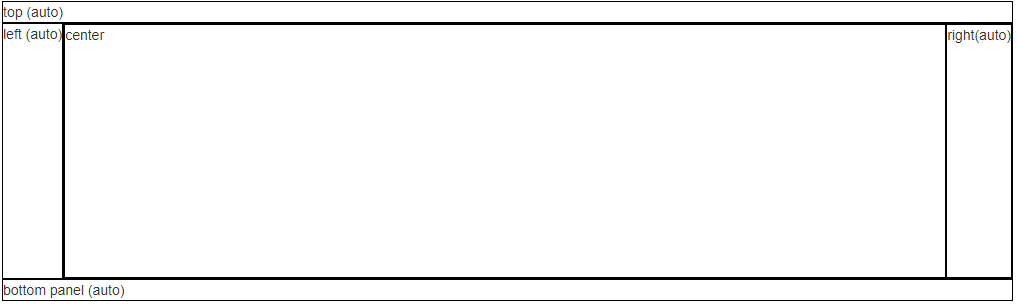
<div class="vertical-container fill-bottom" style="height:300px;">

    <div class="top-panel">

        top (auto)

    </div>

    <div class="bottom-panel">

        <!-- need fill height width -->

        <div class="vertical-container fill-top fill">

            <div class="top-panel">

                <div class="left-panel fill-height">

                    left (auto)

                </div>

                <div class="right-panel fill-height">

                    <div class="horizontal-container fill-left fill">

                        <div class="right-panel fill-height">

                            right(auto)

                        </div>

                        <div class="left-panel fill-height">

                            center

                        </div>

                    </div>

                </div>

            </div>

        </div>

        <div class="bottom-panel">

            bottom panel (auto)

        </div>

    </div>

</div>
.center-container
.center-horizontal

<div class="center-container center-horizontal" style="background: #EE91AD; width: 200px; height: 50px">

    <div class="center-panel">

        center item

    </div>

</div>
.center-vertical

<div class="center-container center-vertical" style="background: #EE91AD; width: 200px; height: 50px">

    <div class="center-panel">

        center item

    </div>

</div>
ver-hor center

<div class="center-container center-vertical" style="background: #EE91AD; width: 200px; height: 50px">

    <div class="center-panel">

        <div class="center-container center-horizontal">

            <div class="center-panel">

                <span>*</span> center item

            </div>

        </div>

    </div>

</div>
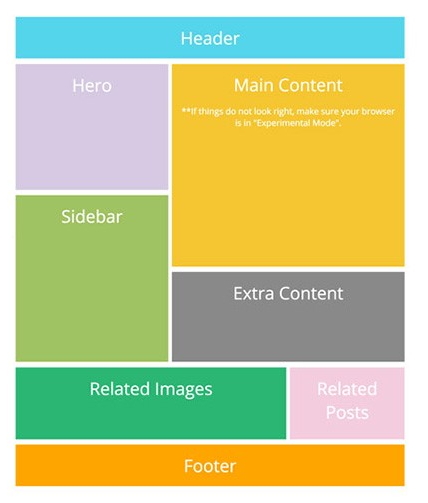
仿照葡萄城举例
正好看到别人举例的一个布局: http://www.cnblogs.com/powertoolsteam/p/combine-flexbox-and-css-grids-for-layouts.html
我们立刻用我们的方法实现了一下: 在线demo
关注我 ##
最后大家可以关注我和 css_layout项目 _
Follow @wz2cool Star Fork
简单CSS 布局的更多相关文章
- 简单CSS布局留用
1.导航栏固定显示代码,文字居中,z-index header{ position: fixed; top: 0px; left: 10%; width: 80%; height: 80px; bor ...
- (转)div+css 布局经验 - 最简单的 = 最不变形的(原创技巧)
站酷几年了 一直饱受其恩泽 尤为感激 一直想奉献些什么 但是苦于水平 苦于奔波 今天静下心来 为大家奉献下 自己的div+css 经验 ,以下观点只代表 深海个人立场 希望为初学者提供一条" ...
- div+css 布局经验 - 最简单的 = 最不变形的(原创技巧)
站酷几年了 一直饱受其恩泽 尤为感激 一直想奉献些什么 但是苦于水平 苦于奔波 今天静下心来 为大家奉献下 自己的div+css 经验 ,以下观点只代表 深海个人立场 希望为初学者提供一条" ...
- [CSS布局]简单的CSS三列布局
前言 公司终于可以上外网了,近期在搞RN的东西,暂时脑子有点晕,等过段时间再来写点总结.倒是最近有个新学前端的同学经常会问一些基础知识,工作空闲写了小Demo给他看,全是很基础的知识,纯粹是顺便记录在 ...
- 界面设计技法之css布局
css布局之于页面就如同ECMAScript之于JS一般,细想一番,html就如同语文,css就如同数学,js呢,就是物理,有些扯远,这里就先不展开了. 回到主题,从最开始的css到如今的sass(l ...
- CSS布局 - 三栏布局
CSS布局技术可谓是前端技术中最基础的技术,就是因为基础,所以我认为要更加熟练,深入的去掌握,去梳理. 一. 传统 ---> 浮动实现的三栏布局 采用浮动实现的三栏布局有以下特点及注意事项: · ...
- CSS 布局
近日开发中,总感觉页面布局方面力不从心.以前也曾学过这方面的内容,但是不够系统,因此我打算整理一下. 在web 页面中一般有 table 和 css+div 两种布局方式. 其中css+div 又分为 ...
- CSS布局经典—圣杯布局与双飞翼布局
在我之前的博客网页整体布局完全剖析-剖完你不进来看一下么?中总结单列.两列.三列固宽与变宽布局,我还以为已经囊括了所有经典的网页布局方法了呢,当然除了CSS3的弹性盒模型没有涉及到,现在看来确实是自己 ...
- CSS篇之DIV+CSS布局
<div></div> div与其他标签一样,也是一个XHTML所支持的标签. div是XHTML中指定的,远门用于布局设计的容器标记. 简单的CSS布局 头部 内容 页脚 & ...
随机推荐
- js 获取当前日期所在周的周一
function week(date,n) { var checkDate = StringToDate(date); checkDate.setDate(checkDate.getDate() + ...
- JavaWeb(八)JQuery
jQuery 市场用得比较多两个框架: jQuery 比较适合做一些互联网 的应用(12306.com,蘑菇街,美丽说,聚美) extjs 比较适合做后台管理系统(电商(订单管理),银行,电信) 核心 ...
- Java温故而知新-插入排序
插入排序 插入排序的基本思想是将待排序的元素依次插入序列合适的位置,然后将这个位置后面的元素依次向后移动一位 位置1 2 3 4 5 6 序列5 4 2 1 8 3 设第1位为最初始的基础元素,也就是 ...
- JavaScript基本语法2
javaScript中要显示> .<必须使用> .<,如果是不显示但是要作为条件可以直接使用>.<. 接下来是JavaScirpt函数: 要使用func ...
- edittext基本用法总结.md
光标的有关问题 edittext.setSelection(2); //记住一个不能越界的bug edittext.setCursorVisible(false); //设置光标显示,不能设置光标颜色 ...
- wpf创建用户控件(计时器控件)
在vs中新增用户控件 前台xaml如下代码: <UserControl x:Class="Zh.SelfServiceEquipment.UI.ZhControls.CountDown ...
- Wifi长距离传输
本人从事Linux驱动开发.现在要实现两端之间wifi长距离(1km左右)传输视频数据(全向天线)的功能.目前用的平台是Atheros AR9342.我在网上查到一些资料是关于禁用802.11的CSM ...
- MySQL索引选择及规则整理
索引选择性就是结果个数与总个数的比值. 用sql语句表示为: SELECT COUNT(*) FROM table_name WHERE column_name/SELECT COUNT(*) FRO ...
- h5新增html标签语义
H5新增常用标签<body> <header>...</header> <nav>...</nav> <article> < ...
- 基于大数据的电影网站项目开发之CentOS的安装(一)
一.下载VMware并安装,至于安装教程从网上搜索进行参考 二.下载系统镜像文件,这里使用的是CentOS-6.5-x86_64-bin-DVD1.iso 三.安装镜像文件 运行VMware work ...